







The best domain names are short, memorable, on-brand, and can even boost your rankings in online search. To choose a domain name, try using your business name first. If that isn’t possible, experiment with alternatives or leverage online tools to find the perfect fit. When you have one in mind, choose the right extension, check availability, and then register your domain.
- 1. Choose a Domain Name With Your Brand or Business Name
- 2. Develop a List of Alternative Domain Names
- 3. Add Keywords That Describe Your Brand
- 4. Hone In by Location
- 5. Try Common Abbreviations
- 6. Use Your Tagline
- 7. Leverage AI
- 8. Try a Different Extension
- 9. Check Availability
- 10. Register Your Domain
- Do’s & Don’ts of How to Choose a Domain Name
- Why Choosing a Good Domain Name for Your Business Matters
- Frequently Asked Questions (FAQs)
- Bottom Line
1. Choose a Domain Name With Your Brand or Business Name
Your domain name is the first point of interaction many customers will have with your brand. Incorporating your business name in your domain is the best way to establish and grow brand presence online. It’s also best for brand recognition and URL retention. Your brand differentiates you from competitors, and including your unique brand name in your domain will help you stand out.
2. Develop a List of Alternative Domain Names
There are more than 233 million .com domains, so unless you have a unique business name, you might have difficulty catching that perfect domain you want. (Source: ColorLib) Before you begin your search, come up with a list of other domain names you can use in addition to your brand or business name. Consider adding words like “the,” “my,” or “your.” This can make a big difference—as evidenced by domains like TheKnot.com.
3. Add Keywords That Describe Your Brand
Using relevant keywords in your domain name not only increases brand retention, but can also boost its standing with search engines. Keywords tell both human visitors and search engines what your site is about, so choose keywords that describe your brand. Action verbs make memorable keywords, as is the case with FlyAsiana.com.
If you get stuck, try using keyword research tools to help you choose a domain name for a business. Deck builder LA Dex chose getyourdeck.com for their domain name. Choosing a search engine optimization (SEO)-friendly domain name can improve your site’s ranking on search engines, which, in turn, increases traffic.
4. Hone In by Location
As with keywords, adding a location to your domain name can help you get a domain with your brand name if your first choice is taken. Examples of this include domains like ComputerRepairNYC.com for a computer repair business located in New York City. You can also leverage regions (e.g., PacNW for Pacific Northwest or SoCal for southern California).
If you choose a domain name with a location reference, just be aware that it could be limiting. Make sure that it’s commonly used and broad enough so your business can grow with it should you expand your service area or add more stores.
5. Try Common Abbreviations
With the disclaimer that using abbreviations can make your website URL harder to remember, there are cases where it’s a good idea. One is when your brand name is longer than 15 characters, as shorter domain names are inherently more memorable and easier to remember and type. An example would be shortening the word “Services” to “Svcs” or how HVAC is short for heating, ventilation, and air conditioning.
6. Use Your Tagline
If your brand tagline or slogan is inspirational or memorable, it could be a great alternative to using your brand name as your domain. For example, an electrical contractor based in Salt Lake City might choose a domain name like LightUpSLC.com.
7. Leverage AI
Short for artificial intelligence, AI tools to generate ideas abound. In fact, top domain registrars like IONOS and Domain.com have domain name generators that will offer suggestions for alternatives if your first choice is taken. Beyond that, AI-powered domain name generators like Namy.ai can come up with unique suggestions based on your business description.
8. Try a Different Extension
Part of learning how to choose a domain name is choosing the right domain extension—what comes after the “dot,” such as “.com.” Choosing the correct extension makes your entire domain name look more credible. It also gives a little hint of the industry your business is in. The .com stands for “commercial,” and applies to almost every type of business—making it the most popular (and competitive) domain extension.
Popular Business Domain Extensions & Who Should Use Them
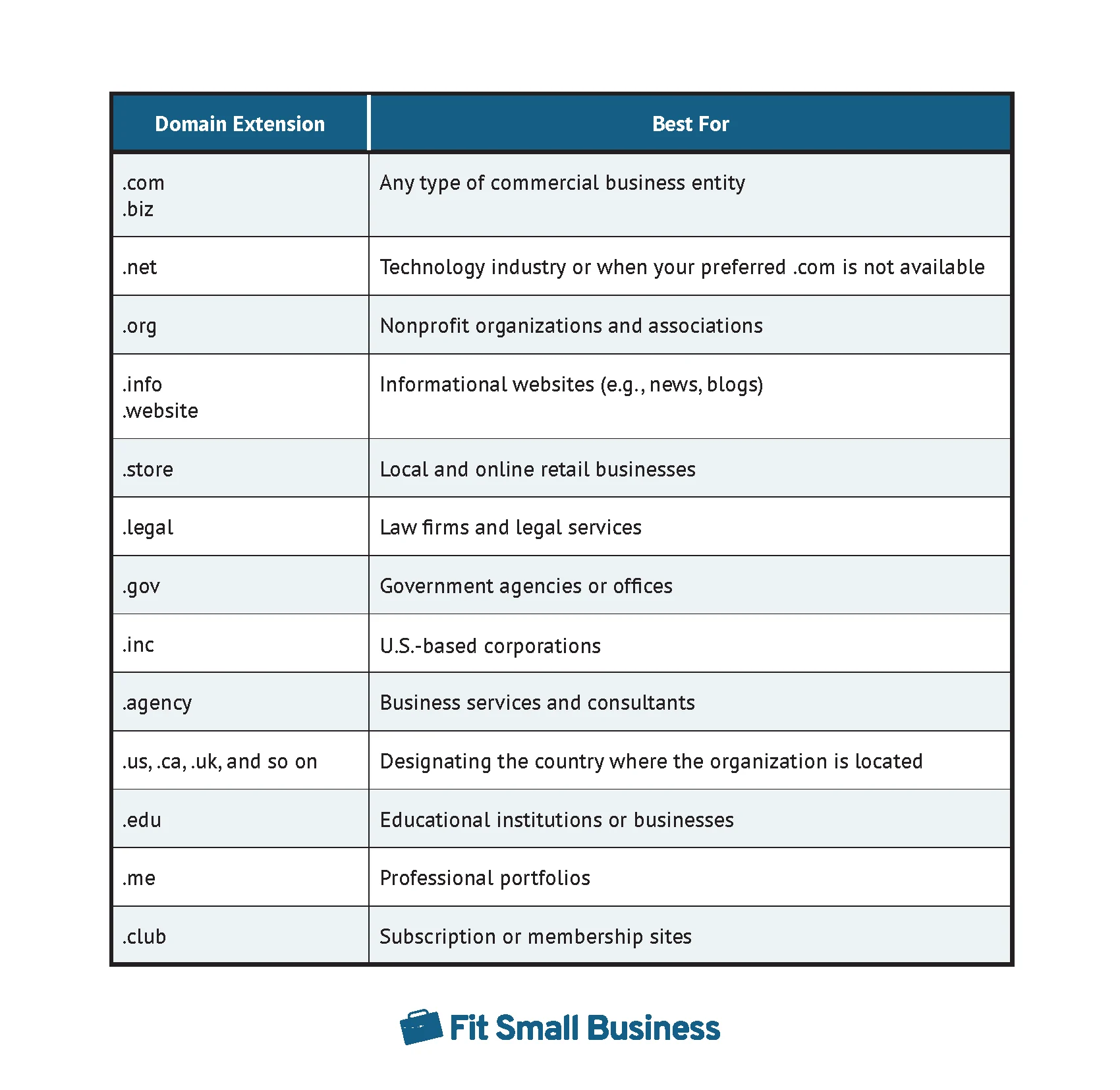
Different domain extensions are used for different purposes
- .com, .co, .website, .company, and .biz for commercial entities (aka businesses and brands) of any kind
- .store for ecommerce sites and shopping platforms
- .repair or .services for residential or commercial service-based businesses
- .club domain for subscription sites, membership sites, and online communities
- .net or .io for web and technology companies (know when to choose .net vs .com)
- .app for computer applications or software as a service (SaaS) offerings
- .org for organizations and nonprofits (see how to decide between .com vs .org)
- .info for informational based websites, such as a business directory or statistics site
- .gov for government entities
- .legal or .attorney for law firms and legal services (e.g., paralegals and others)
- .agency, .solutions, or .consulting for service-based agencies and consultants
- .us, .ca, and other ccTLD (country code top-level domains) for nation-based brands
- .inc signals that the organization is a legally incorporated entity in the U.S.
- .edu, .courses, or .academy for educational institutions or businesses
- .me or .online for personal sites or startup brands
While there are literally hundreds of domain extensions to choose from, for the most clout and authority, try to find a .com domain for your small business website. The .com extensions may be more competitive, but that’s because it’s the most authoritative.
9. Check Availability
Once you’ve got an idea about the domain names and keywords you’re interested in, you’ll need to check their availability. To check if a domain is available, you can use a search tool like the one provided by Domain.com below.
To search a domain, enter the name you want to search with the extension and click “Check Availability.” If your domain is available, you can then register your domain. If the domain is not available, keep searching until you find one that is.

10. Register Your Domain
In most cases, business domain registration will take place at the time you purchase web hosting. If you aren’t ready to build your website just yet, you can use a standalone domain registry like Domain.com and point your domain to your host later. But in most cases, registering your domain through your web hosting provider will be the easiest path to your business domain.
Here are some of the best providers and what your domain will cost with each alternative:
 |  |  |  |
|---|---|---|---|
| Standalone domain registry | Domain + web hosting | Domain + email hosting | Domain + site builder |
| $10.99 per year | From $2.99 per month | From $1 per month | From $16 per month |
| Visit Domain.com | Visit Bluehost | Visit IONOS | Visit Wix |
Do’s & Don’ts of How to Choose a Domain Name
It’s easy to make a mistake when choosing a domain name. Avoid mistakes by following these convenient do’s and don’ts of domain names.
| Do’s for Choosing a Domain Name | Don’ts for Business Domain Names |
|---|---|
| Consider pronunciation: Before settling on a domain name, consider how it sounds when spoken out loud. A name that’s difficult to pronounce can hinder brand retention and word-of-mouth marketing. | Don’t be too limiting: Choosing keywords that describe your brand is a good idea, but don’t be too specific. For example, if you’re starting a real estate agency in New Jersey, the name ApartmentsNJ may apply to you now, but it won’t be ideal if you expand to houses. |
| Use common spelling: An easily spelled domain name is easier to find and convenient to remember. | Avoid hyphens: Hyphens make your domain name harder to remember and increase the chance people will make mistakes while trying to find it. |
| Keep it as short as possible: The longer the domain name is, the more chances visitors won’t remember it or type it in accurately. Keep it within 15 characters or less for maximum retention. | Don’t use acronyms: Unless people know your business by an acronym (e.g., GE or AT&T), avoid using abbreviated versions. |
| Get multiple domains: Purchase domain extensions that closely match yours (including common misspellings) to prevent rivals from registering similar variations. Plus, it redirects customers to your website even if they accidentally type the wrong domain name. | Steer clear of existing brand names or trademarks: Perform a trademark search before choosing to avoid infringing on any other patents or trademarks. Unauthorized use could lead to legal action and suspension of your website. |
Why Choosing a Good Domain Name for Your Business Matters
To build a strong brand presence, choose a memorable domain name for your website. The right domain name can help your business rank higher in search engine results and will be simple for people to remember. It’s also easier for customers to refer others to your website, and it’s the first impression site visitors have when they find your website online.
The web domain name you choose can also be used to create professional email addresses, essentially providing free marketing for your company any time you send an email. Adding your domain name to email signatures, business cards, ads, newsletters, brochures, and other collateral can also be a great way to promote your brand offline.
Frequently Asked Questions (FAQs)
How do I search for domain names?
The best domain name registrars all have domain name generators you can use to see if your desired domain name is available. If not, these generators will give you closely related ideas that might work.
Which domain type is best?
For most businesses, a .com domain will be the best choice. It is the most commonly used domain extension, which can make it challenging to find the perfect domain name for your business. While it might be tempting to choose a .biz or .inc domain extension, those extensions can be difficult to remember, and customers naturally assume your website is a .com—which means you could lose valuable traffic to a competitor with .com in their domain name.
How do I secure a domain name?
Once you’ve decided on your domain name, purchase it at a domain registrar like IONOS or Domain.com. Your domain will cost around $10 to $15 a year. Or, if you’re on a tight budget, web hosting services and website builders like Bluehost and Squarespace will give you a free domain name when you sign up for a hosting plan or an all-in-one site builder.
Bottom Line
Maximizing traffic to your website starts with the right domain name. Keep your domain name on-brand and memorable by ensuring that it’s easy to spell, easy to pronounce, and has the correct extension for the kind of website you’re building. It’s OK to be creative, but simple is almost always the best. Don’t miss out on your perfect domain—register it today through Domain.com.
