







A business domain name is the website name found in your web address or URL (e.g., fitsmallbusiness.com). Similar to how people find a physical business by its street address, think of it as your company’s online business address. Customers can locate your website and identify your brand through its business domain name, and it can be used to create professional email addresses for your company.
Why Businesses Need a Domain Name
Having a business domain name is the easiest way for someone to find your business online. Anyone searching for your business can type your business domain name into the search or address bar, and your business website URL appears in search engine page results (SERPs).
Alternatively, they can type the full URL (e.g., fitsmallbusiness.com) into the browser bar to go straight to your website. Every domain name is also unique, allowing you to maintain brand ownership. When used for a website, the domain name is part of the URL.
You also need a domain name to create a professional email address for your business. This lends credibility to your emails with prospects and customers and helps to build your brand presence.
Components of a Domain URL
A URL, or web address, is the internet version of a mailing address. Just like a mailing address has a structure (e.g., name, street address or PO Box, and location (city/state/ZIP)), a URL also has different parts that serve different purposes. Here are the components you will see in every web address: prefix (or protocol), domain name, and domain extension.
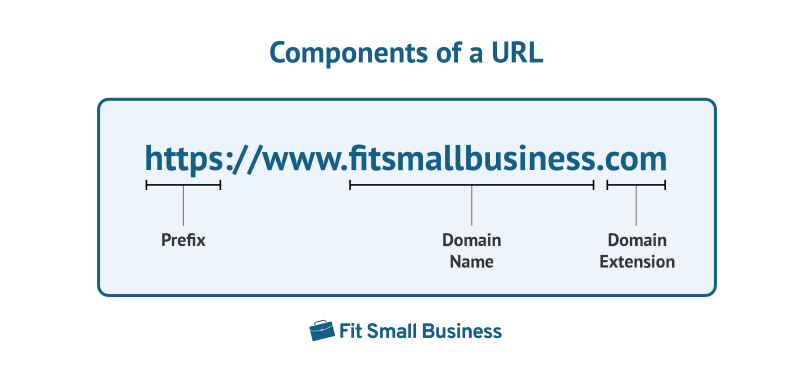
- Prefix: This is the foundation of the internet. It is used to load and connect to the website of your choice and indicates a protocol—for example, “https://” shows the site uses SSL security to encrypt data, making it safer for website visitors.
- Domain, or domain name: This identifies which website or brand a site visitor is currently visiting (e.g., “fitsmallbusiness”).
- Domain extension: This is usually chosen based on the entity type of the business or organization (e.g., .com for commercial businesses, .org for nonprofits, .store for retail sellers, and .me for personal sites).
Types of Domain Names
On top of the components of a web address, there are also different types of domains. For example, “top-level domains” (or TLDs) have extensions like .com, .org, and .net, whereas “second-level domains” may have extensions such as .club, .info, or .store. The domain name hierarchy is based on the type of domain extension used (e.g., a TLD like.com or .net vs a second-level domain like .club).
When choosing a domain name for your website, keep in mind that top-level domains are considered the gold standard, especially the universal “.com.” However, with so many domain names registered, it can be challenging to come up with a memorable, effective domain name with an available .com extension. So you may have to get creative or choose the most appropriate second-level extension.
Domain Name Statistics
There are more than 351 million registered domains in the world. Of those, the biggest chunk are .com domains. The three most popular TLDs (.com, .net, and .org) make up the vast majority of registered domains, or almost 70% of domains. (Source: Verisign)
Here are a few more must-know domain name statistics:
- The top three most popular domain extensions are .com, .tk, and .cn—and .coms are used nearly six times more than any other extension. (Source: Siteefy)
- 52.8% of registered domains are .com TLDs. (Source: Statista)
- There are 1,589 registered domain root extensions, such as .biz, .online, and .nyc. (Source: Website Flip)
Tips for Choosing the Right Business Domain Name
Your domain name can affect your brand’s success online, including your site’s search engine optimization (SEO) keyword rankings, traffic, and marketing efforts. As such, several factors should be taken into account when formulating a business domain name. Furthermore, it’s possible that your first ideas will already be taken, and it may take some trial and error to find an available domain name that best represents your brand.
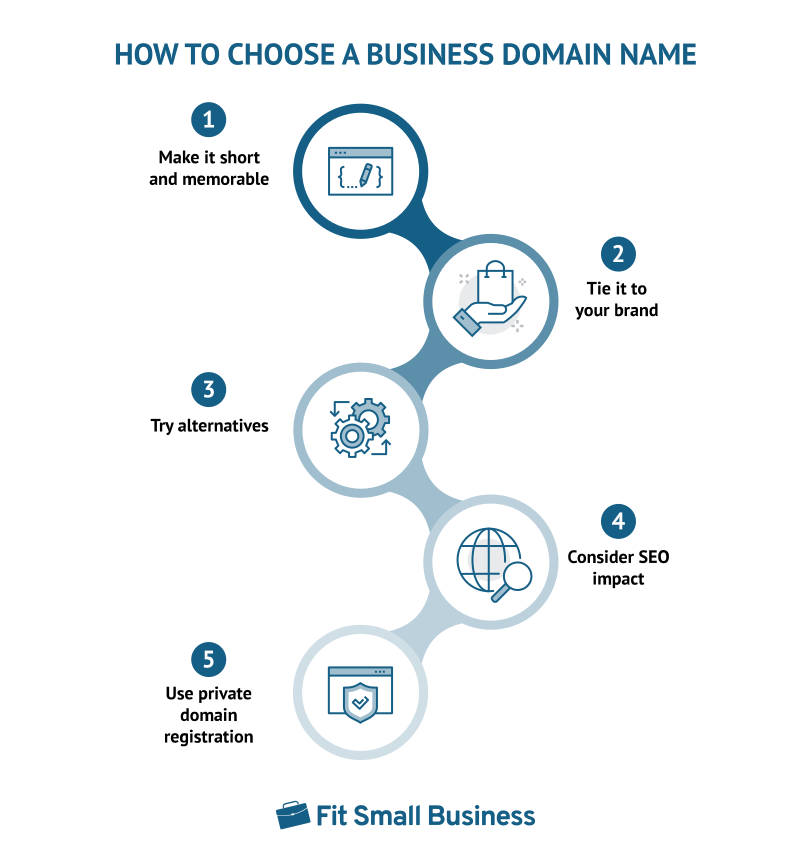
Here are five tips for coming up with the best domain name for your business:
- Keep it short and recognizable: The domain name for a business website should be easily identifiable by prospects and customers. Choose a business domain name that’s short and simple (and thus, memorable) but also unique to help you build a strong brand presence.
- Tie it to your brand: Using your brand name as your domain name is the easiest way to ensure it’s unique. By doing so, you separate yourself from the competition while adding professional credibility to your business and website. It also helps to build your brand, as it’s directly associated with your business.
- Try alternatives with your location or keywords: It’s common to find that a desired domain name is already registered, or even in use, so be sure you have a backup plan. For example, using a location in your business domain name can indicate your service area and further delineate your brand from the rest. Likewise, keywords representative of your services (e.g., plumber, electrician, legal, real estate, and so on) can help you get a close match to your first pick.
- Consider impacts to SEO: Search engines use domain names in coming up with their search rankings. Keywords are used to increase the accuracy and relevancy of the search results. If your domain name includes a keyword related to the services your business offers, it could help your site rank higher on Google.
- Reduce spam through private domain registration: When registering a domain, you are required to provide your contact information. Without private domain registration, this immediately puts your information out onto the web where anyone can use it to send you unwanted spam.
For more guidance, read our guide to learn how to choose a domain name, which also delves deeper into different types of extensions. If you already have a name in mind, see if it’s available using the search tool below.

Where to Get a Domain Name & How Much It Costs
If you’re not ready to build a website yet, you can purchase a domain name through a top domain registrar like Domain.com for between $10 and $20 per year. You can purchase a domain and “park” it at the registrar until you’re ready to use it. If you do plan to build a website in the near future, many web hosting providers include a free domain name when you sign up for hosting.
For example, Bluehost and IONOS both have domains free with hosting plans, as do Squarespace and Wix, along with others on our list of the best website builders for small businesses. Plus, many of these providers include free private domain registration to keep your contact information away from spammers.
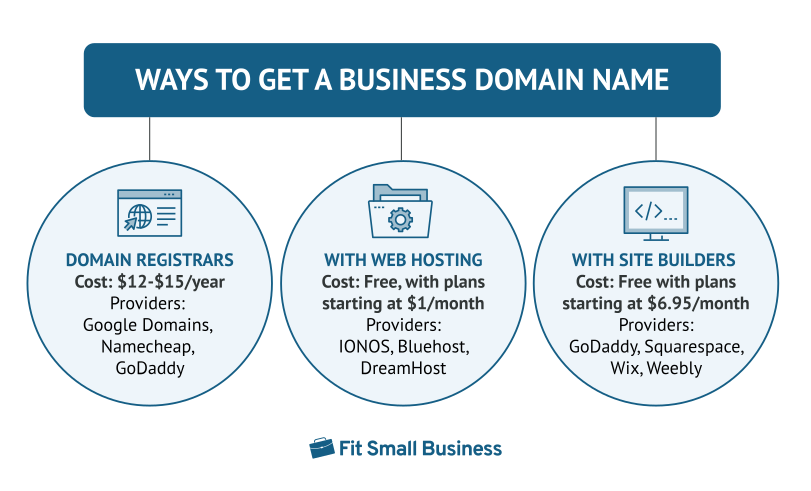
Top Ways to Get a Business Domain Name at a Glance
| Provider | Starting Price | Inclusions | Support | |
|---|---|---|---|---|
 | $9.99 per year | Domain privacy | Email support, forums, FAQ, dedicated chat support | Visit Domain.com |
 | $16 per month with annual contract | All-in-one hosting and SEO-friendly site builder, domain management tools | FAQ, dedicated call support | Visit Squarespace |
 | $2.95 per month with annual contract | Web hosting, WordPress site builder, email addresses, domain lock | FAQ, dedicated call support | Visit Bluehost |
 | $1 per month for first 6 months with annual contract | Email hosting and private domain registration | FAQ, call support, success consultant, 24/7 chat and email | Visit IONOS |
Once you have settled on the domain name of your choice together with the web host, the next step is to register your domain. For the step-by-step process, check out the steps for how to register a business domain in our guide.
Frequently Asked Questions (FAQs)
What’s the difference between a domain & a subdomain?
A domain name is the name of your website. Subdomains act as an extension of your main website domain name, such as the word “support” in the example “www.support.business.com.” They are often used to house specific types of information, such as support resources for customers, blogs, forums, and so on.
Read our guide to learn what a subdomain is and how to use them.
What’s the difference between a domain name & web hosting?
The domain name is the web address or URL where your website resides, and the name people use to find and locate your website on the internet. On the other hand, web hosting is a service that allows your website to be live on the internet. Web hosting plans may provide hosting for one or multiple domains as well as support hosting for one or multiple websites.
What are top-level domains?
Top-level domains are the suffixes found in the last part of a domain name (e.g., the “.com” part of the URL https://fitsmallbusiness.com). Usually, the TLD indicates the nature of the business entity to be easily identified (e.g., .com for commercial businesses, .org for nonprofits, and .store for retail sellers). They can also indicate an industry (such as .io for tech companies) or country, for example, .fr, .it, .no, .uk, representing the European countries of France, Italy, Norway, and the United Kingdom, respectively.
Will my domain choice affect search engine optimization (SEO)?
The domain name you choose can affect your SEO performance. Many businesses use their business name in the domain for brand recognition. However, you should also consider what people can remember and what they’ll be searching for when looking for a business like yours, such as location, product, or service-based keywords.
Is it OK to use a hyphen in my domain name?
Many domains include a hyphen between words, but it’s not ideal since hyphens are difficult to type and remember as part of a domain name. If you have a hyphen in your domain name, chances are you chose it because the unhyphenated version was already registered. Thus, when customers forget to type the hyphen, they’ll end up somewhere other than your website. A good rule of thumb on hyphen use is “don’t.”
Bottom Line
Every business website should have a custom domain name to establish and grow its online presence. In addition to providing a URL for the business’ website, they are also used for professional email addresses, creating instant credibility, especially with top-level domains such as .com, .net, and .org.
