







Ooma and RingCentral are cloud-based business phone solutions providing virtual phone numbers, unlimited voice calling, and hardware purchases. RingCentral stands out in our Ooma vs RingCentral comparison because it’s an advanced all-in-one solution for phone, video, instant messaging, and collaboration. On the other hand, Ooma is a solid choice for a reliable phone system with essential calling features and unlimited international calling.
Based on our comparison, the best use cases for Ooma vs RingCentral are as follows:
- RingCentral: Better for growing companies needing scalable features with advanced analytics and call management features
- Ooma: Better for small businesses looking for a low-cost, straightforward phone solution with first-party hardware
- Ooma vs RingCentral at a Glance
- Best Alternatives
- Best for Pricing: Ooma
- Best for Call Management: RingCentral
- Best for International Calling: Ooma
- Best for Devices & Hardware: RingCentral
- Best for Video Conferencing: RingCentral
- How We Evaluated RingCentral vs Ooma
- Frequently Asked Questions (FAQs)
- Bottom Line
Ooma vs RingCentral at a Glance
| Pricing & Plans |  |  |
|---|---|---|
| Monthly Starting Price (per User) | $19.95 | $30 |
| Trial | 30-day risk-free trial and two-month Ooma Premier trial | 14-day free trial |
| Unlimited Domestic Calling | ✓ | ✓ |
| International Calling | ✓ | ✓ |
| Phone Numbers | Toll-free, local | Vanity, local, toll-free, and international |
| Service Level Agreement (SLA) Uptime Guarantee | ✓ | ✓ |
| Ease of Use | User-friendly | User-friendly |
| 24/7 Customer Support | ✓Chat and phone support | ✓Chat and phone support |
| For More Information | Visit Ooma | Visit RingCentral |
Best Alternatives
RingCentral vs Ooma are two leading voice-over-internet-protocol (VoIP) phone systems offering call management and unified communication (UC) features. However, they only provide 200- and 100-capacity video conferencing, respectively, and offer per-user pricing. Here are some alternatives if you’re looking for a larger video capacity or a straightforward phone system.
- Nextiva: Nextiva is on our list of best business phone systems, particularly for its advanced collaboration tools, such as team messaging and the Cospace app. It offers up to 250 video conferencing participants, 12,500 toll-free minutes, team chat, and toll-free numbers. Our Nextiva review will help you learn more about this system.
- Grasshopper: Grasshopper is a simpler virtual phone system offering essential features such as task management, video conferencing, and business chat. Unlike other providers, it provides flat-rate monthly fees, ideal for budget-conscious startups. Read our Grasshopper review for more on best-use cases and pricing.
- Vonage: It’s a cloud-based phone system with over 50 features across all plans, including call flip and voicemail-to-email. Vonage has unlimited team messaging, multi-level auto-attendant, and on-demand call recording, making it an excellent choice for businesses with high-traffic call centers. More information is available in our Vonage review.
Best for Pricing: Ooma
| |
|---|---|
Ooma offers a 60-day Ooma Premier trial and a 30-day money-back guarantee for Ooma Office and Ooma Office for Mobile. |
RingCentral offers an annual billing option that saves users up to 33%. Volume discounts are available for 50 or more users. |
Pricing for both providers is paid per user, monthly.
Ooma plans are more budget-friendly for just $19.95 per user, monthly. This is about a third cheaper than RingCentral’s base plan. Ooma Pro Plus, Ooma’s highest plan, is similarly priced to RingCentral’s base plan, making Ooma the more affordable option. Ooma’s entry-level plan already has essential features, such as unlimited domestic calls and call forwarding. Ooma offers a 30-day money-back guarantee, while RingCentral only offers a 14-day free trial.
It should be noted that with annual billing, RingCentral’s base plan is $20 per user, which is the same as Ooma’s cheapest plan. However, not all small businesses can afford yearly prepayment, making this discount inaccessible to some small businesses.
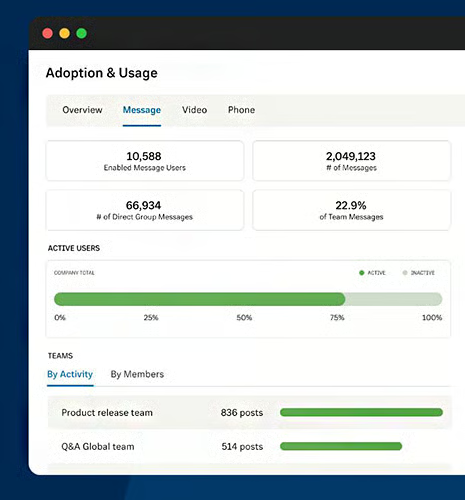
While more expensive, RingCentral’s plans are feature-rich, offering access to advanced capabilities. For example, both providers offer unlimited calling within the U.S. and Canada, but only RingCentral has short message service (SMS) and multimedia messaging service (MMS) features in its base plan. Ooma offers virtual receptionist capabilities, while RingCentral has a multi-level auto-attendant and interactive voice response (IVR).
Best for Call Management: RingCentral
| |
|---|---|
|
|
Our RingCentral vs Ooma comparison of call management features finds that both providers have extensive calling capabilities, but RingCentral edges out Ooma with advanced features like interactive voice response (IVR), unlimited storage, and advanced call handling. In addition to call management, RingCentral has robust collaboration features, like user presence and file sharing, which Ooma small business plans lack.
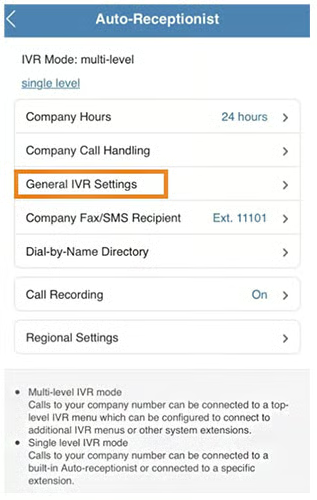
Ooma’s virtual phone services include local and toll-free numbers. RingCentral users have more options, including vanity numbers as well as domestic and international phone numbers and toll-free numbers. While Ooma has less advanced features than RingCentral, core capabilities, like ring groups and call recording, are excellent for startups looking for a more streamlined set of call center features.
Best for International Calling: Ooma
| |
|---|---|
|
|
Ooma and RingCentral offer metered affordable international calling rates. For example, Ooma’s standard per-minute rate for the United Kingdom is 2.8 cents, and RingCentral is priced at 3.9 cents for landline calls. International calling increases as your business grows, and these per-minute charges add up. Ooma has two world calling plans with unlimited calling to landlines in over 70 countries and mobile phones in up to 40 countries, which RingCentral lacks.
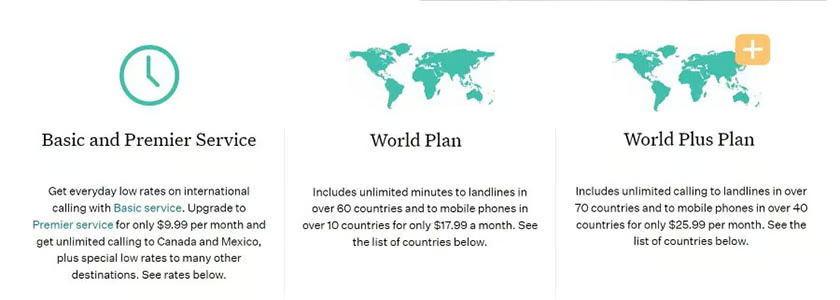
Note that Ooma’s unlimited international calling options are add-on services, with the World Plan costing $17.99 monthly and the World Plus Plan at $25.99 per month. This will significantly lower calling costs for small businesses with high-volume international calling. However, for occasional global calling, you’re better off with per-minute rates, which are slightly lower with Ooma.
Best for Devices & Hardware: RingCentral
| |
|---|---|
|
|
When it comes to Ooma versus RingCentral hardware, RingCentral comes out on top because of its wider range of available hardware and compatible phones. RingCentral has more compatible equipment brands, such as Jabra and Avaya, which Ooma does not support. RingCentral has phone rental with multi-year contracts, while Ooma offers free equipment rental for select items. However, Ooma requires at least three users and a one-year rental contract.
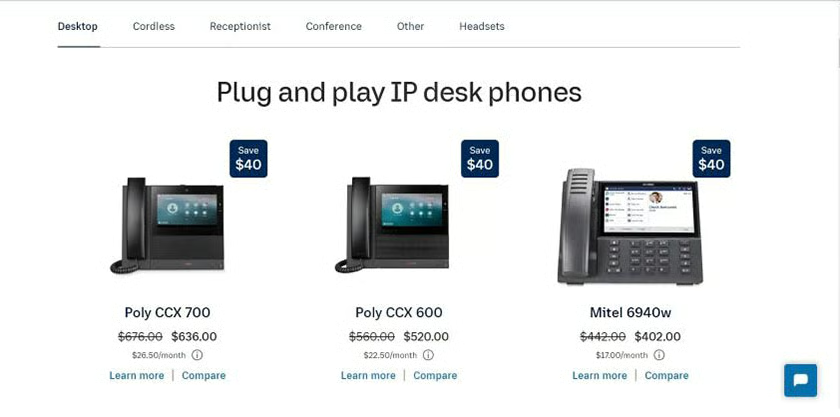
Ooma is ideal for existing Ooma users who want seamless phone functionality with their Ooma phone system. Ooma Office’s compatibility is limited since it primarily works with first-party Ooma hardware and a smaller selection of third-party devices. Purchasing hardware with Ooma requires a one-time, upfront payment that increases the initial investment of small businesses. RingCentral offers phone rentals, like the Polycom VVX 150, costing as low as $4.50 per month.
Best for Video Conferencing: RingCentral
| |
|---|---|
| Up to 200 video conferencing participants with no time limit | Up to 100 video participants for 12 hours |
Wondering what the difference between Ooma and RingCentral’s virtual meeting offerings is? RingCentral wins over Ooma for video meetings, thanks to its unlimited duration, large participant capacity, and collaboration features like breakout rooms and live transcription. RingCentral accommodates up to 200 video participants and has an optional large meeting add-on. Ooma’s virtual meetings host up to 100 video participants for 12 hours.
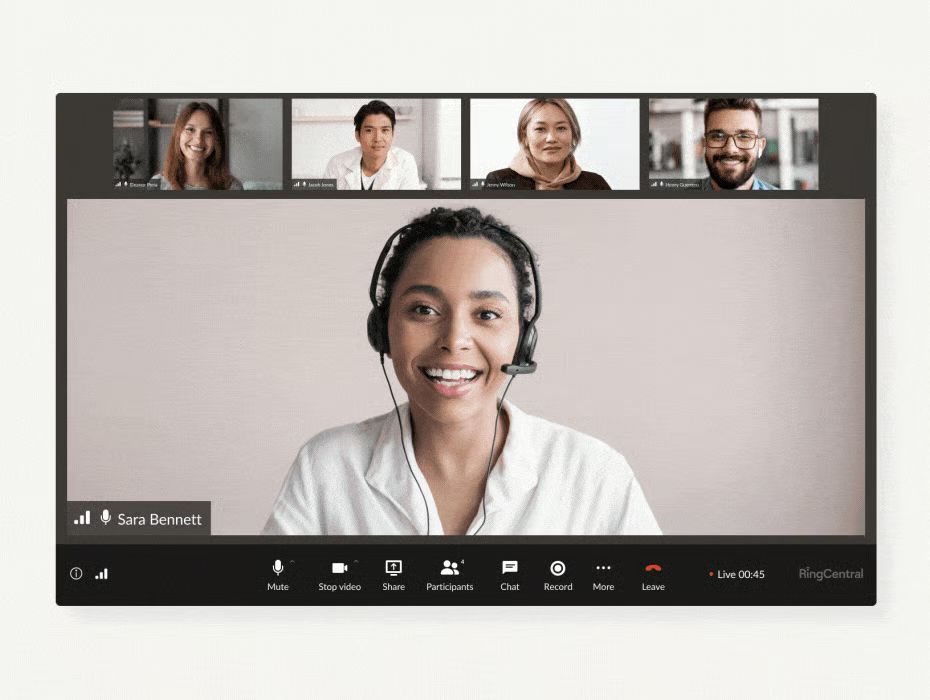
Ooma’s video conferencing features are more basic, including screen sharing, chat, mute, meeting scheduling, access control, and recording. RingCentral offers all of these features. Aside from team messaging, file sharing, and video recording, it uses artificial intelligence (AI) for meeting highlights, real-time transcription, and closed captions.
How We Evaluated RingCentral vs Ooma
We looked at free and paid plans from Ooma vs RingCentral to discover how their service offerings stack up against each other. We also tested each platform to assess ease of use and checked user feedback on popular review websites. From there, we created a scoring system focusing on pricing, phone capabilities, collaboration features, ease of use, and integrations.
Here’s a complete breakdown of the factors we considered in this RingCentral vs Ooma comparison:
We compared monthly per-user costs for Ooma Office vs RingCentral and features accessible at different tiers. In addition to pricing, we looked at the availability of a free plan, free trial, and discounts for annual billing and volume purchases.
We considered features essential to small businesses, such as unlimited calling and call routing features like forwarding and IVR. We also checked its video messaging capabilities, particularly if the provider has a larger participant capacity and longer meeting duration.
Not all small businesses can purchase an entire phone system, complete with hardware. We evaluated each provider’s phone rental options and device pricing to determine which provider is better for solopreneurs and small teams on a limited budget.
The best VoIP platforms should be easy to use, so we used both platforms for specific activities to determine whether their interface is easy or complicated. In addition, we evaluated each system based on ease of setup and installation.
We analyzed each product’s value by considering the total cost and feature sets. We also checked verified user reviews to determine the overall popularity of both platforms while considering our own experiences.
Frequently Asked Questions (FAQs)
Does Ooma have a mobile application?
Ooma has a mobile application for iOS and Android. It’s very easy to install: simply download Ooma from the iTunes store or Google Play and log in using your Ooma name and password. The mobile applications enable teams to communicate quickly, regardless of their location.
Which is more secure, Ooma or RingCentral?
Some prefer Ooma because it offers security equipment and services and VoIP phone systems. Ooma-to-Ooma calls are encrypted, and the provider claims to adhere to government security regulations. On the other hand, RingCentral provides enterprise-grade security in all its plans, including end-to-end in-transit and at-rest data encryption. It’s HITRUST-certified and Health Insurance Portability and Accountability Act (HIPAA)-compliant.
Do Ooma & RingCentral support 911 calls?
Yes. Ooma and RingCentral both support E911. E911 systems provide emergency service personnel with crucial information, such as callback numbers and information location.
Bottom Line
In this RingCentral vs Ooma article, we found both platforms offer phone equipment and helpful call management features like call recording and unlimited calling, but at different price points. Each has unique capabilities—RingCentral offers robust calling and video conferencing, while Ooma has cost-effective pricing plans and international calling.
RingCentral is better for businesses looking for full-featured phone systems with advanced features, such as multi-level IVR and AI-backed meeting analysis and transcription. On the other hand, Ooma is better suited for businesses that want essential communication tools like call queuing, caller ID, and call recording.
