







SumUp and Square allow small businesses to start accepting payments without monthly costs. When it comes to SumUp vs Square, Square is the more versatile choice for omnichannel payment processing and a more affordable full point-of-sale (POS) solution. On the other hand, SumUp is suitable for low-volume transactions and mobile payment processing, such as for solopreneurs, professionals, and service providers.
In our evaluation of the best merchant service providers, Square earned the top spot with an overall score of 4.49 out of 5. Although SumUp did not make our list, it earned a decent score of 3.66 out of 5.
- Square: Best for omnichannel payment processing and POS solution
- SumUp: Best payment solution for low-volume transactions
SumUp vs Square Comparison
SumUp Is Best For
- Businesses that need to process card payments within Europe: One of SumUp’s unique features is its ability to accept payments even when you are not in your home country. This is a significant benefit for merchants who need to accept payments while traveling in Europe.
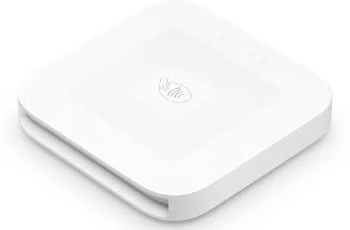
- Affordable contactless card readers: SumUp offers a lower-priced EMV- and NFC-capable card reader than Square.
- International payment processing: Aside from its cross-border support, SumUp does not charge extra for accepting international cards.
Square Is Best For
- Multichannel payments: Square makes it easy to sell in both online and offline channels. It is among our leading multichannel POS systems.
- Growing small businesses: Small businesses will find it easy to start accepting payments with just the Square app, and would find it equally easy to scale up when needed with Square’s full POS system. It took the top spot in our guide on the best small business POS systems.
- Accepting payments through a website integration: Square allows businesses to sell online through its free ecommerce platform Square Online or its many one-click ecommerce integrations. It is included in our list of the best ecommerce platforms for small businesses.
Learn more about Square and why many small businesses love it. Read our article, What Is Square?.
 |  | |
|---|---|---|
| Overall Score | 3.66 out of 5 | 4.49 out of 5 |
| Monthly Fees | Starts at $0 | Starts at $0 |
| Transaction Fees | Starts at 2.75% | Starts at 2.6% + 10 cents |
| Invoicing | ✓ | ✓ |
| Recurring Billing | ✕ | ✓ |
| Setup Fees | Starts at $0, one-time $400 for POS | $0 |
| Chargeback Fees | $10 | Waived up to $250 per month |
| POS Monthly Fees | $199 | $0 |
| International Support | Available in 31 countries; cross-border support within Europe | Available in 8 countries; no cross-border support |
| Deposit Speed | Free: Next day | Free: Next day Instant: 1.75% fee |
| Customer Service |
|
|
| Visit SumUp |
Both SumUp and Square are included in many of our guides:
- Best Credit Card Payment Apps
- Best Credit Card Readers for Small Businesses
- Best Mobile Credit Card Processors
When to Use an Alternative
Square and SumUp are similar in their pricing and features. If you are looking for something different, like interchange-plus pricing or more customizations, consider the alternatives below. For other options similar to Square, see our list of top Square alternatives.
 |  |  | |
|---|---|---|---|
| Best for | Customized payment processing | Interchange-plus pricing with free POS | Occasional sales |
| Monthly fee | $0 | $0 | $0 |
| Card-present transaction fee | 2.7% + 5 cents | Interchange plus 0.15%–0.4% + 6–8 cents | 2.29% + 9 cents |
| Keyed-in transaction fee | 3.4% + 30 cents | Interchange plus 0.15%–0.5% + 15–25 cents | 3.49% + 9 cents |
| Ecommerce transaction fee | 2.9% + 30 cents | Interchange plus 0.15%–0.5% + 15–25 cents | 2.99% + 49 cents |
| Visit Stripe | Visit Helcim | Visit PayPal |
Neither Square nor SumUp supports high-risk businesses. If you have a business in the high-risk category, consider our top option for high-risk merchant accounts, PaymentCloud. Read our full PaymentCloud review.
SumUp vs Square Pricing
| | |
|---|---|---|
| Score | 3.81 out of 5 | 4.27 out of 5 |
| Monthly Fee | Starts at $0 | Starts at $0 |
| In-person Transaction Fee | 2.75% | 2.6% + 10 cents |
| Invoicing Fee | 2.9% + 15 cents | 3.3% + 30 cents |
| Online Transaction Fee | 3.25% + 15 cents | 2.9% + 30 cents |
| Keyed-in Fee | 3.25% + 15 cents | 3.5% + 15 cents |
| Cancellation Fee | $0 | $0 |
| Chargeback fees | $10 | Waived up to $250 |
| SumUp Review | Square Review |
Comparing Square vs SumUp fees, both provide competitive flat-rate pricing structures for their payment processing solutions. Their processing fees do not significantly differ, except for invoicing, where SumUp offers a lower transaction fee.
Both payment service providers have zero monthly fees if you only need the basic payment processing features. However, if your business needs a full POS system, Square beats SumUp because of SumUp’s $199 monthly fee and one-time initial $400 set-up fee for its POS, which can be hefty for new small businesses.
When it comes to hardware, a Square plan comes with a free magstripe reader and has the Tap to Pay on iPhone and Android features, which let you use compatible mobile phones as contactless card readers. This means new merchants can sign up for Square and start accepting in-person card payments with absolutely zero initial costs if they have a compatible mobile device. If you prefer to have a dedicated card reader that can take EMV and NFC payments, SumUp’s cheapest device is more affordable than Square’s.
SumUp vs Square: Card Reader Comparison
| |
|---|---|
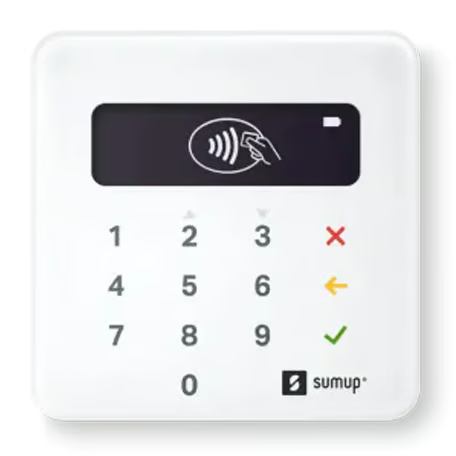 |  |
SumUp Plus: $39
| Square Contactless and Chip Reader: $49
|
SumUp vs Square Calculator
Compare SumUp vs Square Fees. Enter an estimate of your monthly sales data in the calculator below:
SumUp vs Square Fees
| Payment Method | SumUp | Square |
|---|---|---|
| In-person transaction fee | $0 | $0 |
| Online transaction fee | $0 | $0 |
| Keyed-in transaction fee | $0 | $0 |
| Invoice transaction fee | $0 | $0 |
SumUp vs Square Payment Types
| | |
|---|---|---|
| Score | 4 out of 5 | 5 out of 5 |
| In-Person | Requires a mobile card reader | Comes with free magstripe reader;Via Tap to Pay on iPhone and Android |
| Ecommerce | Through integrations and APIs and SDKs | Through Square Online and ecommerce integrations |
| Invoicing | ✓ | ✓ |
| Recurring Billing | ✕ | ✓ |
| Virtual Terminal | ✓ | ✓ |
| Payment links | ✓ | ✓ |
| SumUp Review | Square Review |
When it comes to payment types supported, both Square and SumUp earned high scores in our evaluation. Square still offers a more complete solution, as SumUp does not offer recurring billing.
If you would like to receive payments via your website or online store, SumUp offers limited integrations. It only lists WooCommerce, Wix, and PrestaShop as its ecommerce partner solutions on its website. If your website or online store does not use any of these three platforms, you will need to rely on higher-level developer skills to use SumUp’s APIs (application programming interfaces) and SDKs (software development kits).
Square, on the other hand, lets you build your own ecommerce website through its free Square Online platform. If you prefer to use a different ecommerce platform, Square can be easily integrated with some of the most popular ecommerce platforms such as WooCommerce, Wix, Magento, BigCommerce, WordPress, and Drupal Commerce. It also has developer APIs for integrating Square into custom-built websites.
SumUp vs Square Features
| | |
|---|---|---|
| Score | 2.5 out of 5 | 3.88 out of 5 |
| Deposit Speed | Standard: Next dayNo instant payout option | Instant Payout: 1.75% feeStandard: Next day |
| Chargeback Protection | ✕ | Covers chargeback fee for eligible transactions |
| Chargeback Fee | $10 (regardless of dispute result) | Waived up to $250 for eligible transactions |
| Fraud Prevention | Limited | ✓ |
| PCI Compliance | ✓ | ✓ |
| Customer Service |
|
|
| Integrations | 8 | 26 |
| Buy Now Pay Later | Limited for those with SumUp Business Account | ✓ |
| International Support | Available in 31 countries; cross-border support within Europe | Available in 8 countries; no cross-border support |
| SumUp Review | Square Review |
Square and SumUp have clearer differences when it comes to features, and Square has a significant lead over SumUp in this category. The only edge SumUp has over Square is its cross-border support. Although Square is available in eight countries, merchants cannot receive payments while in another country. Accepting international payments while in the home country where the Square account was opened is not a problem, but if you travel and need to accept payments while traveling, you cannot do it through Square. SumUp, on the other hand, is available in 31 countries and offers cross-border support within Europe.
SumUp vs Square Expert Score
Square is always a top provider in many of our guides, and it holds up its solid reputation in our Square vs SumUp comparison. It allows small businesses to start accepting payments without any fixed monthly costs, while providing cost-effective solutions for scaling up their operations.
SumUp still earned good scores, but didn’t quite hit the mark when it comes to easy and affordable business scalability and integrations. For an all-in-one payment solution, Square still gets our vote.
SumUp
4.06 / 5
SumUp offers a free plan that lets merchants accept payments through its mobile payment app. Its basic mobile card reader is one of the cheapest out there, allowing businesses to take card payments with very little initial costs.
However, growing businesses that require a full POS solution will need to shell out $199 every month, aside from the initial $400 POS set-up fee. A new small business or startup might find the initial costs of SumUp’s POS solution hefty.
Although these SumUp fees make it more expensive, it is still a good option for small businesses that require low-volume payment processing, such as freelancers, professionals, periodic farmers market sellers, service providers, and other solopreneurs.
Square
4.69 / 5
Square has consistently performed strongly in our assessments because of its small business-friendly pricing and features. Merchants that start with Square can feel confident that they can start with low-cost basic payment processing and have the support to scale up their business when needed.
It provides flexible POS software, a wide range of business management tools, cost-effective yet high-quality hardware, and versatile payment processing capabilities. No matter how your small business prefers to accept payments, Square offers a reliable all-in-one payment solution.
Methodology—How We Evaluated SumUp vs Square
We test each merchant service provider ourselves to ensure an extensive review of the products. We then compare pricing methods and identify providers that offer zero monthly fees, pay-as-you-go terms, and low transaction rates. Finally, we evaluate each according to various payment processing features, scalability, and ease of use.
The result is our list of the best merchant services providers. However, we adjust the criteria for specific use cases, such as for different business types and merchant categories. This is why every provider has multiple scores across our site, depending on the use case you are looking for. For this in-depth analysis, we looked closely at how SumUp and Square performed.
Click through the tabs below for our overall merchant account evaluation criteria:
We awarded points to merchant account providers that don’t require contracts and offer month-to-month or pay-as-you-go billing. Additionally, we prioritized providers that don’t charge hefty monthly fees, cancellation fees, or chargeback fees and only included providers that offer competitive and predictable flat-rate or interchange-plus pricing. We also awarded points to processors that offer volume discounts, and extra points if those discounts are transparent or automated.
The best merchant accounts can accept various payment types, including POS and card-present transactions, mobile payments, contactless payments, ecommerce transactions, and ACH and echeck payments, and offer free virtual terminal and invoicing solutions for phone orders, recurring billing, and card-on-file payments.
We prioritized merchant accounts with free 24/7 phone and email support. Small businesses also need fast deposits, so payment processors offering free same-day or next-day funding earned bonus points. Finally, we considered whether each system has affordable and flexible hardware options and offers any business management tools, like dispute and chargeback management, reporting, or customer management.
We judged each system based on its overall pricing and advertising transparency, ease of use―including account stability―popularity, and reputation among business owners and sites like the Better Business Bureau (BBB). Finally, we considered how well each system works with other popular small business software, such as accounting, POS, and ecommerce solutions.
SumUp vs Square Frequently Asked Questions (FAQs)
Is SumUp or Square better?
Both SumUp and Square offer zero monthly payment processing and accept a wide range of payment types. The right provider for your business depends on your specific needs. SumUp’s advantage over Square is its cross-border support, cheaper basic mobile card reader, and slightly lower invoice payment processing fees. For all other aspects, Square provides a better alternative for small businesses.
Is SumUp part of Square?
No, SumUp is not a part of Square. SumUp and Square are two separate companies that provide payment processing solutions and operate independently. They offer similar services, but each provider has its own offerings, pricing structures, and features.
Can I use SumUp or Square for invoicing and recurring payments?
Both Square and SumUp allow merchants to send invoices to their customers, with SumUp having a lower invoice payment processing fee. However, only Square accepts recurring payments.
Bottom Line
SumUp and Square are both reputable payment processors that offer low-cost payment solutions for accepting payments on the go. SumUp stands out with its straightforward pricing and mobile-first approach.
Square, on the other hand, impresses with its all-in-one solution, competitive pricing, extensive business management tools, and versatile payment processing options. The specific choice between SumUp and Square ultimately depends on the specific needs and priorities of your small business, including pricing considerations, desired features, hardware requirements, and scalability for future growth. For most use cases, Square provides a cost-effective and versatile all-in-one payment solution for small businesses.
