







ZoomInfo Sales is a cloud-based lead generation platform with prospecting, engagement, and AI-powered tools. Its core features include a business-to-business (B2B) contact database, buyer intent tracking, website visitor monitoring, conversation intelligence, sales automation, and workflow management. We recommend this platform for B2B businesses seeking to maximize productivity, accelerate sales pipelines, and optimize revenue potential.
- Recommended For
- Not Recommended For
- Quick Look at ZoomInfo Pricing {"message":"ZoomInfo doesn't show platform and product prices on its website. Prices featured in this review are based on user reviews and third-party sources. ZoomInfo did not respond to messages regarding pricing. Contact ZoomInfo for a quote.","icon":"info"}
- More ZoomInfo Resources
- What Users Think of ZoomInfo
- What Our Expert Thinks of ZoomInfo
- ZoomInfo Review: Alternatives
- ZoomInfo Pricing & Plans
- ZoomInfo Features
- ZoomInfo Review: Support
- ZoomInfo Review: Ease of Use
- Frequently Asked Questions (FAQs)
- Bottom Line
Recommended For
- B2B sales managers and reps: ZoomInfo’s Engage sales engagement tool helps sales teams quickly connect with the right B2B prospects at the perfect time and with the best message to hit their numbers.
- B2B account executives: ZoomInfo is equipped with a call and demo recording tool called Chorus, powered by conversation intelligence. Account executives can use this tool to analyze client interactions across their sales team for performance tracking and training purposes.
- B2B revenue operations: Enrich by ZoomInfo is a sales intelligence tool that enhances data gathering. It’s recommended for revenue teams wanting to use data-enriched contacts to improve their sales operation’s peak performance.
Not Recommended For
- Business-to-customer (B2C) companies: ZoomInfo’s contact database includes information like technologies and organizational segments (technographic and firmographic data) relevant to the B2B sector.
- Solopreneurs and startups: ZoomInfo Sales is packed with sales and marketing tools, but the provider doesn’t provide a free plan and clear pricing. This is a downside for solopreneurs and startups wanting to try the features before purchasing.
Quick Look at ZoomInfo Pricing
- Free trial: 14 days
- Paid plans: Start at $14,995 per year with 5,000 bulk data credits. Contact the provider for a custom quote.
More ZoomInfo Resources
- UpLead vs ZoomInfo: Pricing, Features & What’s Best: While UpLead stands out for its data accuracy, affordability, and usability, ZoomInfo has more advanced data analytics and in-depth contact details. ZoomInfo is an excellent tool for comprehensive contact search, obtaining customer insights, and market research.
- 8 Best Places to Buy Business Leads Compared: We evaluated several databases and platforms to buy B2B leads. ZoomInfo is our top pick for a robust contact database with 321 million B2B leads in 104 million companies.
- UpLead Review: Is It Right for Your Business?: One of UpLead’s top alternatives includes ZoomInfo, which is recommended for businesses that want a vast contact database. Its key features include contact search, buyer intent data, and CRM lead enrichment.
What Users Think of ZoomInfo
Users mention that this platform is easy to use with comprehensive data for prospecting—one of the most important aspects of sales management. They can easily upload a list of target companies and identify the right leads to engage with. Moreover, the platform integrates with LinkedIn, Salesforce, and other popular sales technology tools.
At the time of this publication, we noted the following scores from ZoomInfo reviews posted on popular user review sites:
- G2: 4.4 out of 5 based on 8,487 reviews
- Capterra: 4.1 out of 5 based on 286 reviews
- TrustRadius: 8.1 out of 10 based on 1,692 reviews
Based on online ZoomInfo reviews, some users wish this platform included a LinkedIn automation feature. This feature would allow users to send connection requests and InMail messages (private messages to LinkedIn contacts without contact information) while maintaining visibility within ZoomInfo. On the other hand, other users find the cost of ZoomInfo expensive.
When it comes to ZoomInfo reviews on its mobile app, we noted the following scores based on popular app store reviews and ratings:
- Apple App Store: 4.6 out of 5 based on 642 reviews
- Google Play: 2 out of 5 based on 298 reviews
ZoomInfo users reported some glitches while using its mobile app. Some users experience log-in issues like being immediately logged out while using the app. Others mention that searching for a name takes several clicks and they encounter unnecessary pop-up messages.
What Our Expert Thinks of ZoomInfo
4 / 5
We would definitely use ZoomInfo Sales for its helpful prospecting, engagement, and intelligence tools. Its B2B search engine provides over 300 company attributes, which enables sales teams to refine data and track key contacts for new business opportunities. ZoomInfo Sales’ conversation intelligence tool can be useful for sales managers, allowing them to forecast sales confidently.
On the other hand, reps can use its sales automation, account-based selling, and email analytics features to create more meaningful, tailored client conversations. They can also create multiple sales cadences with ZoomInfo Sales’ email tool and direct phone dialer to convert leads to customers quickly. With website visitor tracking and buyer intent features, users can connect with decision-makers actively seeking solutions similar to what they offer.
ZoomInfo Review: Alternatives
While ZoomInfo offers an excellent B2B contact database and lead generation tools, your business may want more affordable, scalable, or comprehensive features. That said, there are other providers you can consider based on what best fits your budget. The table below shows how other prospecting solutions compare with ZoomInfo.
| Provider |  |  |  |  |
|---|---|---|---|---|
| Best For | Businesses looking for a wider contact database | Small B2B businesses for sales and targeted lead generation | Freelancers and marketers for cold emailing | Comprehensive sales prospecting |
| Key Features |
|
|
|
|
| Pricing |
|
|
|
|
| Learn More | Visit ZoomInfo | Visit UpLead | Visit Hunter.io | Visit Lusha |
ZoomInfo Pricing & Plans
1.5 / 5
We rated ZoomInfo costs 1.5 out of 5 because its company website doesn’t show specific pricing details. We encourage our readers to contact the provider for ZoomInfo pricing.
Based on recent user updates and other third-party sources, ZoomInfo Sales offers the following plans and add-ons:
- Pro: Starts at $14,995 per year for three users (two-year contract) and 5,000 bulk credits*
- Advanced: Starts at $24,995 per year for five users (two-year contract) and 10,000 bulk credits*
- Elite: Starts at $34,995 per year (includes attributes and workflows)*
ZoomInfo Features
5 / 5
In this ZoomInfo Sales review, we gave a 4.75 out of 5 rating for the general features. ZoomInfo Sales has an excellent contact database and lead-generation tools. These include Chorus for conversation intelligence, buyer intent to track companies, sales automation, workflows, and website visitor tracking.
B2B Lead Database
ZoomInfo Sales has a large contact database of 321 million B2B contacts worldwide. Sales teams can build a list of prospects based on their ideal customer profiles (ICP) and contact key decision-makers with more than 70 million direct dial phone numbers and about 174 million verified email addresses.
With ZoomInfo’s advanced firmographics, sales teams can quickly search for qualified leads using the platform’s advanced B2B search engine. It provides over 300 company attributes with several filters to refine data search. You can also track key contacts for data changes, like a new job title, company, and start date.
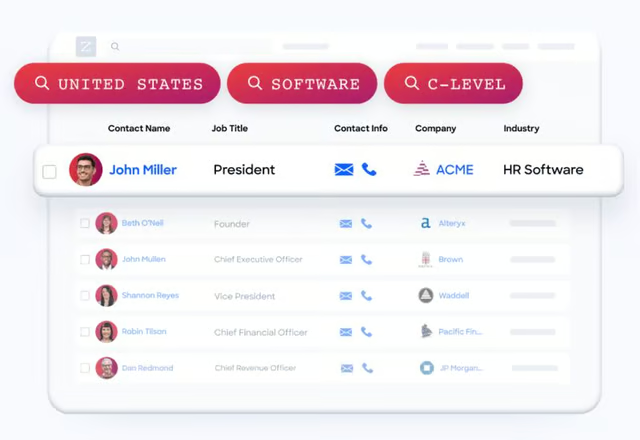
ZoomInfo Sales’ advanced firmographics with data filters (Source: ZoomInfo) 
ZoomInfo Sales lets you track key contact changes. (Source: ZoomInfo)


Buyer Intent Data
ZoomInfo’s intent engine triggers buying signals tracked from 210 million Internet Protocol (IP) to organizational pairings and more than six trillion new keyword-to-device pairings. The data is sourced from over 90 percent of devices across the US monthly.
Its website tracking tool helps you identify potential prospects based on specific topics they research on your website. The platform captures the visitor’s data, like company name and email address.
ZoomInfo’s buyer intent data is usually paired with technographic and firmographic data, narrowing the list to high-fit accounts. Users can push contact and intent data into their CRM software to create automated workflows. With data-rich workflows, sales reps can generate leads with less time and effort.
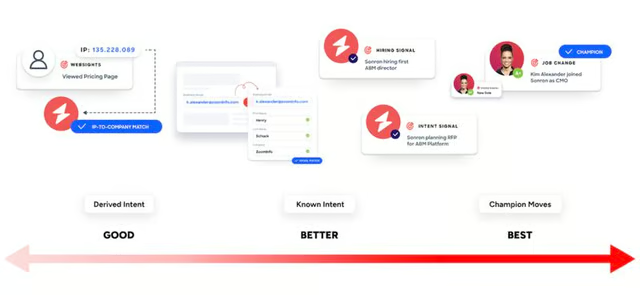
ZoomInfo Sales’ intent data scoring (Source: ZoomInfo) 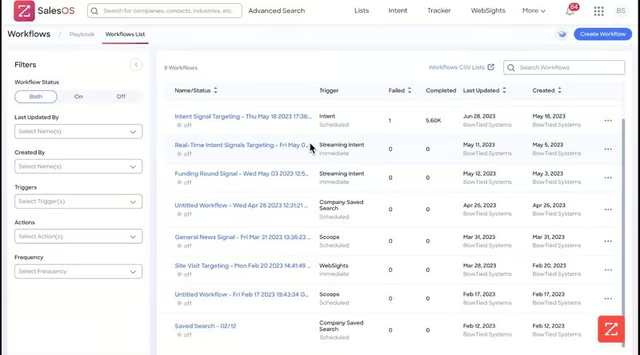
ZoomInfo Sales’ workflow list of contact intent data (Source: ZoomInfo)


Automated Workflows
ZoomInfo Sales lets you create automated workflows for salespeople to pull deals, get on the phone, and book meetings with sales qualified leads faster. Sales managers can set automated sales workflows, such as task assignments and follow-up reminders, to assist sales reps in lead prospecting, nurturing, and conversion to paying customers.
With ZoomInfo Sales’ clean and comprehensive data, automated workflows empower your favorite business tools to accelerate the launching of your marketing campaigns and sales cycles. For instance, you can create a rule to export a gathered contact’s info to a CRM or any sales and marketing software and assign a dedicated rep to handle the lead as shown in the image below. This is an example of setting a workflow trigger.
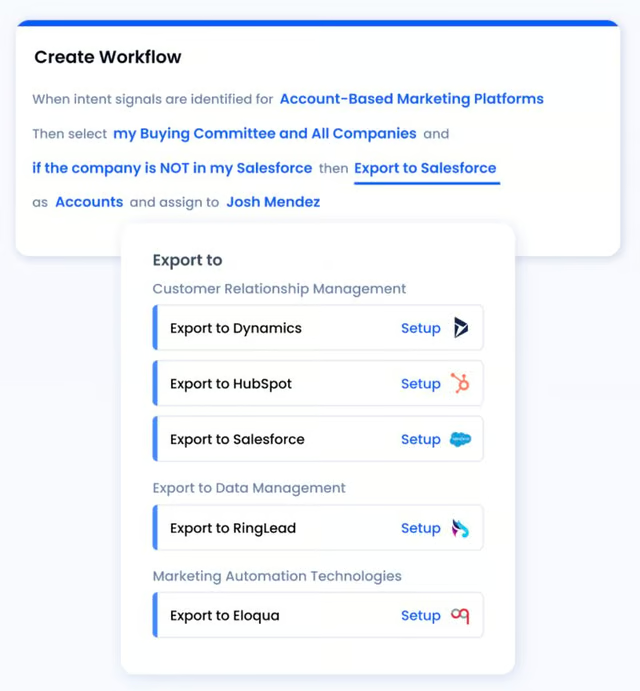
ZoomInfo’s process of creating an automated workflow shows a data export flow. (Source: ZoomInfo) 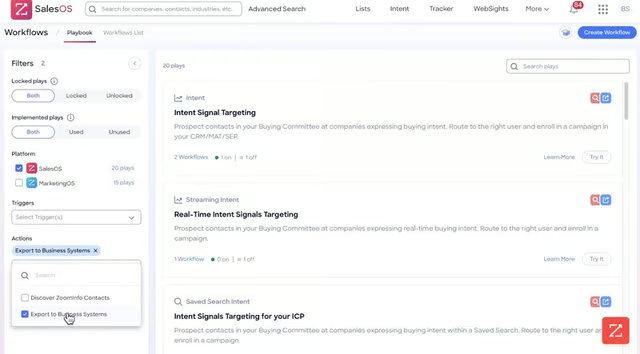
ZoomInfo lets you create desired actions like exporting to business systems for automated workflows. (Source: ZoomInfo)


Prospecting Tools
ZoomInfo Sales’ database provides salespeople with prospecting insights through enriched data and established workflows. With ZoomInfo Engage, sales teams can connect with more prospects through phone calls or email and capture every lead interaction. Reps can spend less time prospecting and focus on engagement to win more deals.
ZoomInfo Sales’ sales intelligence tools provide sales teams with valuable insights into a prospect’s purchase authority, seniority, and engagement touchpoints. It enables reps to gauge the quality and potential of each lead or account (lead prioritization) based on their buying signals, tech stack, and demographic profile.
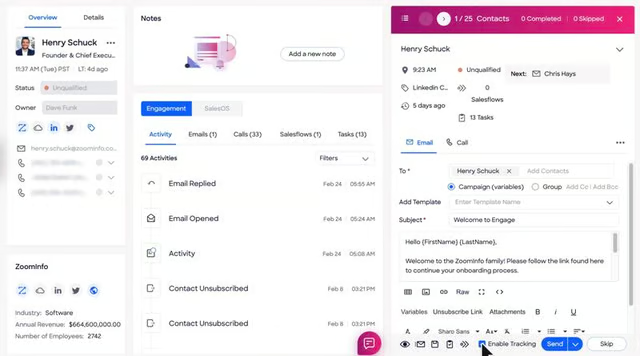
ZoomInfo Engage lets you call, send a text message, or email a lead and enable tracking for prospecting. (Source: ZoomInfo) 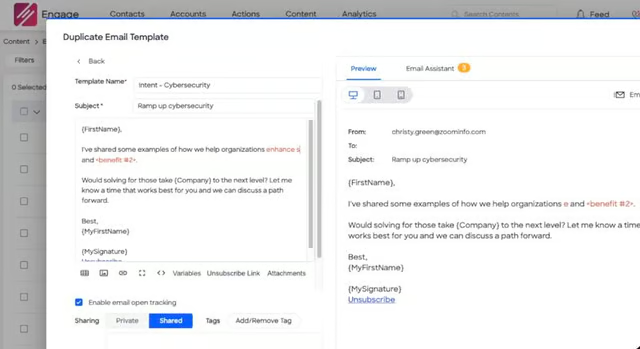
ZoomInfo Engage’s example of an email template for prospecting (Source: ZoomInfo)


Data Security
In this ZoomInfo review, we found that this provider gathers data about companies and people through digital platforms such as websites and social media. ZoomInfo has implemented a comprehensive information security management system (ISMS) that meets ISO 27001 standard guidelines. ZoomInfo’s security also received SOC 2 attestation from the AICPA for its security and confidentiality controls.
Additionally, ZoomInfo published a press release about its commitment to data privacy. The company highlighted its compliance with GDPR, CCPA, and other data security and privacy certifications. Moreover, ZoomInfo also has a data collection notice flow, wherein new contacts receive notifications about using their data. Contacts who don’t want to be contacted can remove their information from the platform.
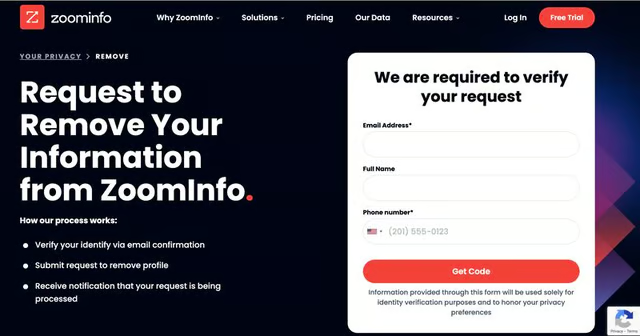
ZoomInfo’s dedicated opt-out request page (Source: ZoomInfo) 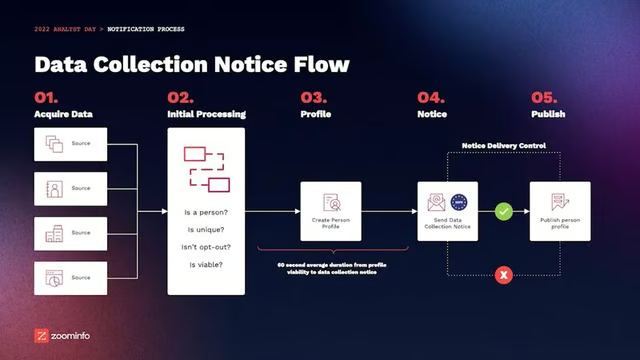
ZoomInfo’s data collection notice flow (Source: YouTube)


Data Import/Export
Users can import internal data from spreadsheets and integrated tools like Salesforce or HubSpot to ZoomInfo for effective data acquisition. For example, ZoomInfo’s Salesforce Sync lets users import contact, lead record, and account data from Salesforce to ZoomInfo. Account executives and managers can build lists based on records they own, while sales development representatives (SDR) can prospect based on contacts their executives own.
ZoomInfo Sales administrators authorize integrations, export options, and mapping for users. Export individual reports or use advanced search to build up a list. Sales teams can send data into integrated tools like Salesforce and HubSpot and download it into a spreadsheet or an email inbox.
With ZoomInfo’s data import and export capabilities, salespeople can save time and effort transferring data for various sales activities like prospecting and email campaigns.
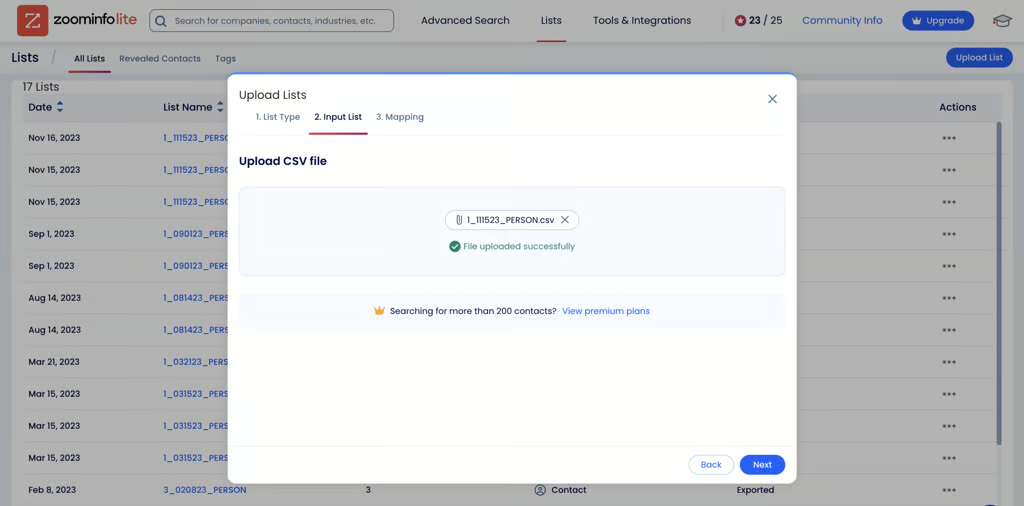
ZoomInfo lets users import data from a CSV file to the platform. (Source: ZoomInfo) 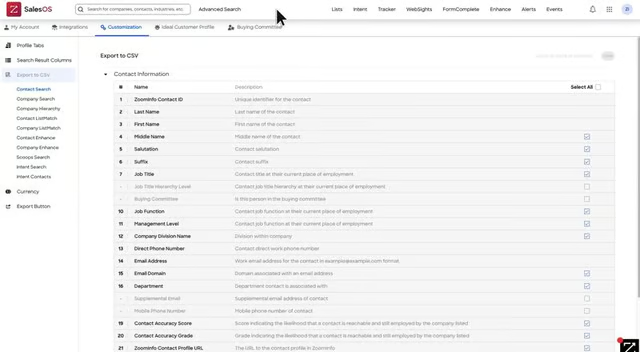
ZoomInfo has an export option to transfer contact data to a CSV file. (Source: YouTube)


CRM Integration
ZoomInfo Marketplace has several integration options in various categories including data warehouse, revenue intelligence, and revenue operations. Users can experience customizable integrations to unlock sales insights, engage customers, and win deals faster. Its CRM integration options include apps like Salesforce, HubSpot, SugarCRM, Dynamics 365, and Pipedrive.
Other featured integrations include G2, Databricks, TrustRadius, Amazon Web Services, and Gong Engage. ZoomInfo is also partnered with Aircall, a cloud-based call center software for customer support, and Clari, a revenue management platform for operations. Overall, ZoomInfo has 79 app partners, bringing B2B intelligence to every company’s tech stack.
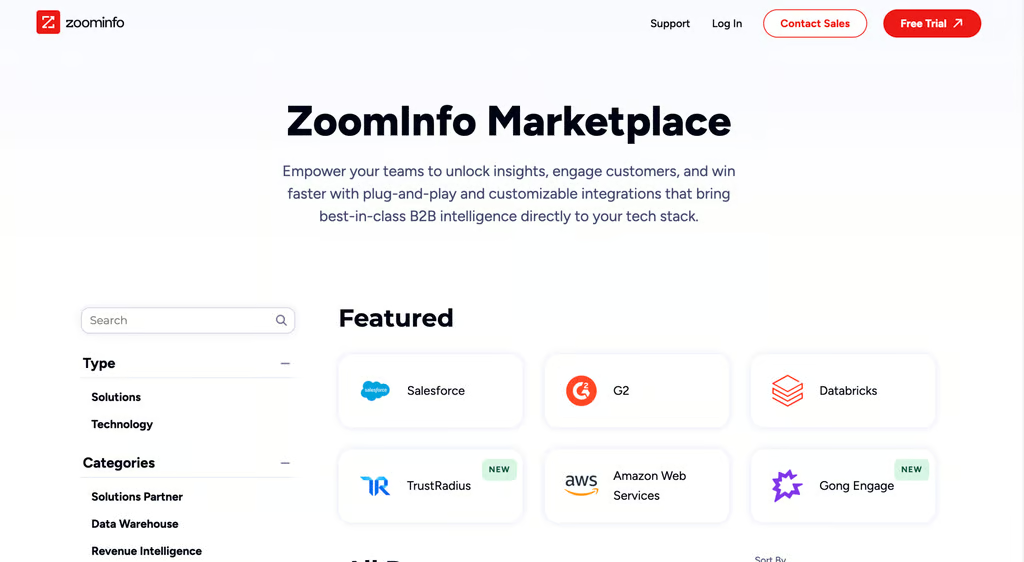
ZoomInfo Marketplace with featured integrations (Source: ZoomInfo) 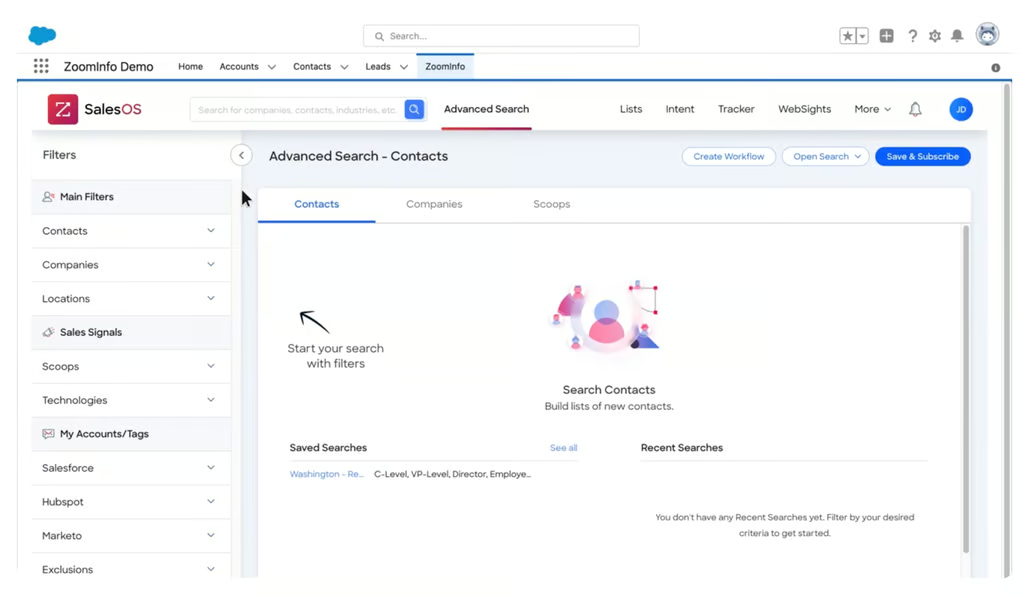
The ZoomInfo and Salesforce integration offers an advanced search feature for sales teams. (Source: YouTube)


ZoomInfo Copilot
In this ZoomInfo review, we found that this provider has artificial intelligence. ZoomInfo Copilot leverages AI to help sales teams quickly search for, target, and message leads.
Copilot generates thousands of data points and signals, creating custom account summaries for comprehensive research and analysis to understand customers better. It combines business data with validated ZoomInfo data to create a solid database for reliable AI insights.
Furthermore, one of the most notable features of ZoomInfo Copilot is SmartSheet. Sales reps can use the recommended actions for the next best steps to nurture leads and close deals faster. Copilot creates a custom feed to help sales teams prioritize accounts based on buying intent, earning calls, funding, and other relevant signals.
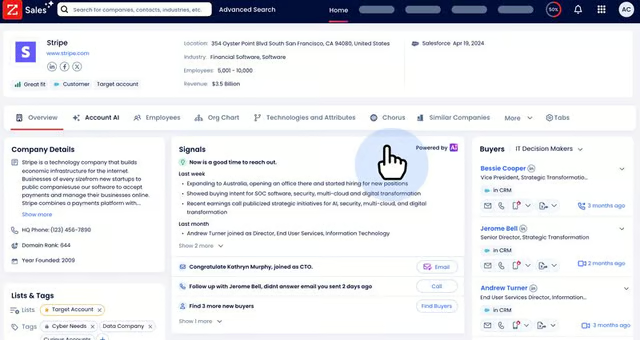
ZoomInfo’s Copilot detects intent signals like technology product interest and job changes. (Source: ZoomInfo) 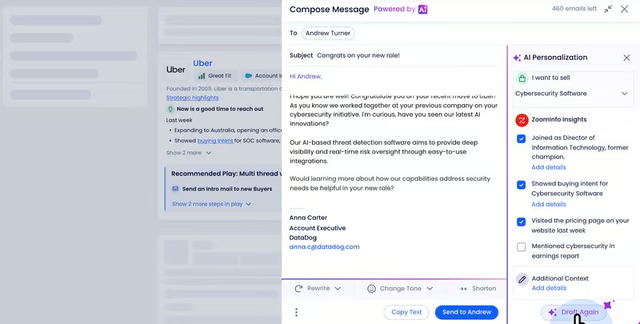
ZoomInfo’s Copilot personalizes messaging for outreach and engagement campaigns. (Source: ZoomInfo)


ZoomInfo Mobile
ZoomInfo’s mobile app lets salespeople pull up company information on leadership, industry, and technographic data to guide conversations over the line. Users can access the same insights available on the ZoomInfo platform on a smartphone, tablet, or any mobile device.
You can review meeting briefs by connecting your calendar to ZoomInfo’s mobile app. Create last-minute talking points with the help of Copilot (AI assistant) before your meeting based on key insights. Moreover, use the prospecting feature of the app to gain insights into B2B companies in your target market.
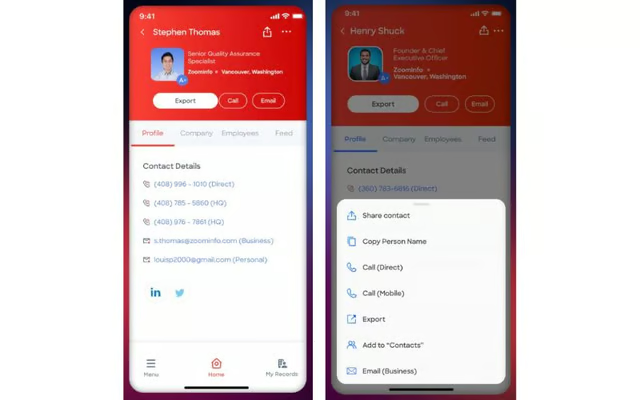
ZoomInfo’s mobile app lets you manage contacts and sales activities. (Source: Google Play) 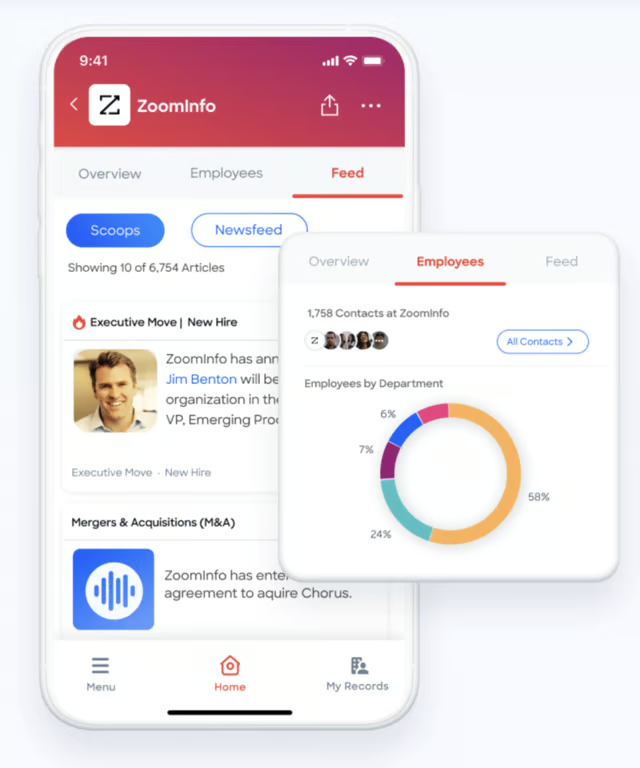
ZoomInfo’s mobile app provides the same insights users get from the platform. (Source: ZoomInfo)


ZoomInfo Review: Support
3.75 / 5
ZoomInfo provides multichannel support options, including phone support, email, and a help center. The provider has a dedicated customer service number on its website that users can call for inquiries and concerns.
Users can visit the ZoomInfo University page to learn more about its products through training videos and courses to obtain certifications. ZoomInfo also provides “getting started” resources, making onboarding easier for new users. Both registered and nonregistered users can also attend monthly live training sessions. Schedules are shown in ZoomInfo University’s webinar calendar.
ZoomInfo Review: Ease of Use
4.18 / 5
ZoomInfo is relatively easy to use with intuitive features, a modern dashboard design, and a clean user interface. It pulls up detailed information about target contacts instantly without so much effort. The advanced search and filters can help reps quickly see what they are looking for in the dashboard.
Additionally, ZoomInfo is equipped with convenient features, like the ‘Save Search’ function, so you never lose track of prospects you want to keep in contact with. While generally easy to use, ZoomInfo has a slight learning curve due to its advanced sales intelligence features. The setup and onboarding processes are also lengthy.
How We Evaluated ZoomInfo Sales
Frequently Asked Questions (FAQs)
How reliable is ZoomInfo?
While ZoomInfo generally has high-quality contacts, users report that they still run into contacts that are no longer in use, such as previous employees. So while ZoomInfo works to keep its database updated, changes happen, and users occasionally get invalid contact information.
Is ZoomInfo owned by Zoom?
No. DiscoverOrg (founded by Henry Schuck) acquired ZoomInfo in 2019 from its competitor and set a new standard for B2B business intelligence with quality data. ZoomInfo continued its evolution and became a publicly traded company in 2020. In 2022, ZoomInfo was launched as an integrated, full-service platform.
Does ZoomInfo track IP?
Yes. ZoomInfo links the internet protocol (IP) and the website domain. The provider uses B2B website identification software to identify anonymous web visitors. ZoomInfo can also track residential browsing or work-from-home activity when professionals send emails, fill out forms, and consume content.
Bottom Line
We find ZoomInfo Sales’ contact database reliable and comprehensive for prospecting. Its deep search is excellent, and highly recommended for B2B companies looking to build and grow their prospect list quickly.
Other notable features include Chorus for effective sales coaching and Enrich for refining data in real time. While ZoomInfo doesn’t have transparent pricing and plan details, its rich database and prospecting features can be worth the cost.
