







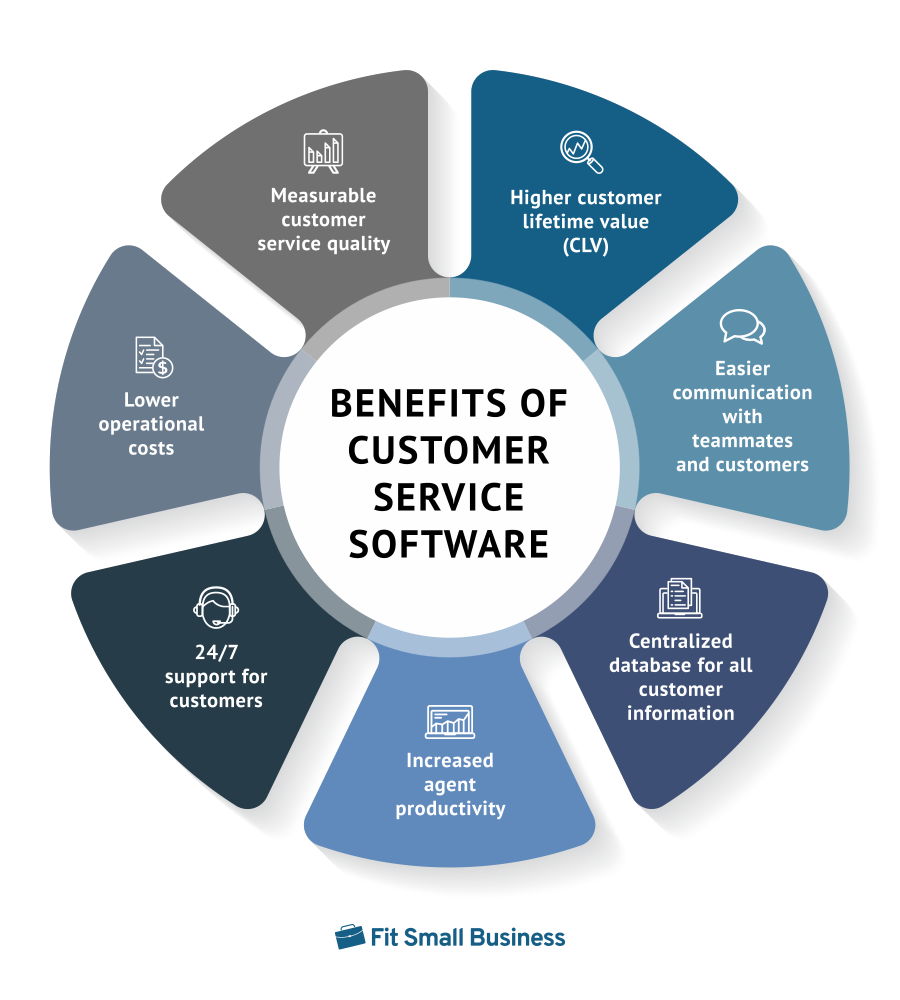
Using customer service software improves the quality of support your customers receive—increasing their lifetime value to your business. This type of software centralizes customer data, communication, and agent performance reports. Other benefits of customer service software include increased agent productivity through service automation and 24/7 customer access to self-help resources.
In this article, we explore the seven top benefits of customer service software and the importance of customer service. We also offer examples of the best tools you can use to engage and support every customer effectively.
- 1. Measurable Customer Service Quality
- 2. Higher Customer Lifetime Value (CLV)
- 3. Easier Communication With Teammates & Customers
- 4. Centralized Database for All Customer Information
- 5. Increased Agent Productivity
- 6. 24/7 Support for Customers
- 7. Lower Operational Costs
- Bottom Line: Customer Service Benefits
1. Measurable Customer Service Quality
It is essential to access measurable customer service performance metrics and indicators. This helps you know the customer service strengths and weaknesses of your team and individual agents. With a customer service system, you can run reports on metrics, such as average resolution time, customer effort score, and customer retention rates. Use these metrics as a basis for either continuing or altering your customer service practices.
For example, if you see some of your agents have an unusually long average response time, you can investigate what causes this pattern. A customer service agent struggling to resolve customer issues quickly can participate in one-on-one coaching or additional training. If the problem lies in the nature of the product or service itself, you can work to resolve the issue with your team.
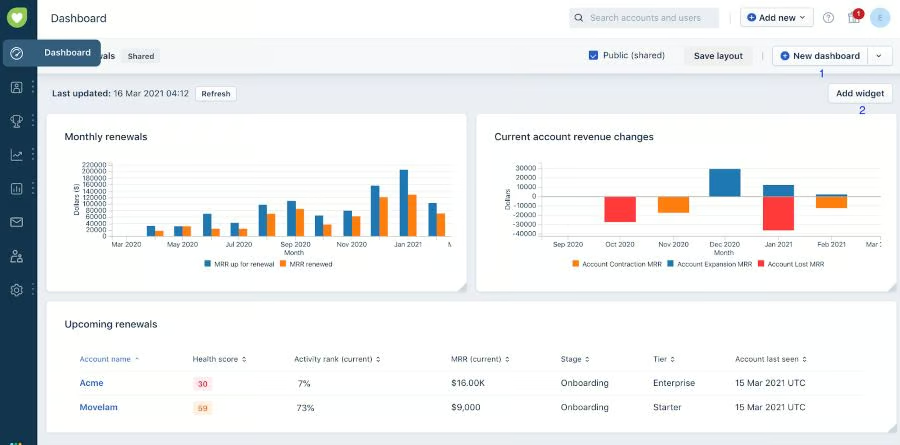
Freshdesk, by Freshworks, provides users with support data and metrics to help you make better decisions concerning your service team’s practices. Use the data provided to identify delays in your ticket cycles, analyze agent and group workload, and measure customer sentiment.
Want to see why Freshdesk is our top recommended customer service software solution for small businesses? Check out our in-depth Freshdesk review for more information on features, pricing, and overall usability.
2. Higher Customer Lifetime Value (CLV)
Customer lifetime value (CLV) is a critical metric representing the gross profit you expect to generate from a single customer account. As they spend more on your business, their CLV also increases. Using customer service software paves the way to the best customer service experience because it makes the entire service request process more efficient.
Existing customers with a positive experience with the service team tend to see your company positively. You can expand your client base when happy customers refer your products or services to their peers. This is a part of customer service benefits which opens up more opportunities for your sales team to facilitate upselling and cross-selling.
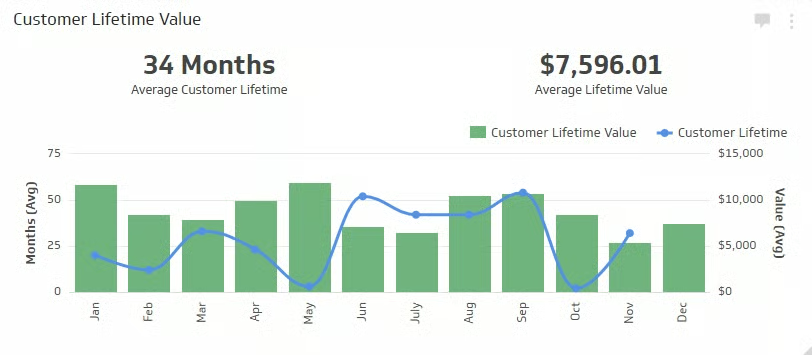
The example above shows a CLV dashboard generated using the business analytics software Klipfolio. Here, we see a visualization of the average monetary value of each new customer over the entire time they do business with your company. These projections are usually based on various factors, including historic customer trends, pricing models, and sales expenses.
3. Easier Communication With Teammates & Customers
One of the top benefits of customer service systems is that your clients can chat with a human agent in real time via live chat or online messaging. This makes getting help more accessible for your customers. Plus, internal chat or messaging is an excellent way for support executives to communicate with each other concerning customer service requests.
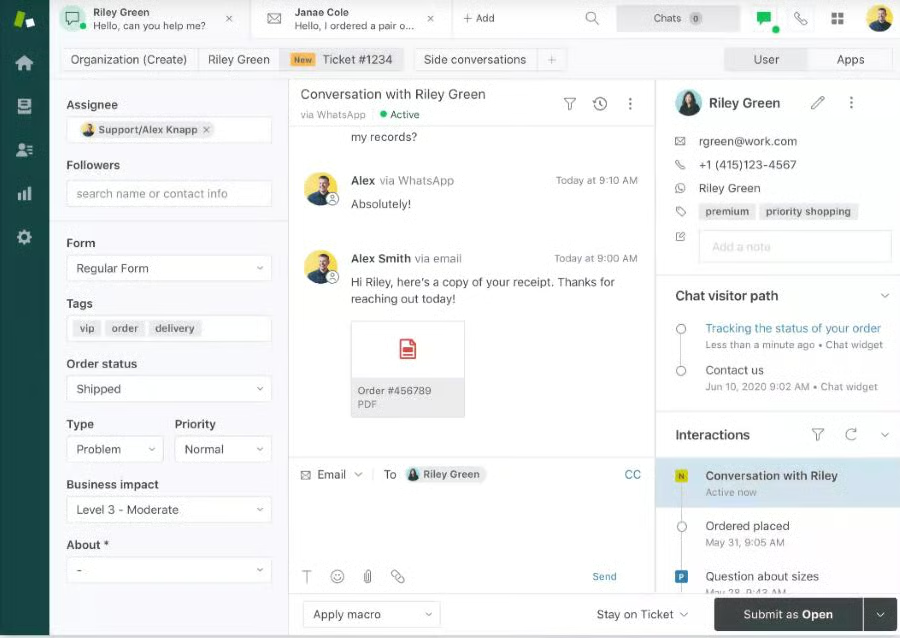
For example, Zendesk for Service features an Agent Workspace with a unified view of all support conversations across all channels. These communication channels include email, social messaging, and internal chats. Administrators can choose to enable or disable this function for each Zendesk account.
To learn more about this customer service software, read our Zendesk review to explore its rich feature set.
4. Centralized Database for All Customer Information
One of the reasons why support agents put customers on hold is the time it takes them to look up customers’ details, communication history, and service requests. If you don’t have immediate access to all these pieces of information, you may have to ask the customer about these details repeatedly.
Using customer service software, you can store and manage all customer information and interactions from a centralized database. You just have to enter their email address, name, or phone number to access the information you are looking for. When you integrate the software with a customer relationship management (CRM) system, you can also access customers’ interactions with your sales and marketing departments.
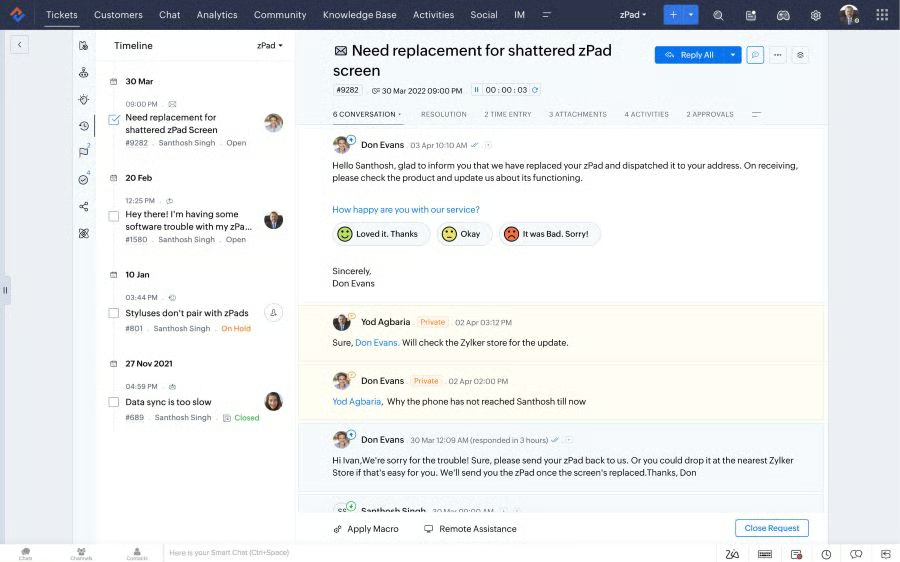
With Zoho Desk, you can view all relevant customer data from the ticket tab. This arrangement helps you better understand how your customers interact with your support team. The details it displays include customer activity, tickets by status, tickets by channel, customer satisfaction rating, first response time, average response time, and average resolution time.
Head on to our Zoho Desk review to learn more about the customer support benefits of this platform.
5. Increased Agent Productivity
Speed is essential in providing top-notch customer service. When you use a customer service platform, you can use prewritten email support templates to save time when answering customer queries. This way, agents don’t have to type their responses from scratch or repeat the explanations to various customers. In addition, you can easily route requests to the right department or person who can solve the issue immediately.
You can also create different inboxes for each department in your company, such as accounting, billing, and payment. For example, all emails to the accounting department are sent to accounting@support.com. This helps you and your team prioritize the requests according to the type of support the customer requires.
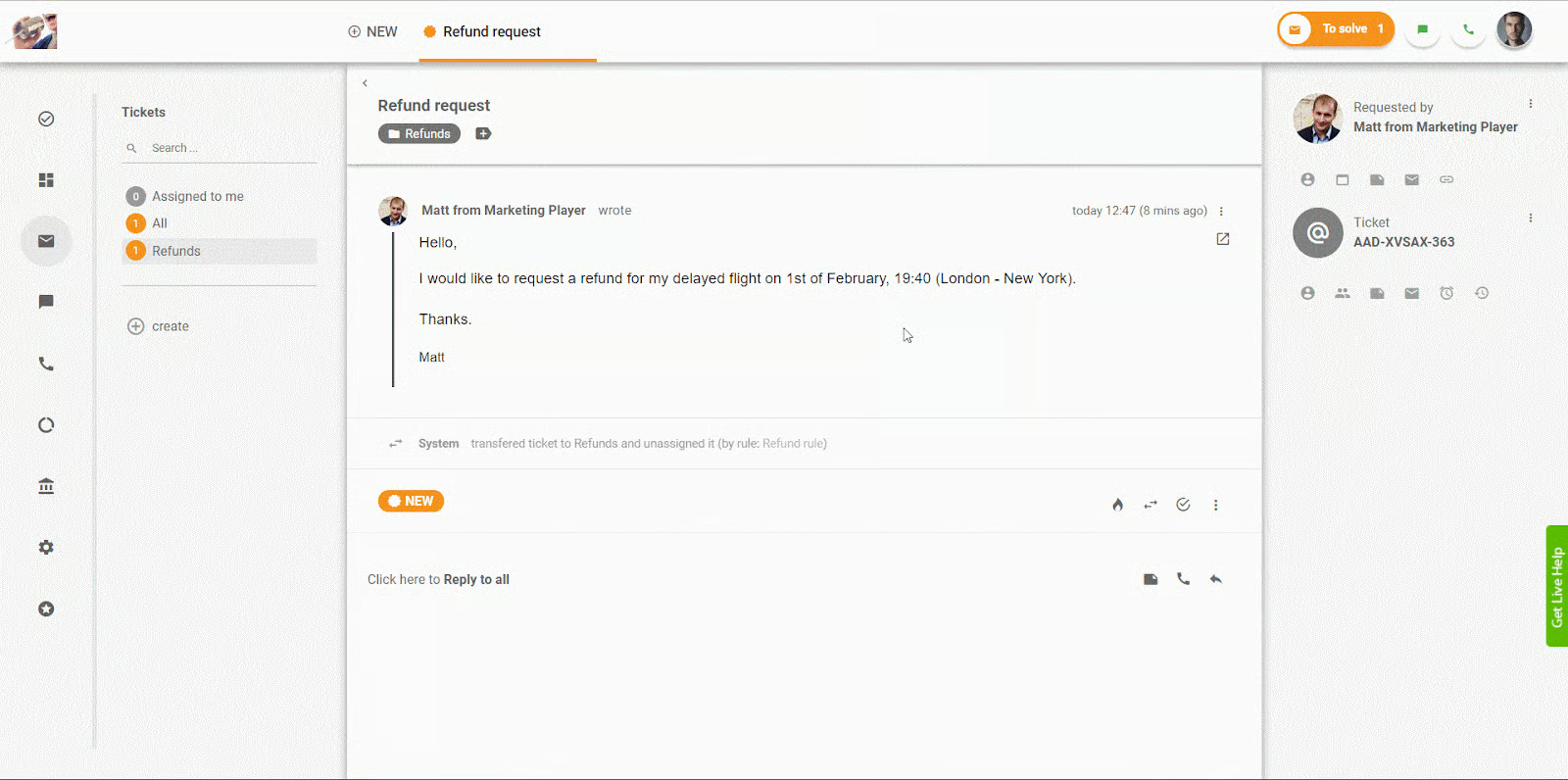
LiveAgent allows you to create predefined responses to prevent agents from repeating or rephrasing answers to commonly asked customer queries. You can create unlimited canned responses and customize which agents or departments can use them. Agents can also define their own canned responses based on their respective workflows.
Want to discover how this provider can help you reap the benefits of good customer service? Check out our comprehensive LiveAgent review, where we explore its rich feature set.
6. 24/7 Support for Customers
Using customer service software, you can provide a self-service system that allows customers to look for answers to their frequently asked questions (FAQs). Customers can log in at any time, view their request history, or search for resolutions to common technical issues. This helps customers feel more satisfied because they feel they are receiving 24/7 support and can resolve issues independently.
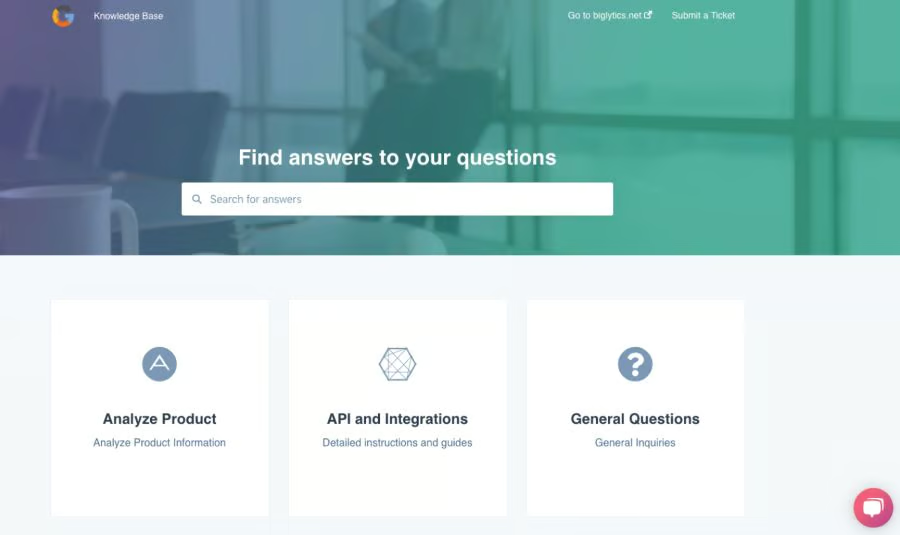
HubSpot Service Hub makes it easier for customers to find answers to their common questions through its knowledge base software. You can create a library of help articles customers can browse through at their convenience. This system improves the efficiency of your support agents because they can focus on addressing unique support cases instead of answering repetitive questions.
Read our HubSpot Service Hub review to learn what it does best and how it helps customer support teams and small businesses achieve their goals.
7. Lower Operational Costs
Customer service tools allow you to automate many service processes, including call logs, request prioritization, and agent responses. As previously mentioned, you can also create self-serve portals for your customers. All these translate into more efficient service that requires fewer agents than what is normally needed without using a customer service platform, thus lowering your operational expenses.

For instance, HappyFox uses Smart Rules to automate routine tasks that boost agent productivity, one of the top customer service benefits. These tasks include workflows, the ability to send templated responses, and rule-based ticket assignments.
Still undecided on which provider you should use? You can also look at our top recommended tools to help you provide quality customer service.
 |  |  | |
|---|---|---|---|
| Best For | Businesses needing customer service software with multichannel communication support and email ticketing systems | Startups and small teams looking for free customer support software | Teams looking for a customer service platform with robust automation tools |
| Starting Price* | Free for unlimited users or $15 per user, per month | Free for unlimited users or $45 per month (2 users included) | $29 per user, per month |
| Read Freshdesk Review | Read HubSpot Service Hub Review | No Review Yet |
*Based on annual billing; monthly subscriptions are also available at slightly higher rates.
Not what you are looking for? Read our guide to the best free customer service software for your small business.
Bottom Line: Customer Service Benefits
Using a robust customer service system improves the quality of your company’s support team. It can also drive clients to be loyal to your brand. Plus, most providers allow you to run one-click reports to help you track service requests and agent performance. Carefully assess your priorities and choose the right software that fits your business needs in terms of features and budget.
Freshdesk boasts features for multichannel ticket and productivity management that aid businesses in providing excellent customer service. Get started for free, or sign up for a 21-day free trial.
