








Wave and PayPal are both outstanding payment facilitators for solo merchants and freelancers. However, businesses that need recurring billing services will get more value for money with Wave because it’s completely free. Small retailers looking for mobility and flexible payment solutions will find PayPal a better solution.
- Wave: Best for contractors and solo professionals needing free recurring billing
- PayPal: Best for mobile merchants needing a wide range of payment solutions
Wave vs PayPal Quick Comparison
Wave Is Best For
- Contractors: Wave lets you create multiple business profiles and send out invoices to your customers. The built-in full accounting service automates financial reconciliation and tax reporting.
- Free recurring billing: Wave offers advanced recurring billing features with customizable estimates and stored card payments at no extra cost.
- Remote payments: Wave comes with free invoicing and a virtual terminal that allows you to accept credit card, ACH, and digital wallet payments.
PayPal Is Best For
- Occasional selling: PayPal does not charge any monthly fee or inactivity fee so merchants only have to pay per transaction.
- Peer-to-peer in-person transactions: PayPal’s mobile app allows merchants to receive payments from a customer’s PayPal wallet and generate QR codes that customers can use for their purchases.
- Accepting international payments: PayPal supports 25 currencies that can be accepted in any country where PayPal is supported.
- Adding payment options to your website: PayPal provides a number of online payment methods that ecommerce merchants can easily integrate as an additional payment option.
 |  | |
|---|---|---|
| Our Wave Payments Review | Our PayPal Business Review | |
| Monthly Account Fee | $0 | $0 |
| Monthly Fee for Add-on Services | From $8–$149 | From $5–$30 |
| Card-Not-Present Fee | From 2.9% + 60 cents | From 2.59% + 49 cents |
| Card-Present Fee | N/A | From 2.29% + 9 cents |
| Contract | Month-to-month | Month-to-month |
| Average Payout | 2 business days Instant deposit: Undisclosed fee | Next business day Instant via PayPal Balance Instant Deposit: 1.5% fee |
| Mobile Apps | Invoicing+Receipts | Invoicing Point of Sale (POS) |
| Integrations | Limited | Good |
| Hardware | N/A | Proprietary |
| Ease of Use | Very good | Very Good |
| Customer Service |
|
|
| Visit Wave | Visit PayPal |
Wave and PayPal’s biggest difference is its primary use. Wave’s suite of financial products are built around its accounting services. Its invoicing, payment processing, and payroll management automates journal entry updates. The reporting functionality is designed to prepare financial statements for tax compliance.
Additionally, merchants have free access to Wave’s full-service accounting software (available in PayPal only via third-party integration). You also get advanced invoicing and recurring billing features completely free, while PayPal will charge you as much as $40. However, Wave offers very limited payment method options and does not support in-person transactions.
In contrast, PayPal is a pioneer in mobile and online payments—focused on creating a convenient platform for individuals and small businesses to send and receive funds. Its additional services like POS software, Buy Now, Pay Later (BNPL) app, and cryptocurrency wallet are an extension of its primary use, which you won’t find with Wave.
We only recommend Wave and PayPal for solo businesses for different reasons. Wave does have a payroll management service add-on, but compared to Square, costs more and lacks certain features. On the other hand, PayPal’s POS, Zettle, only comes with basic staff management functionality and will require integration with a third-party payroll management service. Both Wave and PayPal are on our list of top online payment processors scoring 3.58 out of 5 and 3.82 out of 5 respectively.
Wave vs PayPal Pricing
| | |
|---|---|---|
| Our Wave Payments Review | Our PayPal Business Review | |
| Monthly Software Fee | $0 | $0 |
| In-Person Transaction Rate | N/A | 2.29% + 9 cents |
| Online Transaction Rate & Apple Pay | 2.9% + 60 cents | 2.59% + 49 cents |
| Keyed-in Transaction Rate | N/A | 3.49% + 49 cents |
| Amex Surcharge | +0.5% | N/A |
| Nonprofit Rate | 2.9% + 60 cents | 1.99% + 49 cents |
| ACH Transaction Fee | 1% ($1 minimum fee) | (Echecks)3.49% capped at $300 |
| Add On Services Monthly Fees |
|
|
| Crossborder Fee | $0 | +1.5% |
| Chargeback Fee | $15 refundable | $20 |
| Instant Payout Fee | Not disclosed | 1.5% |
| Hardware | N/A | From $29 |
| Visit Wave | Visit PayPal |
Winner: Tie
It’s difficult to declare a winner for this category considering the difference in target user premise. Overall, Wave’s transaction rates are higher and the payment options are limited compared to PayPal. However, the simplicity is what makes Wave perfect for contractors and solo professionals. PayPal’s versatility and low online transaction fee stand out, but the provider lost significant points in our book for the add-on monthly fees and complex pricing.
With these pros and cons in mind, we will let each merchant decide which provider is best in pricing based on their best match in terms of business priorities and needs.
Wave vs PayPal Business Apps
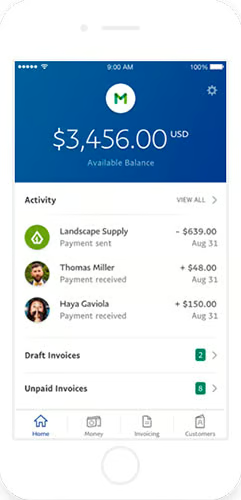
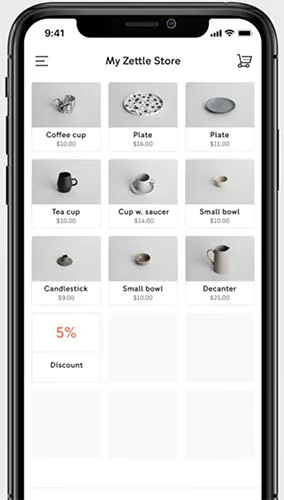
Both Wave and PayPal come with free payment apps where you can manage invoices and track sales. PayPal also has a POS app primarily for selling on the go but can also be used in a countertop setup. PayPal leads in this category in terms of pricing and functionality.
Winner: PayPal
It comes as no surprise that PayPal is the clear winner for payment apps when compared to Wave. Merchants with a PayPal account get free access to the PayPal Business app for managing invoices and account activity, and the POS app for managing inventory and accepting in-person payments with or without a mobile card reader. Both are very useful in their own right, providing better accessibility in handling front-end and back end business tasks. There are no extra fees to use the features of either app.
PayPal Business App user ratings:
PayPal Zettle POS App user ratings:
When to Use Wave
If you use Wave Accounting and Wave Invoicing to run your business, then Wave’s business apps are the natural choice. Initially, Wave offered two separate mobile apps for invoicing and receipts but the July software update finally combined both functions into one platform. However, note that the use of the receipt image capture tool will require you to pay a monthly fee of $8 to use.
Wave Business App user ratings:
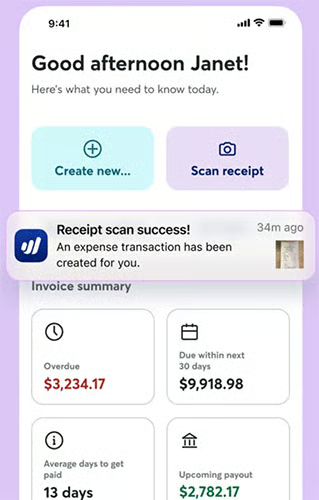
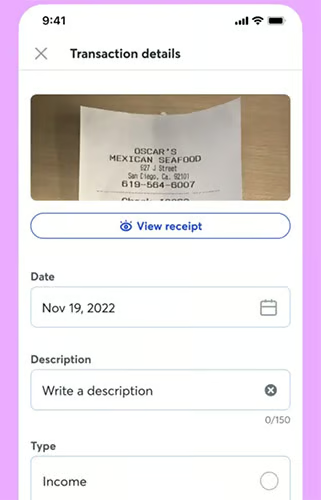
Wave’s Business App lets you create and send invoices, track sales, and scan physical receipts via the smartphone camera. (Source: Wave)
Wave vs PayPal Online Payments Features
| | |
|---|---|---|
| Our Wave Payments Review | Our PayPal Business Review | |
| Online Payment Options | Payment Links for InvoiceDigital Wallet (Apple Pay) | Website Pay ButtonsPayment LinksPayPal CheckoutBNPLCryptocurrencyQR Code |
| Virtual Terminal | Limited to Invoicing | $30/month(for manual payments) |
| Ecommerce | N/A | Multiple integrations |
| Online Invoicing & Recurring Billing | ✓ | ✓Additional Fees for Recurring Billing |
| International Payments | Unlimited* | 25 currencies |
| Social Media Selling | N/A | ✓ |
| Visit Wave | Visit PayPal | |
| *Wave does not specify which currencies it supports, except that it uses xe.com rates as a basis for accepting international payments and recording loss or gain in currency conversion (in the journal entries). It does not charge any conversion fees for accepting international payments. | ||
Winner: PayPal
We often recommend PayPal as an ideal choice for merchants who want to add more payment method options to their online checkout. And as an online payment platform, PayPal is way ahead of Wave. PayPal provides you with ecommerce checkout integrations, sharable payment links for social media selling, and a virtual terminal that can process manual payments. It also offers additional payment options such as QR codes, cryptocurrency, and its very own Buy Now, Pay Later program.
When to Use Wave
This has been already mentioned a few times, but the one aspect of payment processing where Wave really stands out is its free recurring billing and recurring payment features. So for merchants who run a subscription business, you will definitely save more money with Wave compared to PayPal. Note, however, that Wave’s product catalog tool is very basic so only service-type subscriptions or professional services that do not carry inventory to sell should choose this option.
Wave vs PayPal Invoicing
| | |
|---|---|---|
| Our Wave Payments Review | Our PayPal Business Review | |
| Monthly Fee | $0 | $0–$30 |
| Unlimited Invoicing | ✓ | ✓ |
| Recurring Billing | ✓ | +$10 per month |
| Stored Card Payments | ✓ | +$30 per month |
| Transaction Fees |
|
|
| Payment Methods | Credit CardACHApple PayStored card payments | Credit/Debit CardEchecksPayPal CheckoutStored card payments |
| Estimates and Subscriptions | ✓ | ✓ |
| Invoice Customization | ✓ | ✓ |
| Visit Wave | Visit PayPal |
Winner: Wave
Most merchant processors (including PayPal) impose additional fees for advanced invoicing customization and recurring billing tools, but Wave does not. This is a huge reason why Wave consistently makes our list of recurring payments software. The added full service accounting software that automates bookkeeping for account receivables makes Wave stand out even more over PayPal in this category.
As an overall payment processor, Wave’s payment method options are limited (it does not support in-person and keyed-in transactions). But for invoice collections, Wave’s embedded online payment options processing is pretty much standard and Apple Pay for digital wallet payment is a plus.
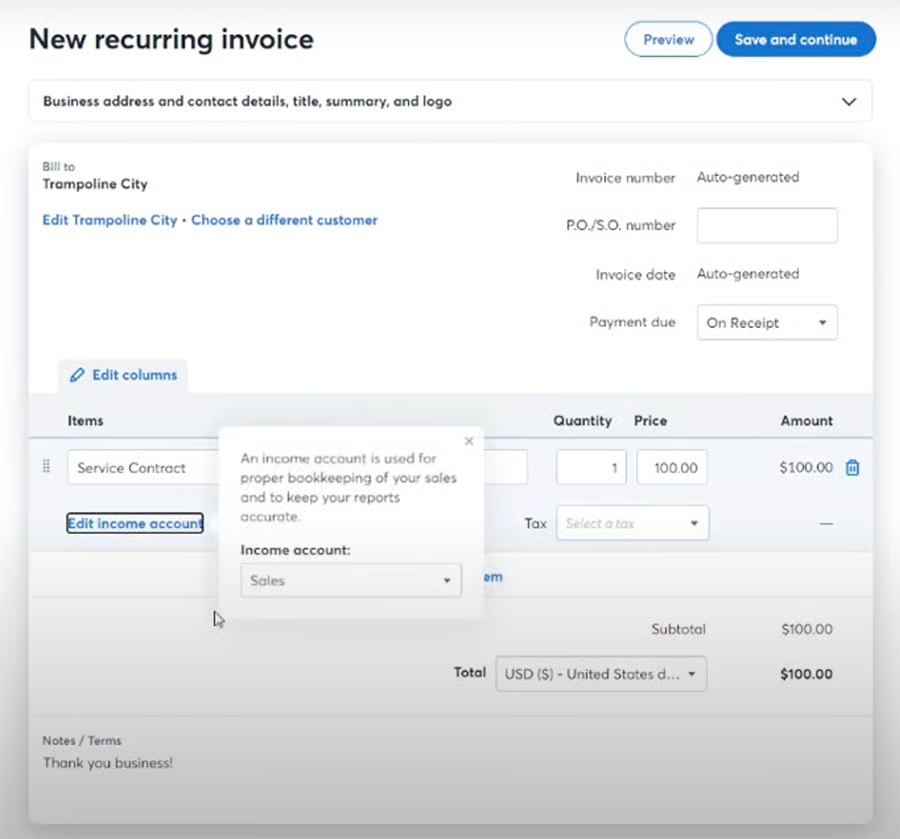
Invoicing is integrated with Wave Accounting software so merchants can automatically record and update account receivables. Learn how with our Wave Accounting review. 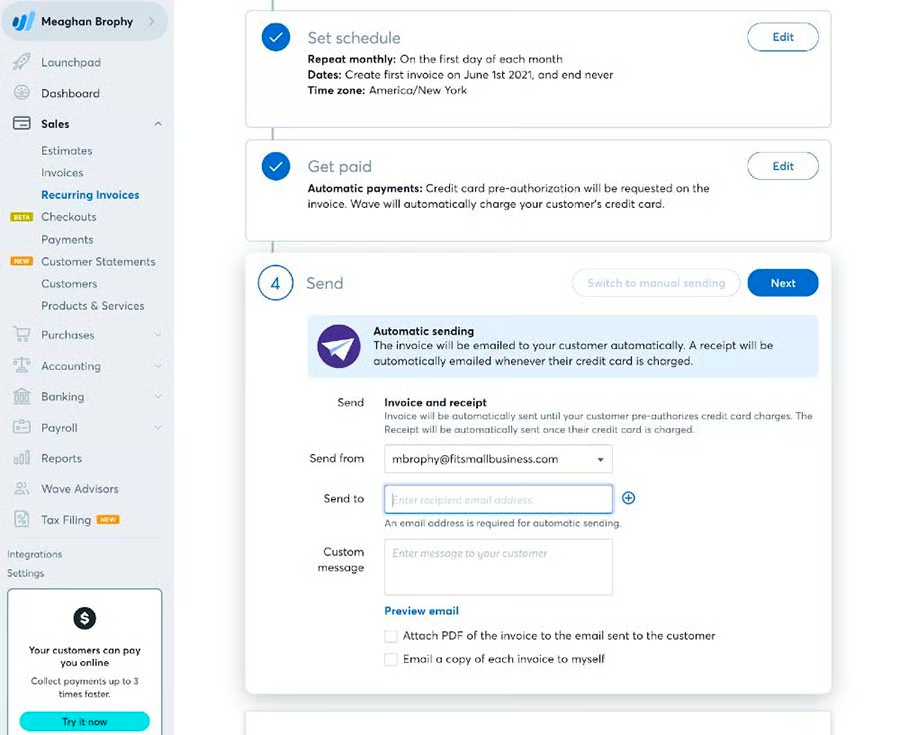
Wave supports stored card payments for automatic invoice payment collections. (Source: Wave)


When to Use PayPal
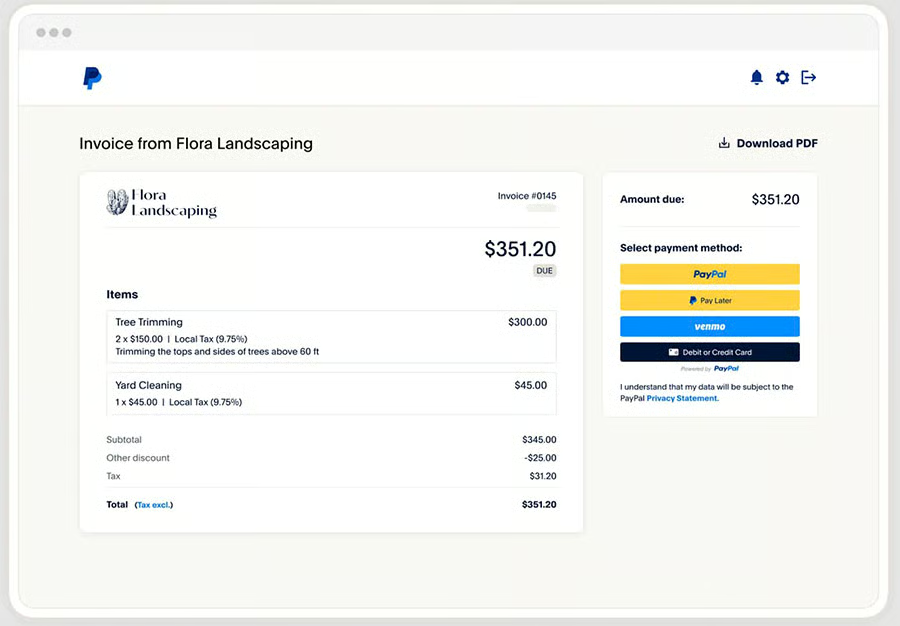
Using PayPal to send out invoices and collect payments makes the most sense for merchants who would like to offer PayPal payment options to its customers. As one of the most trusted names in online payments, millions of individual users use PayPal to complete online purchases which can lead to better conversion rates. And while Wave offers Apple Pay, PayPal Checkout gives your customers the ability to pay via Venmo or Pay in 4 (PayPal’s buy now, pay later service).
Wave vs PayPal Integrations
Winner: PayPal
PayPal has come a long way from a peer-to-peer/digital wallet app to one of merchants’ most sought after add-on online payment methods. With millions of individual users trusting PayPal for their online purchases, it has since developed ready integrations to improve business processes and now works seamlessly with popular online business systems. This includes ecommerce platforms, online marketplaces, accounting systems, donation platforms, and more. It even integrates with POS software such as Clover and Hike.
PayPal Integrations:
- PayPal Risk management
- PayPal Dispute management
- Paypal Reporting tools
- PayPal Returns management
- PayPal Shipping management
- PayPal Third-party Integrations
When to Use Wave
Like PayPal, Wave’s list of integrations are focused on its primary use—financial management. So recommending Wave is very particular to merchants who need a strong bookkeeping functionality and only simple invoicing to run their business. Wave’s integrations are very limited, compared to PayPal, but are all seamlessly connected to help small merchants handle their business finances with ease.
Wave integrations:
- Wave Payroll
- Wave Invoicing
- Wave Payments
- Wave Money
- Google Sheets
- BlueCamroo (for CRM)
- Ecommerce platforms (via Zapier)
Wave vs PayPal Ease of Use
| | |
|---|---|---|
| Our Wave Payments Review | Our PayPal Business Review | |
| Account Approval | Not required | Not required |
| Account Set Up | RemoteMay take time w/ the accounting component | RemoteEasy set up |
| Contract Length | Month-to-month | Month-to-month |
| Funding Speed | 2 Business daysInstant w/fee | Instant w/ PayPal BalanceDeposit: Next business day or Instant w/fee |
| Platform | Easy to learnClean interface | Easy to learnClean interface |
| Chargeback Management | By email | PayPal Resolution Center API website integration |
| Fraud Protection |
|
|
| Customer Support Hours |
|
|
| Average User Reviews | 4.5 out of 5 stars | 4.5 out of 5 |
| Visit Wave | Visit PayPal |
Winner: PayPal
One of PayPal’s best features is its options for providing fast access to funds. Because PayPal also functions as a digital wallet, merchants can use their PayPal balance to pay bills and make online purchases. Aside from PayPal’s resolution center, I like how PayPal gives you an API that can create a portal on your website where customers can file their dispute.
I also particularly like payment processing platforms that provide access to fraud protection filters. Some broadscale fraud protection tools tend to decline even legitimate customers. Merchants with access to customize these filters can finetune the settings so they don’t miss out on legitimate sales.
What users say about PayPal: PayPal has received thousands of online user reviews from merchants garnering an average score of 4.5 out of 5 stars. The system is praised for its ability to provide frictionless payment processing tools and for its huge list of integrations.
When to Use Wave
Wave is designed to be startup and small business-friendly, but its ease of use is underscored by its main functionalities. For example, the guided set up for customer support is primarily to assist in setting up the chart of accounts for bookkeeping. So unless you need a free full service accounting software or operate under a subscription-based payment system, you will likely be better off with a provider like PayPal.
What users say about Wave: Like PayPal, real-life users give Wave an average score of 4.5 out of 5, although there are significantly fewer online reviews. Based on general user feedback, the free invoicing seems to be the Wave’s most popular feature. Most find Wave easy to use but will definitely need someone familiar with bookkeeping knowledge to minimize the time needed to learn the system.
How We Evaluated Wave vs PayPal
To provide an unbiased evaluation of PayPal vs Wave, it’s important to identify their key differences and focus on the common functionalities that merchants look for in a business system (not just as a payment processor). Our payment experts personally tested both systems (for Wave, we also asked our payroll and accounting experts to weigh in) in order to create a clear picture of what Wave and PayPal can offer.
We then put together the following criteria to evaluate Wave vs PayPal:
- Business management tools: Our experts provided us with their insight into Wave and PayPal’s distinct functionalities, and evaluated both based on how small-business friendly the systems are. Integration features also fall into this criteria to gauge how each system can improve a merchant’s current business workflow.
- Payment processing features: Here, I took the standard approach to evaluating online payment processors. Regardless of whether payment processing is a primary or secondary feature, merchants should still be able to have a decent range of payment method options.
- Pricing & contract: Both Wave and PayPal are designed for startups and small merchants so we prefer a system that offers zero monthly fees and does not require an approval process or a long-term contract. We also compared transaction fees and docked points for any add-on cost.
- Value for money: In this criterion, I compared how much value merchants get from Wave and PayPal’s free account. Ideally, it should include advanced features and customization options that merchants would have had to pay with other payment processors. I also took into consideration whether it would be possible to start one’s business with either provider without any upfront cost.
- Ease of use: Last but not least, our experts also weighed in based on their experience in signing up for a Wave and PayPal account and setting up the platform. I also considered my personal experience in testing the systems tools and how easy it is to get support. Real-life user reviews also fall under this criteria, taking note of what users liked the most and if there had been any improvements to the common problems encountered with each system.
Wave vs PayPal Frequently Asked Questions (FAQs)
These are some of the most common questions we get about PayPal vs Wave.
What is the difference between Wave and PayPal?
Wave and PayPal are significantly different business systems. PayPal is primarily focused on providing payment processing solutions, while Wave is a more holistic software solution designed to completely manage a small professional startup business. It comes with a basic payment processing feature, advanced invoicing and recurring billing tools, and a complete payroll and accounting service.
Does Wave work with PayPal?
No, there are currently no available PayPal integrations with Wave. However, PayPal has direct integrations with other accounting software such as QuickBooks.
Does Wave hold money?
No, at the moment, there are no complaints against Wave about frozen funds. Wave accepts payments via invoice and automatically transfers the funds to your linked bank account.
Bottom Line
Both Wave and PayPal were designed as business solutions for startups, micro businesses, and small merchants—but clearly for different primary use. So when comparing PayPal vs Wave, we have to consider a merchant’s specific needs. PayPal provides merchants avenues to expand its customer base with a wide range of payment methods and integrations. On the other hand, if you are a startup professional needing a simple but solid invoicing and recurring billing system to run your business, Wave is your best choice.
