








QuickBooks Premier and QuickBooks Accountant Desktop are built for different purposes. Premier is designed for businesses, entrepreneurs, and independent contractors with experienced in-house bookkeepers. Meanwhile, QuickBooks Accountant Desktop is tailored to independent bookkeepers and accountants who manage the accounts of multiple clients, each of whom may be in a specialized industry.
- QuickBooks Premier vs Accountant Quick Comparison
- When To Use
- Alternatives & When To Use Them
- The Key Difference: Understanding Accountant’s Copy in QuickBooks Desktop
- Why Companies Prefer QuickBooks Premier
- Why Independent Bookkeepers Prefer QuickBooks Accountant
- Frequently Asked Questions (FAQs)
- Bottom Line
QuickBooks Premier vs Accountant Quick Comparison
| QuickBooks Premier | QuickBooks Accountant Desktop | |
|---|---|---|
| Read our review | Visit QuickBooks Accountant Desktop | |
| Pricing ($/Year) | From $799 per year for one user | $799 per year per ProAdvisor |
| Discounted Pricing per Additional User |
| N/A(Each ProAdvisor is charged full price) |
| Create & Send Invoices | ✓ | ✓ |
| Create Account for Multiple Currencies | ✓ | ✓ |
| Track Unpaid Bills | ✓ | ✓ |
| Manage Inventory | ✓ | ✓ |
| Compare Estimated & Actual Job Costs | ✓ | ✓ |
| Export Accountant Copy | ✓ | ✕ |
| Import Accountant Copy | ✕ | ✓ |
| Industry-specific Editions | Choose one | Toggle between all |
| Access Accountant-only Tools | ✕ | ✓ |
| Read our QuickBooks Desktop Premier review | Read our QuickBooks Accountant Desktop review |
When To Use
QuickBooks Premier is great for companies working with on-site certified public accountant (CPAs), bookkeepers, or tax preparers. The program includes many essential accounting features that expanding businesses need to manage their finances, such as sending and tracking invoices, managing inventory, and tracking project profitability.
If you have graduated from entry-level accounting software like QuickBooks Pro and now need access for up to five users, then Premier is an excellent choice. QuickBooks Accountant Desktop has the same features but, as a business owner, you will have to send your accounting files to your accountant from time to time—and you’ll need Premier to export your files to send to them.
QuickBooks Accountant Desktop is best for independent bookkeepers and CPAs managing the accounts of multiple clients. Accountant has special tools and features not found in QuickBooks Premier, including the Accountant Toolbox and the ability to switch between all the industry-specific Pro and Premier editions.
As a bookkeeper, you can use specialized accountant-only tools to import, review, adjust, and communicate file changes with your clients. You can even use the program to manage your own firm’s books.
Alternatives & When To Use Them
QuickBooks Online is a better choice than both QuickBooks Desktop versions for businesses with remote accountants. With QuickBooks Online, you can share files with your bookkeeper easily by sending them an invitation via email.
It is also easier to use, and it has a functional mobile app that allows you to send invoices, accept payments, and view reports from your mobile device. Hence, if your accountant works remotely and you want an easy-to-use accounting software that doesn’t require an accounting background, go with QuickBooks Online.
Read our QuickBooks Online review to see if its cloud-based features are more suitable for your needs than QuickBooks Premier and QuickBooks Accountant Desktop.
If your client is using QuickBooks Online, then you will need QuickBooks Online Accountant instead of QuickBooks Accountant Desktop to access their files. As a cloud-based software, QuickBooks Online solves some of the drawbacks of Pro and Premier. For instance, compared to QuickBooks Online, Premier is more difficult to share with accountants, is less easy to use, and has a very limited mobile app.
Learn more about its features and benefits over QuickBooks Accountant Desktop through our QuickBooks Online Accountant review.
If you’re choosing between QuickBooks Online and Desktop, read our side-by-side comparison of QuickBooks Online vs QuickBooks Desktop.
The Key Difference: Understanding Accountant’s Copy in QuickBooks Desktop
One of the key differences, and often the deciding factor, in choosing between QuickBooks Premier and QuickBooks Accountant Desktop is which side of the Accountant’s Copy function you need. The client uses Premier to create, export, and send the Accountant’s Copy to their accountant. The accountant then receives the copy in QuickBooks Accountant Desktop, makes adjustments to the file, and then sends it back to the client.
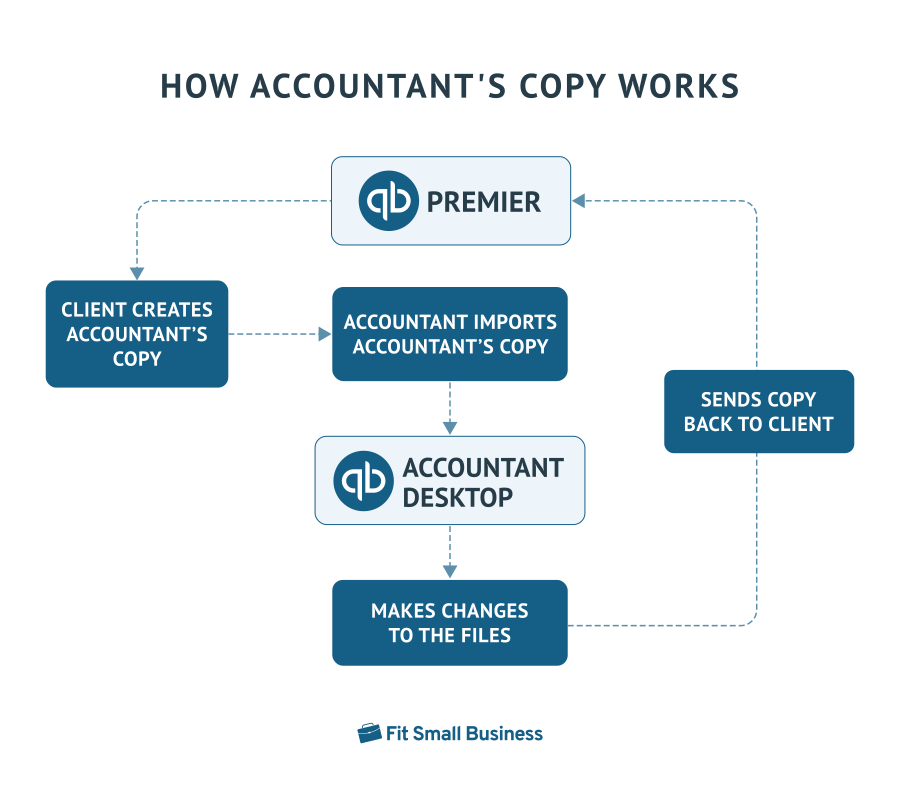
The difference between an Accountant’s Copy and a regular copy of your QuickBooks file is that the Accountant Copy imposes a split date (usually the year-end) in Premier when it is exported. The Premier user will not be able to make changes to any prior years, while the Accountant user will not be able to make any changes to the current year. This prevents differences from being created between the two sets of books while the Accountant is working.
Why Companies Prefer QuickBooks Premier
Are Required to Export an Accountant Copy
Often, your accountant needs to review and make changes to your file. It’s inconvenient to give them a copy of the file and wait for them to make changes until you can record transactions in the current period.
With Premier, you can create and export an Accountant’s Copy of your file and send it to your accountant in different ways, such as through the Accountant’s Copy File Transfer Service, email, or a storage device like a flash drive. Using a dividing date, you and your accountant can make changes simultaneously to your accounting data—meaning they can work on your files without interrupting your day-to-day work.
Receive a Discounted Price per Additional User
QuickBooks Premier and Accountant are priced differently. Both start at $799 per year, but Premier is more affordable because you can add up to five users at discounted prices. Based on Premier’s current pricing, each additional user costs $300 per month, as opposed to the full price in Accountant. If we do the math, Premier costs $1,699 annually for five users, while Accountant is worth $3,995. This makes Premier essentially more affordable for businesses.
Why Independent Bookkeepers Prefer QuickBooks Accountant
Import Accountant’s Copy
Just like you need Premier to export your files, your bookkeeper also needs QuickBooks Accountant Desktop to send the changes back to you. Once they review and make the necessary changes to your file, the Accountant’s Copy is sent back to QuickBooks Premier, with the changes imported to the original file automatically. Your accountant can then use the Accountant’s Copy File Transfer Service to import the file to QuickBooks Premier.
Toggle Between Any Edition
With QuickBooks Accountant, bookkeepers can toggle between any industry-specific version of QuickBooks Pro and Premier: General Business, Manufacturing and Wholesale, Professional, Retail, Contractor, and Nonprofit. This feature allows you to provide your clients with reports that they cannot access in their QuickBooks Desktop account.
For instance, the Manufacturing and Wholesale edition lets you create industry-specific reports, such as Profitability by Project, Sales by Class and Item Type, and Sales by Product. Your clients can’t access these reports in their QuickBooks Pro or Premier general business account.
Access the Accountant Toolbox
As the name suggests, the Accountant Toolbox provides specialized accountant-only tools, shortcuts, and reports that can be used to manage client’s files effectively. These offer special privileges, such as the ability to reclassify multiple transactions all at once into the correct account, write off invoices, adjust incorrectly recorded sales and payroll taxes, and troubleshoot prior account balances.
The toolbox also includes quick links to journal entries, charts of accounts, and reports. This helps you save time and provide more efficient services to your clients.
Access the QuickBooks Desktop ProAdvisor Program
QuickBooks Accountant Desktop comes with a free ProAdvisor Program membership for bookkeepers and accountants. As a member, you will be eligible to take the QuickBooks Desktop ProAdvisor certification. When you pass the exam, you’ll become a certified QuickBooks ProAdvisor and unlock several benefits.
A QuickBooks ProAdvisor certification helps you establish your authority in the industry and expand your network, increase your online presence through accumulating points, receive QuickBooks discounts, and access exclusive product support and training.
Frequently Asked Questions (FAQs)
What is the difference between QuickBooks Premier and QuickBooks Accountant?
QuickBooks Premier is ideal for businesses with in-house bookkeepers while Accountant is designed for independent bookkeepers, accountants, and tax preparers serving QuickBooks Pro or Premier clients.
Do Premier and Accountant have the same features?
No, they don’t. Accountant has all the features found in Premier, such as invoicing, inventory management, and project accounting, but it also has special tools for accountants, such as the Accountant Toolbox and the ability to toggle between all editions of Pro and Premier.
How much does QuickBooks Premier cost?
Prices for QuickBooks Premier range from $799 per year for one user to $1,999 per year for five users.
How much does QuickBooks Accountant Desktop cost?
QuickBooks Accountant Desktop comes with the purchase of the ProAdvisor Premier Software Bundle, which costs $799 per year for each ProAdvisor.
Is Premier more affordable than Accountant?
Yes, as prices for each additional user in Premier are discounted whereas, in Accountant, every ProAdvisor must pay the full price of $799 per year.
Bottom Line
QuickBooks Premier and QuickBooks Accountant Desktop have entirely different use cases. If you work closely with an in-house accountant, you’ll need Premier to be able to export and send your files to your tax preparer or external accountant when needed. If you are an accountant or bookkeeper handling multiple accounts of different clients that use QuickBooks Pro or Premier, then you’ll need QuickBooks Accountant Desktop to import their files. If you work closely with an external accountant, we recommend QuickBooks Online as it is much easier to share your books than with QuickBooks Premier.
