







You can accept payments without a website using links that open a provider-hosted checkout page. You can send the link by email, text, or social media, and your customers can pay using the options your provider supports. Payable invoices, QR codes, virtual terminals, and mobile card tools give you other ways to take online payments or collect money face to face.
For freelancers and service businesses, I recommend checking the software you already use for invoicing and bookkeeping. QuickBooks Payments supports payment links and payable invoices, making it worth considering when you want customer payments connected to accounting.
- Ways to accept payments without a website
- What is a payment link for business?
- 6 ways to accept payments without a website
- How to create payment link requests and collect payments
- Payment link providers to consider
- What does it cost to accept payments without a website?
- How to collect payments online: Choose a workflow that fits
- When should you add a website or online store?
- Bottom line
Ways to accept payments without a website
The best payment option for those that don’t have a website depends on where the sale happens and what information you need to collect. A social seller taking a fixed-price order has different needs from a contractor billing for materials and labor, for example.
Collection method | Best for | What you need | What to check |
| Payment link | Remote sales, service fees, and deposits | Approved payment account and hosted checkout link | Check whether the link is reusable or intended for one customer |
| Payable online invoice | Freelancers, contractors, and B2B billing | Invoicing software with payment acceptance | Compare payment options, reminders, and accounting features |
| QR-code checkout | Markets, events, and on-site services | QR code connected to a payment destination | Confirm the completed payment before fulfilling the order |
| Mobile card payment | Face-to-face sales | Compatible app, phone, and reader or Tap to Pay | Check device requirements and transaction fees |
| Virtual terminal | Phone orders | Processor’s secure card-entry tool | Keyed payments may cost more than customer-entered checkout |
| Marketplace checkout | Sellers using an established marketplace | Approved seller account | Consider platform fees, payout rules, and seller restrictions |
Some methods I mentioned above overlap. For example, a QR code may open the same checkout page as a payment link, and an invoice may contain its own payment link. What changes is how you request payment and manage the sale.
Also distinguish collection tools from internet payment methods. A link or invoice brings customers to checkout; cards, ACH bank payments, and supported digital wallets are the methods they use to pay.
What is a payment link for business?
A payment link for business is a shareable URL that opens a secure checkout page hosted by a payment provider. Customers review the request, enter or select their payment details, and complete the transaction without needing to visit a website.
The process usually includes creating the payment request, sharing the link, receiving the customer’s payment, and checking the transaction in your merchant account.
Usually, payment links are categorized into:
- Single-use links: Intended for an individual payment request and may expire after payment.
- Reusable links: Available for multiple transactions, such as selling the same service or product to different customers.
Payment provider rules differ. For example, PayPal supports reusable links, while QuickBooks Desktop links work once and expire after the customer pays. QuickBooks Online also has a multi-use option.
A payment link does not necessarily replace an invoice. For a fixed-price consultation, a simple checkout request may be enough. For a project with several charges, a due date, and an outstanding balance, a payable invoice provides a clearer billing record.
Take note that a completed checkout also does not always mean the funds are immediately available in your bank account. Payment processing and deposit timing are separate.
6 ways to accept payments without a website
1. Send a payment link by email, text, or social media
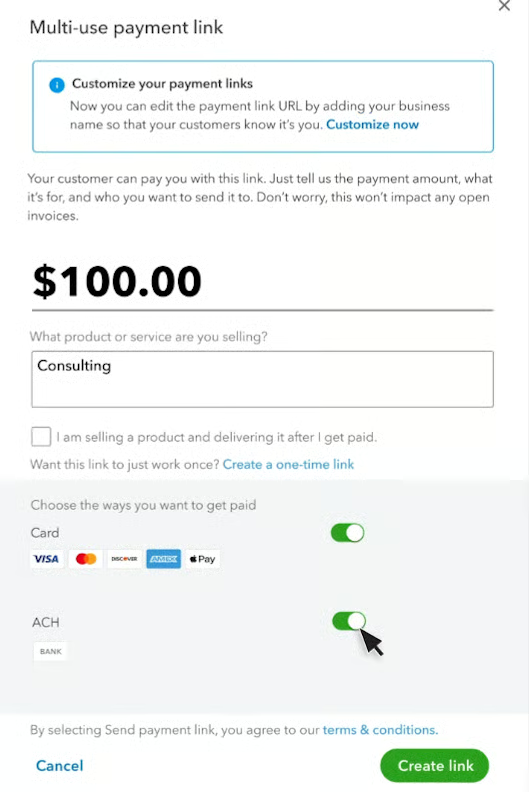
If you already sell through email, texts, or social media, a payment link can make getting paid easier. Once you and the customer agree on the price, send them a link so they can complete the checkout.
For custom orders, create a payment request for that customer. If you’re selling the same product or service to several people, a reusable link can save you time, provided your payment provider supports it. Before sharing, check that checkout asks for the details you need, such as a delivery address or order reference.
Just keep in mind that collecting payment is only part of the sale. A basic payment link may not track inventory, reserve appointment slots, or manage delivery, so you’ll need a way to handle those details.
Example: A home baker receives an Instagram inquiry for a custom cake. After confirming the design, price, and pickup date, the baker sends a payment request describing the order. The payment record is then matched to that customer’s booking.
2. Send an online invoice with payment options
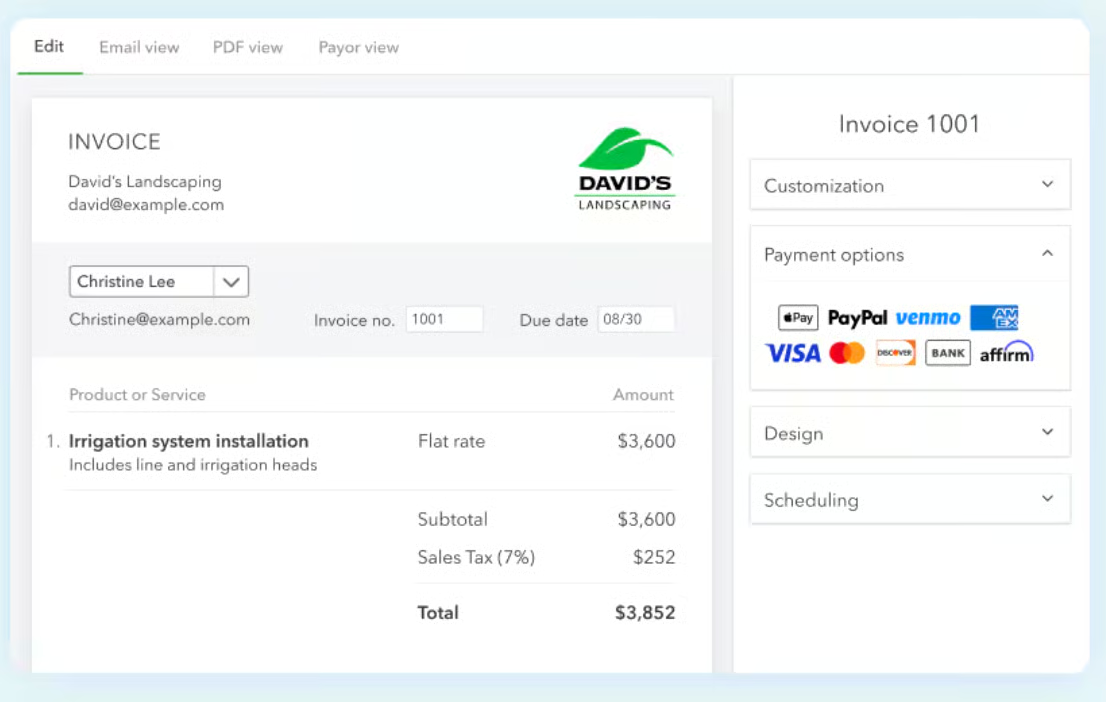
A payable invoice combines the billing document and payment request. It can show products or services, quantities, taxes, due dates, and the amount owed.
I would choose this method for client work, wholesale orders, and projects that need a clear paper trail. It is also useful when customers expect an invoice before approving payment.
QuickBooks supports invoices customers can pay online and lets businesses track invoice activity. Its collection tools also include separate quick requests and recurring payment workflows.
Avoid sending an invoice and a separate request for the same full amount without explaining how they relate. That creates room for duplicate payments and mismatched records.
Example: A consultant sends an invoice for research, a strategy session, and a written report. The customer reviews the itemized charges and pays through the invoice’s enabled payment options.
For follow-up guidance, read our guide on how to collect unpaid invoices.
3. Display a QR code that opens checkout
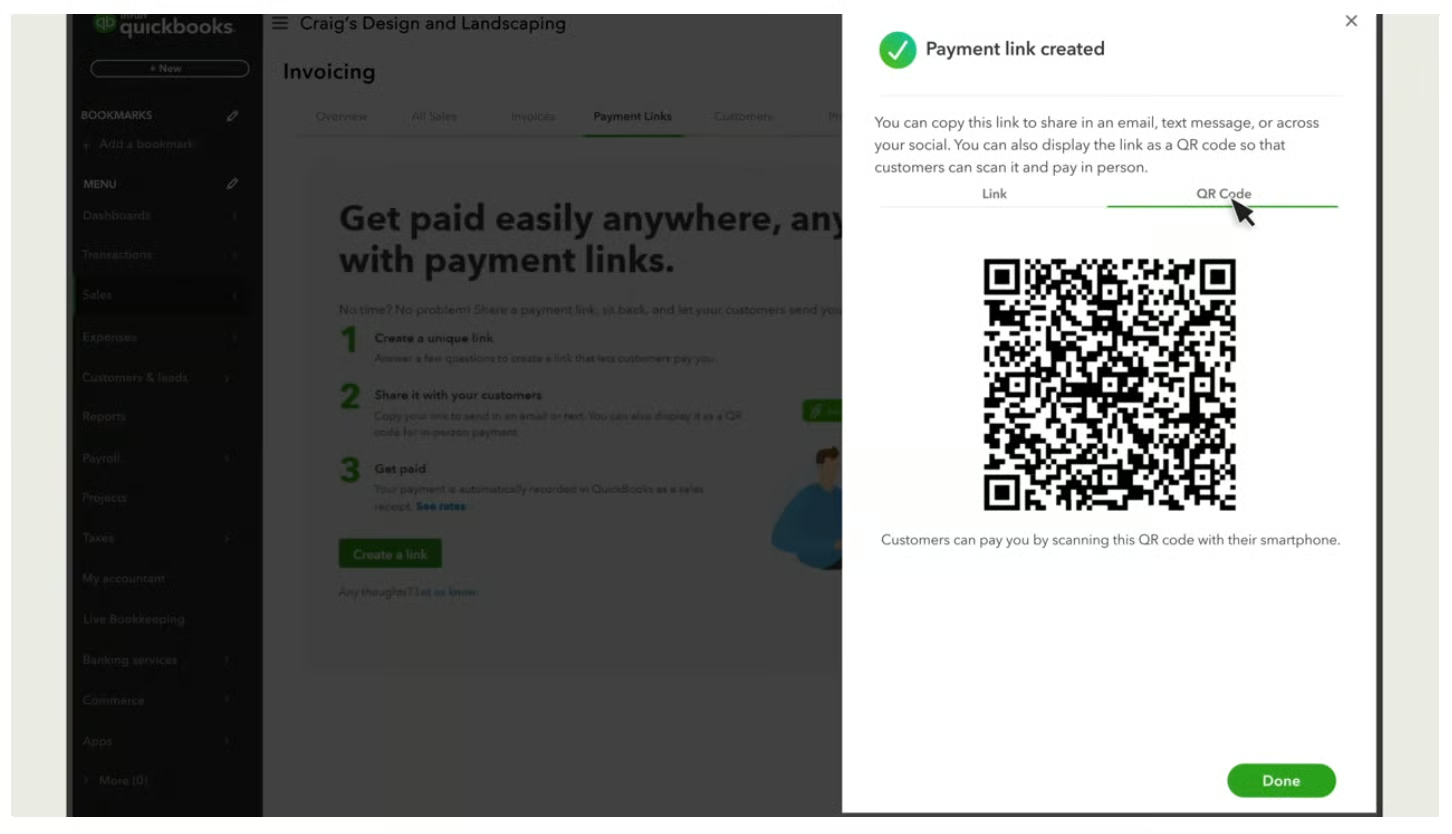
A QR code makes a payment destination easier to open from a printed sign, estimate, or phone screen. Customers scan the code and complete checkout on their device.
This can work for markets, workshops, appointments, and on-site services. The code itself does not determine which payment methods are accepted; the checkout provider does.
It also does not make the transaction equivalent to tapping a card on a reader. Compare the applicable checkout rate rather than assuming that a sale made face-to-face receives an in-person processing rate.
Example: A workshop organizer displays a QR code linked to registration checkout. Attendees scan it, enter their details, and pay. The organizer checks the completed transaction before confirming admission.
Read more: Best QR Code & Scan to Pay Payment Apps
4. Take card payments with a mobile app
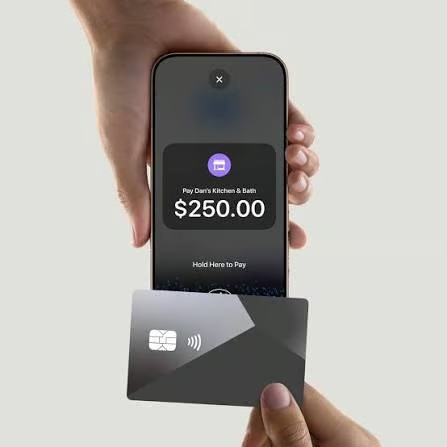
A mobile payment app helps you accept payments anywhere you serve customers, provided your device, connection, and account support the transaction. Depending on the provider, you can use a card reader or accept contactless payments through Tap to Pay.
This suits appointments, deliveries, and pop-up sales. Check supported phones, operating systems, payment methods, and connection requirements before choosing equipment.
QuickBooks offers a mobile card reader and Tap to Pay on iPhone for supported contactless transactions. A reader remains useful when customers need to insert a card.
Example: A cleaner finishes a job and accepts a contactless payment at the customer’s home, then provides a receipt.
Compare hardware options in our guide to the best credit card readers for iPhones.
5. Use a virtual terminal for phone orders
A virtual terminal is a processor-provided tool for manually entering payment details. It can support phone orders when your business has an approved process for taking those payments.
Compare the cost carefully. QuickBooks’ published keyed-card rate is 3.5%, compared with 2.99% for cards paid through invoices or quick requests.
Customer-entered checkout can be easier to manage when a caller can open a payment link. If you take details by phone, enter them through the approved payment tool and follow the processor’s security instructions.
Example: A repair shop takes a phone order and offers to send a payment link. If the customer needs phone payment instead, an authorized employee uses the processor’s card-entry tool.
Find the best options in our buyers’ guide to virtual terminals.
6. Use a marketplace’s checkout
An established marketplace can provide a place to list products and collect payments without operating your own website. This suits businesses that also need customers to discover their products through the platform.
Payment collection follows the marketplace’s rules. Review seller eligibility, listing and transaction fees, refund policies, payout schedules, and restrictions on directing buyers elsewhere.
Marketplace checkout is different from sharing an external payment link. Do not assume the platform permits outside payment collection for orders generated there.
Example: A maker lists standard products through a marketplace and manages those orders through its checkout. Separate direct business is handled through the maker’s own approved payment process.
How to create payment link requests and collect payments
Learning how to create payment link requests starts with choosing the right checkout workflow. You need an approved account, a clear payment description, and a process for handling the transaction after the customer pays.
Step 1: Choose a provider for your sales process
Compare customer-specific requests, reusable links, invoices, recurring billing, and the information checkout collects.
Consider accounting, too. A small difference in processing fees may be less useful than a workflow that saves regular administrative effort.
Example: A contractor prioritizes invoices, deposits, and customer balances. A social seller prioritizes reusable checkout, delivery details, and order identification.
Step 2: Set up your account and payout destination
Complete the provider’s business and owner verification, connect the appropriate bank account, and review the processing terms.
Creating a software account does not necessarily mean you are approved to accept payments. Check the account’s status before telling customers that checkout is ready.
Example: Before advertising a paid consultation, confirm that payment acceptance is enabled and the payout details are correct.
Step 3: Create payment link requests with clear details
When you create payment link requests, describe what the customer is buying and enter the correct amount. Include a customer or order reference when you need it to match the payment.
Make deposits clear. Explain what portion of the purchase the payment covers and how the remaining balance will be collected.
Example: For a $500 custom order with a $150 deposit, describe the request as “Deposit for custom order 1042.” Explain that $350 remains payable under the agreed terms.
Step 4: Generate the link and preview checkout
After you generate payment link requests in the provider’s dashboard, inspect checkout on a phone. Check the business name, amount, description, payment options, and required fields.
If the provider offers test mode, use it to inspect the workflow without creating unnecessary live transactions. Pay attention to fulfillment information: accepting money without collecting a delivery address can create another round of messages.
Example: Preview a product checkout and check whether customers can provide the details you need to ship or arrange pickup.
Step 5: Share the link where the sale happens
Send individual requests through the relevant customer conversation. Reserve public sharing for links configured to accept multiple purchases.
Include enough context for customers to recognize the request. A bare URL with no explanation can look suspicious.
Example: Send a customer-specific deposit link in the email confirming the project. Share a reusable workshop registration link in the event announcement.
Step 6: Confirm payment and update your records
Check the transaction in your merchant account rather than relying on a customer’s screenshot. Record it against the correct order, invoice, or customer balance.
Review the status before fulfillment, particularly when the payment method has a processing period. Keep the receipt and relevant order records.
Example: After receiving a deposit, update the project balance and avoid sending another request for the original full amount.
Creating a payment link in QuickBooks Online
Intuit documents this route for its multi-use link option:
- Open All apps, then Sales & Get Paid, then Payment links.
- Select New payment link.
- Choose Multi-use payment link, then Next.
- Enter the amount, description, and available payment methods.
- Select Create link.
Multi-use links do not expire and can accept multiple transactions. Use the generated checkout URL for sharing; website embedding is a separate option. Menu labels and available features may differ by account.
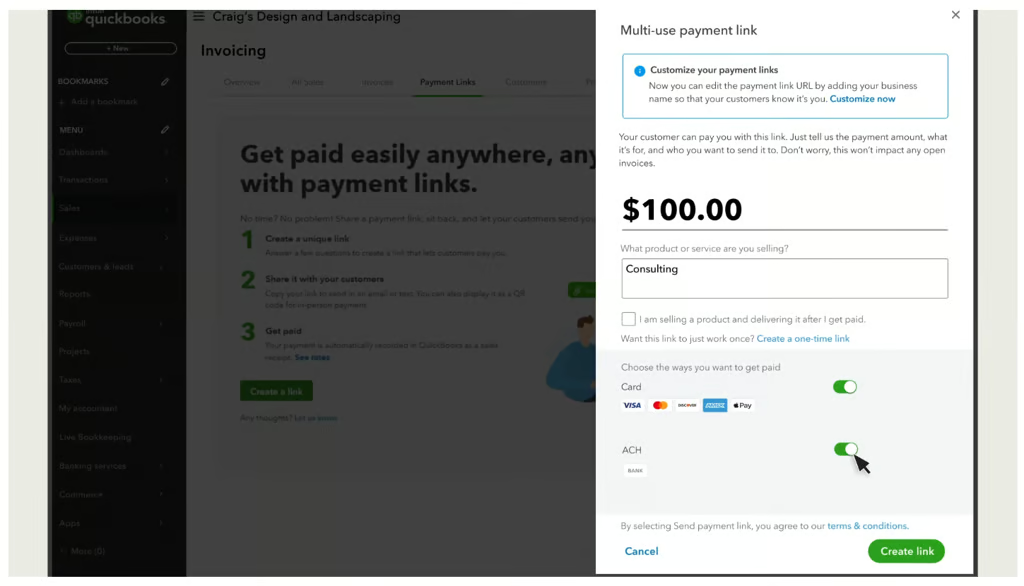
Enter the amount and a description, choose your payment methods, then click Create link. (Source: QuickBooks) 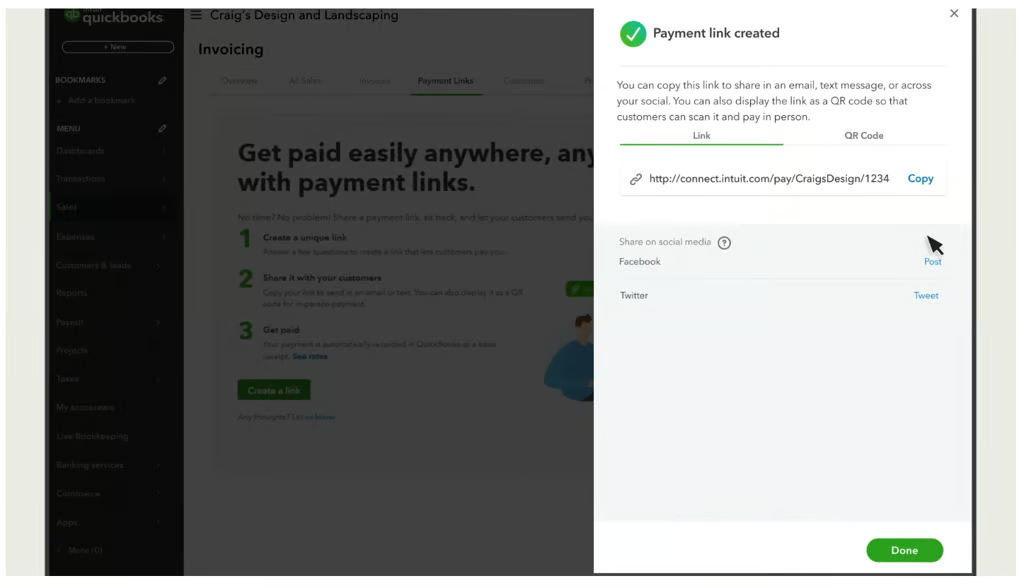
Copy your payment link to share with customers by email, text, or social media. (Source: QuickBooks) 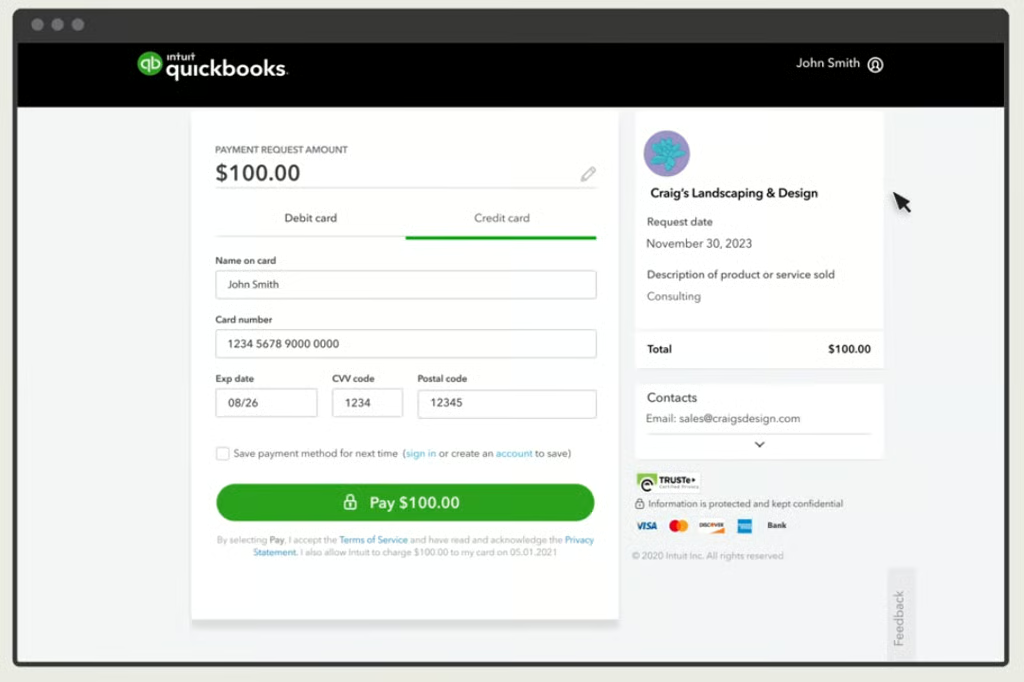
Customers open the link, enter their payment details, and pay through a QuickBooks checkout page. (Source: QuickBooks) 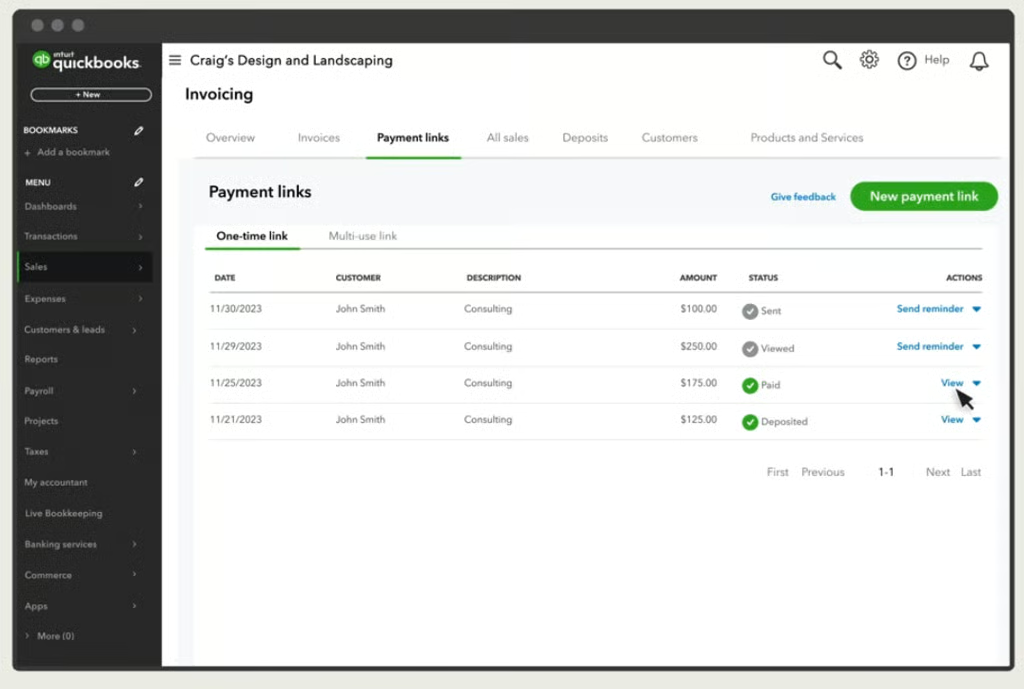
Track payment requests from sent to deposited, and send reminders for outstanding payments. (Source: QuickBooks)


Payment link providers to consider
These providers suit different workflows. The comparison focuses on standard US pricing and practical fit rather than assigning a universal winner.
Provider | Best-fit use case | Monthly cost for basic payment acceptance | Published online card rate | Accounting connection |
| QuickBooks Payments | Service businesses connecting collection to bookkeeping | No separate standard online Payments fee; account and plan conditions apply | 2.99% through invoices or quick requests | Built into QuickBooks Online |
| PayPal Payment Links | Sellers wanting hosted checkout with PayPal and other options | No setup or monthly Payment Links fee | 2.99% + 10 cents for cards and Apple Pay | Evaluate the accounting connection you need |
| Square Payment Links | Sellers connecting remote collection with Square tools | No monthly Payment Links fee | 3.3% + 30 cents for new customers | Evaluate a supported accounting integration |
Rates checked in October 2026. Payment methods, account pricing, optional services, and international transactions can affect the final cost.
QuickBooks Payments: For payment collection connected to accounting
QuickBooks Payments is Intuit’s payment acceptance product built into QuickBooks Online. It accepts credit and debit cards, ACH bank transfers, Apple Pay, PayPal, and Venmo on invoices. Eligible payments receive next-business-day standard deposits; instant deposits are available for an additional fee.
I would consider it for freelancers, contractors, and service businesses that want customer payments connected to accounting. Its Online offering records payments within QuickBooks, while eligible transactions can match to bank activity.
The standard online Payments service has no separate monthly processing subscription fee. Intuit advertises a Free account, although eligibility and feature limits apply. Its main paid Online accounting plans range from $38 to $340 monthly before introductory discounts.
Read our QuickBooks Payments review for pricing, account requirements, and product fit.
PayPal Payment Links: For shareable hosted checkout
PayPal lets you create a hosted checkout, share its URL or QR code, and reuse the same link across customers. You can adjust checkout details without replacing the link.
Published rates differ by method: cards and Apple Pay cost 2.99% + 10 cents, PayPal and Venmo cost 3.49% + 10 cents, and Pay Later costs 4.99% + 10 cents. International and currency-related charges may apply.
Consider PayPal when those payment options matter more than having accounting built directly into collection.
Learn more in our PayPal review.
Square Payment Links: For sellers using Square’s business tools
Square supports checkout links shared through messages, social media, and QR codes. Links can connect with its marketing, loyalty, subscription, and in-person selling tools. Payment Links rate is 3.3% + 30 cents for new customers. Different payment options or account terms can change the cost.
Consider Square when you already use its POS or want remote collection alongside face-to-face sales.
Read our Square Payments review to learn more.
What does it cost to accept payments without a website?
Avoiding a website removes one potential expense. You still need to account for processing and the software or services required to manage the sale.
Monthly software fees
Some providers include basic checkout links without a monthly fee. Others charge for accounting, advanced invoicing, subscriptions, or additional business tools.
Qualified QuickBooks Free users can enable Payments and send unlimited invoices. Free excludes mobile app access and third-party integrations, so check the plan needed for your workflow.
Processing rates
Compare the rate for the actual payment method. Online cards, keyed cards, in-person cards, ACH, and financing can have different charges.
At QuickBooks’ published standard rates, a $1,000 payment costs:
Payment method | Processing fee |
| Invoice or quick-request card payment at 2.99% | $29.90 |
| ACH bank payment at 1% | $10 |
| Manually keyed card at 3.5% | $35 |
These calculations exclude optional services and other applicable charges. The current public ACH rate does not advertise a universal fee cap.
Compare bank payment options in our guide to the best ACH payment processors for small businesses.
Setup and hardware costs
Hosted checkout links generally do not require a dedicated card reader. Mobile card collection may require hardware, depending on the phone, provider, and payment types you want to accept.
Account for setup effort, too. Building requests, documenting fulfillment, and connecting records takes time even when the provider charges no installation fee.
Contract terms and optional charges
Review commitments, cancellation terms, disputes, international payments, refunds, and faster deposits.
QuickBooks lists an additional 1.75% instant-deposit fee. On an eligible $1,000 deposit, that adds $17.50 beyond processing costs.
Example: A freelancer should compare monthly processing costs, required software subscriptions, and the effort of matching payments to invoices. The lowest advertised rate may not produce the lowest total cost.
How to collect payments online: Choose a workflow that fits
Deciding how to collect payments online starts with your sales process. Choose the collection method that handles the transaction details you need.
Your business situation | Starting point |
| Customers buy one standard offer through messages | Reusable payment link |
| Each customer receives a different quote | Customer-specific request or payable invoice |
| Customers need itemized charges and due dates | Payable invoice |
| Customers pay while you are together | Mobile card acceptance or QR checkout |
| Customers pay for an ongoing service | Authorized recurring payment setup |
| You need product discovery and marketplace order tools | Marketplace checkout |
| You already invoice and keep books in QuickBooks | Evaluate QuickBooks Payments |
For a reusable offer, check how you will identify each purchase and avoid selling more than you can deliver. For custom work, prioritize customer references, deposits, and remaining balances.
Ask how the accounting workflow handles fees, refunds, deposits, and duplicate records. A connection that imports sales does not necessarily match every payment correctly.
For example, a monthly bookkeeping service needs agreed recurring charges and receipts while a seller taking occasional custom orders may need only individual requests and a reliable order log.
Keep payment requests clear and secure
Use recognizable business details and explain what each request covers. Send checkout through the provider’s tools, check the destination before sharing a QR code, and confirm payment in your merchant account.
Do not ask customers to send card details through ordinary email, text, or direct messages. PCI guidance says messaging channels used to transmit card numbers must meet applicable security requirements and bring related systems into scope. Hosted checkout avoids introducing that collection process into everyday messages.
Keep payment and order records together. If you replace a request or change the balance, explain which link the customer should use and retire outdated requests where the provider allows it.
Example: When a customer changes a custom order, update the request and explain the new total before collecting another payment.
When should you add a website or online store?
Payment links can remain useful for a service business that agrees on each sale directly. An online store becomes more useful when customers need to browse and buy without speaking to you.
Consider adding one when you regularly need a searchable catalog, product variants, stock control, shipping calculations, and self-service order tracking.
For example, a maker selling a few custom pieces through messages may manage well with links. A shop with dozens of products and daily shipping orders may save time by connecting checkout to an ecommerce workflow.
Frequently asked questions
Can I accept online payments without a registered company?
Check the provider’s eligibility rules for your business structure and activity. Not having an incorporated company is different from having no verification requirements. Confirm what identity, business, and bank information the provider requires before applying.
Do customers need an account to pay through a payment link?
Requirements depend on the provider, payment method, and workflow. QuickBooks says customers do not need a QuickBooks account for payment-link checkout, but recurring payment instructions say customers may need to create an account or sign in. Avoid assuming the same rule applies to every payment type.
Can I collect a deposit and the balance through payment links?
Yes, where your provider supports separate requests for the amounts due. Label each request clearly and record the deposit against the sale. If you need formal billing, an outstanding balance, or payment terms, a payable invoice may be easier to manage.
Can a payment link charge customers automatically each month?
A reusable link does not automatically authorize recurring charges. You need a supported subscription or recurring payment setup with customer agreement. QuickBooks documents a separate process in which customers confirm the terms before scheduled charges begin.
Can I accept international payments without a website?
Some providers support international checkout, but merchant eligibility, currencies, payment methods, and fees vary. PayPal supports international payment-link transactions and notes that cross-border and currency-conversion charges may apply. Check the requirements for your merchant country and customers.
Can I offer buy now, pay later without a website?
Yes, through a provider offering it within hosted checkout or payable invoices. Affirm is the pay-over-time option built into QuickBooks Payments, available on QuickBooks invoices where enabled. Affirm provides the financing and carries the customer’s repayment risk; QuickBooks Payments processes payment acceptance. Availability is limited and subject to change.
Affirm is subject to eligibility. See lending terms at affirm.com/disclosures. Money movement services are provided by Intuit Payments Inc., licensed as a money transmitter by NYDFS.
Can I use QuickBooks Payments without a paid QuickBooks Online plan?
Intuit advertises a Free account with payment acceptance subject to qualification and approval. Qualified users who enable Payments can send unlimited invoices, but Free has limits, including no mobile-app access or third-party integrations. Choose a plan based on the workflow you need.
Bottom line
Payment links are a practical starting point for collecting remote payments without a website. Choose payable invoices when customers need itemized billing and payment terms, and mobile card tools when most sales happen face to face.
For freelancers and service businesses, QuickBooks Payments is worth considering when keeping customer payments connected to accounting can reduce regular administrative work. Check your account’s features and calculate the full cost before choosing your setup.
