







Toast and Clover are both well-developed point-of-sale (POS) systems with strong industry-specific features designed for kitchens and food businesses. In general, Toast favors simplicity and straightforwardness, while Clover prioritizes flexibility.
In our evaluation of best restaurant POS systems, Toast ranked as the best overall with a score of 4.16. Clover did not make the final list, but scored a decent 3.19. Here is what each system is best suited for:
- Toast: Businesses that want a free restaurant POS subscription, pay-as-you-go options for hardware, and industry-grade hardware kits
- Clover: Businesses that want mobile payments, specialized hardware, and their choice of merchant account
If neither of these systems seems suitable for your needs, you can see other great options in our list of the best POS systems for small businesses.
Toast vs Clover At a Glance
 |  | |
|---|---|---|
| Visit Toast | Visit Clover | |
| Fit Small Business Overall Score | 4.16 out of 5 | 3.19 out of 5 |
| Best for | Free POS, flexible payment terms, hardware kits, and restaurant-specific features | Mobile payment, specialized hardware options, and choice of merchant account |
| Free trial | None, but free baseline POS | 30 days for virtual terminal |
| Contract length | 2 years | Month-to-month |
| Monthly software fee | $0–$165+ |
|
| Hardware options |
|
|
| Standout features |
|
|
| Payment processing options | Locked into Toast Payments |
|
| In-person payment processing fees | 2.49% + 15 cents |
|
| Online payment processing fees | 3.5% + 15 cents | 3.5% + 10 cents |
| Customer support | 24/7 | 24/7 |
| Read our full review | Toast review | Clover review |
When to Choose Each
| PROS | CONS |
|---|---|
| Free baseline POS with flat processing rates | 2-year contract required |
| Simple pricing scheme for upgrades and hardware | Upgrades or extra fees needed for delivery, online ordering, marketing, and advanced inventory |
| Great hardware and software starter options for new businesses | Toast Payments is the only available payment processor |
| Features and tools designed specifically for restaurants | Required hardware purchases |
Toast is designed specifically for restaurants. It has advanced functionality for cash management, tipping, online ordering, and bar features. The robust kitchen display system (KDS) improves and streamlines back-of-house operations. Overall ease of use and an offline mode ensure that a busy restaurant won’t have to pause its operations if the internet goes down. Establishments that value simplicity will also appreciate Toast’s straightforward pricing plan, affordability, and flat processing rates.
The only two major downsides of Toast are that you need to commit to a two-year contract, and some basic features, such as inventory management, now require a subscription to xtraCHEF by Toast.
| PROS | CONS |
|---|---|
| Programmable payment processor (one-time) | Hardware tied to the merchant account (Cannot be reprogrammed after purchase) |
| Access to proprietary hardware | Little oversight of third-party resellers |
| Offline mode | Complicated pricing scheme |
| Lower processing fees | No free plan |
Clover’s strength is its flexibility. It offers a default payment processor (Fiserv), but you can purchase the system directly from a merchant services provider, who can program the system with their processing software. You’ll also get lots of hardware options for both in-store and mobile selling. Loyalty and marketing features are available in the baseline POS as well.
This system’s flexibility can sometimes be a downside, however; its pricing plans can be confusing and vary depending on your business type. There are also lots of Clover resellers out there and not a lot of regulation on processing rates and other terms and conditions. So, you’ll need to be careful who you get the POS from.
Pricing
| | |
|---|---|---|
| Visit Toast | Visit Clover | |
| FSB Pricing Score | 2 out of 5 | 3 out of 5 |
| Free trial | None, but free baseline POS | 30 days for virtual terminal |
| Monthly POS software fee | $0–$165+ |
|
| Software/subscription upgrades | Add-ons for:
| Subscription upgrade gives you:
|
| In-person payment processing fees | 2.49% + 15 cents |
|
| Online payment processing fees | 3.5% + 15 cents | 3.5% + 10 cents |
Toast’s pricing scheme is built around simplicity. Monthly subscription fees are straightforward and transparent, as are the payment processing fees. The baseline Quick Start Bundle, which includes the POS software and hardware for one terminal, is free; this subscription would be enough to run a food truck or single-location cafe. While you won’t get a comprehensive set of features in the Quick Start Bundle (online ordering, inventory, and marketing tools are all extra), you can upgrade to the reasonably-priced higher plans to unlock more functionality.
Clover prioritizes flexibility over straightforwardness when it comes to pricing. You’ll pay different prices based on not only the plan you choose, but also your business type and hardware selections. The same variation applies to in-person payment processing fees. As with Toast, higher-tier Clover subscriptions give you more features to run your business.
Why Clover Is Better for Pricing
Clover takes the cake here due to its reasonable monthly software fees and flexibility for payment processors and month-to-month contract length. While Toast’s option for no upfront-cost hardware is impressive, that is somewhat offset by the fact that you need to use Toast’s proprietary hardware with the POS. Toast also lost points because of its lack of flexibility with regard to payment processors and especially the two-year contract length.
When to Choose Toast
Toast does have a simpler pricing scheme for its software as well as premade hardware kits with a no-downpayment option. If those perks sound good to you, then Toast will be a good fit.
Hardware
| | |
|---|---|---|
| Visit Toast | Visit Clover | |
| Hardware pricing |
|
|
Both Toast and Clover offer robust hardware with multiple devices and options for users.
Toast focuses on premade hardware kits for countertop, handheld, and customer self-service.
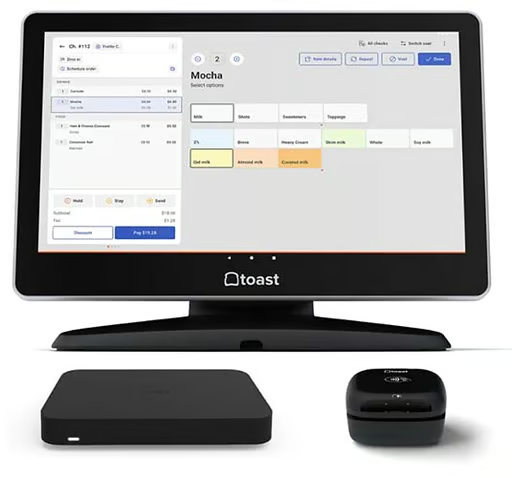
Countertop kit: Terminal, card reader, and router 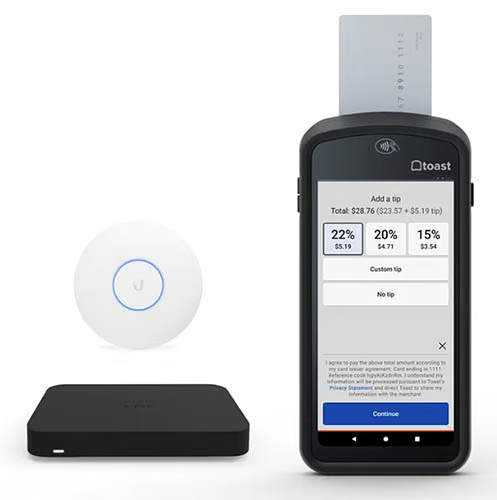
Handheld kit: Mobile POS device, Wi-Fi access point, and router 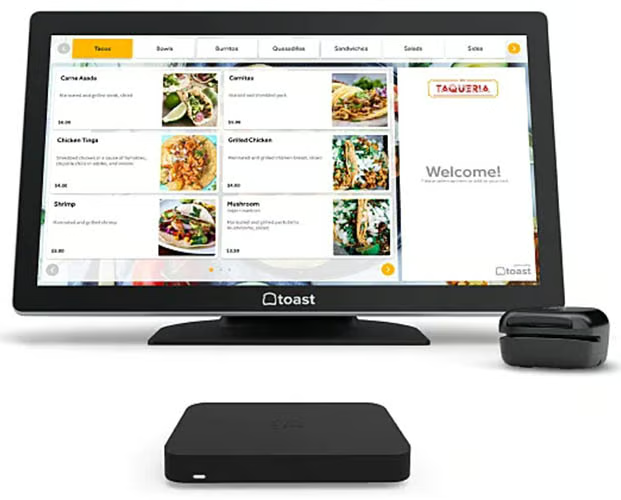
Self-service kit: Self-serve terminal/screen, card reader, and router


Toast has a unique pay-as-you-go option in which you don’t pay any money upfront or in installments when you get the hardware; you simply pay a higher processing fee (2.99% + 15 cents), and that higher fee pays for the hardware over time. In the meantime, you already own the hardware (you’re not just borrowing it). This is a fantastic option for restaurants that want to get right down to selling without having to invest a lot for hardware upfront.
Clover offers both individual devices and more complete POS stations. You can get a simple card reader for as little as $49, or an entire station with customer screen, barcode scanner, printer, and more starting from $1,799.
As a retail shop, you’ll get some basic hardware included with your chosen software plan:
- Starter: Cash drawer
- Standard and Advanced: Weight scale and handheld barcode scanner
For quick-service restaurants:
- Starter: Mini touch screen, cash drawer, kitchen printer
- Standard: Station Duo, kitchen printer
- Advanced: Station Duo, Clover Flex, kitchen printer
For full-service restaurants:
- Starter: Station Solo, kitchen printer
- Standard: Station Solo, Clover Flex, kitchen printer
- Advanced: Station Solo, Clover Flex, Station Duo, kitchen printer
Why Clover Is Better for Hardware
This was a tough decision, but Clover just slightly wins on the hardware front. We appreciated Clover’s flexibility—it allows users to choose individual devices, while still having good options for full hardware kits. You can customize your setup from very simple all the way to elaborate and complete, with all the accompanying features and price points.
Toast does have an impressive pay-as-you-go option. However, its hardware kits are premade, which somewhat reduces flexibility, in addition to users being locked into using the proprietary hardware.
When to Choose Toast
While not having as much hardware variety as Clover, Toast’s kits have everything a small business would need, with options for countertop, handheld, and self-service. Its hardware is also industry-grade and very robust; if this is a priority for you, go with Toast.
Front-of-House Tools
| | |
|---|---|---|
| Visit Toast | Visit Clover | |
| FSB niche POS functions score | 4.58 out of 5 | 3.13 out of 5 |
| Online ordering/delivery | ✓ (for an additional cost) | Ordering only; delivery needs integration |
| Loyalty/CRM/promotions | ✓ (for an additional cost) | ✓ |
| Contactless payments | ✓ | ✓ |
| Bar features | ✓ | ✓ |
| Virtual terminal for accepting payments | ✕ | ✓ |
Both Toast and Clover have a fairly comprehensive set of front-of-house (FOH) tools, though in some cases full access would require upgrading to higher plans.
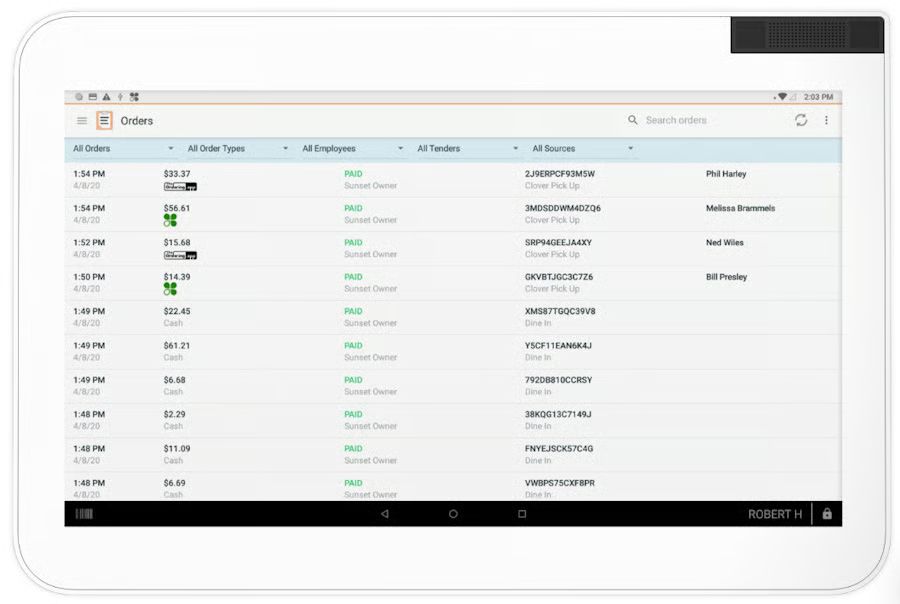
Toast has online ordering and delivery services as part of its $165/month Growth plan. The same features are available in the other subscriptions, though you will need to get them as add-ons. Customers can order via Google, and Toast also has a dedicated TakeOut app that lets customers order from Toast restaurants in their area.
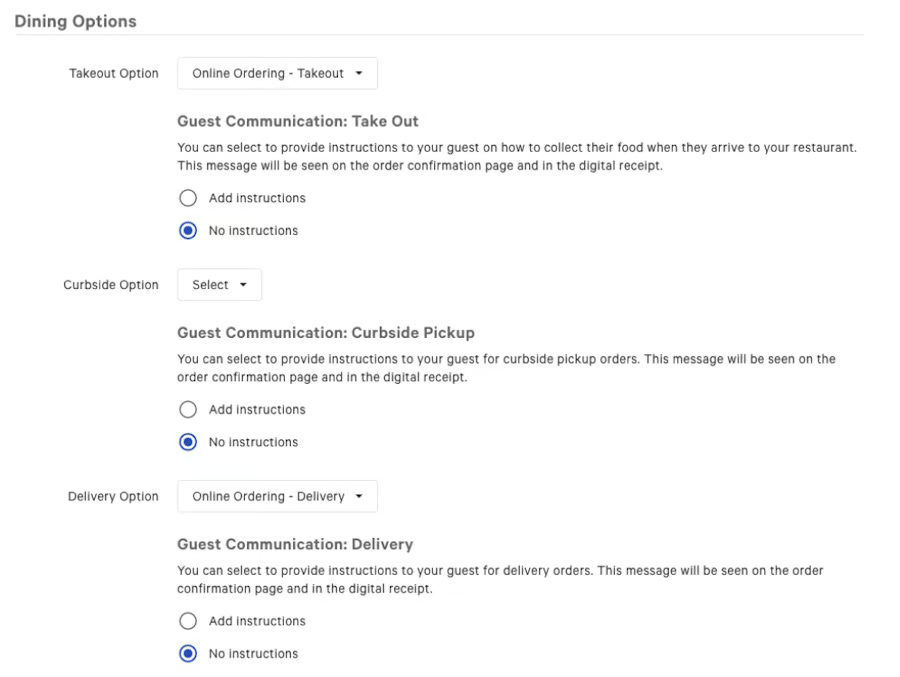
Clover has a free customer-facing loyalty app that grants buyers points for their purchases. Specific offers can be customized to your business, and customers can enroll in the program easily, either at the counter or from the app itself. Clover also has online ordering and delivery options, but unlike Toast, you’ll need to use integrations to get the full functionality.
Why Toast Is Better for Front-of-House Tools
This was another close fight, but Toast ultimately wins out for front-of-house tools, mainly because it has a slightly more complete set of features that don’t require as much third-party integration.
When to Choose Clover
In terms of customer-facing tools, Clover has nearly everything that Toast has, except for a native order delivery tool, for which you’ll need an external integration. If you don’t mind looking around for integrations (which would probably give your POS more flexibility anyway), then Clover would work well for you.
Back-of-House Tools
| | |
|---|---|---|
| Visit Toast | Visit Clover | |
| FSB general POS features score | 4.13 out of 5 | 3.56 out of 5 |
| Ingredient-level inventory management | Requires xtraCHEF subscription | Requires integration |
| Vendor management | Requires xtraCHEF subscription | Requires integration |
| Integrations | >30 | >30 |
| Employee management | Has clock-in and out; scheduling requires integration | Payroll and scheduling require integration |
| Reports | Detailed reporting | Detailed reporting |
| KDS | ✓ | ✓ |
| Costing tools | Requires xtraCHEF subscription | ✕ |
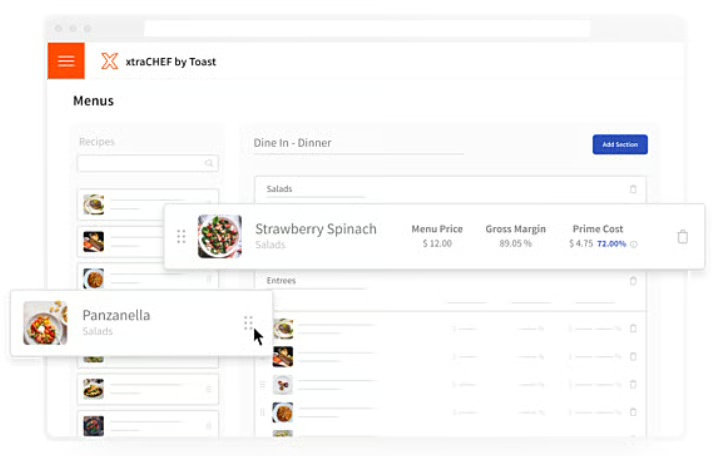
Toast and Clover continue to be similar when it comes to back-of-house (BOH) management tools. Both systems can easily handle real-time item-level inventory, but if you want ingredient-level inventory and vendor management, you’ll need an integration. Toast has the slight edge when it comes to inventory because it has its own proprietary inventory app—xtraCHEF by Toast—that syncs seamlessly with the Toast POS. Clover users will have to choose from third-party tools like MarketMan and ORCA.
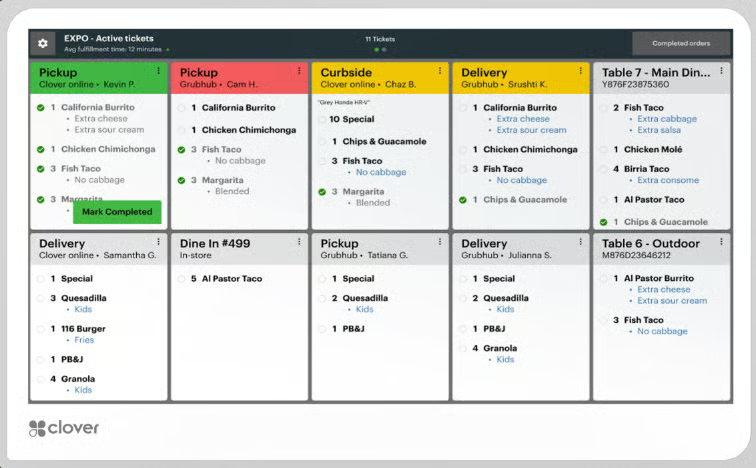
Both systems offer similarly complete, customizable and user-friendly reporting modules. And both have excellent KDS systems. Though Toast, again, gets the slight edge over Clover because it includes some more niche features like all day counts and an easy “rush order” function that moves a ticket to the front of the order screen.
Why Toast Is Better for Back-of-House Tools
Though both systems offer decent back-of-house tools, Toast wins because it is slightly more user-friendly. The KDS and inventory tools have more insightful features that solve restaurant pain points more completely than Clover’s offerings.
When to Choose Clover
If you don’t need niche functions like rush orders and all-day counts on your KDS screens, then you’ll be more than happy with Clover.
Ease of Use & Expert Score
| | |
|---|---|---|
| Visit Toast | Visit Clover | |
| FSB ease of use score | 5 out of 5 | 3.13 out of 5 |
| FSB expert score | 5 out of 5 | 3.13 out of 5 |
| User reviews score* | 4.2 out of 5 | 3.9 out of 5 |
| Set-up | Virtual assistance or in-person assistance (with custom-quoted fee) | Personalized and concierge-level assistance |
| Customer service | 24/7 | Varies depending on reseller |
| Online guides/articles | Online resource library | Online resource library |
| Offline mode | ✓ | ✓ |
| Installation | Guided installation included | Guided installation from external service provider, but with fee |
*Averaged across multiple review sites
We examined both providers for ease of use, with criteria for customer service availability, ability to process payments and perform other vital functions even without an internet connection, and how much help you can get (if necessary) when installing the POS.
Toast and Clover both have offline modes, but that’s their only similarity. Toast offers 24/7 customer support and installation guidance on all three of its plans. Clover, on the other hand, is again defined by its flexibility; while there are lots of resellers out there from whom you might be able to get a good price, this also means that customer service availability can vary wildly. Clover does also provide guided installation, but this is done by an external provider (SMB CompuCom) and carries an extra fee.
Why Toast Is Better for Ease of Use
This one was no contest: Toast takes the cake. More help in the form of customer service and installation guidance carry it through to the winner’s podium.
When to Choose Clover
It’s tough to recommend Clover in this case, since it doesn’t really offer anything that Toast doesn’t in terms of ease of use. If you value flexibility enough to do the necessary research to avoid resellers that are hard to work with, then Clover could work out for you, as you might be able to find good deals.
Finally, we assigned an overall expert score to each provider we evaluated. Here, we considered the quality and breadth of standout features, value for money, and popularity among users (averaged across multiple review sites). Ultimately, Toast beat out Clover with a perfect expert score; Clover got average marks, earning a 3.13 out of 5.
Toast vs Clover Frequently Asked Questions (FAQs)
My business isn’t a restaurant. Should I choose Toast or Clover POS?
Both of these systems really shine for restaurants, but if you aren’t one, Clover is your only option. Toast only supports food service businesses like restaurants, bars, and coffee shops.
I need a free POS. Should I choose Toast or Clover?
Go with Toast, as it has a free Quick Start Bundle plan with the POS software and one terminal. Clover does have a free trial available for its virtual terminal, but this only lasts 30 days, after which there are no more free options.
Bottom Line
In deciding whether to go with Clover vs Toast, both systems can serve your restaurant business well. Having said that, we gave Toast more wins in this review—it’s our top-rated restaurant POS for its easy-to-work-with pricing scheme, software plans, and user experience.
Clover is still a good choice for users who value flexibility and options in payment processing and pricing schemes, or who want plans that automatically include hardware options that are suited to your business. If you’re willing to do some research and due diligence to find the best deal for yourself, you’ll go far with Clover.
