







Nextiva is a popular voice-over-internet-protocol (VoIP) platform known for its call management and team collaboration features, but it may not meet every business need. Users often seek alternatives due to Nextiva’s higher pricing, somewhat complex interface, and extensive feature set, which can be too much for smaller teams and startups. For businesses seeking a more affordable, user-friendly solution or better international calling plans, Nextiva alternatives can offer tailored features.
When evaluating a Nextiva alternative, look for platforms with simpler pricing, seamless integration, and mobile-first functionality. Based on our evaluation, we recommend the following Nextiva alternatives:
- 8×8: Best overall Nextiva alternative
- RingCentral: Best for advanced call management
- Zoom Phone: Best for remote workers
- Aircall: Best for sales-centric teams
- OpenPhone: Best for ease of use
- Ooma: Best basic phone service
- GoTo Connect: Best for global reach
- Best Nextiva Alternatives Compared
- 8×8: Best Overall Nextiva Alternative
- 8x8
- RingCentral: Best for Advanced Call Management
- Zoom Phone: Best for Remote Workers
- Aircall: Best for Sales-centric Teams
- OpenPhone: Best for Ease of Use
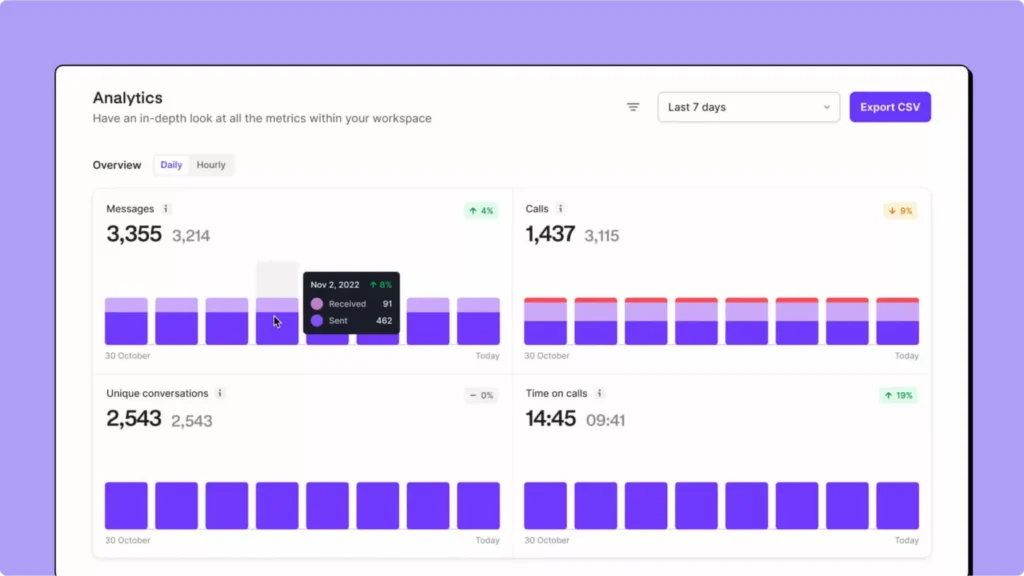
- Ooma: Best Basic Phone Service
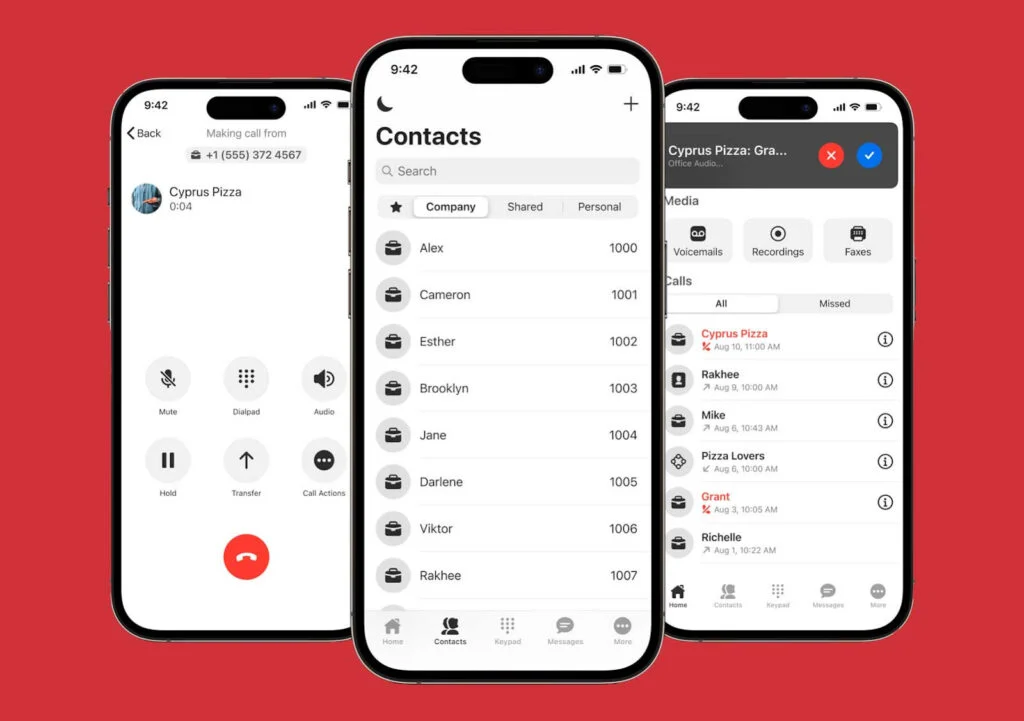
- GoTo Connect: Best for Global Reach
- What to Look for In a Nextiva Alternative
- Frequently Asked Questions (FAQs)
- Bottom Line
Best Nextiva Alternatives Compared
| Alternatives to Nextiva | Monthly Starting Price | Key Features | FSB Rating (out of 5) |
|---|---|---|---|
 | $25 per user |
| 4.29 |
| Visit Nextiva | |||
 | Custom pricing |
| 4.70 |
| Visit 8x8 | |||
 | $30 per user |
| 4.34 |
| Visit RingCentral | |||
 | $10 per user |
| 4.11 |
| Visit Zoom Phone | |||
 | $40 |
| 4.10 |
| Visit Aircall | |||
 | $19 |
| 4.07 |
| Visit OpenPhone | |||
 | $9.99 (Home Phone); $19.95 per user (Office) |
| 4.03 |
| Visit Ooma | |||
 | Custom pricing |
| 4.00 |
| Visit GoTo Connect | |||
8×8: Best Overall Nextiva Alternative
How It Compares to Nextiva
- 8×8 includes unlimited international calling in certain plans, whereas Nextiva charges separately for international calls
- Both offer collaboration tools, but 8×8 excels in messaging, while Nextiva focuses more on voice and video communications
- 8×8 offers more AI-driven tools and functionalities than Nextiva
Our Expert Opinion
8×8 stands out as the best Nextiva alternative due to its combination of unlimited international calling and inclusive collaboration tools with UC functionality. Depending on the plan, it offers unlimited global calling to 14 or 48 countries, making it ideal for businesses with international operations. Its collaboration tools, such as instant and team messaging, provide a single chat, voice, and video platform, ensuring teams stay connected in real-time.
A standout feature is the multi-level auto-attendant, which helps businesses route calls efficiently by guiding customers through a structured menu. This is perfect for improving call handling without needing a live receptionist. 8×8’s Work app allows seamless calls, messaging, and video meetings across devices, which is excellent for remote professionals and distributed teams looking for uninterrupted transitions between devices.
Even though 8×8 offers an all-in-one communication solution, more transparent pricing is needed to help small teams budget accurately. For simpler pricing, Ooma offers straightforward, cost-effective plans. Ooma’s affordable plans include unlimited domestic calling, a virtual receptionist, and call forwarding.
8x8 Custom Pricing
- X2: Unlimited voice calling to 14 countries, hot desking, extension calling, 1GB media storage, auto attendant, ring/hunt groups, 1:1 and team messaging, and 100-participant video and audio conferencing
- X4: Unlimited voice calling to 48 countries, 10GB media storage, switchboard pro, and barge-monitor-whisper
Additional Features
- Team messaging: 8×8’s team messaging allows seamless one-on-one and group communication via the 8×8 Work app. It also enables file sharing, voice or video calls, and access to the company directory. While you can create private or public chat groups, messaging is limited to communication between 8×8 users.
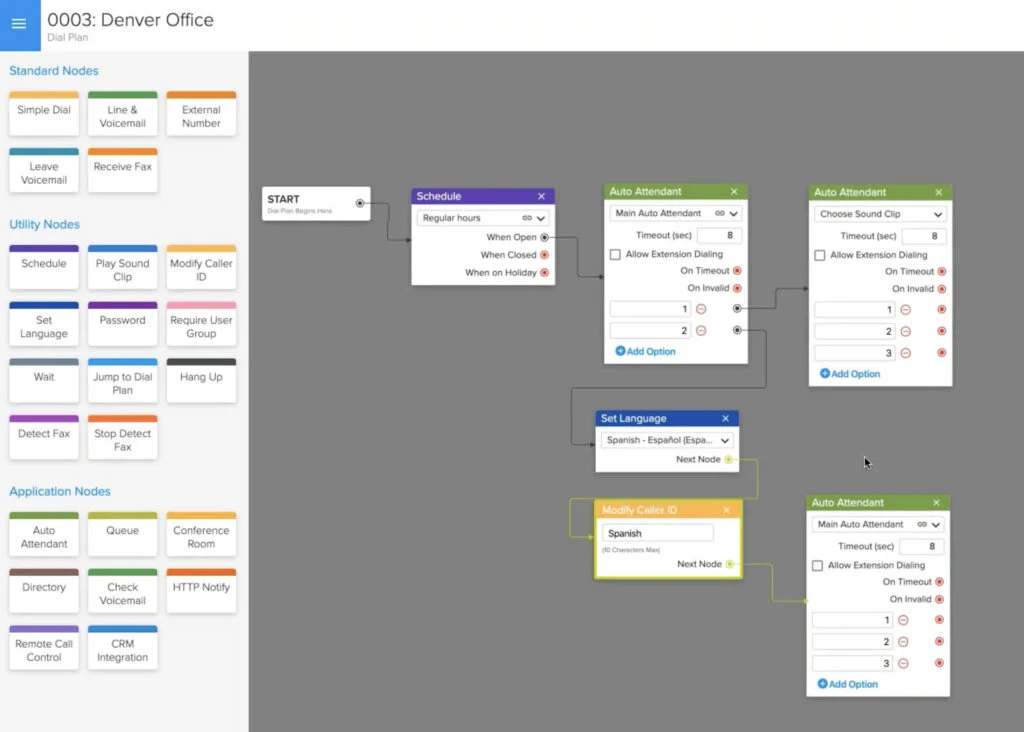
- Multi-level auto attendant: This feature is an automated receptionist, guiding callers through menu options with prerecorded greetings. You can set up multiple menus and rules using the configuration manager to efficiently route calls across your phone system.
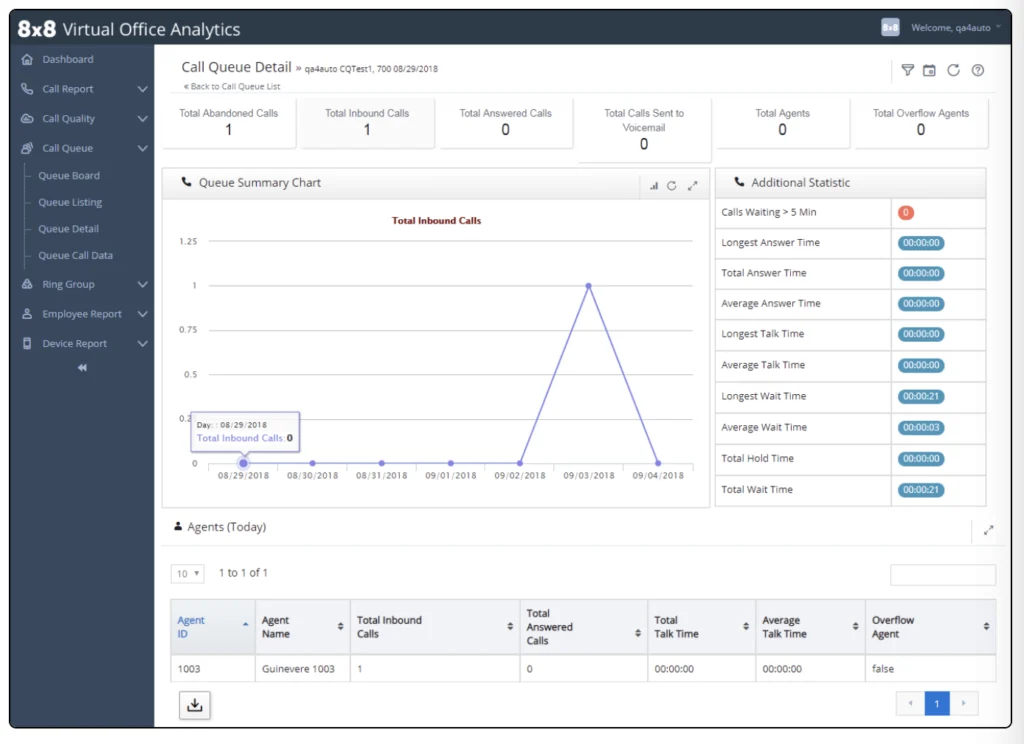
- Call analytics and monitoring: Get detailed reports, dashboards, and call summaries to provide insights for forecasting call volumes, improving agent performance, and ensuring reliable service. Supervisors can easily monitor and analyze call activities through a dedicated workspace for instant visibility.
RingCentral: Best for Advanced Call Management
How It Compares to Nextiva
- RingCentral offers voicemail transcription on all plans, while Nextiva only provides it for Enterprise accounts
- Both providers have extensive collaboration tools, but RingCentral has a longer meeting duration than Nextiva
- RingCentral’s base VoIP plan is cheaper than Nextiva’s, but Nextiva offers a digital plan priced at $25 per user monthly
- Both Nextiva and RingCentral’s toll-free minute offerings are capped at 10,000 minutes on their highest plans
Our Expert Opinion
RingCentral is the best Nextiva alternative for businesses needing advanced call management and telephony features. Unlike Nextiva, RingCentral has key features such as automatic call distribution (ACD) for efficient call routing and a visual IVR editor for configuring your multi-level IVR.
At its entry-level plan, RingCentral provides multi-level IVR, shared lines, call queues, and on-demand call recording. It also offers complete video meeting tools and team chat features, such as file sharing and storage. Thus, businesses get greater value for money because they get a full suite of services at the base plan.
While RingCentral offers excellent value given its price for its feature inclusions, at $30 per user, it can be too expensive and complicated for small teams with straightforward phone needs. Try Ooma if you don’t need the bells and whistles of a full-featured VoIP solution. This provider stands out for its low-cost plans, simplicity, and over 50 standard VoIP features.
RingCentral Pricing
- Core: $30 per user for one phone number, unlimited domestic calls, 100 toll-free minutes, 25 SMS credits, visual voicemail, call management, multi-level auto-attendant, interactive voice response (IVR), team chat, and video meetings
- Advanced: $35 per user for 1,000 toll-free minutes, 100 SMS, advanced routing, internet fax, business analytics, and auto call recording
- Ultra: $45 per user for 10,000 toll-free minutes, 200 SMS, unlimited cloud storage, file sharing, and device analytics and alerts
- Free trial: 14 days
Additional Features
- Heads-up display: This feature displays the real-time status of up to 100 user extensions. You can also create a list of extensions to easily monitor, call, and text them in one place.
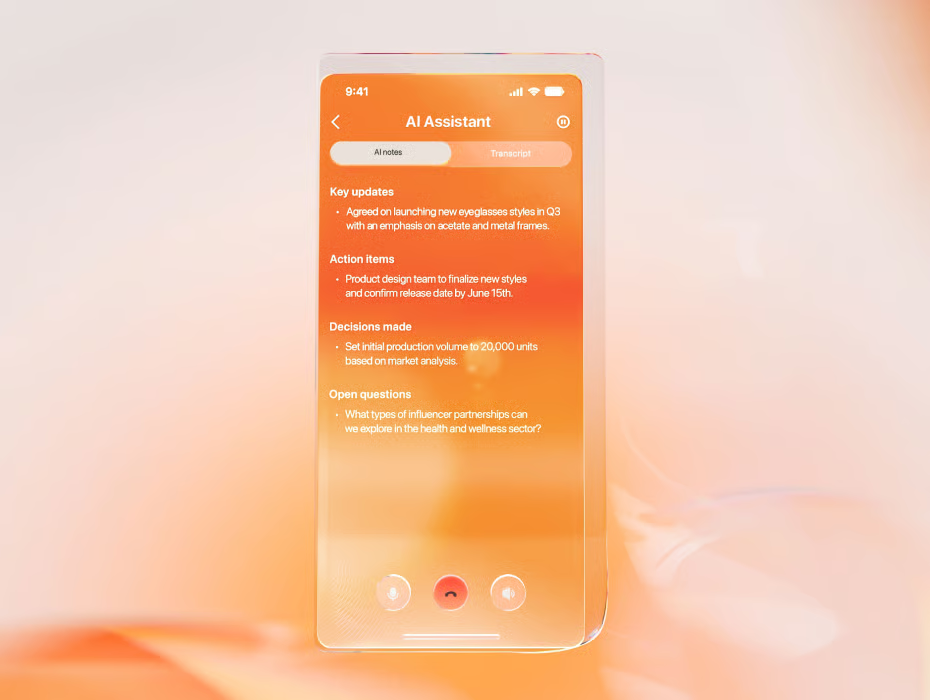
- Artificial Intelligence (AI) Assistant: RingCentral uses machine learning to automate call management, voicemail transcription, and meeting summarization tasks. Its AI Assistant reduces manual tasks and provides insights for better decision-making in business communications.
- SMS automation: Create SMS auto-replies to inbound text messages for after-hours or out-of-office. Triggers can be missed calls, a keyword, or a received SMS.
Zoom Phone: Best for Remote Workers
How It Compares to Nextiva
- Zoom Phone’s monthly plans are more budget-friendly, whereas Nextiva reserves cheaper plans for larger teams
- Zoom Phone has all-inclusive packages for its business phone, while Nextiva distributes VoIP features across higher-level plans
- Zoom Phone offers unlimited international calling as an add-on, whereas Nextiva charges per minute.
Our Expert Opinion
Nextiva excels in team collaboration, but Zoom Phone is a strong alternative for flexible communication, especially for remote or on-the-go employees. With native integration into Zoom’s video meetings and team chat, users can seamlessly transition from voice to video calls and switch between devices without interruptions, ensuring smooth, unified communication. This facilitates seamless communication and call transition for remote and on-the-go employees.
Its mobile app mirrors desktop capabilities, enabling teams with internet connectivity to take calls, send messages, and join meetings on the go—no matter where they are located. A standout feature is dynamic call handling, which allows businesses to route and delegate calls effectively, ensuring productivity for remote team members working across time zones or from different locations.
Unlike its video conferencing counterpart, which has up to 2,000 integrations, Zoom Phone only has 100 supported apps. This can limit businesses wanting to connect multiple apps with their phone system. For better integration possibilities, choose RingCentral, which integrates with over 300 third-party software, including customer relationship management (CRM) and productivity tools.
Zoom Phone Pricing
- U.S. and Canada Metered: $10 per user for a local number, metered outbound calling, domestic SMS and MMS, and unlimited auto-attendants
- U.S. and Canada Unlimited: $15 per user for a local number, unlimited calling within the US and Canada, domestic SMS and MMS, and optional add-on of unlimited calling to 19 countries
- Pro Global Select: $20 per user for a direct dial number, unlimited domestic calling in one of the 40-plus countries, and optional unlimited international calling add-on
Note: All plans include unlimited internal calling, HD calls, number porting, voicemail transcription, auto-attendant, IVR, call monitoring, call recording, business hours routing, call park, team chat, and hot desking.
Additional Features
- Elevate to a meeting: You can seamlessly switch a phone call to a Zoom video meeting without asking attendees to join manually. The other user can enter from the Zoom desktop, mobile app, or external phone service.
- Shared line groups: Enables admins to share a direct phone number, extension, and voicemail with a group of users. Set routing rules and apply custom business hours.
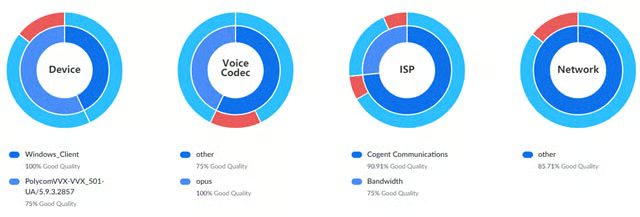
- Quality dashboards: Monitor the overall quality of phone calls and categorize data by extension, phone user, call queue, or auto receptionist. This allows you to diagnose and troubleshoot network issues and call quality.
Aircall: Best for Sales-centric Teams
How It Compares to Nextiva
- Both have mobile apps, but Aircall’s interface is more straightforward, ideal for smaller, agile teams
- Aircall has a minimum number of users for plans, which Nextiva does not have
- Aircall lacks crucial team collaboration tools like chat and video, which Nextiva offers
Our Expert Opinion
Aircall topped our list as the best Nextiva alternative for sales teams due to its native integrations with 100-plus CRM and helpdesk software and detailed individual and team monitoring metrics. Integrations with popular CRM platforms like Salesforce, HubSpot, and Pipedrive streamline workflows by logging calls and tracking interactions directly into your CRM platform. Aircall offers advanced features like call tagging and comments for team coordination on leads or clients.
Use the Power Dialer to automate dialing from a predefined list, which is great for cold-calling campaigns or high-volume outreach. Aircall allows you to foster a coaching culture by providing users with AI-powered coaching capabilities and other features for agent monitoring, like call whispering.
Unfortunately, Aircall’s pricing and minimum user requirement are not ideal for solopreneurs, two-person teams, or small teams looking for an affordable solution. Choose Zoom Phone; its base plan costs $10 per user monthly and includes video conferencing and collaboration challenges, which Aircall needs to improve.
Aircall Pricing
- Essentials: $40 per license for unlimited calls in the US and Canada, one-year access to call recordings, 6-months of basic analytics data, instant numbers, IVR, shared call inbox and contacts, conference call, and forward-to-mobile
- Professional: $70 per license for unlimited access to call recordings, smart routing, queue callback, call whispering, mandatory tagging, PowerDialer, and voicemail drop
- Custom: Custom air call packages with unlimited worldwide calling, custom onboarding, and single sign-on
- Free trial: 7 days
Additional Features
- Smart routing: This automatically directs incoming calls to the most appropriate team member based on their expertise, availability, or priority rules. Automated, intelligent call routing improves the customer experience and team response times.
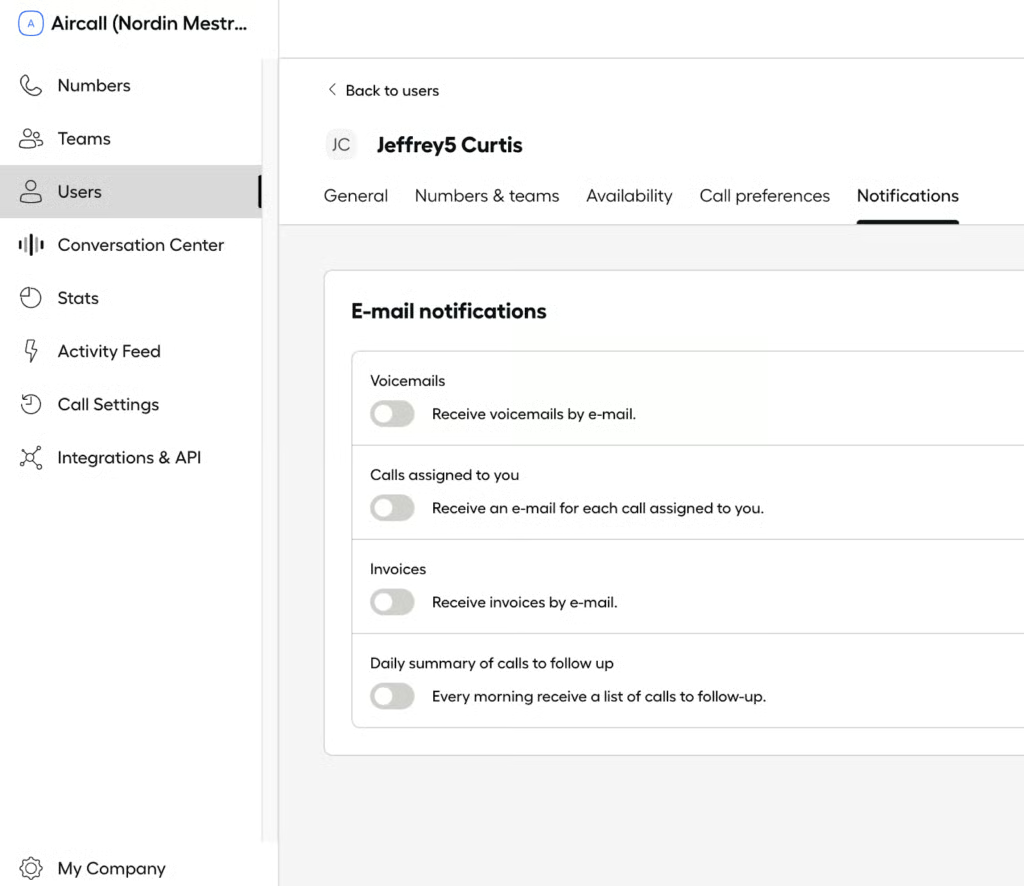
- Email reporting: Receive detailed call performance metrics directly to your inbox and gain valuable insights into team productivity without requiring constant platform monitoring.
- Mandatory tagging: Ensure consistent data collection by enforcing call tagging before completing a call. With this feature, you will have consistent data collection for better reporting and analysis of customer interactions.
OpenPhone: Best for Ease of Use
How It Compares to Nextiva
- OpenPhone offers essential tools for calling, messaging, and AI at a more affordable price than Nextiva
- Unlike Nextiva’s comprehensive collaboration tools, OpenPhone offers more basic features like group messaging and user groups
- Both offer voicemail transcription, but OpenPhone’s is available in its base plan, making it more accessible for smaller businesses
Our Expert Opinion
OpenPhone is on our list of top Nextiva alternatives as the best for user-friendliness, especially for startups seeking quick VoIP setups. It offers simplicity, affordability, and an easy-to-use interface that makes it easy to navigate. Its base plan includes essential features like unlimited domestic calling, 10 shared phone numbers, and voicemail transcription. OpenPhone helps teams streamline communication and gets you up and running with minimal technical expertise.
Users get several calling and telephony features that are more accessible to small teams and startups, including call forwarding to mobile phones. This ensures that business calls are always answered, even when entrepreneurs are out of the office. Lean teams will appreciate this level of flexibility because it allows businesses to stay connected no matter where they are for better responsiveness and a more professional business image.
However, while OpenPhone offers a straightforward, cost-effective solution, it lacks certain advanced features, such as detailed analytics and reporting, available in more enterprise-level systems like RingCentral and 8×8. While OpenPhone provides a more approachable customizable pricing structure, these alternatives would be suitable if advanced analytics or reporting were prioritized.
OpenPhone Pricing
- Starter: $19 for one phone number, unlimited domestic calling and messaging, voicemail transcripts, and email ticket support
- Business: $33 for OpenPhone AI, group calling, custom ring order, auto call recording, phone menus, and live chat support
- Enterprise: Custom pricing for a dedicated account manager, priority support, and audit logs
- Free trial: 7 days
Additional Features
- Number porting: Transfer your existing phone numbers to the platform so you can continue using the same contact information even when you use a different phone service. This capability streamlines supplier changeover while maintaining brand recognition and consumer confidence.
- User groups: Organize teams and contacts to make managing communication and group-related contacts easier for smoother collaboration within specific departments or projects.
- Group messaging: Send messages to multiple members at once to keep everyone updated. Use this to provide project updates, customer follow-ups, or general team-wide discussions.
Ooma: Best Basic Phone Service
How It Compares to Nextiva
- Ooma’s pricing is more suitable for small business budgets, while Nextiva only gets cheaper if you’re eligible for volume discounts
- Like any VoIP provider, Nextiva offers unlimited calls to the US and Canada, whereas Ooma also includes Mexico and Puerto Rico
- Nextiva integrates with several commonly used CRM apps compared to Ooma
Our Expert Opinion
One of the leading alternatives to Nextiva is Ooma because it delivers a basic phone service with features that won’t overwhelm a small team. The entry-level plan has 50 essential VoIP features, such as auto-attendant, extension dialing, call forwarding, and voicemail. This removes the need to upgrade to advanced plans to get all the call management features, unlike most competitors that force users to upgrade.
Another highlight feature of Ooma is its internet protocol (IP) phone paging, which includes features like paging group and overhead paging support. This makes it easy to communicate with your workforce and lessens hold time for internal calls when making announcements.
Unfortunately, Ooma’s interface appears outdated compared to modern VoIP services. If you want to skip the learning curve, go for OpenPhone. This provider offers instant numbers and a quick and easy setup, which is ideal for small businesses with limited technical expertise.
Ooma Pricing
Home Phone Plans:
- Ooma Basic: Free for unlimited calls within the US, call waiting, call hold, and online call log
- Ooma Premier: $9.99 for unlimited calls to the US, Canada, and Mexico, instant second line, call forwarding, and custom call blocking
- World Plan: $17.99 for unlimited calling to landlines in over 60 countries and to mobile phones in over 10 countries
- World Plus Plan: $25.99 for unlimited calling to landlines in over 70 countries and to mobile phones in over 40 countries
Office Plans (per User):
- Essentials: $19.95 for one toll-free number, 50+ phone features, ring groups, call blocking, and virtual receptionist
- Pro: $24.95 for SMS/MMS, hybrid ring groups, call recording, call analytics, voicemail transcription, and 25-attendee video meetings for four hours
- Pro Plus: $29.95 for call queues, call screening, 100-attendee video meetings for 12 hours, hot desking, and CRM integrations
- Free trial: 7 days
Additional Features
- Digital call deflection: The customer can move a phone call to text messaging with a single key press. For instance, if a customer calls the virtual receptionist, they can receive an SMS containing the link to order online instead.
- Call leaderboard: Provides valuable information and metrics on how Ooma users use your company’s phone lines. These include the number of internal, incoming, outgoing, and missed calls.
- Call forwarding (offline mode): Automatically redirects calls to the user’s landline or cell phone when your Ooma devices are offline.
GoTo Connect: Best for Global Reach
How It Compares to Nextiva
- GoTo Connect offers vanity numbers, while Nextiva can only port in vanity numbers
- Volume discounts at GoTo Connect start at two to 10 users, while Nextiva provides discounts starting at five to 19 users
- Both providers come with built-in video meetings and team messaging
Our Expert Opinion
GoTo Connect is our top Nextiva competitor for businesses with an existing global market. Upgrading to the second-tier Standard plan includes unlimited calls to over 50 countries, including Australia, China, France, Germany, and Italy. This lets you call your international customers for free without worrying about costly per-minute charges.
This provider offers a comprehensive suite of VoIP features that cater to the needs of growing teams, including high-quality voice calling, video conferencing, team messaging, and mobile support. These features ensure seamless communication across devices and locations, addressing many challenges businesses face in the hybrid work era.
While GoTo Connect supports text messaging, monthly SMS credits are limited to 40 to 80 credits per user. If you’re running an SMS marketing campaign, you need a provider like Aircall or OpenPhone, which offers unlimited messaging.
GoTo Connect Custom Pricing
- Phone System: Free calls to 50 countries and toll-free minutes, unlimited auto attendants, dial plans, call routing and queues, video meetings with up to 250 participants, teams chat, and messaging
- Connect CX: Social media channels, shared inbox for UC, enhanced reporting and analytics, attendant console, and advanced integrations (ServiceNow and Zendesk)
- Contact Center: AI chat analysis, agent dashboard, advanced call priority management, queue callback and auto dialer, and agent coaching and monitoring
Additional Features
- Paging: You can instantly contact one or multiple team members by communicating over a two-way speakerphone. To successfully page, a system admin should assign your desk phone with a paging profile.
- Customizable dial plans: Customize how you handle incoming calls using a visual dial plan editor. Map out call flows and set various patterns for weekends, holidays, and after-hours.
- Caller hold time report: This indicates how long a caller has been put on hold before the employee picks up the call. It gives the employee a heads-up on how long the customer waited.
What to Look for In a Nextiva Alternative
VoIP phone systems like Nextiva are known as a centralized communication platform that integrates voice, video, and messaging under one system, helping teams streamline their communication flow. Nextiva is popular for its extensive team collaboration tools, including chat and conferencing, and exceptional customer service support.
However, if Nextiva isn’t the right fit for your business for reasons like high pricing or complexity, here are some factors to consider when looking at different Nextiva competitors:
- Pricing: Nextiva’s base plan, starting at $25 per user per month, offers competitive pricing, but its digital plan lacks the full functionality of a complete VoIP phone system. Compared to other providers, Nextiva’s pricing can be higher than more straightforward, more affordable options. Consider discounts and user minimums, as these factors can significantly impact the overall cost.
- Collaboration tools: Nextiva offers robust team collaboration features, making it an excellent choice for businesses with coordination needs. If integrated communication tools are a priority, review Nextiva’s offerings before considering other solutions. Alternatives like OpenPhone, Zoom Phone, and Aircall may offer a more straightforward approach for smaller teams or those requiring basic collaboration features.
- Ease of use: While Nextiva’s interface and mobile app are highly functional, its complexity can make navigating difficult, especially for businesses new to VoIP systems. For smaller companies or those needing an intuitive, easy-to-use platform, take advantage of free trials and demos to familiarize yourself with alternatives that may suit your needs more quickly.
- International calling: Nextiva provides competitive overseas calling rates but lacks an unlimited international plan. If your business relies heavily on global communications, alternatives like Zoom Phone, 8×8, and GoTo Connect may be more cost-effective with their unlimited international calling options.
How We Evaluated the Best Nextiva Alternatives
Frequently Asked Questions (FAQs)
What makes Nextiva different?
Nextiva stands out for its all-in-one UC platform, which offers generous call management tools. Thanks to its tools for team collaboration, CRM, and advanced analytics, it’s a popular VoIP service. Unlike other VoIP providers, Nextiva recently introduced a digital plan that offers a streamlined package for businesses looking for a digital-first approach.
Can I use my own device with Nextiva?
Yes, Nextiva is compatible with most internet-enabled devices, including desk phones, smartphones, and laptops, ensuring flexibility in device usage. It also has a line of IP phones and supports VoIP phones from other manufacturers like Cisco, Poly (Polycom), VTech, and Panasonic. It also offers both iOS and Android-optimized apps.
Does Nextiva record phone calls?
Yes, Nextiva includes a call recording feature in its Pro and Enterprise plans so users can record, store, and access calls for future reference. Nextiva does not record calls without permission, and the platform requires users to configure call recording settings in compliance with laws like the Health Insurance Portability and Accountability Act (HIPAA).
Bottom Line
Nextiva offers excellent telephone and UC features, but some users seek alternatives to meet specific needs, such as unlimited global scalability or competitive pricing. After evaluating various providers, 8×8 emerged as the top choice. It excels in unlimited international calling and offers similar communication functionality, such as video conferencing and built-in collaboration tools. Visit 8×8’s website and contact sales for more information on its product offerings.
