


Visual voicemail empowers users to effortlessly manage their voicemails in a visual interface and convert them into readable text. It displays crucial information like caller ID, date, and time and provides options to replay and respond to voicemails through call, text, or email. Read on to find out what visual voicemail is, its key features, and how it optimizes your business communication strategy.
How Visual Voicemail Works
Visual voicemail works by placing all incoming voicemails on an email-like dashboard alongside key information, such as the duration, contact name, and timestamp. Selecting a voicemail allows the user to read the text transcription, listen to the audio file, and access options to delete, archive, and respond to the message.
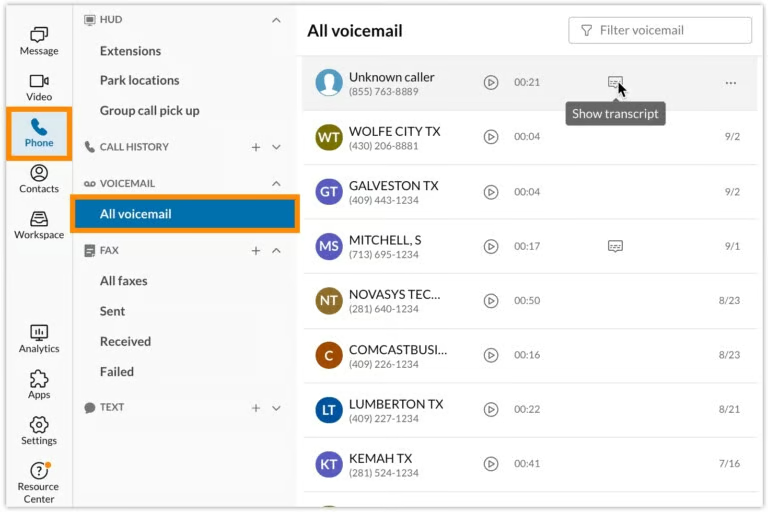
Voice-over-internet-protocol (VoIP) phone systems, like Nextiva, have visual voicemail capabilities that allow users to access, listen, or read their voicemails from their desktop or mobile devices. You can also respond to voicemail messages via text or call and forward voicemails to your email or another recipient.
How to Set Up a Visual Voicemail
Setting up a visual voicemail varies across phone service providers, but typically, everything is already set up for you once you’ve installed the app. All you need to do is configure the voicemail greetings, notifications, and the call handling rules for directing calls to voicemail. To set up these features, access the phone system’s settings or online portal.
Most phone providers offer a default voicemail greeting, but you may record or upload a custom greeting through an audio file. You may navigate to the call handling rules and select the voicemail option to route missed calls to your voicemail inbox when you’re unavailable.
If you want to be notified of new voicemails, set the option to receive email or text message alerts on your computer or mobile device. Then, enter the email address and phone number to which you want notifications sent.
Visual Voicemail Features
Visual voicemail services come with a few useful features, including the ability to transcribe voicemails to text and customize voicemail greetings. If you’re looking for a top-notch visual voicemail app, make sure to look out for the following features:
Voicemail Transcription
Voicemail transcription is a popular visual voicemail feature wherein the audio content of a voicemail is transcribed into text. It provides users with an idea of what the voicemail is about without even having to listen to it. This is particularly convenient if you’re in a meeting and want to review your voicemail discreetly at any time.
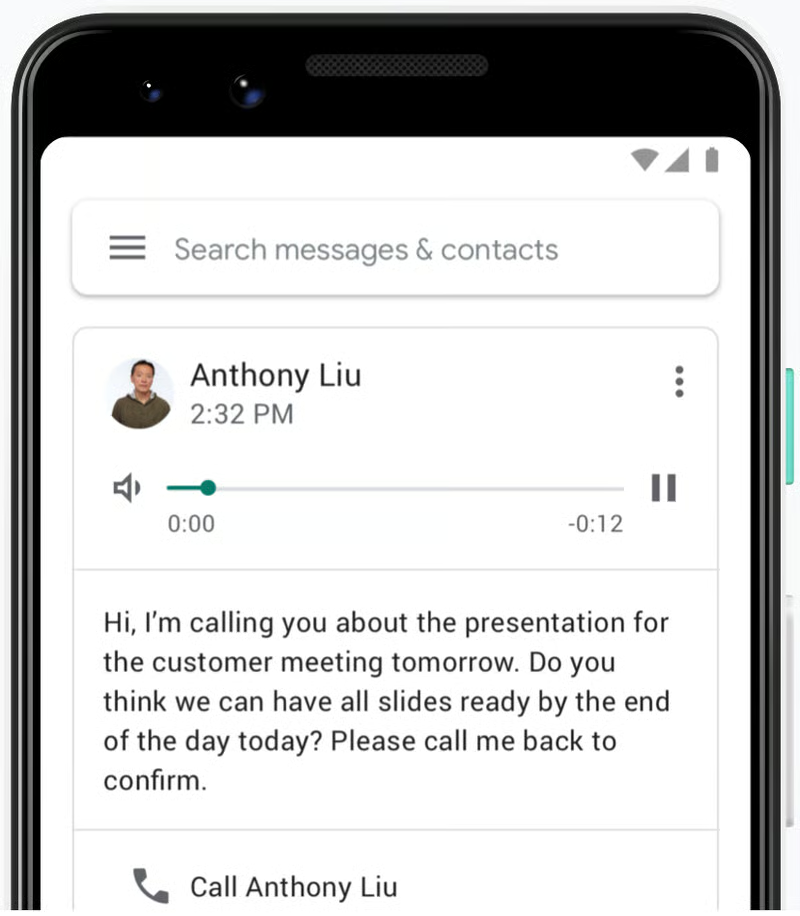
Google Voice is a cloud-based phone service offering free U.S. phone numbers and affordable plans as low as $10 per user, monthly. This provider stands out for its intuitive and straightforward approach to VoIP, which greatly appeals to solopreneurs and small business owners. One of its notable features is voicemail transcription, powered by Google’s artificial intelligence (AI) technology.
Voicemail-to-email/text
This feature lets you manage your incoming voicemails from the convenience of your email inbox. Every time you receive a new voicemail, you will be automatically notified through your email account. Depending on the provider, an email may include an audio attachment, transcript, or a link to access the voicemail message. You can also forward them to your contacts who need to be in the loop.
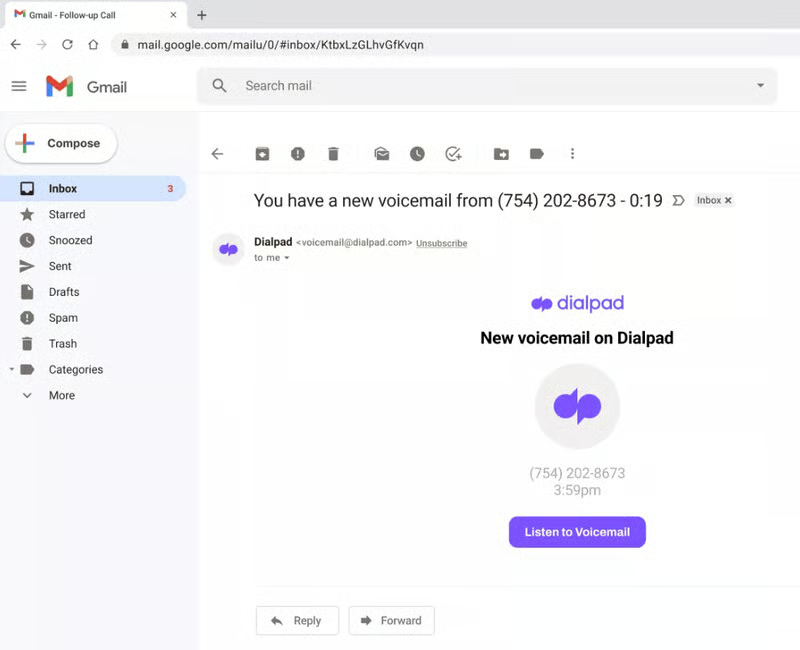
Dialpad is a VoIP service that utilizes artificial intelligence (AI) for voice, chat, and video channels to ensure efficient and personalized interactions. Its visual voicemail feature transcribes voicemails in real time and emails both the audio and text versions of the voicemail for easy sharing.
Voicemail Greetings
Personalizing your voicemail greeting allows you to set the right tone for receiving a caller. If you have a small business, setting a custom voicemail greeting establishes professionalism and provides callers the assurance that you will call them back.
While voicemail services come with default greetings, many providers allow users to upload their own audio files or use the text-to-speech feature. Some even grant access to voice studios so that a business can have a more natural-sounding greeting with professional voice talent.
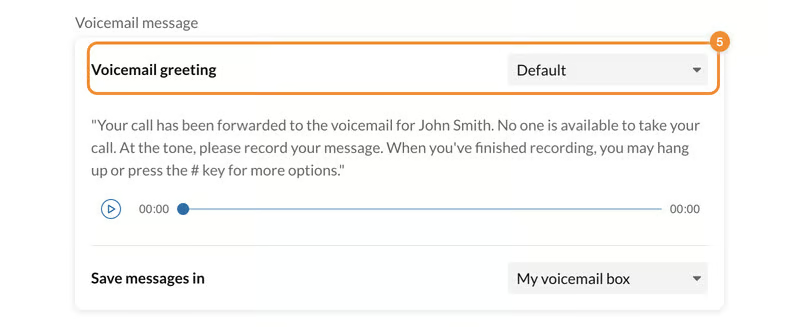
RingCentral is a full-featured business phone system with robust visual voicemail features, such as voicemail preview, voicemail-to-email, and voicemail greetings. Starting at only $30 per user, monthly plans include call management tools, team chat, and video meetings.
Benefits of Visual Voicemail
Instead of navigating through your messages one by one, visual voicemail allows you to manage all of your voice messages in one place. Take a look at the different advantages of including visual voicemail in your communications stack:
- Increased productivity: Having a dedicated section for voicemails streamlines message retrieval since you can access all of your new and old voicemails in one place. Plus, reading the text version of your voicemail saves you time from picking up the phone to listen to each message and taking notes manually.
- Remote access: Visual voicemail offers convenient access to your messages from any device, regardless of location. You can easily forward a message to email or respond via text message, giving you the flexibility to manage your voicemails on any of your preferred channels.
- Prioritize messages accordingly: Visual voicemail lets you prioritize messages based on caller information. Instead of listening to all the messages in the order they arrived and going back and forth, you can choose your preferred order. This lets you prioritize callbacks and see which ones require more attention. You can also scan the most important messages and respond to those first.
Best Visual Voicemail Apps
While most business phone systems have built-in voicemail capabilities, only a few of them support a range of visual voicemail features. To find the right option for you, here’s a look at the leading VoIP providers with visual voicemail capabilities:
| Visual Voicemail Providers | Monthly Starting Price (per User) | Voicemail Features | Learn More |
|---|---|---|---|
 | $30 |
| Read Our RingCentral Review |
| Visit RingCentral | |||
 | $30.95 |
| Read Our Nextiva Review |
| Visit Nextiva | |||
 | $23 |
| Read Our Dialpad Review |
| Visit Dialpad | |||
 | $10 |
| Read Our Google Voice Review |
| Visit Google Voice | |||
Frequently Asked Questions (FAQs)
How can I get visual voicemail on my iPhone?
On your iPhone, navigate to the phone app and tap the voicemail icon on the right corner of the screen. You will see all your voicemails neatly organized in a list, including the date and time they were received.
What is the difference between a voicemail & a visual voicemail?
A traditional voicemail is a digitally recorded message left by a caller to the intended recipient who is unavailable or is busy with another conversation. Visual voicemail enables users to access all their voicemails in one place and read them in text format.
How do I turn on visual voicemail?
There’s no need to activate visual voicemail as it comes built into your phone service app by default. Simply go to the voicemail section to access all the messages you’ve received. If you don’t want to receive a transcription of your voicemails, go to settings and switch off the voicemail transcription feature.
Bottom Line
Visual voicemail is a telephony service that provides access to all your voicemails through an intuitive, visual interface. With its emphasis on shareability and convenient access, visual voicemail offers the flexibility you need to carry on business interactions without interruption. Now that you understand what a visual voicemail is, you can utilize its features to enhance your communication experience further.
