







Amazon SEO is the practice of tailoring the content of an Amazon webpage to appear higher in search results. Naturally, this leads to greater visibility and more sales.
Effective Amazon SEO strategy comes down to promotional campaigns, identifying winning keywords, and optimizing each of your listings’ five elements. This includes a well-structured title, compelling images, reader-friendly bullet points, a detailed product description, and competitive pricing.
Here’s what you need to know to create optimized Amazon listings that sell.
How Amazon SEO Works
While standard ecommerce SEO works for search engines like Google, Bing, and Yahoo, Amazon uses its own proprietary search engine called A10. Amazon SEO strategy dedicates itself to the specific algorithm A10 uses (although there are many similarities).
So, how does the A10 algorithm work? In a nutshell, it targets revenue per click by prioritizing listings most likely to generate a sale from the shopper searching.
That means your SEO strategy should be customer-focused at its core—above all, your listings should be clear and attractive to potential buyers.
In addition to listing content, the A10 algorithm weighs customer reviews to determine ranking. Of course, your reviews also impact conversion rate and sales velocity, so aim to keep them high. Since review quantity is another important factor, many sellers encourage their customers to leave reviews after buying. Read Amazon’s product review policies to learn more.
Aside from customer appeal, two of A10’s primary ranking factors are sales rank and keywords:
Amazon’s search algorithm is on the lookout for products that perform well—items with a high sales rank. Even with perfectly crafted product listings, it’s difficult for an item to show up in search if it isn’t already selling.
While it may seem like a catch-22, one of the fastest ways to improve your listing’s ranking is to drive a sales spike.
Consider these methods to drive a sales spike:
- Paid ‘Sponsored Product’ Amazon advertising
- Paid social media advertising
- Paid Google search advertising
- Launching a Lightning Deal
- Social media engagement
- Influencer marketing
- Backlinks from popular blogs or relevant websites
- Email marketing
Amazon’s search engine uses keywords to index web pages and determine where they should appear in search results.
Keywords are the search terms that your potential customers are using. Once you’ve done your research to figure out what these terms are, they should be incorporated throughout the elements of your listing so A10 can pick up on them. You’ll want to include your keyword in the following areas:
- Product title
- Product description
- Product photo alt text
- Key features
- Amazon Search Terms
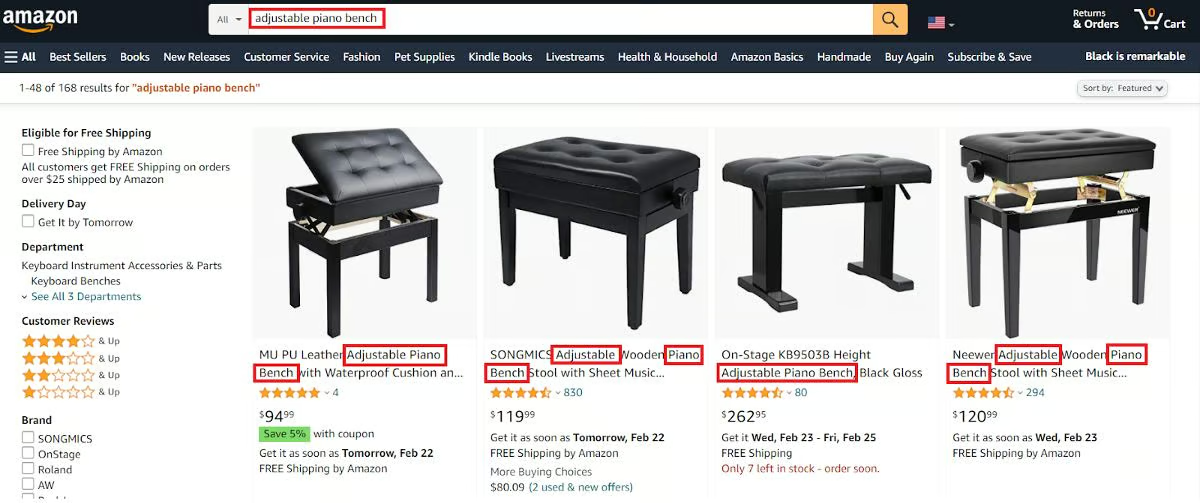
The more relevant your keywords are to what qualified shoppers are searching, the more likely they are to drive traffic. Conversely, if your keywords aren’t relevant to shoppers at all, your listings won’t be seen.
Use the tips outlined in the next section to identify the best keywords to use for your Amazon listings.
How to Find the Best Amazon Keywords
Keyword research is the process of nailing down the most relevant search terms your potential customers are using.
It may seem straightforward, but not all shoppers enter the same words when they search for products. By identifying a range of terms that searchers might use to find your product, you can incorporate multiple keywords into your listing—which maximizes discoverability.
The simplest (and cheapest) way to see what Amazon shoppers are searching for is to go straight to the source. By typing in a basic description of your item in the Amazon search bar, you’ll see suggestions for frequently searched related keywords, as shown below.
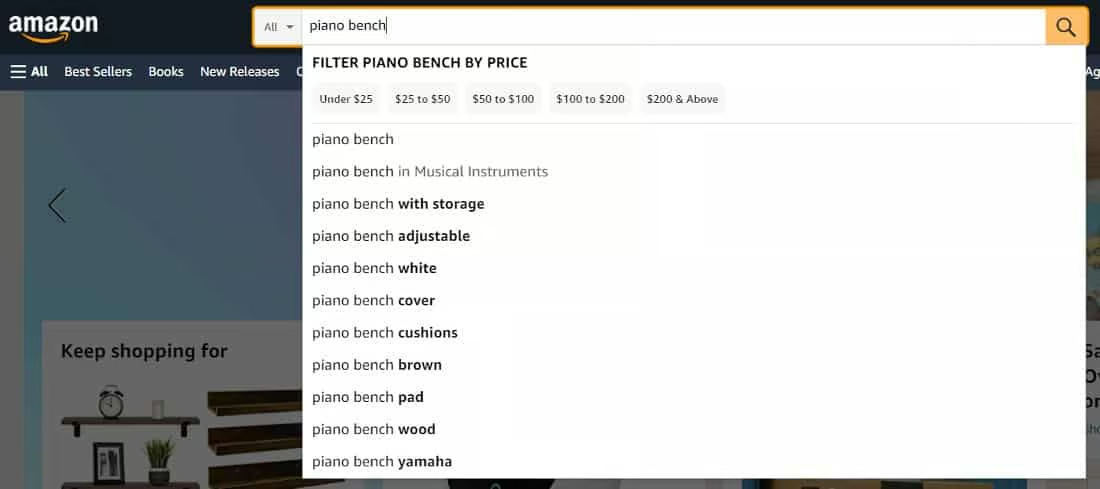
You can use this method to take your keyword research further by entering variations of the suggestions back into the search bar. This uncovers more specific or “long-tail” keywords.
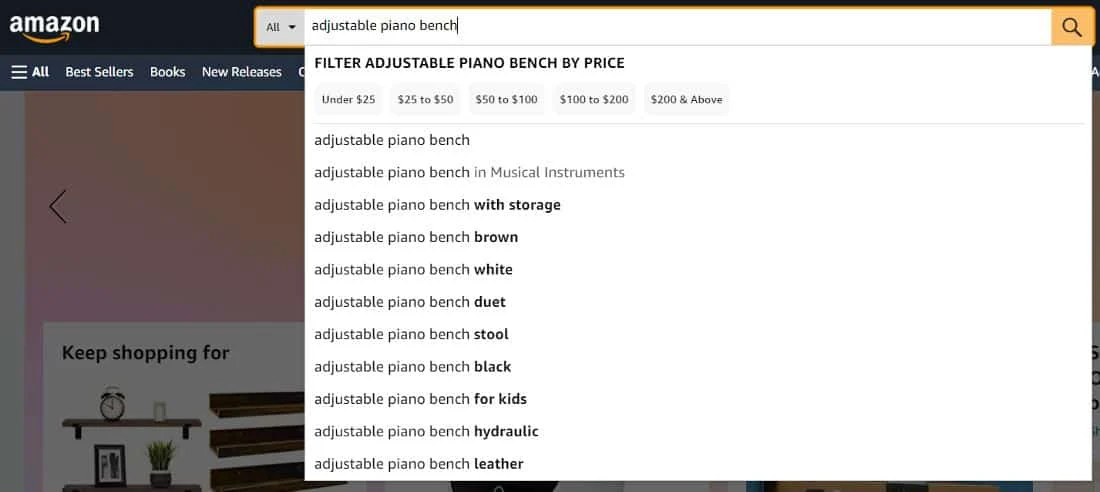
You can supplement your research with dedicated tools and methods to track down the most relevant keywords for your product. Make a list of varying keywords—including basic, “short-tail” terms and detailed, “long-tail” terms—and prioritize those with the most promising search volume.
Keep your keyword list close at hand as you proceed to optimize your Amazon listing for maximum discoverability.
Amazon Keyword Research Tools
For more detailed data to help you land on the most effective keywords, here are our top recommendations among various online tools:
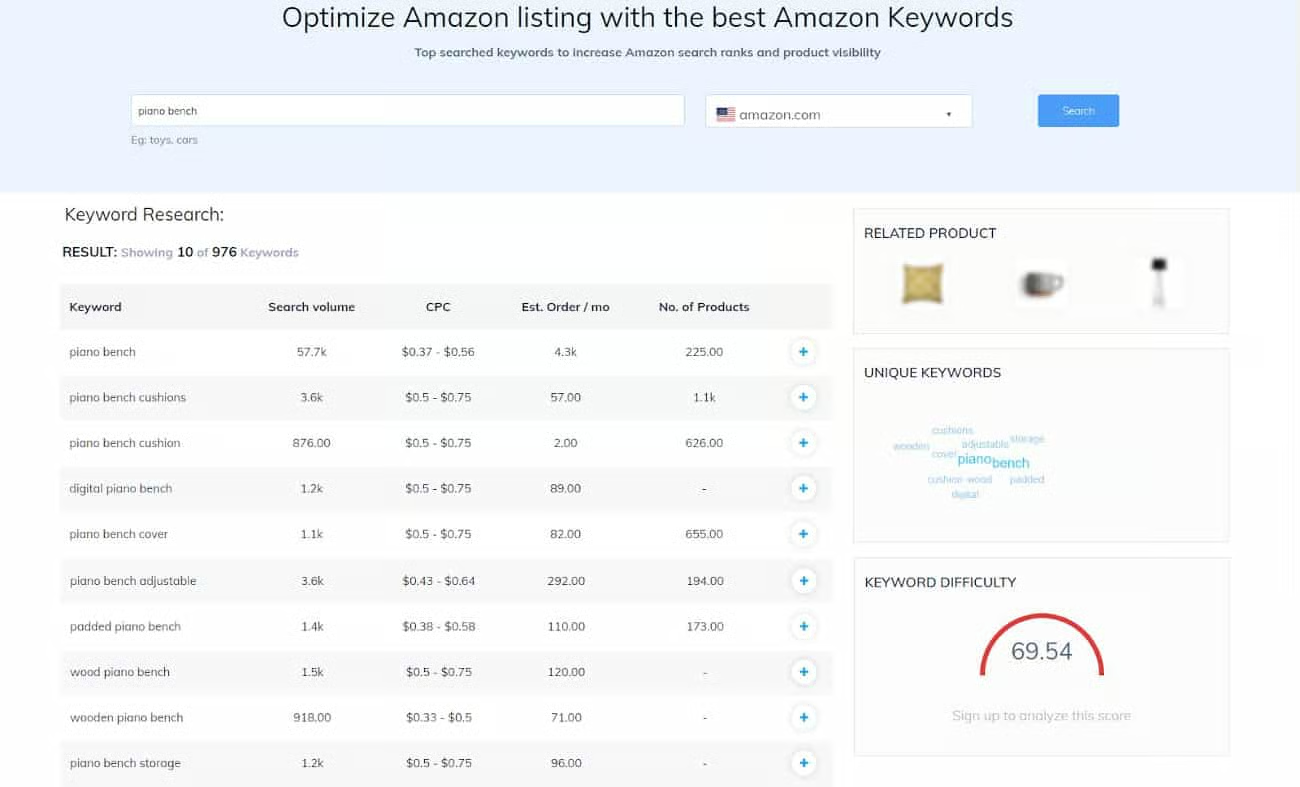
SellerApp is an Amazon intelligence platform that delivers a suite of useful features, including a free keyword research tool. It displays the precise search volume of the keyword results and other data points like monthly sales, number of products, and advertising cost. It also shows the estimated keyword difficulty of your query.
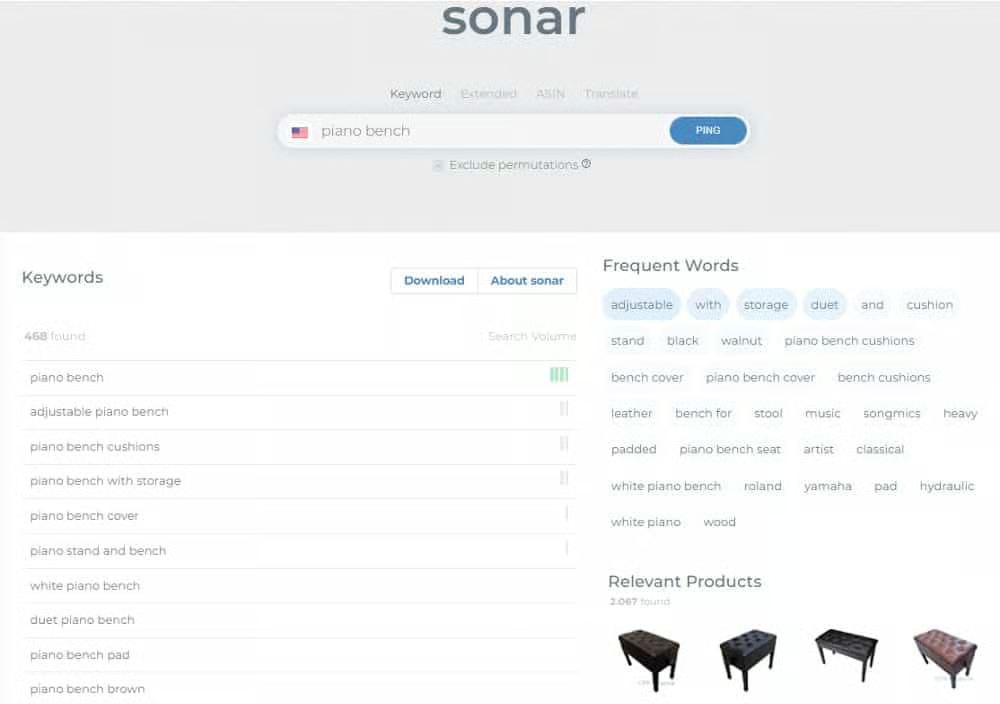
Sonar is a free tool from Sellics. You can use it to look up keywords based on your product, frequently used words in relevant listings, and links to competing listings. The tool indicates the general search volume for each term by displaying several bars next to the result. Sonar also features reverse Amazon Standard Identification Number (ASIN) lookup, which allows you to identify and track your competitor’s keywords.
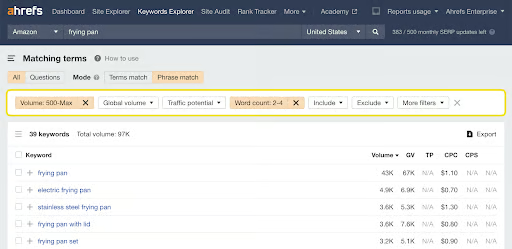
Ahrefs has a keyword research tool. The free version will give you the monthly search volume for your query and a list of the top 100 related keywords. You can also pay for more data, including additional related keywords and average cost-per-click (CPC).
How to Optimize Your Listing for Amazon SEO
If you’re new to selling on Amazon, it’s best to develop your SEO strategy before creating your listings. You can then use a formula to generate each listing with your SEO practices intact.
If you’re an existing seller with a catalog of unoptimized listings on the platform, it may take some time to go through and modify each one. Developing a workflow is equally important in this case, and it’s wise to start with your business’ best-performing products.
In either situation, follow these steps to produce Amazon product listings that rank highly and drive sales:
Step 1: Write Your Listing Title
Your product title is one of the most impactful ranking factors in your listing. Optimizing your listing title comes down to using the right keywords and describing the product properly. Amazon recommends keeping this between 60 and 80 characters.
At a minimum, it’s crucial to include some level of clear, product-identifying information (such as “hiking boots” or “umbrella”). Failure to do so may cause your listing to be suppressed from Amazon search results altogether.
To avoid penalties, it’s also important to exclude promotional phrases like “free shipping” or “100% quality guaranteed,” as well as decorative characters like ~ ! * $ ? _ ~ { } #.
From the list of effective keywords you identified using the methods we covered earlier, select the most important ones. It’s best to use two to three keywords in your title that have a high search volume but also serve to explain the product thoroughly.
Use the most relevant and valuable keywords first, and aim to position them toward the beginning of the title. This ensures that your listing is indexed for that particular keyword—and draws in qualified shoppers.
Lastly, avoid overstuffing keywords into your product title. This practice has been previously used to try to rank higher or appear in more relevant results. Modern-day algorithms (including A10) don’t prioritize overstuffed content, and it compromises clarity for the shopper.
Amazon allows 200 characters (including spaces) for your product titles, though you should aim for 60–80 characters. It also recommends incorporating elements such as:
- Brand
- Line/collection
- Material/ingredient or key feature
- Size
- Color
- Quantity/packaging
Amazon recommends styling your titles by arranging elements in this order. While this may be helpful for some sellers, it’s not a foolproof way to write an SEO-friendly title. Consider whether your brand is a selling point for the item, and which elements are more relevant to shoppers.
Furthermore, not every item sold on Amazon has or needs every factor listed above. But this formula is a good guide for building a product title that Amazon recognizes as high-quality.
Rather than typing your product name in all capital letters, use sentence case (when only the first letter of the first word is capitalized) or title case (when the first letter of all important words are capitalized). For starters, all caps may be off-putting and look unprofessional.
But the reasons go beyond simply aesthetic. Accessibility is an important consideration for online sellers. Something written in all capital letters is more difficult to read and understand than something in sentence or title case—and this is especially the case for individuals facing challenges with reading, comprehension, and/or language.
In addition to capitalization, pay attention to how you write numbers. Amazon recommends using the numerical digit rather than writing out the number—so your product title should say “3 in 1” instead of “three in one,” for example. Amazon also recommends avoiding the use of non-language ASCII characters like Æ, ©, and ®.
Here’s a sample product title from Amazon’s Seller University video tutorials:
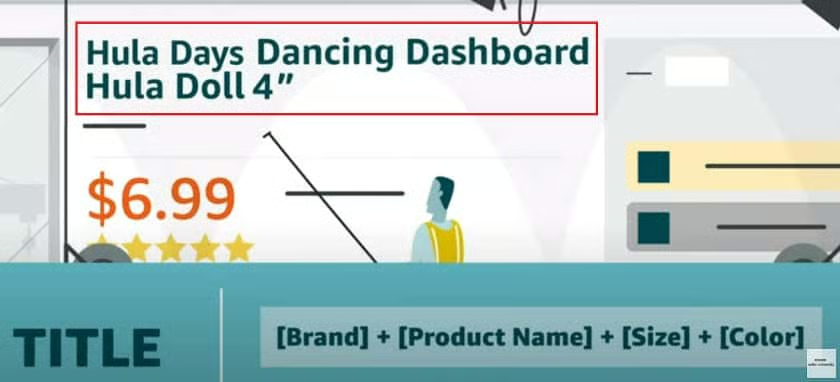
Following this guideline, we’ll write a Descriptive Title for an example product that incorporates the three best Amazon SEO keywords we identified in our research.
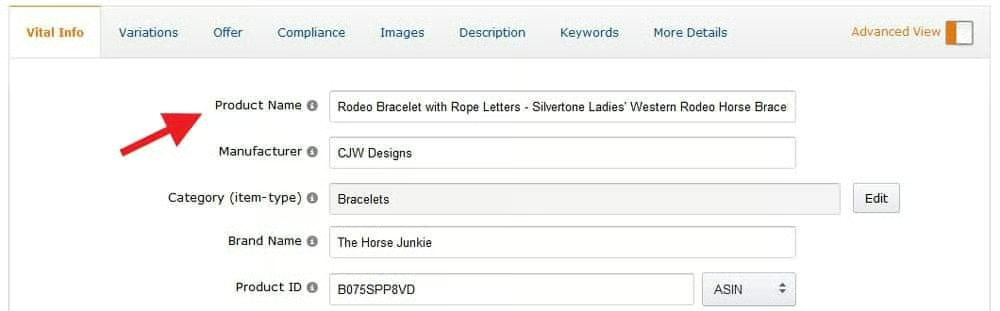
Here’s how our optimized title appears in the live listing. It’s descriptive, contains effective keywords, and presents the information clearly.
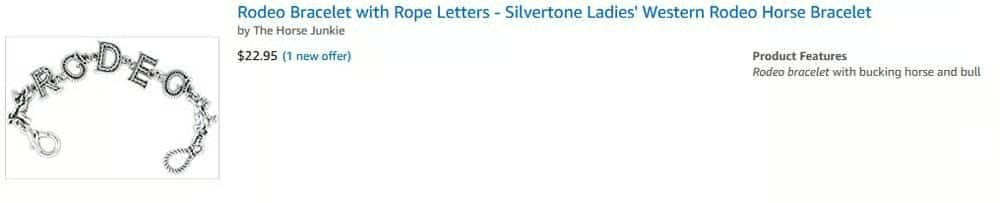
As you can see, this item doesn’t have a specific brand, line, or collection, and quantity doesn’t apply since most jewelry items are sold by piece. So we used our keywords as the basis of our description. We then added other important descriptors, such as rope letters, ladies’, silvertone, and Western, to highlight details and catch the shopper’s eye.
Step 2: Prep Product Images
Product images don’t affect your SEO directly, but they do have a direct impact on making sales and breaking bounce rates. In turn, this increases your rankings because sales rank is a major consideration for the A10 algorithm.
SEO aside, Amazon has strict guidelines for product images. If they aren’t met, your listing could be suppressed from appearing in searches altogether.
The best way to optimize your product images is to ensure they follow Amazon’s guidelines and make them appealing to shoppers.
Here’s what you need to know to get effective product photos for Amazon:
Upload High-quality, Professional Images
Amazon enforces image guidelines to maintain a consistent appearance throughout its site. One standard is that product images must be professional photos that accurately portray the product being sold.
But you don’t need to hire a professional photographer to adhere to this rule. You can capture top-quality product shots yourself by using your iPhone, digital camera, or other devices.
Use a White Background for the Main Image
Amazon requires a pure white background product photo for the main listing image. Listings that don’t heed this suggestion have been known to appear lower in search results and receive low-quality alerts—or, worse, be taken down.
If you didn’t shoot your product photos on a white background, you don’t have to do a whole reshoot. You can use photo editing tools, apps, or services to get that clean white background look:
- Adobe Photoshop: Adobe’s photo editing software is an industry standard. It’s a powerful tool but requires a monthly subscription fee, advanced photo editing skills, and time to do the edits.
- Square Photo Studio App: This tool allows you to easily isolate the product in your pictures and swap in a clean, white background from your iPhone. It’s free and easy to use, though it relies on artificial intelligence (AI) technology to execute the edits, which may be imperfect and require manual fixes.
- remove.bg: Another AI-based tool, this program is web-based so you can do it from your phone or computer. It’s not free, as background removal starts at 20 cents/photo, and you still may need to make some fixes yourself.
- Path: If you prefer to have a human edit your photos, Path is a virtual photo editing studio with designers available around the clock. The biggest drawbacks here are you give up control over the editing process and it’ll also cost a bit more.

The Square Photo Studio App helps you take and edit great product photos from your iPhone. (Source: Square)
Take Diverse Secondary Images
Amazon allows you to upload up to sx images in addition to your main listing image—the more product photos you use, the better it is for SEO and sales.
Showing items in use, zooming in on fine details, and including different angles helps shoppers better connect with your products—which persuades them to buy.
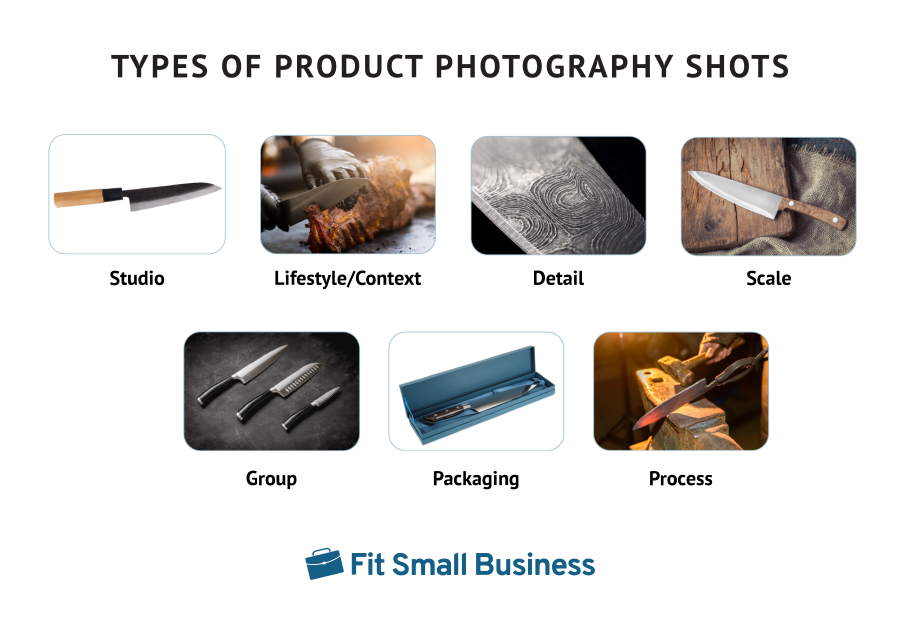
Amazon upholds this second set of standards for product images that show additional “other” views of an item:
- The image must be of, or pertain to, the product being sold.
- The image must be in focus, professionally lit, and photographed or scanned, with realistic color and smooth edges.
- Other products or objects are allowed to help demonstrate the use or scale of the product.
- The product and props should fill 85% or more of the image frame.
- Cropped or close-up images are allowed.
- Backgrounds and environments are allowed.
- Text and demonstrative graphics are allowed.
- Pornographic and offensive materials are prohibited.
Use Images 1000 x 500 Pixels or Larger
Amazon strongly prefers a minimum image size of 1000 pixels in either height or width for all of your product images. This size enables Amazon’s image zoom feature to give buyers a closer look.
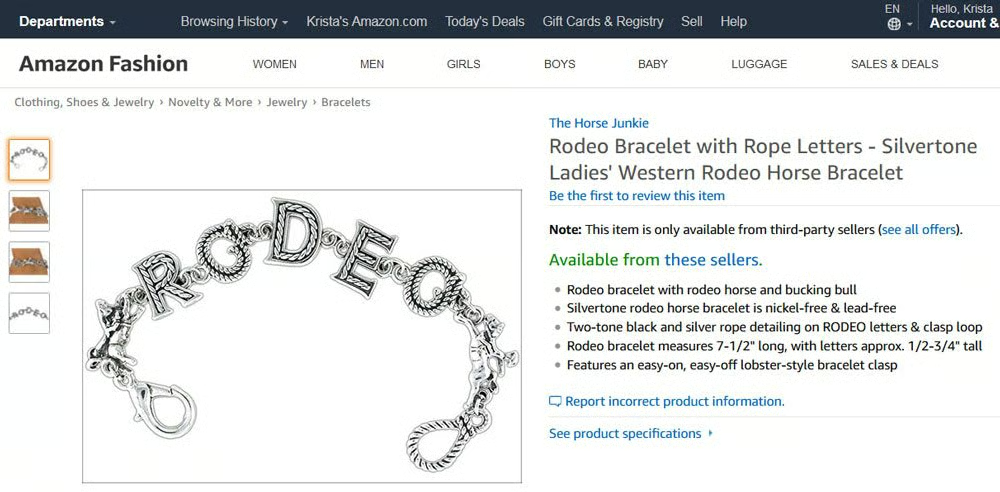
We created an optimized product photo that meets each of these image requirements. Here’s what shoppers will see when they view our product listing:
Step 3: Draft Bullet Points
Amazon listing pages feature a bulleted list of product details called Key Product Features in your product entry screen. You can fill out up to five bullet points in this section.
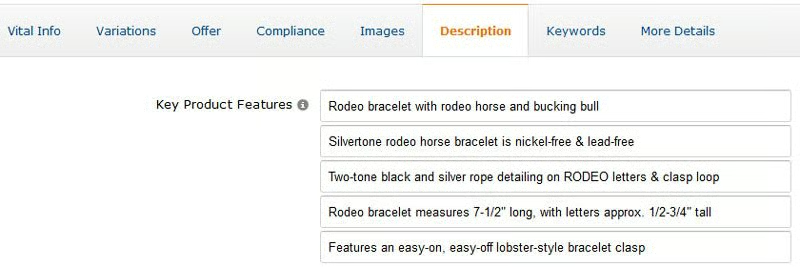
Amazon uses the copy you insert here to create a bulleted list of your item’s features, benefits, and details. Shoppers can quickly scan this list to learn about your product. These bullets also contribute to how your listing is indexed—so they’re the perfect place to incorporate relevant keywords.
Use your target Amazon SEO keywords to describe the following information about your product:
- Product name, use, or intent
- Sizing, dimensions, or fit details
- Features and benefits
- Improvements (if a new model or release)
- Materials, colors, contents, or ingredients
- Guarantees, warranties, etc.
Keep in mind Amazon intends this section to be informational and not overtly promotional, so it doesn’t allow:
- Promotional language, coupons, or deals
- Pricing information
- Free shipping offers
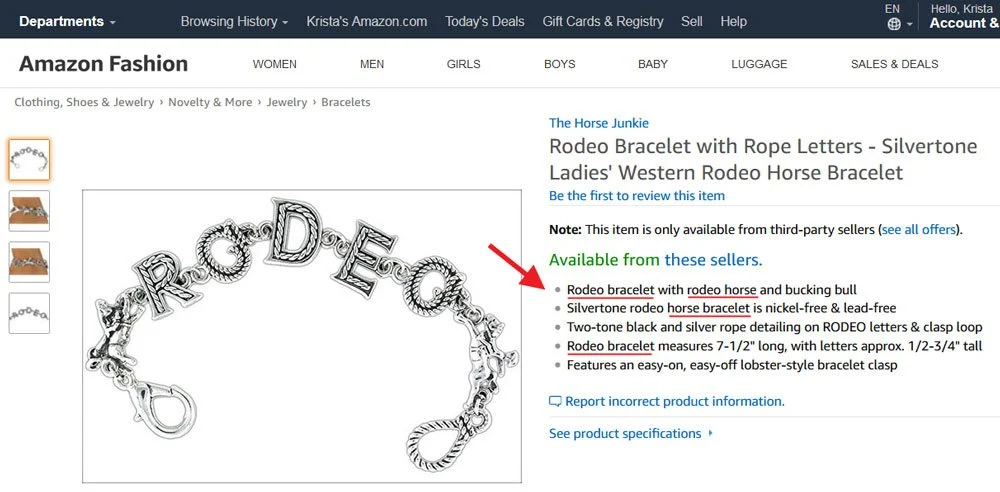
Following Amazon’s guidelines and using three of our Amazon SEO keywords, here’s how the key features appear as a bulleted list on our Rodeo Bracelet listing:
You’ll also want to keep the following best practices from Amazon in mind:
- Use a max of 1,000 characters total for all your bullet points
- Maintain consistency for all your products
- Put the most important information first
- Write sentence fragments and skip punctuation—though capitalize the first letter of the first word
Remember key features are a snapshot of important details about your product—you still have one more area to give shoppers more information and really sell it. Save the bulk of your copy for writing the product description.
Step 4: Optimize the Product Description
This key element of a quality Amazon listing is where you fully describe your product, answer any questions your shoppers may have, and try to close the sale.
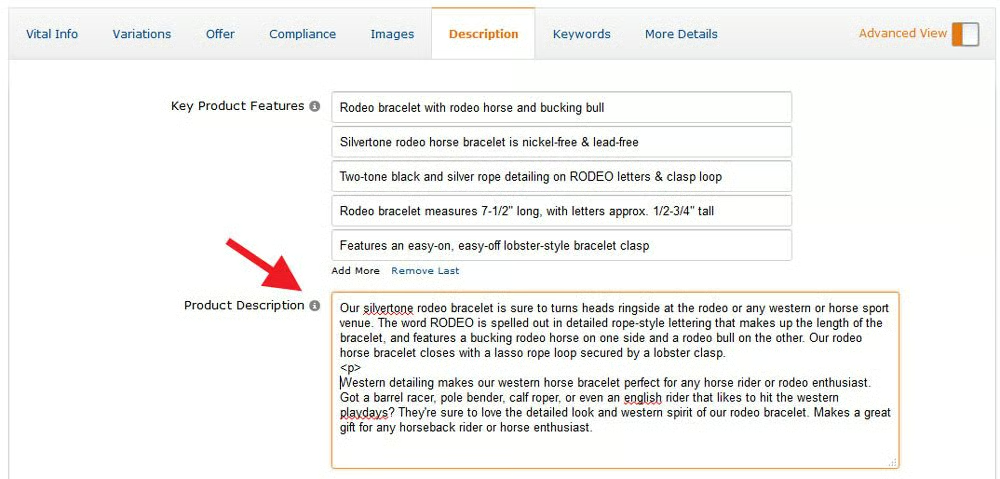
Amazon allows 2,000 characters in your Detailed Product Description, so you have plenty of space to describe and sell your product using your Amazon SEO keywords, as we did above.
Try using these pointers to craft an SEO-friendly Amazon product description:
- Incorporate keywords wherever possible in a natural, conversational way.
- Use basic HTML codes to underline or italicize text, break up paragraphs, create a second bulleted list, or add bold headers in this field. If you don’t know HTML, try using Amazon Product Description Editor—it incorporates the right codes for you to copy and paste into Amazon.
- Paint a picture or tell your product’s story with illustrative words and narrative language to take your description to the next level.
- Make it easy to read by avoiding difficult syntax and keeping blocks of text short.
With our optimized product description entered, here’s what shoppers see on our Amazon listing:

Step 5: Get the Price Right
Retail product pricing is a delicate balance that requires trial, error, and careful strategy to ensure that items sell. But when selling on Amazon, your prices also contribute to your search rankings.
Mind the Gap
Always research your competitor’s prices when creating your listings. Amazon typically prioritizes the lowest-priced products on search result pages—so aim to beat or match competing listings.
If you can’t manage to make the above strategy work for your margins, keep the price gap between you and your competitors as small as possible. This helps to prevent your listings from falling too low in the SERPs (search engine results page).
To justify the price difference and persuade shoppers, be sure to clearly highlight any factors that give your product an edge over the competition.
Consider Shipping Costs
The A10 algorithm factors in all elements in a product’s final price—so consider any shipping fees you charge the customer when determining how you’ll price your products.
Whether you choose to offer free shipping and bump up the product price or charge for both separately doesn’t affect SEO—it’s the final cost that matters.
That being said, offering Prime shipping (by using Fulfillment by Amazon or the Seller Fulfilled Prime program) has a substantial impact on your listings’ rankings.
Step 6: Input Your Product Search Terms
Amazon Search Terms are data fields that allow you to plug in relevant keywords related to your product listing. They function similarly to your product listing title and description—except these Search Terms aren’t visible to the customer.
Instead, Search Terms are backend data points not visible to shoppers. Merchants add these Search Terms to give Amazon clues as to what related keywords might also make sense to rank for this product.
Amazon has the following recommendations when it comes to your Search Terms:
- Abbreviations, alternate names, topics, and key characters (for books, movies, etc.) could make good Search Terms
- Avoid brand names, product names, compatible product names, ASINs, UPC codes, and other product identifiers
- Ensure information is accurate and relevant but not redundant of data capture in other fields like the product title, author, brand, etc.
- Abide by character limitations
- Put search terms in a logical order when there are multiple words in the query (e.g., use “big stuffed teddy bears” instead of “teddy stuffed bears”
- Use a single space to separate keywords
- Avoid timely or temporary information like “new,” “on sale,” or “available now” and descriptors and claims like “amazing” and “good quality”
- Omit common misspellings of the product name
- Skip variations and punctuation—you don’t need variants of spacing, punctuation, capitalization, hyphenation, and pluralization (“80GB” and “80 GB,” “computer” and “computers,” etc.)
- Leave out stop words including “a,” “an,” “and,” “by,” “for,” “of,” “the,” and “with”
Dos & Don’ts of Amazon SEO
Optimizing your listings is a crucial step in becoming a successful Amazon seller. Here are some final tips for driving rankings and profitability through SEO:
Stay on top of your competitors: It’s vital to research your competitors’ SEO practices and monitor their performance. This can provide insight into what works, what doesn’t, and what you need to do to climb the rankings.
Maintain your SEO process: Developing and implementing an SEO strategy is only half of the battle—an ongoing effort is necessary to maintain rankings and keep sales coming in. Integrate a periodic SEO workflow to monitor your listings’ performance, check in on your competitors, and act on any changes that need to be made. Be sure to record your findings for visibility into what works.
Manage your Amazon inventory carefully: Nothing impacts your rankings more than running out of inventory. The “temporarily out of stock” disclaimer makes your listing’s position drop dramatically—and if it happens frequently, Amazon may penalize your seller account. Read our guide to Amazon inventory management for useful tips.
Consider enrolling in Fulfillment by Amazon: Using FBA for your Amazon inventory can have major benefits on the platform. The Prime badge provides an instant SEO boost, and FBA products are significantly more likely to be designated for the “Buy Box” (also known as the “Featured Offer”). This creates more sales and higher rankings.
Choose the wrong products to list: As mentioned above, sales velocity is one of the biggest contributors to SEO. This makes it even more important to perform proper market research before choosing which products to sell on Amazon. Aside from having healthy demand, make sure your goods can provide sufficient profit margins when sold at even the most competitive prices.
Fall behind on A10 algorithm updates: The A10 algorithm is constantly being updated to process and rank listings in more advanced ways. Stay on track with recent updates by keeping up with ecommerce blogs, Amazon seller communities, and SEO publications.
Write inaccurate information: Writing false information in your product listings will inevitably harm your seller reputation. When customers receive unsatisfactory products they can leave damaging reviews and report your seller account—leading to decreased rankings, platform penalties, and even account suspension.
Rule out getting help: If Amazon SEO practices are too time-consuming to tackle on your own—or if your efforts aren’t yielding results—you can outsource the task to a freelance SEO specialist through Fiverr or Upwork.
Bottom Line
Without SEO practices, your Amazon listings are unlikely to get sustainable traction—but Amazon SEO is a straightforward process that can be easily achieved without hiring a specialist.
By engineering your product’s title, photos, bullets, description, price, and Search Terms with the A10 algorithm in mind, you can increase your products’ ranking to drive better sales.
Many of Amazon’s quality standards go hand in hand with effective SEO methods. The platform prioritizes uniform and attractive listings—so following guidelines on Seller University is a great place to start. Then proceed to hone your product listings with targeted keywords and optimized content in each element.
