







Nonprofit customer relationship management (CRM) software enables organizations like community service groups, philanthropic organizations, and political advocacy firms to manage operations, marketing, and financial activities. A CRM for nonprofits provides useful tools to handle donations, volunteers, and communication outreach. We evaluated dozens of systems ideal for donation management to identify the best CRM software for nonprofits:
- Bloomerang: Best for data management
- Neon CRM: Best for managing fundraising events
- Donor Tools: Best for simple interface
- CiviCRM: Best for nonprofit CRM customization
- Bitrix24: Best free option for unlimited users
- Freshsales: Best for in-app calling and analytics
- HubSpot Marketing: Best for nonprofit marketing features
- Best CRM for Nonprofits at a Glance
- Bloomerang: Best for Data Management
- Neon CRM: Best for Managing Fundraising Events
- Donor Tools: Best for Simple Interface
- CiviCRM: Best for Nonprofit CRM Customization
- Bitrix24: Best for Price for Unlimited Users
- Freshsales: Best for In-app Calling and Analytics
- HubSpot Marketing: Best for Nonprofit Marketing Features
- Frequently Asked Questions (FAQs)
- Bottom Line
Best CRM for Nonprofits at a Glance
| Provider | Starting Monthly Price | Free Plan? | Our CRM Rating out of 5 |
|---|---|---|---|
 | $125 for unlimited users | ✕ | 4.76 |
| Visit Bloomerang | |||
 | $99 for unlimited users | ✕ | 4.51 |
| Visit Neon CRM | |||
 | $39 for unlimited users | ✕ | 4.48 |
| Visit Donor Tools | |||
 | $0 | ✓ | 4.44 |
| Visit CiviCRM | |||
 | $49 for 5 users | ✓(unlimited users) | 4.37 |
| Visit Bitrix24 | |||
 | $9 per user | ✓(up to 3 users) | 4.32 |
| Visit Freshsales | |||
 | $15 per user | ✓(up to 5 users) | 4.13 |
| Visit HubSpot Marketing | |||
Keep reading to learn more about each nonprofit CRM for small businesses, their features, pricing, and more:
Bloomerang: Best for Data Management
When to Use Bloomerang
- You need a tool that automatically updates donor data: Bloomerang’s data management features help users gather and regularly update donor data and insights. For instance, the nightly address verification and deceased updates ensure you have the correct mailing address of donors, ensuring your appeals reach them.
- You want to connect other third-party business tools to the CRM: Bloomerang natively integrates with popular apps like QuickBooks and Mailchimp. It can also be connected to Zapier, enabling users to connect virtually any business tool they use to the CRM.
- You want access to analytics: Through the analytics feature, users can create data reports for presentations, marketing campaigns, fundraising, and annual planning. Moreover, the data engagement scoring provides an overview of donor engagement based on past interactions and wealth scoring to raise more funds from qualified donors.
When to Use an Alternative
- You have a limited budget: Bloomerang’s starting price point is $125 monthly, making it steep for nonprofits.
- You need a CRM for nonprofits with robust event management tools: Bloomerang’s event management features are limited to custom donation options during registration, event pages, and ticket packages. Event features require the Bloomerang Fundraising – Giving+ add-on, starting at $40 for unlimited users with donation forms, text fundraising, and data tools in one platform.
- Alternatives: CiviCRM is an excellent tool to promote fundraising events. It can be used to update the status of each event participant during the event and soon after to ensure accurate information for evaluating your event.
Bloomerang Pricing Plan & Overview*
Bloomerang lets you add and remove products based on what you need.
Bloomerang CRM: Donor Management
Cost:
- Starts at $125 for unlimited users
Key features:
- 1,000 contacts or records included
- Unified constituent management
- Marketing and engagement
- Reports, dashboards, and analytics
- Data management and segmentation
- Mobile app
*Pricing is based on annual billing on a per-month breakdown. The price range depends on the number of records or contacts. While we update pricing information regularly, we encourage our readers to check current pricing.
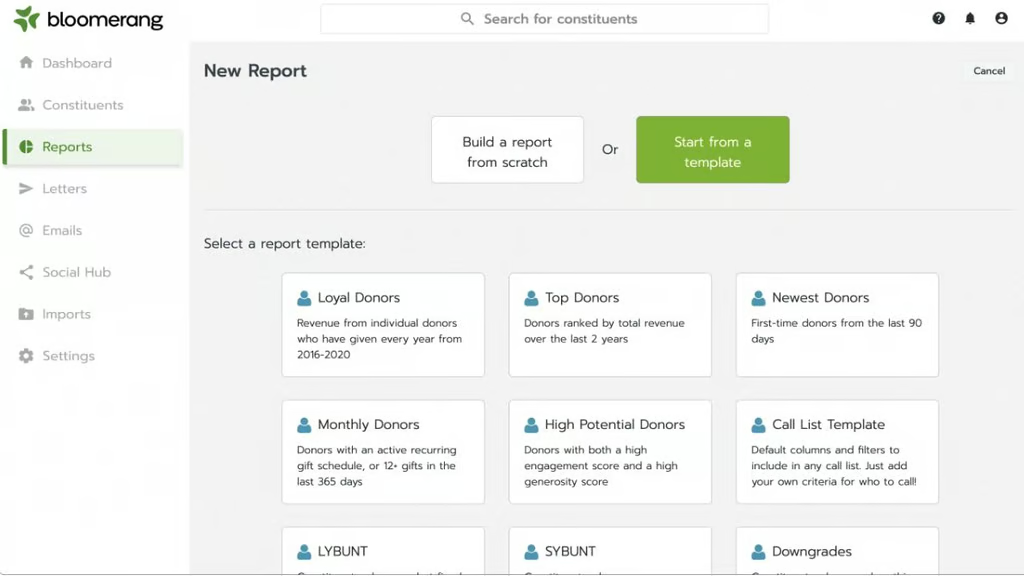
Bloomerang’s built-in reporting templates—covering standard reports fundraisers need. (Source: Bloomerang) 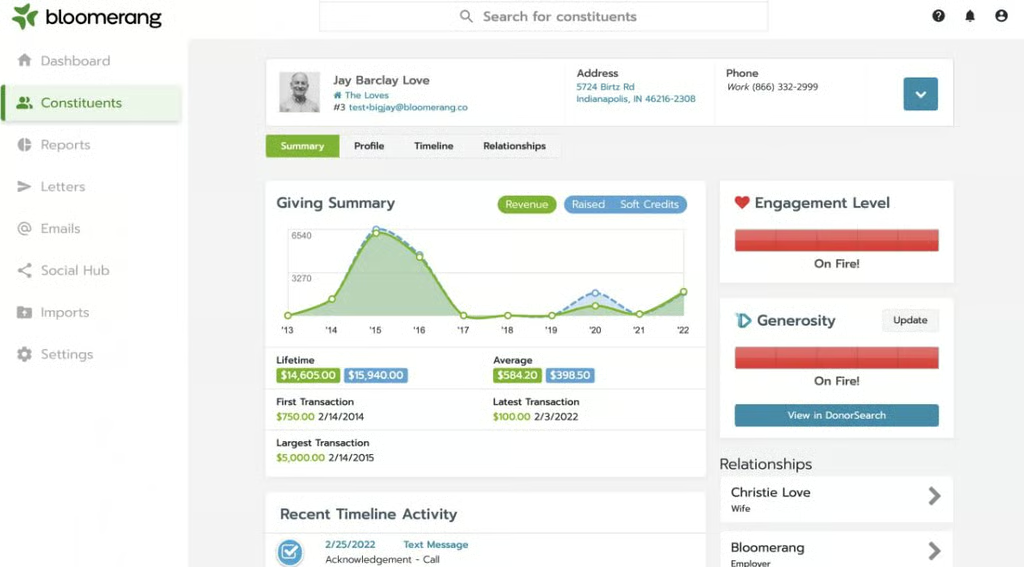
Bloomerang’s dashboard shows information about a nonprofit’s fundraising activities. (Source: Bloomerang)


Our Expert Opinion
Bloomerang made it to the top spot of this list because of its essential features useful for nonprofits, particularly donation management, donor database, online giving, and reports. While the startup cost can be an issue for some organizations as plans get more expensive as the number of contacts increases, this industry-specific CRM provides unique features like donor engagement scoring, nightly address verification, and deceased updates.
Neon CRM: Best for Managing Fundraising Events
When to Use Neon CRM
- You hold several fundraising activities: Neon CRM lets users create and manage fundraising campaigns and events with online forms that support one-click donations, recurring giving, and multiple ticket structures. Users can also hold virtual fundraising events with tools encouraging more donor and fundraiser adoption, including online challenges and live fundraising activities.
- You need to create a nonprofit org website: You can create your organization’s web template with a front-end drag-and-drop editor that produces professional-looking websites for both desktop and mobile browsers.
When to Use an Alternative
- You need a free plan: Neon CRM, unfortunately, has no free plan. This can be a drawback for civic and nonprofit organizations wanting to test the tool first before committing to purchasing it.
- Alternatives: Bitrix24 and HubSpot Marketing are excellent CRM alternatives that do not require a setup fee and have free options for unlimited users. These are general-use CRMs with data analytics, reporting, and automation tools, which can be helpful for civic and nonprofit organizations.
- You need a nonprofit CRM without a setup fee: Neon CRM requires a one-time setup fee starting at $349 to import data and implement the system.
- Alternatives: General-use CRMs like Bitrix24, Freshsales, and HubSpot CRM do not require a setup fee and have free options. These providers offer data analytics, reporting, and automation tools that can be used for donor management.
Neon CRM Pricing Plan & Overview*
Cost:
- Starts at $99 per month
Key features:
- Donor management
- Constituent login portal
- Grant management
- Activity tracking and prospecting
- One active workflow
- Generosity Indicator
- Unlimited emails and letters
- Unlimited online forms and file storage
- Reporting and analytics
- Customizable dashboards
Cost:
- Starts at $199 per month
Key features:
- Everything in Essentials
- QuickBooks integration
- Volunteer management
- Events management
- Open application programming interfaces (APIs)
- 15 active workflows
Cost:
- Starts at $399 per month
Key features:
- Everything in Impact
- Geocoding and radius search
- Priority support
- Quarterly success reviews
- Unlimited active workflows
*Pricing is based on a per-month breakdown. The provider only provides monthly billing. While we update pricing information regularly, we encourage our readers to check current pricing.
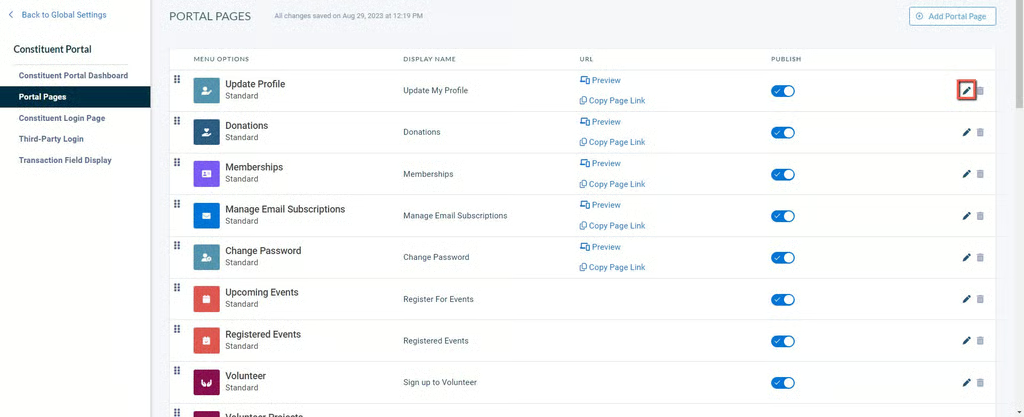
Neon CRM’s constituent portal dashboard shows an editing option to customize pages. (Source: Neon CRM) 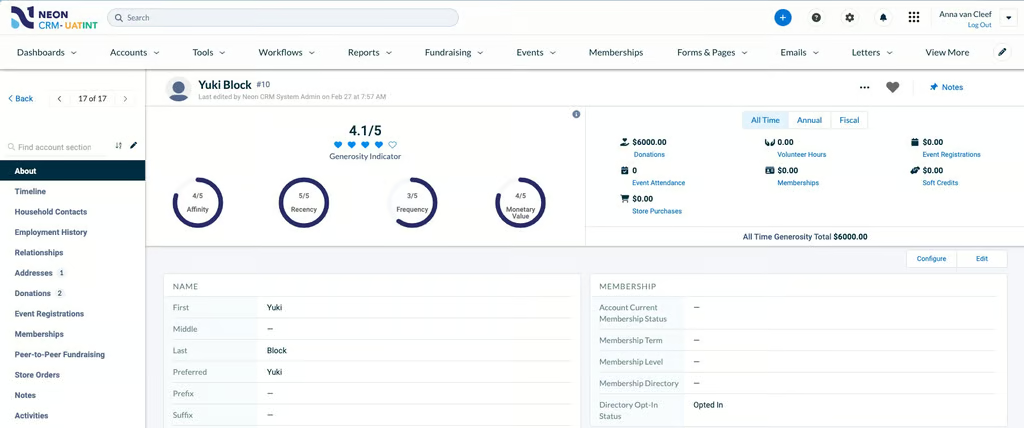
Neon CRM’s generosity indicator displays various types of donor support. (Source: Neon CRM)


Our Expert Opinion
Neon CRM is a great all-in-one cloud-based nonprofit management solution for fundraising activities—both offline and online. Its Essentials plan includes fundamental functionalities, such as donor management, contact management, a generosity indicator, and fundraising campaigns, making it great for small nonprofits. Upgrade to their higher-priced plans or get add-on features if you need more advanced tools like unlimited workflows.
Donor Tools: Best for Simple Interface
When to Use Donor Tools
- You need a no-frills nonprofit CRM tool: Donor Tools is a simple, low-cost CRM system built for nonprofits to raise money, track donations, record physical transitions, and manage their donor and contact base. Because there’s only one plan, all features are included with accessibility to an unlimited number of users and donor records.
- You need a no-code webpage builder: The website builder function of Donor Tools is quick and easy—only requiring users to upload their logo and enter information about their organization. The system then publishes the website to advertise and capture donations.
When to Use an Alternative
- You need more advanced CRM features: Donor Tools offers basic features—mostly recording and processing donations and generating simple reports. It doesn’t have advanced features like email marketing or an in-app phone.
- Alternatives: For users who want more advanced functionalities like email marketing, HubSpot Marketing is a good alternative. Freshsales, on the other hand, provides a robust in-app phone.
- You need a free plan: Despite having an affordable starting price and unlimited access to all the features in its 30-day free trial, Donor Tools doesn’t offer a free plan. This could be a drawback for nonprofits that don’t have the budget for a paid CRM subscription.
- Alternatives: Bitrix24 and HubSpot CRM are excellent CRM alternatives that offer free options for unlimited users. These general-use CRM systems offer analytics, reporting, and other helpful features that can help in donor management and fundraising activities.
Donor Tools Pricing Plan & Overview*
Donor Tools
Cost:
- $39 per organization
Key features:
- Branded web page to accept online donations
- Custom and filtered reports on donations and donor activity
- Option for users to organize and track donor contact records to view their activity and donation history
- Online donations recorded automatically
*Pricing is based on a per-month breakdown with no contract required. Interested users can sign up for a 30-day free trial. While we update pricing information regularly, we encourage our readers to check current pricing.
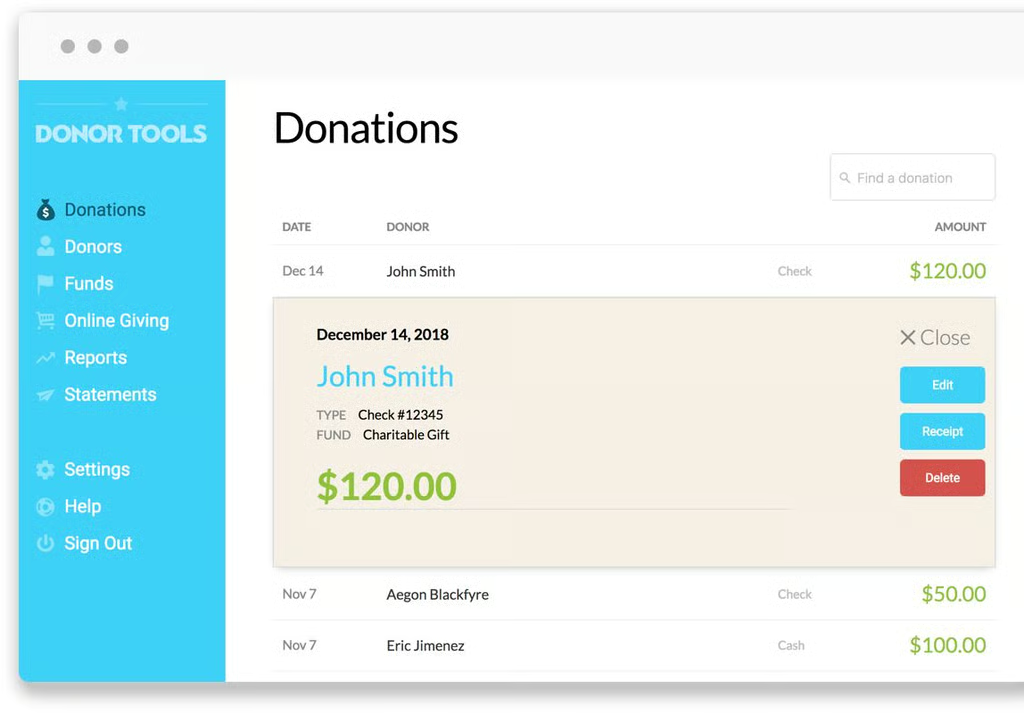
Donor Tools records donations in its system. (Source: Donor Tools) 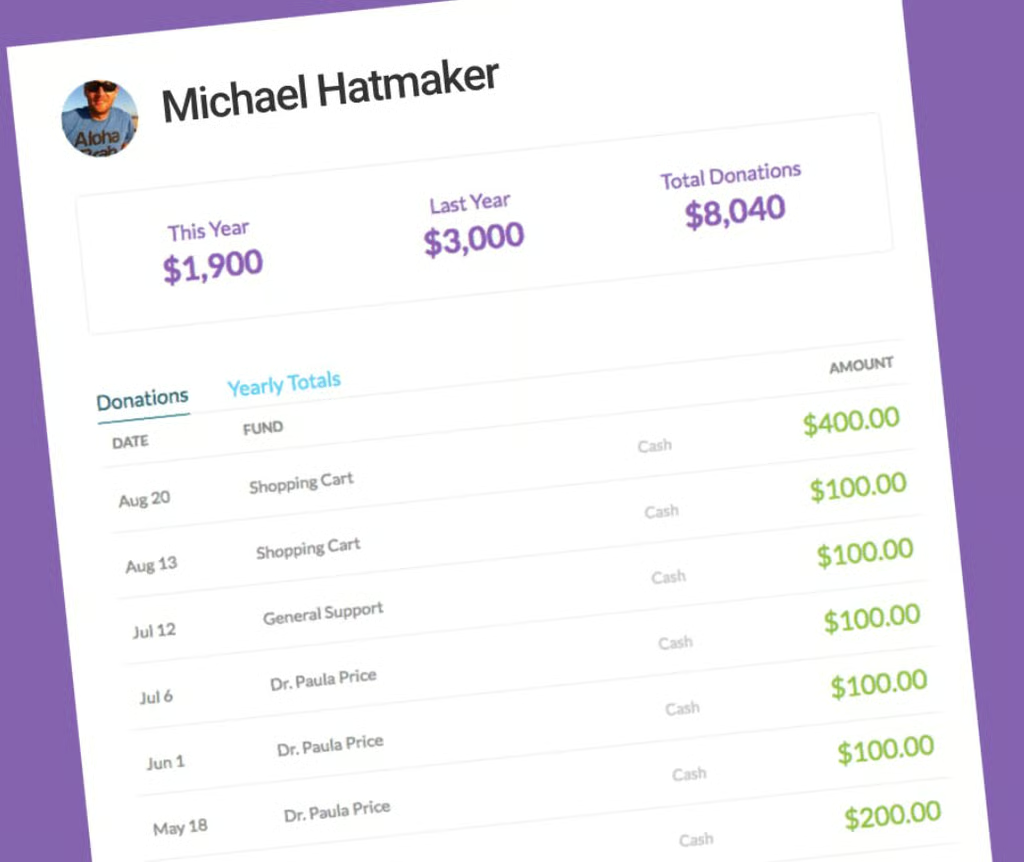
Donor Tools shows a donor’s donation history data. (Source: Donor Tools)


Our Expert Opinion
Donor Tools is a simple tool recommended for startup nonprofit organizations needing a dependable platform to accept and record donations. This nonprofit CRM software program has only one plan, with all features included for an unlimited number of users and donor records. If you’re looking for the best CRM for small nonprofits, Donor Tools can be an excellent option that also provides a more affordable payment or donation processing option like PayPal.
CiviCRM: Best for Nonprofit CRM Customization
When to Use CiviCRM
- You want a customizable CRM tool: CiviCRM’s open-source license allows users to tailor the tool installation and design to their needs. It enables users to configure any option list (location types, activity types, event types, etc.), create their forms via the drag-and-drop feature, and add custom fields.
- You need robust contribution management tools: CiviCRM enables users to process and track contributions, send gift acknowledgments, and report on their data using an intuitive workflow process. Users can collect and record contributions made via check, phone, and public web forms and tie them directly to donors’ contact records.
When to Use an Alternative
- You need a simple and easy-to-use CRM: Because of its open-source nature, CiviCRM can be customized to fit a nonprofit organization’s unique needs and processes. This requires technical experience and a programming background.
- Alternatives: Users who need an out-of-the-box CRM can consider other providers, such as HubSpot or Freshsales, that are easy to use and don’t require technical setups.
- You want a sleek and modern-looking CRM: While free and feature-packed, CiviCRM’s interface looks outdated and is not visually appealing, which could be an issue for some users.
- Alternatives: Those wanting a CRM with pleasing aesthetics can consider either Bloomerang or Freshsales. Both have clean, modern-looking interfaces.
CiviCRM Pricing & Overview*
CiviCRM
Cost:
- $0 per license
Key features:
- Contact management
- Contribution management
- Event management
- Membership management
- Email marketing tools
- Reports
- Case management
- Advocacy campaign management
*CiviCRM is an open-source CRM that is free to download, use, and share. Go to https://civicrm.org/download to access developer resources.
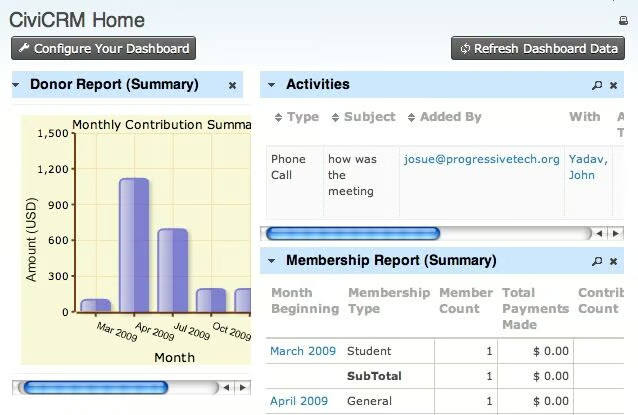
CiviCRM’s donor report summary shows the amount of monthly contributions. (Source: CiviCRM) 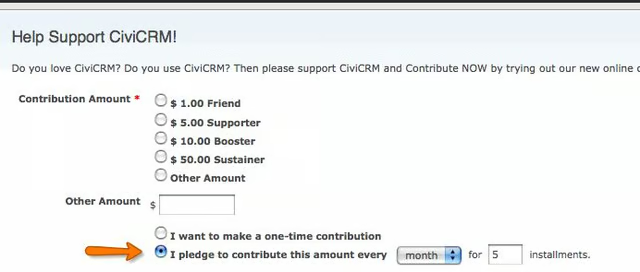
CiviCRM lets you set up, create, and monitor pledges. (Source: CiviCRM)


Our Expert Opinion
CiviCRM is the only open-source CRM on this list, making it a great option for organizations that not only need a free tool but a highly customizable one for their unique needs. Users can configure the data to create no-code forms and add customized data fields. The only catch is that they need a programming background if they want to tailor the system to their internal processes.
Bitrix24: Best for Price for Unlimited Users
When to Use Bitrix24
- You want a free and feature-packed CRM: Bitrix24 is one of the best CRM platforms for small nonprofits because of its free plan. Nonprofits are often strapped financially and need a free option to get rolling. With this platform, an unlimited number of users can manage projects, organize and track donor data, build a fundraising website, and process donations for free.
- You want free website-building tools: Small nonprofits can use Bitrix24’s website-building tools to establish their online presence. It provides users with responsive website design templates for different devices, including mobiles, tablets, and personal computers (PCs). These capabilities are free, alongside project management tools, donor databases, and payment processing.
When to Use an Alternative
- You want a CRM with a simple user interface: Bitrix24 users need to customize the data fields and features to make it applicable to nonprofit operations. As a result, some users, especially beginners, might find the user interface complex.
- Alternative: Neon CRM is the best alternative as it is built specifically for nonprofits and has all the required capabilities, including donor management, for fundraising without configuration requirements. Freshsales is also an excellent choice for a simple-to-use nonprofit CRM.
- You need an industry-specific CRM for nonprofits: Bitrix24 can be used for different industries. As mentioned above, data fields require customization to fit nonprofit organizations.
- Alternatives: Neon CRM, Donor Tools, CiviCRM, and Bloomerang are industry-specific tools for nonprofits. These solutions are equipped with features intended for nonprofit operations.
Bitrix24 CRM Pricing Plan & Overview*
Cost:
- $0 for unlimited users
Key features:
- Task management including recurring tasks, subtasks, and status summary
- Deal management including unlimited leads, deals, and contacts
- File sharing within the platform
- Simple visual website builder
- Websites for marketing teams
Cost:
- $49 for five users
Key features:
- Everything included under the Free plan
- Unlimited invoices
- Easy-to-use, mobile- and desktop-friendly online store
- Online store including tools for product management and payment processing
- Sales and marketing automation
Cost:
- $99 for 50 users
Key features:
- Everything included under the Basic plan
- Marketing features such as customer segmentation, bulk email, and messenger integrations
- Segment-based marketing
- CRM.payment and delivery
- Collaborative editing of online documents
- Convert estimates to deals and invoices
- Calendar event planner
Cost:
- $199 for 100 users
Key features:
- Everything included in the Professional plan
- Sales intelligence including customer journey, traffic, and keyword analysis
*Pricing is based on annual billing on a per-month breakdown. Paid plans offer a 15- to 30-day free trial. Monthly billing is available for a higher cost, and a two-year contract for a lower cost. An Enterprise plan is also available at a higher price, suitable for 250 users. While we update pricing information regularly, we encourage our readers to check current pricing.
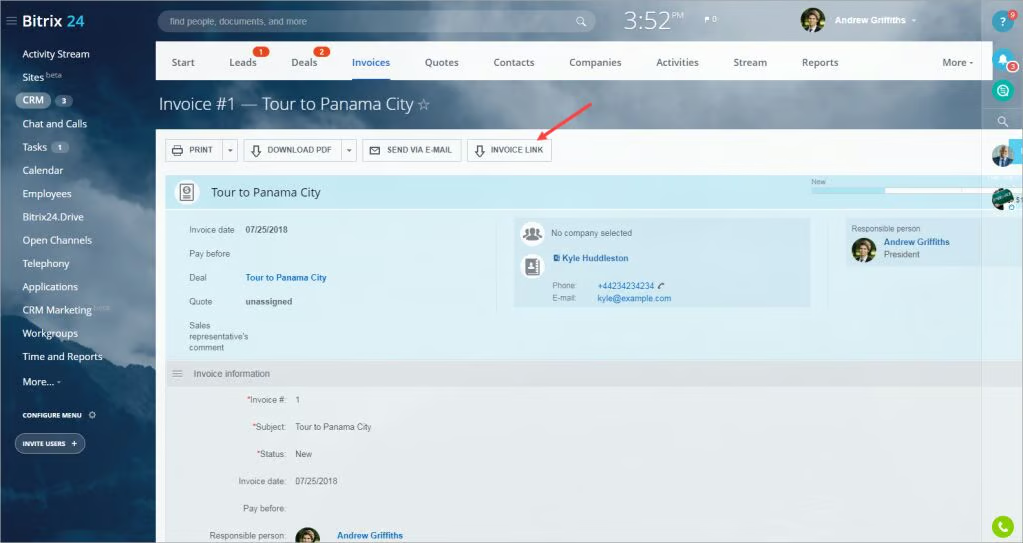
Bitrix24’s new Invoice Link tab for donations’ online payment option. (Source: Bitrix24) 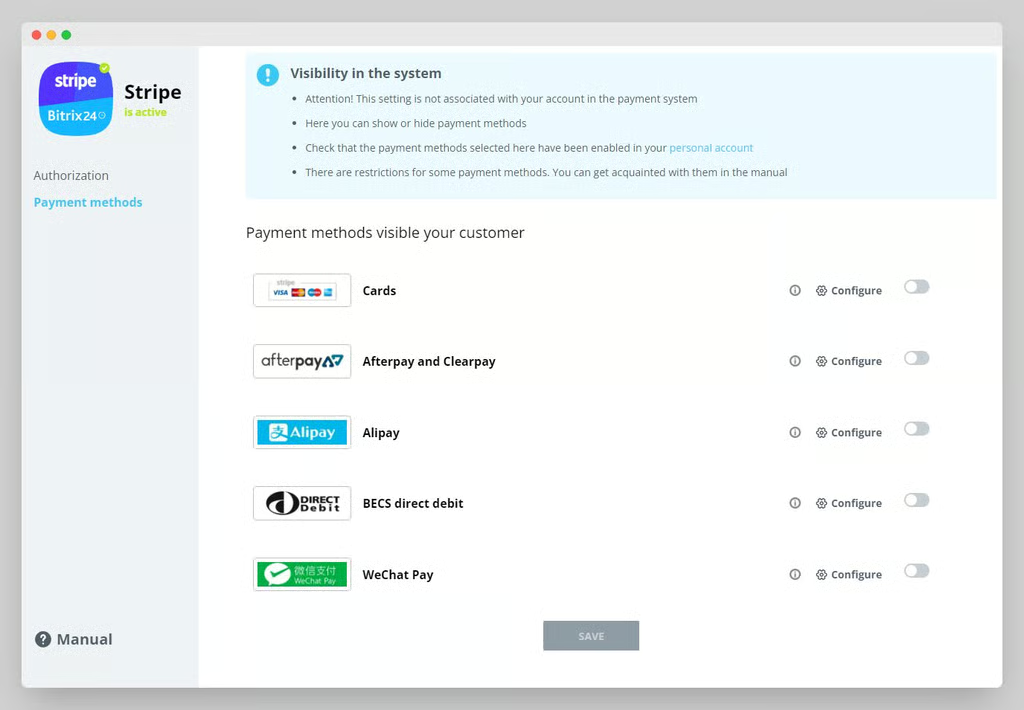
Bitrix24’s integration with Stripe can be used to process donations. (Source: Bitrix24)


Our Expert Opinion
Bitrix24 is a free, feature-packed CRM that offers fundamental features like contact and task management, a website builder, and calendar management. However, it has no nonprofit-specific features, such as donation and fundraising event management tools. Still, if you need basic CRM functions like keeping tabs on tasks and donor contacts, Bitrix24 is a good option.
Freshsales: Best for In-app Calling and Analytics
When to Use Freshsales
- You need an advanced in-app caller: Many nonprofits need to directly engage with key donors and sponsors on a personal level to keep their contributions up. For that, Freshsales has an excellent built-in phone system, including core components such as placing and receiving calls. It also comes with call logging, queue management, call routing, and warm transfer, giving users context before a call is routed to them.
- You need an all-around and user-friendly CRM: Freshsales is a general-use CRM with contact management, deal tracking, and email communication tools. The system is easy to navigate for users at any technical skill level.
When to Use an Alternative
- You want a CRM specifically designed for nonprofit organizations: Because it’s a general-use CRM system, users must custom-design the fields and modules to make Freshsales into a nonprofit CRM.
- Alternatives: Neon CRM is a great alternative for teams looking to invest directly in a ready-to-use, nonprofit CRM system. Donor Tools, CiviCRM, and Bloomerang are also industry-specific tools with capabilities like donor scoring and event planning useful for nonprofit operations.
- You want a CRM for nonprofits with a payment processing feature: Freshsales doesn’t have direct tools to collect and process donations. This can be a downside for nonprofit or civic organizations needing to process donations quickly on one platform.
- Alternatives: HubSpot and Bitrix24 are excellent general-use CRMs that nonprofits can use to process payments or donations. Donor Tools, an industry-specific CRM for nonprofits is also a great choice.
Freshsales Pricing Plan & Overview*
Cost:
- $0 for three users
Key features:
- Contact and account management with contact lifestyle changes
- Custom fields
- Deal management
- Data import and export with a CRM migration
- Email templates
- Built-in phone with inbound caller ID
- Chat widget for ecommerce website
- AI chatbot with pretrained answers and intent capture
- Chat dashboard
- Mobile app
Cost:
- $9 per user
Key features:
- Everything in Free
- Ability to record tags for contacts, accounts, and deals
- Access to third-party CRM integrations
- Expanded communications including text, chatbot, and email
- Integrated communications using Facebook Messenger, WhatsApp, Apple Business Chat, and Google Business Messages
- Product catalog
- Quote and invoice generation
- Automated CRM workflows
- AI chatbot builder to auto-engage prospects and generate leads
- Lead scoring through Freddy AI
Cost:
- $39 per user
Key features:
- Everything in Growth
- Contact and lead scoring
- Multiple sales pipelines
- Automated contact, lead, and account assignment
- Option for teams to book meetings directly from live chat
- Automated workflows with time-based triggers
- Freddy AI for deal insights
- Smart Matches data duplication powered by Freddy AI
- Sales forecasting
- Multicurrency support
Cost:
- $59 per seat
Key features:
- Everything in Pro
- AI forecasting insights that predict deals to commit to a forecast
- Automated profile enrichment
- Customizable modules or apps within the CRM
*Pricing is based on annual billing on a per-month breakdown. Paid plans offer a 21-day free trial. Monthly billing is available for a higher cost. While we update pricing information regularly, we encourage our readers to check current pricing.
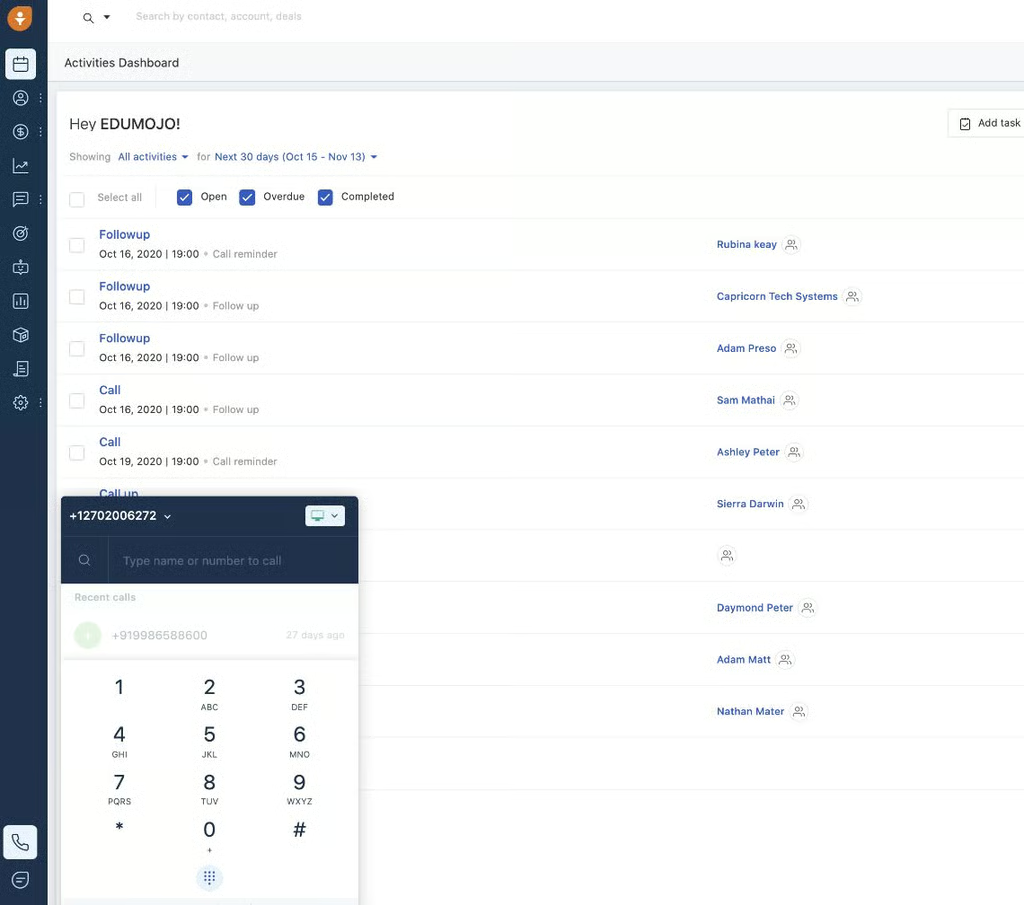
Freshsales’ activities dashboard allows users to take calls. (Source: Freshsales) 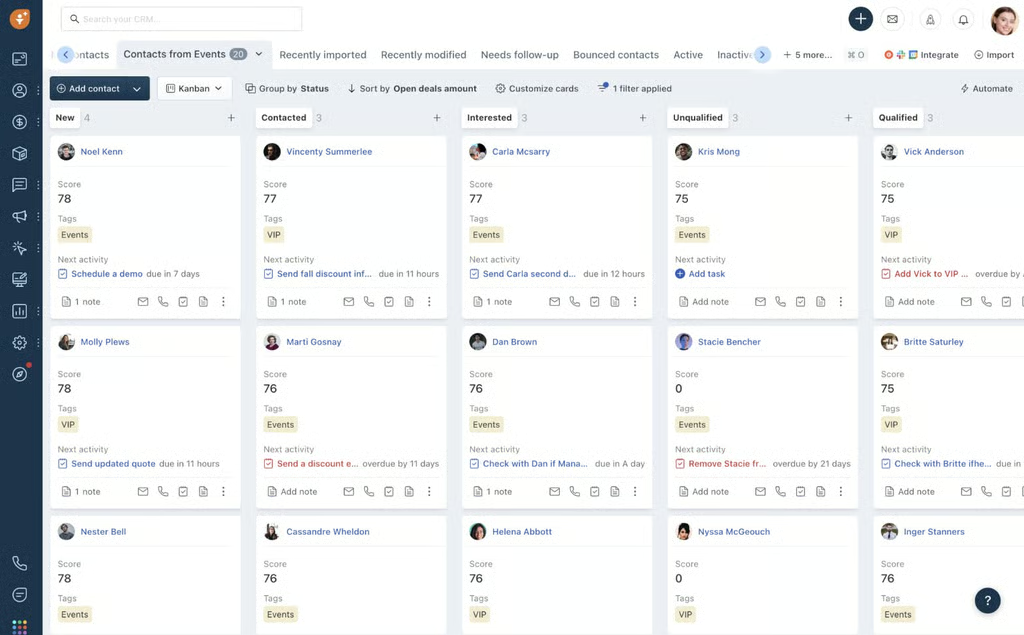
Freshsales lets users manage contacts for fundraising activities. (Source: Freshsales)


Our Expert Opinion
Freshsales is a good choice for users who need to place calls through the system while having access to all vital information about their donors, including viewing their profiles or recording notes based on conversations. Also, Freshsales is one of the most intuitive and all-around CRM solutions. However, it’s more designed as a general-purpose CRM than a nonprofit one.
HubSpot Marketing: Best for Nonprofit Marketing Features
When to Use HubSpot
- You need robust marketing tools: HubSpot is a marketing-heavy platform that enables nonprofits to design and distribute email campaigns, manage online ads, publish social media and blog posts, and host video content from the CRM solution. Plus, they can get higher web traffic and engagement through built-in search engine optimization (SEO) analytics.
- You need a simple CRM tool: HubSpot can be used out of the box and is user-friendly even for beginners. Tools are laid out sensibly in the dashboard, making it easy for users to explore and use the features they need.
When to Use an Alternative
- You need a cheaper basic plan with more automation features: HubSpot provides up to 10 automated actions for form submissions and email automation. These capabilities are crucial in automating donor nurturing. The next tier with more automation is the Professional plan, which provides unlimited automation for $800 for three users monthly.
- Alternative: Freshsales offers 20 basic workflows for automating marketing campaigns. This feature is available in its startup plan, Growth for only $9 per user, monthly.
- You need more affordable custom reporting: While HubSpot offers custom reporting starting in its Professional plan, the cost is more expensive than other providers ($800 for three users, monthly).
- Alternative: Freshsales offers custom or business-specific reports starting in its Pro plan for only $39 per user, monthly. This price is way cheaper than HubSpot’s Professional plan.
HubSpot Marketing Hub Pricing Plan & Overview*
Cost:
- $0 for five users
Key features:
- User option to send up to 2,000 mass emails per month with five email templates and one automated action
- Ads management and custom landing pages for simple audiences
- Simple web form designer plus hosting of up to one blog
- Contact management, and up to one deal pipeline
- Prospects tool to view companies visiting the website plus basic live chat
- Up to one ticket pipeline to manage customer inquiries
Cost:
- $15 per user
Key features:
- Free tools with increased limits, plus:
- User option to remove HubSpot branding from emails, forms, and live chat
- Simple marketing automation
- Email and in-app chat support
- Payments (US only)
- 1,000 marketing contacts included
Cost:
- $15 per user
Key features:
- Marketing Hub Starter, plus:
- Sales Hub Starter
- Service Hub Starter
- Content Hub Starter
- Operations Hub Starter
- 1,000 marketing contacts included
Cost:
- $800 for three users
- $45 per additional user
Key features:
- 2,000 marketing contacts included
- Ads management for up to two contact and company list audiences
- User option to create multilanguage versions of website pages, landing pages, and blog posts
- No HubSpot branding for email marketing materials
- Payment processing for up to 30 currencies
- Tracking of up to 10,000 logged contact interactions
- Omnichannel marketing communications
- Up to 50 connected accounts. 10,000 posts per month; post scheduling up to three years in advance
Cost:
- $3,600 for five users
- $75 per additional user
Key features:
- Up to 300 connected accounts. 10,000 posts per month; post scheduling up to three years in advance
- Email marketing content powered by HubDB tables included
- Up to 500 custom reports
- User option to test up to five landing page variations at a time
- Customer journey analytics
*Pricing is based on annual billing on a per-month breakdown. Monthly billing is available for a higher cost, and a two-year contract for a lower cost. While we update pricing information regularly, we encourage our readers to check current pricing.
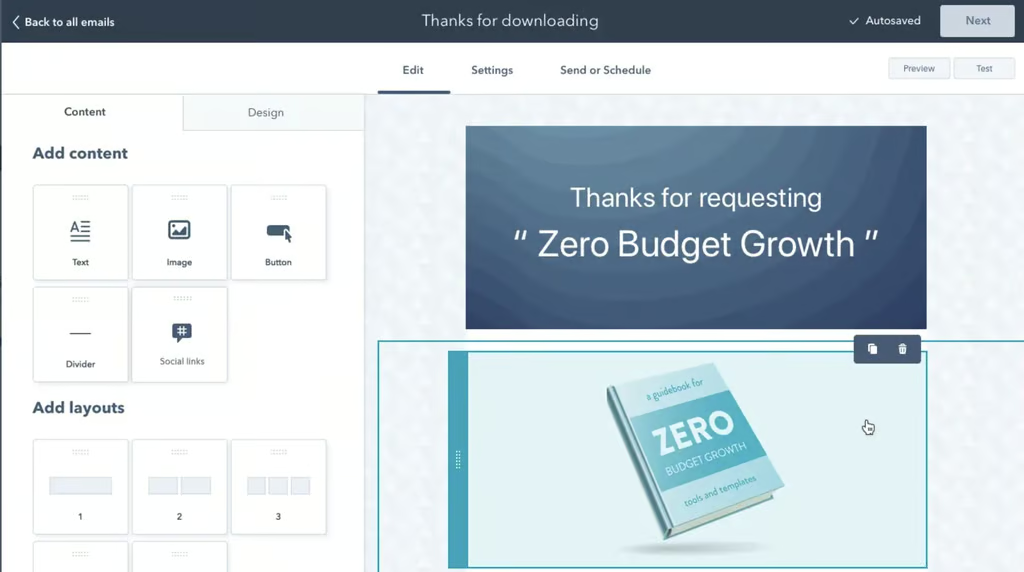
HubSpot users can create fundraising emails for marketing campaigns. (Source: HubSpot) 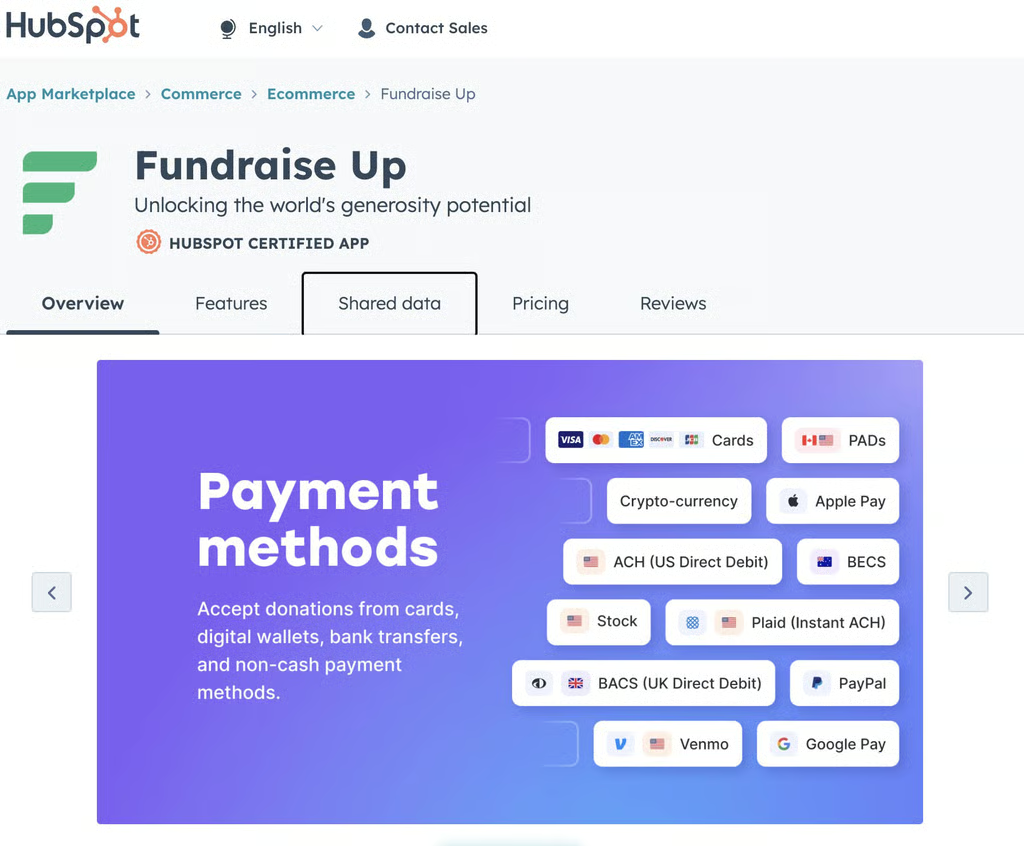
HubSpot and Fundraise Up integration to accept donations via different methods (Source: HubSpot)


Our Expert Opinion
HubSpot is one of the most popular CRM providers in the market—specifically because of its robust free plan and excellent marketing tools. It’s a great option for nonprofits that want to create professional, creative-looking templates for fundraising emails. However, the biggest drawback of HubSpot is its expensive paid subscription plans, which could be steep for small nonprofit organizations.
How We Evaluated the Best CRM Software for Nonprofits
Frequently Asked Questions (FAQs)
What are the best CRMs for nonprofits?
The best nonprofit CRMs include Bloomerang, Neon CRM, Donor Tools, and CiviCRM. These systems are industry-specific and provide helpful donor management features like donor scoring. On the other hand, the general-use CRMs like Bitrix24, Freshsales, and HubSpot also have useful features like event management tools for nonprofits.
Why do nonprofits need a CRM?
Nonprofits need CRM software to manage and analyze their interactions with donors, volunteers, and other stakeholders. It can help automate routine tasks like sending thank-you notes, organizing fundraising campaigns, and managing memberships. It provides valuable insights into the effectiveness of fundraising efforts, donor retention, and outreach campaigns.
Can a CRM tool help nonprofits acquire new donor leads?
Yes. A CRM can help nonprofits get donors by collecting and analyzing data on donor behavior. The best CRMs for nonprofits provide valuable insights into the motivations and preferences of various donor segments. This allows nonprofits to tailor their outreach campaigns and messages accordingly.
Bottom Line
Nonprofit CRM solutions support organizations through premade or customizable modules for fundraising, donor and volunteer management, and marketing outreach tools. While Bloomerang is our top choice for the best nonprofit CRM software, the other products on this list could be better depending on your organization’s usability requirements, feature demands, and tolerance for customizing the platform to your needs.
