






Semrush and Moz are two of the most trusted tools by SEO professionals, including the folks behind the website you’re currently reading. Keyword research, backlinks, and SEO audits are right up our alley, which is why I can say comparing Semrush vs Moz isn’t exactly apples-to-apples.
The biggest difference between Moz and Semrush is that Semrush covers more of the keyword research and analysis, while Moz’s biggest strength is in backlink research, aka finding out the sites linking back to your website.
As a content marketer, I get value out of both: Semrush for keyword research and content planning, and Moz for analyzing how people are finding our website. But if I only had to recommend one, it’d come down to your biggest priorities as a business.
If you’re just starting out building a blog, you’ll likely need Semrush’s content planning and research tools more. Meanwhile, if you already have a blog that isn’t generating the right traffic, leads, or building brand authority, Moz’s backlink research will be helpful.
I put both tools to the test and compared Moz vs Semrush side by side for their keyword research, backlinking, and website audit capabilities. I also looked at what other reviews and comparisons don’t: their local SEO tools, pricing, and overall value for marketing your small business.
- Semrush vs Moz: an overview
- Keyword research and content planning: Semrush
- Backlinking and domain authority building: Moz
- SEO and website audit: Semrush
- Local SEO tools: It’s a tie
- All-around digital marketing usefulness: Semrush
- User-friendliness: Moz
- Moz vs Semrush pricing comparison
- So, which is better: Moz or Semrush? My verdict
- Frequently asked questions (FAQs)
- Bottom line
Semrush vs Moz: an overview
 |  | |
|---|---|---|
| Keyword research and suggestions | ✓ | ✓ |
| Content and technical website audits | ✓ | ✓ |
| Backlink analysis | Uses numbers-focused, graphics-heavy charts to present data | Uses a clear, content-focused breakdown, listing backlink sources and anchor text |
| Content planning and creation | Generates topic and keyword cluster maps | Creates topic clusters, AI-generated SEO content briefs, and blog outlines |
| Local SEO tools | Local listings and reviews management | Local listings and reviews management |
| AI search | Search tracking across SearchGPT, ChatGPT, Perplexity, and Gemini, plus recommendations for AI Overviews | AI Overview tracking |
| Other digital marketing tools | Social media marketing, digital advertising, content planning | None |
| Pros |
|
|
| Cons |
|
|
| Plans | Free plan available, paid plans from $139.95 a month | Free plan available, paid plans from $49 a month |
| Overall score | 4.93/5 | 3.91/5 |
| Visit Semrush | Visit Moz |
Keyword research and content planning: Semrush
| | |
|---|---|---|
| Keyword search volume (SV) and keyword difficulty (KD) | ✓ | ✓ |
| Related keyword suggestions | ✓ | ✓ |
| Keyword intent | ✓ | ✓ |
| Cluster maps | ✓ | ✕ |
| Content brief generator | ✓ | ✕ |
First of all, going with either Semrush or Moz will get you all the best tools for keyword research and content planning. Both can fetch the search volume and keyword difficulty of certain keywords, as well as their top search engine results. They just have different ways of presenting data.
Both can also analyze the keyword’s search intent: informational, navigational, or commercial, and the features that show up in Google search results, like images, local packs (i.e., local search results), and AI overviews.
However, here’s where Semrush gives you that little bit of leverage: It also shows related keywords you can add to your blogs to help them get discovered more easily, as well as their related questions, search volumes, and keyword densities. These give you a more well-rounded view of your topic and help you write more accurate content that has a higher chance of getting found by your target audience.
If you plan on running Google Search Ads, Semrush can also give you an estimate of how much an ad for your keyword will cost per click (CPC). For example, for the keyword “vegan doughnuts,” I can anticipate that placing a search ad can cost an average of $1.19 per click.
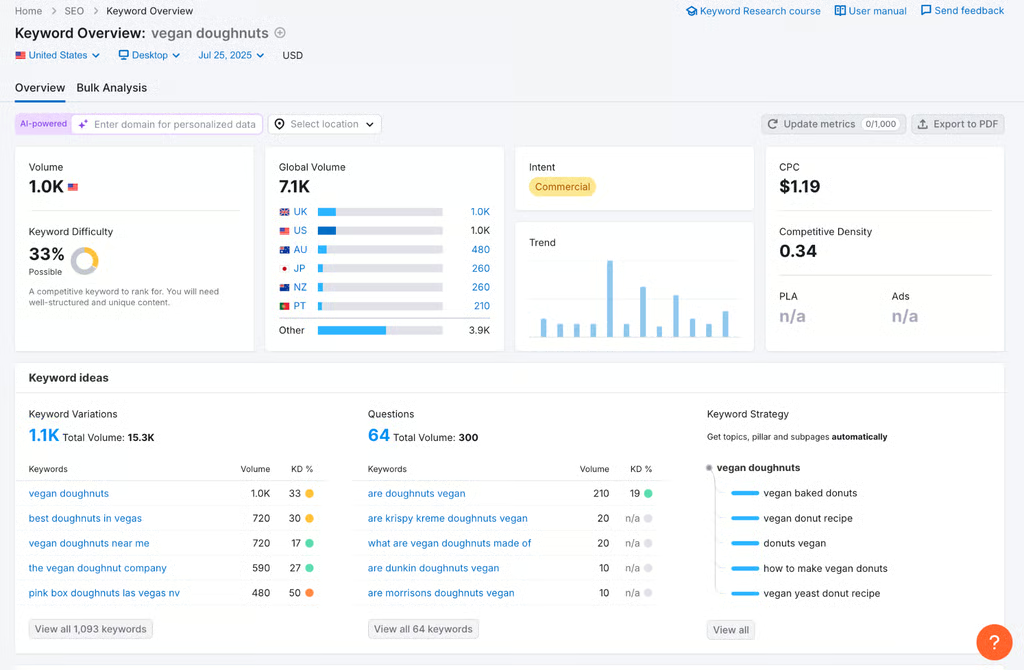
Semrush gives a comprehensive overview of your keyword’s search volumes, keyword densities, and related keywords. (Source: Semrush) 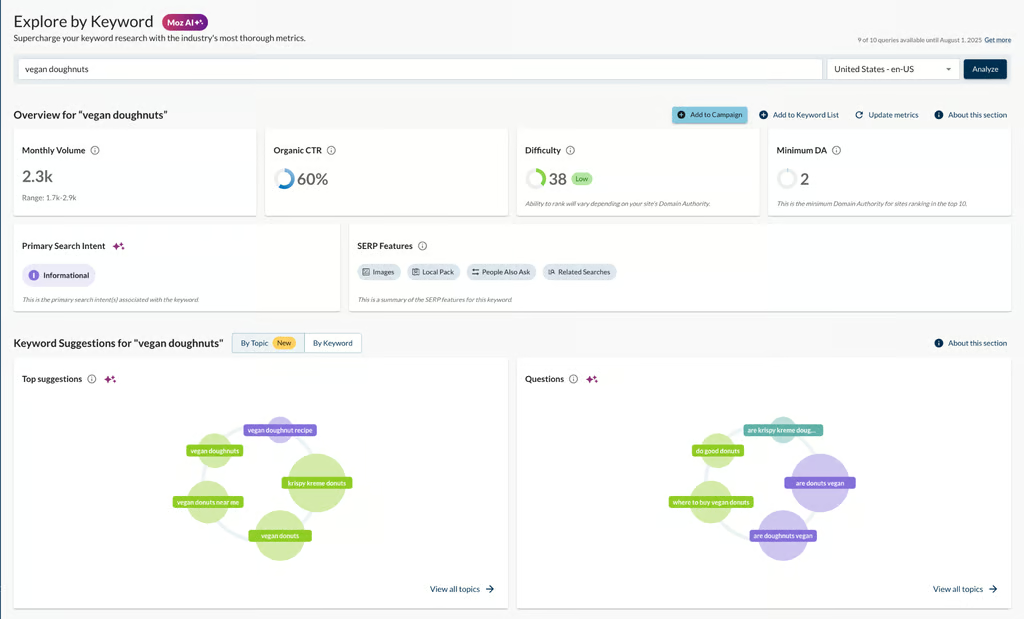
Moz also does keyword analysis, but not as comprehensively. (Source: Moz)


Also, Semrush’s Keyword Strategy Builder automatically creates cluster maps of your keywords to plan content around, with pillar pages and subpillars, which makes content planning a lot easier and more accurate. Moz just doesn’t have that same capability yet.
Semrush also has an SEO writing assistant that checks your work and suggests improvements to rank higher on Google, and for an additional cost, a content drafting tool that generates briefs for blog posts using AI based on SEO best practices.
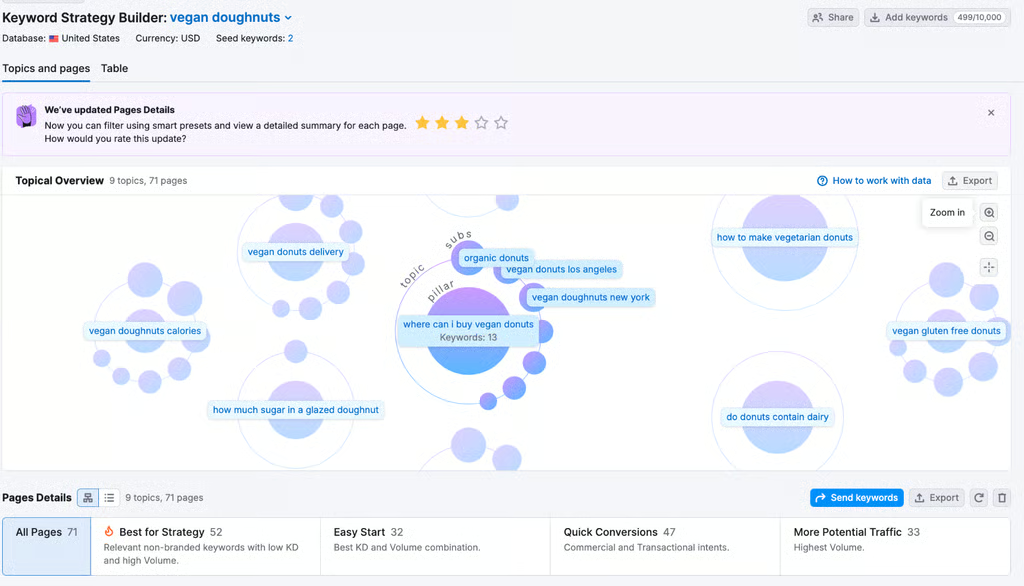
Semrush gives a comprehensive overview of your keyword’s search volumes, keyword densities, and related keywords. (Source: Semrush) -
Moz also does keyword analysis, but not as comprehensively. (Source: Moz)

As a content marketer, both tools are genuinely helpful in writing blog posts more efficiently and accurately, and even if I don’t rely on them 100%, they’re still a good assistant I can reference. The SEO assistant, in particular, is something I use regularly after writing. It helps determine how understandable my work is to readers and the areas I need to fix before publishing.
Backlinking and domain authority building: Moz
| | |
|---|---|---|
| Domain authority score | ✓ | ✓ |
| Identify specific backlinks and anchor texts | ✕ | ✓ |
| Identify backlink formats (text, images, etc.) | ✓ | ✕ |
The next point of comparison between Semrush vs Moz is in backlinking and domain authority analysis, or the tools you need to build a strong, authoritative brand presence via your website. Again, both Semrush and Moz have backlink analysis tools and give you a domain authority score (aka your overall quality score of your website). However, I’m giving this one to Moz because its analysis is just a little more helpful.
While Semrush can give you a high-level overview of your backlink analytics over time, including new and lost backlinks, and your overall domain authority score, Moz actually lists all your site’s backlinks and their anchor text (the text over which those links are placed).
It also shows how many websites are linking to each page — all of which is significantly more useful to me than Semrush’s very numbers-heavy overview when I’m analyzing what’s performing well on a website.
Moz also very helpfully indicates which links are “nofollow,” or don’t indicate to search engines where they come from and therefore aren’t contributing to your SEO performance. Moz also has a unique “Brand Authority” rating, which analyzes your business’s overall authority in your topic area and how well you’re trusted as a source on your specific topic.
However, it doesn’t indicate how exactly it analyzes that, so it’s more guideline than gospel.
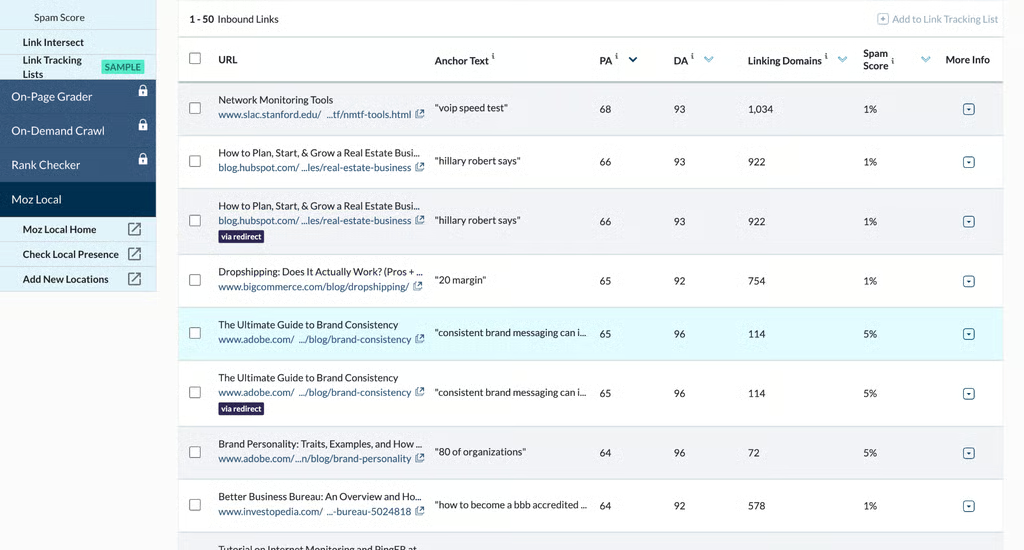
Moz’s standout feature: listing the top backlinks to your website and their anchor text. (Source: Moz) 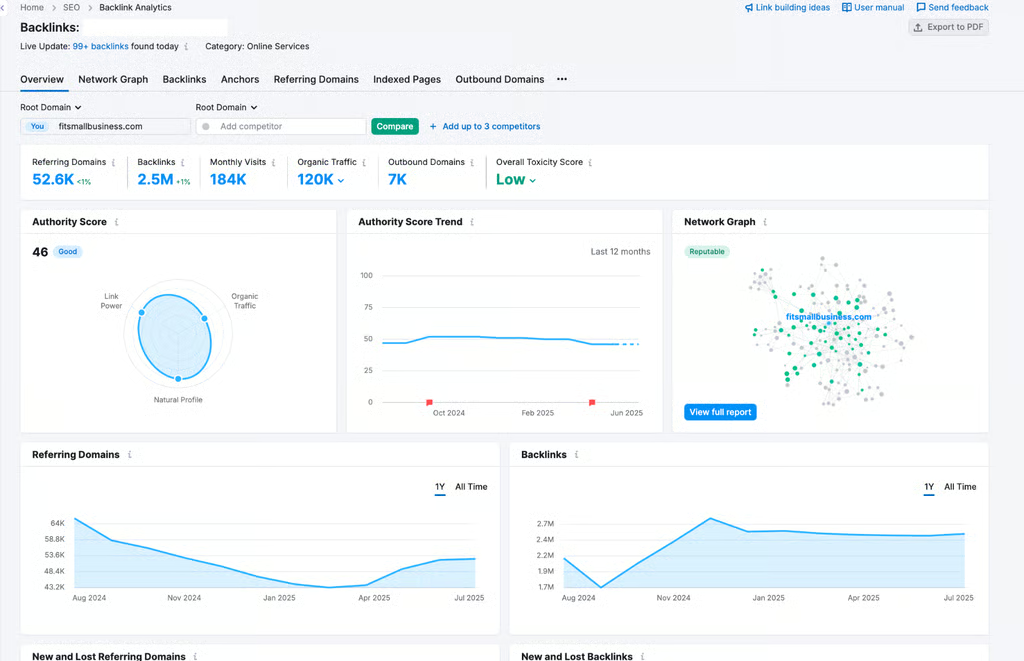
Semrush’s data-heavy backlink overview is … a lot of information and significantly less helpful to me. (Source: Semrush)


Moz can also analyze anchor text and find the top sites they link to from around the web. That way, you can easily see who your main competitors are for certain links. It’s just about as detailed an analysis you’ll get of how people are finding their way to you from other websites.
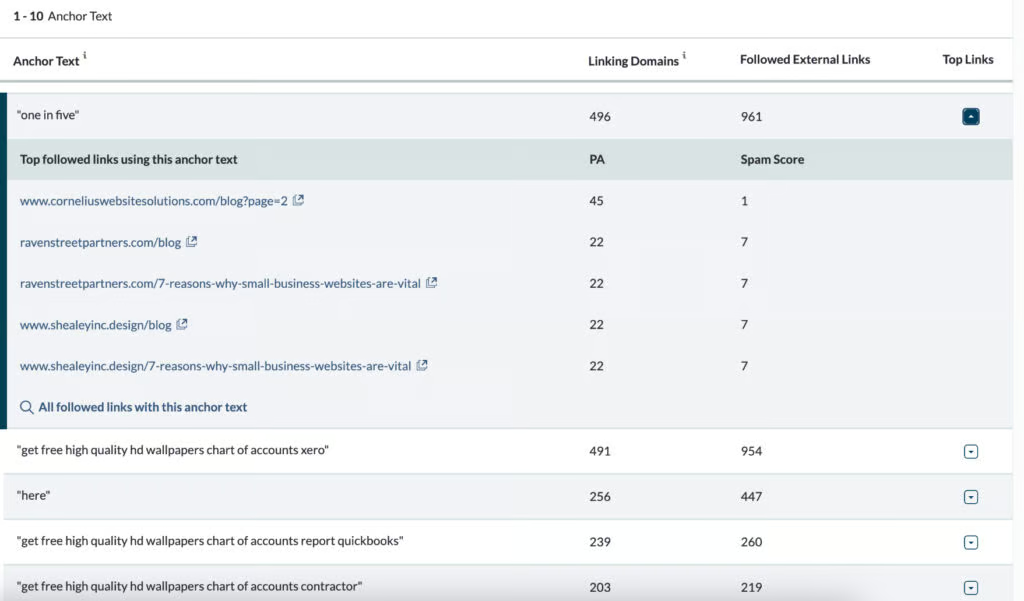
Generally, I find Semrush’s backlink tools more suited to big websites that need regular data reports, but the one chip it has over Moz is its ability to differentiate backlink types, whether text, image, or sign-up form.
It can also categorize the topic areas where the majority of your backlinks are coming from. These are both helpful information, though again, it’s all very high-level data estimates — it doesn’t provide specific details like what images or text were linked.
SEO and website audit: Semrush
| | |
|---|---|---|
| Technical website audit | ✓ | Paid plans only |
| Content or on-page website audit | ✓ | ✓ |
| Audited website pages | Up to 1 million | Up to 3,000 |
Every good SEO tool should be able to conduct a capable website or SEO audit. This evaluation checks the overall health of your website: both its content and technical aspects, like loading speed and site structure. Both are integral to your site’s performance and chances of ranking well in search results.
Semrush and Moz are among the best SEO audit tools and have similar functions in that they can do technical and on-page (content) website audits. However, this is where Semrush’s information overload tendencies work to its benefit.
Every website audit on Semrush is automatically comprehensive, showing your overall site health, performance, average loading speed, and how well your site is indexed or “understood” by Google’s robots, which also affects how well you rank.
But what ultimately gives Semrush the upper hand for SEO and website audits is that it lists the technical issues that need immediate fixing to help you rank higher, including for AI search engines. It also shows how you can fix those errors, whether it’s a quick fix like a broken link or something that’ll take ongoing effort, like writing better titles and meta descriptions on your blog posts.
Moz, on the other hand, does a similar technical website audit. But it can only audit up to 3,000 site pages at most. Also, Moz only does technical website audits. Its content audits are its backlink analysis tools.
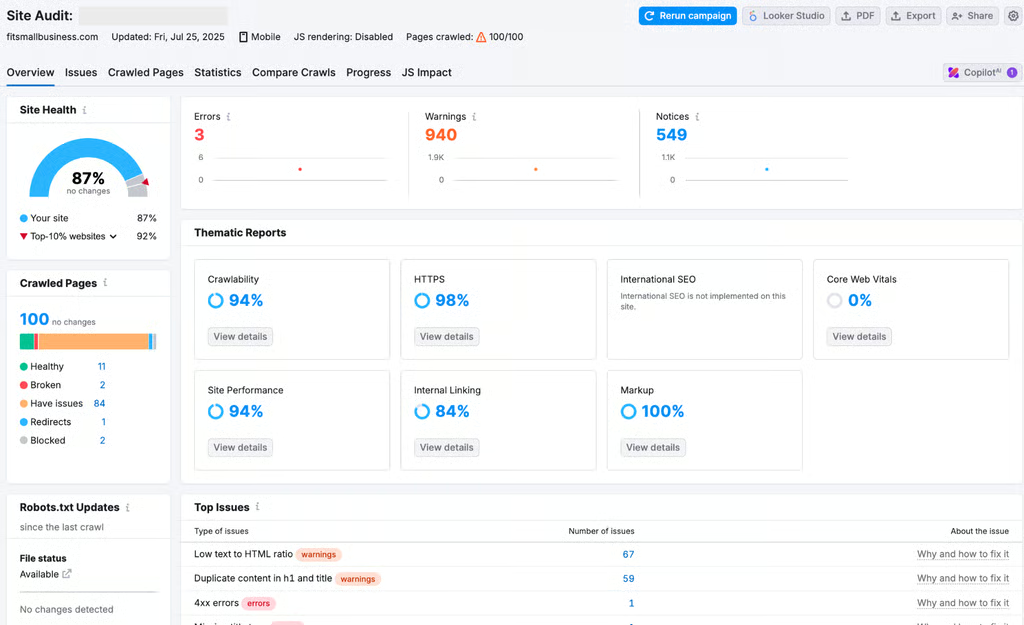
Semrush gives a detailed audit of your website, both its content and technical elements. (Source: Semrush) 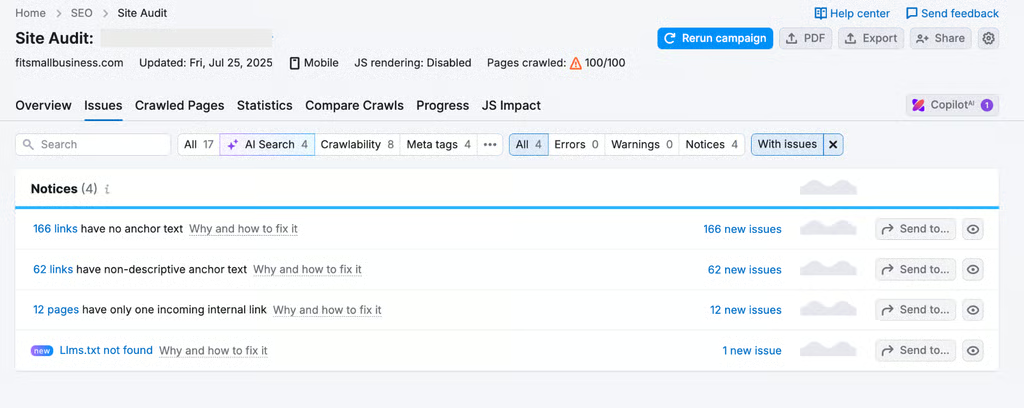
It also suggests improvements to rank higher, including in AI search results. (Source: Semrush)


Local SEO tools: It’s a tie
| | |
|---|---|---|
| Track and auto-sync business listings across Google Business Profile, Yelp, and other databases | ✓ | ✓ |
| Track and manage reviews | ✓ | ✓ |
| AI-generated review response suggestions | ✓ | ✓ |
| Engagement and local ranking analytics | ✓ | ✓ |
This was something I wasn’t expecting: Semrush and Moz are neck-and-neck when it comes to their local SEO tools. These tools help your business get discovered by audiences in your area via local listings on directories like Google Business Profile and Yelp, and they’re invaluable if you have a brick-and-mortar business.
Each tool can track your business’s profile across all those listings and make sure they’re all synced with the correct information, and help collect and manage reviews from customers on those platforms. They’re also both easy to navigate and have all the necessary reports: how many reviews you’re getting, your average review rating, and your profiles’ engagement.
Where they really differ is in the details: Semrush, as usual, puts a lot of emphasis on super-detailed data, while Moz also lets you manage your social media posts from the same dashboard (Semrush also has this feature, but it requires purchasing a separate toolkit).
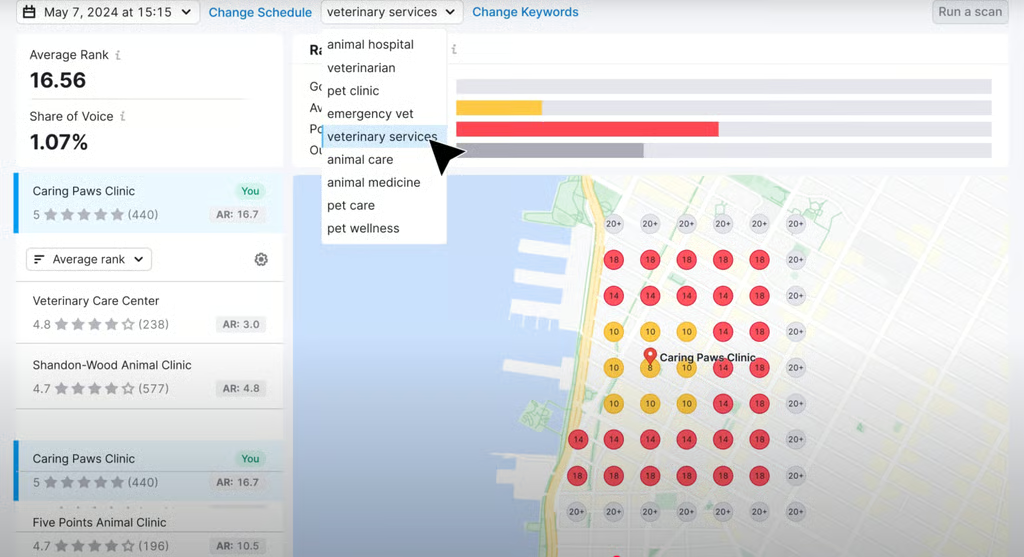
Semrush’s local SEO tools focus on giving detailed reports of your business’s local search rankings. (Source: Semrush) 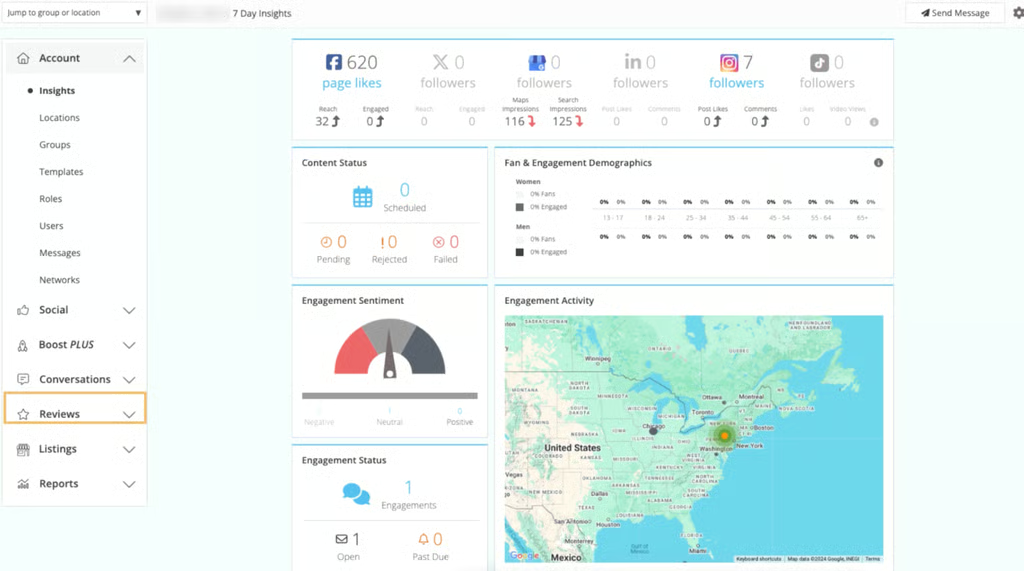
Moz keeps it simpler with everything viewable at a glance. (Source: Moz)


In my view, they have two different audiences. Semrush is better-suited to larger businesses with many local listings to manage, while Moz Pro is handier and more compact, more ideal for busy business owners who need a tool that gets the job done quickly.
So it all comes down to your biggest priorities, ultimately. If you’re keen on analyzing and tracking your local reputation over time, Semrush has more detailed data. But if you want something that does the job well and efficiently, Moz Pro will be the better fit.
All-around digital marketing usefulness: Semrush
| | |
|---|---|---|
| Social media marketing tools | ✓ | ✕ |
| Digital advertising tools | ✓ | ✕ |
| Content marketing tools | ✓ | ✕ |
When I set out to compare Moz vs Semrush, I also wanted to look at them holistically and how they can support your small business’s marketing efforts beyond SEO. By this, I mean tools for social media, email marketing, and even digital advertising. And ultimately, this is another clear case of Semrush having the upper hand.
Ever since its platform update in May 2025, Semrush has been rebranding itself as an all-in-one digital marketing platform, and I’m happy to report that it’s true. It now has tools for posting on social media, setting up digital ads, and even an AI Toolkit to analyze your brand sentiment using AI. It doesn’t have any email marketing tools yet, and each toolkit has its own cost.
So, it’s nearly perfect. I dove into these tools in detail in my Semrush review, which I recommend for a deeper look into its capabilities.
Overall, I can’t say Semrush’s toolkits do anything revolutionary that other similar tools can’t also do, like scheduling social posts and setting up and monitoring ad campaigns. But they do provide the convenience of having them all on the same platform. There’s also the benefit of Semrush’s detailed analytics for measuring your campaigns.
User-friendliness: Moz
Here’s the thing: Neither Moz nor Semrush is a beginner-friendly, learn-everything-in-10-minutes tool. Both will take some time to learn, especially if you’ve never done SEO research before. But if I had to pick just one that’s more suitable for beginners, Moz has the less complicated interface. But that’s also because it has fewer tools, in general.
All of Moz’s tools are neatly labeled on the left-hand panel, and it doesn’t have an overwhelming amount of information. It’s honestly one of its best assets — it gives you only the most essential SEO data and tools, without being overwhelming. I can’t say the same for Semrush.
Even after having used it for a few years, it can still be a lot of data to take in. The platform’s a lot better now than it used to be pre-upgrade, however, with everything helpfully organized into toolkits (i.e., SEO Toolkit, Traffic & Market Toolkit, etc.). With Semrush, there’s just a little more navigating around compared to Moz.
Take, for example, Semrush vs Moz’s keyword suggestion tools. Moz presents its keywords neatly with visual graphs and color-coding for each keyword’s search intent, relevance, and difficulty, while Semrush tends to be heavy on the numbers, which gets a little mind-boggling if, like me, you’re not much of a numbers person and prefer data presented visually.
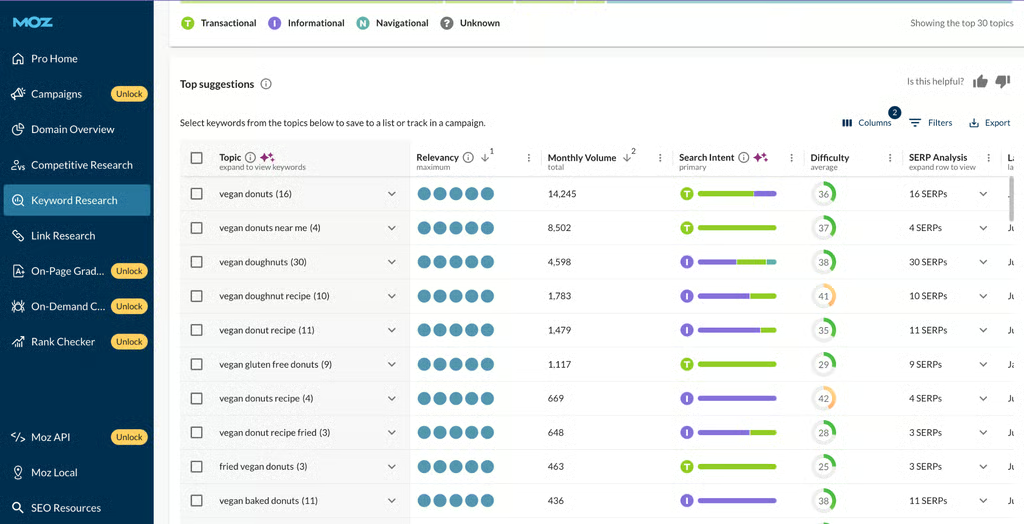
Moz’s data is easy to understand with graphs and color coding. The platform is also clean and neatly organized. (Source: Moz) 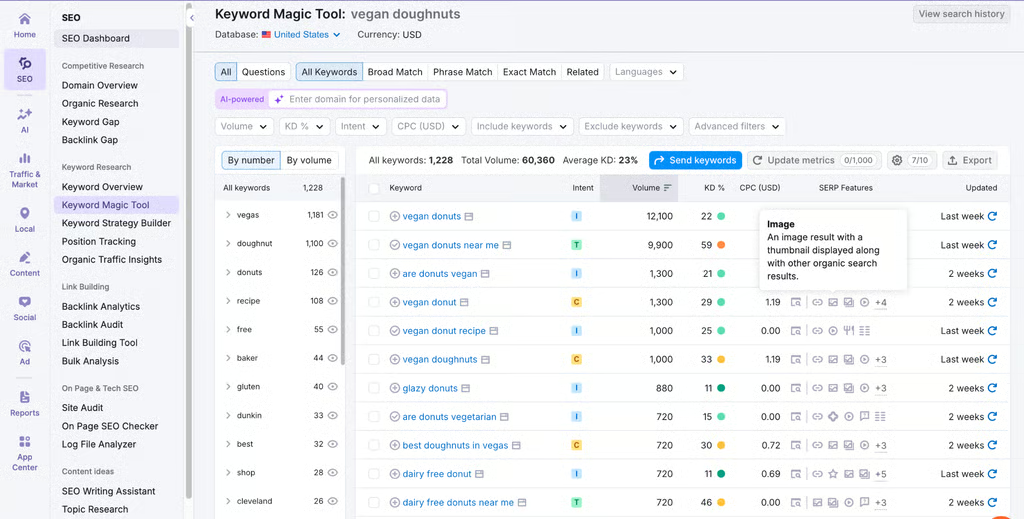
Semrush tends to be more numbers-heavy, but not too bad once you get the hang of it. (Source: Semrush)


Moz vs Semrush pricing comparison
| Pro | Guru | Business | |
|---|---|---|---|
| Cost per month | $139.95 | $249.95 | $499.95 |
| Tracked websites | 5 | 15 | 40 |
| Keyword research | 500 | 1,500 | 5,000 |
| Competitor analysis | ✓ | ✓ | ✓ |
| Backlink analysis | ✓ | ✓ | ✓ |
| Website audit | ✓ | ✓ | ✓ |
| Content marketing tools | ✕ | ✓ | ✓ |
| ChatGPT search tracking | ✕ | ✓ | ✓ |
| Share of Voice tracking | ✕ | ✕ | ✓ |
Note: The prices above are for Semrush’s SEO Toolkit. Other toolkits, like the Traffic & Market Toolkit and Local SEO Toolkit, have separate pricing plans.
| Starter | Standard | Medium | Large | |
|---|---|---|---|---|
| Cost per month | $49 | $99 | $179 | $299 |
| Tracked websites | 1 | 3 | 10 | 25 |
| Tracked keywords | 50 | 300 | 1,500 | 3,000 |
| Keyword research queries per month | 75 | 150 | 5,000 | 15,000 |
| Backlink queries per month | 75 | 5,000 | 20,000 | 70,000 |
| Keyword suggestions | ✓ | ✓ | ✓ | ✓ |
| Brand authority score | ✓ | ✓ | ✓ | ✓ |
| AI Overviews tracking | ✓ | ✓ | ✓ | ✓ |
Semrush and Moz have pretty different pricing structures. First, the good: Both have free-forever plans, although Semrush’s offers more capabilities than Moz. But Moz ultimately has the less expensive paid plans.
Again, this is because both platforms, ultimately, have different levels of complexity. Semrush is a more comprehensive platform with more features and more in-depth analyses, while Moz has just the essentials — nothing more, nothing less.
Another major difference is that Semrush has separate prices for each of its toolkits, while Moz’s plans are all-inclusive of its entire SEO suite.
So, which is better: Moz or Semrush? My verdict
While Moz and Semrush are two of the most well-known SEO tools around, they’re actually pretty different in a few key areas. For one, Moz is exclusively an SEO tool, while Semrush is an all-around digital marketing platform (or at least it’s trying to be).
Moz focuses heavily on on-page SEO and backlinking, while Semrush covers both content and technical SEO. Semrush also does comprehensive data and analysis, while Moz offers just the essentials, focusing on efficiency and getting tasks done over detailed reporting.
I’d choose Semrush if precise, accurate, and detailed data is a top priority for my business, whether for keyword research, checking website traffic, or doing website audits. If you prefer doing your own reporting and analysis, Semrush is definitely the better fit.
It’s also ideal if you have a predominantly online business, like an online store or full-time blog. Semrush can make sure your website is always fully functional and spot any issues before they get worse. It’ll also help your site adapt to AI search engines.
I’d choose Moz if I needed a more beginner-friendly tool. I absolutely recommend it to beginners and businesses that are still growing their online presence. It has just the right amount of keyword analyses and suggestions to get an accurate idea of the topics your audiences are searching for and craft your content strategy accordingly, without bogging you down with too much data.
Moz’s backlinking features are also good guidelines for building up your site’s authority through links from other websites. Its local SEO features will also be handy if you have a physical location and want to attract a local audience.
Frequently asked questions (FAQs)
Is Moz or Semrush better?
Semrush is the better tool for more detailed keyword and website traffic analyses and website audits. It’s also the more comprehensive platform overall, with more features beyond SEO, including digital advertising and social media marketing tools.
Semrush is also more updated to AI search engines and AI Overviews than Moz. However, Moz is the more beginner-friendly tool that doesn’t require as much manual analysis as Semrush. It also has more detailed backlink analyses that show the specific sources and anchor texts of your backlinks.
Is Moz good for SEO?
Moz is particularly good as an SEO tool for analyzing your website’s backlinks. It can list all the backlinks on your website, where they’re coming from, and even the specific anchor texts where they’re linked. It’s also good at analyzing your website’s domain authority and the general theme of Google searches that lead to your website.
It can also do keyword research and website audits, although not as in-depth as Semrush. At most, Moz is a good SEO tool for small and growing websites that only need basic SEO tools or detailed data and reporting.
What is the alternative to Moz?
The best alternative to Moz is Semrush, for more detailed keyword research, website audits, and content planning tools. Semrush is also more advanced and updated to AI search engines, which is one of Moz’s biggest weaknesses. Other alternatives to Moz are SE Ranking, Serpstat, and Ahrefs, all of which have similar keyword research and website auditing tools.
Bottom line
Honestly, Semrush is the tool I use most often, but that’s because I mostly do keyword research to write articles for a large online publication and need to stay on top of AI search engines. But for more in-depth backlink research, or if your business is still in the process of building an online presence, Moz might be the easier tool to start with.
So, there really is no clear “better” option when comparing Semrush vs Moz. While Semrush has more capabilities and deeper insights, they may not always be relevant to your specific needs. It ultimately comes down to your main priorities as a business.
