







Using search engine optimization (SEO) tools to rank higher in turn boosts web traffic, brand awareness, leads, and sales with customers in your area. The best local SEO tools are free or affordable and easy to use. They offer a broad range of features from websites and analytics to site audits, keyword research, social media monitoring, competitor analysis, reviews, listings, locale-based rank trackers, and more. Based on use case, here are our top picks:
- SE Ranking: Most beginner-friendly and affordable all-in-one local SEO tools
- Semrush: Ideal for those looking for the most comprehensive all-in-one solution
- Google Business Profile: A must for placement in Google local search and map results
- Bing Places for Business: Best for getting found in Bing searches
- Local Services Ads: Quickest way for service-based businesses to get into local search results
- Wix: Best website builder for local SEO
- Yoast: Great for ensuring content optimization on WordPress or Shopify
- MobileMoxie: Best free tool for ensuring user experience (UX) across device types
- Dashword: Best AI-powered content brief generator for local SEO
- SpyFu: Best free local SEO keyword tools
- SEOquake: Best Chrome extension for researching competitor or high-ranking URLs
- Keywords Everywhere: Best browser extension to get instant data for keywords in search results
- Podium: Outstanding platform to get customer reviews to increase local rankings
- Moz Local: Best for monitoring online brand reputation
- Yext: Best for enhanced local listings optimized for voice search
- BuzzStream: Best local SEO tools for link-building outreach
- BrightLocal: Top local SEO rank tracker for rankings by neighborhood, city, or region
- LocalFalcon: Best multi-location rank tracker
- Wix QR Code Generator: Excellent free quick response (QR) code maker to increase web traffic
- Synup: Excellent platform for streamlining social media monitoring and management
- Merkle: Multiple free local SEO tools: XML sitemap generator, Schema Markup generator, mobile-friendly test, and location-based search results pages
- Best All-in-one Tools for Local SEO
- Search Engine Tools for Local SEO
- Google Business Profile
- Bing Places for Business
- Local Services Ads
- Best Local Search Optimization Website & Content Tools
- Best Free Local SEO Tools for Keyword & Competitor Research
- SEO Quake
- Best Off-page Local SEO Tools
- Best Local Rank Checkers
- Best Niche Tools for Local SEO
- Synup
- Merkle
- How We Evaluated the Best Local SEO Tools for Small Businesses
- Frequently Asked Questions (FAQs)
- Bottom Line
Best All-in-one Tools for Local SEO
All-in-one platforms with local SEO tools save you time and eliminate the guesswork of where your site ranks locally now and how to rank higher on Google and other search engines. There are several platforms with tools similar to the solutions below, but we chose these based not only on cost (which is a top concern for most small businesses), but also provider reputation and data accuracy.
1. SE Ranking: Most Affordable & Beginner-friendly All-in-one Local SEO Tools
Key Features for Local SEO
- A nearly complete solution for local SEO, including keyword research, site audits, content writing and optimization, backlink monitoring, and competitor benchmarks
- Similar tools as competitors at a more affordable cost—starting under $30 a month
- Training and suggestions provided for local optimization are written with SEO beginners in mind
- Large number of very high customer reviews point to the quality of the platform
New to our lineup of the best local SEO tools as far as an all-in-one solution is SE Ranking. It provides the best combination of essential tools for local search optimization at a more affordable starting price point than competitors like Semrush. However, keep in mind that lower-cost plans restrict the frequency of your tracked keyword rankings, will be updated, and limit your number of projects, reports, tracked backlinks, and so on.
The SE Ranking platform is visually oriented, making navigating all available tools easier. In addition, with your subscription comes an orientation meeting and a question-and-answer session. This makes it a lot easier to understand all the tools available to you and to ensure you can get the data and reports you need to find ways to rank higher in local searches.
We also find its documentation and suggestions to be written with beginners in mind. This makes it easy to learn about local SEO and implement the tactics needed to increase your rankings on Google, Bing, and other search engines.
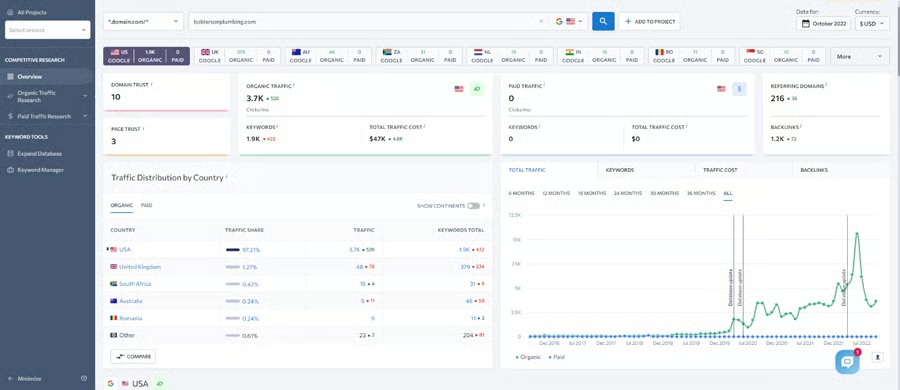
The SE Ranking competitor research dashboard (Source: SE Ranking dashboard) 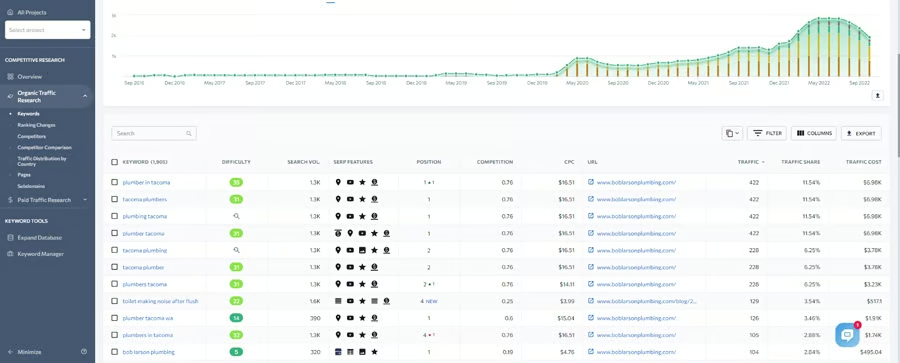
See what keywords your sites or your competitors’ sites rank for and discover opportunities. 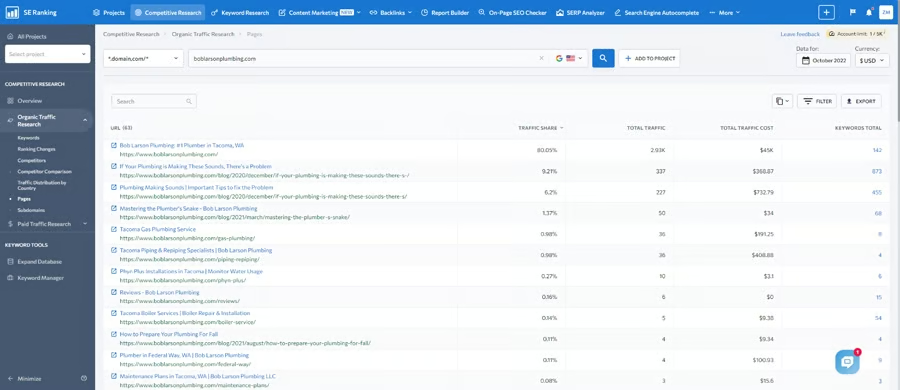
See which pages of your site are working to bring in and convert site visitors.


Local SEO tools on SE ranking include the ability to set up projects. This allows you to create a dashboard with high-level information about your site vs local competitors you want to track. It also has tools to help you find the best local keywords to target with your content and digital ads. Plus, you can enter your target keywords into the SERPs (search engine results pages) analyzer to see what URLs are ranking for keywords you want your site to rank for.
New to SE Ranking are tools for local content marketing, which require an add-on costing $29 to $99 per month, depending on how many articles you plan to publish. You can get a content brief with suggestions, analyze your content to ensure it’s optimized well for local SEO, get a content quality score, and see a list of related keywords to include. There’s also a content idea finder, and coming soon is an artificial intelligence (AI) content writing add-on.
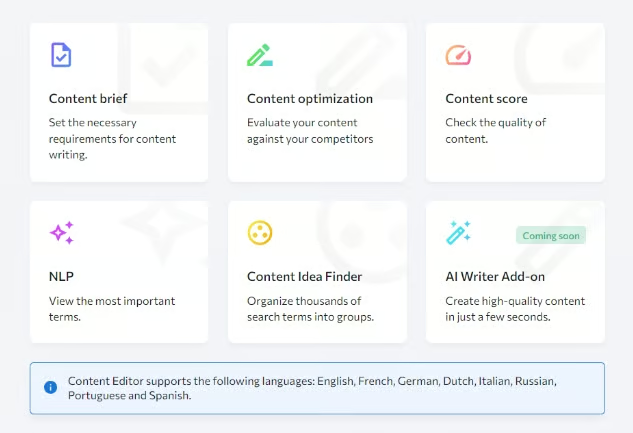
A feature unique to SE Ranking’s content marketing tools is its locale-based results. Tools like Semrush and Dashword generate content ideas and information about top-ranking articles at the national level, but with SE Ranking, you can hone in on city-based results. This allows you to see exactly what people near your business are searching for and tailor your content accordingly.
SE Rankings’ pricing structure is complex, especially compared to the straightforward options offered by competitor Semrush. However, this allows you to choose your own adventure and control your costs, which is how it can offer less expensive pricing that’s more budget-friendly for startups and small operations.
For example, you can get daily ranking checks and pay month-to-month for $49. If you only need to check rankings weekly, you can pay as little as $23.52 per month, billed annually. In the table below, we’ve simplified the structure by showing what your costs will be if you pay monthly.
SE Ranking Pricing & Plans
| Ranking Check Frequency for Tracked Keywords | Weekly | Every 3 Days | Daily |
|---|---|---|---|
| Cost per Month (Monthly Billing) | $29.50 | $65.40 | $143.40 |
| Keywords Tracked | 250 | 1,000 | 2,500 |
| Projects | 10 | Unlimited | Unlimited |
| Website Audit | 30,000 pages | 150,000 pages | 450,000 pages |
| Monitored Backlinks | 4,000 | 20,000 | 60,000 |
| Competitor & Keyword Research | 100 reports/day | 5,000 reports/day | 10,000 reports/day |
| User Seats | 1 | 3 | 10 |
| Marketing Plan | ✓ | ✓ | ✓ |
| Content Marketing Add-on | $29 for 15 articles$49 for 30 articles$99 for 120 articles | $29 for 15 articles$49 for 30 articles$99 for 120 articles | $29 for 15 articles$49 for 30 articles$99 for 120 articles |
| Historical Data | ✕ | ✓ | ✓ |
| APIs* | ✕ | ✕ | ✓ |
*Application program interfaces for automations with third-party apps
If you’re able to pay three, six, nine, or 12 months in advance, you can also save an additional 5% to 20% with any plan. Another way that SE Ranking saves you money vs competitors is by including multiple user seats (three to 10) when you upgrade to a higher plan. Semrush, for example, charges an additional $45 to $100 per extra user seat, depending on your plan.
While less expensive than Semrush, it’s not fully apples to apples. For example, Semrush’s base tier includes 500 tracked keywords vs 250 with SE Ranking, as do plan upgrades. Also, Semrush has features specific to local SEO not found in SE Ranking, like listings and reviews management.
Still, SE Ranking can’t be beaten if you’re looking for a robust set of tools for local SEO that don’t come with an expensive price tag. This opinion is also bolstered by an impressive 4.8 out of 5 rating from over 1,000 customers on G2.com. Try it risk-free with a 14-day free trial, no credit card required.
2. Semrush: Most Comprehensive Local SEO Tools
Key Features for Local SEO
- The most comprehensive local SEO tools for any size business, and highest limits
- Site auditor constantly monitors your site for issues like broken links, spammy backlinks to disavow, and suggestions for improving local SEO
- SEOquake Chrome extension to instantly get site and page-level data for traffic, rankings, backlinks, and more
- Connect and post to social media from the dashboard, including your Google Business Profile
- Listings management available as a low-cost add-on ($20-$40 per month)
Semrush has long offered some of the most comprehensive local SEO tools for content marketing, competitor research, and site auditing. In recent years it has further enriched these features with new tools, such as a content marketing template and SEO writing assistant (for Guru and Business subscribers), a $20 listings management add-on, and broader social media integration.
While some of its tools are similar to SE Ranking, they offer far higher limits in every plan. This makes Semrush the best choice for local SEO tools for advanced users or teams wanting to get the most data points.
For example, at the base tier, Semrush provides 3,000 keyword and competitor reports with 10,000 results each, vs 100 reports with 1,000 results each with SE Ranking. Likewise, Semrush site audits include 100,000 pages in the base tier vs 40,000 with SE Ranking.
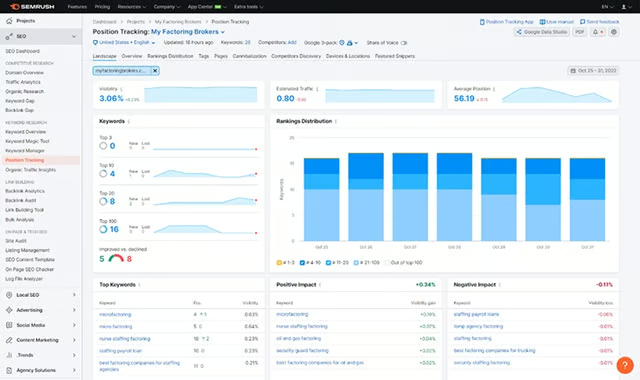
Examples of a ranking position tracking report in Semrush (Source: Semrush) 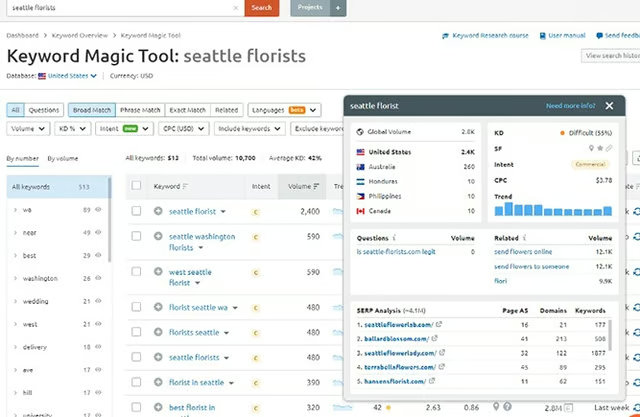
Use Semrush’s Keyword Magic Tool to identify high-volume keywords and see which sites rank highest for them. (Source: Semrush) 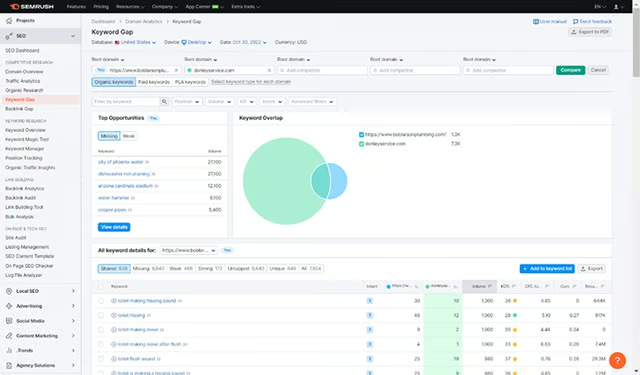
Use keyword gap analysis reports to identify ranking opportunities.


When it comes to local SEO, there’s almost nothing Semrush doesn’t offer. However, some features require higher-tier subscriptions, which may put some tools out of reach for startups and solopreneurs on a limited budget. For instance, while all users can see what keywords a page ranks for, viewing historical data of position changes requires a Guru or Business subscription.
Semrush is a must-have for digital marketing agencies managing local clients’ SEO efforts. You can leverage its tools to create products and services, such as competitor analysis reports, which can offset your costs. For example, competitor gap analysis reports show how each site compares for specific keywords, identifies content that needs improvement, and suggests which keywords you can rank for.
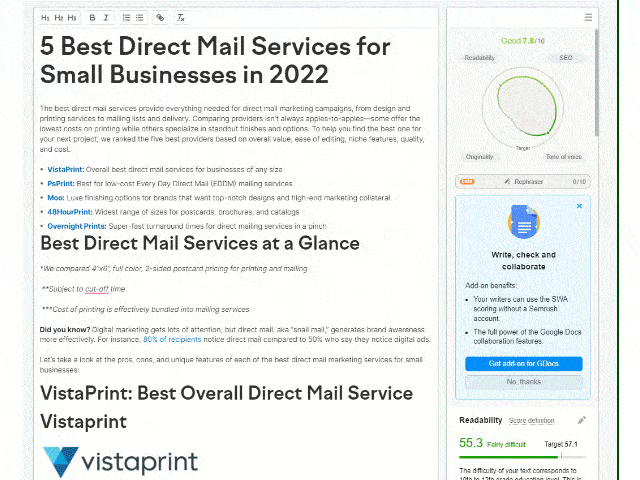
The Semrush Writing Assistant (Guru plan and above) is especially helpful for small businesses using content to drive and convert organic website traffic. You can analyze a URL on your website or cut and paste the text of an article or page you are writing, input your intended keyword, and quickly find out whether the content is local-search optimized or get suggestions for improving it.
Semrush Pricing & Plan Features
| Plan & Features | Free | Pro | Guru | Business |
|---|---|---|---|---|
| Cost per Month (One User)* | $0 | $119.95 | $229.95 | $449 |
| Additional Users per Month | $0 | $45 | $80 | $100 |
| Projects | 0 | 5 | 15 | 40 |
| Scheduled Reports per Month | 0 | 5 | 20 | 50 |
| Social Profiles Monitoring | 0 | 50 | 100 | 300 |
| Domain & Keywords Analytics | 10/day | ✓ | ✓ | ✓ |
| Google Ads History and Performance (Yours & Competitors) | ✕ | ✓ | ✓ | ✓ |
| Content SEO | ✕ | ✕ | ✓ | ✓ |
| Historical Data | ✕ | ✕ | ✓ | ✓ |
| Google Data Studio Integration | ✕ | ✕ | ✓ | ✓ |
| Share of Voice | ✕ | ✕ | ✕ | ✓ |
*Save 17% by paying annually
SE Ranking has plan offerings under $30 per month, which Semrush doesn’t. However, Semrush has a free-forever plan for those needing basic keyword and competitor data to boost local SEO efforts. Also, keep in mind that as you add more features and higher limits to your SE Ranking plan, your cost will be comparable to Semrush’s pre-packaged options.
For the most extensive local SEO marketing tools, Semrush is the powerhouse. While not as cheap as SE Ranking, its features and limits are better. The return on investment can be significant for those wanting to attract leads through local search-optimized content and Google Ads. It’s also an excellent tool for agencies managing the local SEO efforts of multiple clients or wanting to leverage local SEO reports as a product offering.
Search Engine Tools for Local SEO
Top search engines like Google and Bing provide free and paid tools you can access to increase rankings, such as free listings with local SEO citations. The free tools, in particular, are essential for small businesses that want to show up on local search results pages (SERPs) and map-based results. Here are three to consider:
3. Google Business Profile: A Must for Ranking in Google Search & Map Results
Key Features for Local SEO
- Essential for ensuring your site ranks in local search and map results on Google
- Getting Google reviews and engaging with customers via your profile also improves your website’s rankings
- Call history tracks phone calls from customers on Google Search and Maps
- Analytics reports show you how people interact with your profile
A quick check of Google Search Statistics shows that 92% of global search volume is from Google. Because of this, a Google Business Profile (GBP) is an essential local SEO tool for any business that wants to be visible in local search results or map pack results on Google.
With no cost beyond your time, you can easily create a Google Business Profile that shows essential information such as your business address, phone number, website, reviews, photos, and hours of operation. Doing so ensures that your information will be accurate when your site is included in search results.
It also offers more ways to improve SEO, including customer reviews and questions. The more positive reviews you have on Google and the more you engage with people who visit your profile, the more benefit to your optimization efforts.
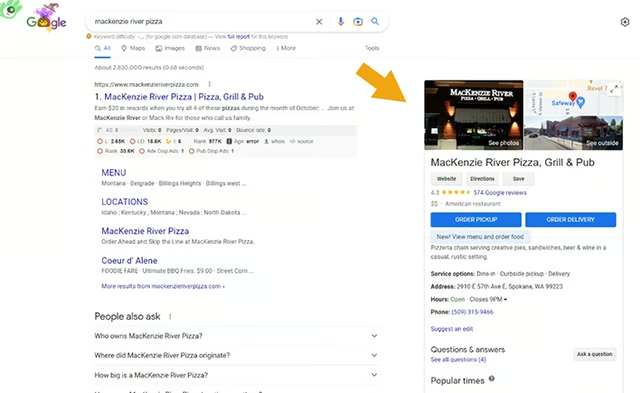
Example of a Google Business Profile in Google search results (Source: Google) 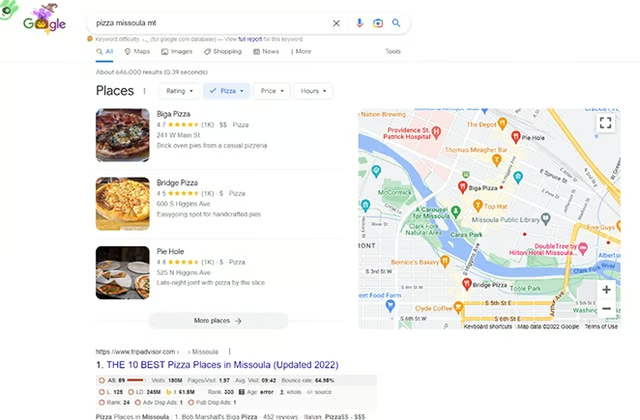
Example of Google map results in search pages (Source: Google)


Once you’ve created a profile and it’s been verified, you can also connect with customers through phone calls or chat messaging. Publish Google Posts to share updates and offer promotions to your customers, or provide announcements like a holiday closure or temporary changes to hours of operation during the holidays. Then, Google My Business Insights allow you to see how customers interact and connect with your brand on Google.
Of course, one of the most important features of GBP is the fact that customers can leave reviews. These reviews show up alongside your Business Profile in Maps and Search, so they can give your small business a big credibility boost without having to spend a lot of money. These features make Google Business Profile one of the best free local SEO tools for small businesses.
4. Bing Places for Business: Best for Getting Found on Bing
Key Features for Local SEO
- Essential for local businesses that want to rank in local search and map results on Bing
- Second-most popular platform for searches after Google
- Ability to capture the attention of niche audiences, such as highly educated or affluent
A Bing Places for Business listing is intended for use by local businesses with a physical location that customers visit. Similar to a Google Business Profile, it provides a free business directory listing for SEO and ensures that your information is accurate when your profile appears in Bing search or map results.
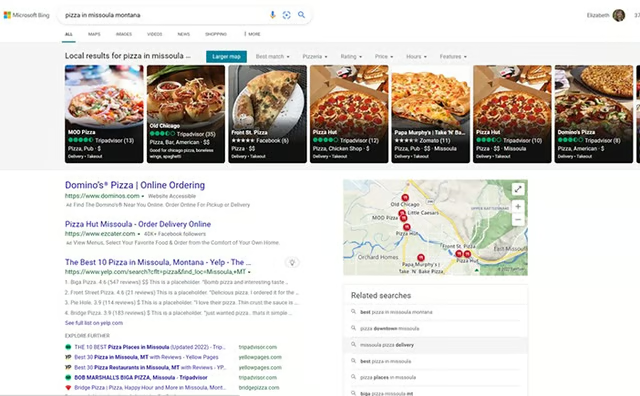
Examples of business listings in local search results on Bing (Source: Bing) 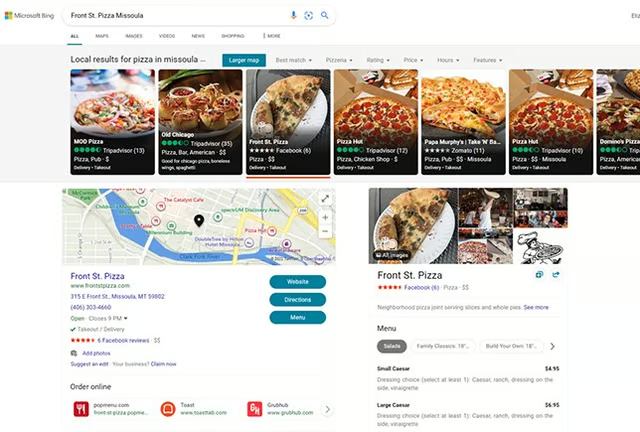
Example of a local business listing in Bing search results


Google and Bing are just two online business listings that can improve your site’s SEO and rankings. See where else to add your business listings in our write-up of more than three dozen online business directories to expand your brand presence online.
Learn how to create your free listing on Bing Places for Business in a few easy steps. Our article walks you through the steps, including instructions to follow if you have 10 locations or more. It also has key stats about Bing Places and Bing search audiences, demonstrating the value of investing your time in this local SEO tool.
5. Local Services Ads: Best Paid Option for Local Service Businesses
Key Features for Local SEO
- An efficient paid option for service-based businesses to connect with local customers at the moment they are ready to buy
While you can use Google or Microsoft Ads to promote your business locally, Google’s Local Services Ads represent a better option for service-based companies. Local Services Ads include trust markers like “Google Guaranteed” (reserved for home-based services) or “Google Screened,” along with your aggregate review rating. All of these increase trust, in turn generating more leads than basic search ads.
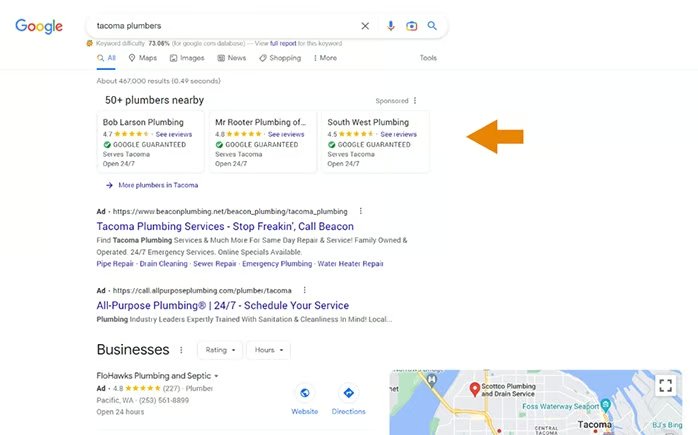
Another way Local Services Ads differ from search ads is the cost basis. With search ads, you pay any time when someone clicks on your listing. With Local Services Ads, you only pay if someone contacts your company through the advertisement. In other words, you pay per lead, not per click. Learn more about the benefits and how to get started with Local Services Ads.
Cost of Local Services Ads
It’s impossible to provide exact pricing for Google’s Local Services Ads. However, you do have control over your budget at all times, and you can pause and restart ads at will. Your cost per lead could be just a few dollars or much higher, depending on the competition for ad placement in search results.
The general consensus is that most advertisers will pay from $5 to $30 per lead. However, as with Google Ads, the cost for industries like legal services are likely to be much higher, with some examples coming in at over $200 per lead.
One way to determine if it’s worthwhile for your industry is to compare the cost per lead to sales metrics, such as your average customer lifetime value (CLV). Since all of these leads are trackable, you can also compare the profits earned on sales produced from ads to determine if it’s cost-effective for your business.
Best Local Search Optimization Website & Content Tools
No discussion of local SEO tools would be complete without talking about tools used to build or optimize your small business website itself. These include both internal website solutions and external tools you can use to ensure a good user experience (UX), content optimization, and get backlinks to build your site’s authority with search engines.
6. Wix: Best Website Builder for Local Search Optimization
Key Features for Local SEO
- All-in-one website builder with the strongest set of search engine optimization features
- Semrush keywords in the dashboard (Semrush free or paid plan required)
- Automatically generates schema and compresses images
- SEO Wiz to guide you and SEO Site Booster in after the first paid tier
A lot of people think they have to use WordPress if they want good local SEO—and for the most part, this used to be true. Today, site builders like Wix are the usually best way to build a small business website. There’s little to no learning curve. Still, integrations and apps can be installed and activated with no more than a click or two, security is built-in, and many offer free plans or trials, giving you a no-risk way to explore the platforms.
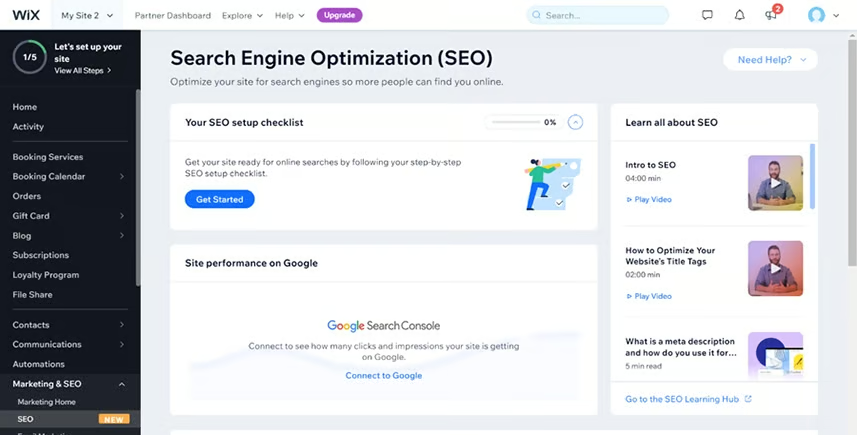
Wix’s SEO Guide walks you through the SEO checklist. (Source: Wix) 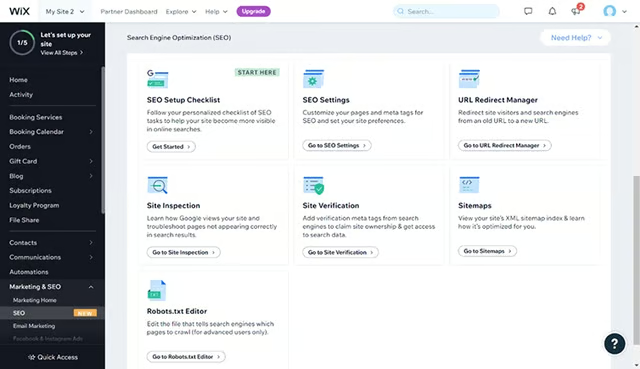
Wix’s suite of SEO tools ensures your site can get found and rank in search results. (Source: Wix) 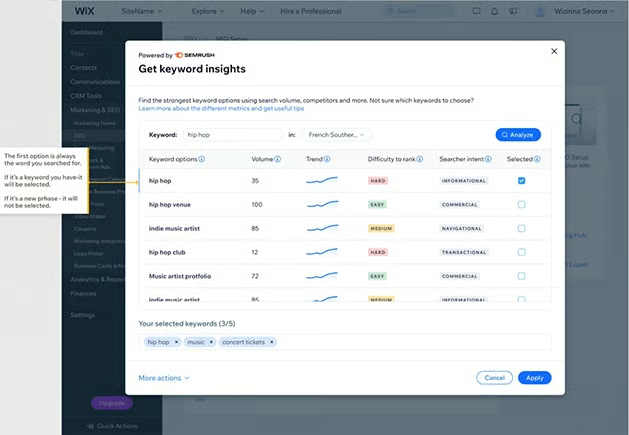
Semrush users can connect their accounts to Wix for instant keyword data. (Source: Semrush)


We reviewed dozens of website builders against about 30 different data points. We conclude that Wix is the best site builder for SEO, including local search engine optimization. In addition to SEO features that ensure site visitor security (free SSL and protection from hackers and malware), it provides automatic image compression (for fast load time) and automatic schema markup (aka structured markup).
On top of these impressive features, Wix and Semrush announced a new partnership. Semrush users can now integrate the platform’s keyword research tools into their Wix dashboards. This means you can create a custom, professional-looking website for your business quickly and easily, including tackling both on-page and technical SEO issues.
Wix Pricing & Plan Features
| Free | Light | Core (Ecommerce) | |
|---|---|---|---|
| Cost per Month* (Annual Billing) | $0 | $16 | $27 |
| Ad-free | ✕ | ✓ | ✓ |
| Free Domain & SSL | ✕ | ✓ | ✓ |
| Storage | 2GB | 2GB | 50GB |
| Video Storage | ✕ | 30 minutes | 5 hours |
| $500 Google Ad Voucher | ✕ | ✕ | ✓ |
| SEO Site Booster | ✕ | ✕ | ✓ |
| Unlimited Ecommerce | ✕ | ✕ | ✓ |
| Abandoned Cart Recovery | ✕ | ✕ | ✓ |
| Tickets & Events | ✕ | ✕ | ✓ |
| Online Ordering | ✕ | ✕ | ✓ |
| Online Bookings & Reservations | ✕ | ✕ | ✓ |
| Social Selling | ✕ | ✕ | ✓ |
*Month-to-month billing is also available for all plans at a slightly higher cost.
Wix is great for local SEO, and it’s one of the best website builders for small businesses overall. Plans are affordable, its tools are intuitive and beginner-friendly, and SEO features are baked in.
7. Yoast: Best Content Optimizer for WordPress & Shopify
Key Features for Local SEO
- Yoast recommendations align with Google’s best practices for local SEO for content marketing
- Features like Google Analytics, Search Console, and Bing Analytics integrations give you even more data to learn from
- Makes it easy to submit an XML sitemap to Search Console for indexing
Yoast SEO is a popular plugin that can be added to your WordPress or Shopify website. At the page or blog article level, it provides instant analysis of the content based on your desired target keyword. Your results will either indicate you have optimized the page well or provide easy-to-implement suggestions that even beginners will have no trouble understanding.
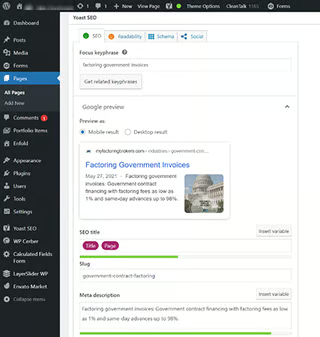
Example of Yoast content analysis for a target keyword 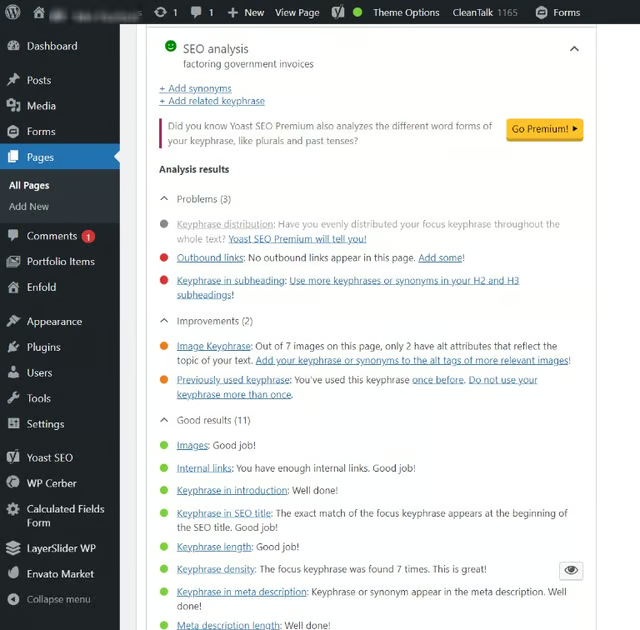
Example of Yoast suggestions to improve optimization 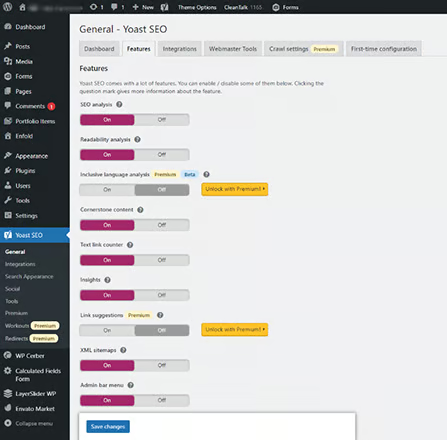
Yoast app interface, including controls for generating an XML sitemap


Opting for a paid plan provides even more local SEO tools you can take advantage of. For example, Yoast Workouts walk you through on-page and technical aspects of optimization that help you rank higher, get more website traffic, and improve your site’s UX. It also includes full access to Yoast SEO Academy to build on what you already know.
Yoast Pricing & Plan Features
| Free (for WordPress) | Yoast for WordPress | Yoast for WooCommerce | Yoast for Shopify | |
|---|---|---|---|---|
| Cost | $0 | $99/year | $79/year | $19/month |
| Keyword Optimization Tools | ✓ | ✓ | ✓ | ✓ |
| Technical SEO Improvements | ✓ | ✓ | ✓ | ✓ |
| XML Sitemaps | ✓ | ✕ | ✕ | ✕ |
| Google, Bing, Yandex & Baidu Integrations | ✓ | ✓ | ✕ | ✕ |
| Auto 404 Page Redirection | ✕ | ✓ | ✕ | ✕ |
| Yoast Workouts | ✕ | ✓ | ✕ | ✕ |
| Orphaned Content Finder | ✕ | ✓ | ✕ | ✕ |
| Internal Linking Tools | ✕ | ✓ | ✕ | ✕ |
| Premium Integrations (e.g., Semrush, Wincher, Zapier, WooCommerce) | ✕ | ✓ | ✕ | ✕ |
In addition to standalone offerings, Yoast saves you money by offering a bundled version for WordPress ecommerce websites using WooCommerce. Or you can go all-in with Yoast’s Plugin Subscription plan for $229 per year and get all five of the plugins they offer, full access to all online training, and updates. Month-to-month billing is also available for this plan at $22.
8. MobileMoxie: Best Free UX Testing Tool
Key Features for Local SEO
- Providing a fast, suitable omnidevice user experience (UX) is a key ranking factor
- Ability to see how your website, landing pages, and individual URLs look on over 50 different types of desktop and mobile devices, including iOS and Android
- Country-aware landing page testing
MobileMoxie is an SEO software platform with tools that enable you to fine-tune your search attribution tracking. It will automatically track your search rankings, landing pages, and mobile apps across over 50 device types and by location. It also offers some tools you can use for free.
Among MobileMoxie’s free local SEO tools are the Page-oscope and SERPerator. The Page-oscope allows you to test mobile landing pages on over 50 iOS and Android devices. See what your site visitor sees when they visit your site, including mobile calls to action and how your conversion pipeline works.
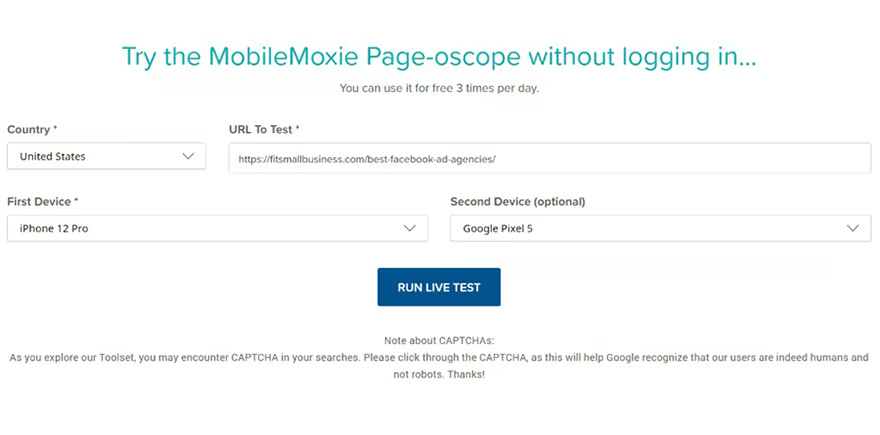
MobileMoxie Page-oscope test interface (Source: MobileMoxie) 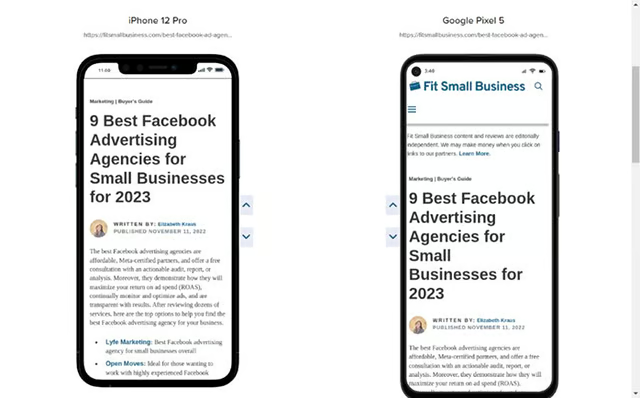
Example of MobileMoxie Page-oscope results


Use the insights to improve the site visitor user experience (UX), ensuring a good experience on every type of device. You can use the Page-oscope up to three times a day for free or get more use with any paid plan.
MobileMoxie’s SERPerator is another local SEO tool you can use for free up to three times daily to check mobile rankings by address. It also provides historical data (for paid plan users) that allows you to go back in time up to three months to see changes in rankings and SERP features like Featured Snippets and Knowledge Graph posts from your Google Business Profile.
MobileMoxie Pricing & Plans
| Solo | Team | Pro | Enterprise | |
|---|---|---|---|---|
| Cost per Month* | $29 | $99 | $299 | $399 |
| SERPerator Tracked Keywords | 20 | 100 | 500 | 500 |
| SERPerator Addresses | 10 | 50 | 200 | 200 |
| Frequency | Weekly | Weekly | Daily | Daily |
| Unlimited Live Tests | ✓ | ✓ | ✓ | ✓ |
| Page-oscope Tracked URLs | 10 | 50 | 100 | 100 |
| Page-oscope Countries Tracked | 1 | 5 | 10 | 10 |
| Page-oscope Devices Tracked | 1 | 5 | All | All |
| Frequency | Weekly | Weekly | Daily | Daily |
| Unlimited Live Tests | ✓ | ✓ | ✓ | ✓ |
*Month-to-month pricing, or save by paying annually
Use MobileMoxie’s Page-oscope to ensure a good site visitor experience by device type. Use SERPerator to see rankings for your target keywords based on a radius from any address you type in. Take advantage of the ability to test these tools for free to see whether a subscription makes sense for your business.
9. Dashword: Best AI-powered NLP Content Brief Generator
Key Features for Local SEO
- Assistance in crafting content writing briefs for content and SEO
- SEO content marketing guidance
- Scoring content against ranking factors (length, readability, keywords) before publishing
- Tracking and monitoring published content to look for low-hanging fruit or shortcomings with your content
While you will find similar tools in both SE Ranking and Semrush, Dashword is the best local SEO tool for those looking for content creation and analysis tools that generate natural language processing (NLP) results. NLP results are significant for local businesses wanting to rank in online mobile searches as well as searches on voice assistants like Siri and Alexa.
Creating NLP content is also an effective way to capture SERP features, like Google snippets. As a bonus, this tool can also help you create content for frequently asked questions (FAQ) pages and chatbot responses, which rely on NLP. It’s also excellent for optimizing product descriptions and social media advertising content if you’re looking for more ways to leverage Dashword.
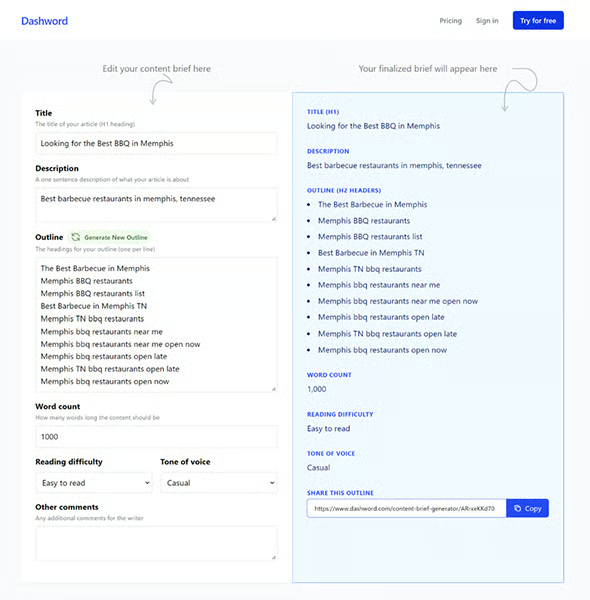
Dashword has a Google Docs add-on that allows you to use the tool while writing content and easily share access with multiple collaborators. Within the tool, you can generate an outline, edit it, and then share it with your writers in minutes.
Note: While artificial intelligence (AI) content generators are impressive, it’s essential to use them correctly. Google’s algorithm can easily detect AI content. Using content generated straight from AI without re-writing it and ensuring the content is high-quality can end up penalizing your website. The best way to use automatic content generators is as a guide to know what is included in the top search engine results and to brainstorm ways to make your article better.
Ideas and competitive research in hand, take this analysis and use it to write an article that deserves a high ranking because it provides unique value to your reader. Google refers to this as “people first content,” and it’s essential for small businesses looking to rank higher in local searches. Learn more in this article on Google Search Essentials.
Dashword Pricing & Plan Features
| Hobby | Startup | Business | |
|---|---|---|---|
| Cost per Month | $39 | $99 | $249 |
| NLP Reports per Month | 5 | 20 | 100 |
| Content Briefs | ✓ | ✓ | ✓ |
| Monitored Content Pages | 5 | 20 | 100 |
| Monitored Traffic Pages | 25 | 100 | 500 |
| User Seats | 3 | 5 | 10 |
| Premium Support | ✕ | ✓ | ✓ |
Dashword is an excellent tool for those wanting a dedicated platform to generate content briefs and monitor and track content over time. It allows you to quickly brainstorm what to include in your content and find ways to improve your existing articles and landing pages over time. Plus, you can test out the content brief generator for free before committing to a plan.
Best Free Local SEO Tools for Keyword & Competitor Research
For small businesses on a tight budget or those just learning the ins and outs of local SEO, free local SEO tools could be the best way to get started. The free tools below were selected because they provide a lot of value that you can use for keyword and competitor research.
10. SpyFu: Best Free Local SEO Tools for Keyword Research
Key Features for Local SEO
- Free unlimited keyword searches
- Excellent tool for competitive research
- Contact data (sales and marketing leads) with paid plans
SpyFu is an all-in-one tool for keyword research, rankings, backlinks, competitor benchmarking, SERP analysis, and more. It’s one of the best free local SEO tools, as you can access nearly everything on the platform in the free version. See which keywords local customers use to find businesses like yours, what types of backlinks can help your site rank higher, and export data for tracking.
It’s worth pointing out that Semrush does have a free plan and offers more comprehensive tools for keyword research (and arguably more accurate data). However, SpyFu offers more access at the free level, making it the best all-in-one local SEO tool for small businesses on a budget.
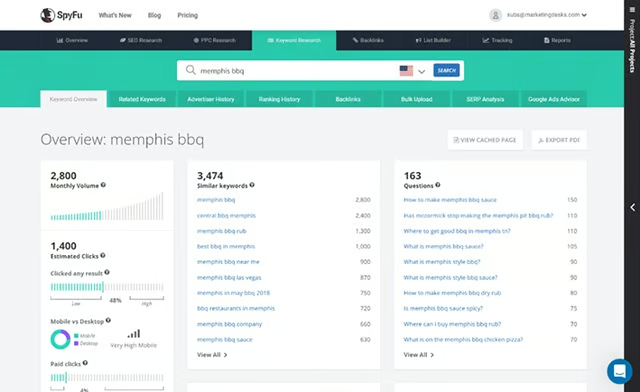
Example of keyword research results in SpyFu (Source: SpyFu) 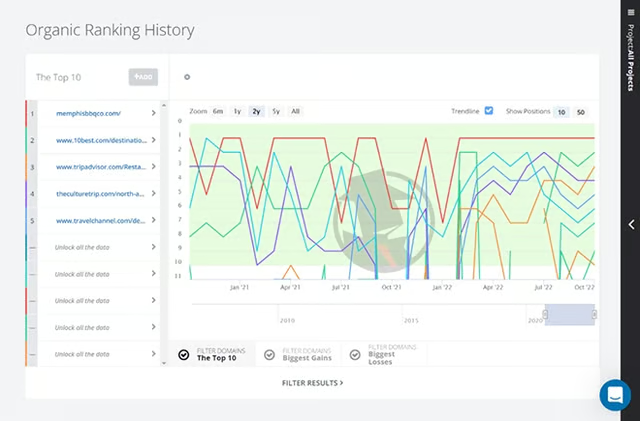
See which sites rank highest in organic search for free on SpyFu 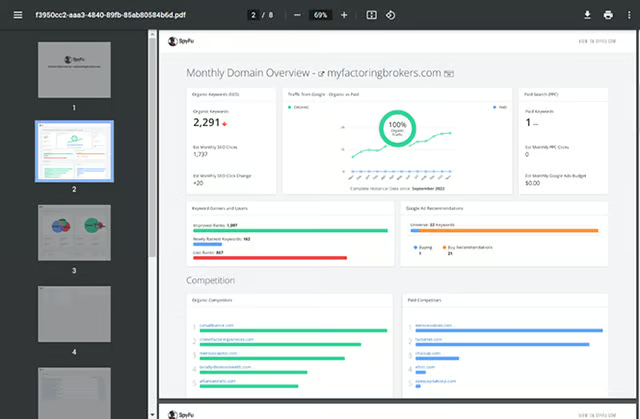
Example of a monthly domain PDF report in SpyFu 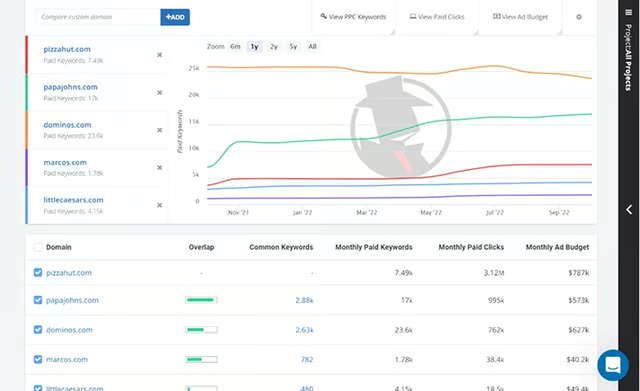
See the keywords your competitors are using in PPC ads, ad budgets, and results


In addition to finding the top local keywords for your website’s content, you can also find the keywords to use in your pay-per-click (PPC) ads on Google and social media. Plus, you’ll be able to see what keywords your competitors use in their ads and which ads are most effective.
Upgrade to a paid plan to automate tracking for rankings and keywords and get more data in your results for keywords, top-ranking sites, and more. Paid plans also provide you with contact information of potential prospects or domain contacts to help with link building.
SpyFu Pricing & Plan Features
| Free | Basic | Professional | Team | |
|---|---|---|---|---|
| Cost per Month* | $0 | $16 | $36 | $149 |
| Search Results | 5 rows | 10,000 rows | Unlimited | Unlimited |
| Data Exports | 10 rows | 10,000 rows | Unlimited | Unlimited |
| Domain PDF Reports | 1 at a time | 100 | Unlimited | Unlimited |
| Historical Data | ✕ | 6 months | 10+ years | 10+ years |
| Sales Leads & Domain Contacts | ✕ | 250 | 500 | 2,000 |
| Weekly Tracked Keyword Rankings | ✕ | 5,000 | 15,000 | 40,000 |
| API Access | ✕ | ✕ | ✓ | ✓ |
| Custom Reports | ✕ | ✕ | ✓ | ✓ |
| User Seats | 1 | 1 | 1 | 5 |
*Monthly billing is also available for $39, $39, or $299 per month, respectively.
SpyFu is a solid option for small businesses looking for an affordable, all-in-one solution for improving local SEO. Keep in mind, it’s not nearly as comprehensive as Semrush or SE Ranking, and only provides data for two countries. Still, it offers the ability to get a lot of local SEO data on competitors, in particular, starting in the free version, so there’s no risk in trying it out to see if it’s right for your business.
11. SeoQuake: Best Free Chrome Extension for Quick URL Insights
Key Features for Local SEO
- Chrome extension for instant data about any site or URL’s traffic, backlinks, keywords, and more while you’re on the page
- Quickly research competitors websites or URLs that are ranking well for your target keywords for insights and statistics (while surfing the web)
- Check your site’s pages to ensure they are entirely local SEO-friendly
SeoQuake is a free Chrome extension you can use to get instant information about any website or web page URL while surfing the internet. Semrush powers it, so you must create a free Semrush account to use it (or subscribe to a paid plan).
Once installed, simply click on the SeoQuake favicon in the extensions (top right menu bar of your Chrome browser, see below). A pop-up will instantly appear with domain information such as traffic, number of pages indexed, number of backlinks, and additional tabs for more information.
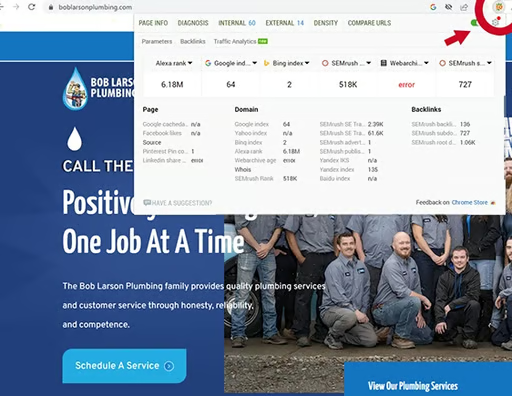
Example of data provided for any URL by SEOquake (Source: SEOquake and Semrush) 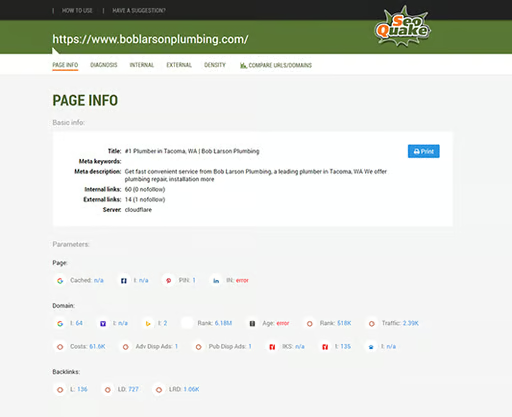
Page-level data on SEOquake 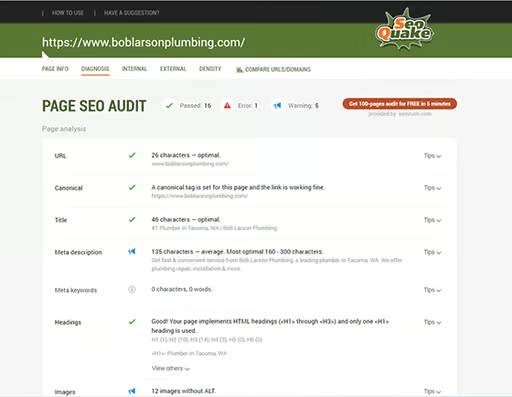
Site and page health statistics for local optimization on SEOquake 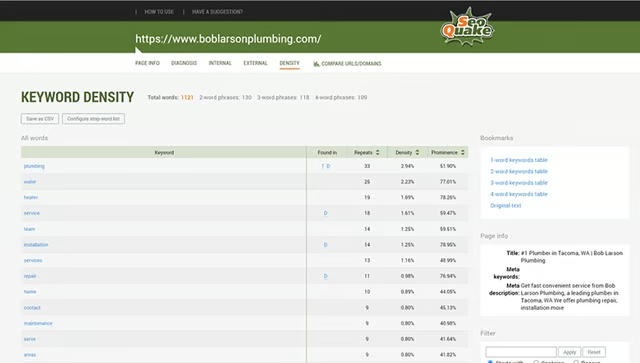
Keyword density analysis of a URL on SEOquake


You can also dial down into metrics for any URL. Clicking on “PAGE INFO” opens up a new tab on your browser and shows page-level data, including keywords used on the page. “DIAGNOSIS” provides an SEO audit report for the page, “INTERNAL” and “EXTERNAL” show link-related details, and “DENSITY” gives you a more focused look into the keywords used as well as the page’s title and meta description.
There are a few different ways you can use this data. You can use it to research the URLs that rank highest for your target keywords or to research competitors’ sites (or determine which competitor sites to use as benchmarks). You can also use the tools to check pages on your own site and ensure you’re doing all you can to boost local SEO rankings and traffic—and did we mention it’s free?
12. Keywords Everywhere: Best Extension-based SERP Insights & Discovery Tools
Key Features for Local SEO
- Getting keyword ideas and metrics while on SERPs pages
- Seeing what sites are ranking for your target keywords, and getting info about their domains
Keywords Everywhere is a freemium extension available for both Chrome and Firefox web browsers. You can use the tool for free, forever, to access a ton of data about keywords on Google Search and in Search Console, or buy credits to enrich the data provided.
The extension offers instant access to keyword data while you are on search pages for specific keywords. This makes it easy to find keyword variants, and there’s a long-tail keyword finder to help you find location-based alternatives. It’s also country-specific, so you can tailor your results based on where your customers are searching from.
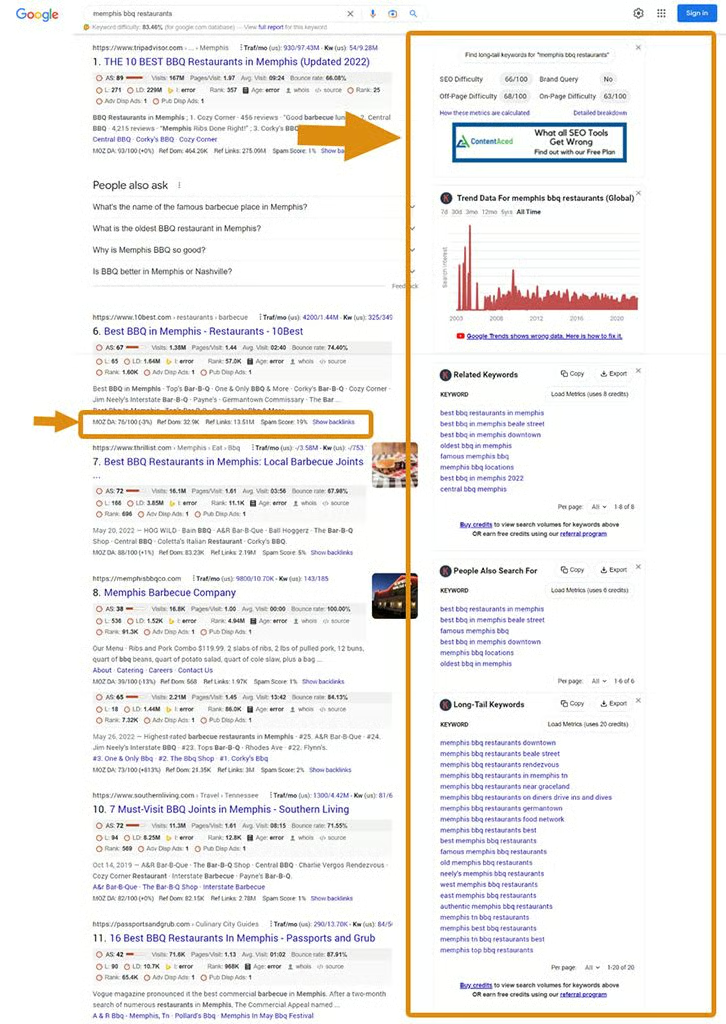
The main difference between the paid and free versions of Keywords Everywhere is that paid users get access to data on search volumes, pay-per-click cost averages, ranking difficulty, and keyword trends. The video below explains what’s included in each and shows you how to use it on Google, YouTube, and Amazon.
Both versions work across a variety of sites, including Google’s search pages, Search Console, Analytics, and on YouTube. In addition, ecommerce sellers on Amazon can see keyword data while searching on that platform, as can Etsy and Instagram users. And it works on Bing and DuckDuckGo. See the complete list of where you can use this tool on the “Start Here” page.
Once generated, you can export the data with any plan. You can also click the star to add a keyword to your favorites list. Plus, get page-level data on any URL, and pull domain authority scores and data from MOZ (into search results).
Keywords Everywhere Pricing (1 Keyword = 1 Credit)
| Cost | Credits |
|---|---|
| $10 | 100,000 |
| $50 | 500,000 |
| $100 | 1,000,000 |
| $200 | 2,000,000 |
| $500 | 5,000,000 |
| $100 | 10,000,000 |
While one keyword = one credit, this isn’t to say that each search will only cost you one credit. For example, if you search on Google for a specific key phrase and the results include 10 “people also ask” questions, 10 long-tail keywords, and 10 related keywords, you’ll use 31 credits—one for the initial search and 10 each for the additional results provided in each of the widgets.
Searching a single keyword on Amazon or YouTube will only cost a credit each, as the additional widgets shown on SERP pages don’t appear on these sites. Using the tool while on Search Console can eat up credits quickly; if 250 results are shown on the page, 250 credits will be used. There’s also a bulk analyzer version, so for example, if you uploaded 1,000 keywords, getting the report back would cost 1,000 credits.
Using Keywords Everywhere for free may be enough for small businesses that are just looking for content and competitor keyword ideas. With that said, the average paid user spend is only about $10 per year. There’s no risk to trying it since you can use the Chrome or Firefox extension for free to evaluate whether the search engine results pages (SERPs) and URL-level data are worth it.
Best Off-page Local SEO Tools
Off-page local SEO tools account for things you can do to improve your site’s optimization and rankings outside your website. These include business directory listings, earning backlinks, and reputation management tools for generating and managing reviews.
Online listings provide backlinks from high authority sites that also give customers another way to find your business online, and, therefore, drive more traffic to your site. In addition, developing a proactive strategy for acquiring high-quality backlinks can significantly impact your site’s authority with Google, in turn leading to higher rankings and more web traffic.
Reputation management is also a key contributor to local SEO. For example, poor customer reviews can hurt your rankings, especially if left unaddressed. On the other hand, finding ways to get positive reviews coming into your business on Google, Facebook, Yelp, and other directories regularly can propel your website to the top of organic search results in your area.
13. Podium: Best Local SEO Tools for Getting Customer Reviews
Key Features for Local SEO
- Email and SMS text marketing to quickly obtain customer reviews and feedback
- Integrates with Google Business, so Podium-generated reviews automatically appear on Profile
- Monitors your reputation online so you can focus on your business and get alerts when needed
- Integrates with hundreds of apps to streamline review building and relationship nurturing
Having positive online reviews and ratings is a ranking factor for local SEO, and it’s ideal to generate them on a regular basis. Podium is a cloud-based platform that helps businesses track, monitor, and respond to online reviews. In turn, businesses that consistently generate positive reviews on Google, your Yelp business profile, and other platforms benefit from higher rankings in local search results.
You can use Podium to automate and trigger text messages to quickly obtain customer reviews and feedback, and it’s easy to use. Using a reputation management platform enables you to systematically engage with your customers to manage and improve your brand’s online reputation.
You can also use these reviews to inspire trust in website visitors. Podium reviews can be embedded into your website, providing instant social proof that a prospect should choose you over your competitors.
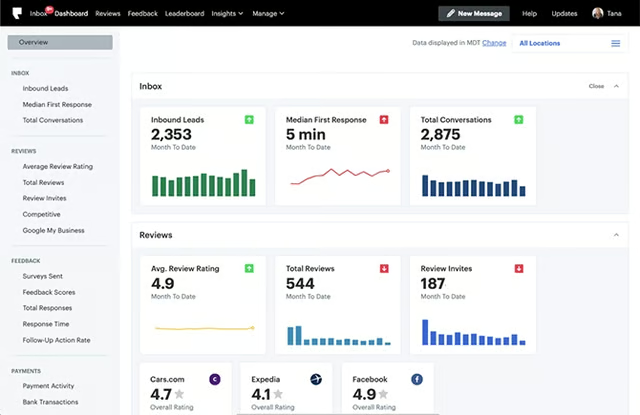
Get instant statistics on review generation in the Podium dashboard. (Source: Podium) 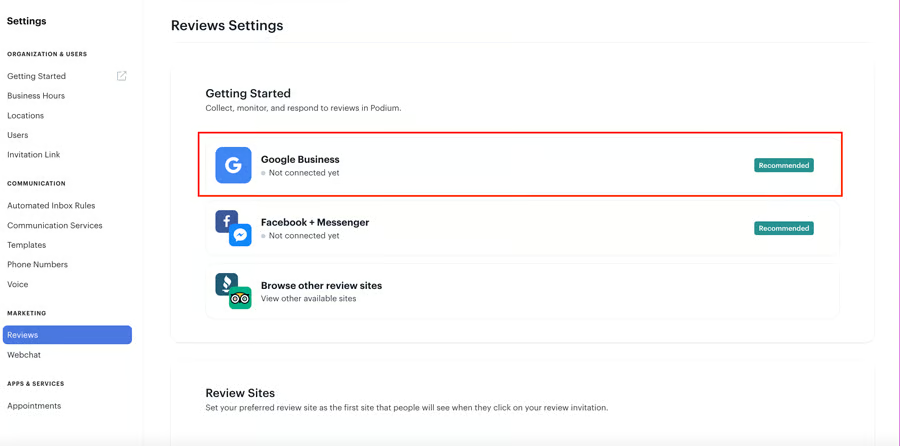
Easily connect Podium to your review sites to streamline the process.


In addition to review generation, you’ll get reports showing online sentiment toward your business. You’ll also get an alert any time you get a new review, so you can thank customers for their feedback or address potentially damaging issues immediately. Your plan also comes with a website chatbot for site visitor engagement. Plus, there are hundreds of integrations—if there’s an app you want to connect to Podium, chances are it’s there.
Podium consolidates reviews and customer interactions into a single dashboard so you can tackle online review management in less time. Instead of going to individual websites to track reviews, it centralizes them on a single platform you can easily access. It also provides a single inbox so that no matter how customer communication comes in, it’s accessible in one place.
Podium Pricing & Plan Features
| Plan & Features | Essentials | Standard | Professional |
|---|---|---|---|
| Cost per Month | $289 | $449 | $649 |
| Number of Contacts | 1,000 | Unlimited | Unlimited |
| Team Members | Maximum of 3 | Unlimited | Unlimited |
| Single Inbox* | ✓ | ✓ | ✓ |
| Integrations | ✓ | ✓ | ✓ |
| Unlimited Text Messages | ✓ | ✓ | ✓ |
| Text-based Website Chat | ✓ | ✓ | ✓ |
| Voicemail Transcripts, Automations & Scheduled Messages | ✕ | ✓ | ✓ |
| Auto-FAQ Response | ✕ | ✓ | ✓ |
| Round-robin Lead Routing | ✕ | ✕ | ✓ |
| Topic-based Routing | ✕ | ✕ | ✓ |
*Stores all your texts, emails, phone calls, and social messages in one place
The lowest Podium package costs $289 a month, which is rather steep for startup businesses that might not be able to maximize all of the features provided by this local SEO tool. For $289 a month, you get three user seats and can save up to 1,000 contacts.
For $499 a month, this is upgraded to unlimited contacts and unlimited team members. It also comes with the ability to send automated review invitations. The Professional plan, priced at $649 monthly, includes unlimited team members, unlimited contacts, automation services, and personalization options.
You can leverage Podium’s powerful integration capabilities through over 180 application developer interfaces (APIs) and Zapier. In addition, Fit Small Business readers save 15% when signing up.
14. Moz Local: Best for Local Business Listings Management
Key Features for Local SEO
- Automates online business listing and citation updates, so you don’t have to monitor them constantly or manually update them on every site
- Includes Foursquare aggregator for location listings in all plans
- Alerts you to new customer reviews and those that need attention
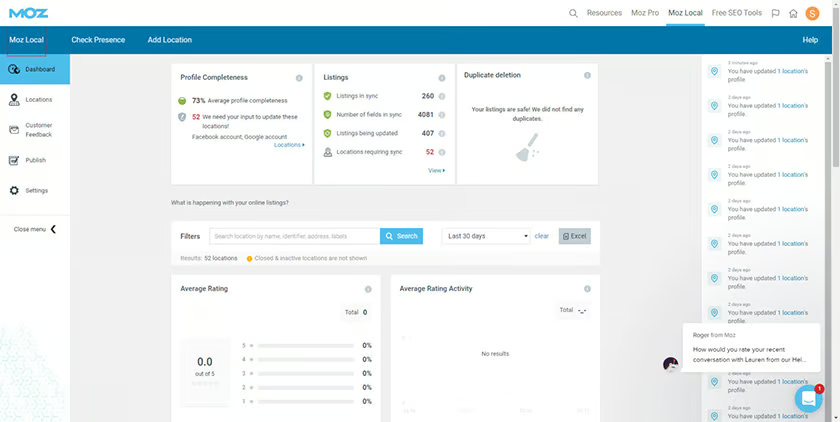
Moz Local is the best local SEO tool for small businesses that need to monitor and track listings and citations on multiple directories. The best part is that Moz Local automates the process, so you don’t have to babysit your listings. You can also read and respond to reviews from your Moz dashboard, but you don’t have to monitor that constantly either, as you can set alerts for the big sites to save you time.
Moz Local Pricing & Plan Features
| Plan & Features | Lite | Preferred | Elite |
|---|---|---|---|
| Cost per Month per Location | $14 | $20 | $33 |
| Listing Management From a Single Dashboard | ✓ | ✓ | ✓ |
| Submit Listings to Search Engines, Directories, Social Media & Apps | ✓ | ✓ | ✓ |
| Foursquare Data Aggregator Submission | ✓ | ✓ | ✓ |
| Automate Submission, Syncing & Duplicate Deletion | ✓ | ✓ | ✓ |
| Integrate Google & Facebook | ✓ | ✓ | ✓ |
| Review Monitoring | ✓ | ✓ | ✓ |
| Respond to Reviews & Monitor Sentiment | ✕ | ✓ | ✓ |
| Post to Social Channels | ✕ | ✓ | ✓ |
| Additional Local Directories | ✕ | ✕ | ✓ |
Unfortunately, there is no free trial for Moz Local. While $14 per month is very affordable if you only have one location, the cost could be steep if your business has multiple locations, ranging from $168 to $396 per location, per year. Plans are month to month, however, so there is not much risk for you to test it out. Plus, Moz’s reputation in the world of local SEO is exceptional, so this software is highly recommended for use by local businesses.
15. Yext: Best for Local Voice Search & Enhanced Listings
Key Features for Local SEO
- Addresses the challenges in local SEO due to the increasing use of voice assistants vs typed searches
- Save time by automating and syncing listings across hundreds of sites
- Reports to show how your listings are performing
- Listings are expanded with the details ready-to-buy customers are looking for, giving your business a leg up on listings that don’t provide these details
Like Moz Local, Yext is an affordable option for automating listings management across the internet. It’s unique in that this is done through direct integrations or APIs, including voice search assistants (e.g., Alexa, Google, Siri), maps, global positioning systems (GPS), search engines, and online directories.
Your listing can expand with more fields, such as delivery services, special offers, whether appointments are required, driving directions, menus, and more. This gives prospects the information they’re most interested in when making a buying decision, which can make for a faster decision to visit your business or online store vs competitors with less detailed listings.
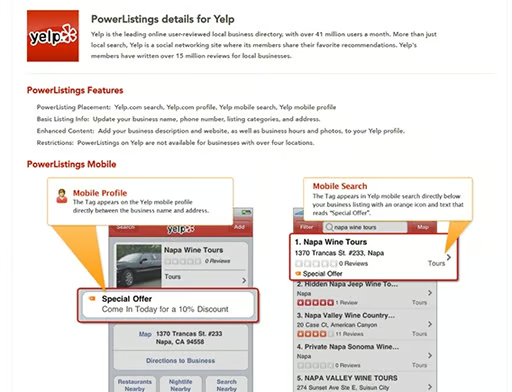
Example of enhanced listings with Yext PowerListings+ (Source: Yext) 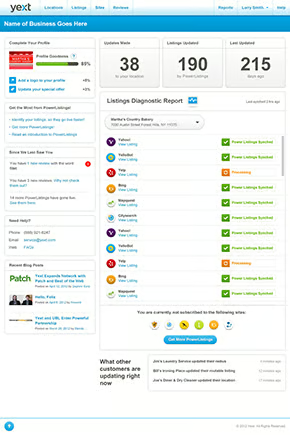
Yext Enhanced Listings dashboard 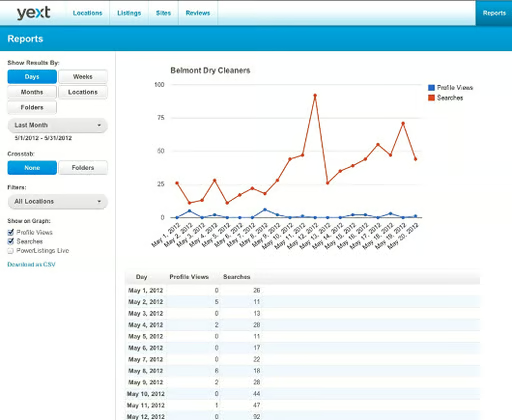
Yext analytics on listings views, searches, and engagement


Because listing management is done through integrations, data is also returned to the system. You’ll get reports showing the number of impressions and clicks your directory listings received as well as conversions. You can then use this data to test and improve your listings to increase sale-producing conversions over time.
Yext Pricing & Plans
| Emerging | Essential | Complete | Premium | |
|---|---|---|---|---|
| Cost per Year | $199 | $449 | $499 | $999 |
| Listings | 40 local directories and apps | 14 global directories and apps, including Foursquare | Everything in Emerging and Essential | Everything in Emerging and Essential |
| PowerListings+ (Enhanced Listings) | ✕ | ✕ | ✓ | ✓ |
| Analytics | ✕ | ✕ | ✓ | ✓ |
| Review Monitoring | ✕ | ✕ | ✕ | ✓ |
| Website Widgets | ✕ | ✕ | ✕ | ✓ |
The base tier is billed at $199 per year and includes at least 40 locale-based directories and apps. If the advantages of enhanced listings and integration with voice search systems aren’t a top priority, Moz Local would be a less costly option for you. It includes Foursquare aggregator listings submission in the base tier ($14 per month), whereas this will cost you $449 per year with Yext.
Yext also provides reputation management features for monitoring and responding to online reviews, but only in its most expensive package ($999 per year). Also, to automatically find and fix issues with your listings and sync them or access enhanced content in your listings, you’ll have to subscribe to the Complete or Premium plan for PowerListings+ features.
Yext has high customer satisfaction ratings, and you can get a sense of what you can do with it by using the platform’s free business listings scan. Also, if you opt for either of the top-tier plans, you’ll get a free training session to ensure you can get the maximum benefit from the platform.
16. BuzzStream: Best Local SEO Tools for Link Building & Outreach
Key Features for Local SEO
- BuzzStream offers affordable tools for identifying the best places to get backlinks and building links through outreach
Backlinks, which are links to your site’s content from other websites, are an essential ranking factor in Google search. Generally, the more backlinks from high authority websites your content earns, the higher the page will rank in search for its optimized keywords, and the more authority your domain will have with Google.
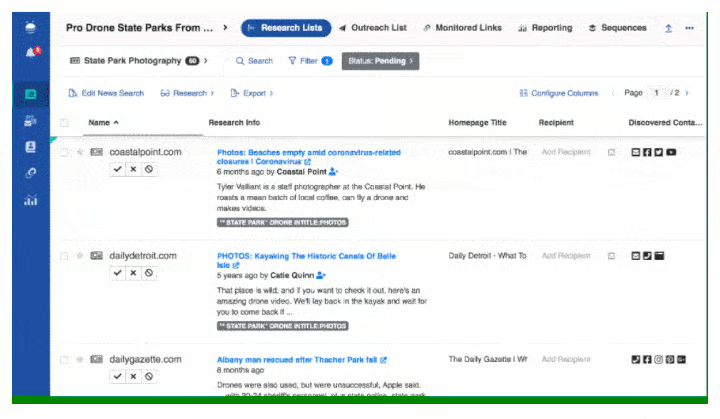
BuzzStream makes outreach for link building easier than using manual email or even email marketing tools. Prospect link opportunities for your small business website that will improve its local SEO. You can use BuzzStream to generate links, monitor links, track Twitter and email conversations, and build prospect lists for outreach.
BuzzStream Pricing & Plan Features
| Plan & Features | Starter | Growth | Professional | Custom |
|---|---|---|---|---|
| Cost per Month* | $24 | $124 | $299 | $999 |
| Users | 1 | 3 | 6 | 15+ |
| Contacts | 1,000 | 25,000 | 100,000 | 300,000+ |
| Links Monitored | 1,000 | 25,000 | 100,000 | Custom |
| Prospecting Searches | 30 | 250 | 1,000 | Custom |
| Contact Info Discovery | ✓ | ✓ | ✓ | ✓ |
| Email Templates | ✓ | ✓ | ✓ | ✓ |
| Scheduled Emails, Reports & Tracking | ✓ | ✓ | ✓ | ✓ |
| Automated Follow-ups | ✓ | ✓ | ✓ | ✓ |
| Chrome Extension | ✓ | ✓ | ✓ | ✓ |
| Link Reporting | ✕ | ✓ | ✓ | ✓ |
| API Integrations | ✕ | ✕ | ✓ | ✓ |
| Onboarding | ✕ | ✕ | ✕ | ✓ |
*Billed monthly; or pay annually to receive one month free
You can try BuzzStream risk and obligation-free for 14 days. Pricing ranges from $24 to $999 per month; however, the Growth plan is listed as the most popular. With three user seats, it’s perfect for small teams and comes with everything in the Starter plan. Plus, it has bulk email sends for link building, team template sharing, project performance, and link reports. Pay as you go or pay annually to get one month free.
Best Local Rank Checkers
It’s possible to get high rankings in your local area without achieving high rankings nationally, especially for small local businesses. To know whether you are achieving success with local SEO, you need to be able to view locale-based SERPs. For this, use the tools below:
17. BrightLocal: Best Local SEO Tools for Locale-based Rank Tracking
Key Features for Local SEO
- Affordable local SEO tools for small businesses, including site audit, citation building, and review monitoring
- Ability to view your rankings across both multiple locales and search engines
BrightLocal is well-known for its data, reports, statistics, and insights on small business SEO. It’s also one of the most useful local SEO tools for local businesses. It even made our list of the top SEO services for local businesses.
BrightLocal tools tackle local SEO from multiple angles. Start with a local search audit of your site to see where you need to put in the work (on-page or off-page SEO, local search, social media, etc.). Track your business’ rankings in three top search engines, manage directory listings, and monitor your company’s reviews across the web.
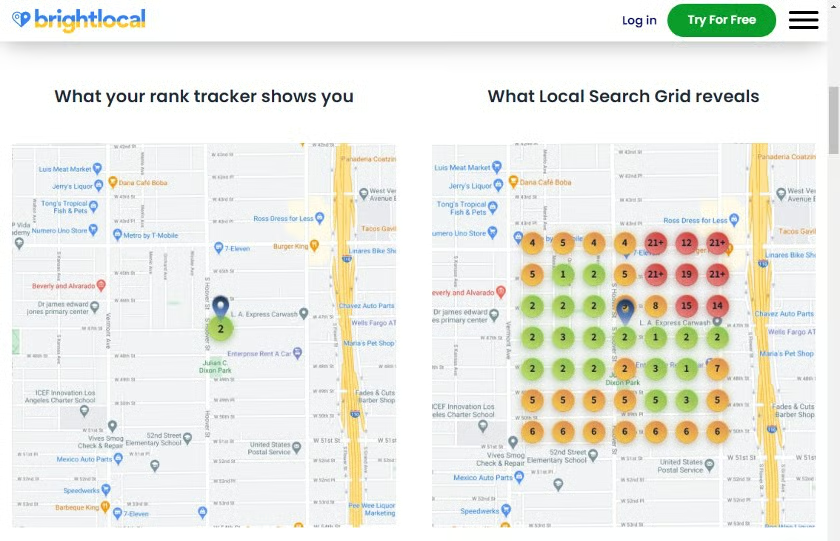
Most notable for our purposes is BrightLocal’s local search grid reporting. This shows you where your business ranks in local results at various locales, including people searching very near to your business, those searching city-wide, county-wide, and so on. In addition, you can see which keywords are performing well (or not) to better optimize your website’s content for local search.
BrightLocal Pricing & Plan Features
| Plan & Features | Just Reviews | Single Business | Multi Business | SEO Pro |
|---|---|---|---|---|
| Cost per Month | $8 | $29* | $49* | $79 |
| Generate, Monitor & Showcase Reviews | ✓ | ✓ | ✓ | ✓ |
| Local SEO Audit Reports | ✕ | 1 | 6 | 20 |
| Local Search Ranking Reports | ✕ | 3 | 6 | 100 |
| Local Search Grid Credits | ✕ | 250 | 1,000 | 2,000 |
| Citation Builder | ✓ | ✓ | ✓ | ✓ |
| Citation Tracking Reports | ✕ | 3 | 6 | 50 |
| Google Analytics, Profile, Facebook & Twitter Integrations | ✕ | ✓ | ✓ | ✓ |
| White-labeled Reports & Emails; API Access | ✕ | ✕ | ✓ | ✓ |
| Google Mobile Rank Tracking | ✕ | ✕ | ✕ | ✓ |
| Competitor Tracking | ✕ | ✕ | ✕ | ✓ |
*Monthly billing costs shown here, or get two months free with annual prepayment
While there is no free plan, BrightLocal offers a 14-day free trial, so you can try out its features and see if you like the interface. If all you want is reviews management, there’s a reviews-only plan that’s $8 per location, per month. You can also use the citation builder without a plan for $2 per citation.
18. Local Falcon: Best Tool for Multi-location Rank Checking
Key Features for Local SEO
- Check and track Google Business and Maps rankings for unlimited locations
- Includes rankings for service businesses with hidden addresses (e.g., home-based businesses that have Google Profiles)
Like BrightLocal, Local Falcon gives you the ability to see your business’ and competitors’ rankings using a grid-style tool. But with Local Falcon, all plans allow you to check an unlimited number of locations. Plans also include far more credits for grid searches each month than BrightLocal—of course, you’ll go through more credits getting data for multiple locations.
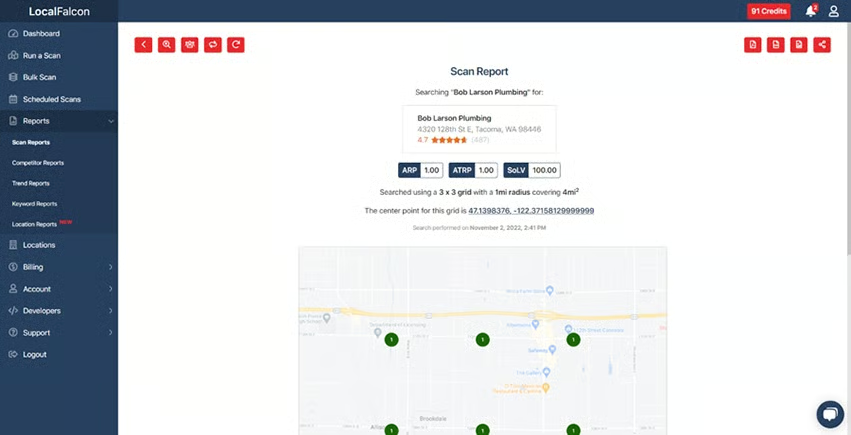
However, BrightLocal offers many more features for local SEO, as Local Falcon doesn’t have much apart from this functionality. Still, there are seven different options for grid sizing to dig deep into rankings for each of your business locations. Every plan includes competitor reports, trend reports, and keyword reports.
Local Falcon Pricing & Plan Features
| Starter | Basic | Pro | Premium | |
|---|---|---|---|---|
| Cost per Month | $24.99 | $49.99 | $99.99 | $199.99 |
| Credits | 7,500 | 15,000 | 31,000 | 63,000 |
| Unlimited Locations | ✓ | ✓ | ✓ | ✓ |
| Auto-scan Scheduler | ✓ | ✓ | ✓ | ✓ |
| Competitor Reports | ✓ | ✓ | ✓ | ✓ |
| Trend Reports | ✓ | ✓ | ✓ | ✓ |
| Keyword Reports | ✓ | ✓ | ✓ | ✓ |
| Variable Grid Sizes | ✓ | ✓ | ✓ | ✓ |
| White-label Reports | ✕ | ✕ | ✕ | ✓ |
| API | ✕ | ✕ | ✕ | ✓ |
Local Falcon is an excellent local SEO tool for small businesses with multiple locations, like restaurants, coffee stands, car maintenance services, and more. It’s also a good option for doing competitive and keyword research for service-based businesses that don’t have a public address (e.g., home-based businesses of plumbers, electricians, accountants, and so on).
While you’ll need the most expensive plan, white labeling and integration through APIs make it a good solution for marketing agencies managing local SEO for multiple clients. Plus, you can test it out for free without adding a credit card to see if it’s right for your business.
Best Niche Tools for Local SEO
The niche tools below provide unique functionality that earned them a spot on our list of the best local SEO tools. Most are free to use, which is essential when you’re looking to use several different tools and ranking strategies in combination with one another without your costs skyrocketing in the process.
19. Wix: Free QR Code Generator to Boost Web Traffic & Engagement
Key Features for Local SEO
- Increasing web traffic through sales and marketing campaign materials to improve domain authority and rank higher in local search
Analytics like website traffic and site visitor engagement affect your local rankings. Google (and other search engines) assume the more popular a website and individual URL is, the more valuable it is to site visitors. One way to drive web traffic to your website’s home, product, or landing pages is to incorporate QR codes into your digital and print marketing materials.
In addition to being the best SEO site builder for small businesses, Wix also provides a free QR code generator anyone can use. Once generated, you can easily add the QR code image to landing pages, email newsletters, menus, in-store signs, flyers and postcard campaigns, business cards, and more.
Using QR codes in this way can increase both web traffic and on-page engagement, both of which can boost local SEO. For example, you can drive site visitors to pages with interactive elements like forms, downloads, polls, calculators, image galleries, or clickable links and buttons. This increases time on the site and produces engagement-based conversions tracked by Google and other search engines.
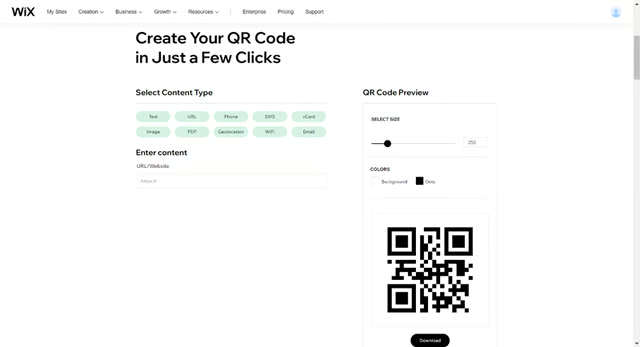
Easily create a free QR code to drive traffic to your website with Wix. (Source: Wix) 
Example of a QR code for a website URL


Anyone with a smartphone can quickly scan your QR code with their camera to be instantly taken to any page on your website (or shopping site, event page, and so on). But it’s not limited to just driving web traffic, as QR codes can also take users to a click-to-call phone number, image, PDF, Wi-Fi, allow them to instantly send you an email, and more.
Wix’s QR code generator is completely free to use, and you can even match the QR code’s color to your branding or marketing materials. Once generated, you can download it in PNG, SGV, or JPG format.
20. Synup: Best for Social Media Monitoring & Management
Key Features for Local SEO
- Monitor social media mentions on one dashboard and post branded content to your social media channels
- Monitor, generate, and respond to reviews
Among Google’s best practices is having links from your website to your social channels, and by extension, for your brand to be active on social media. Synup is included here on our list of the best local SEO tools because it allows you to monitor social media mentions across networks from a single dashboard. In addition, you can schedule social media posts to Facebook and your Google Business Profile to streamline your workflows.
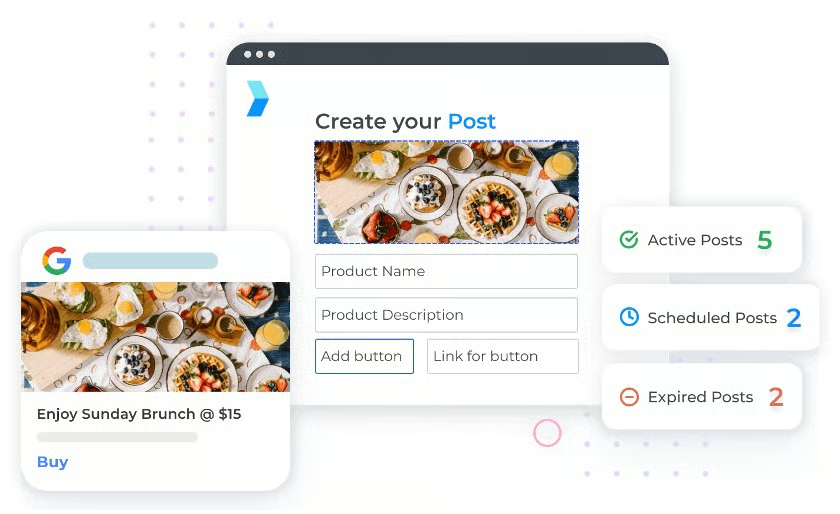
There is no free trial or demo for Synup. Instead, request a demo, and a sales agent will reach out to you to follow up. Pricing and plan options are unpublished and while the cost may vary, research suggests it will typically cost about $30 per location, per month, with a 12-month contract, which is a bit higher than BrightLocal for similar services.
21. Merkle: Best Free Local SEO Tools for Local Businesses
Key Features for Local SEO
- Schema markup generator makes it easy to add structured data without needing to learn schema to better-optimize for local SEO
- Free XML sitemap generator and option to submit XML sitemaps to Google and Bing for indexing
- Location-based SERPs tool
- Mobile-first indexing tool and test
Schema markup helps search engines better understand each of your site’s pages so you rank more easily and relevantly. And because it sounds technical (and it is), small businesses often overlook it or lack the resources to add it. The businesses that employ local business schema markup are the ones that reap the rewards and rank higher in local search results.
Luckily, with technical SEO tools from Merkle, you can easily take advantage of schema markup and create structured data. In addition, you can generate an XML sitemap or submit your sitemap to Google and Bing for indexing. Submitting a sitemap ensures that search engines find all of your content, as crawlers are essentially requested to crawl each of the pages in your sitemap.
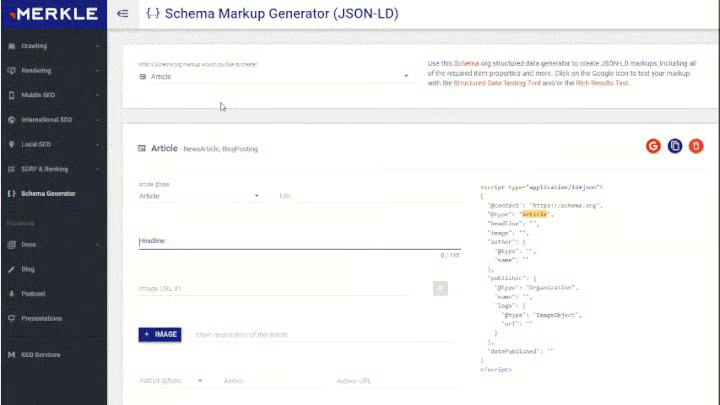
There are also location-based technical tools for SEO here, including a SERP simulator that shows you what your title, page URL, and description look like when viewed in search results. This enables you to easily assess your Google listing and make improvements to increase conversions of people choosing to click through to your site instead of other options.
The Local Search Results tool displays SERPs for keywords based on location. In other words, you enter a keyword like “florists near me” and designate a location by ZIP code or city, and the tool shows you the results someone in that location would see. You can also test your site’s pages’ desktop and mobile versions to ensure they are mobile-friendly with Merkle’s Mobile-First Index tool.
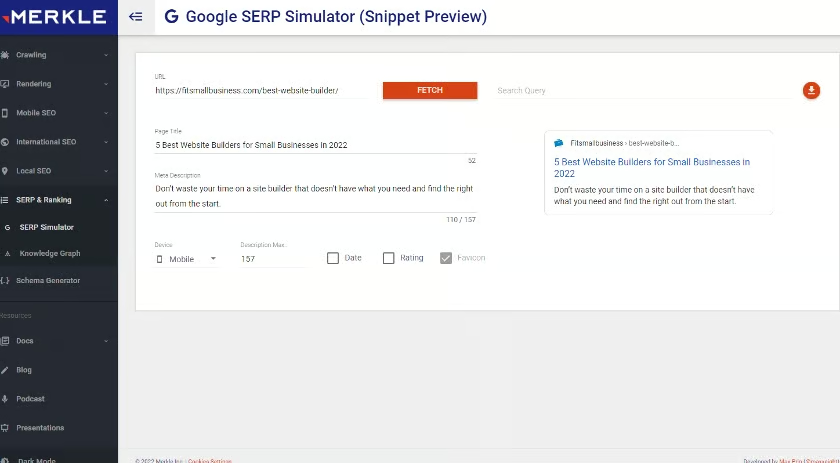
The SERP simulator lets you see how your listing appears in local search results. 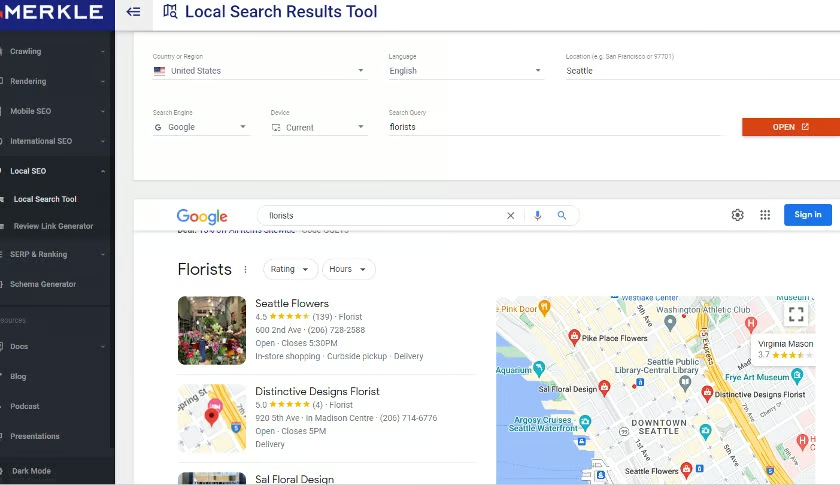
See location-based SERPs by keyword. 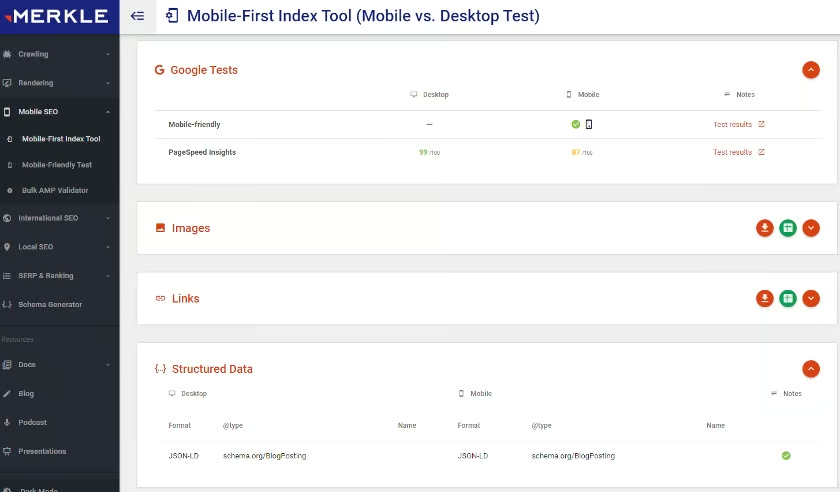
Make sure your website is local mobile search-friendly.


Merkle’s free technical SEO tools let you choose the type of markup you need using drop-down lists. It automatically generates the code you need to add to each page. In addition, you can simulate your business’ listings in location SERPs, see who ranks in location-based search results for your keywords, make sure your site is local mobile-friendly, and more.
How We Evaluated the Best Local SEO Tools for Small Businesses
The tools needed for local SEO encompass a broad range of functionality. They include tools for local keyword and competitor research, content optimization, rank checking, brand monitoring, and more. To be considered, a tool must offer unique value for local SEO, be easy to use, and be affordable for small businesses. Here are some of the criteria we considered:
- Cost
- Value for the money
- Availability of a free version
- Ease of use
- Potential impact on local search optimization
- User-friendly documentation (is it easy to understand?)
- Tutorials and guides
- Support
- Accuracy and reliability
- User reviews and popularity
- Our firsthand experience and expertise
Frequently Asked Questions (FAQs)
What’s the difference between SEO & local SEO?
SEO and local SEO both refer to search engine optimization. However, local SEO is a subset of SEO geared toward businesses that serve customers within a specific geographic area. For example, a dog food company ships nationwide, focusing on general SEO, whereas a local dog groomer with a set service area would want to use local SEO tactics. Learn more about local SEO and its relationship to search engine marketing overall.
How do you do local SEO?
Doing local SEO involves executing SEO with a local focus. For example, you should optimize your website’s content with locale-based keywords potential clients would use in online searches. You’ll also want to include location-specific keywords in your Google Business Profile and other directory listings and strategies for getting reviews, managing your brand’s reputation, earning website backlinks, and so on. If this sounds overwhelming, consider outsourcing to Hibu, one of the best local SEO services for small business.
Where can I find free local SEO tools?
Several free local SEO tools are available online, including several in the list above. They make it easier for businesses to rank higher in online searches, even with a minimal budget. Here are a few of the most popular ones:
- Google Business Profile and Bing Places for Business: Free listings to ensure your information is correct in search results, shown in local map searches, and gets reviews
- Semrush: Free tools to research local keywords, rankings, and your competitors
- Wix: Free website builder with great SEO tools
- MobileMoxie: Page-oscope shows if your site is providing a good user experience on 50-plus mobile types
- Merkle: A free way to see the top-ranking websites by keyword and location
Bottom Line
The best local SEO tools help you start seeing results more quickly while also making your search optimization efforts easier and less time-consuming. Use the tools proactively in research, competitive benchmarking, and site optimization. Then follow your progress by tracking links, online mentions, reviews, and your search engine rankings using the tools recommended above.
If you’d rather save time and effort and leave the work to experienced professionals, we recommend Hibu. Data-driven smart sites, local on-page optimization and listings, and reviews management services all work together to ensure your business is found in Google search and local maps. Get your free consultation today.
