







I’ve watched tech reshape retail in real time. Every few years, I hear a new label: omnichannel, hybrid, unified, now total. It’s fair to ask if this is just another term experts throw around, but what I see on the ground is simpler. As tech weaves into every step of shopping, customers expect more. They want clear info, fast answers, and the same treatment everywhere.
Sales no longer happen only at the register or the online checkout. They start with first impressions, discovery, and small moments of interaction and brand trust. Total commerce is the thread that ties those moments together so the path to purchase feels easy and consistent.
If you run a small retail business, your goal is to get closer to that standard for your store and for your customer.
In this guide I keep it practical: a short definition, a side-by-side with omnichannel and unified commerce, the minimal software to run it, what it costs, and three moves you can launch now — plus a simple test to decide if you need new tools.
- What is total commerce (in plain English)?
- Total commerce in action
- Omnichannel vs unified vs total commerce
- The software you actually need for total commerce
- What this can cost, realistically
- Is total commerce achievable for small retailers?
- Benefits you’ll notice quickly
- “Do I need new software?” A simple way to decide
- Frequently asked questions (FAQs)
- Bottom line
What is total commerce (in plain English)?
Total commerce, also called total experience (TX) in commerce, brings your store and ecommerce into one system. Instead of juggling separate tools, you connect POS, ecommerce, an order management system, customer data, and service so shoppers get consistent experiences, such as BOPIS and return anywhere.
Total commerce means your customer sees one store, no matter how they shop. Prices match, inventory is accurate, orders are easy to pick up or return, and support already knows who they are. Behind the scenes, your team uses the same basic info — products, orders, and customers — so work is faster and fewer things fall through the cracks.
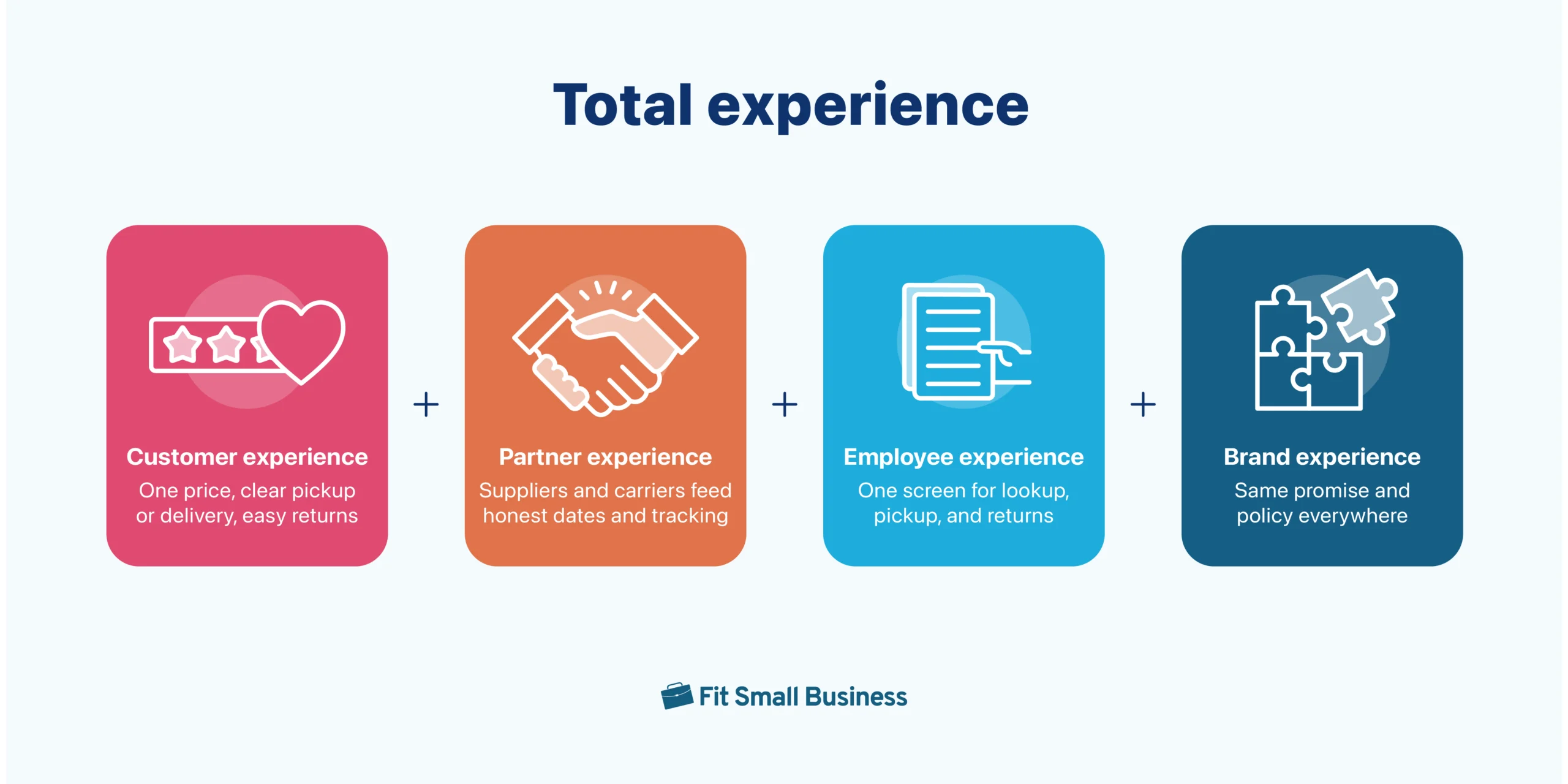
When I say “total,” I’m talking about four everyday experiences that need to line up so shopping feels simple from first glance to refund. If these four experiences move together, customers get clear info, on-time pickups, and fast help. If one lags, you feel it as mixed prices, missed dates, or slow lines.
Below are quick, practical examples for each so you can spot where to start.
- Customer experience (CX). Customer experience is what shoppers see and feel across your site, store, social, and support. In total commerce, prices, promos, and inventory match everywhere, pickup windows are clear at checkout, returns work at any location with a confirmation that states refund timing, and support can reference the order without making the customer repeat details. A quick win is to add “pick up in-store” with a real pickup window and send a ready-for-pickup message the moment the order is staged.
- Partner experience (PX). PX defines how smoothly you work with suppliers, marketplaces, and carriers. In total commerce, supplier lead times sit next to your stock levels so back-in-stock dates are honest, marketplaces read the same product feed and price list you use on your site, and carriers push tracking into the same order view staff and customers see. A quick win is to send your top supplier a weekly “what is low and when it arrives” note so you can set realistic alert timing and avoid overselling.
- Employee experience (EX). EX is how easy it is for your team to do the job at the counter, in the aisle, and in support. In total commerce, staff use one screen to look up orders by name, email, or order number, a short return script with reason codes guides consistent refunds, and pick tickets include aisle and bin, so BOPIS gets staged fast without extra logins or copy-paste. A quick win is to post a one-page “BOPIS pick and stage” checklist by the stockroom door and time the average pick so you can improve week by week.
- Brand experience (BX). BX is the promise people associate with your store and how consistently you keep it. In total commerce, the same tone, policies, and visuals appear in emails, product pages, receipts, and counter signs; delivery dates are ones you can hit; loyalty perks work the same in store and online; and when something slips, customers get a proactive message with a make-good that fits your brand. A quick win is to publish a simple service promise that covers price match rules, pickup timing, and refund timing, then use the same wording on the website, in order emails, and at the checkout counter.
Total commerce in action
Imagine “Trail & Hearth,” a small outdoor-and-home retailer with two stores and a simple online shop.
For customers (CX): Maya has been eyeing a $120 rain shell since fall. In March, the Trail & Hearth site and app nudge her that the jacket is now 45% off at her nearest store, with same-day pickup. She buys online at lunch, picks up after work, and gets a follow-up tip for a $12 waterproofing spray based on what’s in stock. Returns are simple: if the fit is off, she can bring it back to either store with a QR code and get a clear refund timeline. The whole trip feels easy and helpful.
For employees (EX): Peak season is calmer because more shoppers buy in shoulder months. Associates use one screen to find orders, stage pickups, and process returns without chasing emails. A quick “pickup ready” checklist by the stockroom door keeps lines short. Staff get small wins daily — fewer “we can’t find it” moments and more chances to recommend the right add-on.
For the brand (BX): Trail & Hearth promises fair pricing, honest stock, and fast help. The same tone and policies show up on product pages, receipts, and counter signs. When delivery slips, customers get a proactive message and a make-good that matches the brand’s voice. The store builds a reputation for being clear and dependable — not flashy, just reliable.
For partners (PX): A jacket supplier shares planned markdown windows and lead times, so Trail & Hearth sets realistic “back in stock” dates and avoids over-ordering. Carriers feed tracking updates into the same order view customers and staff see, which cuts “where is my order” tickets. Everyone saves time and clears inventory without last-minute scrambles.
This isn’t just about moving jackets. It’s about making shopping, service, and restocking feel coordinated for customers, staff, partners, and the brand — one simple, connected experience.
Omnichannel vs unified vs total commerce
Shoppers don’t care what we call it, they care that prices match, pickups are ready, and support gives the same answer every time. Still, the terms get confusing: I hear “omnichannel,” “unified,” and “total” used like they’re the same thing. They aren’t, and the difference changes what a small shop needs to do first.
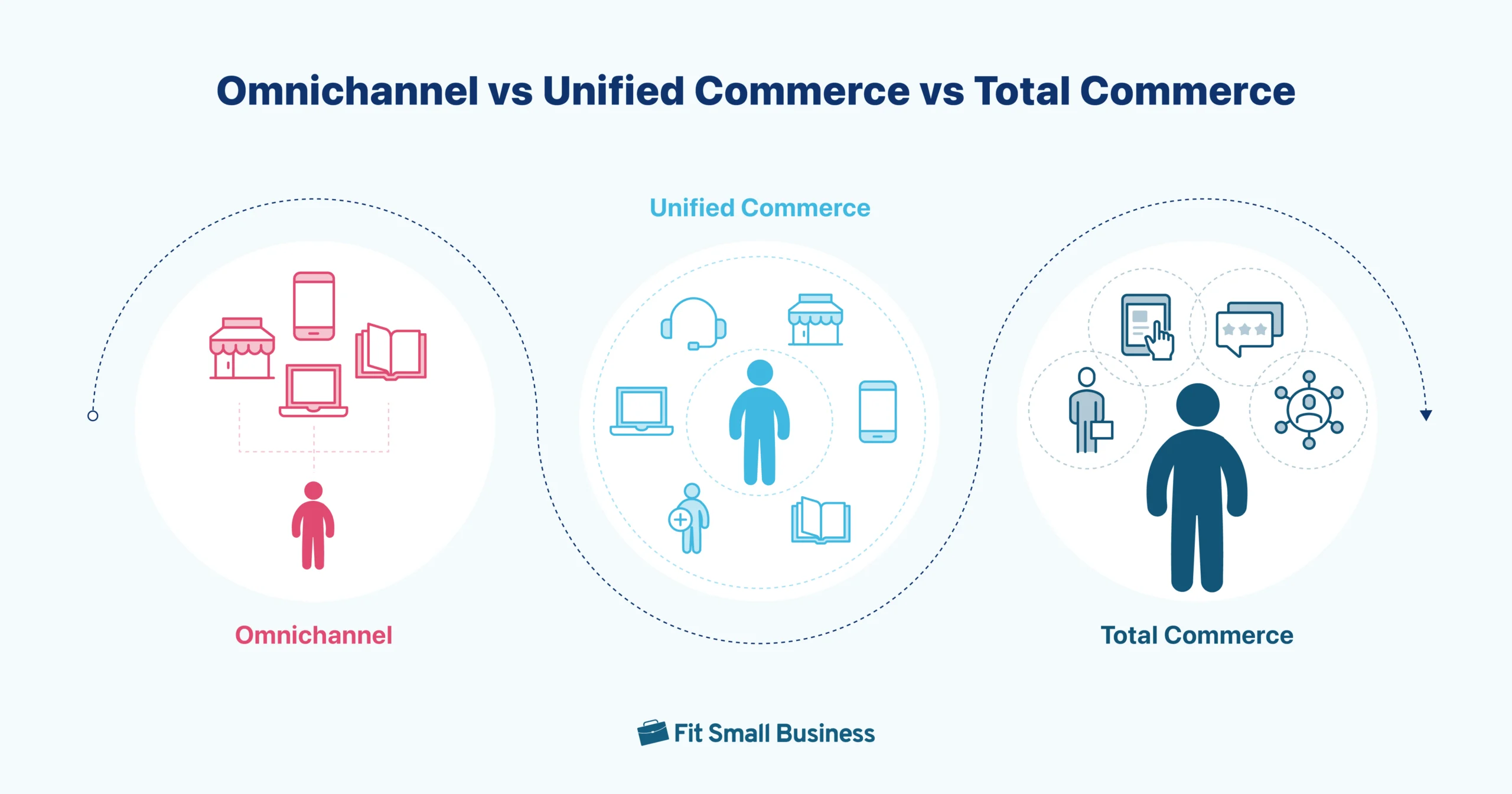
Think of it this way: omnichannel commerce is being in many places; unified commerce is one data backbone behind those places; total commerce puts that unified data in the hands of staff so the experience is fast and consistent. The table below shows how each approach impacts data, day-to-day work, and the use cases you can actually deliver.
| Factor | Omnichannel commerce | Unified commerce | Total commerce |
|---|---|---|---|
| Core idea | Be present across channels | One data and transaction backbone | Unified data in staff tools and ops |
| Data model | Split by channel | Single product, order, customer, inventory view | Same single view plus service and workflow context |
| Consistency | Varies by channel | Prices, promos, and stock align | Same alignment plus faster service at the counter |
| Staff impact | Swivel between tools | Fewer systems to manage | One screen for lookup, returns, and order actions |
| Use cases | Basic pickup, separate returns | Reliable BOPIS, ship from store, return anywhere | Order-aware support, mixed returns, clienteling |
| Best fit | Early stage presence | Scaling operations | Turning consistency into speed and loyalty |
The software you actually need for total commerce
You do not need an enterprise stack to get moving. Think in five pieces: where you sell, how you take payment, how you route orders, how you help customers, and how you message them. Most small retailers can cover this with tools they already know.
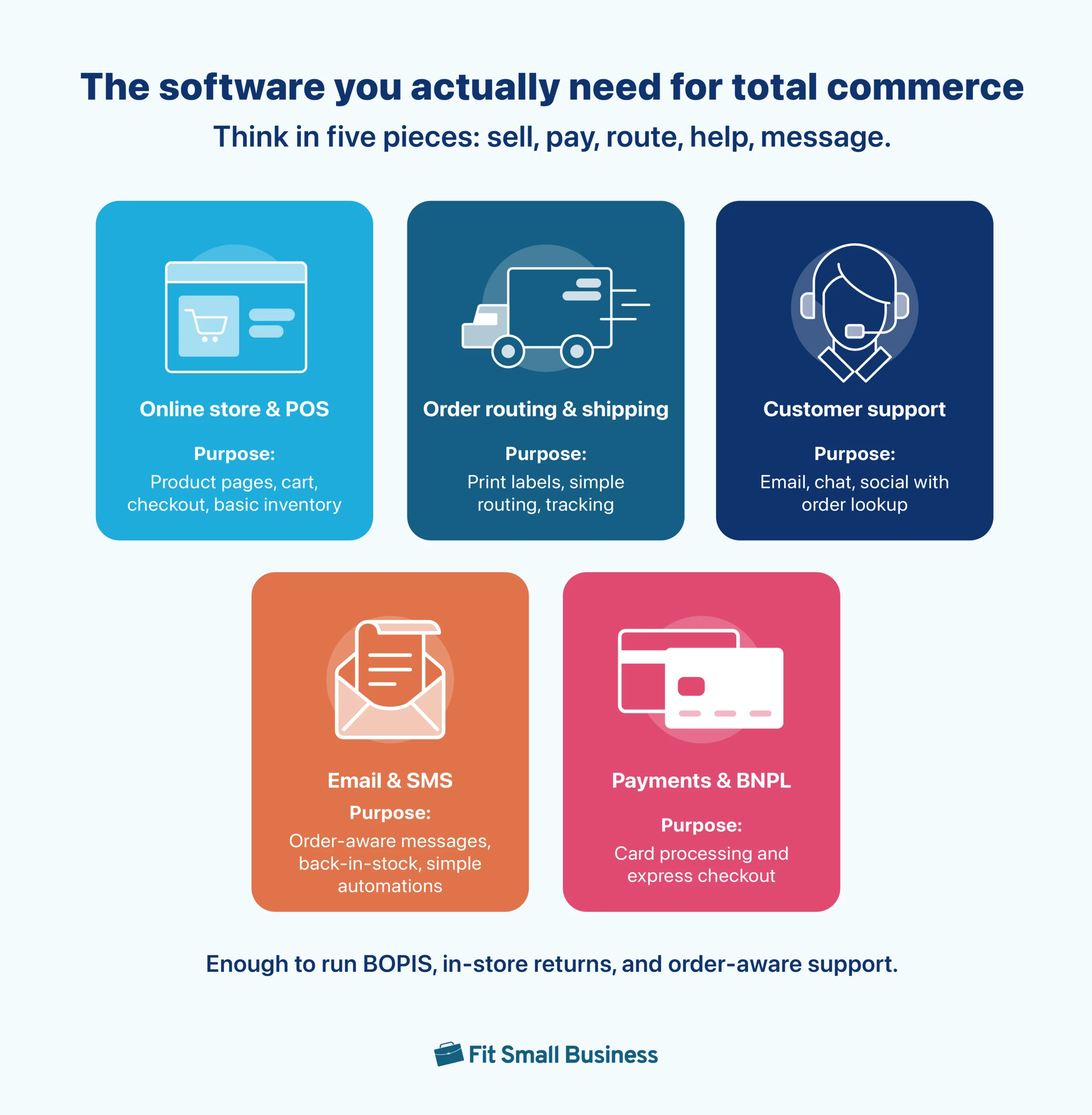
- Online store and POS. Shopify or BigCommerce for the site, with Shopify POS, Square, or Lightspeed in store. These handle catalog, checkout, taxes, and basic inventory.
- Order routing and shipping. Start light with built-in workflows plus ShipStation, ShippingEasy, or Easyship. If you outgrow that, look at Cin7, Extensiv, or Linnworks for fuller OMS features.
- Customer support. Gorgias or Zendesk for email, chat, and social, with order lookups from your store.
- Email and SMS. Klaviyo or Mailchimp for order-aware messages, back-in-stock alerts, and simple automations.
- Payments and buy now pay later. Stripe or your platform’s processor, plus Shop Pay, PayPal, or Afterpay if it fits your audience.
With those pieces connected, you can run BOPIS, returns in store for online orders, and order-aware support without heavy customization. If you already use alternatives, stick with them as long as they meet the same goals.
What this can cost, realistically
For a single store and a modest online catalog, expect a base toolkit to land in the low hundreds per month, plus a little for add-ons and training.
| Software | Purpose | Starter options | When to upgrade | Typical SMB cost (monthly) |
|---|---|---|---|---|
| Online store | Product pages, cart, checkout, taxes | Shopify, BigCommerce | You need complex pricing, multi-store, or deep B2B features | $40-$400 (plan tier) |
| POS (in-store) | Counter sales, barcode, basic inventory | Shopify POS, Square, Lightspeed | You add more registers/locations or need advanced inventory | $60-$200 per register |
| Order routing & shipping | Print labels, basic routing, tracking | ShipStation, ShippingEasy, Easyship | You need multi-warehouse rules, splits, or purchase orders | $0-$100 |
| Help desk (support) | Email/chat/social with order lookups | Gorgias, Zendesk | You need complex SLAs or multiple brands/queues | $10-$50 per seat |
| Email & SMS | Order-aware flows, back-in-stock | Klaviyo, Mailchimp | Your list scales and you want advanced segmentation | $0-$50 to start (usage-based) |
| Payments & BNPL | Card processing and express pay | Stripe, platform processor; Shop Pay, PayPal, Afterpay | Your rates are high or you need alternative tenders | Processor fees (variable) |
The figures above can feel like a lot. The key is sequencing. Start with what delivers value this quarter, not a full rebuild. If your current tools can support reliable pickup, fast returns, and clear support replies, you can delay upgrades and still give customers a smooth experience.
Is total commerce achievable for small retailers?
I get it. This can feel overwhelming. There are a lot of moving parts, and lean teams don’t always have the people, tech skills, or budget to make big changes. The good news: it is achievable in small steps. I’ve seen retailers roll out a few simple moves that lifted sales and built a loyal following because shopping felt easier.
You can do these with most basic POS and online store setups. I’ll explain why each works, how to do it, and what “good” looks like. I have seen versions of these in the wild. Even if your setup is different, the same ideas apply.
BOPIS, but make it reliable
Pickup works when it saves time. The fastest way to lose trust is making someone show up to an order that isn’t ready. Aim for most pickups ready at the promised time and for single-item orders to be staged in under five minutes. That’s doable without new tools. Here’s how I’d set it up.
How to implement
- Add “Pick up in store” at checkout with a real time window customers can see before they pay.
- Print a simple pick ticket with aisle or bin so anyone can grab the item fast.
- Create a small, labeled staging shelf near the counter or stockroom by last name.
- Mark the order ready and send a short text or email with pickup instructions and hours.
A quick example: I’ve seen a two-location boutique promise “Ready by 4 p.m.” for orders placed before noon. They staged bags by last name and texted a short pickup code. Afternoon lines moved faster because the order was already waiting, and customers stopped calling to ask if it was ready.
What I recommend
- BX: Use the same pickup promise on product pages, checkout, and the counter sign so expectations match.
- EX: Post a one-page “pick and stage” card by the stockroom door and time the average pick.
- PX: Share expected delivery times with your main supplier so you never promise pickup before stock arrives.
- Metric: Track pickups ready on time each week and talk about it in a two-minute huddle.
Allow in-store returns for online orders
Returns keep trust when they’re fast and clear. Aim to finish most returns in under three minutes and start refunds the same day the item comes back in good condition. You can hit that with a simple script and one reliable lookup. Here’s how I’d set it up, then a few extras that keep it tight.
How to implement
- Keep a one-page counter script: greet, verify the order, inspect the item, choose outcome (refund, exchange, store credit), state refund timing.
- Always look up by name, email, or order number — no paper needed.
- Print or email a return receipt that shows refund timing and the reason code.
A quick example: I’ve seen a gift shop add a big “Returns” button on the POS home screen that jumps straight to order lookup. Staff stopped digging through emails, and customers heard the same clear line every time: “Your refund usually shows in 3 to 5 business days.”
What I recommend
- BX: Use the same wording for refund timing on the website, receipt, and counter sign so expectations match.
- EX: Create two macros in support: “Return approved” and “Refund issued” to keep replies consistent.
- PX: Ask your main carrier for a fixed drop-off time so mail-back returns move faster.
- Metric: Track average time to issue refunds each week and review it in a quick huddle.
Turn on back-in-stock alerts
Sold-out does not have to mean lost. Aim for a healthy share of alert signups to convert within 48 hours of restock and for fewer “Do you have this?” messages. You can get there with a light setup that captures interest and follows through the moment items arrive. Here is how I would do it, plus a few extras that keep it tight.
How to implement
- Add “Email me when it is back” on high-demand products.
- Deduplicate signups by email or phone so people are not spammed.
- Trigger alerts as soon as on-hand rises above zero and include a store pickup option.
A quick example: I have seen a sneaker shop email waitlisted customers the minute a size run landed. Half the restock sold in a day without discounting, and support volume dropped because shoppers knew they would be notified.
What I recommend
- BX: Keep your tone consistent. “Good news. Your size is back near you.”
- PX: Ask your supplier for expected restock dates so your alert timing is realistic.
- EX: Add a quick filter in your email tool for “back-in-stock” so staff can resend to non-openers the next day.
- Metric: Track alert-to-order conversion within 48 hours and review it weekly.
Benefits you’ll notice quickly
A total experience helps customers at three moments that matter. Keep it simple and useful, and you’ll feel the lift in sales and loyalty.
Product discovery
Shoppers no longer move in a straight line. They jump in from TikTok, Google, a friend’s text, or a store visit. Total commerce meets them wherever they start and keeps prices, promos, and messages consistent. Showing local pickup on product pages sets clear expectations early, and helpful content — size guides, fit notes, care tips — removes guesswork so people feel confident before they add to cart.
What I recommend:
- Run one cross-channel promo for a single product family using the same headline, images, and end date everywhere.
- Add two small helpers to top products: “Find my size” and “Pick up near me.”
Committing to purchase
Once shoppers like what they see, make it easy to say yes. Replace vague copy with clear delivery dates and real pickup windows at checkout. Offer simple bundles or “complete the look” suggestions that actually match what’s in the cart. Let people buy from a social post or email without starting over, so momentum isn’t lost on extra clicks.
What I recommend:
- Post one shoppable update each week for a bestseller.
- Offer curbside pickup at checkout with a real time window, not just “today.”
Realize product value
The relationship doesn’t end at the register. Post-purchase is where loyalty builds. Order-aware support should answer “where’s my order” in one reply. Returns should be clear, with refund timing in the email and on the receipt. Follow up with something useful — care tips, setup guides, a loyalty invite, or a back-in-stock alert for related items — so the purchase keeps paying off.
What I recommend:
- Send one useful email two days after delivery: how to use it, how to care for it, and how to return if needed.
- Invite the customer to join a simple loyalty program or set a back-in-stock alert for related items.
How you know it’s working
As orders, inventory, and customer details live in one place, daily headaches ease. Staff can pull up any order by name, email, or phone in seconds, which cuts the “we can’t find it” moments and keeps lines moving. Clear pickup windows and a short returns script speed the counter, so most pickups are ready on time and refunds go out the same day items come back. Support gets simpler, too — agents see order status, tracking, and past returns on one screen and resolve most questions in a single reply. You’ll notice fewer “Do you have this?” and “Where is my order?” messages and a steady rise in repeat purchase rate over the next quarter.
“Do I need new software?” A simple way to decide
I hear this a lot, and I get why. It is easy to think new tools will fix everything. My rule is simple: keep what you have if it supports the basics you will roll out in the next 90 days. Upgrade only when the same problem keeps tripping you up after you tighten the process.
Keep what you have if you can. If staff can pull up any order by name or number in seconds, if prices and in-stock counts match online and in store for your top items, and if you can offer pickup and in-store returns without spreadsheets or email digging, you are ready to pilot. Run a small test in one location, document what works, and hold off on buying anything new.
A quick way to tell if your current tools are enough is to ask three questions:
- Can staff find any order in seconds by name, email, or order number?
- Do prices and stock match online and in store for your top 20 SKUs?
- Can support see order status and past returns on one screen?
If any answer is no, fix that single gap first. Many gaps close with settings, a low-cost app, or a small workflow change.
It is truly a tooling gap when the same oversell keeps happening on the same items after you tighten counts, when refunds stay slow or manual even after you add a simple script, or when order lookup remains unreliable during busy hours despite training. That is the time to consider an upgrade, not before.
To make the call, run a two-week test on a small set of products and measure pickup on-time rate, refund speed, and first-reply resolution. Write down the blockers you could not fix with settings or a low-cost add-on, then shortlist one upgrade that removes that specific blocker and pilot it in one store before you expand.
Frequently asked questions (FAQs)
What’s the difference: total commerce vs omnichannel vs unified commerce?
Omnichannel is being present in many places. Unified commerce runs those places on one data and transaction layer. Total commerce goes further by putting that same unified view in staff tools, so service is faster and more consistent.
Can a single-store retailer do total commerce?
Yes. Start with three high-impact moves: reliable BOPIS (buy online, pick up in store), in-store returns for online orders, and back-in-stock alerts. You can do these with most basic POS and ecommerce setups.
Do I need a CDP or a new platform to start total commerce?
No. Begin with one customer list (email or phone), one product list (matching SKUs and prices), and one order lookup staff can search. Upgrade only if the same blocker keeps returning after you fix the process.
How do I connect POS and ecommerce for unified inventory and BOPIS?
Use your built-in connector, test with a handful of SKUs, and spot-check price and stock daily on top items. Add a small safety stock on fast movers and set a clear pickup window at checkout.
How much does total commerce cost for small retailers in year one?
Plan for current software, possibly a low-cost pickup/returns app, a few hours of staff training, and simple materials (shelf labels, staging signs). Expand spending only if a recurring issue persists.
Which KPIs prove total commerce is working?
Pickup ready-on-time, refund speed, first-reply resolution in support, and repeat purchase rate. Track weekly; improve the weakest metric before adding new features.
Bottom line
You do not need a big rebuild to deliver a better total experience. Start small, prove one improvement in a single location, and keep what clearly moves the numbers. When shoppers can pick up on time, return items quickly, and get clear answers in a single reply, they come back and tell others.
Begin with reliable pickup, simple in-store returns, and back-in-stock alerts. Make sure staff can find any order in seconds and that prices and stock match online and in store. Track pickup on-time rate, refund speed, first-reply resolution, and repeat purchase rate each week. If those trend up, expand at your pace, one step at a time.
