







Unified communications as a service (UCaaS) and contact center as a service (CCaaS) are cloud-based solutions with voice, video, and messaging capabilities. When comparing UCaaS vs CCaaS, the difference lies in who they serve. UCaaS integrates all business communications, facilitating seamless internal collaboration, while CCaaS provides an all-in-one communications channel to manage customer interactions and deliver exceptional client services.
In this article, we explore the difference between UCaaS vs CCaaS to help you determine which is best for your business. Based on our comparison, the best use cases for UCaaS vs CCaaS are as follows:
- UCaaS: Best for businesses needing an all-in-one platform for customer-facing communications tools and internal collaboration needs
- CCaaS: Best for companies requiring robust customer service and sales tools to manage high volumes of inbound and outbound calls
UCaaS vs CCaaS at a Glance
| UCaaS | CCaaS | |
|---|---|---|
| Best For | Businesses needing multichannel communications capabilities in a single platform | Companies with dedicated support and sales teams that need call center capabilities |
| Estimated Monthly Cost (per User) | $10 to $65 | $15 to 150 |
| Communication Channels |
|
|
| Key Features |
|
|
| Top Benefits |
|
|
| Learn More | What Is UCaaS? | What Is CCaaS? |
Can’t decide whether UCaaS or CCaaS suits your business? Take the quiz below to see which cloud-based solution fits your needs.
Is UCaaS or CCaaS right for you?
When to Use UCaaS
A unified communications (UC) solution provides various communication and collaboration features in one platform. It is a good fit for companies wanting to replace their on-premise phone system with a cloud-based voice-over-internet-protocol (VoIP) service with video and instant messaging capabilities.
If some or most of your team members work remotely, UCaaS doubles as a virtual workspace. Instead of having separate tools for voice calling, video meetings, and team chat, UCaaS combines all these features to streamline various modes of communication. This allows your team to switch from collaborating on a document to joining a video meeting in just a few clicks. With its cloud-based nature, users are able to interact from anywhere they have internet access.
UCaaS is a good solution for businesses with bring-your-own-device (BYOD) policies because of features like direct inward dialing (DID), routing calls to remote workers. Since UCaaS puts various communication and collaboration methods on one platform, you also reduce the probability of missed messages and benefit from robust call management tools.
Businesses with a limited budget will be pleased to know that UCaaS plans typically cost less than CCaaS packages, albeit with fewer customer-centric features like contact center analytics. Plus, some UC platforms scale into full-service contact centers at higher plan tiers.
For example, RingCentral’s VoIP phone system starts at $30 per user, monthly, while its RingCX contact center package is priced at $65 per agent. RingCX is an artificial intelligence (AI)-first, simple-to-use solution that includes unlimited domestic inbound and manual outbound minutes and comes with contact center features.
For more information on RingCentral, check out our RingCentral review and RingCentral contact center review.
Pros & Cons of UCaaS
There are advantages to having UCaaS as your phone service, including efficient communications and higher savings. Knowing UCaaS’ pros and cons will help you determine if the service is right for your organization.
| PROS | CONS |
|---|---|
| Streamlines workflows and facilitates real-time interaction | Requires a strong internet connection for optimal utilization |
| Bundles all communication tools in one platform | Initial learning curve for new UCaaS users |
| Collaboration features boost team productivity | Outdated office hardware may not be compatible with UCaaS platforms |
| Eliminates on-premise installations and maintenance costs | Advanced features may be underutilized by smaller teams |
| Efficient access to company information | Privacy issues due to increased sharing of information |
When to Use CCaaS
Companies use a contact center as a service, or CCaaS platform, to create convenient, flexible, and personalized customer experiences. Whether you have a distributed or on-site customer support center or your business completes a high volume of sales calls, a CCaaS system is an excellent option. Many UC features come in CCaaS platforms, including multichannel communication tools and automated call routing.
Cloud-based call center software adds supervisor capabilities, such as monitoring calls and agent status in real time. It also supports customer surveys and caller sentiment analytics using artificial intelligence (AI), natural language processing (NLP), and machine learning (ML). Many CCaaS solutions have tools for workforce management and optimization, which help analyze agent performance and improve employee engagement levels.
Between UCaaS vs CCaaS, CCaaS supports unlimited customization to help you configure every customer interaction. Advanced interactive voice response (IVR) systems often include skills-based routing, so incoming callers connect to the best agent or self-service tool for their needs. CCaaS systems serve as a single source of customer data, giving every employee access to updated information about the caller before they pick up the phone.
Pros & Cons of CCaaS
CCaaS are designed for external communications and offer advanced features like IVR and call queuing, contributing to improved customer experience and satisfaction. CCaaS’ advantages include enhanced agent efficiency and higher savings. See the table below for a summary of the solution’s key pros and cons:
| PROS | CONS |
|---|---|
| Minimal upfront costs | Requires fast internet connection |
| Syncs conversations across multiple channels | Embracing new technology may alter current workflows |
| Analytics tools provide insights into customer and agent behavior | Interoperability issues for companies using outdated infrastructure |
| AI tools and self-service options free agents from routine tasks | Requires investment in employee training |
| Advanced routing solutions connect clients to the most qualified agents | Handles sensitive customer information, which might require robust security measures and access control |
UCaaS vs CCaaS: Choosing Between Solutions
At first glance, UCaaS and CCaaS platforms seem very similar since they’re both cloud-hosted and improve mobility and performance. However, there are stark differences in functionality; UCaaS mainly streamlines internal coordination and collaboration, while CCaaS solutions focus on improving customer interactions and experiences. Below are points of consideration to help you choose one solution over the other:
| Use UCaaS If | Use CCaaS If |
|---|---|
| You need to streamline internal collaboration and communication | You want to improve the customer experience |
| Primary operations are based in office buildings, home offices, and remote workspaces | Primary users include contact centers as well as service, sales, and marketing divisions |
| Primary users are geographically distributed employees and team members | You don’t have an in-house tech team to create software code |
Now that you know what the difference is between UCaaS and CCaaS, choosing a solution requires decision-makers to consider several factors like available resources and budget, operational flow, and projected growth. Here’s a handy breakdown of key factors you need to keep in mind when making your choice:
1. Evaluate Your Business Needs
Evaluate your organization’s communication requirements and patterns, including your team’s schedule and inbound and outbound volume. For example, teams focusing on improving their incoming and outgoing customer communications would find CCaaS a better fit. It’s designed to deliver exceptional client experiences through streamlined communication solutions. CCaaS vendors typically include contact center features like interactive voice response (IVR) and ticketing.
On the other hand, if your team operates on a remote-first basis and you need to expand your internal communication channels, UCaaS would be the ideal option. UC solutions emphasize collaboration and unite distributed teams. Its key features include video conferencing with screen sharing, task management, calendars, team chat, and file sharing.
2. Think About Your Market & Audience
Consider who will benefit the most from your chosen solution. For example, UCaaS is designed to improve team communications and streamline employee-to-employee communication. However, if you’re looking to empower your agents to track customer calls and provide a much smoother client journey, integrating a CCaaS solution may be the ideal option for your company.
3. Consider Your Budget & Available Resources
Cost is a crucial point of consideration when adopting any new technology or tool. Different factors come into play when calculating the cost of implementing CCaaS or UCaaS, such as:
- Quantity of users or seats: Different platforms offer varying rates and discounts depending on the solution, billing terms, and number of users or seats.
- Number of integrations: Some vendors provide limited integrations, while others include integrations at higher tiers or as paid add-ons.
- Uptime guarantee: Reliability and guaranteed availability may mean a higher cost of maintenance or these may be available only in enterprise plans.
- Inclusive features and tools: Some advanced features may cost extra or are locked behind premium plans.
UCaaS platforms are often subscription-based with affordable or reduced upfront costs. Comparatively, CCaaS tools often have an initial investment with additional subscription costs.
4. Review Your Growth Projections & Targets
In addition to considering your current needs and resources, research each solution’s scalability. As your business grows, the composition of your workforce and its needs will change. UCaaS solutions are easy to scale and can accommodate growing organizational needs. CCaaS, like UCaaS, is highly scalable and very flexible, offering companies the opportunity to adjust resources based on seasonal fluctuations.
Top Providers With UCaaS & CCaaS Features
With a better understanding of what UCaaS and CCaaS are, we know that solutions vary significantly across providers. You’ll find many options to suit the needs of your business, staff, and customers. Many of the best voice-over-internet-protocol (VoIP) providers bundle unified communications and contact center features into advanced plans. Here are the top business phone systems that provide a single source for both UCaaS and CCaaS:
 |  |  | |
|---|---|---|---|
| UCaaS | |||
| Monthly Starting Price (per User) | $30 to $45 | $30.95 to $45.95 | Contact sales for pricing |
| Features |
|
|
|
| CCaaS | |||
| Monthly Starting Price (per User) | Contact sales for pricing | Contact sales for pricing | Contact sales for pricing |
| Features |
|
|
|
| Integrations | 300+ integrations | 100+ integrations (through Go Integrator) | 60 integrations |
| Learn More | RingCentral RevieworRingCentral Contact Center Review | Nextiva RevieworNextiva Contact Center Review | 8x8 Review |
Click on the tabs below for a more in-depth look at each provider.
RingCentral is one of the market’s leading business phone systems thanks to its feature-rich capabilities. The all-in-one platform facilitates communication and collaboration between internal teams while letting external collaborators join as guests. All RingCentral packages include unlimited domestic calls, business SMS, and team messaging.
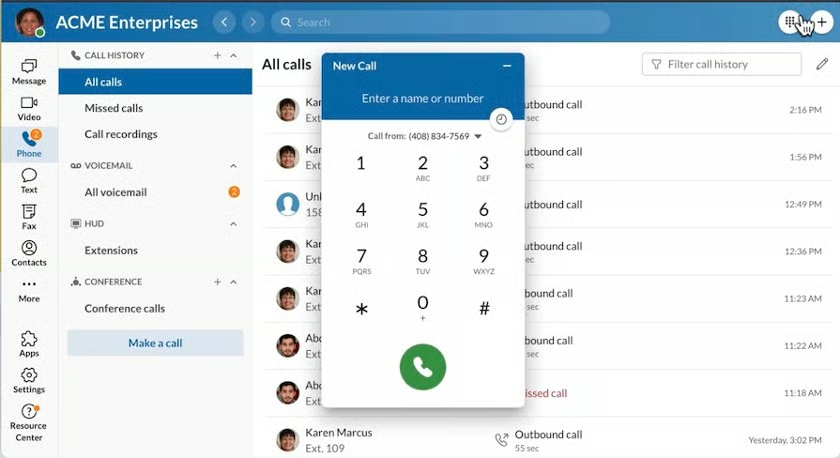
RingCentral features a modern yet intuitive interface that allows users to seamlessly switch between applications. (Source: RingCentral)
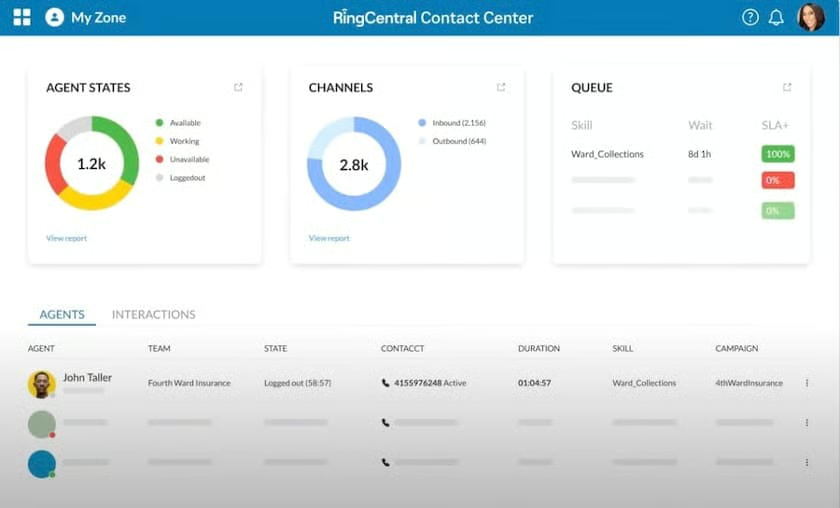
Its contact center solution lets you connect with customers across 30-plus digital channels and provides intelligent routing capabilities to improve the call queue experience. Skills-based routing and IVR are standard features on all plans. The platform includes over 90 real-time and historical reports to help you gain insights about agent performance, call volume, and service level.
Nextiva is a popular UCaaS provider with different communication tools, from voice calls to instant messaging and video conferencing. Compared to RingCentral, Nextiva has a high allotment of toll-free minutes and provides unlimited internet fax on all plans. Its new feature, threaded conversations, brings all conversations with customers and teams into one place, including access to productivity and customer engagement tools.
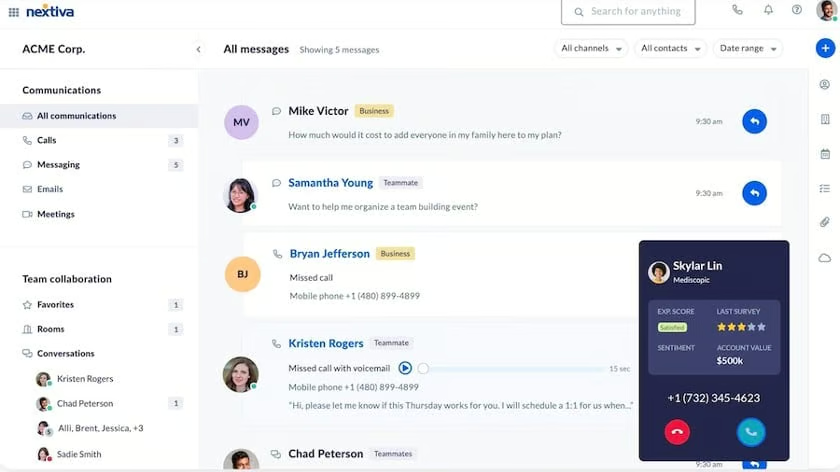
The Nextiva Contact Center platform seamlessly connects with its business phone service. It lets you handle incoming and outgoing requests via phone, chat, email, and SMS. Workforce management (WFM) and workforce optimization (WFO) capabilities include tools for agent coaching, scheduling, and quality monitoring. Self-service IVR and virtual agents help handle high call volume and speed up resolution times.
The 8×8 X Series consists of five tier plans that allow companies to start with lower-priced packages for unified communications and then scale up to a full contact center solution. It uses an a la carte approach, enabling users to mix and match plans based on their unique requirements.
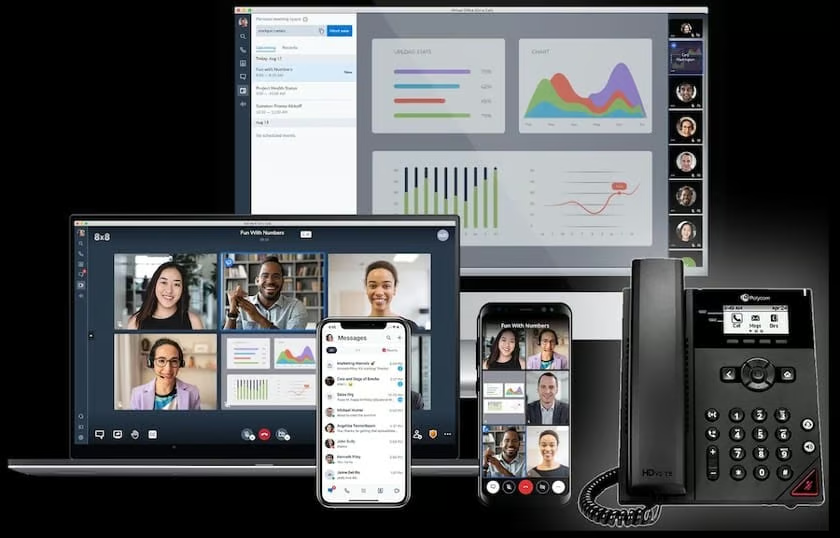
The X2 plan is designed for agents to access communication and collaboration features through the desktop or mobile app. The X4 plan, on the other hand, is well-suited for supervisors who want to monitor agent calls and optimize service quality. It is also ideal for users who make frequent calls to international countries.
8×8 takes pride in its enterprise-level security as it maintains 15 global data centers, 160 patents (120-plus pending patents), and multiple compliance certifications with industry-leading regulatory bodies. This makes it an excellent solution for companies in the healthcare and banking industries.
Frequently Asked Questions (FAQs)
What is the difference between UCaaS vs CPaaS?
UCaaS provides a ready-made solution that bundles various communication features, such as cloud phone, video conferencing, and team messaging. In contrast, a communications platform as a service (CPaaS) provides development tools like application programming interfaces (APIs) to enable businesses to incorporate communication features into their existing applications. Learn more about their differences in our guide about UCaaS vs CPaaS.
VoIP vs UCaaS: How are they different?
VoIP is a standalone technology for voice calls, whereas UCaaS supports multiple communication channels, including VoIP calling, video conferencing, and messaging. Both services are cloud-based and require a good quality internet connection, and VoIP vendors often provide plans with unified communications features.
When is it best to combine UCaaS & CCaaS solutions?
If you can’t decide between CCaaS vs UCaaS, combining both solutions is ideal if you want to simultaneously focus on streamlining internal communications and improving customer experience. With these technologies combined, different teams can work smoothly together. For example, contact center agents can collaborate directly with a subject matter expert when dealing with a complex customer query.
Bottom Line
As you compare CCaaS vs UCaaS, you will find many of their features and benefits overlap, but each offers unique tools that could improve your day-to-day operations. The main goal of UCaaS is to strengthen internal communication, while CCaaS focuses on external communication to enhance customer experience. Both are affordable, improve productivity, and are easy to use for those with little technical know-how.
