








The best time and attendance software is designed to help employers efficiently monitor the working time of employees. It can track actual hours worked, overtime, absences, and leave balances while keeping you in compliance with labor laws. Many time and attendance systems for small businesses also offer online scheduling, team messaging, and GPS tracking solutions, although some providers may charge extra or require you to subscribe to a premium plan to access these tools.
In this article, we evaluated 12 solutions to find the best time and attendance software for small businesses and narrowed it down to our top eight recommendations:
- Best Time & Attendance Software Compared
- Homebase: Best Overall Time & Attendance Software
- Deputy: Best for Businesses with Rotating Staff
- BambooHR: Best for Businesses Needing All-encompassing HR Solutions in Addition to Time and Attendance
- QuickBooks Time (Formerly TSheets): Best for QuickBooks Users Wanting to Simplify Time Tracking
- TimeTrex: Best for Businesses Needing Both Payroll & Time Tracking Tools
- Buddy Punch: Best for Businesses with Multiple Departments Needing Multiple Time Clock Options
- ZoomShift: Best for Businesses With Seasonal Highs & Lows
- ClockShark: Best for Construction & Field Service Companies
- Frequently Asked Questions (FAQs)
- Bottom Line
Best Time & Attendance Software Compared
| Our Scores (out of 5) | Free Plan | Monthly Pricing | Multiple Time Clock Options | Mobile App | PTO, Overtime, Break Tracking | Live Phone Support | |
|---|---|---|---|---|---|---|---|
 | 4.23 | ✓ (for one location with up to 20 workers) | $24.95–$99.95 per location | PIN code, web/mobile app | ✓ | ✓ | ✓ |
| Visit Homebase | |||||||
 | 4.0 | ✓ | $4.50–$6 per employee | PIN code, facial recognition, voice command, web/mobile app | ✓ | ✓ | ✓ |
| Visit Deputy | |||||||
 | 3.80 | ✕ | $4 per employee* | PIN code, web/mobile app | ✓ | ✓ | ✓ |
| Visit BambooHR | |||||||
 | 3.68 | ✕ | $20–$40 + $8–$10 per employee | PIN code, web/mobile app | ✓ | ✓ | ✓ |
| Visit QuickBooks Time | |||||||
 | 3.68 | ✓ | $30–$80 a month (plus $100 new user activation fee) | Facial recognition, web/mobile app, QR code | ✓ | ✓ | ✓ |
| Visit TimeTrex | |||||||
 | 3.65 | ✕ | $19 base fee + $4.99–$7.99 per employee | QR code, facial recognition, PIN, username/password, web/mobile app | ✓ | ✓ | ✕ |
| Visit Buddy Punch | |||||||
 | 3.58 | ✓ (scheduling & communication tools only) | $2.50–$5 per active employee | PIN code, web/mobile app | ✓ | ✓ | ✕ |
| Visit ZoomShift | |||||||
 | 3.33 | ✕ | $40–$60 base fee + $8–$10 per use | PIN code, facial recognition, web/mobile app | ✓ | ✓ | ✓ |
| Visit ClockShark | |||||||
See fullscreen table
×
| Our Scores (out of 5) | Free Plan | Monthly Pricing | Multiple Time Clock Options | Mobile App | PTO, Overtime, Break Tracking | Live Phone Support | |
|---|---|---|---|---|---|---|---|
| 4.23 | ✓ (for one location with up to 20 workers) | $24.95–$99.95 per location | PIN code, web/mobile app | ✓ | ✓ | ✓ |
| Visit Homebase | |||||||
| 4.0 | ✓ | $4.50–$6 per employee | PIN code, facial recognition, voice command, web/mobile app | ✓ | ✓ | ✓ |
| Visit Deputy | |||||||
| 3.80 | ✕ | $4 per employee* | PIN code, web/mobile app | ✓ | ✓ | ✓ |
| Visit BambooHR | |||||||
| 3.68 | ✕ | $20–$40 + $8–$10 per employee | PIN code, web/mobile app | ✓ | ✓ | ✓ |
| Visit QuickBooks Time | |||||||
| 3.68 | ✓ | $30–$80 a month (plus $100 new user activation fee) | Facial recognition, web/mobile app, QR code | ✓ | ✓ | ✓ |
| Visit TimeTrex | |||||||
| 3.65 | ✕ | $19 base fee + $4.99–$7.99 per employee | QR code, facial recognition, PIN, username/password, web/mobile app | ✓ | ✓ | ✕ |
| Visit Buddy Punch | |||||||
| 3.58 | ✓ (scheduling & communication tools only) | $2.50–$5 per active employee | PIN code, web/mobile app | ✓ | ✓ | ✕ |
| Visit ZoomShift | |||||||
| 3.33 | ✕ | $40–$60 base fee + $8–$10 per use | PIN code, facial recognition, web/mobile app | ✓ | ✓ | ✓ |
| Visit ClockShark | |||||||
* Based on a quote we obtained.
Wondering which time and attendance software to use for your business? Answer this four-question quiz and find one that best fits your business needs.
Answer a few questions about your business, and we'll give you a personalized product match.
Wondering which time and attendance software to use for your business? Answer this four-question quiz and find one that best fits your business’ needs.
Question 1 of 4
Which of the following best describes your business’ location?
Homebase: Best Overall Time & Attendance Software
Homebase is a cloud-based time tracking and scheduling software with time clock apps that work on several devices, including POS systems. It has automated timesheets that, aside from letting you add cash and credit tips, can help you calculate total hours worked and the multiple wage rates of employees. These features make Homebase an ideal software for small businesses, specifically retail shops and restaurants.
Scoring 4.23 out of 5 stars, Homebase received high marks for pricing, time tracking functionalities, reporting, and ease of use. Many users said that it has an intuitive interface with robust features. However, its limited integration and clock-in options prevented this software from getting perfect scores.
.
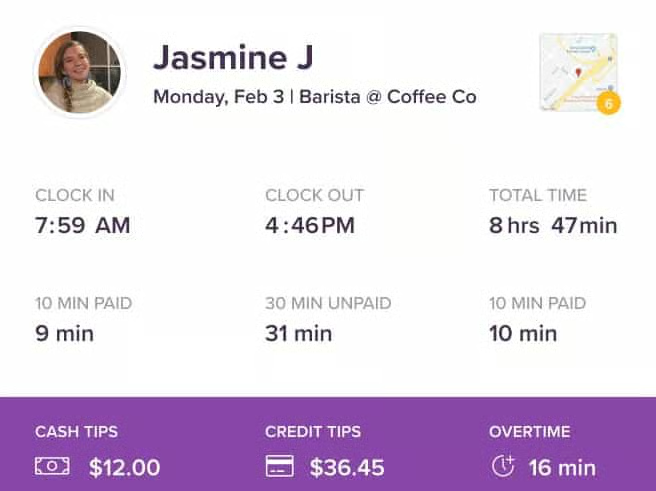
Homebase also provides additional tools for tracking applicants, posting jobs, creating staff schedules, and messaging employees online. It topped our best employee scheduling software and best employee time clock lists.
Homebase Pricing
- Free option: The Basic plan includes automated timesheets, staff scheduling, team messaging, third-party software integration, reports, and time clock apps for computers, as well as POS, Android, and iOS devices. It also supports unlimited employees and schedules. However, this plan is free only for businesses with one location with up to 20 employees.
- Paid plans: Homebase has three paid tiers
- Essentials: $24.95 per location monthly
- Plus: $59.95 per location monthly
- All-in-One: $99.95 per location monthly
These have all the tools included in Basic, plus geofencing, labor cost forecasts, health and safety screenings, paid time off (PTO) accruals and balance tracking, hiring and onboarding tools, and advanced compliance support.
- Add-on services: Unless you subscribe to the All-in-One package, you have to pay extra for the following add-ons:
- Job posting boosts: Starts at $79 per post
- Payroll: $39 plus $6 per employee monthly
Note that only one other software in this guide (BambooHR) offers hiring tools. However, some, like ClockShark grant you access to a dedicated account manager.
Homebase Standout Features
- Intuitive interface: Homebase has a comprehensive suite of time tracking and scheduling solutions that are easy to learn and use. Employers can create schedules and view actual work hours in just a few clicks, while employees can easily clock in/out and even apply for shift trades online.
- Feature-rich free plan: Homebase’s Basic plan is best for small businesses with one location because it has more features at the free level than many other options do in their paid plans. Aside from time tracking and scheduling solutions, it includes a built-in team messenger and integrations with top POS and payroll systems (such as Clover, Square, Toast, Revel Systems, Vend, Gusto, QuickBooks, and ADP).
- Per-location pricing scheme: While other providers in this list charge monthly fees on a per-employee basis, Homebase’s pricing scheme is based on the number of business locations you have. This lets you grow your workforce without having to worry about paying fees for additional user seats—provided your employees work in the same location.
- Efficient time and scheduling tools: From automated timesheets and a drag-and-drop schedule builder to daily labor reports and administrator alerts for late clock-ins and overtime, Homebase provides you with a wide range of online solutions to help you streamline time tracking and scheduling processes. It even lets you allocate hours by jobs and track employees with multiple roles and wage rates.
- Secure clock-ins: Employees can clock in/out using a PIN code through Homebase’s time clock apps (for computers, smartphones, tablets, and POS devices). Its mobile apps (for iOS and Android) also let you take photos and use GPS to confirm who exactly is clocking in and check the employee’s location. In addition, the system has an early clock-in prevention feature that allows you to limit early time-in and an automatic clock-out functionality in case an employee forgets. Competitors, like ClockShark, and TimeTrex don’t have auto clock-out features.
Deputy: Best for Businesses with Rotating Staff
Deputy is an ideal choice for businesses with rotating staff needing straightforward time and attendance tools because of its Flexi Weekly plan, which charges $2.50 per active user and 50 cents per inactive user weekly. It has a free starter plan for US customers, and other plans and packages are also affordable, with monthly fees that start at $4.50 per employee. However, some of Deputy’s tiers require a minimum monthly spend of $25—other providers in this list don’t have this requirement.
Scoring 4 out of 5 stars, Deputy got high marks because it is affordably priced and easy to use and offers efficient time and attendance tools like exportable timesheets, PTO tracking, and time-related administrator alerts. However, it can’t limit early clock-in and geofence time transactions.
In terms of user feedback, Deputy received a lot of positive reviews that highlighted its inexpensive plans and simple yet efficient tools as its best features. On the other hand, some users said that the quality of its customer service is less than ideal, and its system has occasional glitches, especially when connecting with third-party software.
Deputy Pricing
- Free starter plan: This package is available for US users and lets you publish 100 shifts and approve 100 timesheets per month. It includes PTO and leave management, unlimited 24/7 support, and a time clock with biometric and geolocation capture.
- Standalone packages: It has a Time and Attendance plan and a separate Scheduling option that each costs $4.50 per employee monthly. You are granted access to timesheets, payroll integrations, and time clock apps (for iOS and Android) with the former; the latter features an online schedule builder with auto-scheduling functionalities. Both also come with PTO management, meal and rest break planning, POS integrations, unlimited 24/7 support, and a news feed. However, these two packages don’t have reporting tools.
- Paid plans with complete time tracking and scheduling solutions: Deputy has a Premium tier ($6 per employee monthly) and an Enterprise option (custom priced). Both plans have all of the features of the standalone scheduling option and time and attendance package but with reporting capabilities. If you require additional tools like custom roles and permissions, advanced demand planning, and dedicated support, you may want to consider its Enterprise tier.
- Flexible weekly option: Deputy is the only provider in this article that has a “Flexi Weekly” option. Designed for businesses that change employees weekly, it has all the features of the Premium plan but with a lower price tag—$2.50 per active employee and 50 cents per inactive user weekly.
Note that Deputy’s Scheduling, Time and Attendance, and Premium tiers require a minimum monthly spend of $25 per invoice. If you would like to avoid this requirement, then consider its Flexi option or get an annual Premium plan (note that this subscription type isn’t available for the Scheduling and Time and Attendance packages).
Deputy Standout Features
- Ease of use: Deputy offers easy-to-use online tools for managing employee attendance and schedules. It comes with a bit of a learning curve, mainly because some of its features are confusing, hard to find, and take a while to learn. If you need help, you can join the provider’s free training sessions or visit its website to access its library of tutorial videos and online guides. You can also contact its 24/7 support team as many times as you need.
- Flexible time tracking: With Deputy’s time clock apps, you can track employee hours and manage your workforce from any Android and iOS device, including the Apple Watch (none of the software in this guide offers mobile time tracking through this device).
- Secure clock-ins: Deputy’s apps for iPads and Android tablets support touchless clock-ins, enabling your employees to start and end their shifts through facial recognition and voice commands (other providers in this list don’t support clock-ins/outs through voice commands). In addition, its geolocation tracking tool creates a location stamp that you can view. This ensures your employees are clocking in/out from the right work location.
- User-friendly employee scheduling: Aside from its easy-to-use schedule builder, it has an auto-scheduling feature that lets you create artificial intelligence (AI)-optimized shifts with a single click. Competitors like TimeTrex and ClockShark don’t have AI scheduling tools.
- Labor compliance tools: Deputy has smart wage and hour compliance tools (such as meal, rest breaks, and overtime settings) designed to help keep you compliant with labor laws and protect your business from potential risks. Like other software in this guide such as Homebase and ZoomShift, Deputy also has compliance tools. These include fair workweek rules to help ensure that you create fair yet profitable work schedules, track last-minute schedule amendments and capture the employee’s consent to the change, and avoid assigning shifts that require staff to work closing and opening shifts back-to-back.
BambooHR: Best for Businesses Needing All-encompassing HR Solutions in Addition to Time and Attendance
BambooHR is perfect for businesses that need an all-inclusive human resources software. In addition to time and attendance features, it allows you to process payroll, manage benefits, hire and onboard new employees, track time off, and manage employee performance. Additionally, it integrates with over 125 third-party software tools to help you manage your HR workforce.
Overall, this software scored 3.80 out of 5. What kept BambooHR from scoring better in our evaluation was its lack of transparent pricing. However, based on the pricing we were quoted, BambooHR is just as affordable as the other providers on our list, like Deputy or ZoomShift. The software ranked high for user popularity and ease of use, as well as its reporting capabilities—allowing small businesses to manage workforce planning and approve tracking while customizing reports to their needs.
BambooHR Pricing
Time and attendance software is an add-on feature to BambooHR’s two available plans—Core and Pro. Pricing, however, is not transparent, and you must contact BambooHR for a quote. Based on a quote we received, the time and attendance add-on is priced at $4 per employee per month, with a minimum of $12 for up to 3 users, in addition to its plan pricing.
BambooHR Standout Features
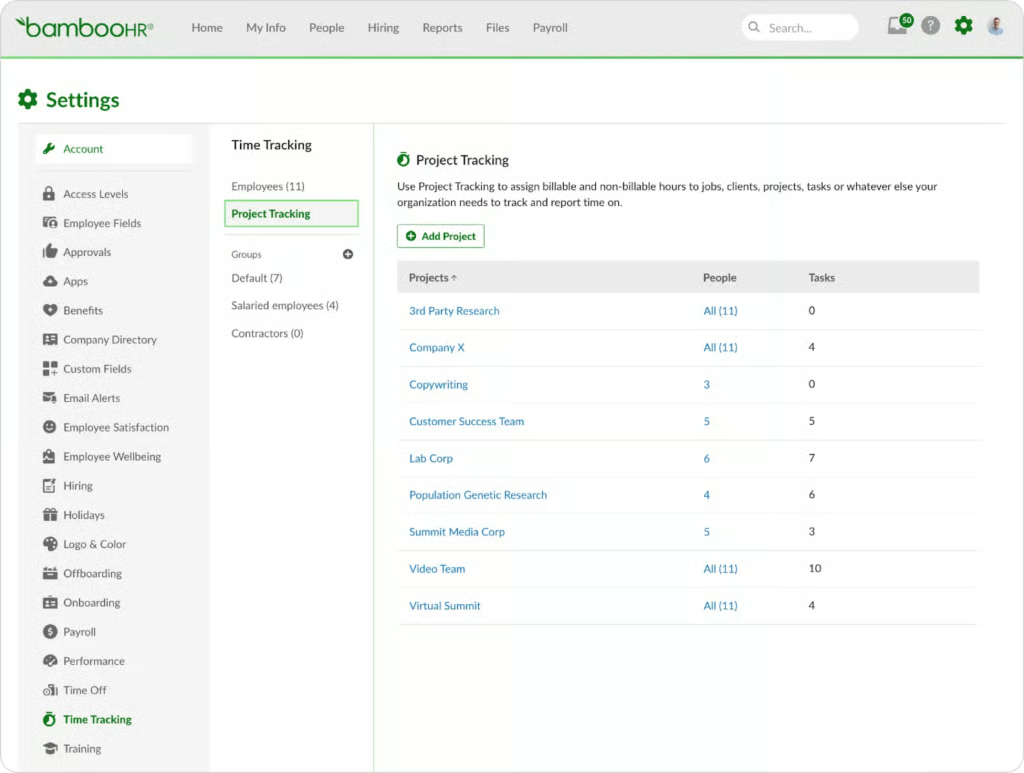
- Project tracking: Similar to Buddy Punch, BambooHR allows employees to log hours worked on a specific project, client, location, or task. This lets you run specific reports to see where time is spent in each category.
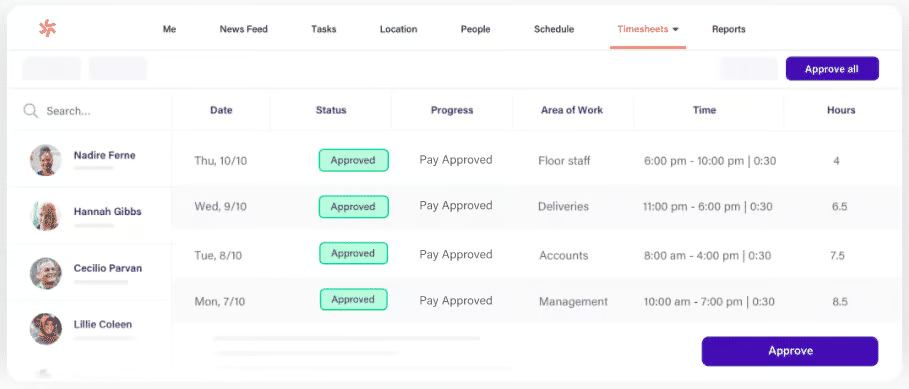
- One-click approval: Instead of looking through spreadsheets or emails to determine employee hours, managers receive copies of all timesheets for instant review. From there they simply click an approve button and the timesheets are approved.
- Mobile clock-in: BambooHR’s mobile app allows users to clock in and out no matter where they are working. All web features are available through the mobile app—clock in/out, review timesheets, fix errors, and log hours to specific projects or clients. Plus, like most of the providers on this list (Homebase, Quickbooks, TimeTrek, BuddyPunch, ClockShark, and Deputy) the mobile app has a geolocation feature that gives managers a snapshot of where their team was when they clocked in and out.
- Automated reminders: This feature sends automated reminders out to both employees and managers for updating scheduling, entering time, and approving timesheets so nothing falls through the cracks.
- Overtime tracking: Some states have specific laws around overtime. BambooHR has built-in overtime tracking in all 50 states so you remain compliant.
- Payroll hours reports: All regular time, overtime, and PTO tracking can be evaluated in one premade report. Or, you can customize reports to see the information you need.
QuickBooks Time (Formerly TSheets): Best for QuickBooks Users Wanting to Simplify Time Tracking
QuickBooks users wanting efficient time and attendance tools don’t need to invest in a separate system. Instead, they can use QuickBooks Time (formerly TSheets) to streamline time tracking and employee scheduling (learn how to use the software here). It takes only a couple of clicks to integrate QuickBooks with QuickBooks Time to make payroll processing more efficient compared to using non-native software. It offers time clock apps that work on any desktop computer, laptop, tablet, and smartphone—provided an internet connection and a web browser are available.
Overall, this software scored 3.68 out of 5 stars. You get intuitive controls, providing you with a secure way to monitor attendance and capture your employees’ actual hours worked. However, unlike Homebase and Deputy, QuickBooks Time has limited third-party software integrations and reports customizability. Several users even wished that it offered more direct application programming interface (API) options and custom reporting.
QuickBooks Time Pricing
- Paid plans: QuickBooks Time has a Premium tier ($20 plus $8 per employee monthly) and an Elite option ($40 plus $10 per employee monthly). Both plans include one administrator seat, expert support, and access to time-tracking and scheduling solutions. What sets the Elite plan apart from Premium is the inclusion of geofencing, timesheet signatures, mileage and project tracking, and a project activity feed.
- Add-on services: You have to pay extra if you need additional administrator seats.
QuickBooks Time Standout Features
- Ease of use: While its online tools are generally easy to use, it has a bit of a learning curve (primarily because of its many features). However, in case you need assistance, you can contact QuickBooks Time’s customer support as many times as you need. You are also granted access to video tutorials, webinars, and how-to guides. The provider even has a community forum that connects you with experts and other QuickBooks users who can help provide answers to your questions. None of the other software in this guide provides an online forum.
- Mobile time tracking: With QuickBooks Time’s mobile apps, you can track, submit, and approve employee hours, including PTO, even while on the go. You can also have employees sign off their timesheets directly from the app. While it has both geofencing and geolocation tracking features, the former is available only for Elite plan subscribers.
- Project tracking: Aside from monitoring the actual hours that employees spend on a job, QuickBooks Time can help you track the status of projects—from the planning stage up to its completion phase. Apart from ClockShark, other software in this guide don’t have this feature.
- Online timesheets: In addition to an audit log that tracks all timesheet edits and approvals, QuickBooks Time’s online timesheets are designed to streamline payroll and invoicing processes—integrating seamlessly with QuickBooks Workforce and QuickBooks Accounting. While you can export its timesheet data to third-party payroll and invoicing solutions, this seamless integration between QuickBooks products can help save you time. This is unlike other options that may have either limited integration options (such as ClockShark) or occasional integration issues (like Deputy).
- Efficient scheduling tools: QuickBooks Time lets you create and assign schedules by jobs and shifts. You can also edit schedules either by dragging and dropping shifts or copying and then modifying a previous week’s schedule, like Buddy Punch and ZoomShift. Most of the software we reviewed in this guide have drag-and-drop scheduling tools except for TimeTrex.
- Custom alerts: To simplify employee management, you can set up custom alerts for employees to clock in/out and submit timesheets for payroll. You can also automate notifications for managers, informing them of late clock-ins, overtime, and mismatched time-in photos for review.
- Smart reporting: QuickBooks Time has employee attendance and project tracking reports that you can use to process payroll, plan future projects, and monitor labor estimates versus the employees’ actual work hours. Its reports are also exportable to PDF, Excel, and CSV file formats.
TimeTrex: Best for Businesses Needing Both Payroll & Time Tracking Tools
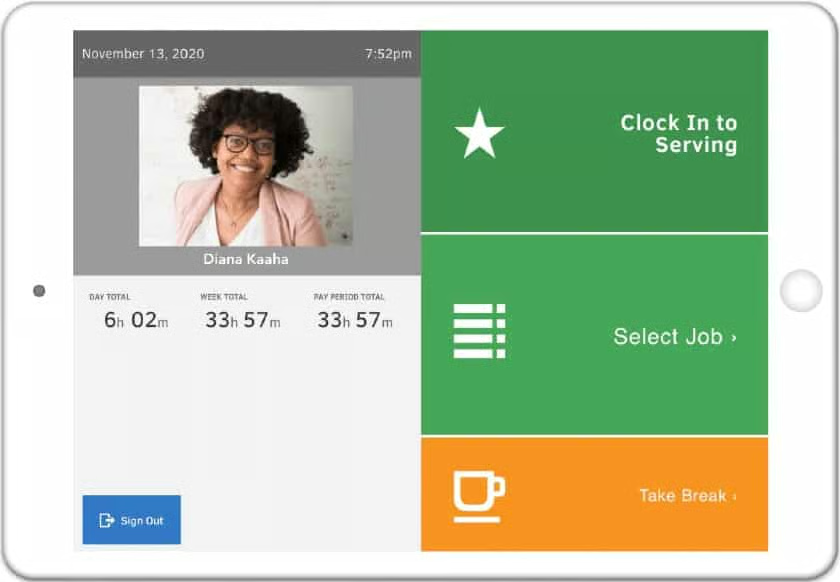
With TimeTrex, you get a rule-based time and attendance software that lets you configure how and where your staff can clock in and out. If you currently don’t use payroll software, you’ll like that it automatically captures time entries to easily process and run payroll. You can set up policies that apply to certain employees (such as those who work only in specific departments, jobs, and shifts), and it will automatically calculate the actual work hours, overtime, and applicable pay rates based on the rules. Its time clock apps (for computers and iOS/Android devices) also allow you to select the type of time entries that can be captured—from PIN ID to QR code and facial recognition clock-ins/outs.
TimeTrex was rated favorably for its efficient time tracking, attendance monitoring, and reporting capabilities—earning 3.68 out of 5 stars. However, its interface looks cluttered and dated, plus some of its features take a while to learn. Several users even said that while TimeTrex is generally easy to use, learning how to navigate it and use all of its tools can be a bit difficult. It also scored low on its pricing due to a lack of full transparency; you have to contact the company to get a quote if you employ more than 10 people.
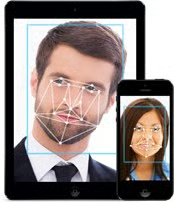
While TimeTrex is primarily a time and attendance software, it also offers a suite of HR solutions for managing hiring, scheduling, PTO, payroll, and employee information. It’s even our top overall choice for free payroll software.
TimeTrex Pricing
TimeTrex offers three paid plans (Professional, Corporate, and Enterprise). However, its rates online are limited to 10 employees. If you have more than 10 employees you have to call TimeTrex and request a quote.
Its professional plan, priced at $30 a month, includes time and attendance tracking. If you need geofencing or location management you’ll need to upgrade to its Corporate plan at $50 a month. Its Enterprise plan, which includes advanced tracking capabilities, is priced at $80 a month. In addition, all new accounts are subject to a $100 activation fee.
TimeTrex Standout Features
- Touchless time clocks: Similar to Deputy’s touchless time clock app for tablets (but without the voice command feature), TimeTrex allows you to use a tablet as a time clock kiosk where your staff can do clock-ins/outs through facial recognition—a feature that prevents buddy punching. Employees also don’t have to touch the device. The system will automatically scan, identify, and verify a person by comparing his/her facial features from the saved image in its database.
- Secure clock-ins: Aside from facial recognition and PIN time entries, TimeTrex has geolocation and geofencing capabilities that allow you to limit where remote and off-site employees can clock in from. Similar to Buddy Punch, TimeTrex also supports QR code clock-ins/outs.
- Efficient attendance monitoring and employee scheduling: TimeTrex makes tracking employee attendance easy given its real-time timesheets that managers can review even while on the go. It also offers automated scheduling tools that can handle simple to complex shifts.
- Rule-based time tracking: TimeTrex has a “policy groups” feature where you can add specific rules to control how employees can clock in/out. For instance, you can create “policy groups” that include only overtime-exempt workers, so if they clock out several hours after their designated schedule, the system won’t consider the excess hours as overtime. You can even assign which devices, including the type of time transactions, employees can use to clock in/out from. These functionalities make TimeTrex’s time-tracking controls more robust than Homebase and the other software in this guide.
- Payroll features: With TimeTrex, you don’t have to manually transfer time entries from one software to the next because it automatically captures information to run payroll. TimeTrex can also handle your federal, state, and local tax calculations, including deduction types and custom earnings, such as bonuses. Note, though, that it doesn’t file and remit payroll taxes for you. In paying employees, you can use its check printing capabilities or electronic fund transfer. You may also print pay slips to give to your employees; employees can also view them via the mobile app or user dashboard.
Buddy Punch: Best for Businesses with Multiple Departments Needing Multiple Time Clock Options
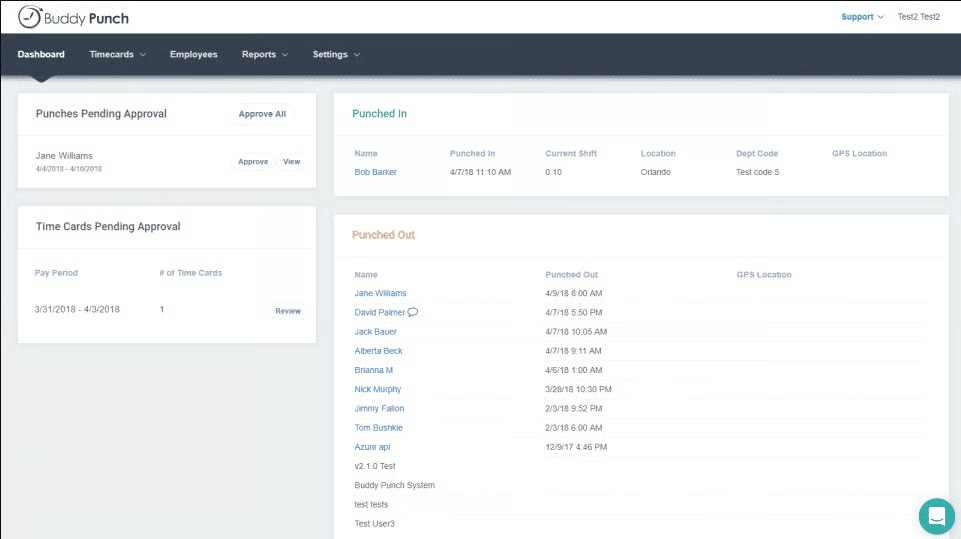
Buddy Punch is a cloud-based time tracking software designed to streamline how you monitor employee time and attendance. Its scheduling tool allows users to specify locations, positions, and job codes for employee shifts, making it a good option for businesses with multiple departments. It also features an online time clock with apps that work on web browsers and mobile devices. Unlike other solutions presented in this list, it doesn’t have a free plan, but its paid tiers are affordably priced, with fees that start at $19 base fee + $4.99 per employee per month.
The software earned an overall score of 3.65 out of 5 and got perfect marks for security. However, it scored only 2.5 out of 5 for reporting since users cannot customize reports. Although it’s an easy platform to use, it lacks live phone support for immediate technical concerns.
Buddy Punch Pricing
All pricing plans have a $19 base fee per month.
- Standard: Starts at $4.99 per employee per month. Includes the following features:
- Unlimited administrations
- Time, job, and PTO tracking
- Mobile app with GPS features
- Timecard approvals
- Alerts and reminders
- Integration options
- Pro: Starts at $5.99 per employee per month. Includes everything in the Time and Attendance plan plus a drag-and-drop scheduler.
- Premium: Starts at $7.99 per employee per month. Includes everything in the Time and Attendance plus Scheduling plan, as well as API and SSO access.
- Enterprise: Custom-priced. Includes everything offered above in a combined package.
Buddy Punch also offers customized pricing for 200 or more employees. It doesn’t charge set-up or termination fees in case you decide to cancel your subscription. If you exceed your plan’s user seat limits, you can upgrade to a higher option at any time and Buddy Punch will prorate your monthly fee.
Buddy Punch Standout Features
- Multiple clock-in/out options: In addition to PIN code and facial recognition scans, Buddy Punch supports QR code and username with password clock-ins/outs. Buddy Punch has the most clock-in/out options out of all software on this list.
- Flexible time tracking: Like other providers in this guide, Buddy Punch has a mobile app for iOS and Android devices, which lets you turn tablets and smartphones into online time clocks. Given that its platform is web-based, you can also access its time tracker on computer browsers—Buddy Punch recommends Google Chrome for a better user experience.
- Time tracking controls: Buddy Punch has punch-limiting features that allow you to set up specific timeframes when employees are allowed to clock in/out—a feature that’s not found in other providers in this list. It even lets you specify the exact time per day—instead of only the number of minutes—that your staff can clock in/out before and after their shift. This is useful if your employees have different work shifts but you didn’t get Buddy Punch’s plan with scheduling tools. Further, Buddy Punch has geofencing and geolocation tracking, including device and IP address locks if you want to restrict where your staff can clock in/out from.
- Time entry duration tool: Buddy Punch may not have an online timer for tracking hours on projects, but it has a “duration entry” feature that allows your salaried employees to log the total hours they spend on clients (such as meetings or client support).
- Employee scheduling: Buddy Punch has a drag-and-drop scheduler that lets you create, edit, assign, and share work shifts with employees. The scheduler even works on mobile devices, allowing you to easily manage employee scheduling while on the go. In addition to specifying the exact time range, you can add specific locations, positions, and job codes to employee shifts. It also has a feature that automatically clock-outs employees when their schedules end.
ZoomShift: Best for Businesses With Seasonal Highs & Lows
ZoomShift is a scheduling and time tracking software that is great for small businesses that have seasonal highs and lows, such as those in the agricultural, construction, and tourist industries or businesses offering vacation accommodation or lawn care maintenance.
Compared to other software that lets you do daily or weekly schedules, ZoomShift allows you to plan months ahead to make sure you have everything covered during peak or low seasons. It also places your plan on hold, should you need to close for a season or during slow months, and its per-active user pricing is helpful.
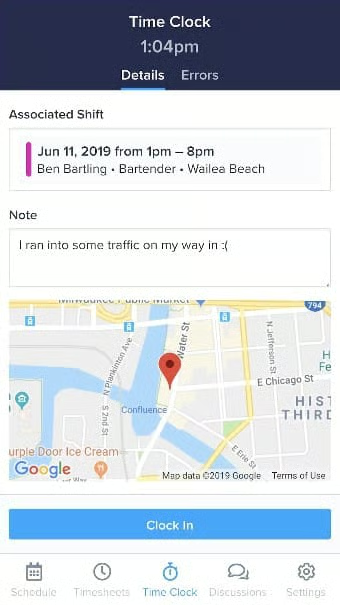
The software scored 3.58 out of 5, with modest marks for most of our criteria. With ZoomShift, users get an easy-to-implement software with scheduling and time and attendance functionalities. Its flexible by-employee pricing is similar to most providers in this guide, providing a mobile time clock and great tools for shift scheduling.
ZoomShift Pricing
- Essentials: Free. Includes basic scheduling and communications tools for small teams.
- Starter: Priced at $2.50 monthly per active user and includes the following features:
- Schedule
- Time off and availability
- Shift swap
- Time clock
- Timesheets
- Payroll report
- Reminders
- Calendar app sync
- Premium: $5 monthly per active user and includes all of Starter’s features plus:
- Overtime warnings
- Shift rules
- Enterprise: Custom; designed for large businesses or franchises needing customized solutions. Includes all Premium features plus the following:
- Priority support
- API access
- Sub account management
ZoomShift Standout Features
- Scheduling and time tracking: It has basic tools that let you copy schedules or save schedules as a template—as many of them as you like. You can sync the schedule with Google Calendar, iCal, and Outlook. The time tracker is integrated, making time sheets easy and enabling you to set up clock-in/out rules and geofencing. You can track missed shifts, late arrivals, and more.
- Employee communications: Like other providers in this list (except Buddy Punch), ZoomShift lets you send schedules to workers, offer open shifts, and allow employees to trade shifts. It alerts managers about overtime and breaks of shift rules (like clocking in early) and has event announcements, group chats, and direct messages.
- Seasonal planning features: The seasonal planning and ease of use make it a good choice for restaurants with high staff turnover or staff that only work at certain times of the year.
- HR and payroll functions and integrations: You can set rules to restrict hours and get alerts when an employee is approaching overtime. In addition, you can approve time sheets and create payroll reports, which you can download as CSV or XLS for putting into a payroll program. You can build other reports, but it doesn’t have many customizable ones. It also lacks integrations into other software.
- Plan holds and active member pricing: If your business has long-term slowdowns or times when you close for a month or a season, then ZoomShift is a great choice. It lets you put your plan on hold when you don’t need it without losing your information—something no other time-tracking software on our list offers.
ClockShark: Best for Construction & Field Service Companies
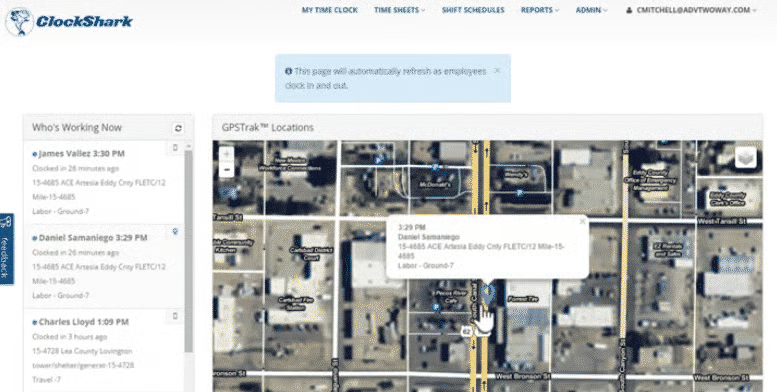
If you need a user-friendly yet robust mobile time tracking tool for your construction or field service business, then you may want to consider ClockShark. Its crew punch feature allows a supervisor to clock in for his staff using the mobile app, which can be helpful if some employees don’t have smartphones. It has job budgeting features, which alert you if you’re nearing the set limit of hours for a job. Managers can share job information, such as addresses, photos, and documents with field employees via the mobile app. Further, it can track an employee’s work hours by job and service codes and send alerts for early/late time transactions, overtime, and location tampering.
If you also need to track the attendance of your non-field employees, ClockShark has a web-based time clock designed specifically for office staff. This allows them to clock in/out directly from their computers—provided there is an available internet connection.
Scoring 3.33 out of 5 stars, ClockShark scored well for ease of use. Many users said that it is simple to install and made time tracking easier for their staff. Its ratings dipped, however, because of the lack of a free plan and having paid pricing that’s a bit higher than many of the other providers on our list, as well as non-customizable reports and limited customer reviews.
ClockShark Pricing
- Standard plan: Ideal for growing businesses that need time tracking with geofencing and scheduling tools. Priced at $40 plus $8 per employee monthly, this option has all of the features included in Basic, plus advanced GPS tracking, third-party integrations, manager approvals, and access to ClockShark’s KioskClock that allows you to use a tablet or smartphone as a centralized time clock kiosk for capturing employee time transactions.
- Pro option: This tier is optimal for multi-location businesses that need complete time and attendance and staff scheduling solutions. It costs $60 plus $10 per employee monthly and includes additional tools like PTO tracking, clock-out questions, advanced job costings, and multi-department/office controls.
ClockShark Standout Features
- Ease of use: ClockShark’s online tools are easy to navigate and require no training. However, if you need assistance, ClockShark offers unlimited customer support (either through chat, phone, or email) and has a library of helpful videos and how-to guides. Note that while it integrates with leading payroll and accounting apps (such as Paychex, ADP, QuickBooks, and Gusto), the selection is limited.
- Efficient time tracking: ClockShark provides multiple time clock options that allow you to capture the clock-ins/outs of both field and office-based employees. It also lets you track the actual hours that employees spend working on a job or task. In addition, you get digital timesheets, proactive alerts, and robust project tracking tools. Note that aside from QuickBooks Time, other software in this guide doesn’t offer project tracking.
- Secure clock-ins: You can create custom work location ranges where your employees are allowed to clock in/out. Aside from basic geolocation tracking, you get advanced GPS functionalities that allow you to see a breadcrumb trail of where field employees went during their shifts (similar to QuickBooks Time). It also has a crew punching feature that allows you to clock in for the whole crew using the mobile app.
- Robust scheduling: Create and edit schedules with its drag-and-drop schedule builder. You can assign tasks and jobs to employees and add addresses for fieldwork. ClockShark will even include a map of the address on the employees’ schedules. Field staff can then tap on the map to get automatic navigation from their mobile devices. They can also add photos and documents to these jobs as they’re done.
- Smart reporting: ClockShark provides more than just clock-in/out data. You can run reports that show the employees’ tasks, locations, and actual work hours. It also has job summaries that show labor costs and reports that provide insights into how specific departments/business locations spend their working hours. Further, its timesheets can help you prepare invoices to bill clients (like QuickBooks Time).
How We Chose the Best Time & Attendance Software
To have an accurate source of time data for payroll processing, businesses need a time and attendance system that can efficiently track their staff’s clocked time, overtime hours, and PTO. In our evaluation of the best time and attendance software solutions, we looked for these features, including whether the software has exportable timesheets, administrator alerts, prebuilt reports, geofencing, mobile apps, and multiple time clock and clock-in/out options. We also compared each system’s ease of use, pricing, customer support, and online user reviews.
To see our full evaluation criteria for best time and attendance software, click through the tabs in the box below.
We checked to see if the provider has a free plan and transparent pricing for its paid tiers. We also considered the cost of paid subscriptions and gave those priced at $10 or less per employee monthly extra points.
The best employee time and attendance software should include the following basic tools: exportable time data, multiple time clock types, breaks and PTO tracking, and administrator alerts. Plus, having access to mobile apps and a self-service portal is also ideal.
Geofencing, geolocation tracking, and multiple clock-in/out options (such as fingerprint, badge, and PIN code) are just some of the essential functionalities we looked at. We also checked whether or not the software has the capability to set up approvals and limit early time-ins.
Having time-tracking software that is intuitive and easy to learn is a must. We also looked at whether the provider offers live phone support, training, quick system implementations, and integration options with payroll, point-of-sale (POS), and scheduling systems.
Aside from having access to standard and pre-built reports, users should be able to customize reports.
We considered online user reviews—including those of our competitors like G2 and Capterra—based on a 5-star scale, wherein any option with an average of 4+ stars is ideal. Also, software with 1,000 or more reviews on third-party sites is preferred.
Frequently Asked Questions (FAQs)
How much does time and attendance software cost?
The size of your business and whether or not time and attendance are an add-on to a larger package will determine its cost to you. Based on our research, a company with 25 employees will likely incur a cost of around $200 – $250 a month for a robust time and attendance software.
Are there free time and attendance software options?
In our research, most time and attendance software comes at a cost–typically a paid add-on to an otherwise free software package. Those that are completely free to use generally lack certain capabilities, like geotracking or payroll integration. This means you’d have to purchase integration products to get the full experience.
What are the advantages and disadvantages of time and attendance software?
Some advantages of using time and attendance software include the ability to integrate with payroll, easy manager approvals, overtime tracking, scheduling capabilities, and more. The biggest disadvantage is the cost to employers, however, it is more accurate than manually recording time.
Bottom Line
The best time and attendance systems for small businesses are those that are easy for you and your employees to use. Aside from providing you with online tools to accurately and securely track clock-ins/outs, it should make your payroll process easier. This means that the software can calculate multiple wage rates, overtime, and deductions for absences and unpaid breaks. It should also have exportable timesheets and integration with online payroll services to allow seamless transfers of time data for pay processing.
For cost-effective and efficient time-tracking tools, try signing up for our recommended best, Homebase. It offers a comprehensive set of time and attendance, employee scheduling, and team messaging solutions that are optimal for small businesses. It even has a free plan that supports time tracking and scheduling for unlimited employees—provided they all work in the same location.
