






BambooHR is an HR information system (HRIS) for small and midsize businesses that want to move employee records, onboarding, paid time off (PTO), and other HR work out of spreadsheets and disconnected tools. It gives business owners and HR teams one place to manage employee information, with everyday HR processes built around those records.
In this BambooHR review, I looked at what you get for the price, how its HR, payroll, time tracking, benefits, reporting, and employee experience tools work, and where its limitations may make another option a better fit. In my evaluation of the best HRIS for small businesses, BambooHR earned an overall score of 3.66 out of 5.
Deciding factors
| Free trial | 7 days |
| Free plan | None |
| Pricing | Companies with 25 or fewer employees: Flat monthly fee starts at $250 Companies with over 25 employees: Three plans; monthly fees start at $10 per employee |
| Paid add-ons | Payroll, benefits administration, time and attendance, and global employment (employer of record services via Remote) |
| Discounts |
|
| Standout features |
|
| Customer support channels | Email, chat, and phone on weekdays, from 6 a.m. to 6 p.m. Mountain Time (MT); online Help Center with how-to guides and videos; dedicated support with the highest tier |
Why you can trust Fit Small Business
The Fit Small Business editorial process follows strict standards to ensure that our best answers are founded on the basis of accuracy, clarity, authority, objectivity, and accessibility.
For this review, I checked BambooHR's product documentation, pricing, support information, product updates, and customer feedback. I also drew on more than eight years of experience evaluating HR and payroll software and 10 years of HR experience working with HR systems. That background helps me look past the feature list and focus on whether the software actually makes work easier for HR, managers, and employees.


Who is BambooHR best for?
BambooHR is the strongest fit for businesses that need better HR processes but still want software that managers and employees can learn without a huge rollout.
BambooHR works well if you:
- Have outgrown spreadsheets and basic employee records: BambooHR keeps employee information, documents, approvals, PTO, and HR reporting connected instead of scattering them across different files. That matters once keeping information accurate starts taking more time than the actual HR work.
- Have a lean HR team supporting a growing workforce: Self-service, workflows, onboarding tasks, and reporting can take repetitive follow-ups off HR's plate. Consider BambooHR when the HR team is spending too much time reminding people to complete routine HR steps.
- Need more consistency around performance and employee feedback: Reviews, goals, 1:1s, surveys, recognition, and compensation tools can stay tied to each employee's HR record. This works well when managers need a clearer process for feedback and development, but you’re not ready for a separate talent management suite.
- Plan to hire internationally: Employer of record services cover more than 90 countries, while contractor management supports more than 200 countries and jurisdictions through Remote. That can save a growing business from setting up a local entity just to make its first few overseas hires.
BambooHR may not be the right choice if you:
- Mostly need payroll and a few basic HR tools: Payroll costs extra with BambooHR, so you may end up paying for more HR software than you need. Consider Gusto as it offers full-service payroll and tax filing plus everyday HR tools, making it a simpler fit for a payroll-first business. See our Gusto review or compare the best payroll software for small businesses.
- Need HR actions to trigger work across IT and finance: BambooHR handles HR workflows well, but it does not reach as far into app access, devices, expenses, and cross-department automation. Rippling is worth a closer look if onboarding and offboarding regularly involve HR, IT, finance, and several business systems. To learn more, see our Rippling review.
- Have only a few employees and need to keep software costs low: A $250 monthly minimum is hard to justify if you mainly need employee records and basic HR administration for a very small team. Zoho People offers a free plan for up to five users and lower-cost paid options, although it is less polished than BambooHR. See how it compares in our best workforce management software guide.
Which BambooHR plan is right for you?
You don’t need the highest BambooHR tier to get a capable HRIS. The starting plan already covers employee records, onboarding, PTO, workflows, custom reporting, and surveys. The upgrade decision really comes down to whether your team needs a formal process for performance management, compensation planning, or deeper workforce analysis.
Companies with 25 employees or fewer pay a flat monthly rate starting at $250, rather than the per-employee rates in the table below. Month-to-month terms are available, so an annual commitment is not required.
| Feature | Core | Pro | Elite |
| Monthly price for 26+ employees | $10 per employee | $17 per employee | $25 per employee |
| Employee records | ✓ | ✓ | ✓ |
| Hiring and onboarding | ✓ | ✓ | ✓ |
| PTO and benefits tracking | ✓ | ✓ | ✓ |
| Custom reports and workflows | ✓ | ✓ | ✓ |
| Employee surveys | ✓ | ✓ | ✓ |
| Performance review | ✕ | ✓ | ✓ |
| Recognition and employee community | ✕ | ✓ | ✓ |
| Compensation management | ✕ | ✕ | ✓ |
| Advanced dashboards | ✕ | ✕ | ✓ |
| HR benchmarks | ✕ | ✕ | ✓ |
| Compliance training | 1 course | 15 courses | 300+ courses |
Here are the differences between the plans:
- Core will be enough for many smaller HR teams. You get employee records, applicant tracking, onboarding, PTO, workflows, custom reporting, employee surveys, compliance resources, benefits tracking, and basic AI assistance. If your main goal is replacing spreadsheets and organizing everyday HR work, start here rather than paying for functionality you may not use yet.
- Pro makes more sense once you want managers following a consistent process for performance and employee feedback. Reviews, 1:1s, goals, recognition, and employee communication give HR more structure around how managers develop and communicate with their teams.
- Elite is more about pay decisions and workforce analysis. Compensation planning, Mercer salary benchmarks, custom analytics, and HR benchmarks can help when leadership expects HR to support salary reviews and workforce planning with data instead of manually piecing information together.
BambooHR also offers the following paid add-ons:
- Payroll: Call for a quote; for U.S. employees only
- Benefits administration: Call for a quote; for U.S. employees only
- Time and attendance: Call for a quote
- Global employment: Call for a quote
What are BambooHR’s features?
BambooHR is most useful when several HR processes depend on the same employee information. Instead of updating one employee across spreadsheets, documents, and separate tools, HR can keep the record and the processes around it connected.
Employee data and workflows
Employee profiles give HR one place to keep personal information, job details, compensation data, employment history, and other workforce records. Documents stay with the employee profile, while e-signatures help move common HR forms out of email attachments and filing cabinets.
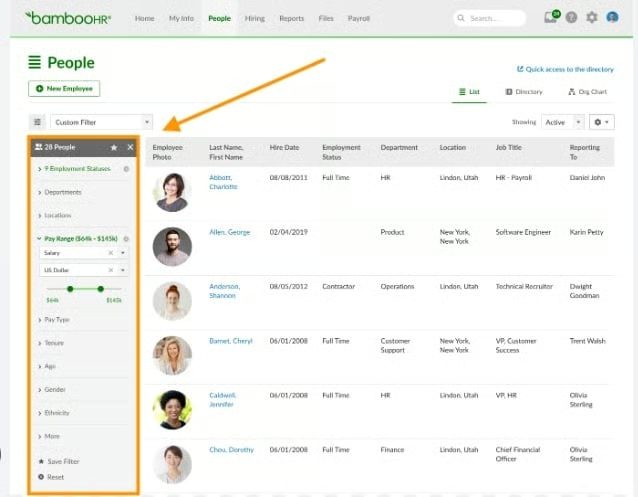
BambooHR also lets you create custom fields when the standard employee record does not capture something your business needs. Access controls help limit sensitive information to the right people, while workflows and approvals can route employee changes or requests without HR manually following up with every person involved.
That combination becomes useful when an HR team is managing more people but still working with the same headcount in HR. Instead of remembering who needs to approve a change or where a signed form lives, the process and the record stay together.
Hiring and onboarding
Applicant tracking is included across BambooHR plans, so recruiting can feed directly into the employee record. HR teams can manage candidates, post jobs, use email and offer letter templates, and move a successful applicant into onboarding without entering the same information again.
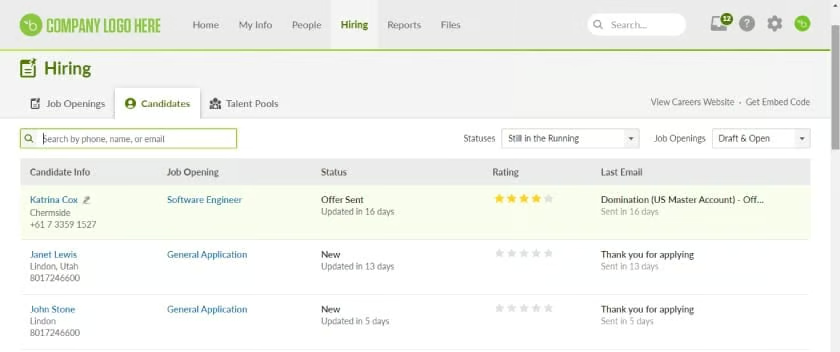
BambooHR, which is one of my top picks for the best onboarding software for small businesses, also handles post-recruiting processes well. After someone accepts an offer, new-hire packets, onboarding checklists, and e-signatures help turn onboarding into a repeatable process instead of a chain of one-off emails. Tasks can also be shared across HR, managers, IT, or anyone else involved in getting a new employee ready.
The main limit to watch is the number of active job openings. Depending on your plan, the allowances range from five in the starting tier to 25 and 50 in the higher tiers, which could matter if you hire for many roles at the same time.
PTO management
Time-off management comes with all BambooHR plans. Employees can submit requests, managers can approve them, and the Who’s Out calendar shows upcoming absences.
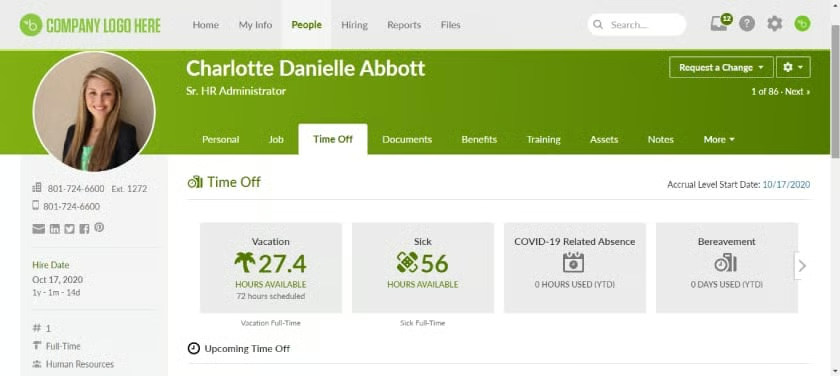
HR can set different policies and accrual rules instead of manually adjusting leave balances. BambooHR supports accruing, flexible, and manually managed policies, and administrators can pause accruals when a worker should temporarily stop earning time off. This setup is useful when one company has different PTO rules for hourly workers, salaried staff, locations, or employee groups.
Tip: Take advantage of BambooHR’s free trial to build one of your actual leave policies rather than relying on a sample. PTO gets used often enough that an awkward setup will become frustrating quickly, while a clean process can remove a surprising amount of back-and-forth.
Time tracking and scheduling
Tracking actual employee work hours requires the paid Time & Attendance add-on. It includes timesheets, project and billable-hour tracking, meal and rest breaks, overtime calculations, approval workflows, shift scheduling, and shared time clock options.
Hourly employees can clock in and out through the mobile app, with geolocation available when you need to verify where a punch occurred. If you also use BambooHR Payroll, approved time flows directly into payroll. Companies that keep another payroll provider can export timesheet data instead.
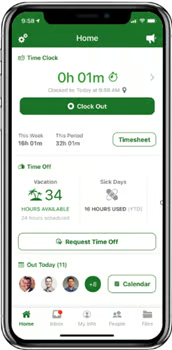
Scheduling sits in the same add-on, so managers can build shifts while taking employee availability and time off into account. Keeping the schedule and time records together also makes it easier to compare when someone was expected to work with the hours they actually recorded.
Looking for other options? Check out our guides for the best time and attendance systems and top employee scheduling software.
Benefits administration
Basic benefits tracking comes with the HR platform. It gives HR and employees a place to view and organize benefit information without requiring the full benefits product.
But with the Benefits Administration add-on, BambooHR handles the actual enrollment process for U.S. employees. It covers new-hire elections, open enrollment, qualifying life events, election reviews and approvals, reporting, and connections with select benefit carriers.
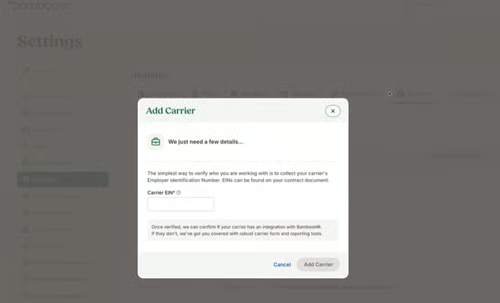
Plus, using Benefits Administration with the Payroll add-on allows BambooHR to sync benefits deductions into its payroll module. This helps save time and prevents potential errors from manual data inputs.
Payroll and tax filing
Payroll is available as a paid add-on for U.S. employers and covers the main tasks needed to run payroll, including direct deposit, W-2 creation, unlimited payroll runs, and federal, state, and local tax filing. It also supports multiple pay rates, which is helpful if employees earn different rates based on their role, project, or type of work.
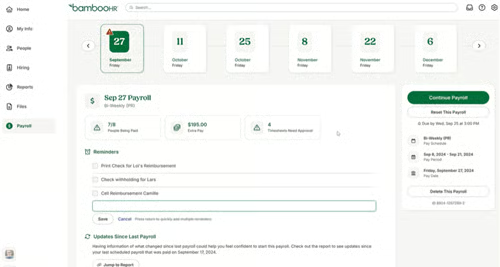
There are a few useful controls for payroll admins, too. BambooHR supports prorated payments, payroll reminders, garnishments, audit trails, and different access levels for people who work on payroll. Employees can view their pay stubs and update tax withholding and direct deposit information themselves, taking some routine requests off HR's plate.
For accounting, the Custom Journal Entry Report Builder lets you format payroll journal entries around your chart of accounts. BambooHR Payroll also connects directly with QuickBooks Online, Xero, NetSuite, and Sage Intacct, which can reduce the manual work of moving payroll data into accounting.
Managed payroll services
If your team would rather hand off more of the payroll work, Managed Payroll Services is available separately for eligible BambooHR Payroll customers. A dedicated specialist handles payroll updates, tax filings, and deadlines inside BambooHR, while your team reviews and approves each payroll before it is finalized.
Also read: If you mainly need a payroll-first platform, see our best payroll software for small businesses guide for more options.
Performance reviews and compensation management
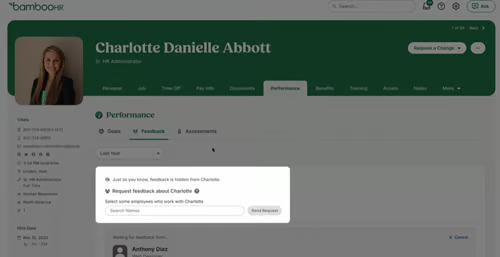
Performance features help HR create a more consistent review process across managers. It lets users run performance reviews, set goals, schedule 1:1, and collect feedback, making it easy to see whether reviews are happening on time. It also reduces the need to manage employee evaluations through separate forms, documents, or spreadsheets.
BambooHR’s compensation tools are aimed at streamlining salary decisions and computations. This module includes compensation cycles, budgets, job levels and bands, pay visualizations, and Mercer salary benchmarks. This provides HR with a more structured way to prepare and review pay decisions.
Tip: If performance reviews are the main reason you’re shopping for HR software, compare the providers in our top performance management systems guide. For pay research tools, check out our list of the best salary comparison solutions.
Employee surveys and recognition
BambooHR’s Employee Satisfaction module uses eNPS to track how employees feel about the organization, with AI helping group open-ended responses into common topics. Employee Wellbeing goes deeper with research-backed questions, anonymous responses, open-text feedback, and heatmap reporting that can show differences between employee groups or changes over time.
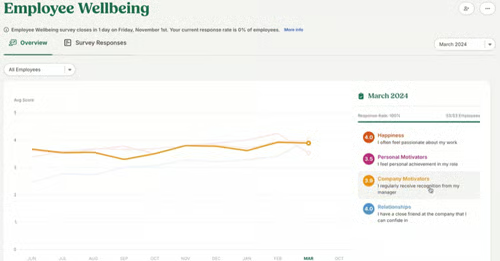
That combination gives HR both a higher-level pulse and more detailed feedback. Instead of running a survey and ending with a score, you can see which topics or employee groups may need attention and use that information to decide where managers should follow up.
For companies that want a more visible recognition program, BambooHR also has a native Recognition & Rewards product. Managers and employees can recognize coworkers publicly or privately, connect recognition to company values, and use points-based rewards with a built-in catalog. Recognition history stays with the employee profile, making it easier to see appreciation over time rather than losing it in chat messages or email.
Bamboo AI and compliance tools
Bamboo AI is built into the HR work you are already doing rather than sitting off in a separate AI workspace. It can help build reports from plain-language requests, compare payroll runs, draft schedules, organize job information, and flag missing employee data.
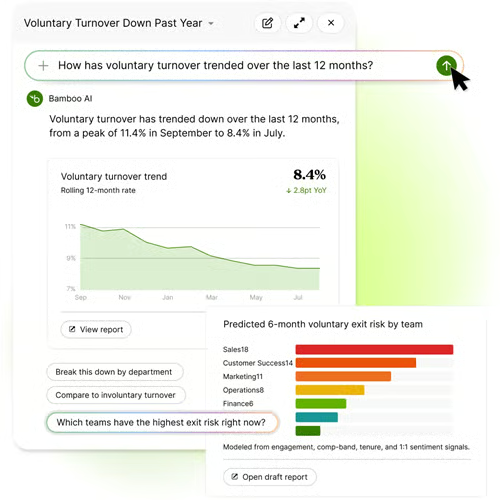
I also like the guardrails. AI access follows the permissions already set in BambooHR, and actions such as payroll approvals, schedule changes, job updates, or employee messages still need a person to review them before anything happens.
For compliance support, every BambooHR package includes Compliance Intelligence powered by VirgilHR. HR teams can use it for US employment-law updates, guidance, and compliance resources without paying for a separate VirgilHR subscription.
Built-in compliance training is powered by EasyLlama. The starting BambooHR tier includes one harassment-prevention course, the middle tier has 15 courses, and the highest tier includes more than 300 courses across topics such as workplace safety, cybersecurity, data privacy, and harassment prevention.
Reporting
You do not have to upgrade to a higher BambooHR plan just to build a custom HR report. Standard dashboards and the custom report builder are included at the starting level, so HR can pull together employee, hiring, time-off, compensation, and other workforce information without rebuilding the data in a spreadsheet.
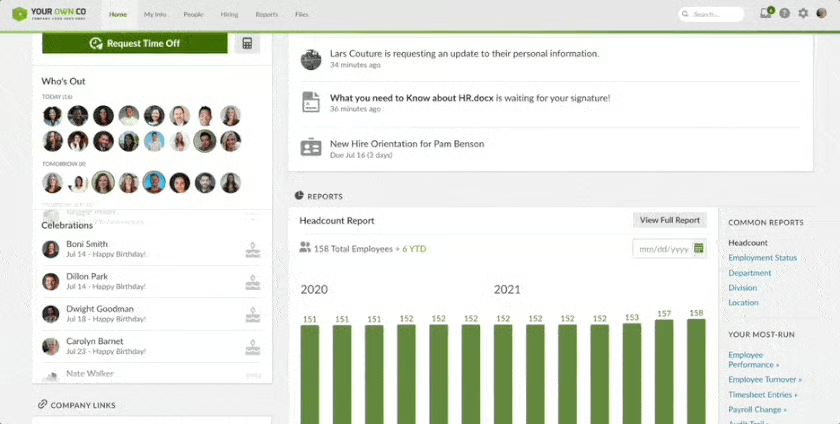
Bamboo AI can also create or refine a report from a plain-language request. That can be handy when you know the question you want to answer but do not know which fields or filters to select.
HR benchmarks sit at the higher end of the product. Those tools can compare internal measures such as turnover and workforce demographics with peer data, with filters available for factors such as location.
Global employment and integrations
International hiring can stay connected to the BambooHR employee record through its partnership with Remote. Employer of Record services cover more than 90 countries, while contractor management supports more than 200 countries and jurisdictions.
There is one setup detail you have to understand before signing up for this service. Hiring and onboarding for EOR employees begins in BambooHR, but country-specific payroll and benefits are handled in Remote. The systems stay connected, but your team will still use Remote for those parts of the process.
Outside global employment, the BambooHR Marketplace has more than 150 integrations covering areas such as payroll, recruiting, learning, performance, benefits, and scheduling.
How easy is BambooHR to use?
BambooHR is easy to navigate for everyday HR tasks. Employees and managers may only open an HR system when they need to request PTO, find a document, update information, or complete a task, so those basics need to be easy to find.
The administrator side takes more setup, which is normal for an HRIS. Leave policies, permissions, approval flows, reports, payroll settings, and other rules need to be configured properly. BambooHR also gives you room to customize fields, workflows, reports, and approval processes, which helps the system fit how your HR team actually works.
Guided onboarding, data migration support, and a library of help articles are available if you need help getting started or configuring features. Implementation generally takes about four to six weeks, depending on company size, complexity, and the products you are setting up, although smaller businesses with simpler requirements may finish sooner.
BambooHR customer support
Live support runs Monday through Friday from 6 a.m. to 6 p.m. MT, with phone and email support available alongside online help resources. Businesses that need more than product troubleshooting can also pay for services, such as HR consulting or managed payroll.
For a typical small HR team, the weekday coverage should handle most questions. The support hours deserve a closer look if pay runs regularly happen late in the evening or your HR team works outside U.S. business hours. AI assistance can help with routine questions, but it is not the same as having a person available when a payroll issue needs attention.
What do users think about BambooHR?
BambooHR gets strong customer feedback overall. As of this writing, Capterra rates BambooHR 4.6 out of 5 from over 3,500 reviews, while G2 gives it 4.4 out of 5 from more than 6,700 reviews.
Ease of use comes up often in reviews. Users like the clean layout, straightforward navigation, and having employee records, PTO, onboarding, and other HR tasks in one place. Several also mention that employees can learn the system quickly without much training.
The main drawbacks are around flexibility. Some users want more advanced reporting, customization, and integration options, especially as their HR processes become more complex. A few also prefer the desktop experience over the mobile app.
BambooHR alternatives
BambooHR may not be the best fit for every small business. Here are some alternatives:
| Software | Consider it if you need | Starting monthly price |
| Gusto | Payroll-first platform with core HR tools | $6 per employee + $49 base fee |
| Rippling | Deeper automation across HR, IT, and finance | Call for a quote |
| Zoho People | Low-cost HR recordkeeping for a very small team | Free: For up to five employees Paid plans: $1.25 per employee |
BambooHR frequently asked questions (FAQs)
Can former employees still get their pay information from BambooHR?
Yes, if the system administrator enables former-employee access. Former employees can use a personal email address to view limited information for up to 24 months after termination, including pay history and paystubs. Clients using BambooHR Payroll can also give former employees access to W-2 and W-2C forms.
Does BambooHR support different languages?
Yes. The platform supports eight languages: English, French, German, Portuguese, Dutch, Spanish, Simplified Chinese, and Japanese. Regional settings can also adjust items, such as holidays, currencies, date formats, and phone numbers.
Can BambooHR handle I-9 and E-Verify?
Yes. I-9 and E-Verify automation is available as a paid add-on through an embedded service powered by Mitratech. HR can manage I-9 steps, document collection, error checks, deadlines, and E-Verify cases from the BambooHR workflow when the service is enabled.
How does BambooHR protect employee data?
BambooHR uses measures including multi-factor authentication, encryption in transit and at rest, vulnerability scanning, penetration testing, and annual third-party SOC 1 and SOC 2 audits. Administrators should still review access permissions carefully because HR systems contain some of a company's most sensitive employee information.
Does BambooHR include a learning management system?
Not a full LMS for building a broad employee learning program. BambooHR includes compliance training that HR can assign and track, while businesses that need course creation, learning paths, assessments, and larger training programs can connect an LMS such as TalentLMS through its marketplace.