








Video conferencing has become an indispensable tool for remote working, but it comes with a few challenges. Visual distractions, technical glitches, and lack of physical interaction can hinder the effectiveness of virtual meetings. To ensure a smooth video call experience, understanding the uses and limitations of video conferencing is necessary to help teams leverage video meeting platforms and successfully enhance their remote collaboration efforts.
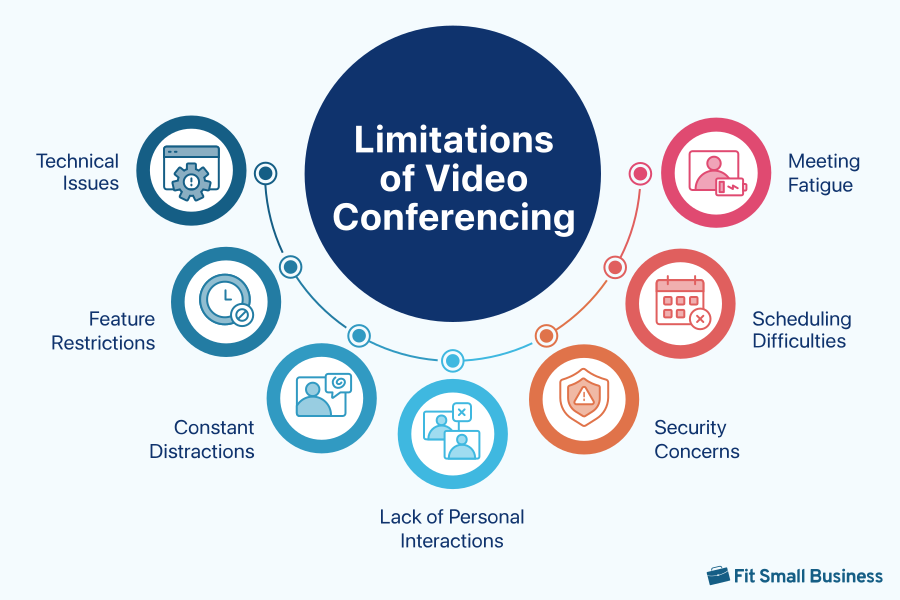
1. Technical Issues
Technical issues in video conferencing vary widely, but the most common ones are typically caused by unstable internet connection. Poor audio quality, video freezing, and lag occur if bandwidth is insufficient, causing audio and video quality to degrade.
Issues with hardware devices, such as microphones, headsets, and webcams, can also happen if they’re not working properly or are incompatible with the conferencing platform used. Even video conferencing software itself is prone to glitches like app freezing and crashes, especially if the provider is pushing out an update or having server issues.
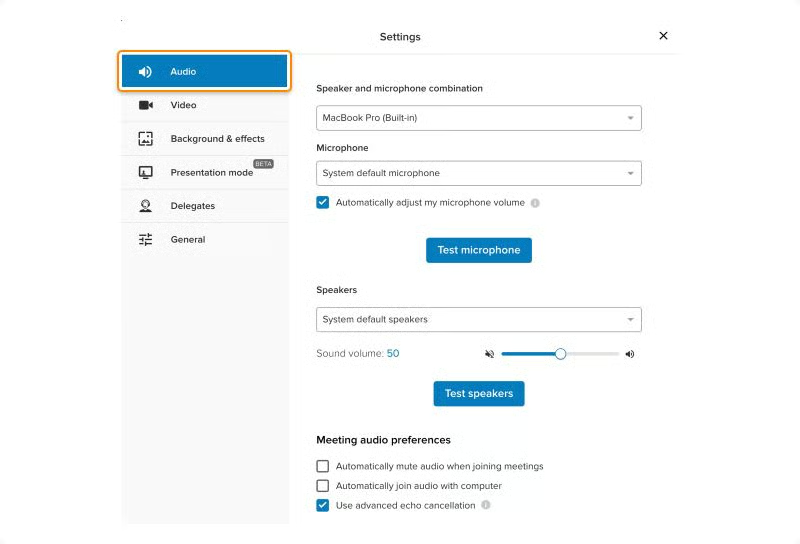
Technical issues can be prevented with the right hardware, stable internet, and a reliable video conferencing solution like RingCentral. RingCentral is a leading unified communications provider with multiple configuration options for video meetings. This allows users to customize video meetings to suit their specific preferences. Combine it with high-quality equipment and a strong internet connection to further enhance the clarity of your audio and video communication.
2. Lack of Personal Interactions
While video conferencing allows participants to see each other in real time, it cannot fully recreate face-to-face communication. A University of Texas study revealed that body language and facial expression affect how information is interpreted. Nonverbal cues are hard to read through a screen, leading to potential misunderstandings between participants.
Video meetings tend to be less personal because participants simply interact through their screens. As a result, many feel the urge to multitask when it is not their turn to speak or are not interested in the topic.

One way to keep participants actively engaged during video meetings is by using interactive tools like whiteboards, polls, quizzes, and breakout rooms. Microsoft Teams uses immersive features like Together Mode, where participants are placed within the same virtual background to establish a feeling of cohesiveness.
Active listening and taking speaking turns also help foster a sense of connection among attendees. If you want to build a more relaxed atmosphere, you can start meetings with icebreakers or organize virtual team-building activities.
3. Constant Distractions
Dealing with various interruptions is probably one of the most challenging aspects of video conferencing. Unwanted noises from pets, vehicles, and home appliances make it difficult to hear the speaker, while visual distractions like children running around, poor lighting, and a cluttered room can draw the attention away from the meeting.
Whether you’re working outside or at home, constant distractions can disrupt the meeting flow and cause frustration not only for you but for other participants in the call. The good news is you can minimize these distractions by taking advantage of high-tech features found in video conferencing solutions.
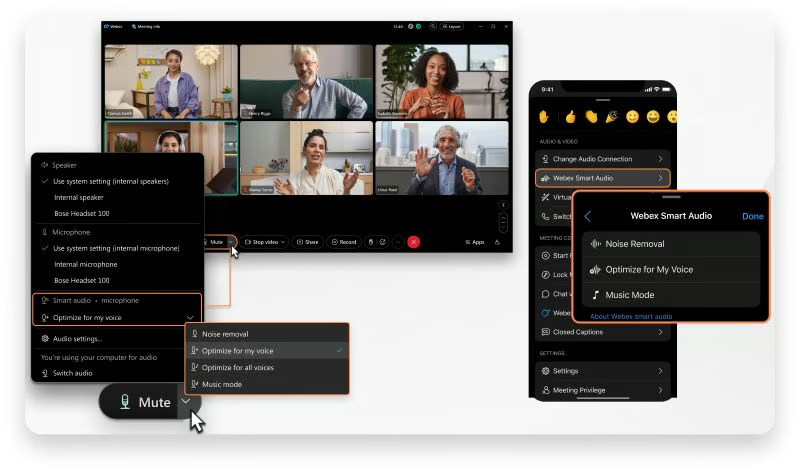
Video conferencing solutions like Webex use advanced deep learning and audio process technology to separate noise from human speech in any language. Activating noise suppression filters out unnecessary sounds so your colleagues only hear your voice. For a better audio experience, use dedicated video conferencing equipment, such as noise-canceling headphones, to help you focus more on the meeting.
When it comes to visual distractions, having a dedicated workspace frees you from all kinds of interruptions. If it’s not possible, use the virtual background feature in video conferencing software to replace your live background with a professional-looking backdrop. You may also take advantage of filters, avatars, and lighting adjustments for low-light settings.
4. Scheduling Difficulties
Scheduling video meetings demands constant coordination to accommodate everyone’s availability to attend. This is particularly true among distributed teams working at varying shifts and time zones. At times, you need to compromise and work during less comfortable hours to be present at the meeting.
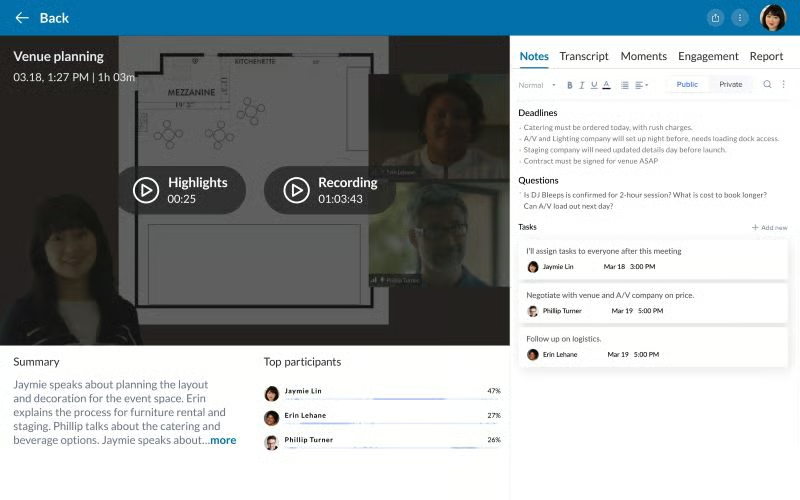
RingCentral has extended its video recording feature using artificial intelligence (AI) to generate meeting summaries and highlights. Recorded sessions allow participants to watch previous meetings on their own time. Another way is to utilize calendar integrations with Google Calendar and Microsoft Outlook so teams can easily find the most convenient meeting times for everyone.
5. Meeting Fatigue
Organizing video calls is so easy that many overdo it by scheduling back-to-back meetings when it could have been done through email or instant messaging. This has led to a phenomenon called “Zoom fatigue,” which refers to the feeling of exhaustion and burnout associated with excessive video conferencing usage.
Studies show that frequent video meetings and sitting for long periods in front of your screen results in increased cognitive load and reduced mobility. When left unchecked, meeting fatigue can have a serious impact on employee morale and well-being.
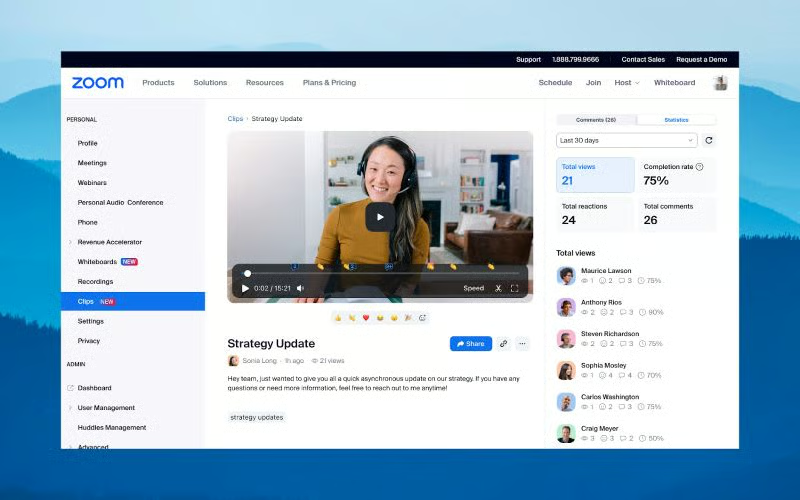
Zoom recently launched a video messaging tool to facilitate asynchronous communication and reduce the frequency of meetings. With Zoom Clips, users can record a video of themselves or their screens and share it with others. You may also use team messaging for document and information sharing, as well as voice recording clips to spontaneously connect with your teams via audio.
6. Security Concerns
Cybersecurity and privacy incidents in video conferencing were a huge concern during the COVID-19 pandemic when meetings were disrupted by unwanted individuals. This phenomenon, called “Zoom bombing,” led global users to question the security surrounding video conferencing platforms.
Since then, video conferencing providers have taken comprehensive measures to protect their users’ privacy. For instance, Zoom introduced more in-meeting security capabilities, such as advanced encryption, waiting rooms, meeting lock, and passcodes.
If you’re looking for a more security-driven video meeting solution, Google Meet adheres to multiple data privacy standards and is regularly audited by third-party organizations. To keep meetings safe, Google employs a wide range of safety measures, such as meeting codes, anti-hijacking controls, and two-step verification.
7. Feature Restrictions
Most video conferencing solutions include time and participant limitations depending on the monthly plan you’re subscribed to. This poses a huge challenge for teams with limited budgets or specific meeting requirements.
Such constraints compel users to purchase a premium plan to host longer meetings and accommodate a large participant capacity. If you opt for the free version, the participant capacity is typically restricted to 100 attendees, while the meeting duration is around 40 to 60 minutes only.
Besides video conferencing, you may want to explore alternative communication tools that better suit your budget and collaboration needs. Top team chat apps like Microsoft Teams and Slack offer a free version where users can create a centralized workspace for sharing files, assigning tasks, and communicating with different teams.
Top Providers of Video Conferencing Software
Now that we have discussed the pros and cons of video conferencing, finding the right video conferencing provider can help you minimize potential drawbacks and unlock greater benefits. Below, we list the best video conferencing providers widely praised for their services and reliability.
| Video Conferencing Providers | Monthly Starting Price (per User) | Key Features | Learn More |
|---|---|---|---|
 | $15.99 |
| Read Our Zoom Review |
| Visit Zoom | |||
 | $10 |
| Read Our RingCentral Review |
| Visit RingCentral | |||
 | $4 |
| Read Our Microsoft Teams Review |
| Visit Microsoft Teams | |||
 | $14.50 |
| Read Our Webex Review |
| Visit Webex | |||
 | $12 |
| No Review Yet |
| Visit GoTo Meeting | |||
 | $5.40 |
| Read Our Google Meet Review |
| Visit Google Meet | |||
Frequently Asked Questions (FAQs)
Can video conferencing effectively support confidential discussions?
Yes. However, such activity requires rigorous implementation of security practices to ensure the confidentiality of the information. Choose a video conferencing platform with tight security measures like RingCentral Video and Webex Meetings. These providers offer end-to-end encryption, user authentication, and secure meeting links. They maintain compliance with security regulations like the Health Insurance Portability and Accountability Act (HIPAA).
Is it possible to organize remote team-building activities through video conferencing?
Yes. Video conferencing platforms offer interactive tools and third-party integrations to enable participants to engage and join team-building exercises. Video meeting features like polling, Q&A, breakout rooms, and digital whiteboards promote attendee participation. If you’re using Zoom, integrate Kahoot! to host interactive presentations and game-based sessions.
What are the privacy considerations of recording video meetings?
Meeting hosts should always ask participants’ permission beforehand if the meeting has to be recorded. Most video conferencing software like Zoom notifies attendees once the host clicks the record button. However, it’s still necessary to verbally notify attendees about the recording because some U.S. states, like California, require the permission of all participants involved in a recording.
Bottom Line
Video conferencing limitations are influenced by various factors, such as technical issues, security concerns, and constant distractions. While these have caused significant challenges to distributed teams, we cannot deny that video conferencing benefits outweigh its limitations. If you want to further maximize the advantages of video conferencing, make sure to choose a trusted and feature-rich provider for your collaboration needs.
