






Cloud computing advances innovation, expands collaboration opportunities, and drives workflow efficiency. These cloud-based tools and services, such as platform-as-a-service (PaaS) and software-as-a-service (SaaS), offer flexibility and on-demand access to resources regardless of time zone or location. Thus, more small business owners worldwide are embracing cloud computing as a crucial part of their operations and expansion strategies.
Read on to discover the benefits of cloud computing and how it continues to shape the small business landscape.
Cloud computing explained: Everything you need to know
Before we dive right into the benefits of cloud computing, let us discuss first what it is, its types, and why it is important.
Cloud computing refers to the process of delivering information technology (IT) services over the internet. While it sounds like a noncomplex process, it offers many benefits to businesses. Some of the IT services that can be accessed and transferred online include databases, software, servers, data storage, and networking. Rather than purchasing and maintaining your own physical IT infrastructure or equipment, you can rely on cloud providers to host your website or email systems and store your data.
In a modern workplace, cloud computing is more advantageous, enabling distributed teams to collaborate in real time using their own devices (e.g., computers, phones, or tablets). It also offers a secure way to store and back up critical data, eliminating the need for hard drives or physical servers, which may not be a sustainable option for growing teams.
Cloud computing also enables access to powerful analytics through cloud-based business intelligence platforms. They can quickly process and visualize data useful for critical business decision-making.
What are the benefits of cloud computing?
According to Gartner’s forecast report, 90% of organizations are expected to adopt hybrid cloud by 2027. The same report revealed that all cloud segments (SaaS, IaaS, and PaaS platforms) recorded a double-digit growth in 2025. These numbers reflect the impact of cloud computing on organizations worldwide, regardless of their business size.
To further support these findings, here are some of the key benefits of adopting cloud computing to stay competitive.
1. Significant cost savings
By shifting your resource allocation from physical servers to cloud services, you’ll be enjoying significant cost savings. Physical setups demand upfront hardware investments, regular maintenance and upgrades, and continuous electricity and cooling bills. Whereas with cloud software solutions, you can opt for flexible payment options (pay-as-you-go pricing or month-to-month subscriptions).
Cloud computing enables you to allocate (or reallocate) resources more efficiently and spend only on the resources you truly need, which is particularly beneficial for small businesses. Moreover, cloud computing simplifies IT management so your team can focus on more critical tasks.
2. Scalability and support for growth
Unlike on-premise infrastructure that operates continuously regardless of demand, cloud-based services offer businesses an option to scale up or down as needed. You can upgrade your plan during your busiest seasons (e.g., product launches, holiday surges, or sudden spikes in sales) or downgrade when you no longer need the same capacity.

Not only does cloud computing promote operational efficiency, but it also supports businesses’ growth and expansion, making sure that they get the features or services they need at whatever stage they are in. This is because cloud-based solutions have the ability to scale according to your requirements. You can either add seats to your plans or upgrade to a higher plan to unlock more advanced features that you might need later on.
3. Remote access
In hybrid and remote work environments, access to data, resources, and tools is imperative. To stay competitive and productive, businesses are turning to cloud-based services to empower team members. They can securely access the information they need to accomplish work or communicate with teams and customers through their own devices or company-issued equipment.

4. Enhanced security and compliance
Security is one of the primary concerns people have about cloud computing, which is valid, especially for teams handling sensitive data. The good news is that, over time, cloud providers have strengthened their security protocols, prioritizing compliance with global standards like HIPAA
5. Reliability and business continuity
Unstable weather conditions, natural disasters, cybersecurity threats, power or internet outages, system failures, and even human error can disrupt operations. These can lead to financial loss, damage to your business’s reputation, and potential legal issues. However, with cloud infrastructure in place, you can safeguard your business through automated backups, built-in redundancy, and strategically dispersed data centers.
Cloud-based solutions offer high availability or uptime, typically at 99.9% or higher. Many cloud providers also offer disaster recovery solutions to prevent damage and to protect you in unfortunate situations. These solutions include conducting risk assessments and facilitating restoration so you can focus on running your business with peace of mind.
6. Increased productivity through team collaboration
Collaboration is probably my favorite benefit of cloud computing, having been a remote employee for several years now. I’ve experienced firsthand how it transforms the way people work, enabling teams to communicate and collaborate in real time, regardless of where they are on the map. Even if my colleagues log out for the day, I can still access our virtual workplace and continue working at any time, eliminating geographical limitations.
With cloud computing, multiple users can view, edit, comment on, and share files simultaneously, making it easier to collaborate and accomplish tasks. It also promotes transparency and accountability among team members, as progress can be tracked in shared dashboards, thereby reducing silos within organizations.
7. Innovations in AI and machine learning
Gone are the days when insightful analytics were only accessible to large enterprises with extensive IT infrastructure. Cloud computing changes the game for small businesses, as they can now access more affordable solutions, tapping into artificial intelligence (AI) and machine learning (ML). These innovations, through cloud-based providers, deliver insights they can use to make data-driven decisions.
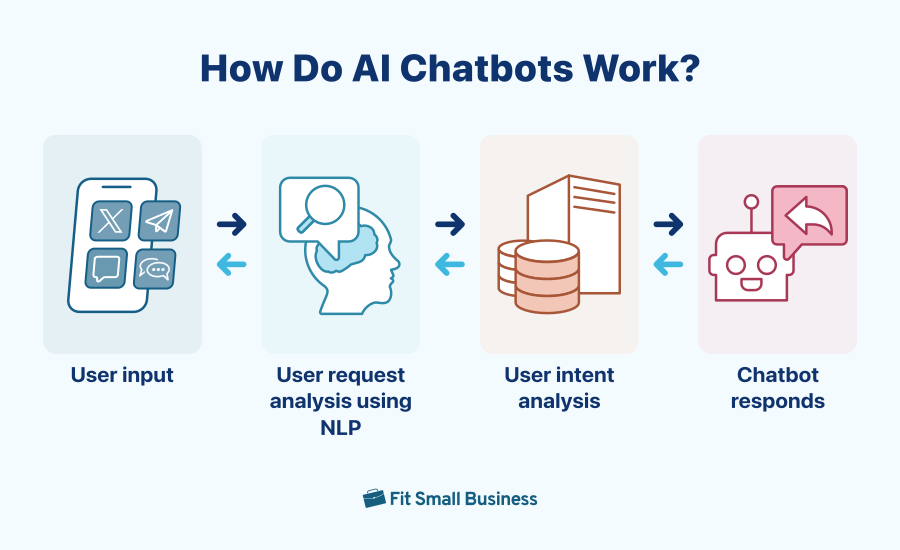
ML algorithms that SaaS tools offer can automate audience segmentation and optimize email campaigns, reducing manual work. AI chatbots have also been useful for small businesses, enabling them to attend to more customer inquiries across different channels (e.g., social media, website, or SMS) and manage appointments even outside working hours.
Expert tips on cloud implementation
The key to successful cloud adoption lies in the preparation, along with proper implementation. To guide you through this transition, I’ve compiled a list of helpful tips you should consider applying:
- Define your objectives (What do you want to achieve?): Different cloud-based platforms address different business needs. It’s not a one-size-fits-all approach, so make sure you know and fully understand why you are moving to the cloud. Is it to enhance remote work arrangement? For automation? To improve security? Or to reduce costs?
- Choose the right cloud deployment model: Various models exist to serve different use cases. For instance, if you are transitioning from an on-premise setup to a cloud infrastructure, choose a hybrid cloud. If you handle sensitive information as a business, then a private cloud is the answer. Other models include public cloud for general use and multi-cloud for more advanced users.
- Carefully assess cloud service providers: Selecting the right cloud-based provider requires a thorough evaluation and comparison of features and pricing. Consider the ease of use and customer support as well to ensure a smooth transition. One tip that I can leave you with is to prioritize security features to prevent data loss or cybersecurity threats.
- Move to the cloud with caution: While it’s tempting to go all out when moving to the cloud (I can’t blame you, what with all the benefits it offers), know that it’s not advisable. Start with low-risk yet high-impact services, and from there, evaluate the outcome. For example, you can begin by transitioning email to the cloud or moving important files to cloud-based storage.
- Proper training: Like any new tool, cloud-based platforms require some adjustment period; that’s why it’s important to choose a solution that is easy to use and deploy. To prepare your team, make time for live training sessions and record tutorial videos. Choose a provider with extensive learning resources that your team can refer to during the transition.
- Evaluate impact and continue to innovate: Regularly review the impact of this change. Does it improve productivity? Are there hiccups that you need to fix? Are the goals met? Most providers offer free trials, free plans, and demos, so be sure to take advantage of these options to determine if it’s worth the long-term investment. Don’t be afraid to refine your cloud stack over time.
Popular cloud-based providers for small businesses
Cloud computing can assist with accounting, website development, and several other actions that you can automate. Here are some of the most popular cloud-based tools that many small business owners invest in:
| Cloud-based provider | Type of service | Starting monthly pricing (per user, per month) | Best for | Learn more |
|---|---|---|---|---|
 | Cloud storage | $7.56 | Remote teams and businesses operating in the Google ecosystem | Read our review or visit Google Workspace |
 | Communications platform | Free or $16.99 | Real-time collaboration and facilitating virtual meetings | Read our review or visit Zoom |
 | Website builder | Free or $17 | Setting up a website; ecommerce businesses | Read our review or visit Wix |
 | Online accounting platform | $38 | Managing finances, payroll, and bookkeeping | Read our review or visit QuickBooks Online |
 | Cloud-based POS | Free or $49 | Small businesses looking for an omnichannel POS solution | Read our review or visit Square POS |
Cloud computing trends to watch out for
The cloud computing industry continues to evolve, and to see how your business can take advantage of it, here’s a list of the most recent studies on cloud computing adoption.
- Flexera’s 2025 State of the Cloud Report discovered that up to 50% of respondents use generative AI (GenAI) as part of their public cloud services.
- The same report revealed that managing cloud spend (84%) and security (77%) are the top two cloud challenges. Other challenges include managing software licenses and the lack of resources or expertise.
- According to PwC’s 2024 Cloud and AI Business Survey, 63% of the respondents are increasing cloud budgets in order to leverage GenAI.
From these reports, I can see how more companies are pushing for GenAI to become part of their cloud tech stack. This comes as no surprise, as GenAI is currently one of the most in-demand technologies helping small businesses automate tasks like creating new content (text, images, audio, video, codes, etc.) based on prompts.
While there are new trends to watch out for, there are also challenges (e.g., spending and security) that continue to affect successful cloud computing implementation. Thus, careful evaluation of your business needs and choosing the right cloud-based providers are crucial factors that will impact the success of your cloud computing strategies.
Bottom line
Moving to the cloud offers many benefits that enable your business to scale, reduce expenses, and boost productivity. In the modern work setup, cloud computing has proven to be an effective solution for keeping your business up and running, even when you have a distributed team or are affected by unforeseen circumstances (e.g., natural disasters or cyberattacks).
Keep in mind that cloud computing entails time and financial investment; therefore, researching the best solutions to address your needs is the first step in order to reap long-term benefits. Explore free plans and free trials to determine whether a solution fits into your workflow before you make a decision.
Frequently asked questions (FAQs)
How does cloud computing work?
Cloud computing works by delivering and facilitating services (e.g., storage, applications, and processing power) over the internet, rather than relying on local servers or devices. Cloud-based providers give users on-demand access to these resources, paying only for what they use.
What is the major drawback of cloud computing?
Cloud computing operates through the internet, which can be a major drawback if you have an unstable internet connection. To mitigate this risk, secure a backup internet connection so that you’ll always have access to your cloud-based tech stack in case of outages.
What industries benefit most from cloud computing?
Based on my research, industries that benefit the most from cloud computing include retail, healthcare, finance, education, and technology, supporting remote work, real-time analytics, and compliance-driven data handling. However, with the increasing number of cloud-based solutions on the market, you’ll find that almost all industries are now reaping the benefits of cloud computing.
