







If you’re looking for an easy-to-use customer relationship management (CRM) system with client intake, case management, data security, and workflow automation for your law firm, you’ve come to the right place. The best CRM for lawyers is equipped with contact storage, appointment scheduling, and document management features like e-signature capture.
We have evaluated dozens of products for their features, pricing, ease of use, and client support. And we came up with the seven best CRMs for lawyers that you can use to streamline your independent legal practice or law firm operations.
- HubSpot CRM: Best overall for law firm marketing
- Zoho CRM: Best for automated case management
- Pipedrive: Best customizable CRM
- Clio: Best for easy payment processing
- CASEpeer: Best for personal injury case management
- Law Ruler: Best for streamlining client intake
- Lawmatics: Best for task and document management
- Best CRMs for Lawyers Compared
- HubSpot CRM: Best CRM for Lawyers Overall With Robust Marketing Tools
- Zoho CRM: Best for Automated Case Management
- Pipedrive: Best for Customizable CRM Features for Lawyers
- Clio: Best for Easy Legal Payment Processing
- CASEpeer: Best for Personal Injury Case Management
- Law Ruler: Best for Streamlining Client Intake
- Lawmatics: Best CRM for Lawyers With Task & Document Automation Tools
- Frequently Asked Questions (FAQs)
- Bottom Line
Best CRMs for Lawyers Compared
| Provider | Free Plan | Free Trial | Starting Monthly Price | Our Rating out of 5 |
|---|---|---|---|---|
 | ✓2 users | ✕ Free demo | $15 per user | 4.57 |
| Visit HubSpot CRM | ||||
 | ✓3 users | ✓15 days | $14 per user | 4.53 |
| Visit Zoho CRM | ||||
 | ✕ | ✓14 days | $14 per user | 4.47 |
| Visit Pipedrive | ||||
 | ✕ | ✓7 days | $39 per user | 4.44 |
| Visit Clio | ||||
 | ✕ | ✕ Demo only | $79 per user | 4.41 |
| Visit CASEpeer | ||||
 | ✕ | ✕ Demo only | Custom pricing | 4.38 |
| Visit Law Ruler | ||||
 | ✕ | ✕ Demo only | Custom pricing | 4.35 |
| Visit Lawmatics | ||||
HubSpot CRM: Best CRM for Lawyers Overall With Robust Marketing Tools
When to Use HubSpot CRM
- You want affordable and robust marketing tools for your legal practice: HubSpot CRM is one of the best social CRM software with free social media ad management features that could greatly benefit your legal practice or law firm. HubSpot’s AI assistant, Breeze Copilot, is also free for email and web content generation and personalized recommendations about leads.
Moreover, HubSpot offers simple marketing automation on its most basic plan (Starter at $15 per user). Create workflows to advertise your legal practice and track and convert marketing emails and web form interactions into leads, further boosting your lead generation efforts.
- You need document management tools for your law firm: Law firms deal with different legal documents like bills and contracts. Luckily, HubSpot’s free plan lets you build a library of legal forms that you can easily share with clients. Get up to 10 digital signatures per account per month in its Starter plan for only $15 per user monthly. If you need more, you can purchase the E-signature Limit Increase when you upgrade to the Professional plan.
When to Use an Alternative
- You need legal-specific CRM tools for your personal injury practice: While HubSpot offers robust tools for client management and law firm marketing, it falls short in legal-specific capabilities. If you are looking for a CRM to track injuries and statute deadlines and calculate settlements, there are more suitable options for you.
- Alternative: CASEpeer is a specifically designed CRM for personal injury lawyers that allows you to set custom statute dates and track doctor visits, records, bills, requests, and lien holders. Lawyers can leverage its high-value case reporting feature to determine the value of personal injury cases. This feature helps in case prioritization that could boost your law firm’s revenue.
- You want CRM software for lawyers with more cost-scalable plans: While HubSpot offers a free plan and an affordable basic plan (Starter at $15 per user), the price increases significantly in the second tier. The Professional plan will cost you $1,170 for five users, which might be an acceptable price for a legal practice CRM for large law firms but not for small legal teams or pro bono attorneys.
- Alternative: Zoho CRM provides a free plan and affordable paid plans. New attorneys or first-time users can begin with the first tier, Standard, which only costs $14 per user. Once you have gained more clients and employees, you can upgrade to the next tier. The highest tier, the Ultimate plan, only costs $52 per user.
HubSpot Pricing Plans*
Cost: $0 for up to two users
Key Features:
- Send 2,000 bulk emails per calendar month with HubSpot branding
- Automated emails after pop-up and embedded form submissions and email reply tracking
- Identify search engine optimization (SEO) issues (website pages, landing pages, and blogs)
- Breeze Copilot (AI assistant) personalizes lead insights and recommendations
- Retarget ads (on Google, Facebook, or LinkedIn) and Facebook Messenger integration
- Document management (up to five documents per account)
- Marketing events object to store, track, and manage marketing event data
- Create multilanguage versions of web pages and blog posts (up to three languages)
- One blog on the same subdomain as your website (up to 100 posts) with an AI post generator
- Create and manage cookie banners to capture tracking consent of website visitors
Cost: $15 per user
Key Features:
- Everything in the free plan
- Create simple workflows for ad campaign creation and management
- Remove HubSpot branding on forms and Facebook Messenger communications
- 5,000 bulk email sends per calendar month with an option to remove HubSpot branding
- Up to 10 automated email form actions
- Live chat engagement with your law firm’s website visitors
- Document management (up to 5,000 documents per account; remove HubSpot branding)
- 10 signatures per account per month
- Two deal pipelines per account and conversation routing to assistants or receptionists
- Built-in payment processing via automated clearing house (ACH) and Stripe integrations
- Automation for task creation, data management, and notifications based on deal or contract changes
- Content analytics for templates, sales documents, and automated sequences
- Get access to HubSpot support through email and in-app
Cost: $1,170 for five users (additional users start at $45 per month)
Key Features:
- Everything in the Starter plan
- Unlimited actions, plus omnichannel marketing automation
- 20,000 bulk email sends per calendar month with an option to remove HubSpot branding
- Facebook Messenger integration includes advanced Messenger bot branching and advanced reporting
- 10 signatures per account per month (buy the E-signature Limit Increase for more volume)
- WhatsApp integration provides up to 1,000 conversations per month
- Customizable website traffic analytics
- Create embedded and pop-up calls-to-action (CTAs) with custom targeting
- Ad retargeting across all available ad types and five audiences
- ABM tools (examples include lead scoring, properties, and templates)
*Pricing is based on annual billing on a per-user monthly breakdown of HubSpot Customer Platform. Monthly billing and an Enterprise plan are also available for a higher cost. We update pricing information regularly but encourage readers to check current pricing.
**Customer Platform includes sales, marketing, customer service, a content management system (CMS), and operations software. Individual modules can be purchased for lower monthly costs.
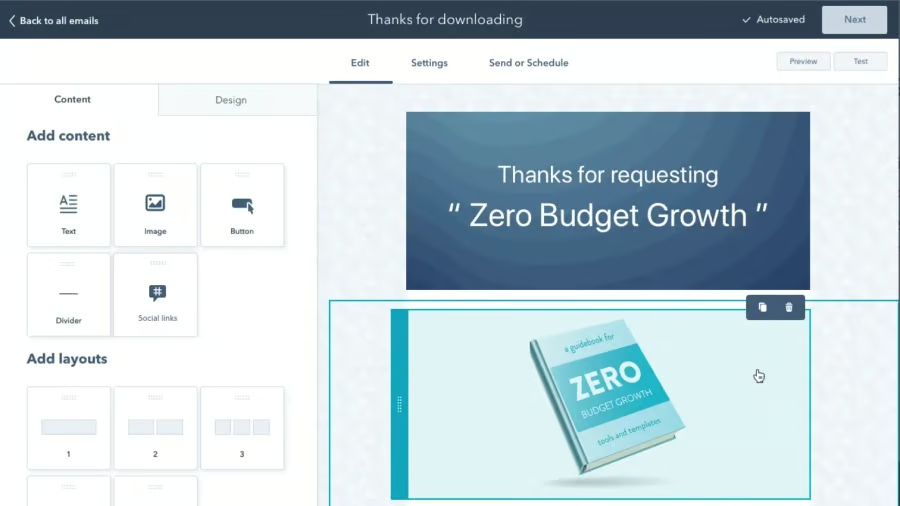
HubSpot CRM lets you create customized emails for your law firm’s client engagement and marketing campaigns to boost reach and leads. (Source: HubSpot) 
HubSpot CRM’s Breeze Copilot can assist law firm marketers in creating content for emails, blogs, and client responses. (Source: HubSpot)


Our Expert Opinion
HubSpot CRM is the best CRM for lawyers overall because of its marketing and document management features, which are included in both its free and paid plans. We love how attorneys can easily launch email and social media marketing campaigns, as well as create and share legal forms with clients. We highly recommend HubSpot CRM to new lawyers and small-scale firms looking to promote their legal practices and get admin tasks done efficiently.
Zoho CRM: Best for Automated Case Management
When to Use Zoho CRM
- You want to automate legal case management: Zoho CRM is equipped with robust CRM automation features to help law firms in case management. For instance, you can set workflow automation rules for generating new cases and managing and tracking existing ones.
Use Zoho CRM’s case management feature for your independent legal practice or law firm. You can create a case module containing relevant legal information, such as the case number, owner, reason, and solution provided.
- You need solid client management capabilities: Zoho CRM can facilitate legal correspondence by allowing users to automate and schedule mass emails and easily set up meetings and phone interviews. Its free plan includes tools for managing leads, contacts, and deals, including task reminders and email notifications to ensure prompt client response to legal inquiries and concerns.
When to Use an Alternative
- You want to use intuitive legal CRM software: Zoho CRM has lots of helpful features that can benefit law firms, especially when it comes to boosting efficiency by automating case management. Because of its robustness, less tech-savvy users may find this law office CRM tough to operate.
- Alternatives: HubSpot CRM and Pipedrive are two of the best simple CRM systems. Pipedrive offers simple CRM automation, while HubSpot CRM is equipped with easy-to-use marketing, customer service, and sales tools on its free plan. Clio, a cloud-based legal practice management system, has an intuitive interface. Its tools for managing cases, billing, payments, and compliance are easy to learn.
- You want specific legal practice management features: If you’re looking for a dedicated CRM for legal firms, you might need to look for an alternative. While Zoho CRM has a case management capability, it lacks features for setting up statute reminders and settlement negotiations.
- Alternatives: CASEpeer, Clio, and Law Ruler are law firm CRM systems with specific features for legal practices. Each CRM has client intake, case management, medical records management, and settlement management tools. Lawyers can easily integrate their current workflows into these best CRMs for small law firms.
Zoho CRM Pricing Plans*
Cost: $0 for three users
Key Features:
- 2500 (maximum 2,000 active) workflow rules (10 rules per module) and five task actions
- Marketing automation for campaigns and email opt-out
- Lead, account, contact, and deal management
- Add tasks, add meetings, schedule calls, and create records (1,000 executed on record action)
- Zoho CRM Mobile Edition
- Document library
- Tasks, meetings, and calls
- Standard reports such as contact mailing list and key legal client accounts
- 10 custom email templates and customized home page components like tabs, views, and layout
- Zoho CRM Mobile Edition (to access CRM data from a mobile app for iOS and Android devices)
- 1GB file storage per organization and 10MB data storage (5,000 records)
Cost: $14 per user
Key Features:
- Everything in the free plan
- Workflow task and email reminders (five email notifications, 100 emails per user license, 5,000 emails daily)
- Add a task, add a meeting, schedule a call, and create a record (50,000 executed on record action)
- Zoho Meetings and Zoho PhoneBridge integrations are available to on-premise and hosted private branch exchanges (PBX)
- Customizable group tabs, email address duplication checks, unique fields, and user layouts
- 200MB data storage (100,000 records) and 1GB file storage per organization plus 512MB per user license
- 100 custom reports, 10 custom dashboards, and 100 custom email templates
- 250 daily mass emails per organization
- Zoho CRM Analytics mobile app
- Revenue forecasting
Cost: $23 per user
Key Features:
- Everything in the Standard plan
- Case management
- Automation for creating records, assigning record owners, and webhooks
- Add a task, add a meeting, schedule a call, and create a record (300,000 executed on record action)
- Webhooks for workflow action (one action; 50,000 calls per day or 100 calls per user license daily)
- Unlimited custom reports, CRM dashboards, and email templates
- 10GB data storage (approximately 5 million contact records)
- Revenue signals for real-time activity notifications on client interactions
Cost: $40 per user
Key Features:
- Everything in the Professional plan
- Automation for custom schedules, marketing attribution, segmentation, and workflow reports
- Add a task, add a meeting, schedule a call, and create a record (500,000 executed on record action)
- 150 cadences, up to 10 cadences per module, maximum 20 emails, 20 tasks, and 10 call follow-ups
- 1,000 daily bulk emails per organization with email scheduling and three autoresponders
- Zia, AI-powered conversation assistant
- Territory-based sales forecasting
- Anomaly detector and cohort analysis
- Web form analytics and A/B testing
- Survey creation in the campaigns module
Cost: $52 per user
Key Features:
- Everything in the Enterprise plan
- 150 workflow automation rules per module (maximum 100 active); 10 conditions per rule
- Data storytelling and higher-level data administration
- Enhanced feature limits
- Extended AI capabilities (deeper-level AI and machine learning capabilities)
- Advanced customization (build personalized customizations using low-code and no-code tools)
- Data preparation
- Augmented analytics to autogenerate reports and dashboards and categorize unorganized data sets
- Unified business insights (deeper data visualization and intelligence)
*Pricing is based on annual billing on a per-month breakdown of the plans. Monthly billing is available for a higher cost. While we update pricing information regularly, we encourage our readers to check current pricing.
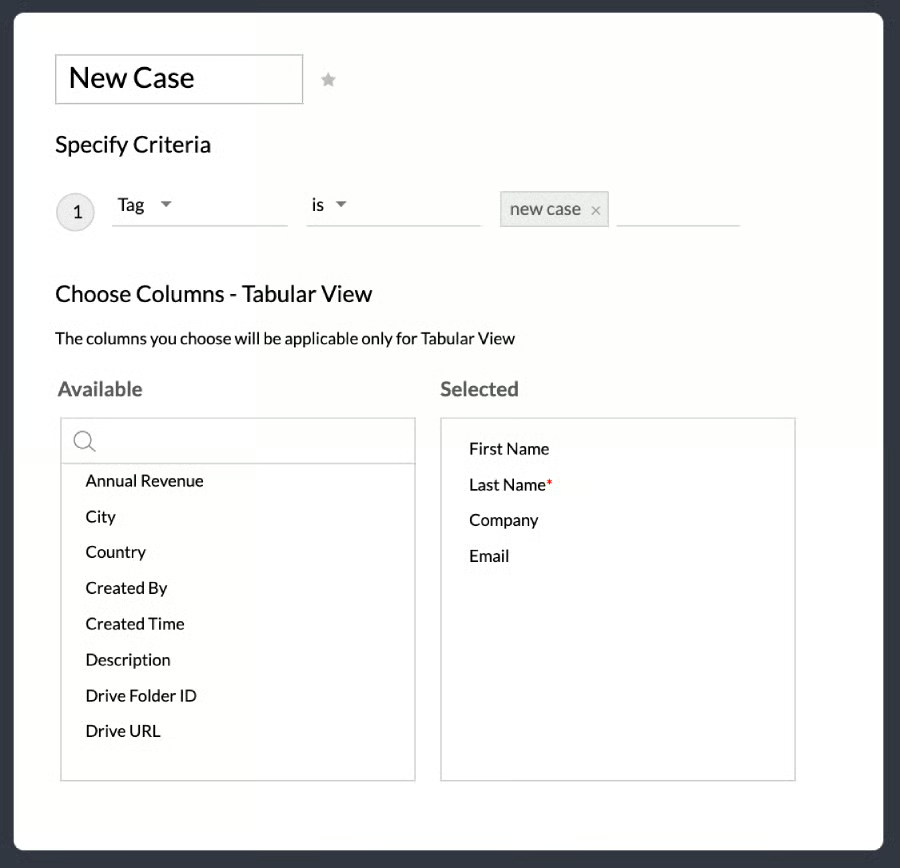
Zoho CRM lets you create a module for managing legal cases and automatically push records to applicable tags like “new cases” for quick access. (Source: Zoho CRM) 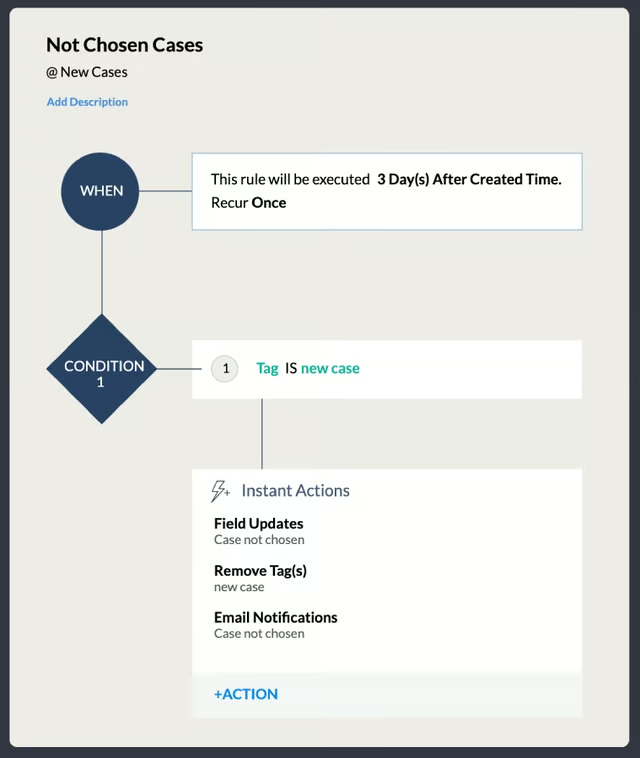
Zoho CRM lets you create automated workflows for generating, managing, and assigning new cases for seamless legal case management. (Source: Zoho CRM)


Our Expert Opinion
Zoho CRM is the winner in automating case management, assisting legal professionals in generating new cases, and managing existing cases efficiently and effectively. Lawyers can greatly benefit from creating a module that contains all relevant legal information for seamless case tracking. We also love how this CRM for attorneys can set workflow rules for automated task reminders and email notifications to build a better lawyer-client relationship.
Pipedrive: Best for Customizable CRM Features for Lawyers
When to Use Pipedrive
- You want a customizable CRM for lawyers: Pipedrive lets you customize pipelines to match your law firm’s unique processes. Add custom fields to legal documents to easily track cases and custom messages to your legal consultation scheduler or calendar.
Expedite the client intake process with a custom dashboard to easily access prospect interactions and activities and convert them into clients. Tailor Smart Docs (an add-on) to centralize your entire documentation process and remove CRM branding.
- You want to leverage AI and automation in your legal practice: Pipedrive’s AI assistant provides recommendations and reminders to support lawyers in client outreach, making it one of our best AI CRMs.
With the automation capability of this CRM software for law firms, you can set reminders to ensure you don’t miss a client follow-up and customize your workflows. This customization helps streamline client engagement and reduce time spent on routine tasks like data entry.
When to Use an Alternative
- You need specific features for legal practice management: Pipedrive is a general-use CRM, which means that other professionals can also use it to streamline their operations. While Pipedrive’s features can help lawyers with client and document management, it falls short with law-specific tools like claim and statute tracking, an intake investigator portal, legal fee processing tools, and a settlement calculator.
- Alternatives: CASEpeer offers an investigator portal, allowing lawyers to collaborate with investigators and intake specialists. Clio has robust billing tools like the Uniform Task-based Management System (UTBMS) for classifying legal services in an electronic invoice. Furthermore, Law Ruler has mobile-friendly client intake forms to improve client experiences and lead data capture.
- You are an independently practicing legal professional wanting a free CRM: While Pipedrive has an affordable starting plan, this CRM provider does not offer a free plan. You can take advantage of the 14-day free trial, but if you bill monthly, you won’t have enough time to see the difference it can make in a typical month or billing cycle.
- Alternatives: New lawyers or independently practicing legal professionals can use HubSpot CRM or Zoho CRM as alternatives to Pipedrive. HubSpot CRM has a freemium plan for two users, while Zoho CRM offers free tools for three users.
Pipedrive Pricing Plans*
Cost: $14 per user
Key Features:
- Visualize legal processes and move deals with unlimited, customizable pipelines in a Kanban view
- Custom data fields and contacts mapping to see where they are located in their record
- Webhooks to push information to your endpoint of choice
- Apps marketplace for third-party apps and integrations
- Activity reporting with sales goal tracking
- API access to develop custom features for free
- Smart assistant to receive suggestions based on past performance and next best steps from AI
- Lead and contact management with file attachments and activity tracking
- Native mobile Android and iOS apps
- 24/7 chatbot support
Cost: $39 per user
Key Features:
- Everything in the Essential plan
- Create automation workflows that perform actions based on a time-lapse or predefined condition
- Workflow automation puts repetitive tasks like data updates on autopilot
- Smart contact data autoenriches contact using publicly available information online
- Delay and wait for steps (combined actions added to the automation)
- Two-way email sync to send email campaigns from the CRM
- Built-in meeting and video call scheduler tools
- Live chat support from 9 a.m. to 5 p.m., Monday to Friday in the user’s time zone
Cost: $49 per user
Key Features:
- Everything in the Advanced plan
- Create custom rules to automatically assign leads and deals to legal associates
- Create compelling emails with customized prompts
- Expanded reporting for tracking custom fields and metrics on revenue reports
- Contact timeline for a visual view of contact activity
- Email summarization (instantly summarizes emails that gauge a lead’s interest and suggest next steps)
- File storage integration with Google Drive and OneDrive
- Revenue forecasting
Cost: $64 per user
Key Features:
- Everything in the Professional plan
- Legal case management through project planning, tracking, and delivery
- Increased control of account permissions and visibilities
- 24/7 live chat support
- Phone support
Cost: $99 per user
Key Features:
- Everything in the Power plan
- Complete access to all features
- Unlimited reports, sales dashboards, and customizations
- Up to 100 active workflow automations
- Unlimited legal team management
- Maximize the number of automations and email syncs per seat
- Enhanced security preferences like security alerts and rules
*Pricing is based on annual billing on a per-month breakdown. Monthly billing is available for a higher cost. While we update pricing information regularly, we encourage our readers to check current pricing.
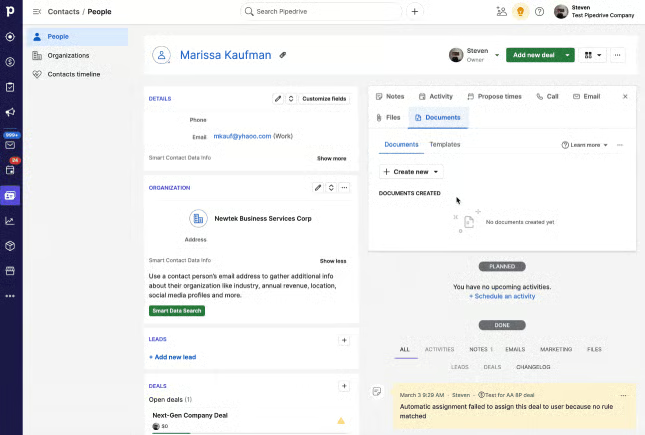
Our Expert Opinion
Pipedrive is one of the best customizable CRMs and customizable law practice management software. Its notable customizable pipelines, data fields, views, and workflows ensure lawyers have access to the right data whenever needed. We also love how its custom reports provide a clear view of a firm’s performance, which helps carry out legal services more efficiently and effectively.
Clio: Best for Easy Legal Payment Processing
When to Use Clio
- You want a billing and payment system specific for lawyers: Clio offers legal electronic data exchange standard (LEDES) billing, a globally accepted standardized digital billing process for the legal sector. And Clio uses it with UTBMS codes (for standardizing legal billing tasks) built into its billing system.
Moreover, Clio’s payment tools include contingency billing, payment plans, card payments, and electronic checks. These payment options provide the utmost convenience to your clients while ensuring you get paid faster.
- You need an attorney timekeeping and expense tracking system: Clio lets you create time entries, which display on bills with one click. Manage your time wisely by running the Clio time tracker as you work and track time using your mobile device.
You can quickly share invoices with your clients to get paid for your legal services faster. Higher plans let you view time durations and expenses for billed and collected accounts. Simplify and oversee the client intake process from a central location.
When to Use an Alternative
- You need marketing features for your law firm: Clio requires third-party integrations for marketing. For instance, you can integrate Clio with Mailchimp for email campaigns and Civille for customizing your legal website. Other providers offer marketing tools that are already included in tiered-priced packages.
- Alternatives: HubSpot CRM and Zoho CRM offer free marketing tools to facilitate email and social media campaigns. Lawmatics is an industry-specific CRM for lawyers that offers marketing automation for email campaigns included in its Premium plan.
- You need built-in client intake in a law firm CRM system: Clio’s client intake feature requires an add-on, Clio Grow. You need to pay extra for this feature starting at $59 per user monthly. If you have a tight budget, you can check other options with client intake already included in the plan.
- Alternatives: Law Ruler is the best choice if you’re looking to streamline your client intake without paying an extra fee. This feature is already built into its Pro and Premium plans. The same is true for Lawmatics, starting with its Essential (most basic) plan. CASEpeer offers this tool in its Basic plan at $79 per user.
Clio Pricing Plans*
Cost: $39 per user
Key Features:
- Hourly, flat rate, and contingency billing
- Bill customization and branding
- Automated bill reminders, UTBMS coding, and LEDES billing and invoicing
- Credit and debit card payments and eCheck payments
- Payment plans
- Timekeeper and enhanced expense tracking
- Case and contact management, scheduling, and task management
- Store and upload an unlimited number of documents
- Email and e-signature integrations for efficient work
- Easy-to-use dashboard for tracking productivity and revenue
Cost: $79 per user
Key Features:
- Everything in the EasyStart plan
- Automated scheduling and reminders for court schedules
- Collaborate and share resources with clients and cocounsels via a secure portal and text message
- Autofilling case data in documents
- Easy-to-fill templates for documents
- Over 250 integrations
- Custom fields for tracking client, case, and practice data
- Accounting integrations (like QuickBooks, Xero, and TrustBooks) for billing and invoicing clients
Cost: $109 per user
Key Features:
- Everything in the Essentials plan
- Split billing across multiple payers
- View time and expenses each user has billed and collected
- Assign a budget to each case and track it over time
- Visualize case progress and gain insights into profitability
- Full document search to avoid misplacing documents
- Access live onboarding and priority support
- Create custom stages and use Kanban-style visual boards to track matter progress
- Unlimited e-signature to prepare and send documents for signature
- Task progress and productivity reporting and manage timelines
Cost: $139 per user
Key Features:
- Simplify and oversee your client intake process from one central location
- Automate appointment bookings, follow-up emails, and reminders
- Collect accurate client information with online intake forms
- Attract and win new clients with a professional website and Google Ads
- Referral reporting to understand where your revenue comes from
*Pricing is based on annual billing on a per-month breakdown of the plans. Monthly billing is available for a higher cost. While we update pricing information regularly, we encourage our readers to check current pricing.
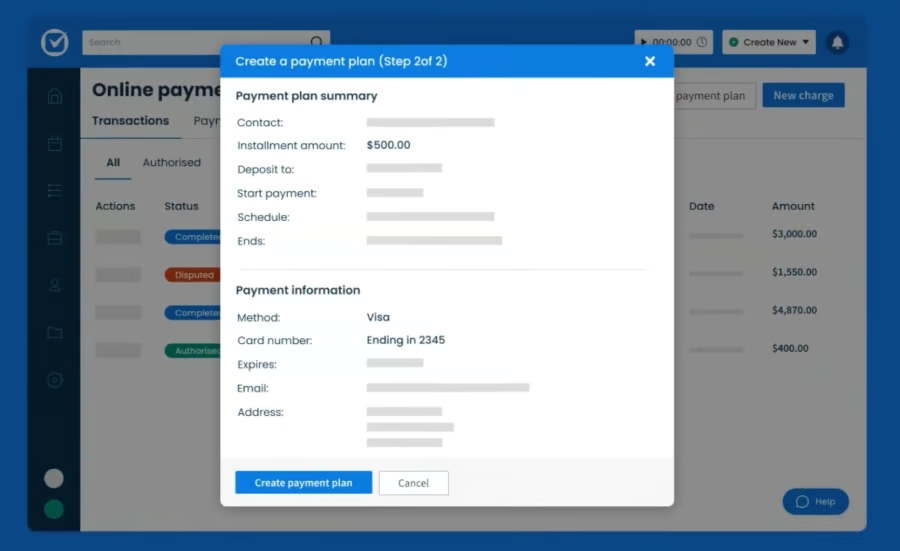
Clio lets lawyers create a payment plan to provide clients with flexible billing options. (Source: Clio) 
Clio enables law firms to accept mobile payments for increased revenue. (Source: Clio)


Our Expert Opinion
Clio is your go-to platform for easy billing and faster payments to ensure the profitability of your legal practice or law firm. We like how Clio designed its CRM for lawyers in compliance with global standards when billing clients for legal services. We highly recommend Clio’s basic plan to new law firms and independently practicing attorneys to streamline billing and payment processes. Its higher plans suit growing and established law firms for sustained profitability.
CASEpeer: Best for Personal Injury Case Management
When to Use CASEpeer
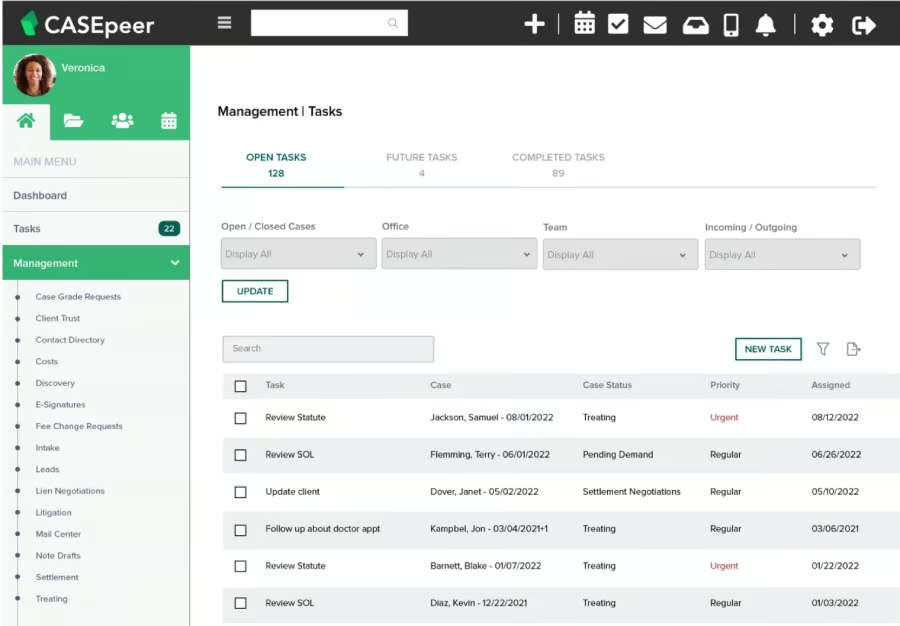
- You need case management software for your personal injury practice: CASEpeer offers robust features that help personal injury lawyers easily manage clients and cases. You can set custom statute dates with automated alerts to ensure no case is overlooked.
Personal injury lawyers need to ensure claims are valid and properly valued. CASEpeer can facilitate this process using its claim-tracking features. For instance, you can easily manage your clients’ medical treatment by tracking records, bills, requests, lien holders, and doctor visits (available in the Basic plan at $79 per user).
- You need to determine cases with high value: With the high case value reports tool, you can analyze and prioritize cases based on their value potential. For instance, get reports on cases with high medical bills, wrongful deaths, or commercial or public defendants. These valuable insights can improve case negotiation and lead to better outcomes.
When to Use an Alternative
- You want a free plan or trial before purchasing software: CASEpeer offers a free demo for personal injury law firms. However, the provider does not have free-forever tools or a free trial period, which can be a huge drawback for new law firms or solo-practicing personal injury lawyers.
- Alternatives: Zoho CRM and HubSpot CRM are general-use CRM systems that lawyers can use to streamline marketing, lead generation, and document management. These tools are available in each provider’s freemium plan. Moreover, you can also consider Clio, an industry-specific CRM for lawyers that offers a free trial for seven days.
- You want robust AI capabilities in a legal practice management system: While CASEpeer offers generative AI, other advanced capabilities like smart insights, document summarization, and text editing are still in the planning stage.
- Alternatives: Pipedrive has a built-in AI assistant that gives insightful suggestions. For instance, its AI assistant recommends the next steps on how legal associates can effectively engage with potential clients based on past interactions and performance. HubSpot CRM has Breeze CoPilot with similar AI capabilities.
CASEpeer Pricing Plans*
Cost: $79 per user
Key Features:
- Case and contact management
- Automated statute alerts
- Settlement negotiations
- Medical treatment tracking
- Case expense tracking
- Client trust tracking
- Task management
- Client portal
- Calendaring to manage deadlines like the statute of limitations with automated timelines
- Unlimited document storage
Cost: $109 per user
Key Features:
- Everything in the Basic plan
- Client intake management
- Unlimited two-way texting (includes accepting images)
- Case stage management screens
- Litigation event plans
- High-value cases report
- Medical requests report
- Firm productivity report
- Over 50 additional reports
- Leverage over 20 key integrations
Cost: $139 per user
Key Features:
- Everything in the Pro plan
- Ability to schedule texts
- Data sync for robust reporting
- Multioffice reporting suite
- Intake investigator portal
- Case grades to establish a tailored process for assessing and prioritizing cases
*Pricing is based on annual billing on a per-month breakdown of the plans. Monthly billing and enterprise-level options are available for a higher cost. While we update pricing information regularly, we encourage our readers to check current pricing.
Our Expert Opinion
CASEpeer is a dedicated legal case management software specifically designed for personal injury lawyers who are usually paid on a contingency basis. We love how this CRM can help lawyers save time and effort tracking personal injury cases, especially those with high-value potential. We like how attorneys and legal assistants can easily monitor expenses, client trusts, medical treatments, and statute dates, streamlining operations and boosting overall revenue.
Law Ruler: Best for Streamlining Client Intake
When to Use Law Ruler
- You need to streamline your client intake process or lead generation: Law Ruler streamlines your intake process from start to finish. This law firm CRM can help you save time and effort when determining if your firm is a good fit for a client. And it lets you easily build custom forms for your practice areas. These intelligent forms flexibly adapt to leads’ answers by presenting customized questions applicable to their legal needs.
- You want to get legal agreements signed quickly: Law Ruler is equipped with a one-click e-signature feature. You can easily request e-signatures for a letter of authority, contracts, and other legal documents via email or text message. This client intake process is more convenient for clients as compared with signing documents via email (because of messages found in spam folders, software download requirements, etc.).
When to Use an Alternative
- You want a legal practice management CRM with clear pricing: Law Ruler has abundant legal practice management features like mobile-friendly client intake forms. However, the provider does not feature price information on its website. You need to contact its sales team to get a custom quote.
- Alternatives: Pipedrive, Clio, and CASEpeer offer transparent pricing. Pipedrive’s Essential plan only costs $14 per user. Clio offers the EasyStart plan at $39 per user. For personal injury lawyers, CASEpeer’s Basic plan costs $79 per user and includes case management tools like automated statute alerts, settlement calculator, medical treatment tracking, and case expense tracking.
- You need robust integrations for marketing, revenue, and other business tasks: Law Ruler integrates with dozens of legal vendor apps and services, such as CosmoLex, TimeSolv, and Clixsy, for law firm case management and digital marketing. If you need more robust integrations, general-use CRMs are your best options.
- Alternatives: Zoho CRM, HubSpot CRM, and Pipedrive have a dedicated app marketplace. Lawyers can search for hundreds of third-party applications, from marketing and revenue management to document management and client support.
Law Ruler Pricing Plans
Cost: Contact provider for custom pricing (up to three users)
Key Features:
- Custom intake forms available with file requests
- Appointments, milestones, and task management
- 10,000 contacts and three automations
- Optional time and billing platform with payments (additional fees apply)
- Client relationship management (CRM) platform
- Two-way text and multimedia messaging and plain text email builder
- One-click outbound referral management and tracking
- Basic marketing dashboard and custom reports
- Document automation for Word, PDF, and Excel
- Open API access and customer-facing online forms
Cost: Contact provider for custom pricing (up to three users)
Key Features:
- Everything in the Pro plan
- 15,000 contacts
- 100 automations
- HTML and plain text email builder
- Advanced marketing dashboard
- Email marketing campaigns
- Marketing source reporting
- Dynamic number insertion (DNI) or digital ad keyword tracker
Cost: Contact provider for custom pricing (10-user minimum)
Key Features:
- Everything in the Premium plan
- Unlimited contacts
- Setup assistance
- Unlimited automations
- Guided data migration
- Live onboarding training
- Dedicated account manager
- Custom scope of work availability

Our Expert Opinion
Law Ruler is the best CRM for attorneys looking for a dedicated tool to streamline their client intake process to convert more prospects to new clients for greater profitability. We love how lawyers can customize intake forms, track appointments and case milestones, and manage tasks using this CRM. These tools facilitate faster case resolution because attorneys can focus more on creating more effective negotiation, defense, and other legal strategies for their clients.
Lawmatics: Best CRM for Lawyers With Task & Document Automation Tools
When to Use Lawmatics
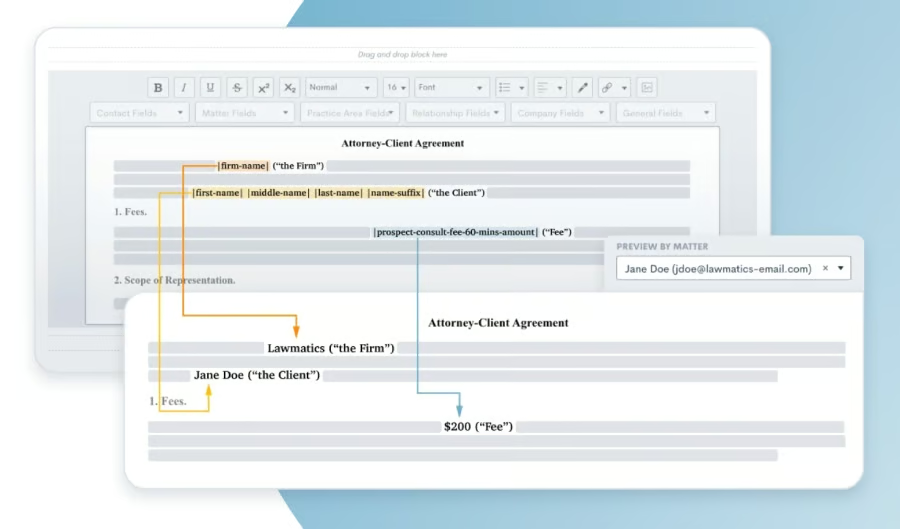
- You want to automate task and document management: Lawmatics makes communication more productive as it streamlines the time-consuming tasks of client and document management. For instance, lawyers can create fee agreements, track client conversations, view scheduled consultations, and hasten the client intake process by setting up rules and triggers for task and document automation.
- You want to use solid base features for your legal practice: Lawmatics offers powerful base or core features in the starting plan that new law firms can use to streamline day-to-day tasks. These capabilities include client intake, calendaring, custom forms, and lead management tools—all essential to attracting and managing clients.
When to Use an Alternative
- You have more than two clients: Lawmatics is not recommended for solo or independent practicing attorneys because of its robust and advanced features (designed for large law firms) and pricing structure (three-user minimum requirement).
- Alternatives: HubSpot CRM and Zoho CRM are excellent alternatives to Lawmatics because they offer free and scalable paid plans recommended for independently practicing lawyers. If you are looking for an industry-specific CRM, Clio and CASEpeer are your best choices, billed on a per-user basis with a monthly payment option available.
- You want transparent pricing for a law firm CRM: Lawmatics does not offer transparent pricing on its website. Interested legal professionals must contact the provider to obtain quotes on plans. Based on our research, the Essential plan could range anywhere from $99 to $199 per month for three users.
- Alternatives: Pipedrive, Clio, and CASEpeer have clear pricing and scalable plans. Pipedrive offers five plans ranging from $14 to $99 per user, per month. Clio has four tiers, starting at $39 per user monthly. On the other hand, CASEpeer is designed for personal injury lawyers, with the basic plan starting at $79 per user every month.
Lawmatics Pricing Plans
Cost: Contact the provider for pricing (three users minimum)
Key Features:
- Document automation for building custom documents like fee agreements
- Task management
- 50 e-signatures to quickly complete contracts, approvals, and other legal documents
- File requests to collect and receive files from anyone
- Client intake
- Lead management
- Calendaring
- Custom forms
- 50 e-signatures to complete contract approvals
- 2,500 contacts and 250 text messages (additional contacts and texts sold separately)
Cost: Contact the provider for pricing (three users minimum)
Key Features:
- Everything in the Essential plan
- Unlimited automation
- Unlimited e-signatures
- Email marketing campaigns
- Advanced conflict checking
- Return on investment (ROI) tracking and analysis
- Custom dashboards
- Event management
- 10,000 contacts and 750 text messages
- Unlimited e-signatures
Cost: Contact the provider for custom pricing
Key Features:
- Everything in the Premium plan
- Full access to all features
- Dedicated account manager
Our Expert Opinion
Lawmatics streamlines the day-to-day activities of lawyers and legal assistants by automating manual, repetitive tasks like creating legal documents. We love how this legal CRM lets you build custom legal documents and request files and signatures from clients to efficiently process contracts and agreements. We recommend Lawmatics to large law firms because of its robust suite of features like client intake, calendaring, and lead management tools in its starting plan.
How We Evaluated the Best CRMs for Lawyers
Frequently Asked Questions (FAQs)
What is a CRM for lawyers?
ACRM for lawyers involves streamlining case management, legal documentation, and client scheduling. It aims to hasten the client intake process or convert leads into clients for profitability. CRM software facilitates this process and case coordination among legal associates, improving case accuracy and outcome.
What are the key features of the best CRM for lawyers?
The key features include client intake, data management, document automation and templates, a client portal, and data security. These streamline law firm operations, from client support to legal documentation and process management. Aside from rich, helpful features, the best CRM software for lawyers is easy to use, affordable, scalable, and reliable.
What is the best legal management software?
For general use, HubSpot CRM is the best legal management software because of its affordable and robust law firm marketing tools. Clio is the easiest-to-use CRM software for lawyers handling payments or setting up fee structures. CASEpeer is best for personal injury lawyers with its statute and claims tracking features.
Bottom Line
The best CRM for lawyers streamlines the client intake process by providing helpful document management features like a client portal, time tracking, custom forms, and e-signatures. Law firms can rely on its collaboration and data security capabilities to ensure client privacy and case detail confidentiality. While HubSpot CRM is the top CRM for lawyers in this guide, consider other providers depending on your legal practice’s needs and requirements.
