







Customer relationship management (CRM) software with broad customization options lets businesses tailor their modules, data fields, and specific features to meet their unique operational needs. The best customizable CRM software offers affordable plans, simple system design features, and various third-party software integration options. We evaluated dozens of products to identify the top customizable CRM tools for small business:
- Best overall: Pipedrive
- Great for designing automations for free: Zoho CRM
- Best CRM for white labeling: Bitrix24
- Most customizable CRM for Google teams: Copper CRM
- Great app to tailor for all business functions: Apptivo
- Most simple customization tools: monday CRM
- Best for a broad range of integrations: Salesforce Essentials
- Great to design for direct sales operations: Nimble CRM
- Best Customizable CRM for Small Business Compared
- Pipedrive: Best Customizable CRM (Overall)
- Pipedrive Pricing Plan & Overview*
- Zoho CRM: Best for Designing Automated Workflows
- Zoho CRM Pricing Plan & Overview*
- Bitrix24: Best White Label CRM Option
- Bitrix24 Pricing Plan & Overview*
- Copper CRM: Most Customizable CRM for Google Teams
- Copper Pricing Plan & Overview*
- Apptivo: Best for Designing a Whole Business Management Tool
- Apptivo Pricing Plan & Overview*
- monday CRM: Best for Intuitive Customization
- monday CRM Pricing Plan & Overview*
- Salesforce Essentials: Best for Integration Options
- Salesforce Essentials Pricing Plan & Overview
- Nimble: Best for Direct Sales Operations
- Nimble CRM
- Nimble Pricing Plan & Overview
- Frequently Asked Questions (FAQs)
- Bottom Line
Best Customizable CRM for Small Business Compared
| Provider | Starting Monthly Price Per User* | Free Plan? | Our CRM Rating Out of 5 |
|---|---|---|---|
 | $14 | ✕ | 4.85 |
| Visit Pipedrive | |||
 | $14 | ✓ | 4.68 |
| Visit Zoho CRM | |||
 | $49 (up to five users) | ✓ | 4.54 |
| Visit Bitrix24 | |||
 | $23 | ✕ | 4.29 |
| Visit Copper CRM | |||
 | $8 | ✕ | 4.24 |
| Visit Apptivo | |||
 | $10 | ✕ | 4.18 |
| Visit monday CRM | |||
 | $25 | ✕ | 4.14 |
| Visit Salesforce Essentials | |||
 | $24.90 | ✕ | 3.72 |
| Visit Nimble | |||
*Based on annual billing; monthly billing is also available for slightly higher rates.
Pipedrive: Best Customizable CRM (Overall)
When to Use Pipedrive
- You want an advanced CRM for pipeline management: Pipedrive is built with a major focus on helping direct sales teams. It’s particularly useful for tasks like lead management, deal tracking, proposal generation, and sales pipeline management. The pipeline monitoring tools specifically are robust—letting users oversee an unlimited number of sales processes that allow complete customization for every stage.
- You prioritize user simplicity in CRM design: While Pipedrive isn’t necessarily the easiest CRM to operate because of its many button and tool options on every page, it is intuitive for setting up and customizing. Teams can alter data fields within the settings using simple click-and-type. They can also adjust sales process stages from the pipeline module and create reports for any activity or performance metrics in the reporting parts of the CRM system.
When to Use an Alternative
- You need free customization: Pipedrive does not offer a free-forever plan, which by default, means users cannot do any sort of free CRM customization.
- Alternative: Zoho CRM and Bitrix24 each have custom CRM builder tools that are available on free-forever plans.
- You want to configure low-cost workflow automations: Automation customization lets you put repetitive tasks, such as updating CRM data, sending email follow-ups, or assigning leads and tasks, on autopilot. Unfortunately, workflow automation design tools in Pipedrive are not available until the Advanced plan for $24.90 per user, monthly.
- Alternative: Zoho CRM is the best option for custom workflow automation, which begins for free.
Pipedrive Pricing Plan & Overview*
Cost:
- $14
Key Features:
- Customizable CRM data fields
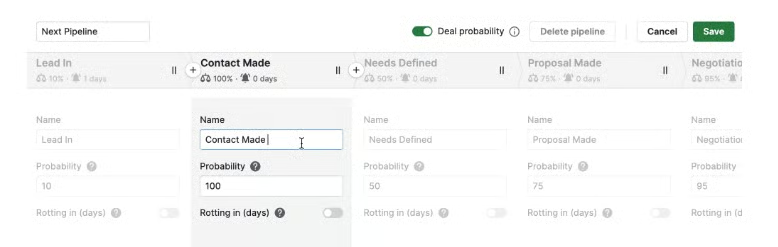
- Custom sales pipelines with weighted probabilities at deals stages and rotting indicator settings
- Access to the app marketplace for connecting CRM with third-party integrations
- Lead, contact, and deal management
- File attachments and activity tracking on CRM records
- Products catalog
- Calendar view on activity and tasks
- Artificial intelligence (AI) sales assistant for performance insights and improvement recommendations
- Deal and activity reporting plus visual dashboards
- Team and individual goal tracking
Cost:
- $39
Key Features:
- Customizable email signatures
- Custom email templates
- Ability to set important data fields indicating its crucial sales information
- Workflow automation design tools with time-based triggers
- Two-way email sync with Outlook or Gmail to send, receive, manage, and track emails from the CRM plus email scheduling and group emailing
- Built-in meeting and video call scheduler tools
- Smart contact data for auto-enriching contact profiles with up-to-date information
- Expanded revenue reporting for subscription-based reports
Cost:
- $49
Key Features:
- Custom formula fields for auto-calculating data values
- Custom reporting with any data field or metrics that can be obtained in the CRM
- Required data field settings indicating users must add the information before saving the record
- Contacts single-view timeline
- Smart Docs for quickly generating sales documents by auto-populating CRM data into proposals
- Document open tracking plus e-signature
- Teams management
Cost:
- $64
Key Features:
- Phone support and CRM implementation program
- Up to 200,000 open deals
- Up to 500 custom fields
- Up to 250 insights reports
- Up to 90 active automations per user
Cost:
- $99
Key Features:
- Custom security rules and alerts
- Implementation program that comes with custom onboarding for new Pipedrive customers
- Unlimited reports and sales dashboards
- Unlimited unique teams
*Pricing based on annual billing on a per-user monthly breakdown; monthly billing is also available for a higher cost. Paid plans include a 14-day free trial.
Our Expert Opinion
Pipedrive’s customizable pipeline and simple design features grant this product the title of best custom CRM. The provider makes it easy for users to tailor deal stages within the deal and pipeline modules—even allowing them to configure settings for closing probability percentages and when to trigger the rotting deal indication. Plus, Pipedrive’s options for data fields, email templates, and automations allow any sales team to make this CRM their own.
Read our Pipedrive review with comprehensive details on pricing, features, integrations, and user reviews to see if it’s the best solution for your business.
Zoho CRM: Best for Designing Automated Workflows
When to Use Zoho CRM
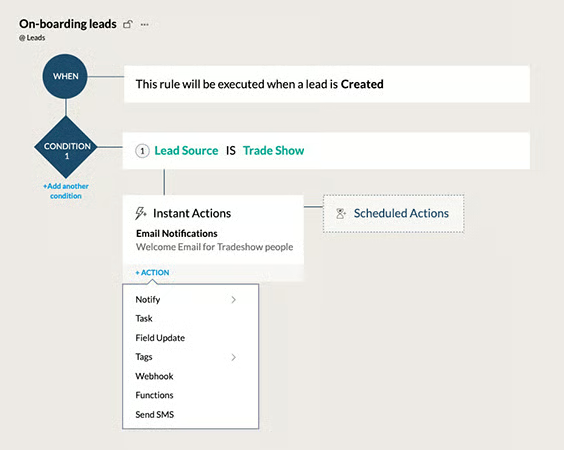
- You need free automation deployment: Zoho CRM is unique in that it includes its sales automation beginning on the Free plan. Users can use automation to create workflows that automatically run based on a trigger. For instance, if a deal stage changes to “proposal,” that lead is automatically assigned to a sales rep, and a premade introduction email is sent automatically.
- You want to connect your CRM with several other software tools: Zoho has tailoring capabilities like custom data fields, layouts, views, pipelines, and even entire modules. Even then, users can take Zoho customization further through CRM integrations. Zoho has 1,000-plus third-party apps to connect and an array of native tools for project management, writing, finance, content, and help desk support.
When to Use an Alternative
- You want to create low-cost custom business modules: Modules in business software refer to a category that represents an aspect of a business and includes relevant tools and data for that category. For instance, Zoho has default modules for sales, marketing, inventory management, and customer support. Custom modules for Zoho CRM, however, require the extensive Enterprise plan for $40 per user, monthly.
- Alternative: Apptivo is the best alternative for users to create entire business modules within its system, starting at just $8 per user, per month.
- You prioritize user experience: While the Zoho CRM customization capabilities are nearly infinite, users report difficulties setting up a new CRM for the first time and say the interface can be tricky to navigate.
- Alternative: Pipedrive, monday CRM, and Nimble are our favorite custom CRM software products that perform well in product usability.
Zoho CRM Pricing Plan & Overview*
Cost:
- $0 for three users
Key Features:
- Organize and rename CRM tabs on the home page
- Ability to design CRM search layouts
- Users can build their own list views for CRM records
- Custom workflow automation
- Email template design tools
- Native integration with Zoho Survey, Projects, Desk, Analytics, Campaigns, and Forms
- Leads, accounts and contacts management with activity tracking
- Deal management with one sales pipeline
- Documents storage
- Standard CRM reporting
Cost:
- $14
Key Features:
- Custom data fields with unique field indicators and color coding options
- Expanded automation with scheduled actions, automated data field updates, and automation based on contact score
- Custom contact and lead scoring rules
- Multiple sales pipelines with custom stages
- Reports and dashboard customization plus scheduled reports
- Zoho marketplace for third-party integrations
- Multi-currency support
- Sales forecasting
- Meeting scheduler
- Mass email sends
Cost:
- $23
Key Features:
- Custom macro automations that lets users create workflows that trigger through user commands
- Automation for creating and assigning records based on a trigger
- Data fields for file and image uploads plus formula fields that calculate values using other data in a record
- Customer support module with case management and automated assignment based on custom rules
- Inventory management module with products tracking plus quote, order, and invoice, generation
- Built-in sales gamification tools
Cost:
- $40
Key Features:
- Customizable modules
- Expanded lead scoring with multiple, customizable rules
- Custom page layouts within modules
- Automation for customizing organization schedules
- Zia artificial intelligence (AI) tool for data enrichment, task reminders, trend analysis, and deal predictions
- Zia for workflow automation suggestions
- Territory-based sales forecasting
- Automated customer case escalation rules
Cost:
- $52
Key Features:
- Up to 50 sales pipelines
- Unlimited application programming interfaces (APIs)
- 50 unique currencies
*Pricing based on annual billing on a per-user monthly breakdown; monthly billing is available for a higher cost. Zoho CRM comes with a 15-day free trial for the paid plans.
Our Expert Opinion
Zoho CRM offers complete customization in its system, much of which is included in the free or lower-priced plans. While we like the automation design capabilities the most, Zoho also shines in other areas, like the affordability of customization tools and widespread native integration options. All-in-all, Zoho is an excellent option for teams to tailor for their unique operation.
Check out our Zoho CRM review for insights on features and user reviews to see how they will fit in your sales operation.
Bitrix24: Best White Label CRM Option
When to Use Bitrix24
- You want a free business management tool: Bitrix24 offers a relatively robust free-forever plan that includes unlimited users and modular access to sales, marketing, project management, and ecommerce tools. On the no-cost option, teams can store and organize contact data, process payments and orders, manage a sales pipeline, oversee special projects, and engage customers via live chat and messaging channels.
- You need a white label CRM solution: Bitrix24 stands out as a white label CRM solution, meaning that businesses can customize and rebrand their CRM to their own brand or create platforms to resell. This makes Bitrix24 particularly useful for sales and technology consultants who provide professional technology advice to business clients—often supplementing it with designing tailored software products.
When to Use an Alternative
- You need an intuitive CRM system: Bitrix24 has many features and modules in its platform for various use cases. That said, users struggle with the product experience because the system is tough to set up, navigate, and operate, especially for new users.
- Alternative: We recommend Pipedrive and monday CRM as intuitive, custom CRM systems.
- You want a low-cost way to customize data fields within projects: While custom data fields on CRM records like contacts and deals are available for free, tailored fields within project records don’t start until the Professional plan for $199 per month.
- Alternative: Apptivo and monday CRM let users tailor their project and task data fields at a much more affordable rate—starting at $8 and $10 per user, monthly, respectively.
Bitrix24 Pricing Plan & Overview*
Cost:
- $0 for unlimited users
Key Features:
- Custom data fields in contact and deal records
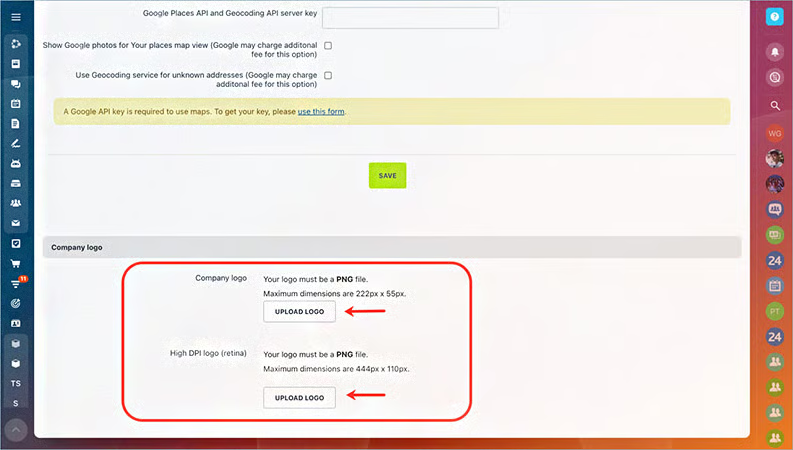
- Company name can be customized in CRM for rebranding
- Website builder
- Project management
- Unlimited deals and contacts
- One sales pipeline with custom deal stages
- Unlimited product catalog items
- Live chat engagement
- Online store payment and order processing
- Human resources management tools with employee profiles and company structure management
Cost:
- $49 (up to five users)
Key Features:
- Rebranding in CRM with logo
- Custom project templates
- Required data field settings
- Sales and marketing automation with custom rule-based triggers
- Built-in telephone
- Email integration for sending and receiving messages in the CRM
- Customer segmentation
- Access to Bitrix24 market for over 600 third-party integration options
- Video call scheduling and hosting plus meeting briefs
- Google Workspace and Office365 integrations
- Unlimited invoices with convert deal to invoice features
- Multiple sales pipelines
Cost:
- $99 (up to 50 users)
Key Features:
- CRM rebranding with background displays and menu navigation control that apply to all users
- Bulk text campaigns and email plus email templates
- Event planning
- Unlimited leads and quotes
Cost:
- $199 (up to 100 users)
Key Features:
- Rebranding CRM options with custom URL and domain names
- Custom data fields in project and task records
- Data fields for CRM records can have granular visibility controls for certain users
- User permission settings for all CRM modules
- Custom business process designer with automation and smart processes for routine tasks and operations
- Task and project automation in project management modules
- File sharing
- Knowledge base resources for employees
Cost:
- $399 (up to 250 users)
Key Features:
- Unlimited sales pipelines
- Unlimited ecommerce products in online store
- HR task and hiring automation with custom triggers
- Multiple business locations and sales branches management
*Pricing based on annual billing on a per month breakdown; monthly billing is available for a higher cost. Bitrix24 offers a 30-day free trial on paid plans.
Our Expert Opinion
Bitrix24 separates from the pack with CRM builder functionality in a white labeling environment. That said, this platform is recommended for those wanting to rebrand their CRM as their own or as a service to others. While product usability brings the provider down a few spots, Bitrix24 offers a powerful solution because of its solid free-forever plan and an infinite number of software modules that expand its use cases past sales and marketing capabilities.
White-labeled or not, Bitrix24 is an excellent solution for managing sales and other business functions like marketing, account management, and special projects. See if it’s right for your team in our Bitrix24 review.
Copper CRM: Most Customizable CRM for Google Teams
When to Use Copper CRM
- You want a seamless Google integration process: Copper CRM is a Google CRM system built for Google users who want to incorporate their favorite applications. As part of being a custom Google CRM, Copper is well-equipped for integrating with Google applications like Gmail, Contacts, Calendar, Sheets, and Drive. There’s also a Chrome extension for teams to access the CRM interface from Gmail and Calendar systems.
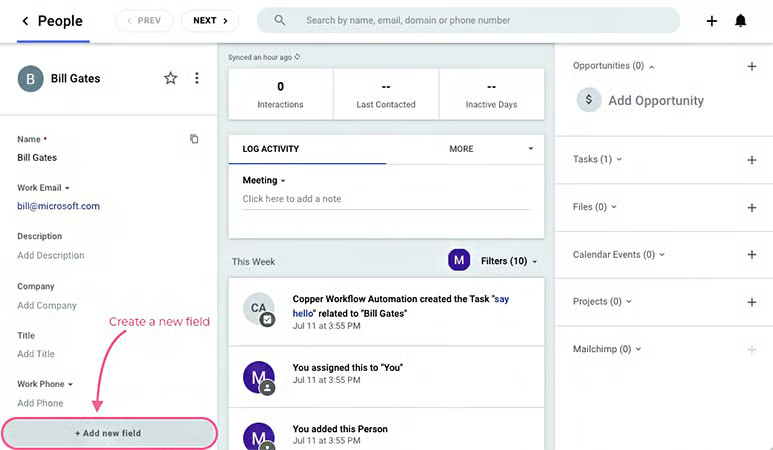
- You need a simple customization solution: Because Copper CRM is built like a Google app with a clean and modern-looking layout, it offers one of the most intuitive CRM customization processes. Within the system, users can tailor things like email templates, pipelines, data fields, automated workflows, reports, permissions, and currencies to meet their operational needs.
When to Use an Alternative
- You prefer non-Google products: Though fairly obvious, Copper CRM is not a good option if you don’t like Google applications or you use other providers such as Microsoft or Apple for business productivity software.
- Alternative: Zoho CRM is a better customizable CRM alternative that has tons of integrations and plugins with both Google and non-Google apps.
- You need more affordable custom CRM solutions: One of the unfortunate attributes of Copper CRM is that most of the design and system tailoring features require the Professional plan and above. For instance, unlimited custom data fields, automations, non-Google third-party integrations, and report and email templates are not included in the Basic plan.
- Alternative: Apptivo and monday CRM have more affordable options with customization included on the lower-tiered plans.
Copper Pricing Plan & Overview*
Cost:
- $23
Key Features:
- Custom sales pipelines
- Up to 10 custom data fields in CRM records
- 2,500 contacts with file storage and activity tracking
- Google Chrome extension which brings the CRM interface into Gmail and Google Calendar pages
- Integration with Gmail, Calendar, Contact, Drive, and Sheets
- Collaboration through notes, mentions and comments on records, and task assignment to other users
Cost:
- $49
Key Features:
- Third-party integrations with popular tools like DocuSign, Mailchimp, QuickBooks, and Slack
- Zapier integration for creating cross-application data workflows
- Application programming interface (API) to build your own integrations
- Bulk emailing with custom templates
- Unlimited custom data fields
- Custom workflow automation for repetitive tasks like record updates, task creation and assignment, and deal status changes
- Custom reports and activity insights with option to design report templates
- User permission setting for certain data records and tools
- 15,000 contacts
- Support for multiple currencies
Cost:
- $99
Key Features:
- Unlimited contacts
- Expanded integrations with LinkedIn and Facebook as well as Wix and WordPress website builders
- Custom email sequences and automated campaigns
- Personal onboarding support from Copper service teams
- Lead scoring
- Email scheduling
*Pricing based on annual billing on a per user, per month breakdown; monthly billing is also available for a higher cost. Copper also comes with a 14-day free trial.
Our Expert Opinion
Copper is specialty software designed to simultaneously customize a CRM and connect it with Google applications. Its seamless integration process with Google products and similar interface feel give users the chance to fill in the void of Google not offering its own CRM system. We also can’t overlook how easy Copper makes it for teams to design their data fields, workflows, templates, and pipelines to meet their specific needs.
Be sure to use our Copper CRM review for deep insights into product attributes and features to see if it’s right for you.
Apptivo: Best for Designing a Whole Business Management Tool
When to Use Apptivo
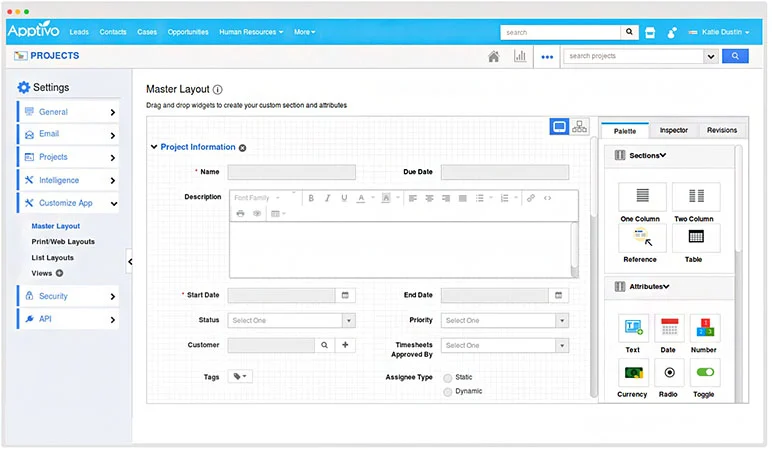
- You need to create a multi-functional business tool: Apptivo is customizable software where users can select multiple applications to serve various business needs. While one of those is a CRM system with contact management and sales outreach features, there are also capabilities to design apps and databases for marketing, customer support, field service, projects, billing, inventory tracking, and supply chain management.
- You want low-cost customization options: Apptivo is affordable all-around, regardless of whether you adopt the first tier or Ultimate plans. Plus, the features specifically used for creating a CRM and other apps are mostly available on the lower-tiered options. For instance, users can create up to 18 different applications, email templates, reports and dashboards, and custom data fields on the Lite plan.
When to Use an Alternative
- You want a free-forever plan to test run the product: While cost-friendly, Apptivo does not offer a free plan for users to try the product in a risk-free environment.
- Alternative: Bitrix24 and Zoho CRM are excellent options with free plans.
- You need a multitude of third-party integrations: One key downside to Apptivo is the range of third-party integration options. It’s limited mostly to Google and Microsoft products, as well as a few popular tools like QuickBooks, Slack, Dropbox, and RingCentral.
- Alternative: Salesforce Essentials and Zoho CRM are the top options for integrations. Each offers options in the thousands of third-party integrations plus various native software tools.
Apptivo Pricing Plan & Overview*
Cost:
- $8
Key Features:
- Custom data fields with mapping capabilities
- Field and role-based security controls
- Custom reports and dashboards
- Users can customize views in their CRM system
- Custom integrations through an application programming interface (API)
- Up to 18 unique business applications
- Contact management with appointment scheduling and notes tracking
- Task management
- Product catalog
- Deal management with multiple pipelines
- File sharing
- Sales stage automation and workflow automation
- Email sync with designable templates plus open and click tracking
Cost:
- $12
Key Features:
- Contact relationships tracking on records
- Multi-firm data access
- Up to 46 unique business applications
- Items for ecommerce management
- Mass emailing with marketing automation and scheduled deployments
- Scheduled reports
- Payment processing integrations with PayPal, Stripe, and Authorize.net
Cost:
- $20
Key Features:
- Up to 57 unique business applications
- Notification builder
- Short message service (SMS) texting
- Automated email sequences
- Proposal and quote generation
- Territory management
- Custom applications
- CRM integration with Xero and QuickBooks
Cost:
- Contact for pricing
Key Features:
- CRM white labeling
- Up to 65 unique business applications
- Google Maps integration
*Pricing based on annual billing on a per-user monthly breakdown; monthly billing is available for a higher cost. Paid plans include a 30-day free trial.
Our Expert Opinion
Apptivo’s product versatility stood out the most for this CRM system. Allowing users to select and customize numerous applications at a low cost, Apptivo quickly converts from a sales and marketing CRM system into a complete business management system. This includes expanded options for customer service, project management, inventory, finance, human resources, and supply chain management.
monday CRM: Best for Intuitive Customization
When to Use monday CRM
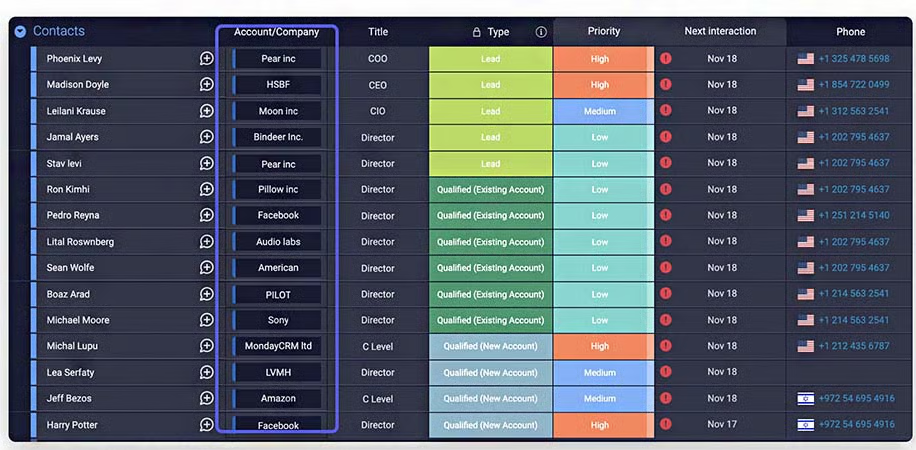
- You need intuitive customization features: monday CRM is the monday.com product specifically for deal and lead management, sales automation, and prospect outreach. Similar to its primary platform, it uses a familiar spreadsheet-style format for data entry that comes naturally to most users. Additionally, customization is a breeze through no-code automation and simple editing of board data field properties.
- You want broad tailoring options at a low cost: monday.com is pretty inexpensive overall—starting at $10 per user, per month. By default, most of the system customization features, including unlimited custom pipelines, custom board designs and fields with templates, workflow automations, and third-party integrations, are available on either the Basic or Standard CRM plans.
When to Use an Alternative
- You prefer a traditional CRM: While monday CRM can do the same functions as a traditional CRM system, like contact storage, deal tracking, and performance reporting, its use of boards and items still makes the product act more as a CRM alternative. It acts like a work management tool redesigned for sales purposes than a true CRM system.
- Alternative: Pipedrive is our pick for the best customization software that serves as a traditional CRM system.
- You need low-cost reporting features: One of the key issues with monday CRM is sales forecasting and custom analytics requires the Pro plan for $24 per user, monthly. Plus, more advanced pipeline analytics and goal tracking require the Enterprise plan, which demands a custom quote from the provider.
- Alternative: Apptivo begins offering its custom reporting and dashboard features on the Lite plan for $8 per user, monthly.
monday CRM Pricing Plan & Overview*
Cost:
- $10 (priced for three-user minimum)
Key Features:
- Custom user notifications for CRM activity
- Board and item templates for using premade pipeline processes and sales data records
- Unlimited contacts and items
- Custom pipelines
- Unlimited boards
- Kanban board view for pipelines or other sales projects
- Dashboard reporting
- Embedded documents and whiteboard collaboration within CRM
- Document storage in items
- Mobile CRM application
- Unlimited free board viewers
Cost:
- $14 (priced for three-user minimum)
Key Features:
- Lead and deal management
- Account management
- Two-way integration with Gmail and Outlook for using email from the CRM
- Quote and invoice generation
- Custom activity management and tracking
- Duplicate data detection and merge
- Workflow automation
- PandaDoc and DocuSign integration for sending documents to receive digital signatures from the CRM
- Aircall integration for placing and receiving calls from monday.com
- Dashboard reporting for five boards
- Zoom integration
- Expanded board views like timeline, calendar, and map views
Cost:
- $24 (priced for three-user minimum)
Key Features:
- Custom email templates
- Privacy settings on boards and documents in the CRM
- Email automations
- Google Calendar sync
- Integration with Mailchimp for managing email campaigns from CRM
- HubSpot integration to synchronize contact and deal data in both systems
- Facebook Ads integration to manage campaigns and ad content from monday.com
- Time tracking on CRM tasks
- Formula column calculations
- Sales analytics on CRM data plus forecasting
- Dashboard reporting for up to 10 boards at once
- Added board views like chart view and workload
Cost:
- Contact for pricing
Key Features:
- Integrations with Salesforce and enterprise resource planning (ERP) systems for two-way data sync
- Lead scoring
- Duplicate warning on lead and account records
- Advanced sales analytics for pipeline, revenue, and cash collection insights
- Team goal tracking and management
- Dashboard reporting for up to 50 boards
- Post-sales support with management for onboarding and renewal processes, client projects, and revenue collection
- Sales-operations management with headcount planning, team onboarding tools, stored collateral and sales resources, and legal request management on sales contracts
- Work performance insights
- Pivot chart analysis and reports
- Advanced account permission setting
*Pricing based on annual billing on a monthly per-user breakdown; monthly billing is available for a higher cost. There is a 14-day free trial for the paid plans.
Our Expert Opinion
monday CRM is the best overall for product usability. We love its use of spreadsheet data entry, no-code automation tools, and how easy it is to customize your boards and item fields to any sales process or project within a sales operation. The complete tailoring capabilities of the system boards are the cornerstones of a fully customizable CRM. We also can’t overlook the pricing of monday.com, which gives CRM access even to those on a tight budget.
Use our monday crm review to learn more about the features and benefits of this product.
Salesforce Essentials: Best for Integration Options
When to Use Salesforce Essentials
- You want the broadest range of integration options: CRM integrations with native and third-party tools let users sync their data to other systems and expand functionality of their CRM. Because of Salesforce’s popularity, it offers the most comprehensive set of direct integration options of any other provider. On top of general-use tools, Salesforce Essentials can also connect with tons of industry-specialized tools.
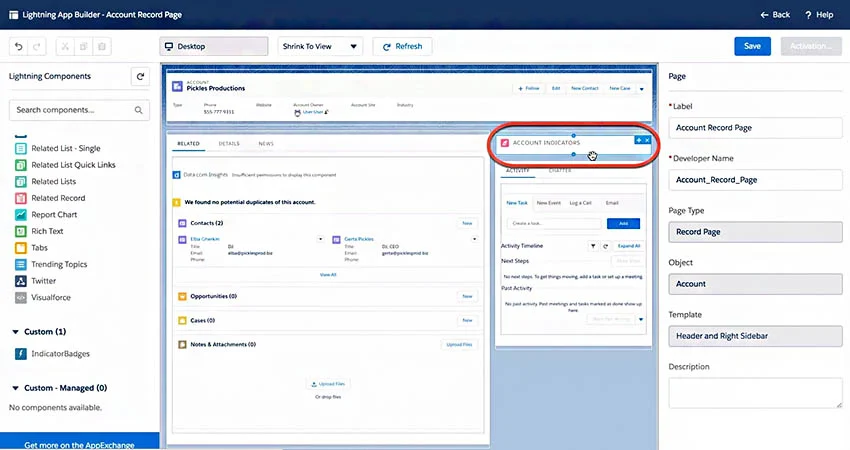
- You want advanced workflow and app design tools to customize Salesforce: Essentials includes unique tools that use low-code functions like click-and-point and drag-and-drop to help design a CRM. One is the Lightning Flow Automation, which lets you build out automated business processes and workflows. The other is Lightning App Builder, which lets users create entire applications within their CRM.
When to Use an Alternative
- You need a more affordable CRM option: Because of its sophisticated features and robust Salesforce customization capabilities, Essentials has no free plan and only has one paid plan that’s relatively expensive compared to other CRM products on this list.
- Alternative: Zoho CRM is the most comparable product to Salesforce Essentials but with a free-forever plan and cost-friendly paid plans.
- You want a more intuitive CRM system: When operating the features and customizing Salesforce Essentials modules, many users report that a steep learning curve is required due to how many features and navigation options are available.
- Alternative: monday CRM is a great alternative most known for its product usability ratings.
Salesforce Essentials Pricing Plan & Overview
Salesforce Essentials is Salesforce’s small business CRM option. It costs $25 per user, per month, comes with a 14-day free trial, and offers features like lead, account, deal, case management, and campaign deployment. For customization, users can tailor sales processes, data fields, and email templates to meet their needs. There’s also expanded customization through the Lightning process and app builders, and robust integration options.
Our Expert Opinion
Like many of its native products, Salesforce Essentials can directly integrate with nearly infinite external applications. We like its use of the Lightning building tools that use low-code solutions for teams to create detailed process automations and entire applications within their CRM. We also find that sales managers can get value from Salesforce Essentials through its custom and advanced reporting tools.
Salesforce Essentials is an advanced, highly customizable CRM for small businesses to manage their unique operation. Find out if it’s right for your business by exploring our Salesforce Essentials review.
Nimble: Best for Direct Sales Operations
When to Use Nimble
- You a part of a direct sales team: Nimble is heavily sales focused in that most of its features are designed for managing the sales process. There are solid prospect research tools through credit-based contact data acquisition, outreach features to generate and nurture leads, and lead qualification features. Teams can also track deals on their pipeline and update their sales contact data using social media enrichment.
- You need a simple CRM to customize: Nimble is an intuitive software option for customizing and operating the CRM. The interface, navigation system, and tools are all well-designed for users to quickly learn and utilize the system features. Nimble’s customization capabilities also make it easy for teams to tailor pipeline stages, data fields, automated workflows, and reports to support their needs.
When to Use an Alternative
- You want to design entire CRM modules: Compared to some of the other products on this list, Nimble has limited customization options—focusing just on tailoring within modules to adjust data fields, pipelines, and workflows and not entire modules or apps.
- Alternative: Apptivo and Salesforce Essentials are the best options for creating and customizing whole modules within the CRM system to meet specific business functions, such as inventory management, billing, or field service operations.
- You need a CRM with multiple scalable subscription options: Nimble only has one subscription option that includes all the features. This is not ideal for users who want to start with a free or low-cost subscription, and then slowly upgrade as their capacity and feature needs adapt.
- Alternative: Zoho CRM offers numerous subscription options, including a free plan for up to three users.
Nimble Pricing Plan & Overview
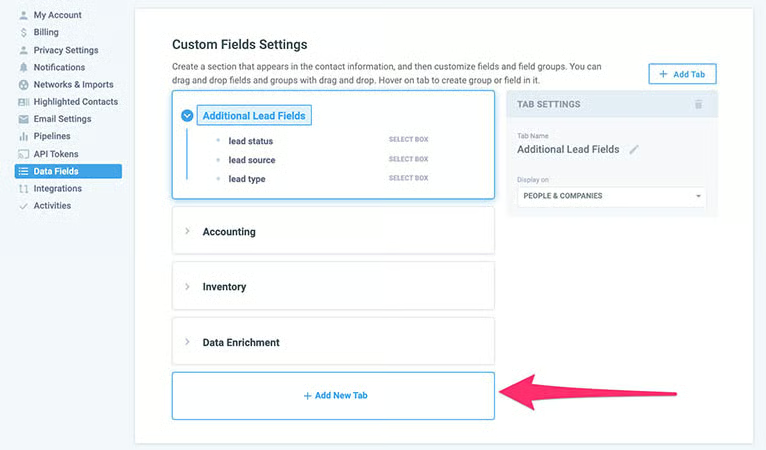
The Nimble Business plan is $24.90 per user, monthly and comes with a 14-day free trial. Included are contact management, email engagement, data enrichment, workflow automation, and lead qualification features. There are also prospecting credits for purchasing contact data and pipeline management to track deals. In terms of customization, teams can design things like data fields, reports and dashboards, automated processes, and pipeline stages.
Our Expert Opinion
Nimble is a viable option for direct sales teams with a unique sales process or day-to-day operation. Its heavy focus on deal tracking, lead management, and prospecting give it a specialty use case for more traditional revenue operation. Nimble CRM also stands out for its easy-to-use customization for all aspects of the CRM system, including data fields, pipelines, and reports.
Visit Nimble to get the full scoop on features and integrations to see if it can help your business grow.
How We Evaluated the Best Customizable CRMs
To determine the best CRM for custom design features, we evaluated the specific capabilities relevant to tailoring a CRM system to meet unique operational needs. For instance, custom data fields and pipeline stages, along with no-code automation design tools make it easy to track the information you want to keep tabs on and automate repetitive sales tasks. We also looked at other general product attributes like price and customer support availability. The tabs below offer insight into our evaluation process of the best options to create customized CRM systems:
We looked at overall features crucial to any CRM system, regardless of its primary use case or niche purpose. For instance, customizable sales pipelines are relevant to every business since each sales team uses its own process to generate and close opportunities. We also wanted to see the providers offer a mobile app, a wide range of integration options, and solid reporting tools that include custom metrics reporting.
Pricing considered free plan availability and access to various subscription options businesses could afford as they grow. We also looked at the availability for a subscriber to either pay monthly or save by paying annually with billing options. Finally, we looked at the costs specifically required to access the custom CRM development tools, like altering data field properties, designing system layouts, or creating workflow automations.
We evaluated niche features specifically for tailoring a CRM system. Being able to create and store custom templates, for instance, lets users easily pull relevant email formats, report designs, or other resources while completing day-to-day tasks. We also evaluated any custom branding options the provider offers as well as whether there are white labeling capabilities to design and resell a CRM as a service.
Extensive support availability and quality service help prevent poor outcomes users may experience while using these products. This criteria was evaluated in terms of customer service hours of availability and channel options via phone, live chat, and email. We also looked at help center resources users can access for self-service including product tutorials, user forums, or training modules.
In addition to firsthand experience evaluating the best customizable CRM for small business, we looked at what actual users say about each product according to reviews. These criteria consider how real teams feel to gain insight into value for the price paid, product usability, and how much users liked the CRM features and customization tools.
Frequently Asked Questions (FAQs)
What is a customizable CRM?
A customizable CRM is software for sales, marketing, and service management that offers many features to tailor the product to specific user needs. For instance, it will come with customizable data fields, layouts, automations, pipeline stages, and even modules for teams to have a CRM that meets any unique operational or informational requirements. It’ll also supply integration options to expand the CRM’s functionality and sync data across systems.
What is the best & most affordable custom CRM?
The best CRM varies depending on needs and use cases. For instance, we ranked Pipedrive as the best overall custom CRM because it has comprehensive capabilities for sales pipeline and deal-tracking customization that is easy to design. If, however, you are on a tight budget and need the most affordable custom CRM, we would recommend either Zoho CRM, which has a free plan and scalable paid plans, or Apptivo, which starts at $8 per user, per month.
Bottom Line
Custom CRM software is crucial to a product meeting your industry and operational requirements. By offering an array of design features to customize data fields, page layouts, templates, and automations, businesses can ensure their CRM is configured to meet their needs. While we ranked Pipedrive as the best overall custom CRM, other systems are better suited for specific businesses depending on features needs, budget, and usability requirements.
