








Copper CRM is one of our recommended customer relationship management (CRM) software platforms for Google Workspace users. It is also one of our top picks for operational and commercial real estate CRMs. It scored high in some areas, particularly on its ease of use and expert score, as we find it highly intuitive and simple to use—as do other existing Copper users.
It got a lower score in customer service because it only provides support during business hours, and has no phone support. We also scored its specialized features lower because, while it offers advanced features, they are primarily available in the higher-priced plans.
- When to Use Copper
- When to Use an Alternative
- Copper CRM Deciding Factors
- Copper Alternatives
- Copper CRM Pricing
- Copper CRM Features
- General Features
- Specialized Features
- Third-party Integrations
- Customer Service
- Ease of Use
- Expert Score
- Copper Frequently Asked Questions (FAQ)
- Who will benefit most from using Copper?
- When should I use a Copper alternative?
- Bottom Line
When to Use Copper
- Google CRM: Its seamless integration with Google makes it one of our top picks for Google users
- Commercial real estate: Our top pick for users who communicate with their real estate clients through Gmail
When to Use an Alternative
- Free CRM: Copper doesn’t have a free option; check out other providers you can use without charge
- Startups: Check out our top picks for providers that cater to startup companies
- Ecommerce CRM: Read this guide for top CRM options to manage your online store.
Copper CRM is a CRM system designed to integrate with Google Workspace apps. It works well with Google products like Gmail, Google Calendar, Google Contacts, and Google Drive. Its compatibility with Google Workspace, along with its contact enrichment and automation tools, make it an excellent fit for businesses using Google’s productivity and communication tools.
Copper CRM Deciding Factors
| Supported Business Types | Small to growing sales teams |
|---|---|
| Standout Features |
|
| Copper Pricing |
|
| Contract Duration | Monthly and annual plans are available |
| Key Integrations |
|
| Customer Support | Live chat and email, 9 a.m. to 6 p.m. Pacific Time, Monday to Friday |
Copper Alternatives
If Copper software doesn’t meet your business needs, below are some alternatives you can consider:
 |  |  | |
|---|---|---|---|
| Best For | Businesses that need a robust free CRM with advanced email marketing tools | Solopreneurs, startups, and small businesses needing a simple, affordable CRM solution | Sales teams that want a built-in telephone system included in their CRM |
| Starting Price | Offers a free plan while paid plans start at $45 per month for two users | Offers a free plan while paid plans start at $15 per user, per month | Offers a free plan while paid plans start at $9 per user, per month |
| HubSpot CRM Review | No Review Yet | Freshsales Review |
Copper CRM Pricing
4.50 / 5
We scored Copper CRM pricing 4.5 out of 5 due to its lack of a free plan. Its paid plans range from $23 to $99 per user, per month, when billed annually. All its plans include contact, deal, and pipeline management, Google Workspace integration, contact enrichment, and team collaboration tools. Its mid-level and highest-priced plans include advanced features like workflow automation, bulk emails, reporting, and third-party integrations.
| Plans | Basic | Professional | Business |
|---|---|---|---|
| Best For | Startups | Small sales teams | Growing sales teams |
| Monthly Pricing($/User/Month) | $23 | $49 | $99 |
| Annual Pricing($/User/Month) | $29 | $69 | $134 |
| Contacts | 2,500 | 15,000 | Unlimited |
| Google Workspace Integration | ✓ | ✓ | ✓ |
| Task Management | ✓ | ✓ | ✓ |
| Bulk Email | ✕ | ✓ | ✓ |
| Email Templates | ✕ | ✓ | ✓ |
| Automation | ✕ | ✓ | ✓ |
| Website Tracking | ✕ | ✕ | ✓ |
| Email Scheduling | ✕ | ✕ | ✓ |
| Lead Scoring | ✕ | ✕ | ✓ |
Click on the drop-down menu below for more information on its plans:
Basic Plan
Copper costs start at $23 per user, monthly, when paid annually. The Basic plan allows users to integrate the CRM with their Google Workspace applications, such as syncing a Google Calendar with Copper’s built-in meeting scheduler. Additionally, this plan allows users to access the platform’s project management features and provides auto-profile enrichment tools, as well as storage for up to 2,500 contacts.
Professional Plan
The Professional plan includes everything in the Basic plan and adds integrations with third-party applications like LinkedIn, DocuSign, and QuickBooks. It also integrates with other CRM systems, such as HubSpot CRM and Zendesk. Other included features are bulk emails, customizable pipelines, workflow automation, and unlimited custom fields.
Business Plan
The Business plan includes everything in the Professional plan plus a major upgrade that provides the ability to send automated email campaigns, as well as track individual sales leaderboards and monitor team sales goals. It also includes advanced features like website tracking and lead scoring.
Copper CRM Features
Regardless of the plan you choose, Copper includes an array of features for contact, lead, and project management, managing sales opportunities, and automating repetitive tasks. Its mobile app is also downloadable and accessible for all users—regardless of plan subscription.
General Features
4.38 / 5
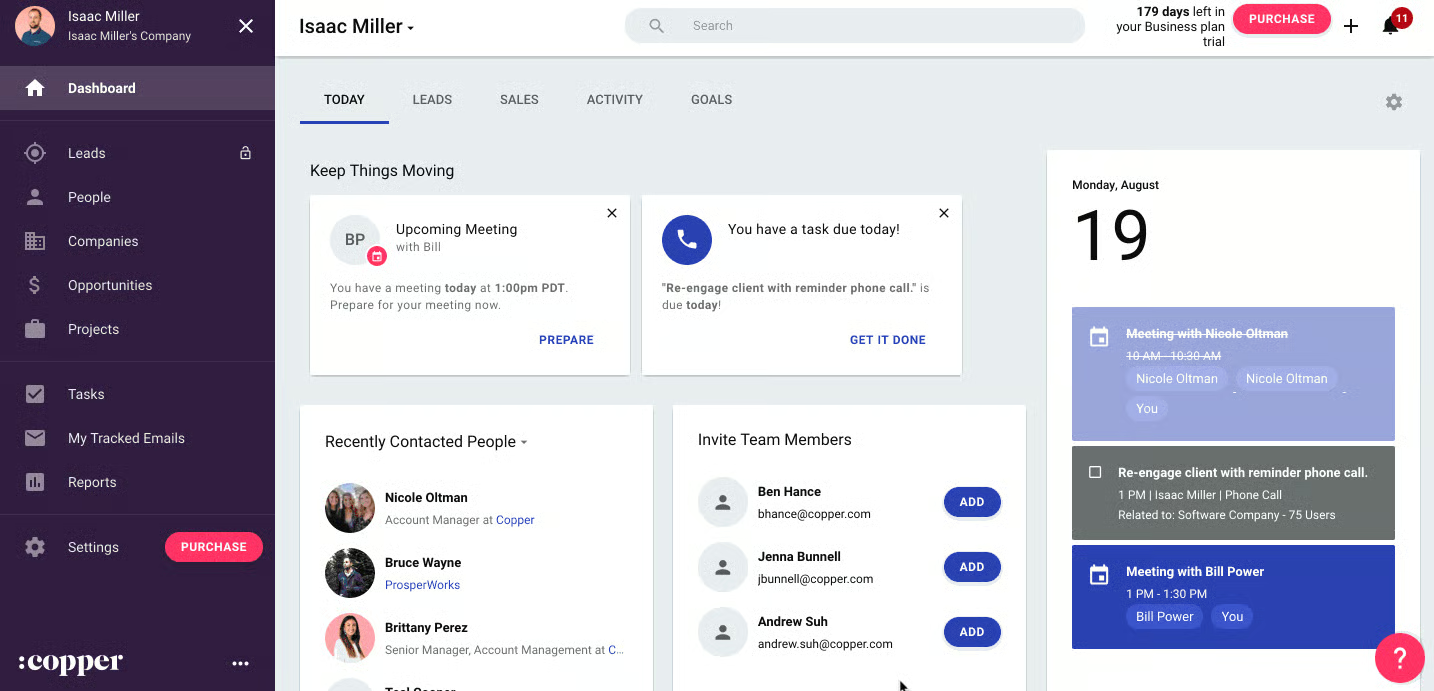
We gave Copper’s general features a score of 4.38 out of 5 as it gives users access to fundamental tools like Google Workspace productivity tools and third-party integrations. It also offers a range of sales, marketing, administrative, and reporting tools.
Below are some of the general features of Copper:
- Project management
- Task management
- Deal management
- Notifications
- Email marketing
- Email templates
- Website tracking
- Email scheduling
- Customizable pipelines
- Activity insights
Specialized Features
4.00 / 5
We gave it a score of 4 out of 5 for its niche features as some are only included in the more expensive plans. These include lead scoring, workflow automation, and email marketing.
Automated Contact Profile Enrichment
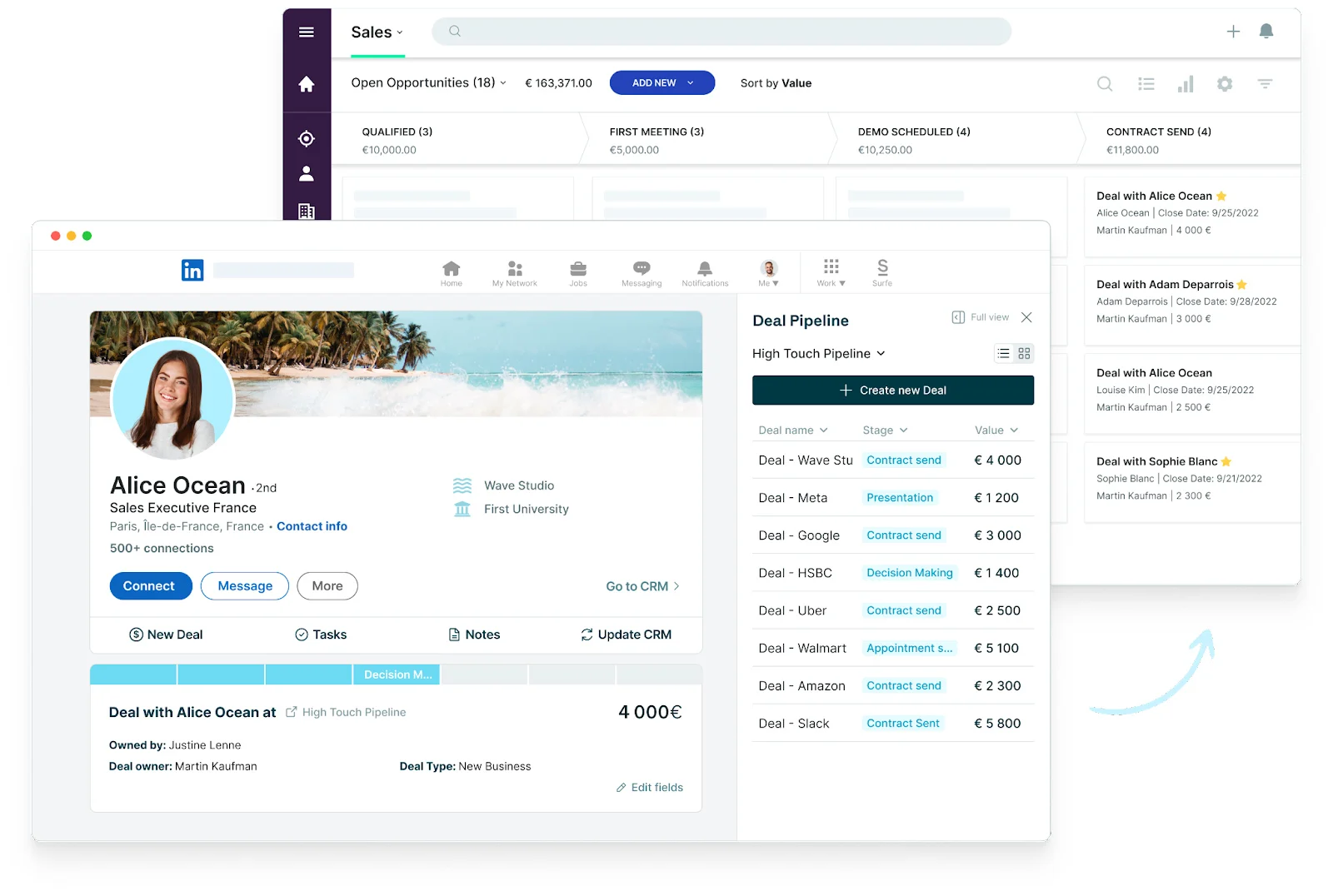
One feature Copper offers that is not typically provided in other CRM platforms is the automatic enrichment of contact profiles. By downloading their Google Chrome extension, contact records can be added from Gmail with just one piece of information, such as an email address.
Existing contact records can also be automatically updated using this feature. Copper does this by scraping the internet, including social profiles for contact and organization information. It then offers to add the lead to your database.
Lead Scoring
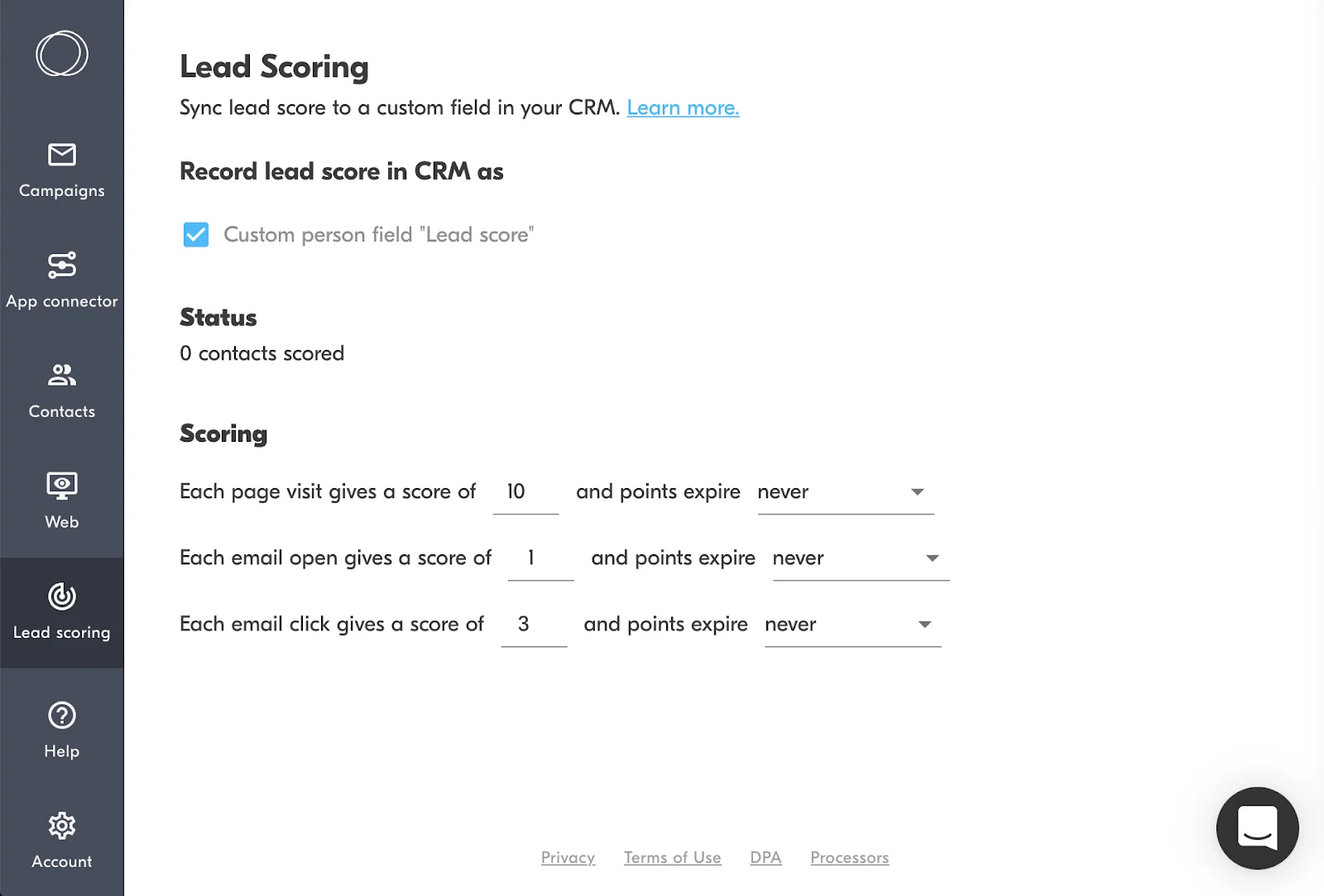
Copper can automate lead management processes, such as lead scoring. Based on preconfigured scoring rules, users can quantify how strong a lead is based on page visits, emails opened, or emails clicked. The system automatically updates lead scores as the prospect performs certain actions, allowing your sales reps to prioritize outreach to those leads most likely to convert and identify those that need nurturing.
Reporting
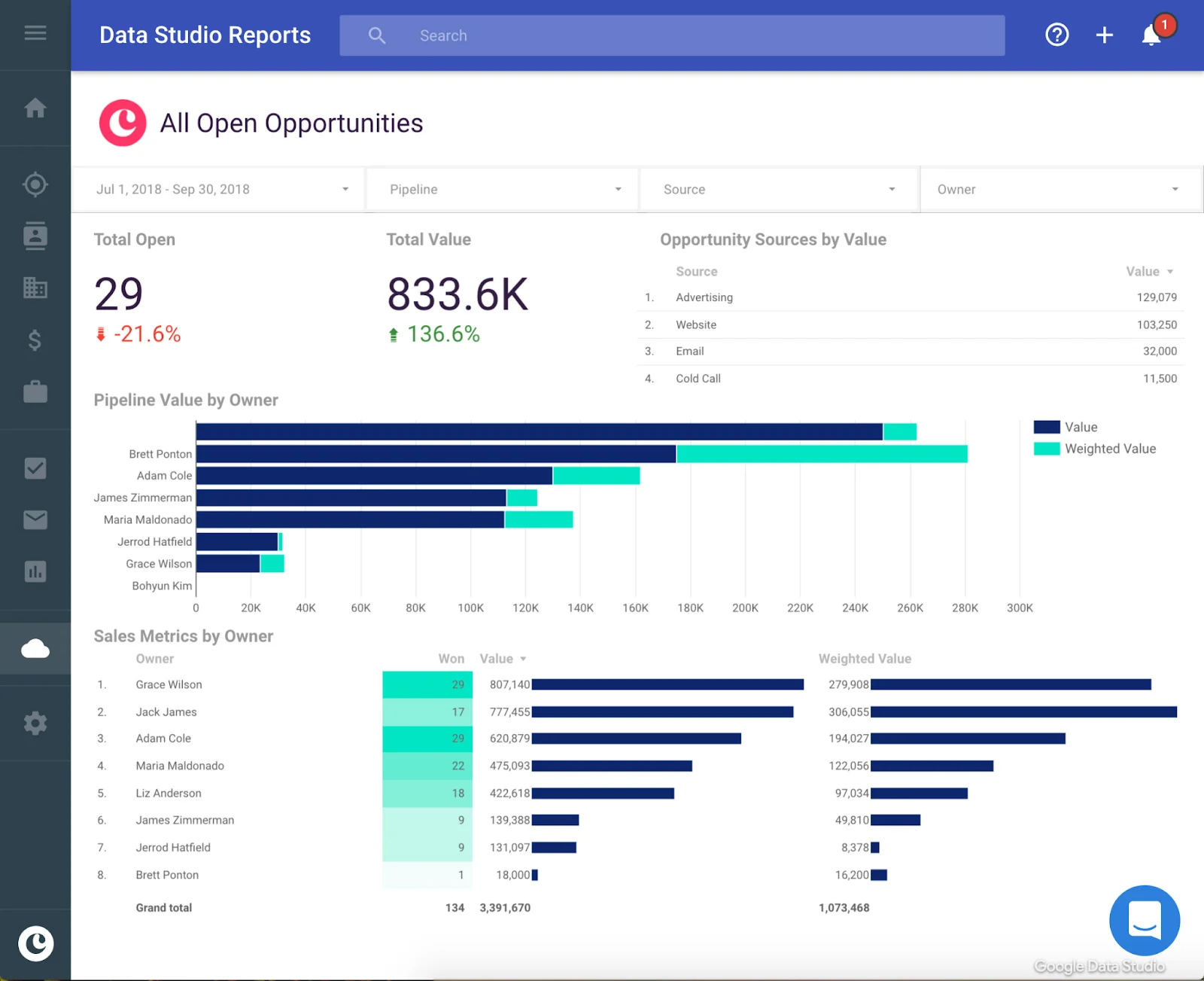
Copper offers a range of reporting and analytics tools, both built-in and through its Google integrations. You can create custom dashboards and reports using Copper’s templates and easily share them with team members. Among the unique reporting features of Copper are its legacy reports for monitoring and reporting individual performance.
Legacy reports monitor team activity and are broken down by user or sales rep. Managers can use legacy reports to track emails, calls, meetings, and calendar events. They can also view sales revenue metrics by user to track revenue lost, won, abandoned, or open, and use the probabilities of those deal opportunities for sales forecasting reports.
Third-party Integrations
Apart from its seamless integration with the entire Google Workspace suite, it integrates with other third-party business tools. These include accounting, analytics, contact management, customer service, ecommerce, email newsletters, marketing automation, sales, and time tracking. You can also extend its integration with other apps through Zapier.
Some of its most popular integrations include:
- Slack
- Mailchimp
- Airtable
- Facebook Leads
- Calendly
- Wufoo
- QuickBooks
- Asana
- Trello
- DocuSign
- Dropbox
- Xero
- Jira
Customer Service
3.13 / 5
The Copper platform earned a 3.13 out of 5 score for customer support because it only offers assistance during business hours (Pacific Time) through live chat or email channels. It also provides a Copper Community web page, which gives users access to tutorials, as well as question and answer (Q&A) forums. They can also access training webinars to assist with using product features and setting up the system.
Ease of Use
5.00 / 5
We scored Copper a perfect 5 out of 5 for ease of use because it is incredibly intuitive to operate for those familiar with Google Workspace products. Users find the CRM system uses fonts and color schemes similar to other Google products, making it appear like a Google-developed CRM. The platform also keeps navigation simple by minimizing page options to just a few on the left menu tab.
Expert Score
4.63 / 5
We scored it 4.63 out of 5 as existing Copper reviews show it is a generally well-liked CRM solution. Ease of use is the top attribute stated, specifically regarding how conveniently it works with Google products. Users also cite the platform’s automation capabilities as a positive feature that saves time on repetitive tasks.
Some negative comments are about its lack of a free plan and difficulties canceling subscriptions. Other users noted the customizability could be improved, particularly by re-arranging the layout of the software.
- Capterra: 4.4 out of 5 based on 563 reviews
- G2: 4.5 out of 5 based on 1,059 reviews
- TrustRadius: 6.3 out of 10 based on 61 reviews
Methodology: How We Evaluated Copper CRM Reviews
As part of writing our software reviews, we test each system ourselves. We look at crucial areas, such as pricing, the core set of features every CRM should have, as well as the level of customer support and ease of use. We also looked through existing CRM ratings about Copper from credible review sources. Click through the tabs below for our Copper review evaluation criteria:
Cost is typically an essential criterion for any business, so it was one of our considerations when evaluating its cost-effectiveness. We usually give a high score to providers that offer a starter plan that costs $30 or less. We also check the availability of a free plan, scalable pricing options, and options to pay monthly or annually.
We looked at overall features necessary for any CRM system, such as integration options, reporting, and analytics tools. We also considered the availability of a Copper mobile app—which is essential for sales reps who are always on the go.
We looked at the niche and targeted features of the software to see the value a user can get by subscribing. We checked if they offer specialized features such as lead scoring, workflow automation, and analytics.
We evaluated the platform’s usability and the level of technical experience needed to use the system. This was analyzed in terms of the expertise needed to set up an account, the learning curve to use its features, and the ease of integrating with other apps.
Support is a critical part of running any CRM tool, especially for small businesses that don’t have in-house technical support. We analyzed the types and availability of support offered by these providers through live chat, email, and phone.
We looked through existing and best CRM reviews on credible sites to measure the level of satisfaction current users have and any problems they typically encounter. We also added our thoughts and expert opinion on key features, value for money, and popularity.
Copper Frequently Asked Questions (FAQ)
Who will benefit most from using Copper?
Copper is primarily ideal for solo entrepreneurs, startups, and growing businesses. It offers three paid subscription options that cater to the varying business needs of small to mid-sized businesses. It is also ideal for businesses that use Google Workspace as their primary office productivity tool.
When should I use a Copper alternative?
- Users who need a free CRM tool should consider other options, as Copper only offers paid subscription options. Check out our guide on the best free CRM software to learn about possible alternatives.
- Its extensive third-party integrations are limited to the two highest-priced plans. Users who want to integrate their other business tools into their CRM without spending too much can consider either HubSpot CRM or Freshsales instead.
- Users who need sophisticated artificial intelligence (AI) and analytics tools. Check out Salesforce, which has an AI assistant tool called Einstein, instead. Another option is Zoho CRM, which has an AI assistant tool named Zia.
Bottom Line
Copper is an effective, easy-to-use CRM solution for businesses that use Google Workspace. It also offers excellent tools for managing projects, auto-finding contact information online, and automatically updating contact profiles. On the other hand, Copper is not the best fit for businesses on a tight budget as it lacks a free plan. It is also not advisable for users who need AI and analytics, as the platform doesn’t offer these features.
