


Call forwarding, or call diversion, is a voice-over-internet-protocol (VoIP) feature that redirects inbound calls to another phone number, such as a company’s main landline, a user’s mobile phone, or a colleague’s extension. Its main purpose is to ensure all calls are answered when the primary call recipient is unavailable. It allows team members to be mobile since the calls are automatically routed to preconfigured devices.
The call diversion setup creates a more pleasant customer experience, as callers won’t have to hear a busy signal or be sent to the voicemail box. In this article, we dive deeper into forwarding calls meaning, advantages, and processes.
How Call Forwarding Works
To answer the question “What is call forwarding?”, let’s discuss how it works. These are the steps an incoming call goes through in a call diversion setup:
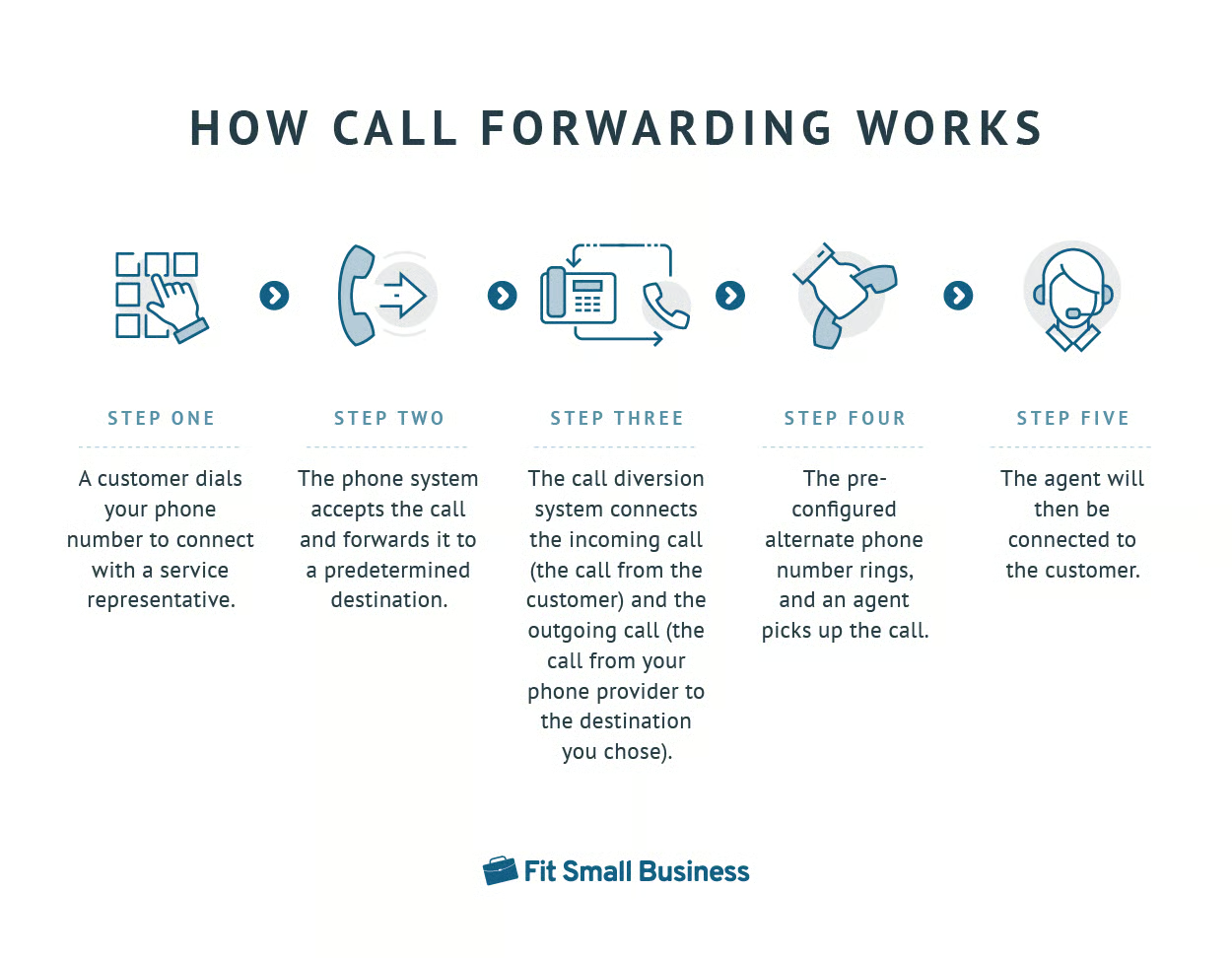
- A customer dials your phone number to connect with a service representative.
- The phone system accepts the call and forwards it to a predetermined destination.
- The call diversion system connects the incoming call (the call from the customer) and the outgoing call (the call from your phone provider to the destination you chose).
- The preconfigured alternate phone number rings and an agent picks up the call.
- The agent will then be connected to the customer.
This is a general overview of how call forwarding works. The process may look slightly different depending on the specific forwarding rules applied. For instance, you may redirect calls only when the primary phone line is busy or calls go unanswered.
Note that the caller will receive a notification that the call is being forwarded. On-hold music may play while the phone system connects the call to an alternate phone number. If the call is redirected to another country, the caller will hear a ring signal different from the one on your primary phone number.
Types of Call Forwarding
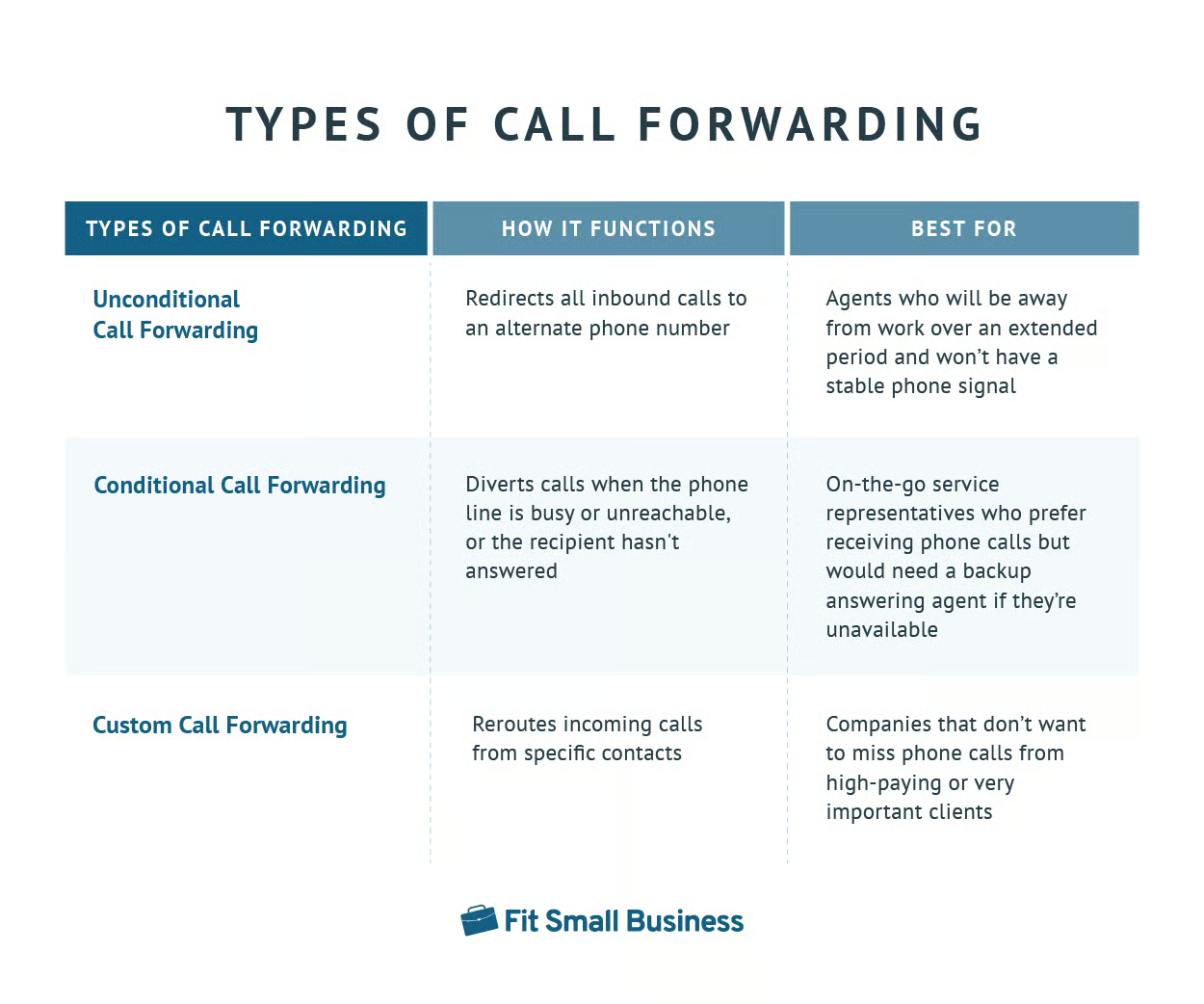
To better appreciate the answer to the question, “What does call forwarding do?”, it helps to understand the various types of call diversion: unconditional, conditional, and custom. We define and differentiate them in the table below:
Difference Between Call Forwarding & Call Transfer
Now that we have answered the question of how does call forwarding work, it’s essential to address how it differentiates from a similar VoIP feature, call transfer. Both forwarding and transfer enable users to move a call from one destination to another. However, the process of conveying the call is automated in call forwarding, meaning it proceeds without human intervention.
In contrast, a customer service representative who picks up a call and decides that another agent will handle the inquiry better must manually press the call transfer option to move the call to a team member. That said, users will only be able to use call transfer when they’re on a live call, whereas call diversion routes the call to the alternate phone number even before the caller speaks to a live agent.
Benefits of Call Forwarding
Companies using business phone systems are curious to know what is call forwarding useful for. The call management feature primarily ensures that no inbound call will be left unanswered, regardless of the availability status of the agent callers are trying to reach. On top of the consistent availability, call diversion offers these advantages:
Provides More Money Savings
The call diversion process happens virtually, so you won’t have to purchase new hardware to establish a phone line. Moreover, since forwarding is automated, you won’t have to hire a middleman that accepts and connects calls from one phone number to another.
Supports Remote Work
When a team member is out for a business trip and cannot access their desk phone, the system automatically diverts calls to their mobile phone. When working from home, the system routes inquiries to the agent’s home landline. Wherever they are, agents conveniently accept calls and accommodate customer concerns.
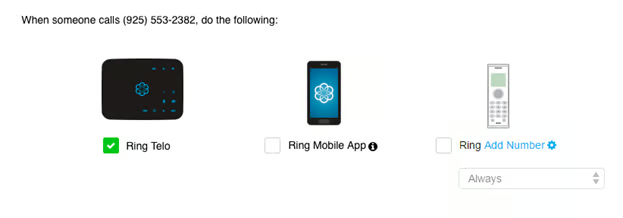
The VoIP platform Ooma lets users forward calls to different kinds of devices. It rings Telo or the home phones connected to the Telo router, the Ooma mobile app (which is available for iOS and Android devices), and other domestic landlines or cell phones. The provider has business phone subscriptions for residential and office use, ideal for solopreneurs, startups, and small companies. Learn more about the platform’s capabilities in our Ooma review.
Facilitates Team Collaboration
If you’re out on vacation, go to the call diversion settings and set your colleague’s number as an alternate phone number. It’s convenient since there’s no need to inform clients individually about another agent’s phone number. The system will automatically connect them to service representatives while you’re away. Your customer support goals as a team won’t be affected on days you’re not taking calls.
Enables Scaling Communications
When you expect to get a huge volume of calls from an ongoing major marketing campaign, add several forwarding numbers for each extension to expand communication lines for leads and customers. Once the campaign is over and the number of calls goes back to normal, phone systems let you disable call diversion or remove some of the forwarding numbers.
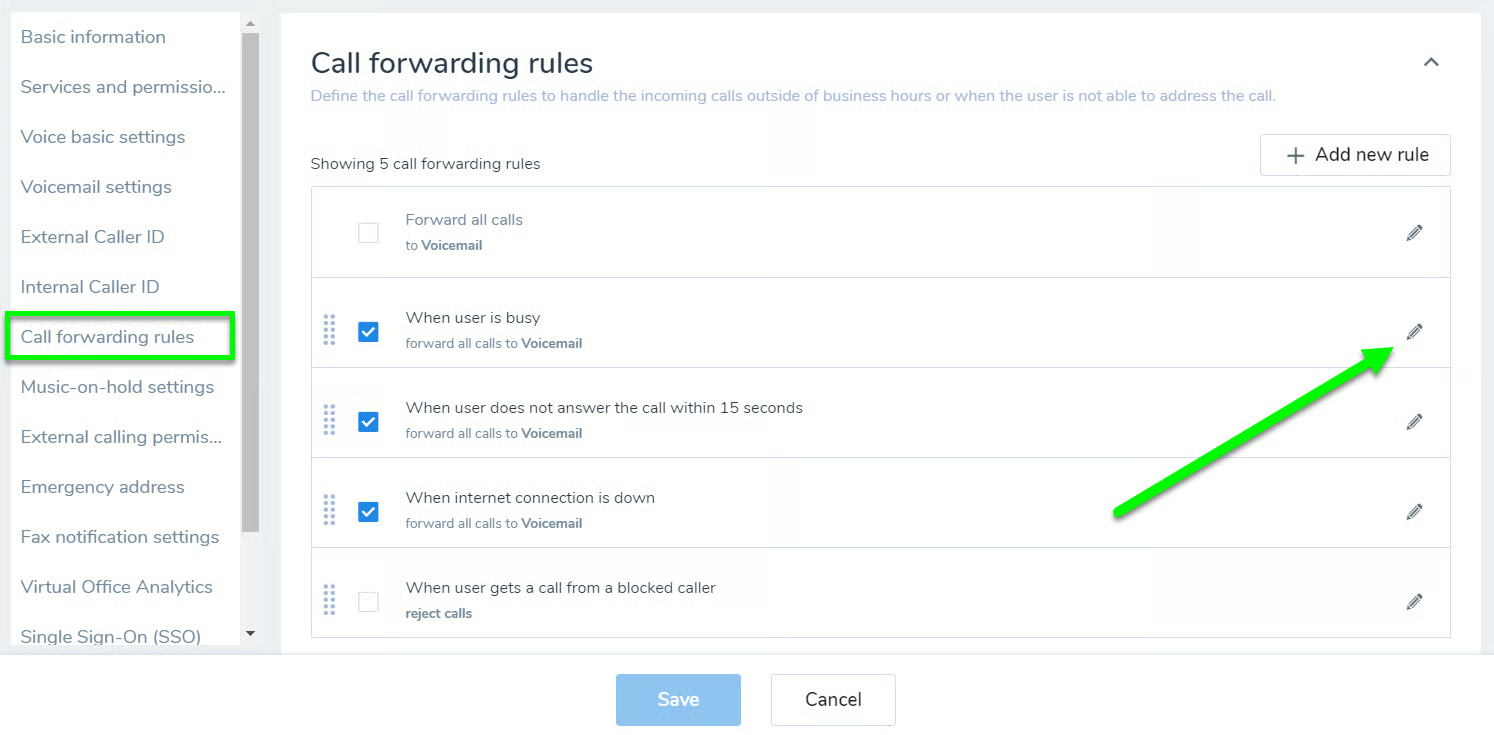
Unified communications platform 8×8 lets users configure call diversion rules. Add multiple phone numbers to the “Forward All Calls” option to catch all the potential customers reaching out to you during a marketing campaign. Aside from unconditional call diversion, you’re able to set rules for when the user is busy, when they don’t answer within 15 seconds, and when the internet connection is down. If you plan to use this VoIP provider in your operations, learn more about its pros and cons in our in-depth 8×8 review.
How to Use Call Forwarding
Different small business VoIP services have various call diversion settings and options. Let’s explore some configurations for specific providers, including RingCentral and Grasshopper, to learn further what call forwarding means.
How to Forward Calls Using RingCentral
RingCentral, a unified communications provider, lets users set call diversion rules through the desktop and web, mobile, and admin portals. If you choose to configure it via the desktop and web, follow the steps below:
- Click the profile icon at the top bar and toggle on “Forward all calls.”
- Select the forwarding destination. The options are voicemail, a coworker’s or external phone number, announcement, call queue, delegated line, shared line, limited extension, and interactive voice response (IVR) menu.
- Tick the “Specify start and end dates” box and key in the start and end date and time of the forwarding setup.
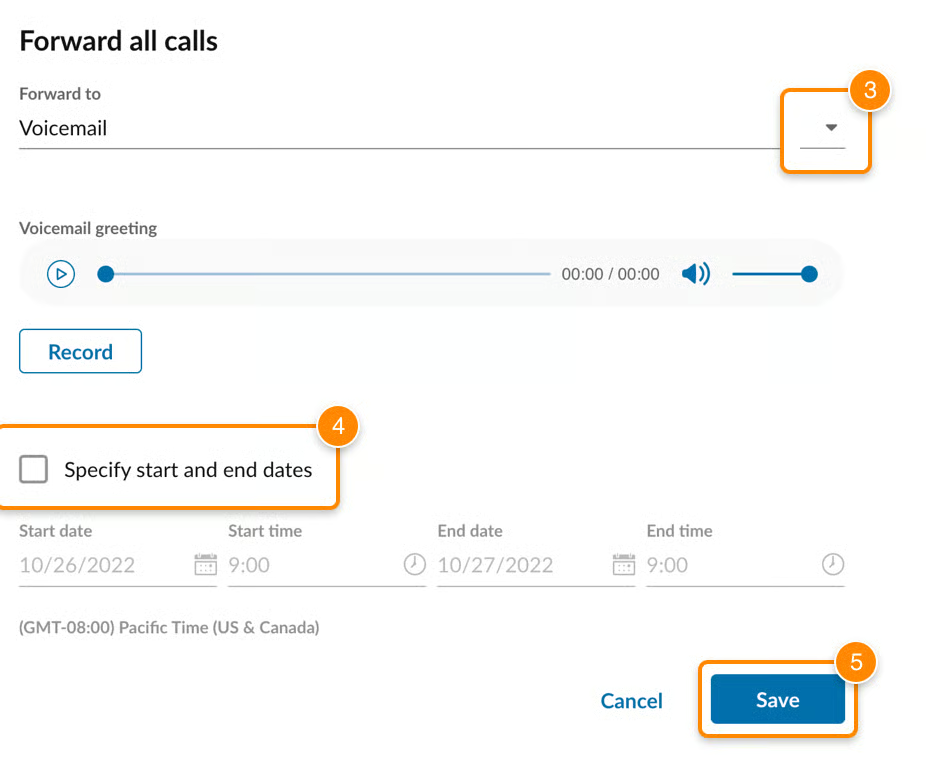
RingCentral offers an easy way to set up call diversion, as it’s readily available under the profile settings. It allows a maximum of 10 forwarding numbers for each extension. On the work hours forwarding settings, choose between simultaneous and sequential rings. The provider’s monthly subscription plan starts at $30 per user. Before subscribing to this VoIP service, explore more of its call management features in our RingCentral review.
How to Forward Calls Using Grasshopper
Grasshopper offers call diversion in all its subscription packages. Here’s how to use call forwarding in this VoIP platform:
- Head over to “Settings” and choose “Call Forwarding Settings” and “Extensions.”
- Choose an extension and click the “Edit” button.
- Add and configure the call diversion numbers. Click the “Edit” button next to the numbers to set the schedule and specify the ringing duration.
- Click the “Options” button below the forwarding numbers and set the ringing method: at once, indefinitely, or simultaneously.
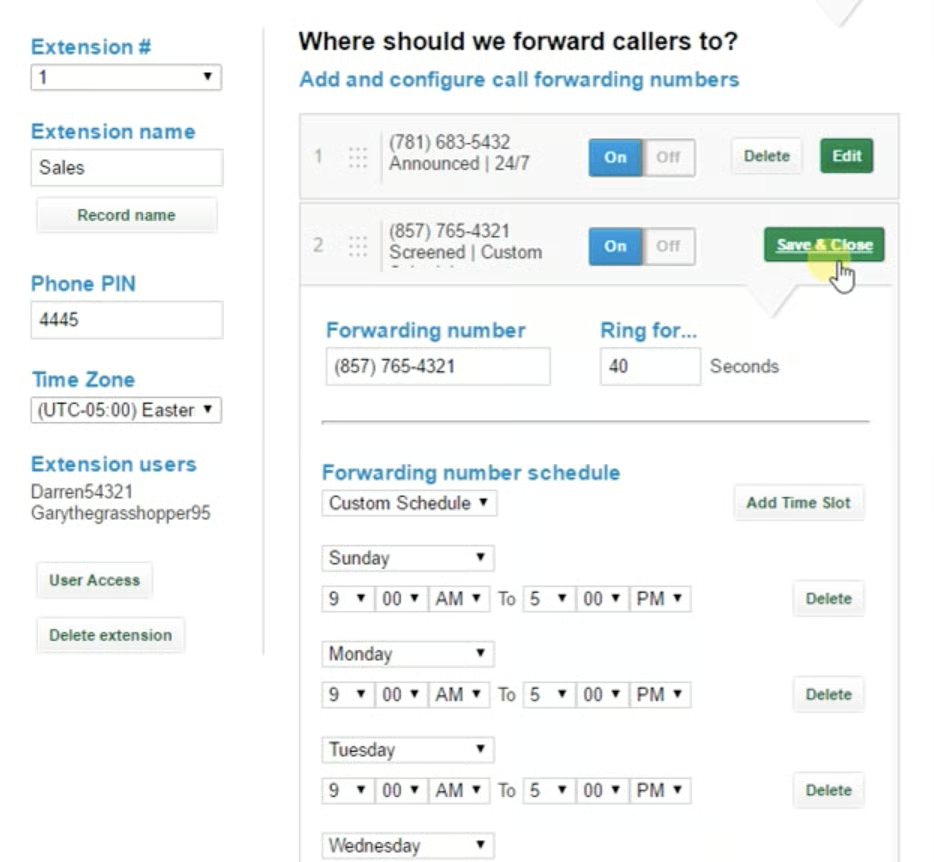
Virtual phone system Grasshopper enables users to add a maximum of 15 forwarding numbers. Set the day, time, and duration the phone system will ring the numbers. While the call is being connected to the alternate number, the caller will hear a transfer greeting, on-hold music, or simple ringing.
Grasshopper’s monthly pricing starts at $31 for unlimited users. See how this VoIP provider fared in terms of pricing and features by checking our Grasshopper review.
VoIP Providers With Call Diversion
The best way to understand what is call forwarding is to use business phone systems yourself and apply it to your customer service operations. Fortunately, several platforms offer free trials, letting you maximize the VoIP business phone features without cost or long-term commitment. Consider the apps below as you explore options:

RingCentral features a robust call diversion system, allowing users to forward calls to external landline numbers when the phone system is offline. This option is available for business hours, after-hours, and custom answering rules. Similarly, the provider lets businesses forward calls to international numbers for specific rates, depending on the country. For its advanced features, RingCentral topped our list of the best call management systems. Its free trial lasts 14 days.

Nextiva enables users to set unconditional and conditional forwarding. Conditional call diversion covers different scenarios, including when busy, unanswered, and unreachable.
Its location forwarding is an excellent feature for preparing for emergencies like power outages. It routes inbound calls to users within a particular location to another phone number or extension. Even if your staff has been affected by severe weather conditions, your business will still be able to receive calls. Before subscribing to this VoIP provider, learn about its capabilities in our Nextiva review. Its free trial lasts seven days.

Vonage’s call diversion service is part of its Never Miss a Call suite. It provides three options: Forward All Calls, Follow Me, and Simultaneous Ring. Forward All Calls sends all incoming calls to a specific extension or external number. Follow Me redirects calls when a user doesn’t answer, ringing up to five numbers. Simultaneous Ring alerts all listed phone numbers at the same time.
These configurations are available on the user portal, admin portal, and mobile app. Explore the pros and cons of using this VoIP service in our Vonage review. Its free trial lasts 14 days.
Frequently Asked Questions (FAQs)
How much does call forwarding cost?
Call diversion is a feature included in most business phone systems’ subscription packages. VoIP providers cost from $10 to $50 per user, monthly. Some providers offer discounts for bulk purchases and annual billing.
Does call forwarding work without a signal?
Yes. The process of forwarding calls happens within the telephone network, not in the actual phone. Thus, the calls will still be diverted to their preconfigured destinations even when the phone is off or there’s no signal.
What is the * code for call diversion?
Business phone systems have different star codes for call diversion. If you choose Nextiva, the code is *72 for activating call forward always and *73 for disabling the feature.
Bottom Line
Call diversion helps team members be flexible in accepting calls wherever they are. It promotes consistent availability, ensuring that customers always get assistance from service representatives. Now that you know what is call forwarding, its benefits, and its different types, choose a business phone system with a robust call diversion system to manage calls better and improve customer experience. Sign up for RingCentral’s 14-day free trial.
