








Comparing Shopify vs Squarespace, Shopify is the better choice for selling online. It is consistently my top-recommended ecommerce platform. If you need a website to showcase your portfolio and plan to sell occasionally or as a side hustle, Squarespace is a better option.
Based on my evaluation, I recommend:
- Shopify: Best overall for ecommerce
- Squarespace: Best for content management features
Shopify provides all the tools you need to start and grow your online business at an affordable price. Squarespace’s ecommerce features are not as robust as Shopify’s. However, it is one of our top picks for best website builders for small businesses, so if website content is more of a priority than online store functionality, Squarespace is the better option.
Squarespace vs Shopify Quick Comparison
 |  | |
|---|---|---|
| Visit Shopify | Visit Squarespace | |
| Ecommerce Platform Evaluation | 4.70 out of 5 | 3.94 out of 5 |
| Best For | Small businesses or startups | Content management features |
| Monthly Fees | Starts at $39; Shopify Starter plan available ($5) | Starts at $36 (for ecommerce features) |
| Additional Sales Channels | Facebook, Instagram, TikTok, Etsy, and more | Facebook and Instagram |
| Ease of Use | Excellent | Excellent |
| POS App | Yes; free and paid options | Yes, with Square |
| Marketing Features | Excellent | Good |
| Product and Order Management | Average | Average |
| App Marketplace | Excellent | Limited |
| Customer Support | 24/7 email, live chat, and phone | 24/5 live chat (weekdays) and 24/7 email |
| Shopify review | Squarespace review |
When to Use Shopify
Shopify is Best For
- Small businesses with online sales as a primary profit driver: Shopify’s interface is beginner-friendly but comes jam-packed with management and sales features—along with thousands of third-party integrations—that allow you to scale your business effectively.
- Selling on social media and doing occasional in-person sales: The platform also lets you sell on social media, such as Facebook, Instagram, and TikTok, and offers a POS system that can connect seamlessly with your online store for omnichannel sales like buy online, pick up in-store (BOPIS), and browse in-store, buy online.
When to Use Squarespace
Squarespace is Best For
- Small businesses, content creators, and creative entrepreneurs more focused on producing web content than running an online store: You can use Squarespace to showcase your content portfolios, such as blog posts and image galleries, and sell physical, digital, and service-based products. These can be done quickly using the platform’s drag-and-drop website builders.
Squarespace also has excellent built-in blogging features, such as analytics, archive functionality, and a search feature. If you plan to sell just a few products as part of your main website and branding is a priority, Squarespace is for you.
Shopify vs Squarespace: Pricing & Payments
| | |
|---|---|---|
| Evaluation Score | 3.75 out of 5 | 3.81 out of 5 |
| Free Trial | 3 days, $1/month for 3 months after | 14 days |
| Online Store Plans (Standalone store) | $39 to $399 per month | $36 to $72 per month(for ecommerce features) |
| Built-in Payment Processor (Optional) | Shopify Payments | Squarespace Payments |
| Option to Connect to Third-party Processor | Yes, 0.5% to 2% fee | Yes, no fees |
| Transaction Fees | 0.5% to 2%; none if using Shopify Payments | 3% under Business; none under Basic and Advanced Commerce |
| Payment Gateway Options | More than 100 | Stripe and PayPal |
| Visit Shopify | Visit Squarespace |
Both Shopify and Squarespace offer free trials and discounts when subscribing to annual plans. They have tiered pricing structures and custom plans for enterprises that are more or less the same.
When you compare plan inclusions, you will notice Shopify’s plans deliver more value. Suppose you were to unpack both platforms’ ecommerce starter plans, Basic Shopify and Squarespace Business. Basic Shopify provides more robust features, specifically:
- Additional sales channels, such as online marketplaces and social media
- Multiple inventory locations
- Abandoned cart recovery
Abandoned cart saver functionality only gets unlocked at Squarespace’s highest tier at $72/month. Multichannel sales, like in-person and social selling, can only happen at the $40/month plan. You get all these for $39/month with Shopify.
Shopify Pricing Plans
- $5/month (Starter): Shopify’s social media selling tool, allows you to sell on social media, messages, and other websites (single-page standalone store). Read how I evaluated this plan in my Shopify Starter review.
- $39/month (Basic): This plan includes all the main ecommerce features but has limited reporting; online transactions are charged at 2.9% + 30 cents.
- $105/month (Shopify): This tier has stronger reporting (such as first-time vs returning customer sales), USPS cubic pricing, and a discounted transaction fee of 2.6% + 30 cents.
- $399/month (Advanced Shopify): Build custom reports and show third-party calculated shipping rates at checkout; online transactions are further discounted to 2.4% + 30 cents.
- Starts at $2,000 (Shopify Plus): This plan is for large enterprises and includes lower transaction fees, a dedicated account manager, full customization access to site coding, and more. Learn how it stacks up with the basic Shopify tiers in my Shopify vs Shopify Plus review.
To learn more about Shopify’s plan inclusions and corresponding fees, read our ultimate guide to Shopify pricing plans.
Squarespace Pricing Plans
- $36/month (Business): Lowest-priced plan supporting ecommerce; sell unlimited products, including digital items and gift cards; lacks a shipping calculator and social media sales (there’s also a 3% transaction fee on top of card processing fees)
- $40/month (Basic Commerce): Gets rid of the extra 3% transaction fee; allows customers to create accounts and provides more advanced analytics, like a purchase funnel report; sell on Facebook and Instagram and unlock advanced merchandising features
- $72/month (Advanced Commerce): Adds a USPS shipping calculator, abandoned cart recovery, and the ability to sell subscriptions.
*All the plans mentioned have ecommerce features. There is a website builder plan at $25 per month.
Payment Processing
When comparing Shopify vs Squarespace in terms of payment processors, Shopify wins. It partners with over 100 payment gateways compared to Squarespace’s limited integrations. Squarespace is limited to Stripe and PayPal, but with Stripe, you can enable other payments such as Apple Pay, Afterpay, and Clearpay for installment payments
Both have built-in payment processing: Shopify with Shopify Payments and Shop Pay (its one-click checkout solution) and Squarespace with Squarespace Payments (launched October 2023). You can start accepting payments from day one without needing to apply for and connect a separate merchant account.
Regarding processing fees, both Squarespace and Shopify charge transaction fees (3% for Squarespace under Business and 2% for Shopify’s Basic). However, with Shopify, you don’t pay transaction fees if you use Shopify Payments as your processor. With Squarespace, transaction fees only get waived if you upgrade to Basic Commerce ($36 per month), even if you use Squarespace Payments.
Shopify vs Squarespace: Site Builder & Maintenance
| | |
|---|---|---|
| Evaluation Score | 4.75 out of 5 | 4.63 out of 5 |
| Free Website Templates | More than 10 | More than 180 |
| Paid Website Templates | 200+ (starting at $100) | None; all its templates are free to use |
| Editing Tool and Customization | Drag-and-drop builder; CSS and HTML | Drag-and-drop builder; AI website builder; CSS and HTML |
| Number of Available Integrations | More than 8,000 | Less than 50 |
Website Themes
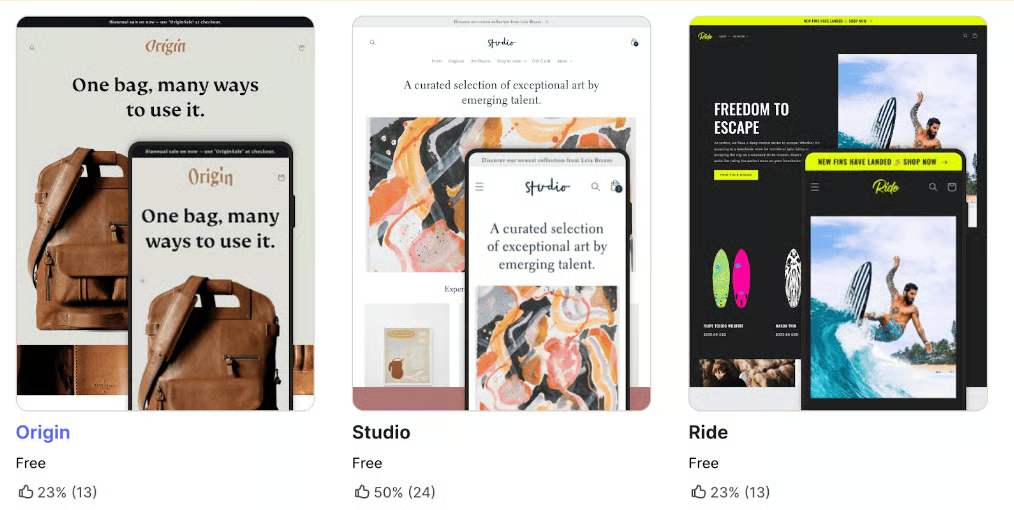
Squarespace is one of our best website builders for small businesses, and it is specifically recommended for its visually impactful design. I have to agree—Squarespace’s themes, which are all free, are modern and elegant, with no template similar in design and layout to each other.

On the other hand, Shopify offers free and paid templates (starting at $100). The free options are different in design and cater to various industries, allowing you to have a variety of designs even with fewer templates. The paid ones are similar in quality to Squarespace’s themes, having modern design features such as full-bleed content, image animation, and video backgrounds. You also have access to a library of royalty-free stock images.
Site Builder
Squarespace edges out Shopify when it comes to site builders because Fluid Engine, its drag-and-drop builder, offers more flexible drag-and-drop functionality and “fluidity.” You can customize almost every aspect of your website easily—fonts, colors, and headers—and divide page sections into grids so you can place website elements however you want. In short, Squarespace hits the right spot between ease of use and a design-forward mentality.
You can add visual effects easily to your images and text, such as fade-in/out, tilt, zoom, and pan-out. It also has built-in integrations with Unsplash and Getty Images (stock photo sites offering free and premium photos), making adding images to your site easy.
Furthermore, you can craft creative video backgrounds by either uploading your video or a YouTube or Vimeo URL. A range of video playback speed options and color filters let you customize your video background further.

One thing to note is that Squarespace’s latest version (7.1) doesn’t allow you to switch templates and carry over all the setup you have already done—design and commerce-wise. I encountered this issue when I set up a demo store. When I switched templates, I had to set up the Commerce portion of the website again.
However, if you want to change your online store’s design, you don’t have to switch templates since they are very customizable—you can add plenty of sections and elements in various layouts to your pages. When I built a demo store and realized changing templates would mean losing my current work’s progress, I just added the sections I liked from other templates without switching—and I could accomplish this easily.
On the other hand, Shopify’s website builder, Online Store 2.0 (OS 2.0) provides sections and blocks that provide modularity, flexibility, and—to some extent—drag-and-drop capabilities. I like Shopify’s site editor; it is intuitive and easy to use. You can easily create a great website even with limited skills. But once you work with Squarespace’s site builder, you just know that it is better.
However, Shopify’s recent updates include an enhancement to its site builder—full drag-and-drop functionality to create custom layouts with flex sections. The new feature, CSS Flexbox, makes it way easier to create custom layouts. Users can simply drag and drop, re-size, group, and edit a section’s components to their liking. It hasn’t fully rolled out yet as of this writing, but I am excited to try it once it goes live.

Security & Compliance
Both platforms are shared hosting solutions, so you do not have to worry about site security as they come with free SSL certificates. They are also Payment Card Industry Data Security Standard (PCI-DSS) compliant so you do not have to worry about payment security.
Related:
- PCI Compliance for Small Business: What You Need To Know
- Ecommerce Payment Security: 10 Small Business Best Practices
SEO & Blogging
Squarespace and Shopify provide basic SEO features to help your online store rank higher in search engine results. You can access and modify page URLs, titles, meta descriptions, 301 redirects, and alt-text for images on both platforms. However, Shopify has a slight edge over Squarespace because of its site speed, automatic 301 redirects (manually done with Squarespace), and several SEO tools (in its App Store).

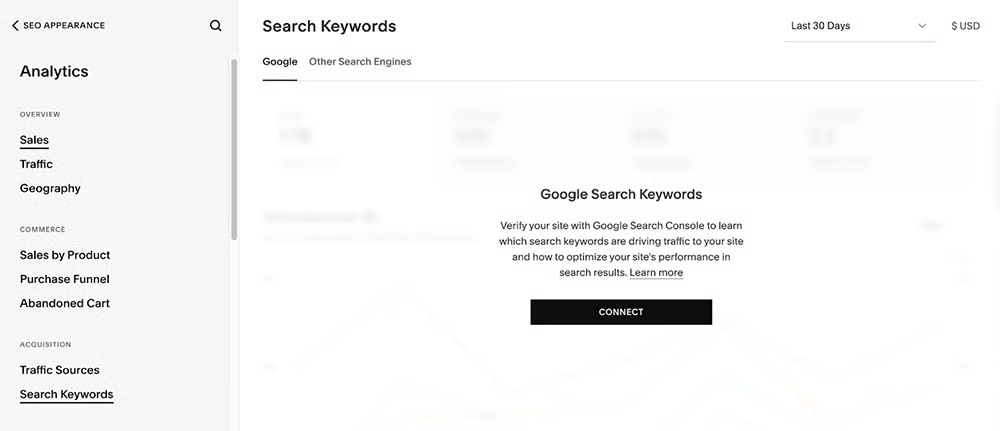
Squarespace’s SEO tools are competent on their own. One aspect Squarespace has that Shopify doesn’t is search keyword analytics. It also has a very helpful SEO checklist you can refer to when setting up SEO for your store.
Not all ecommerce platforms have built-in blogging features, so Squarespace and Shopify have an advantage with their native blogging tools. Shopify has drag-and-drop blocks with its new Online Store 2.0 content management system, although its presentation options limit you.
Squarespace has more robust blogging features than Shopify, however, because you can do more with your content in terms of formatting—customizing layouts with drag-and-drop blocks and adding images, excerpts, tags, and categories—it is one of our bets for best blogging platforms and for good reason. It provides the essential blogging features you need, like tags, categories, SEO, social sharing, social images, and more.

Related: Ecommerce SEO: The Ultimate Beginner’s Guide
Third-party Apps/Integrations
In this area, Shopify wins by a mile, with its more than 8,000 available integrations in the Shopify App store as of this writing. Squarespace, with almost 50 integrations, pales in comparison.
I say this all the time, one of Shopify’s strengths is its App Store—if there is something your store needs, it’s a near certainty that you’ll find it there.
Shopify vs Squarespace: Sales & Product Features
| | |
|---|---|---|
| Evaluation Score | 5 out of 5 | 3.63 out of 5 |
| POS Tool | Yes, native Shopify POS | Yes, with Square |
| Abandoned Cart Saver | Yes (starting at lowest plan - Basic $39/month) | Yes (only at highest plan; $72/month) |
| Sales Channels | Facebook, Instagram, TikTok, and more (all tiers) | Facebook and Instagram only (starting at $40/month) |
| Product Options | Up to 3 | Up to 6 |
| Product Variants | Up to 100 | Up to 250 |
| Custom Product or Work Order Tools | Only with add-on | Yes |
| Real-time Tracking in Between Locations/Channels | Yes, but with an app | No |
| Real-time Shipping Calculators | Available in highest plan, $399/month | Available in highest plan, $72/month |
| Shipping Discounts | Yes, with Shopify Shipping (discounts depend on plan) | None |
| Visit Shopify | Visit Squarespace |
When it comes to product features, Shopify and Squarespace allow you to sell unlimited products and digital goods and services, although Shopify would require the use of a third-party app to sell digital goods. While Squarespace offers better product options (more variants and built-in custom work order tools), Shopify wins in this category because of its real-time shipping calculators and available shipping discounts. Whatever Shopify lacks built-in features can be solved by integrating third-party apps, which it is known for.
Regarding sales features, both platforms know how important ecommerce marketing is for online stores, so both their platforms update their marketing tools to help get your site noticed. While Squarespace offers the same marketing features as Shopify, it only makes it available on higher-priced plans. Shopify has most of its marketing tools (such as Shopify Email and an abandoned cart saver) accessible even on its starter plan.
Product Features
Squarespace has a slight edge with the types of products you can sell since it has built-in tools for selling physical items, digital goods, services, subscriptions, scheduling appointments, and video on demand. With Shopify, you can sell all of these too, but these would require using an app, which may or may not have added fees. You can only sell physical products natively in Shopify (or by default).
- Product categories: Both Shopify and Squarespace have smart tags enabled. This means that products can automatically be segmented based on tags or categories. Shopify tags are not case-sensitive, but products have a limit of 250 tags. Squarespace’s smart tags are more sensitive in formatting. You cannot enter tags using different cases as it results in entirely different categories, such as “pants,” “Pants,” and “PANTS” are three categories. However, Squarespace allows for unlimited tags.
- Product options: Shopify lets you set up three options per product, and its limitation on product variants is only 100. Squarespace, on the other hand, lets you configure up to six product options and has a 250-limit on product variants. It can also auto-generate stock-keeping units (SKUs) for all the different combinations of variants.
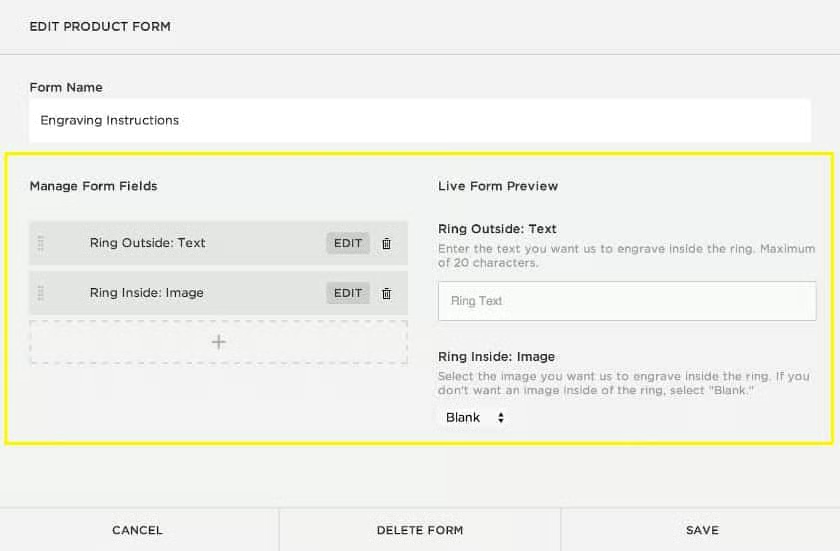
- Custom product or work order tools: In Shopify, this can only be done using third-party apps. In Squarespace, you can easily do custom forms for product customization such as engraving and special delivery instructions.
Inventory Management
Shopify and Squarespace are a close match for inventory management. Both platforms allow you to sell unlimited products, add items manually or in bulk, generate revenue reports, and direct email alerts for low stock.
However, what gives Shopify a slight edge over Squarespace in managing inventory is its fulfillment network for storing and fulfilling orders. You can even adjust inventory from the mobile app.
Moreover, a complete setup with Shopify POS lets you have full visibility to manage products and orders in an omnichannel setting—it’s why Shopify is our top recommendation for multichannel POS systems.
Shipping Tools
Both Squarespace and Shopify allow you to set up various shipping rules, such as:
Free shipping rates
- Flat rates
- Price-based rates
- Weight-based rates
- Calculated (“real-time”) shipping rates from third-party carriers
Real-time shipping rates are unlocked in both platforms’ highest subscriptions. With Shopify, you’ll need to be on the $399 Advanced Shopify plan. However, Shopify can provide real-time shipping quotes and discounts on any plan if you use Shopify Shipping and its partner couriers. With Squarespace, real-time shipping rates are only unlocked at the $72 Advanced Commerce tier.
Multichannel Sales
Shopify has industry-leading partnerships with social channels like Facebook, Instagram, and TikTok. If you want the ability to offer in-app social media selling, Shopify is for you. For in-person selling or if you have a brick-and-mortar retail business, it also has a free built-in POS app, Shopify POS, available for all ecommerce plans (hardware prices are excluded).
While Squarespace lets you sell on Instagram and Facebook, you need to be on the Basic Commerce tier ($36 per month) to unlock this feature. Squarespace doesn’t have a native POS tool, but you can integrate your online store with Square.
Marketing Tools
Both platforms give you tools to market your online store effectively but make them accessible across different tiers. You can create and manage discounts and promo codes under both platforms’ first-level plans, but more advanced marketing features are unlocked at different tiers, as I list below.
- Abandoned cart recovery: Shopify makes this marketing tool available across all subscription tiers for standalone stores ($39 above). It lets you send a singular email as an abandoned cart saver manually or after 1, 6, 10, or 24 hours, with 10 as the default. On the other hand, Squarespace unlocks this feature at the $72 tier (Advanced Commerce) and lets you send a single customizable email 24 hours after a customer abandons their cart. The price difference between the two subscriptions is huge and can be a dealbreaker for small businesses.
- Email marketing: Shopify Email is available across all Shopify plans. You can send up to 10,000 emails per month, and it’s just $1 for every 1,000 emails you send after exceeding the 10,000 limit. You can customize your email with templates and schedule delivery, but advanced email marketing features are unavailable, such as automation and customer behavior segmentation. Meanwhile, Squarespace Email Campaigns has four monthly plans ranging from $10 to $96. Its basic tier, Starter ($10 per month), lets you send 500 emails to unlimited subscribers and comes with email automation already.
Shopify vs Squarespace: Ease of Use
| | |
|---|---|---|
| Evaluation Score | 5 out of 5 | 3.63 out of 5 |
| Onboarding and Setup | Yes, easy-to-follow setup wizard | Yes, easy-to-follow setup wizard |
| Store Management | Beginner-friendly | Beginner-friendly |
| Online Knowledge Base | Extensive | Extensive |
| Community Forum | Yes, active and helpful community members | Yes, active and helpful community members |
| Customer Support | 24/7 live chat, email, and phone | 24/5 live chat (weekdays) and 24/7 email;no phone support available |
Onboarding & Setup
I tested both platforms by setting up the same demo store for an apples-to-apples comparison. Signing up for trial accounts was done in a few minutes, and both provide setup wizards and helpful prompts to guide me in building my site.
When I was building an online store with Shopify, there was a clear-cut setup wizard in my dashboard once I signed up. I can access its full feature set from every interface window because of the navigation menu sidebar. If I had any questions or found a roadblock with any of Shopify’s toolsets, I could easily refer to its help center or click any of the bubble prompts to find out how things are done.
Meanwhile, I found Squarespace’s dashboard sleek, modern, and elegant. Its minimal layout helps you see things quickly, and I found it smart of Squarespace to have different dashboards for Commerce and Design. However, even with the intuitive dashboard, I had to click more to get to what I needed, instead of having nestled subcategories in their main menu sidebar. It also opens up a new page where I no longer see the main menu.
You can find how I set up both stores in the links below:
Store Management
Both Squarespace and Shopify dashboards are easy to navigate. Since Shopify has more robust features, you will have more options to set up and details to fill in so it takes time to accomplish things. However, it doesn’t fail to provide tips and callout boxes throughout the process.
Squarespace’s navigation is more or less the same. However, during our Squarespace setup, we noticed that there is no option to add a product directly from the navigation panel (once the setup wizard is gone). You would need to click on Inventory to add a new product. This process can be counterproductive as you need more clicks to perform the most basic function—adding products—when it comes to store management. You can see how it looks in the image below.
Customer Support
What gives Shopify an edge over Squarespace for customer support is that it provides live chat, email, and, more importantly, phone support 24/7. Squarespace doesn’t offer phone support, and live chat is limited to weekdays (24/5).
Shopify vs Squarespace: Expert Score
| | |
|---|---|---|
| Evaluation Score | 4.69 out of 5 | 4.06 out of 5 |
| Value for Money | Affordable and competitive | Affordable, but key ecommerce features are unlocked at higher plans |
| Popularity | Highly-rated among real-world user reviews; recommended by experts | Ecommerce tier is not as well-rated as its website builder; judged basic at best by experts |
| User Reviews | 4.4 out of 5 | 4.5 out of 5 |
My Shopify Expert Review
Shopify has been my consistent top ecommerce platform recommendation for small businesses. You can set up a Shopify store for more or less $500 with around $100 monthly costs. What I like about Shopify’s subscription plans is that on top of being affordable, they also come with built-in marketing tools you can use to promote your online store.
Shopify also gives your business lots of room for growth. As you scale, Shopify has tools to help you advance your business, with real-time shipping calculators and a vast App Store where you can find almost any integration you need.
My Squarespace Expert Review
Squarespace is one of the best website builders for small businesses. Its ecommerce functionality is basic, at the very least, compared to Shopify’s robust tool set. If your business relies heavily on content and you just plan to sell products on the side, Squarespace is a better option.
However, note that the ability to sell online is unlocked at the $36 Business plan. You might want to consider subscribing to the entry-level plan (for website functionality—not for ecommerce) at $25 a month and sign up for Shopify’s Starter plan at $5 per month. The plan lets you create product links and provides reports on your business performance. Overall, it comes out cheaper. Do note, though, that transaction fees for Shopify’s Starter plan is at 5%.
Methodology—How We Evaluated Shopify vs Squarespace
To help you decide which ecommerce platform is best for your store, I compared Squarespace and Shopify on price, ease of use, store builder and design tools, inventory management, and sales tools. I built demo stores and together with Meaghan Brophy, we then added our own expert opinion based on years of experience testing different ecommerce platforms. Click through the tabs below for my overall online payment processor evaluation criteria:
I considered the price point of each base plan that offers a complete online store, what plan options are available as your business grows, and payment processing options, including fees, flexibility, and one-click checkout options.
Shopify is my winner in this category, despite trailing behind Squarespace’s score. It offers a better overall value at $39/month with a free connected POS app and Shop Pay. In comparison, Squarespace unlocks limited ecommerce functions at its second plan, Business, at $36/month.
I considered how easy it is to build and maintain a professional and attractive online store, including available templates, customization options, free domain and SSL certificates, unlimited storage and bandwidth options, and built-in SEO tools and site analytics.
Squarespace offers better website templates and provides a better drag-and-drop site editing tool with more flexibility than Shopify’s site editor. Both platforms, however, make it easy to manage an online store when adding products and setting up backend tools.
I looked at what kind of product assortments Shopify and Ecwid can accommodate, tools for in-store and mobile, integrated social media, and marketplace selling, and marketing tools. I also consolidated shipping options and PCI compliance.
Shopify wins this category by a mile, as it offers built-in tools for selling in-person and online, has several integrations with social media channels and marketplaces, and provides a one-click checkout option via Shop Pay.
Because online stores operate 24/7, I prioritized platforms that offer 24/7 customer support and have multiple customer touchpoints, such as phone, email, and chat.
While both provide a comprehensive help center, Shopify edges out Squarespace by providing 24/7 customer support by live chat, email, and phone. However, both platforms are easy to use and provide beginner-friendly tools.
Here, I considered overall value, quality of features, popularity, customer satisfaction, and ease of use. I also factored in our own experience working with each platform and feedback from businesses that use each system.
Shopify beats Squarespace in our expert review because of its popularity, ease of use, and industry-leading innovations.
Meet the Experts
The following retail and ecommerce experts contributed to this article:
 | Meaghan Brophy is a resident retail and ecommerce expert at Fit Small Business with over 10 years of retail experience and 7 years of experience delivering actionable content to independent retailers. She has spent the last 4+ years at Fit Small Business testing retail and ecommerce software. |
|---|---|
 | Agatha Aviso is Fit Small Business’ resident ecommerce software expert. She has spent years testing and evaluating different platforms and building online stores. |
Frequently Asked Questions (FAQs)
Click through the tabs below to get answers to the most asked questions about Shopify versus Squarespace.
What's the difference between Shopify and Squarespace?
The main differences between Shopify and Squarespace are built-in marketing features and third-party integrations. Shopify has a more robust set of native tools to help you market your online shop (email marketing, chat, abandoned cart saver) and has more than 8,000 available integrations to add more functionality if needed.
Should I switch from Squarespace to Shopify?
If you are serious about online selling, Shopify gives better ecommerce tools (such as an abandoned cart saver, email marketing tools, and better inventory and shipping options) than Squarespace.
Which is more expensive, Shopify or Squarespace?
If you are using your website as an online store, subscribing to Squarespace’s ecommerce plan will be more costly at $33 a month compared to Shopify’s entry-level plan at $29 a month.
Bottom Line
We recommend Shopify for anyone launching an ecommerce platform. Businesses that sell or plan to sell primarily online will most likely benefit from its online store creation tools, numerous integrations, and shipping discounts. It also provides you with social selling and in-store POS features. It’s easy to sell your products as early as the first day of your free trial, so start yours today.
