







Since 2023, Shopify has rolled out hundreds of product updates through its biannual Editions releases, each one spotlighting the newest ways merchants can build and grow on the platform. On August 6, 2025, Shopify launched Summer ’25 Editions, introducing more than 150 upgrades — from design flexibility and AI-powered storefront tools to expanded payments and retail checkout improvements.
I’ve rounded up the most relevant features for small business owners, including the standout highlights from Summer ’25 Editions, so you can see what’s new and how it can help you run your store more effectively.
I did all the work, and brought you Shopify new features released since 2023 that you should know and be excited about in this article. Read on to learn more about each new feature.
- 1. Markets (NEW)
- 2. Rebuilt Analytics (NEW)
- 3. Improved Product Merchandising
- 4. Shopify Magic
- 5. A Redesigned Shopify Admin
- 6. New Web Performance Dashboard
- 7. Improved Checkout Page
- 8. Shop Pay Updates
- 9. Online Store Flex Sections
- 10. Integrated Marketing Tools
- 11. Shopify Bundles App
- 12. Shopify Subscriptions App
- 13. Shopify Flow
- 14. Shopify Marketplace Connect
- 15. Shopify Collective
- 16. Shopify Collabs
- 17. Shopify Markets
- 18. New Backend Tools: Shopify Tax, Shopify Balance & Shopify Credit
- 19. Improved Logistics & Fulfillment
- Bottom Line
1. Markets (NEW)
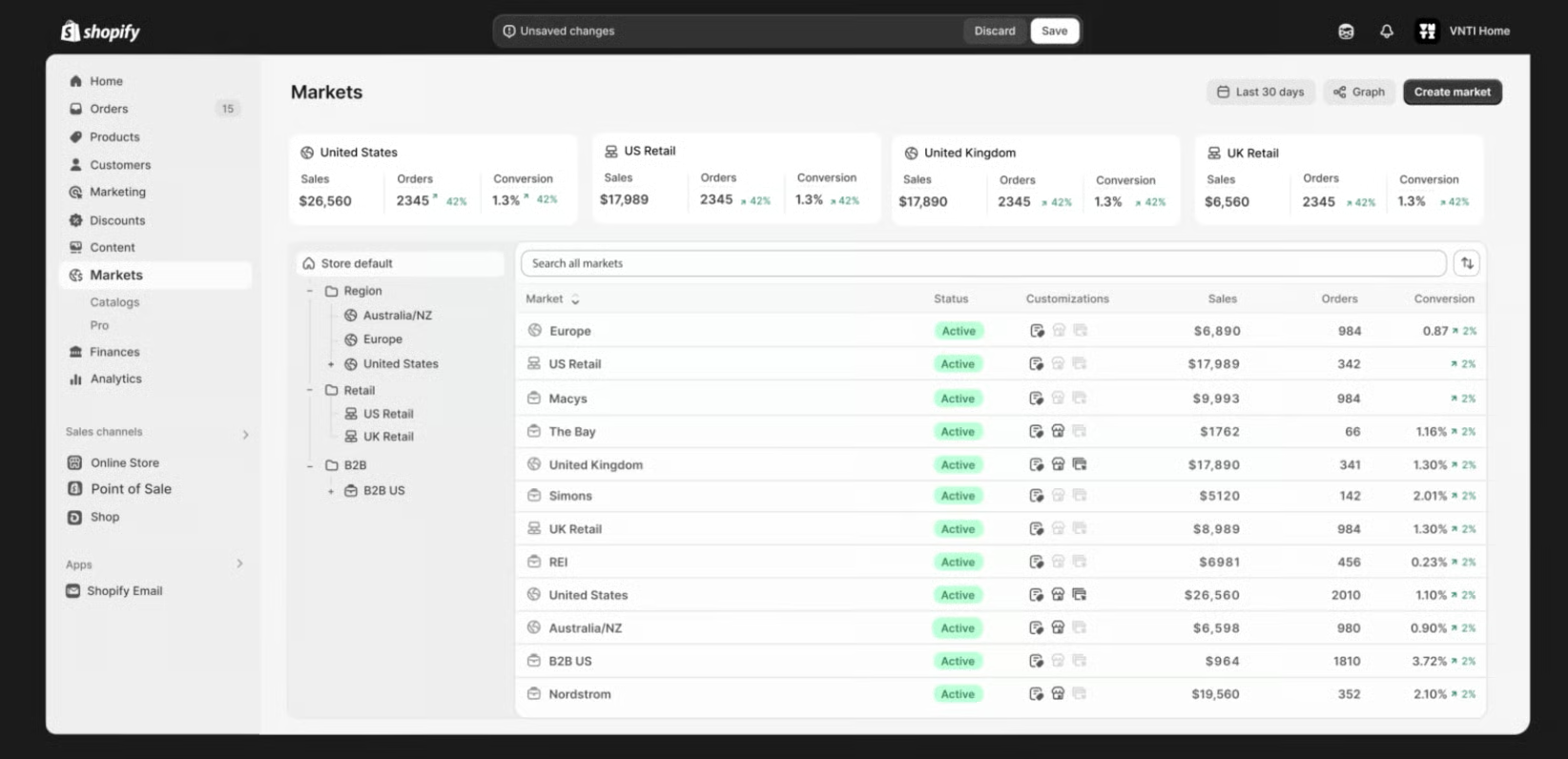
The theme for this latest rollout is unification. Shopify has been rolling out hundreds of updates in the past year, with the intent to make all key workflows in the Shopify backend integrate and seamlessly work together—like they said, “hand in glove.”
They start by announcing a central command center for business expansion called Markets. You can easily manage your store expansions, whether it’s cross-border, B2B, or through point-of-sale (in-person), on a single screen in your Shopify admin, in a single store.
With this unification, you can even create personalized buying experiences for your target markets without having to create multiple stores.
Why You Should Be Excited About It:
Not only will Markets help you expand, it lets you easily get a bird’s-eye view of your expansion. I can see how Shopify stays committed to your business growth—by giving you tools to easily expand your business.
2. Rebuilt Analytics (NEW)
Shopify has also rebuilt and unified its analytics reporting tools. It has integrated pre-built reports but you can also customize your reports to get answers and insights however you want. And the best part is that analytics reporting can now generate reports in real time.
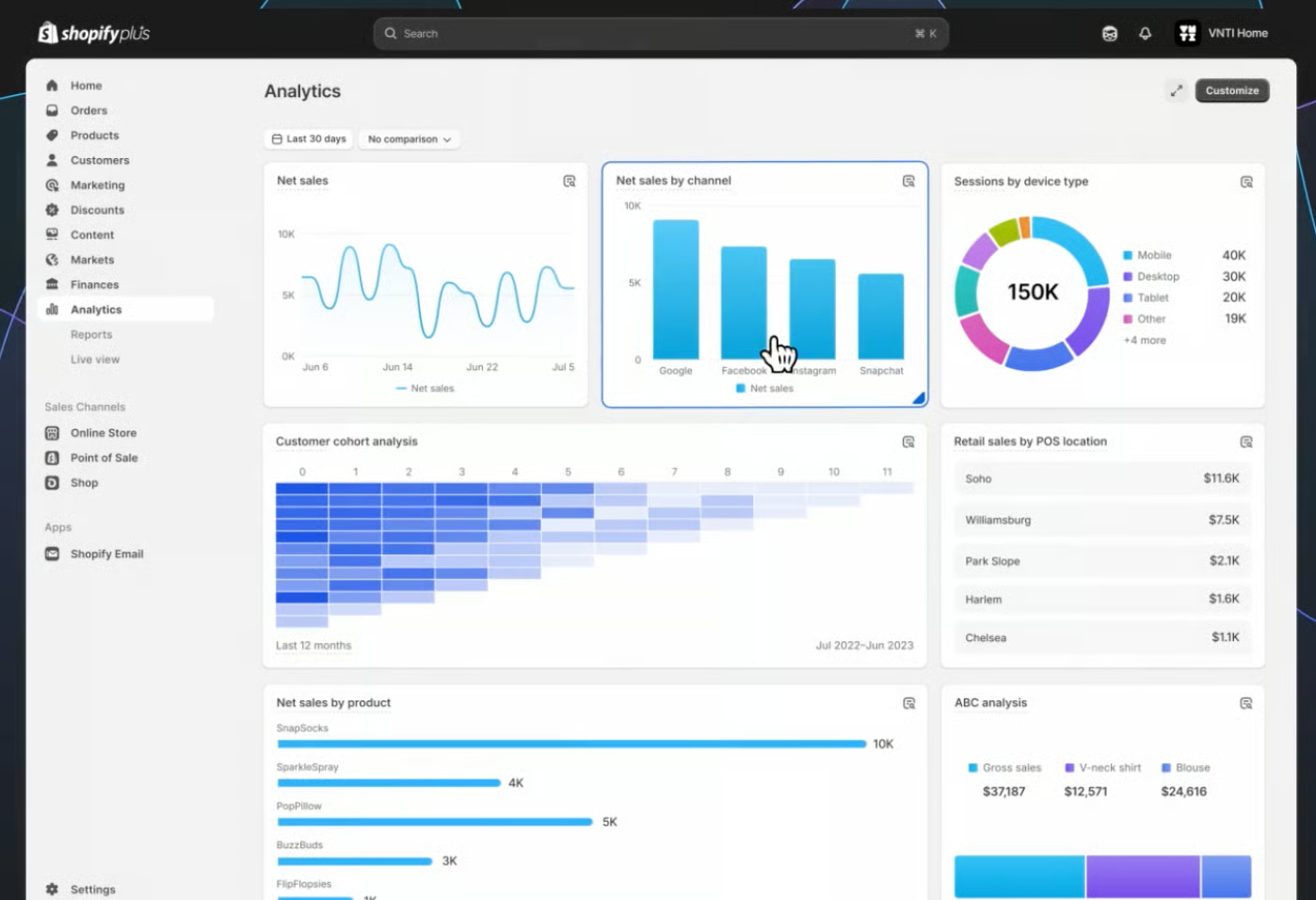
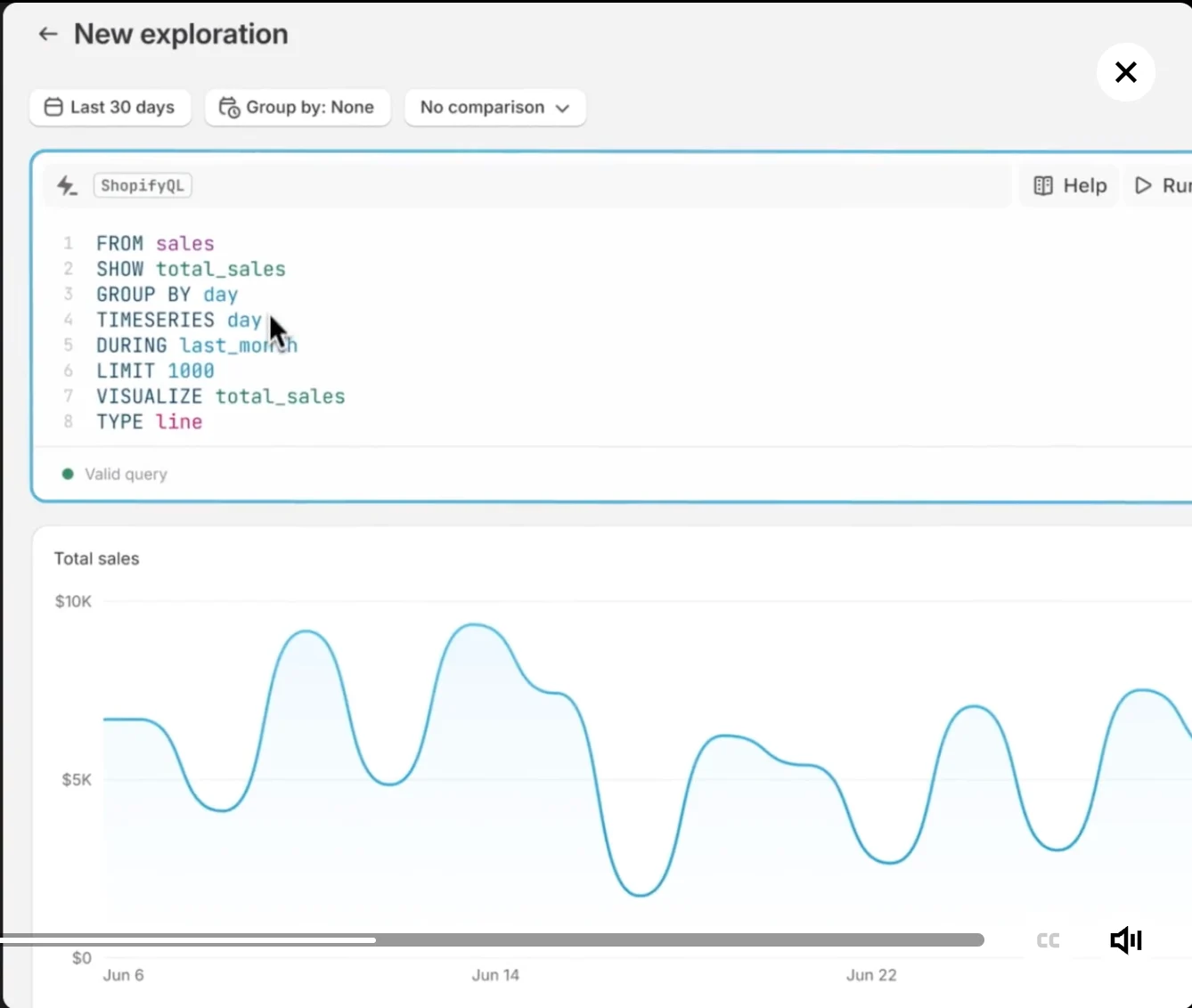
Shopify has also announced that in the next coming months, it will be rolling out a centralized code editing experience that can allow you to switch from point-and-click reporting to running ShopifyQL
Why You Should Be Excited About It:
Reports give tremendous insight on store performance. This feature gives you tangible proof on what is working and what isn’t, and getting real-time reports is going to extremely helpful for strategy and decision-making.
3. Improved Product Merchandising
Shopify rolled out significant improvements to a core ecommerce functionality—product management—and introduced new features that will help you showcase your products better.
More Product Variants
Shopify announced that it has increased its product variant limit to 2,000, a far cry from its original 100-product limit. This feature will be rolled out progressively across Shopify merchants this year.
Why You Should Be Excited About It:
Finally! I am so pleased that Shopify has finally addressed its biggest pain point in product management—variant limits. Shopify is part of the very few platforms in our top picks for ecommerce platforms that had variant limits, and I am happy that they were able to get rid of this. Now, they can truly support growing businesses.
Shopify Combined Listings App
As you grow your catalog, you will need a better way to manage all your product listings. Shopify addressed this potential pain point for growing businesses by launching the Shopify Combined Listings App.
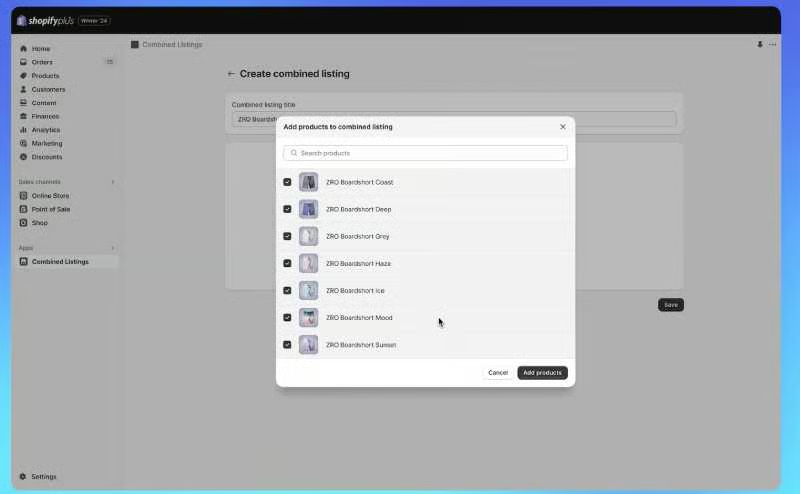
This new app is still in early access but will allow you to create a product listing that combines all its variants into one centralized product listing. Then, each variant can have its own image carousel, descriptive URL, and publishing controls. Each combined listing can be highlighted with its own specific title, product description, and image gallery.
Shopify says that this also helps in search engine optimization—from Google to social media platforms such as Meta.
Why You Should Be Excited About It:
Shopify was serious when they said this Shopify Winter edition is all about foundations. With this app, you can take care of the front end (how your products are displayed in your online store) and back end (your product listings) in one go—saving you time and increasing your efficiency. The best part? Showcasing your products this way helps improve product discovery, increasing your chances of conversion. It’s definitely a win for online merchants!
Standardized Product Taxonomy
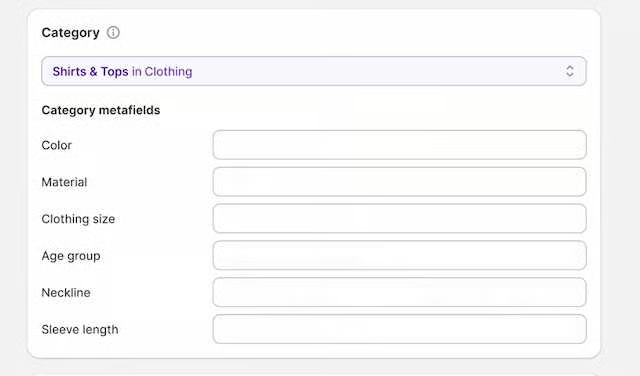
This new feature allows for product attributes to be filled in automatically when you create a product listing. For example, Shopify can automatically get the color, size, product type, and more from your product description alone, and it automatically applies them to your standardized categories and category-specific product attributes, as seen below.
Why You Should Be Excited About It:
This just means better product classification for your product catalog, without you even having to manually input product attributes when you create product listings. This, in turn, helps customers find your products faster.
4. Shopify Magic
The main highlight of Shopify Editions’ Summer 2023 rollout is Shopify Magic. Shopify has been leading the pack of all things AI in ecommerce, and Shopify Magic is at the center of Shopify’s AI tools.
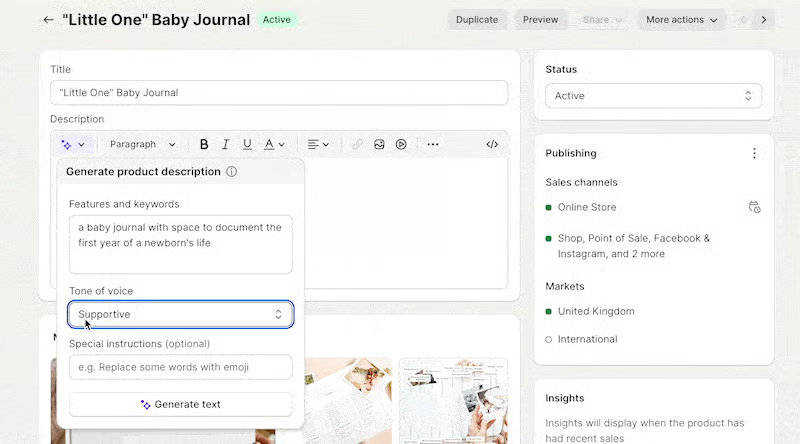
Shopify Magic is a suite of free AI-enabled features integrated across Shopify’s products and workflows to make it easier for merchants to start, run, and grow their businesses. You get personalized and relevant support from store building and marketing to customer support and back office management.
Sidekick
At the center stage of this suite of productivity tools is Sidekick, your very own AI-enabled virtual assistant. For anything you need to get done for your online store, just have to prompt Sidekick, and it will get it done for you! You can instruct it to set up a new product (complete with description and pricing), ask for your store’s bestsellers, and even show you how to do a specific process in your Shopify admin.
Why You Should Be Excited About It:
Shopify Magic has generative AI, which can help you write product descriptions, blog posts, and email campaigns, to help you save time and money. And if you are a one-person operation, you will definitely find Sidekick very helpful and useful.
I took most of the Shopify Magic features available on a test drive and was amazed at how relevant the generated text was to my brand. Read more about how you can use Shopify Magic’s features in my article.
Media AI Editor
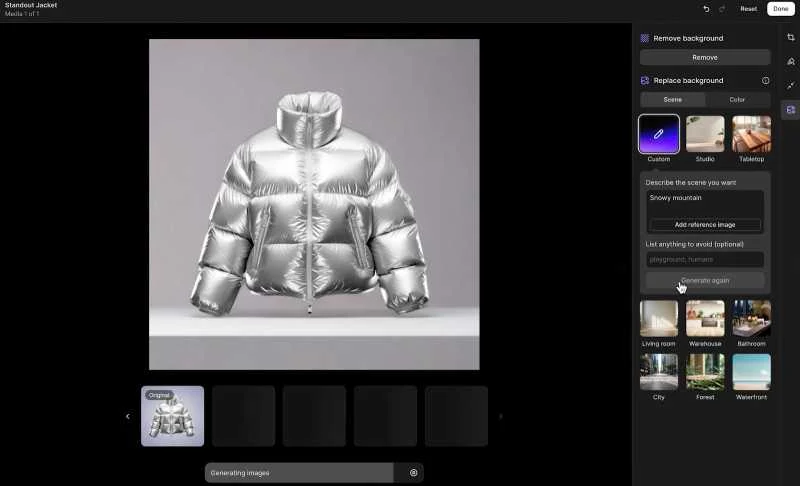
With the new Media Editor, powered by AI, you can create professional product photos. You can generate, match, or remove backgrounds of your product images using prompts or a few clicks without the need for design skills.
Why You Should Be Excited About It:
Like the generative text features of Shopify Magic, the Media Editor is a game changer for small business owners. This helps you save on hiring a product photographer and graphic designer and even allows you to step up a notch when it comes to maintaining consistent branding across your shop.
Semantic Search
This AI-powered storefront search feature allows you to recommend products without customers needing to type a specific keyword for it to show up in search results. This gives your online store the ability to go beyond keywords to better understand your shopper’s intent and give them better relevant search results that they’ll be more likely to buy from.

Why You Should Be Excited About It:
Think about this feature as installing a Google search bar in your store. Site visitors can type in “clothes I can wear for hiking” and the algorithm will instantly recognize that they are looking for hiking boots, jackets, and accessories related to hiking.
5. A Redesigned Shopify Admin
Shopify’s dashboard just got an upgraded visual design and an improved navigation user experience. The buttons and color gradients are subtly different, and the redesigned setting system makes it easier to navigate and find the content you need.
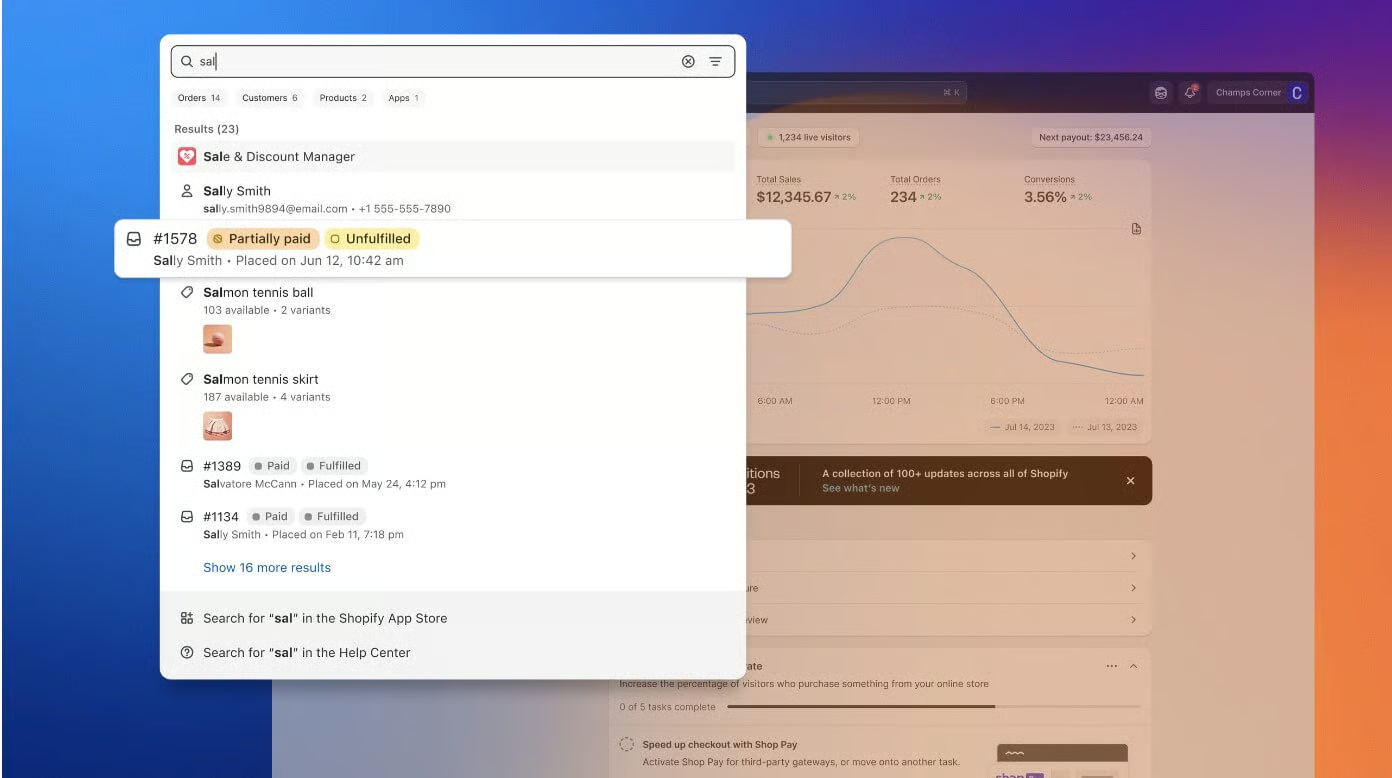
Your store data is also now more prominent, clear, and accessible on both desktop and mobile. Shopify also made improvements to its mobile app. You can add new product media more easily with a consolidated media picker, experience a better workflow for adding products, and have a new account drawer where you can add and switch in between stores you manage.
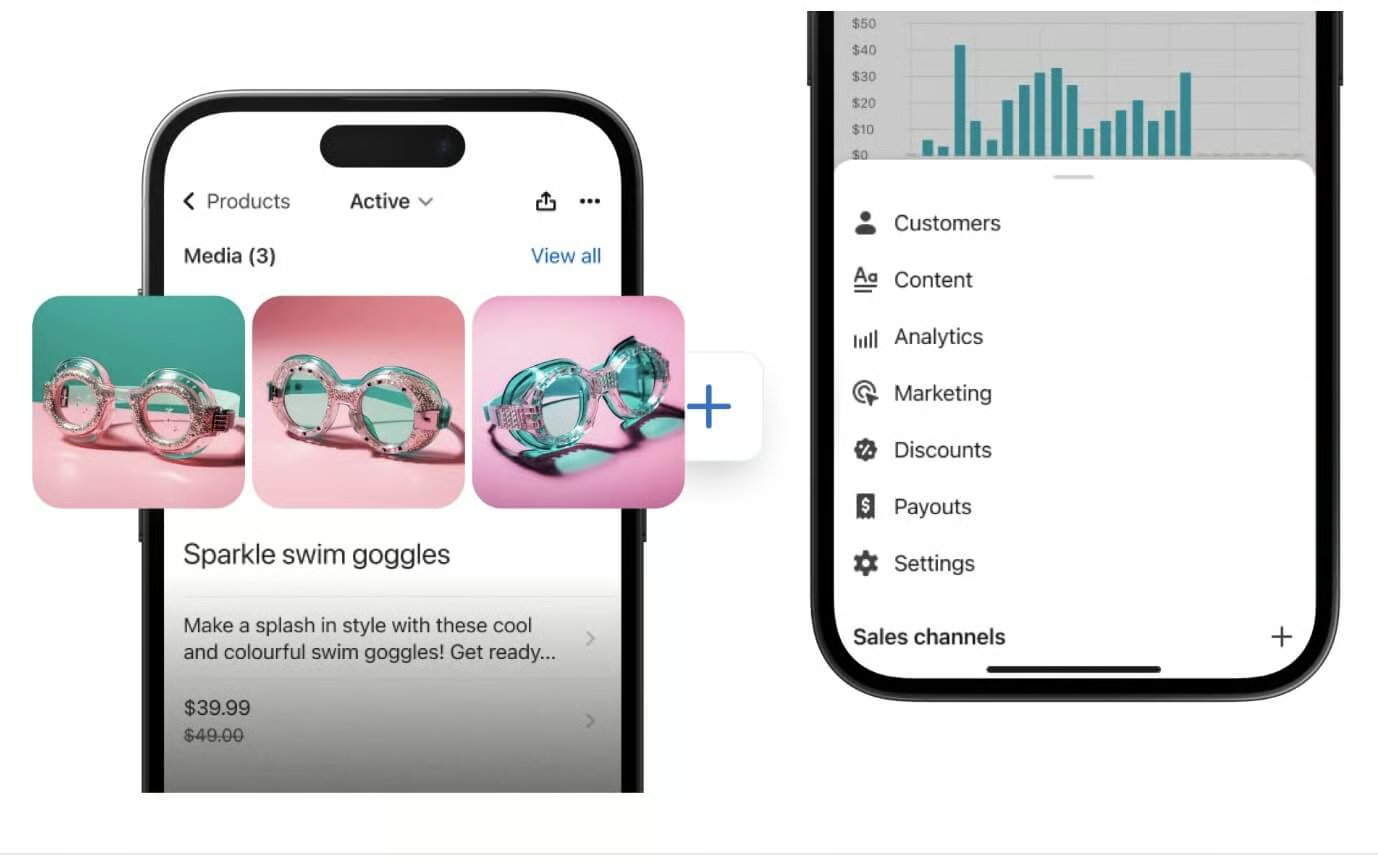
Why You Should Be Excited About It:
I have always found Shopify to be intuitive and easy to use, but with this update, it has become even easier to use. For one thing, typeahead search and search relevance are two features I find to be extremely helpful. I just type in a keyword in my Shopify admin bar and all related products, orders, and customers show up in the results.
Shopify also has an improved search and filter function where you can add custom filter settings and product recommendations. You just need to activate the free Shopify Search & Discover app from the Shopify app store.
6. New Web Performance Dashboard
Shopify has improved its infrastructure by 35% in 2023 and has expanded its global points of presence. It rolled out the web performance dashboard showing three Core Web Vitals so you can track your site performance.
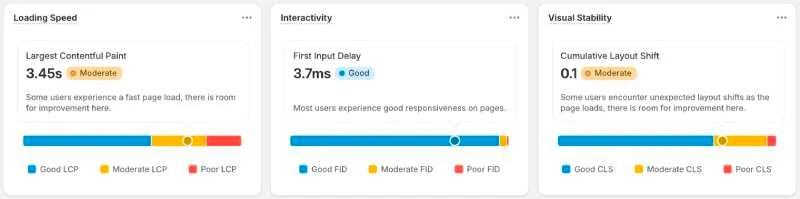
Here’s how it will look when you access it from your Shopify dashboard. You need to be on your site theme page.
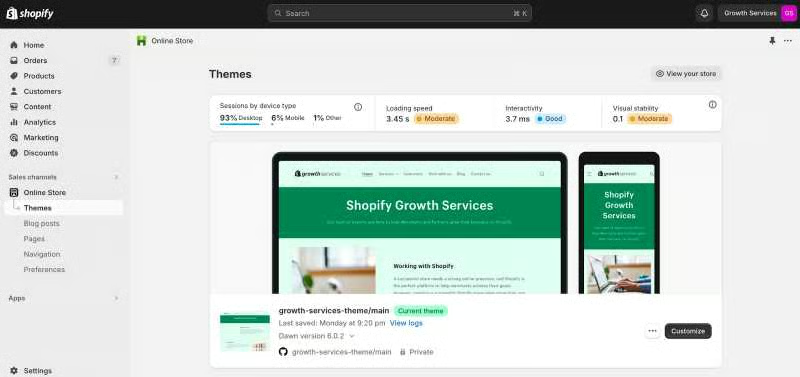
Why You Should Be Excited About It:
Google ranks site performance for search results. The better your Core Web Vitals look, the better the chances of your online store ranking higher. Plus, who doesn’t want to shop at lightning speed, right?
7. Improved Checkout Page
Shopify checkout’s overall conversion rate is the best in the market. It outpaces its competitors by up to 36% and by an average of 15%, according to a study by a global management consulting company.
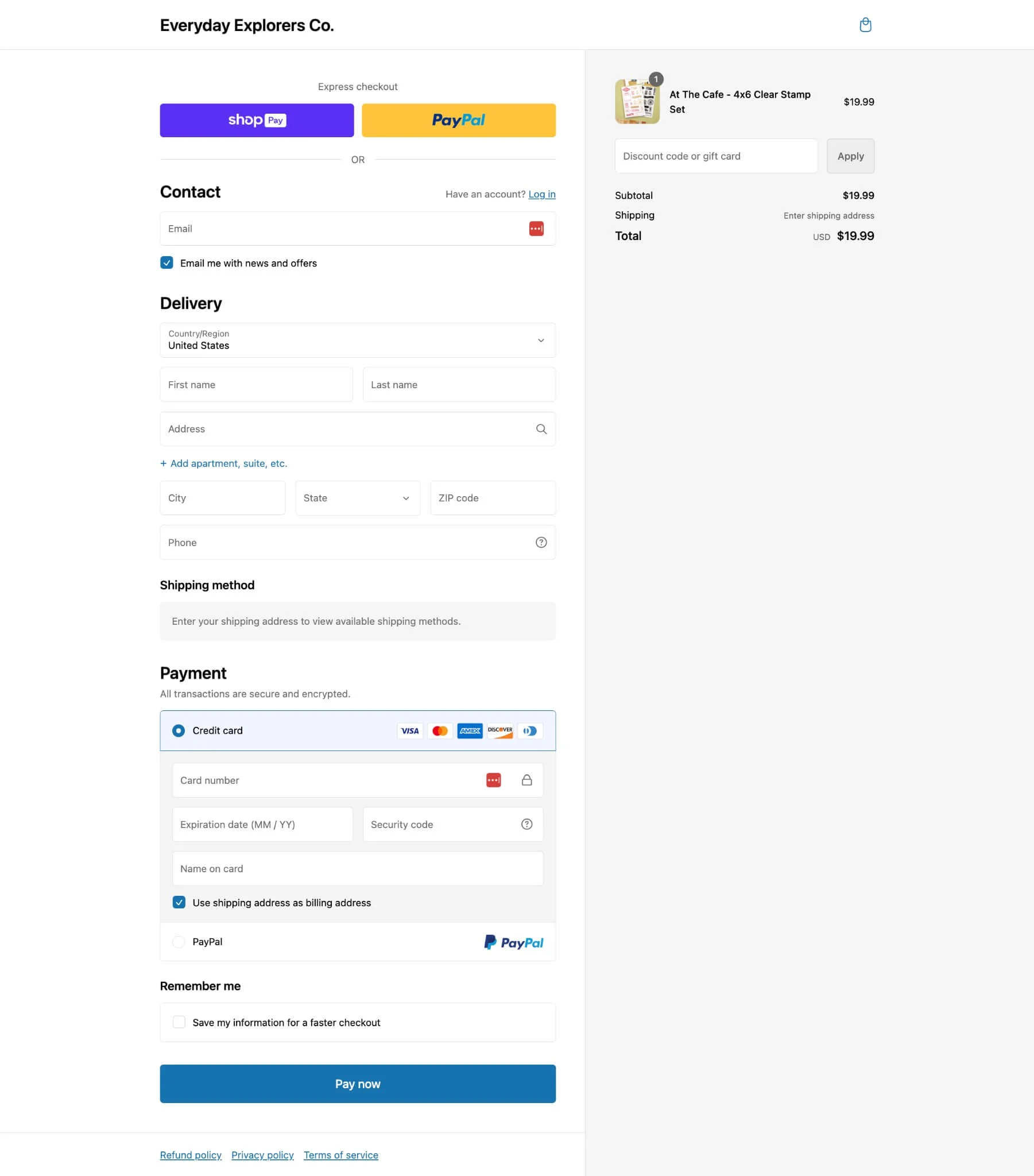
Shopify has further streamlined its checkout into a one-page experience, increasing the likelihood of conversion. Furthermore, Shopify Plus merchants have access to 17 new checkout extensions and apps to customize their customers’ checkout experience. For example, those under Shopify Plus can push subscriptions or pre-orders, offer unique delivery options, or have their checkout pages suggest address changes to guarantee a successful delivery.
Expanded Checkout Extensibility
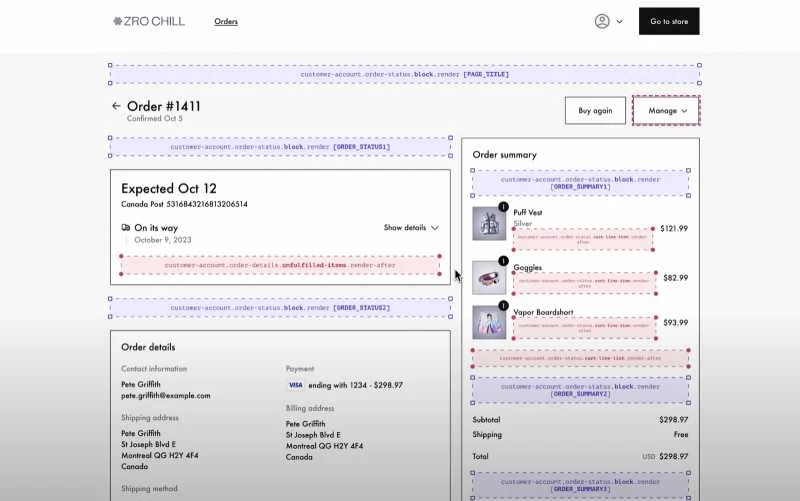
Checkout Extensibility is Shopify’s replacement for checkout . liquid for former checkout page customizations. Customization features are coming to three pages—the Thank You page the, Order Status page, and the Customer Account page—all supporting standard checkout extensions.
Why You Should Be Excited About It:
Anything that lets you close sales faster and increases your conversion rate should be a winner! I love Shopify’s one-page checkout feature, and checkouts happen even faster with Shop Pay (which also has new updates I will discuss in the next section).
8. Shop Pay Updates
Among Shopify’s new releases are updates to Shop Pay, Shopify’s one-click checkout. I mentioned Shopify’s one-page checkout and its impressive conversion rate earlier. Even better? Shop Pay, Shopify’s accelerated checkout offering, can increase conversion by as much as 50% compared to a guest checkout when used—faster than other accelerated checkouts by at least 10%. In fact, the mere presence of Shop Pay can increase lower funnel conversion by 5%.
Some updates to Shop Pay include:
- Shop Pay Installments on POS: Drive sales in-store with flexible buy now, pay later options in Shopify POS.
- Shop Pay Installments premium package: Offer interest-free payments and terms up to 24 months with qualified customers. Available to select businesses in the US.
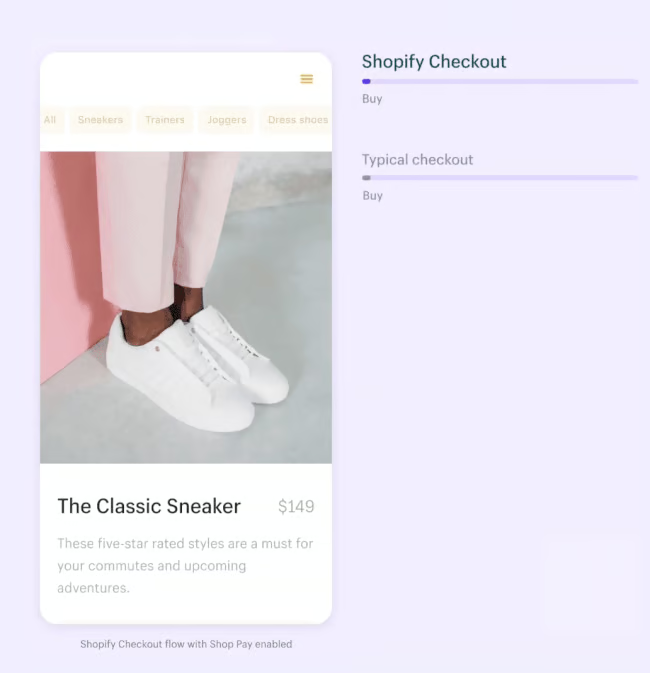
Take a look at how fast Shop Pay is when used at checkout. When used, Shopify can recognize Shop Pay customers in one click.
Why You Should Be Excited About It:
I am excited about Shop Pay’s installment offerings. Statistics show over a third of shoppers use BNPL once a month, and with Shop Pay offering BNPL services, merchants can now include BNPL options without signing up with a partner merchant or third-party payment provider.
9. Online Store Flex Sections
One of the recent Shopify updates I am also excited about is enhancements to its site builder, Online Store (OS 2.0) editor. This hasn’t fully rolled out yet but the website editor will feature new flex sections to help create custom layouts for your online store.
With flex sections, you can now easily drag, drop, re-size, group, and edit content from the OS 2.0 editor. I can imagine all the custom layouts you can achieve once this improvement rolls out.

Why You Should Be Excited About It:
Creating custom layouts will get easier with flex sections. This CSS Flexbox update will help you achieve more multi-directional responsive layouts and easy content alignment within sections of your store.
10. Integrated Marketing Tools
Shopify’s new updates now let you accomplish lead generation and email marketing with automation and segmentation all within its platform—completely free. It rolled out Shopify Forms, its lead generation tool, in its last Winter edition update, and now, you can fully set up rules and automation to further segment and nurture your email list.
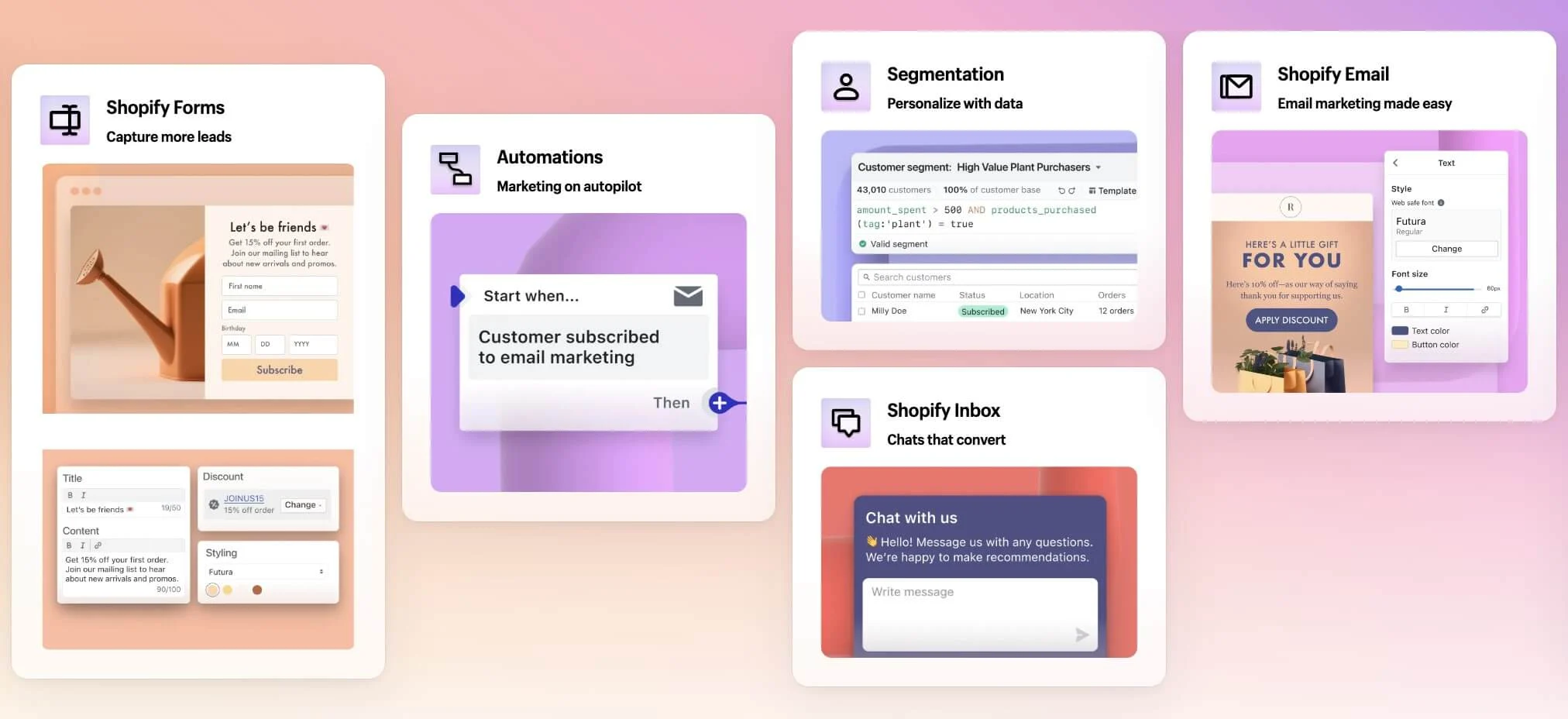
Here’s how you can let Shopify’s built-in marketing tools work for you:
- Grow your marketing list by setting up a lead capture using Shopify Forms
- Set up marketing workflows through Automations using Shopify marketing templates or your own
- Nurture customer relationships by sending emails (from scratch or using templates) using Shopify Email
- Create customer groups to deliver highly personalized communication through segmentation to drive sales.
- Use chat to convert more customers through Shopify Inbox
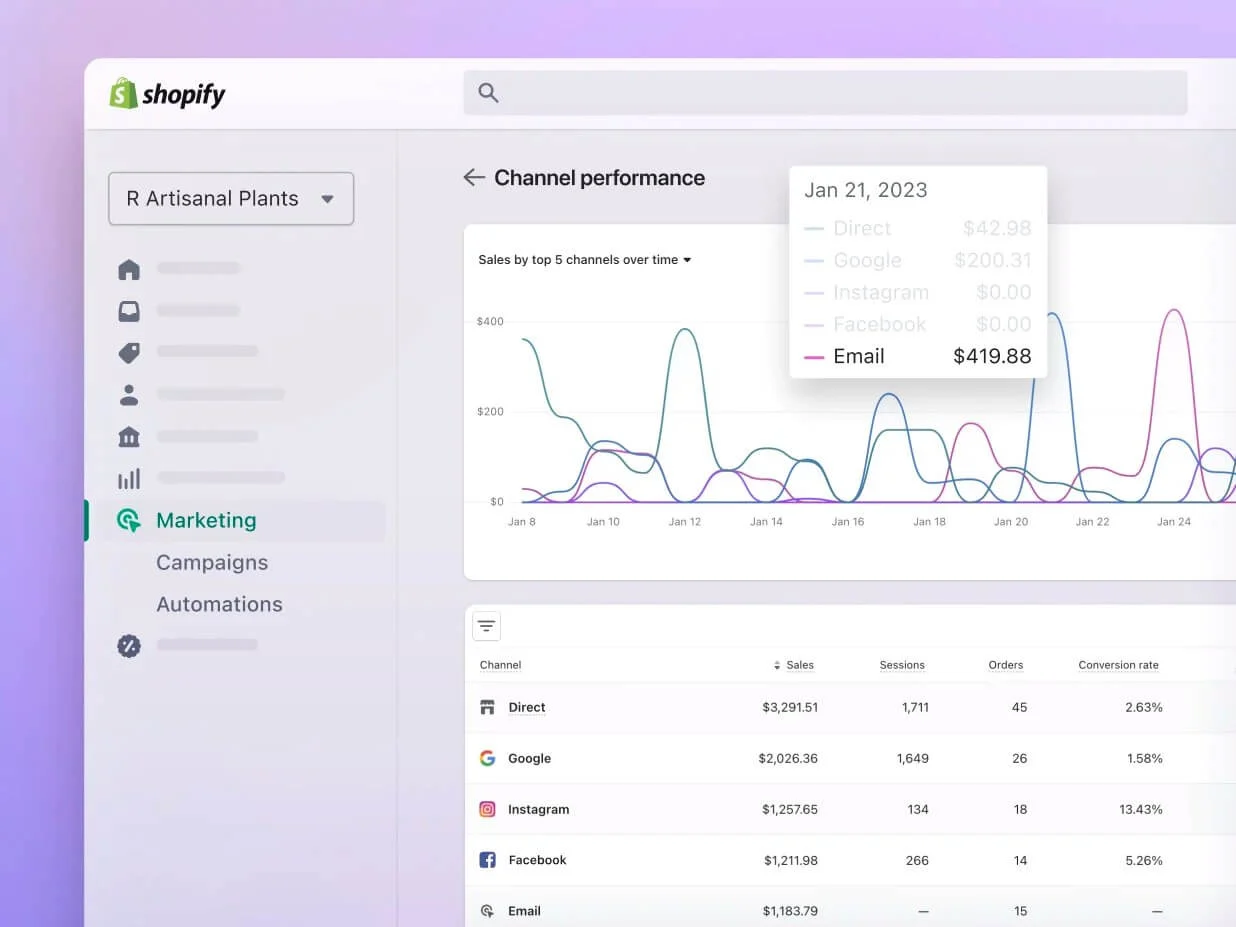
- Get actionable insights in your Shopify admin with metrics and analytics
Why You Should Be Excited About It:
Shopify is the only ecommerce platform that has a built-in marketing tool this robust and completely free (and I have tested more than 20 ecommerce website builders and counting). If you can maximize this Shopify marketing toolkit, I have no doubt you will be able to create a highly engaged (and ready-to-buy) email list.
11. Shopify Bundles App
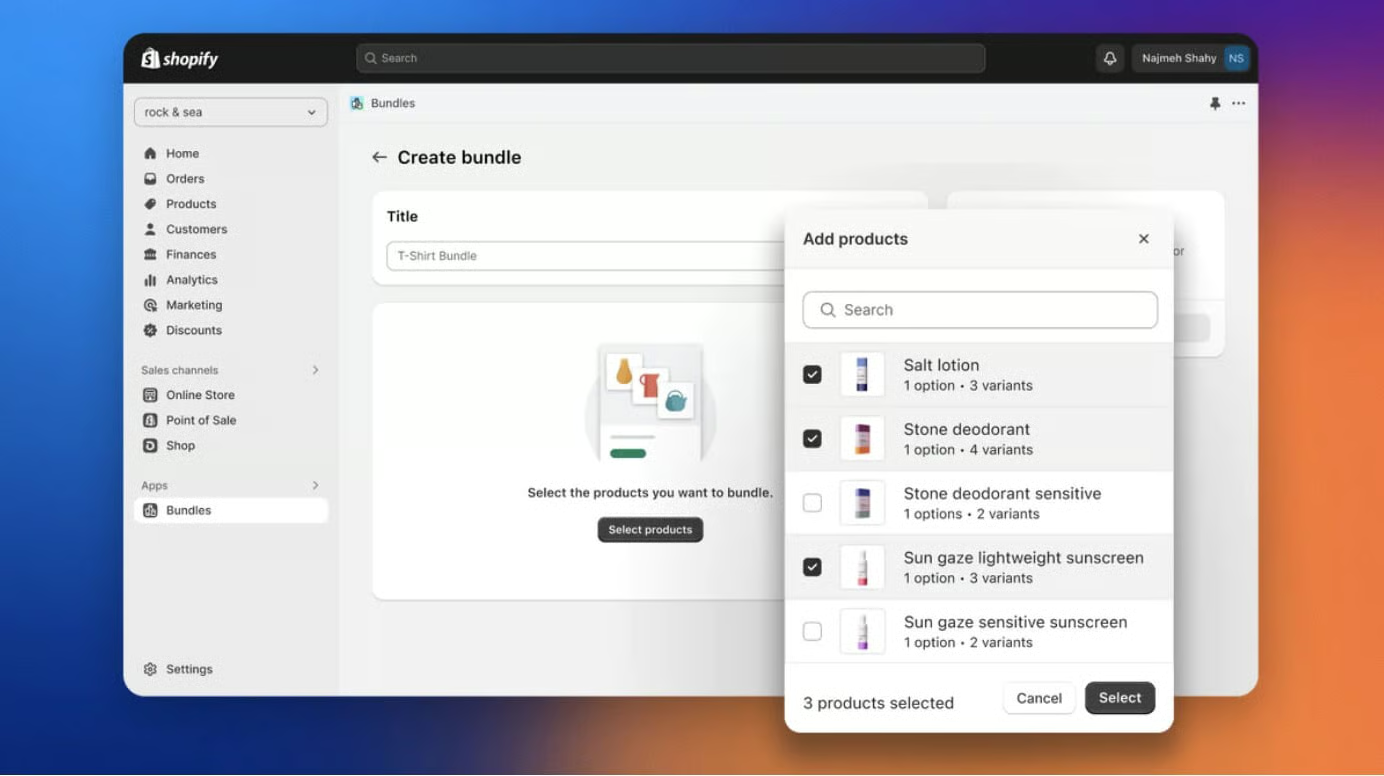
With Shopify Bundles, you can now create and sell bundles from your product listings to encourage customers to buy more. With it, you can:
- Create fixed bundles and multipacks and customize product bundle pages with images, variants, and product options
- Inventory is updated in real time, so you’re protected from overselling. Your bundle count is based on the lowest inventory product from the bundle.
- If you’re on Shopify Plus, you can build a custom bundle offering using Shopify’s APIs.
Why You Should Be Excited About It:
Product bundles are a great way to increase your average order value and curate a better buyer experience. With a built-in app, you can easily set up bundles from new and existing products without the need for a workaround you might have been doing if you had been using a third-party app.
12. Shopify Subscriptions App
One of Shopify’s new features is the ability to easily set up and manage simple subscription offerings with the free Shopify Subscriptions app. It is now in full release after the rollout of the Shopify Editions’ Winter 2024.
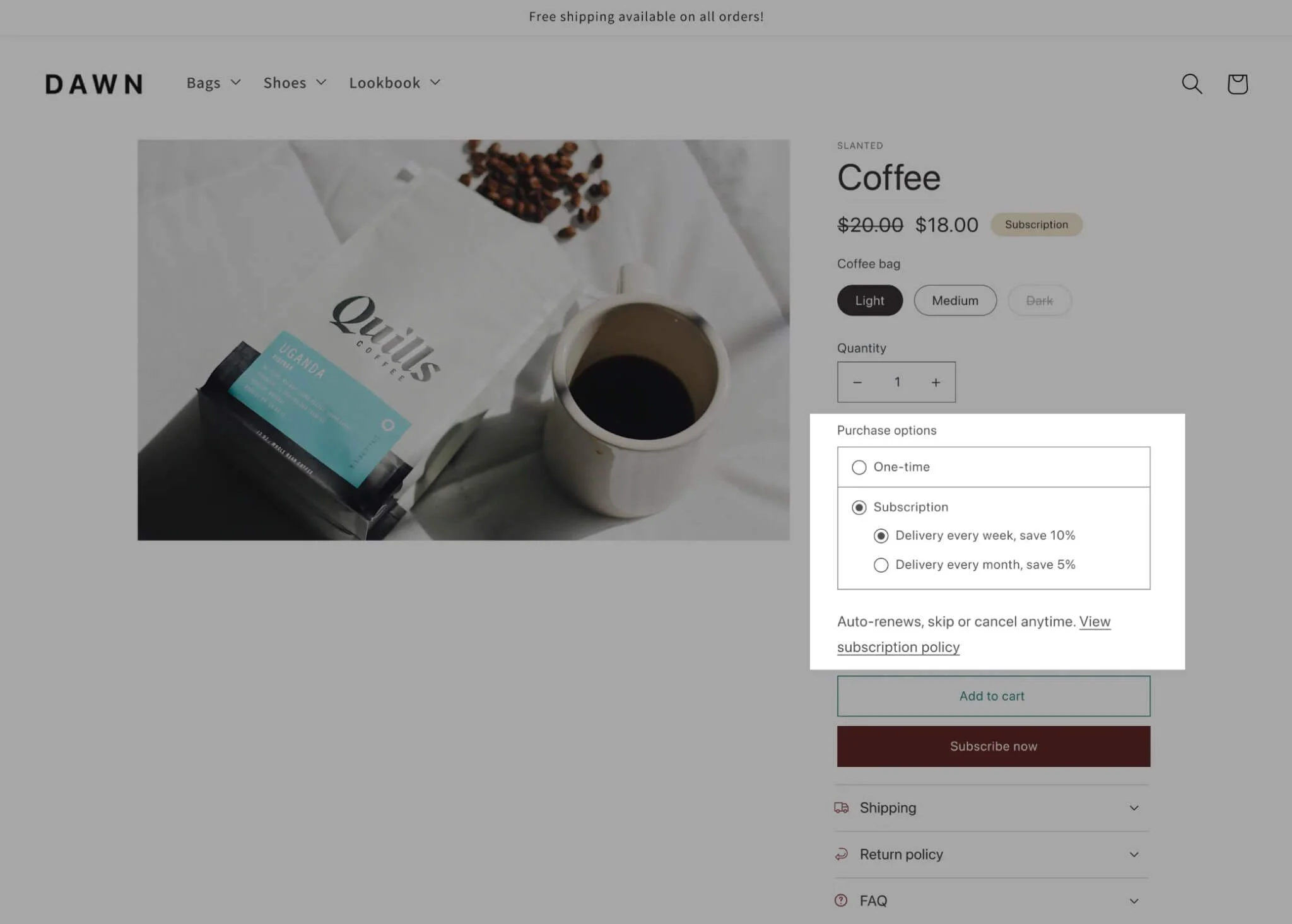
With the Shopify Subscriptions app, you can:
- Create auto-billed subscriptions that renew weekly, monthly, or yearly
- Change, skip, pause, and cancel subscriptions
- Apply discounts to subscription products
- Display a subscription widget on your online store
- Have backend tools to send subscription email notifications and view and monitor subscription analytics
Why You Should Be Excited About It:
Finally, a built-in subscription app! I have been on the lookout for an easy subscription model for a Shopify store I manage for quite some time. Most of the ones I have tested don’t integrate fully with Shopify’s platform and I have had to do some manual work in the backend all the time, which can be confusing and messes up subscription orders.
While Shopify has been clear that its subscription app doesn’t have all the bells and whistles one might need for a robust subscription model, I am sure that its features will be enough for the small business owner wanting to roll out a subscription plan for their products.
If you haven’t thought about adding subscriptions for your online store, now might be a good time to explore it. Read our article below to learn more about how to implement one in your online store:
- What Is a Subscription Business Model & How Does It Work?
- How to Start a Subscription Box Business in 7 Steps
13. Shopify Flow
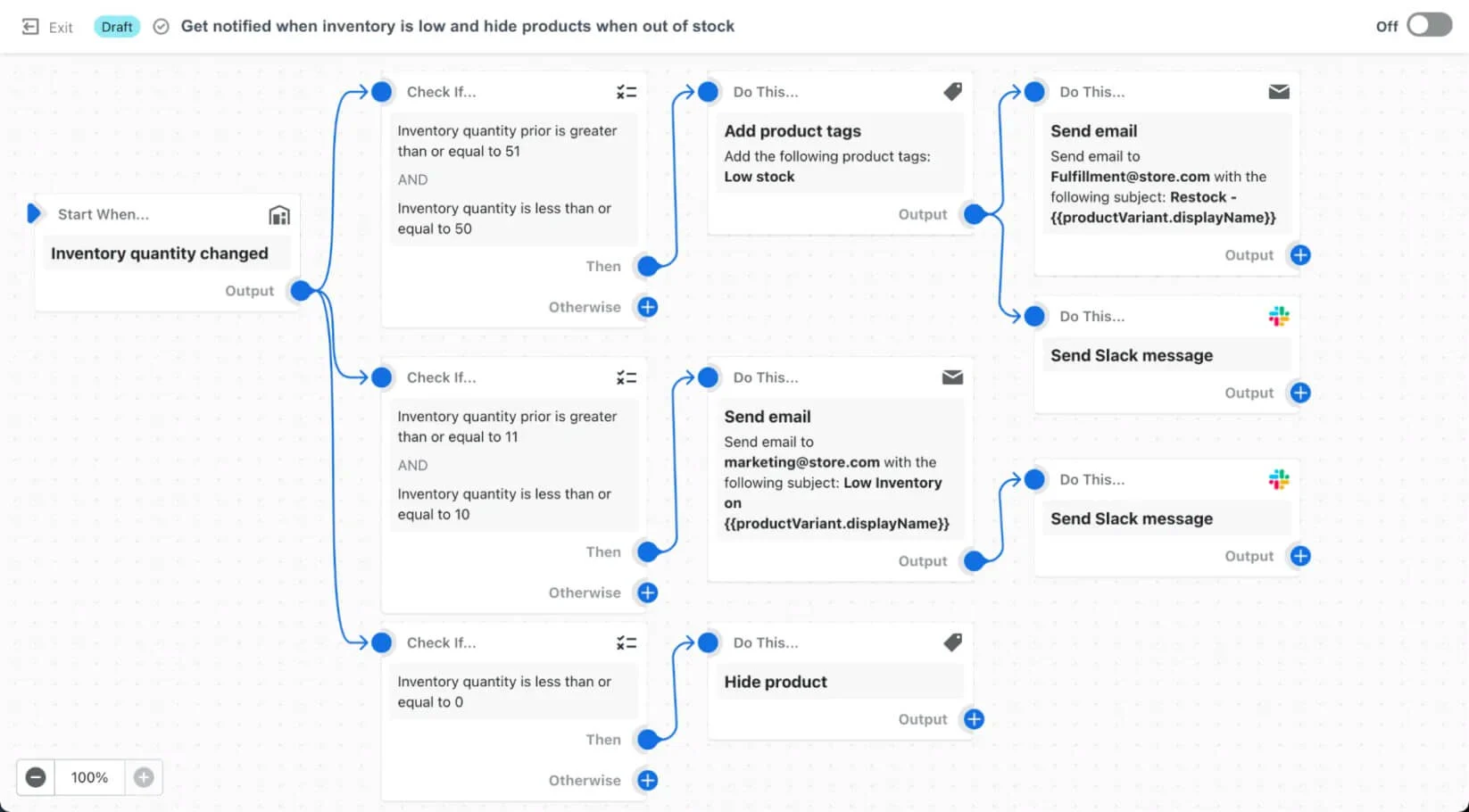
Shopify Flow is an ecommerce automation tool that lets you automate tasks and processes within your store and across your apps. Originally rolled out to Shopify subscribers on the higher tiers (Advanced and Shopify Plus), Shopify Flow is now available even on the Basic tier—which is huge, because custom workflows let you manage everything from inventory, to fraud detection, to loyalty programs, automatically. It’s like letting your store run on auto-pilot!
Why You Should Be Excited About It:
If an app lets you automate almost everything in your online store, go for it. Easily save time and money by setting up custom workflows for everyday tasks in your online store.
14. Shopify Marketplace Connect
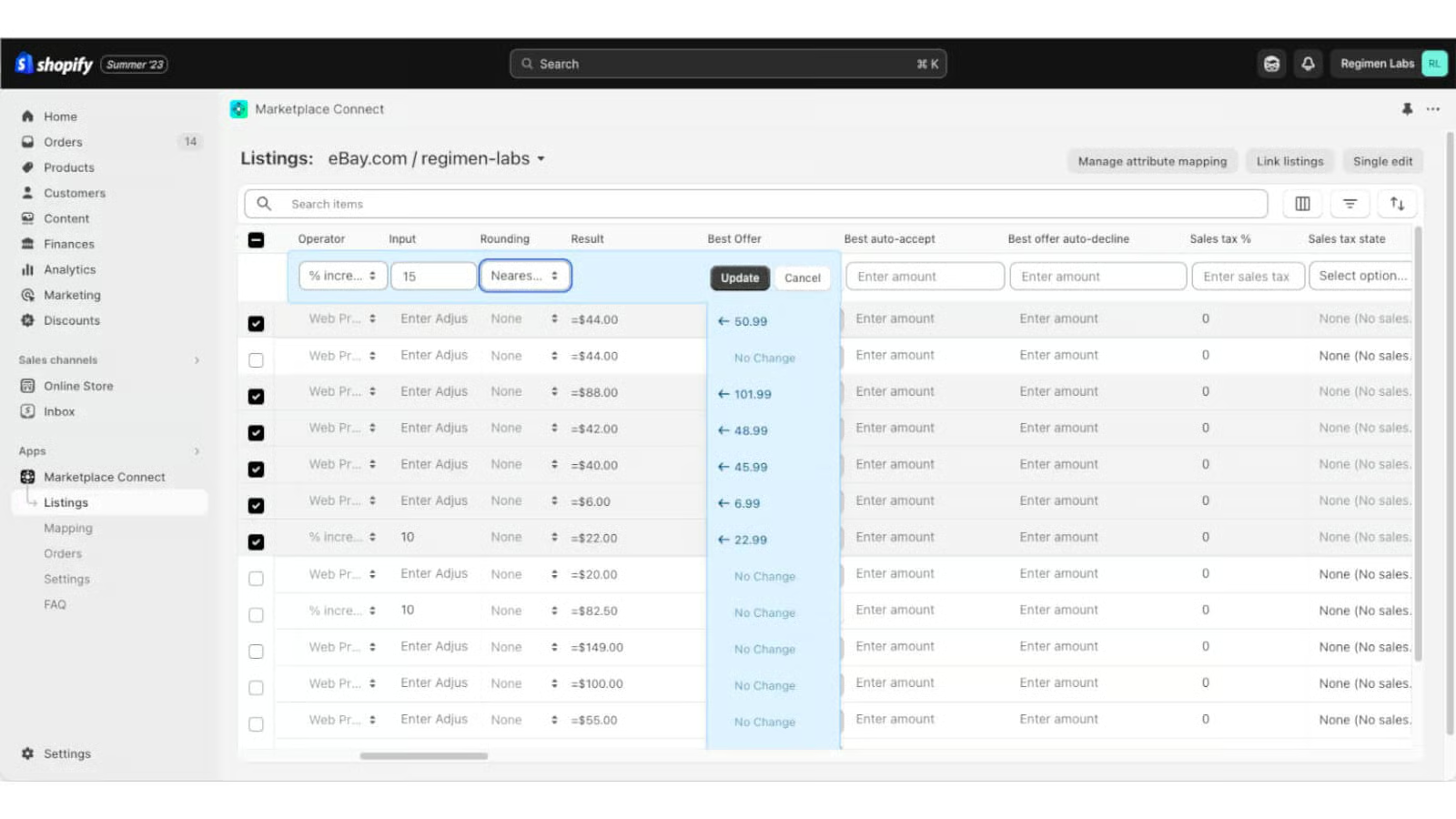
The Shopify Marketplace Connect (formerly Codisto) lets merchants sync their Shopify store products to marketplaces like Amazon, Walmart, and eBay. With the app, you can ensure your inventory stays updated across channels in real time. It is free for your first 50 marketplace-synced orders a month and incurs a 1% fee per additional synced order, capped at $99/month.
Why You Should Be Excited About It:
The Shopify Marketplace Connect app opens up huge opportunities for merchants when it comes to multichannel sales. What I love about it is that you can edit and manage your products and pricing separately from your primary (Shopify) store, and when you make a sale from a marketplace, the order is automatically imported and your inventory is updated in real time.
15. Shopify Collective
Shopify Collective is an innovative way to increase your store sales with almost zero overhead. This new app allows you to sell products from other Shopify brands without having to manage inventory or handle shipping. It’s currently available to select businesses in the US.
Why You Should Be Excited About It:
I totally see this Shopify new feature as a good way to let customers know about complementary products they can or should use together with products you sell. Additionally, it won’t hurt your brand at all; you can even grow your business without the upfront cost of additional inventory and warehousing. Think of it as Shopify’s version of dropshipping within Shopify stores.
16. Shopify Collabs
Shopify Collabs is another one of the new Shopify features you should be on the lookout for; it lets you market products easily with influencers. You can promote products with creators, let verified creators sell your products at a commission rate you set, and automate payments to them through your Shopify bill. It just makes things easier to get verified creators selling your products.
Here’s what you can do with it:
- With the Collabs Network, you can opt in to let verified creators sell your products at a commission rate you set. You don’t have to find and recruit creators anymore.
- You can directly invite creators you already know selling with Shopify Collabs. This is a great way to get the word out about your products to your existing audience.
- Shopify Collabs works seamlessly with the Subscriptions API, so you can get creators promoting your subscription products too.
- Automating your payments to creators through your Shopify bill. You can also set up new automated workflows in Collabs via Shopify Flow.
Why You Should Be Excited About It:
Think of Shopify Collabs as the equivalent of Amazon affiliate links or the TikTok Creator Marketplace. With Shopify Collabs, you no longer need to find influencers and creators to work with manually. Creators can sign up through the Shopify Collab platform, and you can choose which ones to work with. Affiliate marketing is also easily done with this app, with automations set up so you don’t have to worry about payments.
Influencer marketing is a popular marketing trend these days, with seven out of 10 shoppers influenced by product recommendations and reviews from social media. Include influencer marketing campaigns for your online store.
17. Shopify Markets
Global selling can now be easier with Shopify Markets. It is a cross-border management tool that helps you identify, set up, launch, optimize, and manage your international markets – all from a single store.
You can create markets by identifying countries or regions you want to localize the experience for. When you create a market and you’re using Shopify Payments, you automatically have the ability to sell in local currencies in each of the countries or regions you have enabled. Shopify’s research has shown that merchants can experience a 40% increase in conversion when a customer is shown their local currency at checkout. Additionally, you can add local payment methods so your customers can checkout using a payment method they are familiar with.
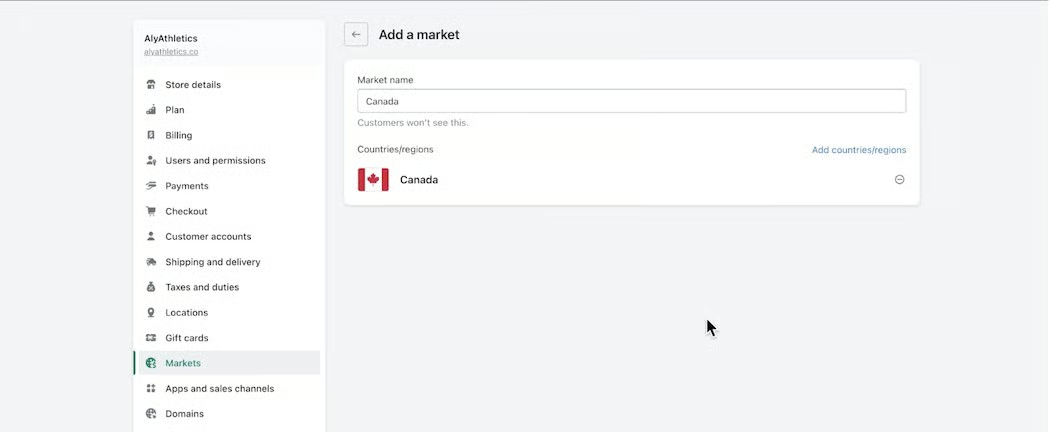
To get customers to experience the right localized experience, you can:
- Set up unique URLs for the markets you sell to and automatically redirect buyers to the localized URL. For example, let’s say you want to sell in Canada, your unique URL would be www.store.ca.
- Provide prompts on your online storefront using a compatible app like Geolocation
- Shopify Markets also allows you to translate your store into multiple languages, adapt your store’s content for different markets using Shopify’s Translate and Adapt app
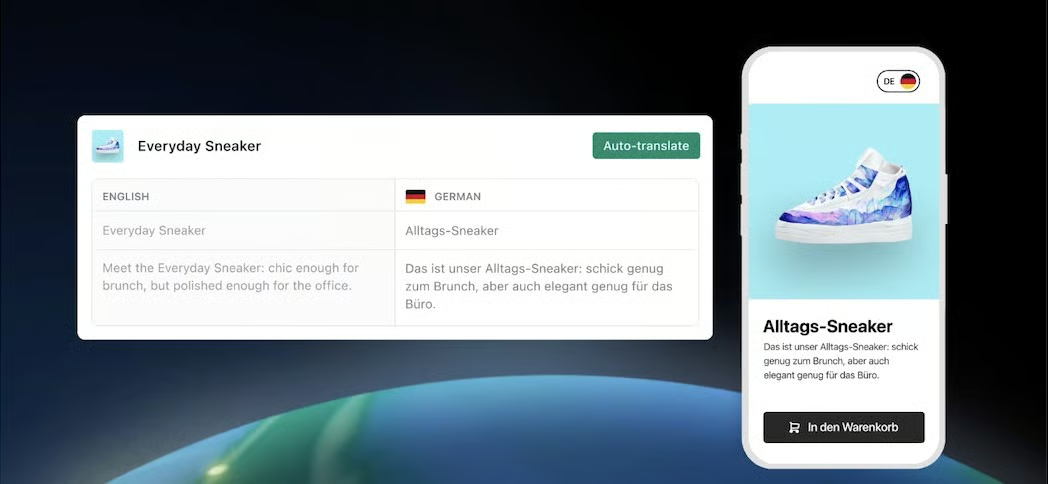
Why You Should Be Excited About It:
Shopify Markets simplifies global selling for the small business owner. If you have plans to expand your business reach but are wary about the backend logistics involved in managing multiple stores, this app can help.
18. New Backend Tools: Shopify Tax, Shopify Balance & Shopify Credit
Shopify’s new updates include financial management tools to help merchants update taxes, get a credit line for business, and manage bills more easily. These are all available in your Shopify admin.
- Shopify Tax simplifies the process of filing your US sales taxes. It breaks down your data to the state, county, and local levels, giving you access to the details you need with less effort and helping you to file your taxes faster and more accurately.
- Shopify Credit is a pay-in-full business card made specifically for entrepreneurs. You can apply for Shopify Credit without worrying about it affecting your credit score. It has no hidden fees or interest charges and you can earn cashback rewards that you can put back into your business. It’s available to select businesses in the US.
- Shopify Balance provides you with a separate account for your Shopify sales, and with it, you can get money from your Shopify sales up to four days faster. You can separate your cash for tax, payroll, or bills and even better, integrate with accounting software to make things easier during tax season. Shopify Balance is available to US-based businesses.
- Shopify Term Loans lets you make static payments over a fixed payback period. You can set your loan amounts, rates, and repayments to align with specific business needs.
Why You Should Be Excited About It:
These tools can be a great help to manage your business finances more efficiently, especially if you manage your business yourself and would like to save time and money on hiring tax or payroll specialists.
19. Improved Logistics & Fulfillment
Shopify updates also include logistics and fulfillment. Here are a few highlights:
- Smart order routing is now fully released: This feature helps streamline fulfillment operations, reduce shipping costs, and get products to customers faster. Businesses with multiple fulfillment locations can now automatically prioritize where orders get fulfilled, based on a set of rules.
- Easily split and merge fulfillments: You now have more flexibility in your fulfillment process. Split and merge items in a single order, fulfill partial orders, fulfill items across multiple locations, and break large orders into multiple shipments.
- Improvements in returns management: New APIs allow for greater control, while self-serve returns make returns more convenient for customers. Offer instant exchanges through integration with Loop Returns.
- New options in inventory tracking: To help get a more comprehensive view of inventory, there is a new Inventory States API to sync on-hand stock across locations and sync data from external platforms.
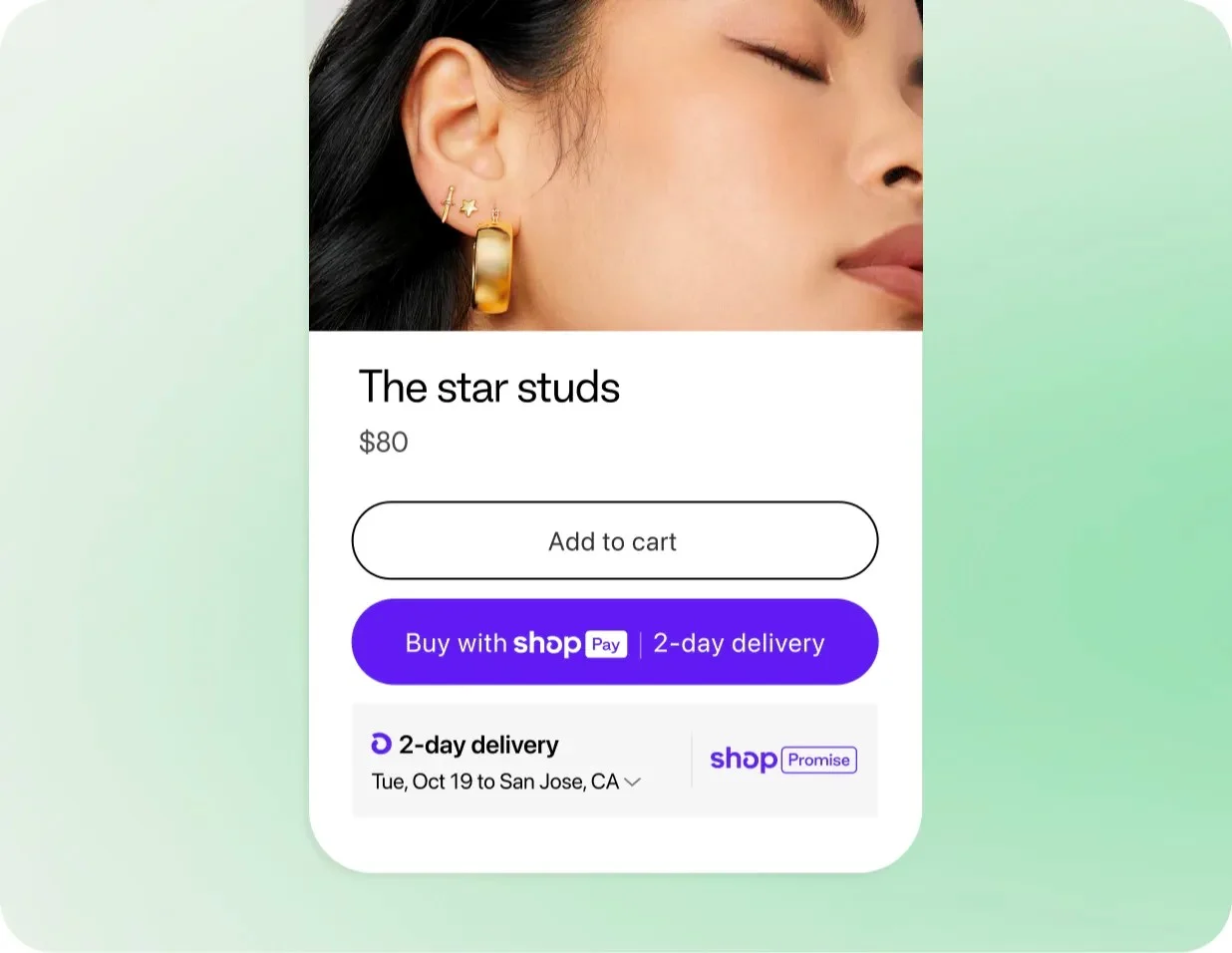
- Access Shop Promise using Shopify Fulfillment Network: The Shopify Fulfillment Network (SFN) now offers Shop Promise. With it, you can display the Shop Promise badge on your products to increase customer trust and potentially boost sales. Shop Promise is currently available to select merchants using the Shopify Fulfillment Network in the US.
Bottom Line
I test and evaluate ecommerce platforms regularly and Shopify always outperforms every ecommerce platform. It regularly releases new features and rolls out feature enhancements, and what I like best is that it still develops built-in features for functions that one can already find an equivalent for in its App Store. With all its new features, Shopify’s price point stays competitive and affordable—proving to be our top-recommended ecommerce platform.
Don’t have a Shopify store yet? Sign up for a three-day free trial and extend it for just $1 a month for three months. You can get a full Shopify store up and running and test all of its features in that span of time.
