







When comparing Square vs Squarespace, Square has a forever-free plan that gives you all the tools you need to start selling right away. Squarespace, meanwhile, has an intuitive website builder and strong SEO tools to help market and sell your products online.
Based on our evaluation and demo store testing, we recommend:
- Square: Storefronts wanting to sell their products online
- Squarespace: Businesses that focus on content production and sell on the side
Both platforms made it to our top picks for best ecommerce platforms, and Square Online is our No. 1 choice among leading free ecommerce platforms.
Squarespace, on the other hand, also made it to our top picks of best website builders and blogging platforms for small businesses. While Square is great for product sales, Squarespace offers a much stronger website builder.
- Squarespace vs Square Quick Comparison
- Get a Personalized Recommendation
- Square vs Squarespace: Pricing & Payments
- Square vs Squarespace: Site Builder & Maintenance
- Square vs Squarespace: Sales & Product Features
- Square vs Squarespace: Ease of Use
- Square vs Squarespace: Expert Score
- Square vs Squarespace Frequently Asked Questions (FAQs)
- Bottom Line
Squarespace vs Square Quick Comparison
Square is Best For
- Storefronts that don’t need robust ecommerce functions: Square offers a free plan, top-rated POS apps, and solutions for industries outside of retail, including restaurants and appointment-based businesses. It is an affordable, user-friendly software with tons of add-ons, which makes it our top-recommended POS system for small businesses.
- Businesses on a budget: A forever-free Square Online plan includes a full standalone website.
- Solo proprietors (such as massage therapists and makeup artists): Square Online’s checkout function accepts prepayments and automatic monthly billing subscriptions.
- Businesses offering curbside delivery or click-and-collect options: Creating a web page to receive orders and set delivery options can easily be done, especially if you already use the Square POS system.
- Square POS users: If you already use Square POS, Square for Retail, Square for Restaurants, or Square Appointments, Square Online is a seamless addition for online sales, orders, and appointment booking.
Squarespace is Best For
- Small businesses that are more focused on producing web content than running an online store: Use Squarespace to showcase your content portfolios, such as blog posts and image galleries, and sell physical, digital, and service-based products. These can be done quickly using the platform’s drag-and-drop website builders.
- Bloggers, vloggers, and social media influencers: Squarespace’s blogging features are among the best. If you primarily monetize your content and offer merchandise on the side, Squarespace is the ideal platform to get into.
- Photographers, creatives, artists: Squarespace has a design-first premise. If you primarily sell a visual portfolio, Squarespace’s plans include unlimited storage and bandwidth, making it a good choice for anyone looking to host a digital portfolio.
 |  | |
|---|---|---|
| Visit Square | Visit Squarespace | |
| Ecommerce Platform Evaluation | 4.07 out of 5 | 3.84 out of 5 |
| Best For | New or small brick-and-mortar shops, businesses on a budget, food-based businesses | Artists, creators, courses, memberships, and building a business website |
| Monthly Fees | $0–$79 (annual billing) | Starts at $33–$65 (for ecommerce features) |
| Additional Sales Channels | Square Online store, payment links, add checkout to an existing site, Facebook, Instagram, mobile POS, in-store, local delivery | Facebook and Instagram |
| Ease of Use | Excellent | Excellent |
| Point-of-Sale (POS) | Built-in—$0–$60; custom plans available | Square integration |
| Marketing Features | Good | Good |
| Product and Order Management | Average | Average |
| App Marketplace | Limited | Limited |
| Customer Support | Monday–Friday phone support, 24/7 automated chat support, seller community, and resource library | 24/5 live chat (weekdays) and 24/7 email |
| Read our Square Online Review | Read our Squarespace review |
| Monthly Fee | Best For | Read More | |
|---|---|---|---|
 | $39+ |
| Shopify review |
| Visit Shopify | |||
 | $39+ |
| BigCommerce review |
| Visit BigCommerce | |||
 | $27+ (for ecommerce) |
| Wix review |
| Visit Wix | |||
Are you looking for more options? Check out our top-recommended ecommerce platforms.
Get a Personalized Recommendation
Are you still undecided about which ecommerce platform to use? Take our quiz below for a personalized recommendation. You won’t need to enter personal information or be directed to another page.
Question 1 of 5
Which best describes your business?
Square vs Squarespace: Pricing & Payments
 | | |
|---|---|---|
| 5 out of 5 | 3.25 out of 5 | |
| Free Plan or Free Trial | Forever-free plan | Free trial, 14 days |
| Monthly Online Store Plans |
|
|
| Built-in Payment Provider (optional) | Yes, Square | N/A |
| Option to Connect to Third-party Processor | N/A | Yes, no fees |
| Transaction Fees | None (standard credit card fees apply—2.9% + 30 cents) | 3% under Business; none under Basic and Advanced Commerce |
| Apple Pay and Google Pay | Yes | No |
| Payment Gateway Options | Square, PayPal, Google Pay, and Apple Pay | Stripe, PayPal, Afterpay, and Clearpay |
| Visit Square | Visit Squarespace |
Take a look at how their pricing plans compare:
Square Online Pricing Plans
As mentioned earlier, Square Online has a forever-free plan and two publicly published paid tiers: Plus ($32/month) and Premium ($88/month). All tiers include unlimited products (digital goods, physical products, services, and events), hosting bandwidth, and storage.
Every plan also includes integrations with Facebook, Instagram, TikTok, Google, and Square POS; a free SSL certificate; a one-click checkout option; and the ability to accept payments via Square, Afterpay, Apple Pay, and Google Pay.
When I was testing Square Online’s platform, I reviewed its published pricing plans and saw the following plans—Free, Plus, and Premium. My first impression was that it wasn’t clear whether the indicated prices were for a monthly or annual subscription—it was for a lump-sum billing.
However, under my free Square Online account, when I tried to upgrade to a paid plan, I got taken to a pricing page that has the Professional plan ($16/month for lump-sum billing) that adds the ability to customize your ecommerce site (no Square branding, connect to a customer domain, and custom font upload).
Squarespace Ecommerce Pricing Plans
Squarespace offers a 14-day free trial, and its ecommerce features are only unlocked at its second plan, Business ($33/month), and ecommerce analytics and POS integration are available at the Basic Commerce tier ($36/month). Additionally, several advanced ecommerce features, including abandoned cart recovery, real-time carrier shipping rates, advanced discounts, and the option to sell subscriptions, are only offered in its most expensive plan, Advanced Commerce ($65/month).
You also get charged a 3% transaction fee for every purchase in the Business plan ($33 per month), so you will quickly outgrow this tier once sales pick up. I’d recommend going with the next ecommerce tier, Basic Commerce, which takes out the 3% transaction fee, and only costs a few dollars more than Business ($36/month).
Having tested several ecommerce platforms, I find Squarespace’s plans a bit expensive when considering value for money. For example, abandoned cart savers are found in Shopify’s entry plan ($39/month), while real-time shipping rates are present in BigCommerce’s starter plan (also at $39/month). These features are only unlocked at Squarespace’s highest tier ($65/month).
Compared to Square Online where you can also sell unlimited products and get a custom-branded site at the basic paid tier, Plus ($32/month), Squarespace’s basic tier, Premium ($33/month) comes a bit short especially because of the 3% transaction fee.
Note that you can save between 24% to 30% in fees when you subscribe annually.
Payment Processing
Both platforms have limited payment provider integrations. Squarespace is limited to Stripe, PayPal, and installment providers Afterpay and Clearpay. Apple Pay is accepted for physical products only and for customers using Safari on supported devices. While with Square Online, you can only use Square Payments as your payment processor. However, Square does support PayPal, Google Pay, and Apple Pay payments. You’ll also benefit from accepting Cash App payments and buy now, pay later payments through Afterpay.
When it comes to transaction fees, Squarespace only charges extra fees at the Business plan ($33/month) at 3% but waives it in higher tiers, Basic Commerce ($36 per month) and Advanced Commerce ($65 per month). Square doesn’t charge any transaction fees.
Square vs Squarespace: Site Builder & Maintenance
| | |
|---|---|---|
| 3.5 out of 5 | 4.38 out of 5 | |
| Free Templates | Around 30 | More than 100 |
| Editing Tool | Built-in styles, limited drag-and-drop functionality | Drag-and-drop builder (Fluid Engine) |
| Customization | Limited | Yes (CSS and HTML) |
| App Marketplace | Few | Few |
| Secure Sockets Layer (SSL) Certificates | Free | Free |
| Payment Card Industry (PCI)-Compliant | Yes | Yes |
| Visit Square | Visit Squarespace |
Both platforms provide aesthetically pleasing templates and intuitive website editors. The biggest difference between the two is their website builders.
Square takes on a more cookie-cutter approach when it comes to building a website, giving you few choices when it comes to customization. You can easily build a website in under an hour because it is so simple. With Squarespace, you will encounter a slight learning curve because of the numerous customization options, but you will quickly get the hang of working with its page editor.
Website Builder & Templates
When it comes to templates, both platforms provide beautiful free website themes to help you get started. The only difference is in the available choices. When I tried to build a website with Square Online, I only had the option to choose from more than 20 templates, which I tried to check one by one. They basically had the same format, only in different colors, fonts, and stock photos.
I also wished that they provided a desktop preview as a default viewing option rather than going with a mobile version, as shown below, as I needed to click on the thumbnail to preview its details.

With Squarespace, you get over a hundred free templates to choose from. You can filter the templates by category and product you intend to sell, and whatever fits your filter gets shown first. When I checked Squarespace’s templates, I was impressed with how versatile all layouts were—no template looked the same—and how accurate the filter results were.
I chose the online store category with fashion products to sell, and it gave me these results.

When it comes to page editors, the platforms provide website builders with stark differences. For one, Square Online’s page editor has limited functionality. It’s very easy to use; you can even build a complete website in a few hours—but that’s because it’s too simple.
When I was building our demo store, I could only hide or delete certain sections of the website from the editor and add limited section types, such as text, image gallery, button, text and image, video, and PDF. Embedding a code (in a section) required me to upgrade to a paid plan. Sections also had limited styles to choose from.
For example, in my screenshot below, you can see a few option styles you can use when you choose to insert a text and image section in your webpage.

Unlike Square Online, Squarespace’s page editor, Fluid Engine, offers more flexible drag-and-drop functionality and “fluidity.” You can customize sections into grids so you can place website elements however you want.
As you can see from the video below, each section can be customized further, depending on your preference. It can be quite overwhelming at first, but when you get the hang of using the page builder, you will be amazed at how much you can do with your website.
For me, Squarespace hits the right spot between ease of use and a design-forward mentality. You have so many customization tools at your disposal (tilt, zoom, text styles, and more) and built-in integrations with Unsplash and Getty Images for stock photos.
One thing to note is that Squarespace’s latest version (7.1) doesn’t allow you to switch templates and carry over all the setup you have already done—design and commerce-wise. I encountered this issue when I set up our demo store. When I tried to switch templates, I realized I had to set up the Commerce portion of the website again.
However, I also realized that I don’t have to switch templates since Squarespace templates are very customizable—you can add plenty of sections and elements in various layouts to your pages.
When I built our demo store and realized changing templates would mean losing our current work’s progress, I just added the sections I liked from other templates without switching—and I was able to accomplish this easily.
Third-party Integrations & Apps
Both platforms provide limited third-party integrations. Squarespace mainly provides website builder integrations, while Square has a few marketing integrations. Both have a multilingual integration, Weglot, available.
Compared to other ecommerce platforms I have tried and tested, Squarespace and Square Online’s app extension availability leave a lot to be desired.
Security & Compliance
There’s no need to worry when it comes to website and payment security for the platforms. Both Square and Squarespace are on shared hosting platforms, so you don’t have to handle security measures yourself.
Both platforms have Secure Sockets Layer (SSL) Certificates and are Payment Card Industry Data Security Standard (PCI-DSS) compliant.
SEO & Blogging
Both platforms provide you with SEO tools to help increase your page’s chance of ranking highly in Google search results. For example, both platforms provide mobile-responsive websites—essential for Google ranking—and SEO headers and descriptions can easily be set up per product.
With Square Online, you have access to basic SEO tools that are enough to help your pages get indexed on Google. You can edit a site page or item’s permalink, title, and page description easily in your page details. Square also recently added 301 redirect capabilities, which you can set up under the Website section in your Square Online dashboard.
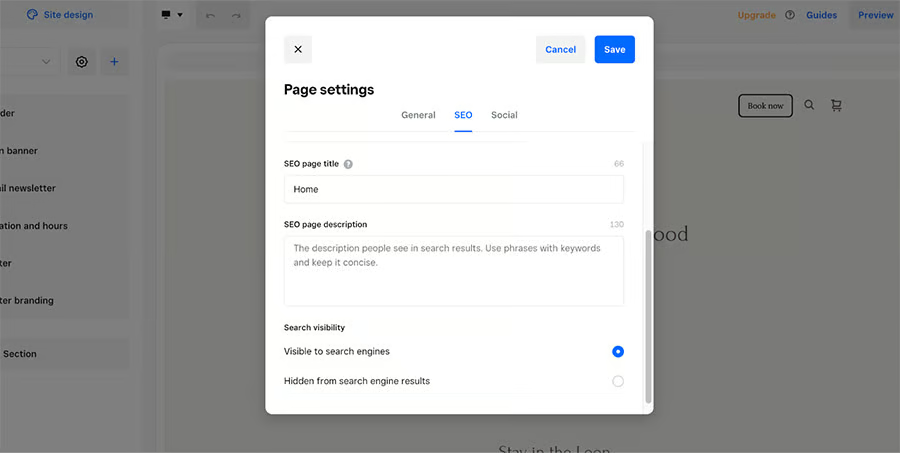
Increase your site’s search engine visibility by setting up SEO details in your site pages. 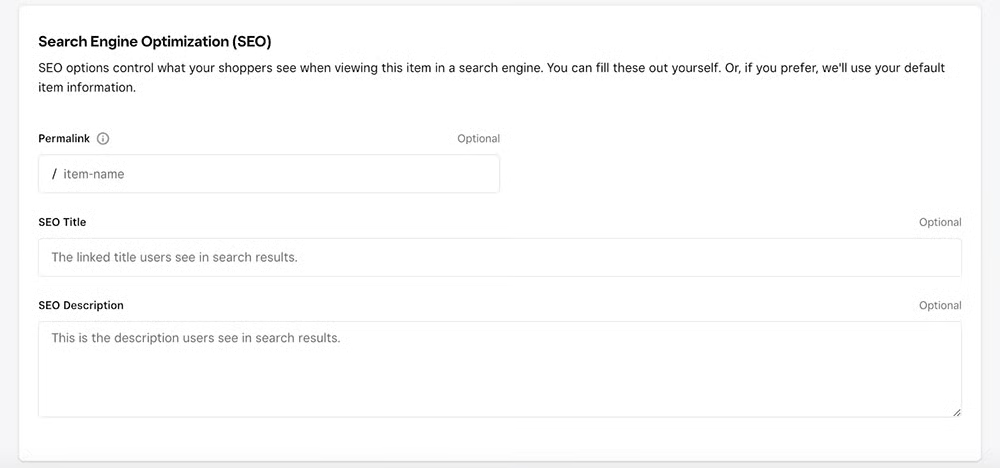
Square Online also lets you set up SEO for individual product pages.


Squarespace provides the same SEO tools and other advanced features as well. Squarespace lets you set up redirects and 404 error links in your site and automatically convert your image descriptions into alt text (the information Google uses to understand images), and provides analytics for search keywords. It also has a very helpful SEO checklist you can refer to when setting up SEO for your store.
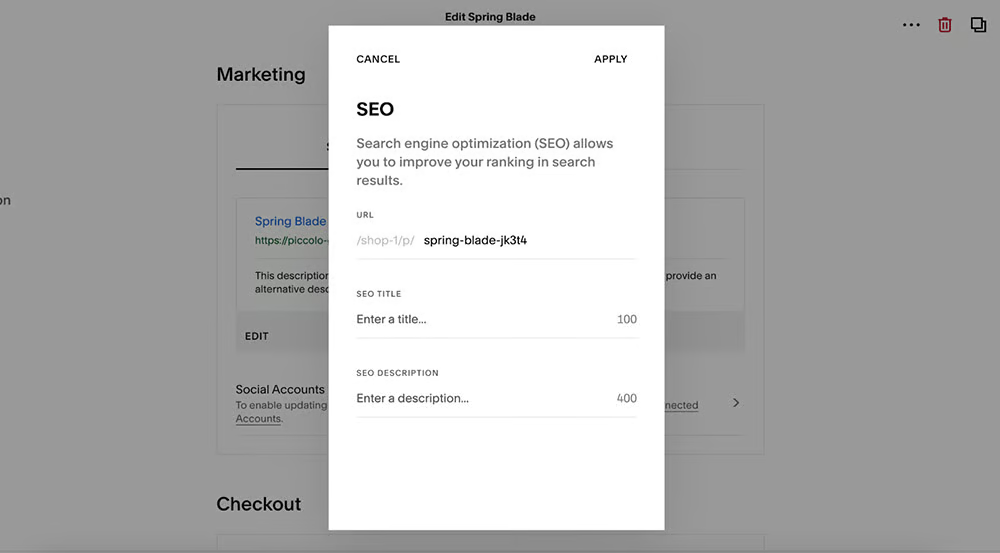
You can set up a custom URL for your product pages. 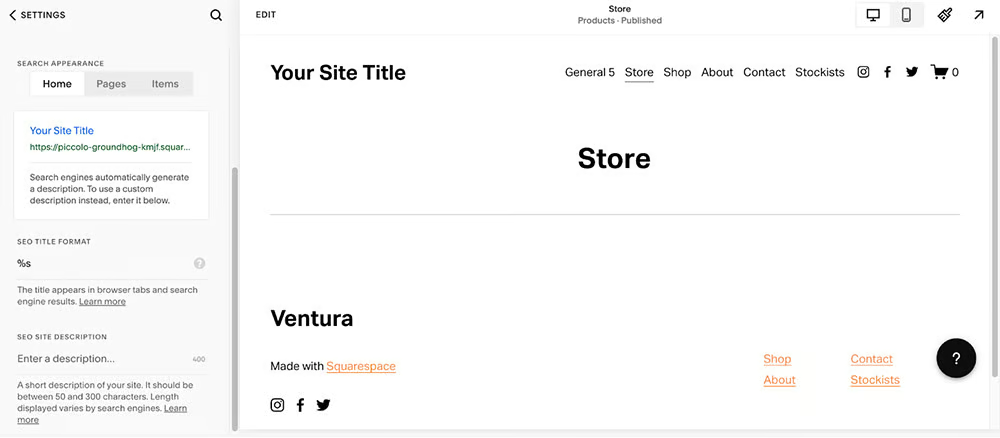
As you can see from the sidebar, there are helpful links to how-to’s and information when you set up your site pages’ SEO. 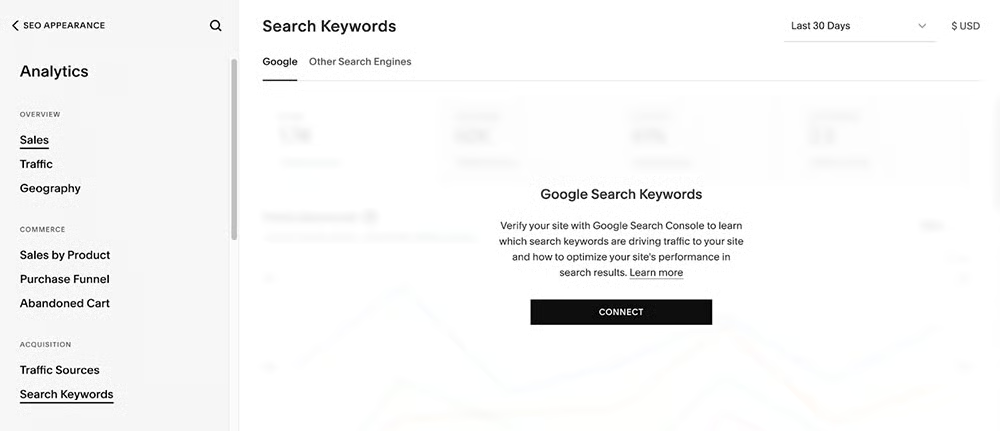
Squarespace gives you a report on search keywords when you connect Google Analytics to your store.


When it comes to blogging, Squarespace wins by a mile over Square Online. Squarespace is one of our bets for best blogging platforms and with good reason. It provides the essential blogging features you need, like tags, categories, SEO, social sharing, social images, and more.
Moreover, the Squarespace blog editor is very comprehensive. I was able to choose from plenty of blog layouts, add image galleries, opt-in forms, Instagram feeds, and more.

Adding a blog in Squarespace is straightforward. Choose from different feed styles, then design a page. 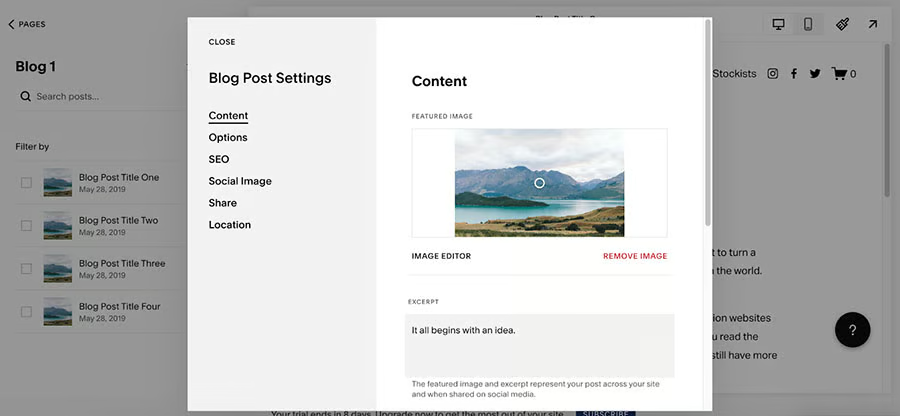
You can even set up more for your blog posts, such as SEO, social image sharing, and featured image.


On the other hand, the Square Online blog platform is called Stories. It doesn’t have as many blogging features as Squarespace.
You can set up a title (Story header), a cover image, and simple text (Story content)—and that’s it. You cannot format your text into different headers (an essential strategy for SEO).
When I was trying to format text headers, the formatting automatically applied to the whole text. I am unable to add a new text section.

Square Online’s blog platform is integrated with its site editor. You are pretty much constrained to only blog layout, and the sections outlined on the sidebar. You can only add an opt-in, Instagram feed, and image gallery as additional section. 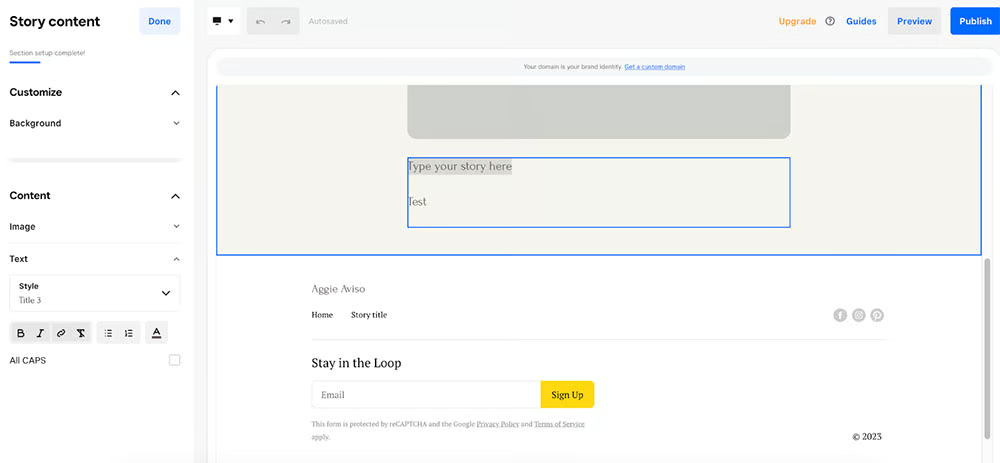
When I was trying to format a single line of text to be a header, the format applied to ALL text in the box.


Square vs Squarespace: Sales & Product Features
| | |
|---|---|---|
| 3.81 out of 5 | 3.63 out of 5 | |
| Social Media Integration | Yes, Facebook and Instagram | Yes, Facebook and Instagram |
| POS Tool | Yes, built-in Square POS | Yes, Square integration |
| Gift Cards, Discount, and Coupon Codes | Yes | Yes |
| Email Marketing | Yes, paid add-on | Yes, paid add-on |
| Abandoned Cart Recovery | Yes, on Plus ($32 per month) | Yes, on Advanced Commerce ($65 per month) |
| Product Options & Variants | Yes | Yes |
| Custom Product or Work Order Tools | Yes | Yes |
| Real-time Shipping Calculators | Yes, on Premium ($88 per month) | Yes, on Advanced Commerce ($65 per month) |
| Visit Square | Visit Squarespace |
Multichannel Sales
Both platforms have direct integrations to popular sales channels—Facebook, Instagram, and Google Shopping. Note, though, that for Square, the Google Listings feature is only available for Food and Drink sites.
Both platforms also offer features for in-person selling and are exclusive to using the same POS solution, Square POS. However, Square Online has an advantage because it can sync offline and online inventory from the get-go. You need to start from scratch in Squarespace.
Product Management
Square Online and Squarespace provide features for digital downloads, services, memberships, event tickets, and appointments. Squarespace only has options for on-demand videos and online courses.
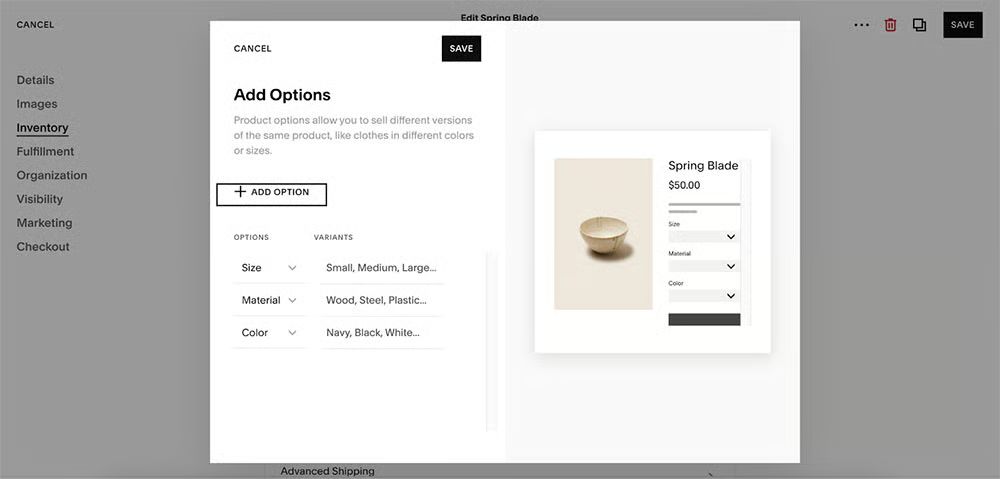
Both platforms also offer tags for easier product categorization, custom work order fields, and product variants. The only difference I want to point out is the ease of setting up variants in Squarespace compared to Square.
With Square, you need to set up variant combinations manually. For example, let’s say I am selling a t-shirt with options such as sizes and colors. I would need to manually enter different combination options to make it clickable on the product page.
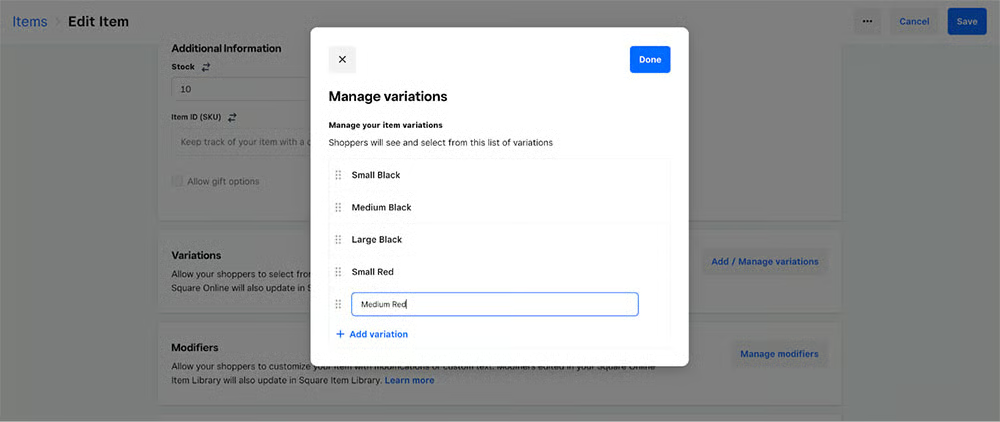
This manual variant combination setup is taken care of by Squarespace. When I tried to set up variants for a product, I just needed to set up options, enter the corresponding variants, and Squarespace handled the combination of the options for me.
Inventory Management
Both platforms offer the same inventory features—adding SKUs, inventory tracking, and stock updates.
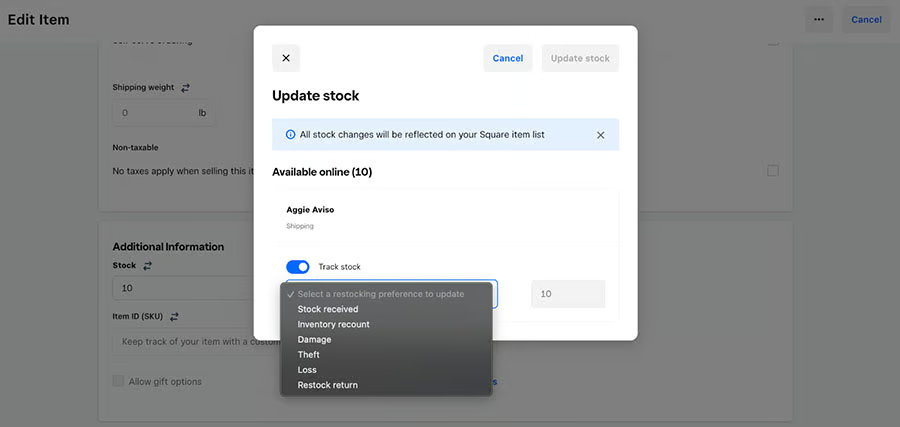
There are a few differences when updating inventory for the platforms. With Square Online, there are clear categories when updating stock: Stock received (adds to quantity), Inventory recount (replaces the quantity value), Restock return (adds), Damage (decreases), Theft (decreases), Loss (decreases).
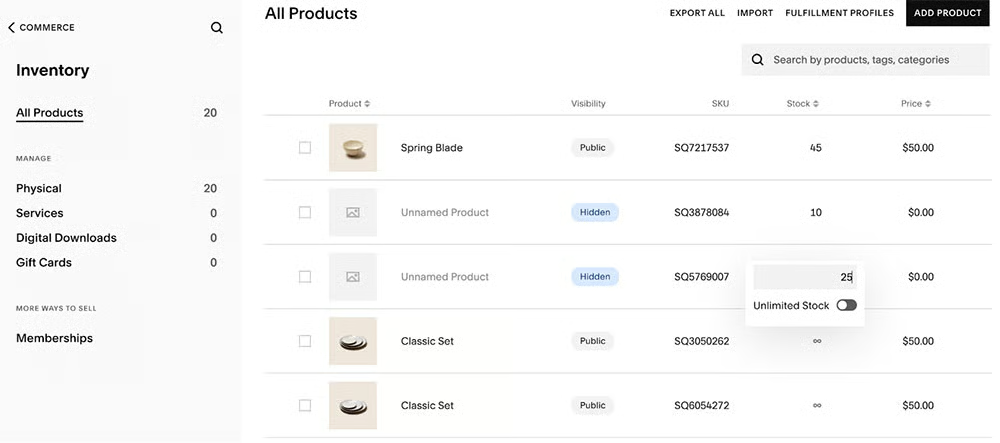
With Squarespace, updating inventory is quickly done because you can change product details such as the item name, visibility, stock, and price from the inventory dashboard itself. You need the product editor for each item to make inventory changes on Square Online.
Shipping Tools
Both platforms allow you to set a range of shipping options—free shipping, flat-rate shipping, local pickup, local delivery, location-based shipping, weight-based shipping, and product price-based shipping for all regions.
Both also allow you to get real-time shipping rates based on FedEx, UPS, and USPS carrier charges on both. However, Square Online provides an additional option for DHL.
Third-party fulfillment companies are also available as integrations, like ShipBob, ShipStation, and Shippo.
Marketing Features
Both platforms have robust marketing features. But if you consider price, Squarespace’s top-tier plan (Advanced Commerce at $65/month) is less expensive than Square Online’s highest plan (Premium at $88/month) and offers the same features.
Both platforms enable you to set up discount codes, banner announcements, and website pop-ups. They also provide email marketing services but as a paid add-on.
Square vs Squarespace: Ease of Use
| | |
|---|---|---|
| 4.25 out of 5 | 3.5 out of 5 | |
| Onboarding & Setup | Easy | Easy |
| Store Management | Easy | Easy |
| Online Knowledge Base | Extensive | Extensive |
| Community Forum | Active | Not That Active |
| Live Chat, Email & Phone Support | Monday–Friday phone support, 24/7 automated chat support, seller community, and resource library | 24/5 live chat (weekdays) and 24/7 email |
| Visit Square | Visit Squarespace |
Onboarding & Setup
I tested both platforms by setting up the same demo store to have an apples-to-apples comparison. Signing up for trial accounts was a breeze, and both platforms provide set-up guides and helpful prompts to guide me in building my site.
I found Square Online to be more intuitive when navigating dashboards. Since Square acquired Weebly to strengthen its online store solution, navigating and setting up a Square Online store is straightforward. Your dashboard offers video tutorials and step-by-step instructions on building your single-page or multipage online store.
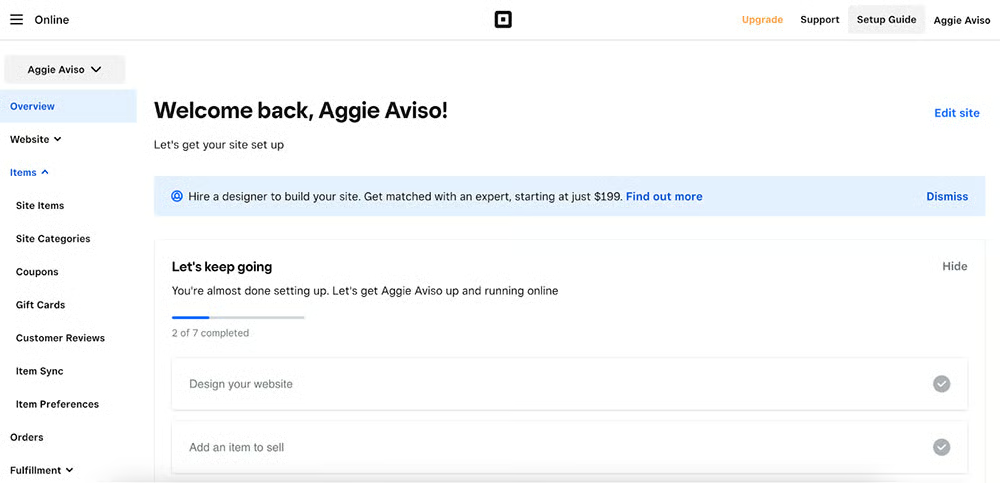
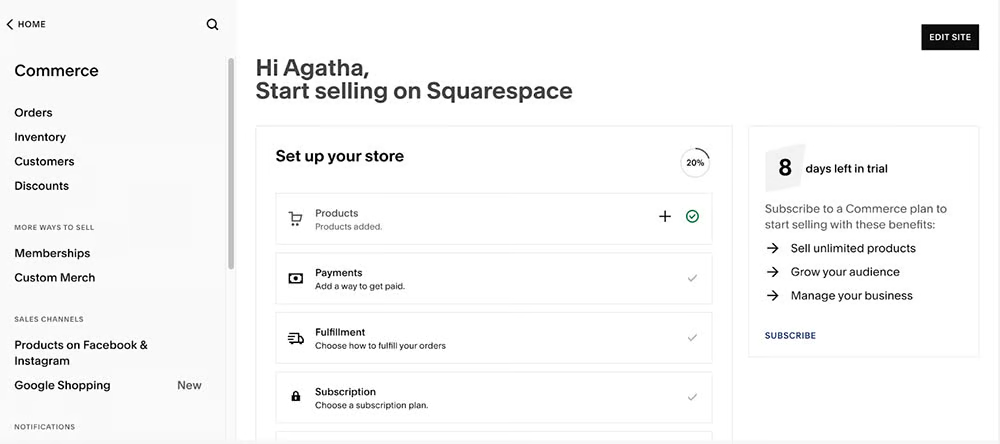
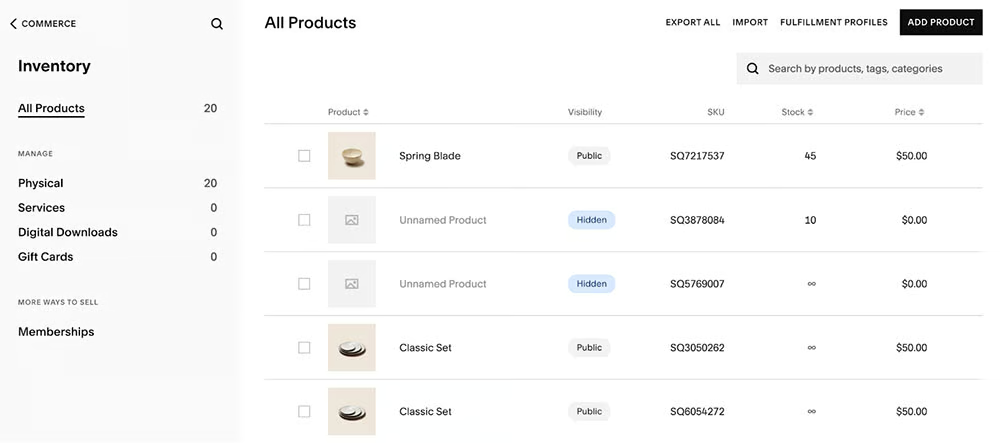
When it comes to Squarespace, although its dashboard is also intuitive, I found that I had to click more to get to what I need, instead of having nestled subcategories in their main menu sidebar. It also opens up a new page where I no longer see the main menu. You can see how it looks with the images below.


Customer Support
Both platforms offer extensive help centers but differ in the support types they provide. Squarespace doesn’t offer phone support, which can be a deal breaker for some. However, its live chat connects you with competent support.
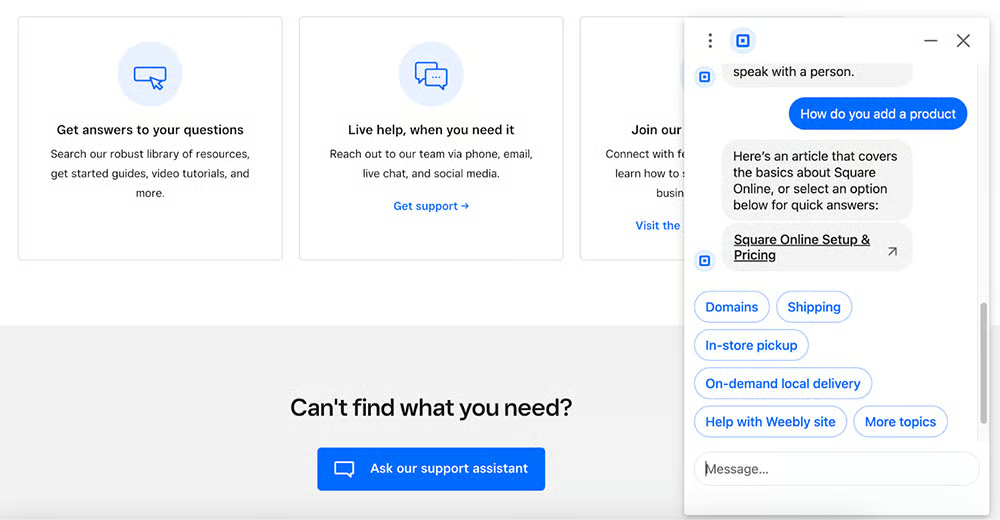
Meanwhile, I tried Square’s chatbot assistant and found it to be very “robotic.” It links to several articles from its knowledge base, which I can easily accomplish by doing a quick search. Its seller community is an active forum, though, and customers are helpful and quick to respond to any questions.
Square vs Squarespace: Expert Score
Square Expert Score
4.06 / 5
Square Online offers incredible value, being a completely free ecommerce platform with few limitations. Moreover, Square as a whole is extremely popular for small businesses and has a great reputation.
When grading Square Online for expert score, I looked at Square Online’s features and compared them against what an ideal ecommerce platform should have and whether the platform offers anything unique or does anything exceptionally well.
Square Online falls a little short with its design flexibility and product and order management. However, its strongest feature is its excellent multichannel tools via its POS and local delivery options. Most ecommerce platforms I tested are designed specifically for online sales; hence, they don’t provide strong tools that cater to local shoppers.
Square Online User Reviews
Majority of Square Online users agree with our assessment of Square Online being one of the best ecommerce platforms, highlighting its ease of use and great payment processing fees. Its biggest drawbacks, however, are limited customization and inconsistent customer support.
Squarespace Expert Score
4.38 / 5
Overall, Squarespace is an excellent website builder and a good ecommerce platform. Since it’s primarily designed as a website builder and ecommerce platform second, there are a few limitations to Squarespace’s online selling features, such as marketing features, shipping discounts and printing labels, and multi-location inventory management.
However, Squarespace provides an excellent platform for your portfolio and arms you with strong SEO tools to market your business (and products). If your business primarily thrives on content marketing and sells on the side, Squarespace is the best choice.
Squarespace User Reviews
We encountered most Squarespace user reviews as a website builder, not an ecommerce platform. While Squarespace reviews show users are happy with the site builder and its beautiful templates, many agree that it falls short regarding its intuitiveness and customizability. Its interface isn’t the easiest to use, and when you figure out how to work around it, you will find that it cannot produce a fully customized website design.
Methodology—How We Evaluated Square vs Squarespace
To help you decide which ecommerce platform is best for your store, we compared Shopify and Wix based on price, ease of use, store builder and design tools, inventory management, and sales tools. We also added our own expert opinion based on years of experience testing different ecommerce platforms:
We considered the price point of each base plan that offers a complete online store, the plans available as your business grows, and payment processing options—including fees, flexibility, and one-click checkout options.
We considered how easy it is to build and maintain a professional and attractive online store, including available templates, customization options, free domain, and secure sockets layer (SSL) certificates; unlimited storage and bandwidth options; and built-in SEO tools and site analytics.
We looked at what kind of product assortments and marketing features both platforms provide and if they offer tools for in-store and mobile selling. We also considered if they have built-in integrations for additional sales channels (such as social media and marketplaces), consolidated shipping options, and Payment Card Industry (PCI) compliance.
Online stores operate 24/7, so we prioritized platforms that offer 24/7 customer support and have multiple customer touchpoints, such as phone, email, and chat.
We considered overall value, quality of features, popularity/customer satisfaction, and ease of use. We also took into account our own experience working with each platform and feedback from businesses who use each system.
Meet the Experts
The following retail and ecommerce experts contributed to this article:
 | Meaghan Brophy is a resident retail and ecommerce expert at Fit Small Business with over 10 years of retail experience and 7 years of experience delivering actionable content to independent retailers. She has spent the last 4+ years at Fit Small Business testing retail and ecommerce software. |
|---|---|
 | Agatha Aviso is Fit Small Business’ resident ecommerce software expert. She has spent years testing and evaluating different platforms and building online stores. |
Square vs Squarespace Frequently Asked Questions (FAQs)
Expand the sections below for answers to some of the most frequently asked Square vs Squarespace questions:
What is the difference between Squarespace and Square?
While Squarespace and Square have similar-sounding names, these are entirely different ecommerce platforms. Squarespace is a website builder that offers ecommerce features in its higher plans, and Square is a mobile payment company that offers a suite of business software, point-of-sale (POS) systems, payment hardware products, and small business services. Square has an ecommerce platform called Square Online.
Do I need Square and Squarespace?
Technically, yes, you might need both. Square has a POS solution that integrates with Squarespace to enable in-person selling. However, if you are talking about Square’s ecommerce platform, Square Online, then, no—you only need one ecommerce platform to sell products online.
What is the best website builder to use?
Wix is our top pick for the best website builder for small businesses. Read our Wix review.
Bottom Line
Squarespace and Square Online are both good ecommerce platforms. In fact, they are part of our list for best ecommerce platforms for small businesses.
In our Squarespace vs Square comparison, both platforms came neck and neck with each other in almost all categories, with Square edging out Squarespace slightly. Square Online is a better fit for businesses on a budget and storefronts that want to increase sales by selling online.
