








Customer relationship management (CRM) software is a popular tool to keep a sales operation organized and productive. By leveraging industry data relating to CRMs, their use cases, and their benefits, you can incorporate key insights into your business to improve overall sales performance. Broken down by category and use case, here are 28 must-know CRM statistics to help solve your software challenges and optimize every stage of your sales process.
General CRM Stats
These general stats provide a broader view of the software, giving you an overview on CRM usage, popularity, marketplace breakdown, and specific challenges when adopting one. You’ll also gain insight into the latest trends in the CRM industry and the potential return on investment (ROI).
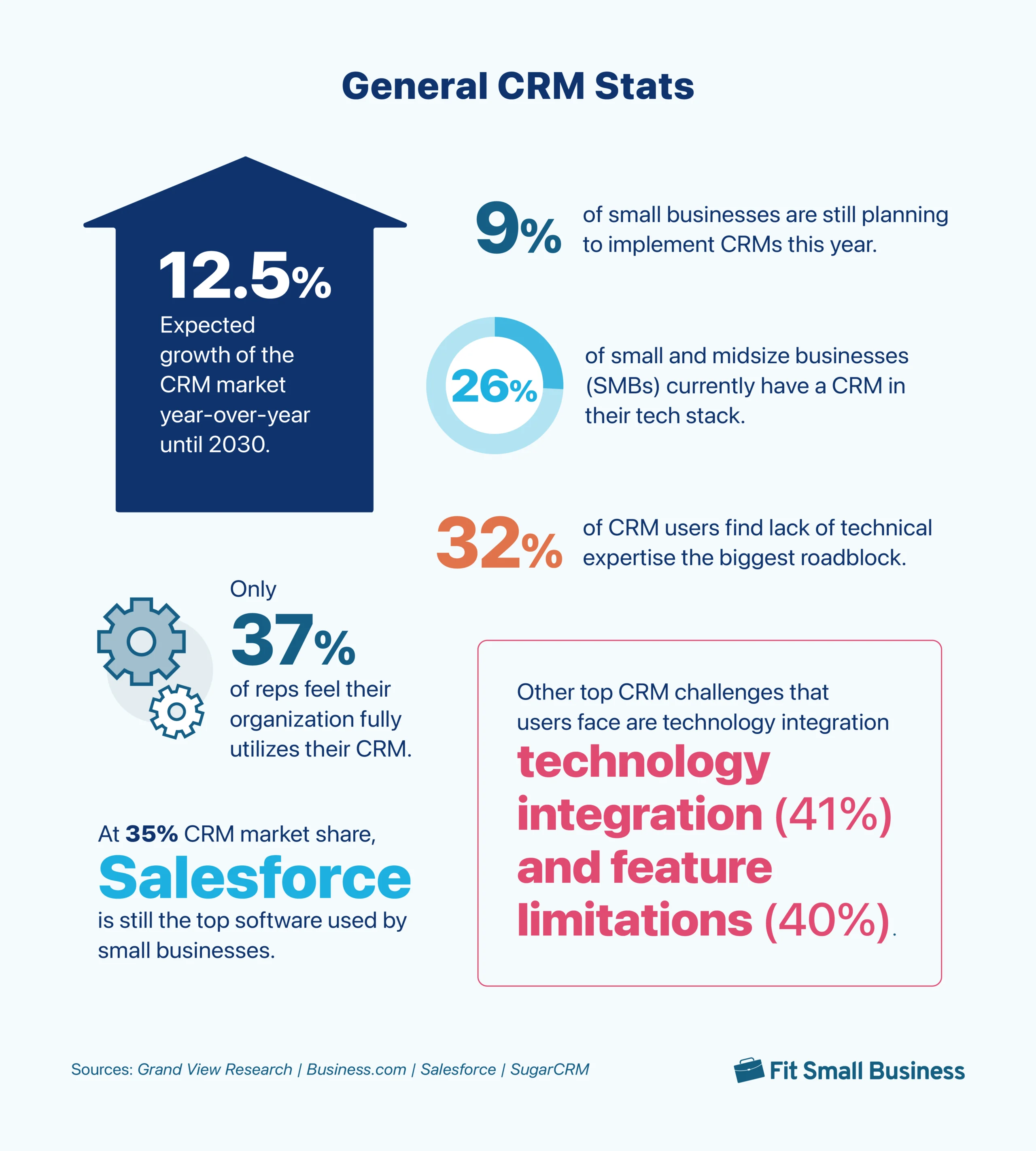
1. The CRM market is expected to grow 12.5% year-over-year until 2030.
(Source: Grand View Research)
Summary: Industry data shows the U.S. CRM market was valued at $20.5 billion in 2022—a substantial size that’s expected to hit $51.53 billion by 2030. The primary reason for such CRM growth is that more businesses recognize the value it has to offer. Additionally, providers are incorporating more features and integrations each year that expand into other business processes outside of traditional sales and marketing.
2. Only 37% of reps feel their organization fully utilizes their CRM.
(Source: Salesforce)
Summary: CRMs have tons of features, from contact storage to email marketing to workflow automation to sales reporting. Unfortunately, when it comes to CRM usage, most reps feel their organization isn’t leveraging enough of the capabilities. Businesses often entrap themselves by purchasing a product for one or a few modules or choosing not to invest time into learning other tools.
3. Just 26% of SMBs currently have a CRM in their tech stack.
(Source: Business.com)
Summary: This report uncovered a discrepancy. For small businesses using a CRM, 83% saw a positive return on investment (ROI), 61% cited they improved customer retention, and 86% felt the CRM helped achieve business goals. Yet only about a quarter of all small businesses have actually adopted a CRM.
4. 9% of small businesses are still planning to implement CRMs this year.
(Source: Business.com)
Summary: Despite the proven track record CRMs have in improving workflows and revenue, many small businesses haven’t yet adopted them. The study by Business.com points to the difficulty in selecting a provider as one of the top reasons companies don’t adopt a CRM.
5. At 35% CRM market share, Salesforce is still the top software used by small businesses.
(Source: Business.com)
Summary: The CRM juggernaut Salesforce continues its prominence in the marketplace thanks to its many productivity-enhancing integration options and robust features. When looking at other contenders of CRM by market share, Microsoft Dynamics 365 is at 16% while HubSpot is at 7%.
6. About a third of CRM users find lack of technical expertise the biggest roadblock.
(Source: Business.com)
Summary: There are many challenges to CRM implementation and maximizing value. For small businesses, the lack of expertise in using a CRM system was the largest. Next was the cost of a CRM (31%), followed by data migration issues (30%), user adoption (27%), and lack of app integrations (23%).
7. Other top CRM challenges that users face include technology integration (41%) & feature limitations (40%).
(Source: SugarCRM)
Summary: Aside from the top technology integration and platform feature limitations, another aspect that CRM users struggle with is their internal knowledge and skills (37%). The SugarCRM study emphasizes the importance of a CRM that is easy to set up, configure, and use because you cannot fully realize its benefits if your team does not actually use it.
CRM Statistics for Lead Management
These CRM stats cover one of the top use cases of a CRM system—overseeing sales leads. From generating new opportunities to qualifying prospects and everything in between, here’s how CRMs support lead management activities.
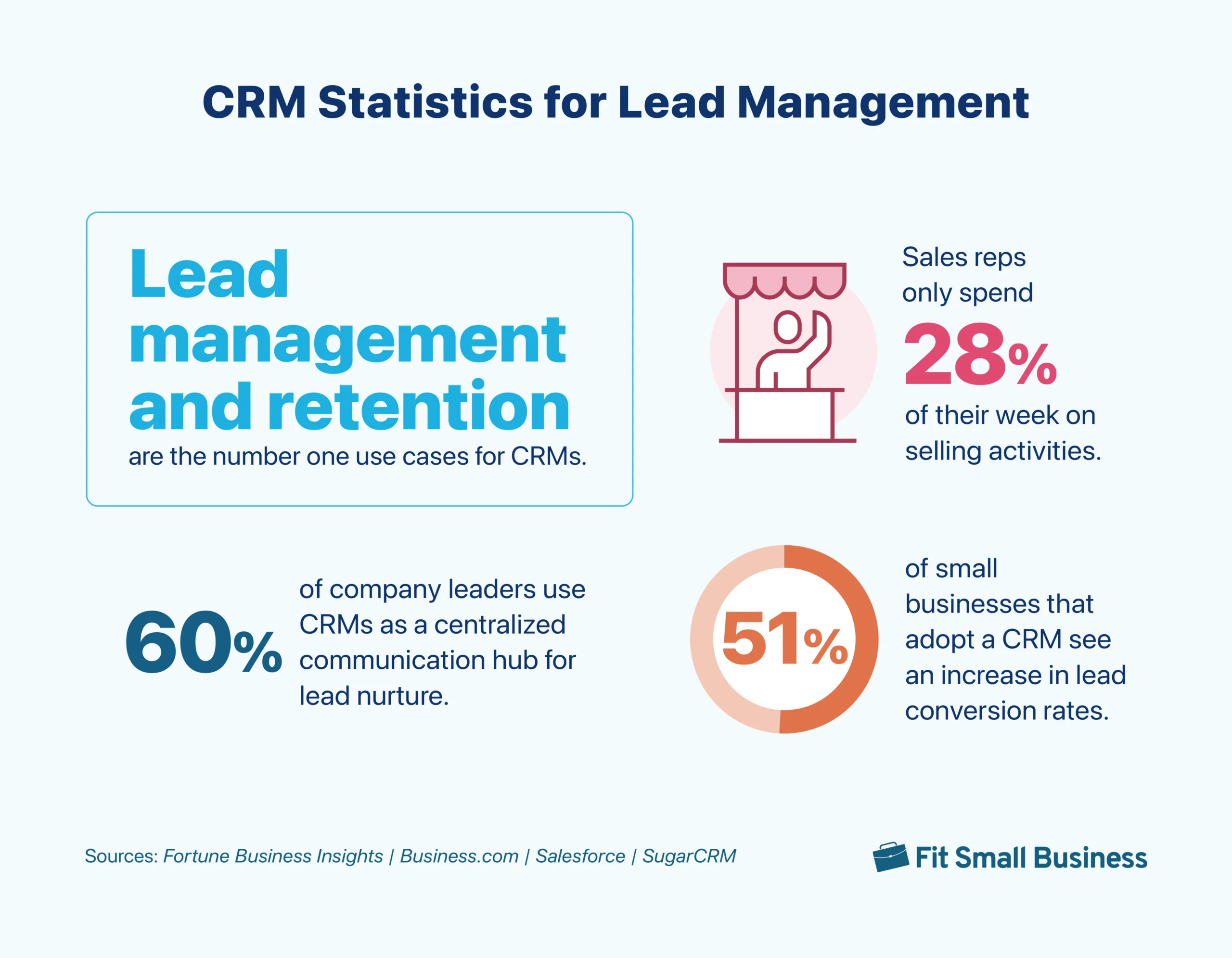
8. At 27.8%, lead management & retention are the top use cases for CRMs.
(Source: Fortune Business Insights)
Summary: In one of the CRM industry trends that has remained for a long time, most users simply want to generate and retain customers with their CRM. Specifically for lead generation, you can connect a CRM to third-party tools, such as Facebook Ads or your website forms, to create new contacts for form submissions. Many CRM products also let you directly engage prospects via email, phone, chat, and text to produce new leads.
9. 51% of small businesses that adopt a CRM see an increase in lead conversion rates.
(Source: Business.com)
Summary: Similarly, this survey also revealed that 33% of small business users see a significant decrease in the cost per lead conversion. Either way, these are solid outcome metrics and likely a result of the sales tools offered by a CRM system. For instance, there’s lead scoring that lets reps prioritize their time on good opportunities, drip campaigns that put email nurturing on auto-pilot, and task management tools that keep reps on track for their activity goals.
10. Sales reps spend only 28% of their week on selling activities.
(Source: Salesforce)
Summary: Salesforce studied how reps spend their time each week to find a discrepancy—particularly how much time is spent on selling and lead management activities. For example, only 9.3% is spent on prospect research, 8.7% on prospect outreach, and 19.8% on customer meetings. Most teams are bogged down with administrative, data entry, quote generation, and day-planning tasks, many of which a CRM can handle for you.
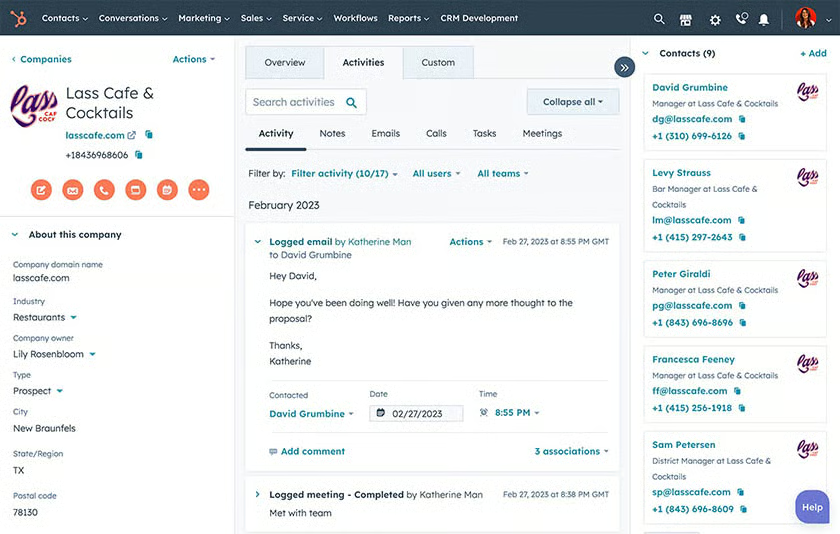
11. 60% of company leaders report using their CRM as a centralized communication hub for nurturing leads & customers.
(Source: SugarCRM)
Summary: SugarCRM surveyed over 800 leaders in global business-to-business (B2B) sales, marketing, service, and IT organizations to better understand how CRM use has changed in the last five years. Among the respondents, 54% represent small and midsize businesses, while 46% represent large enterprises. For the next five years, 45% of businesses will prioritize getting a complete view of customer interactions to maximize the value of their CRM system.
CRM Stats on Communications
Communication tools in CRMs enable teams to engage leads or customers via phone, live chat, email, and text from the same interface where they store their data. They also let you create and deploy bulk communications, such as a mass email marketing campaign, to your contacts. Let’s cover some CRM stats on communication features.
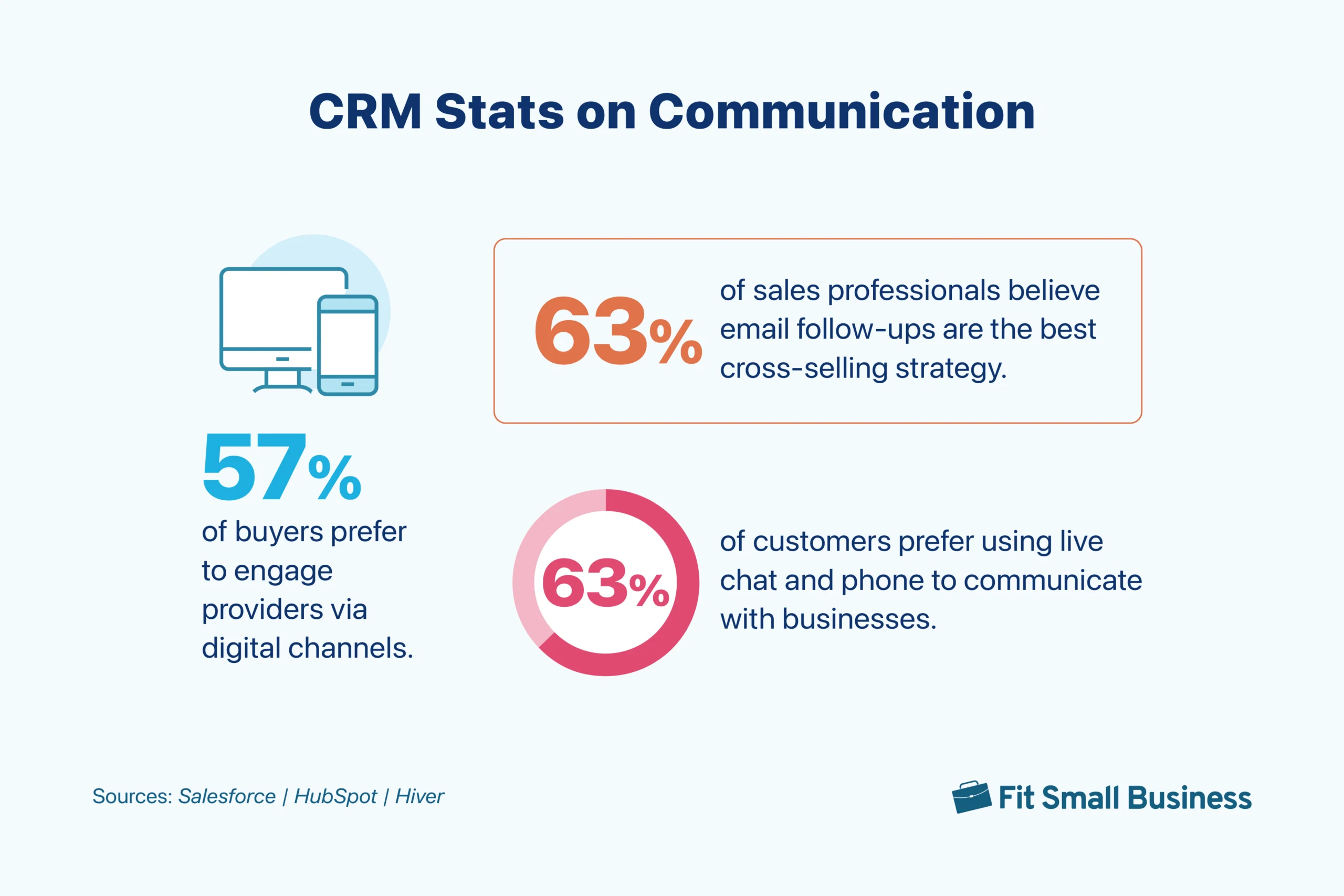
12. 57% of buyers prefer to engage providers via digital channels.
(Source: Salesforce)
Summary: Most customers want to connect on channels like online chat or email rather than in person or over the phone. Nearly all CRMs already offer email integrations with Outlook and Gmail—letting you manage your inbox and receive messages from your CRM. Many are also adopting live chat functions to enable more omnichannel functions for users.
13. 63% of sales professionals believe email follow-ups are the best cross-selling strategy.
(Source: HubSpot)
Summary: This same study found that 43% of reps feel email is an effective email channel for conducting outreach and that 32% find email templates to be one of the best sales enablement content. CRMs ultimately can serve as centralized email systems. Once integrated, you can directly contact leads, store email templates, and manage mass marketing campaigns all in one place.
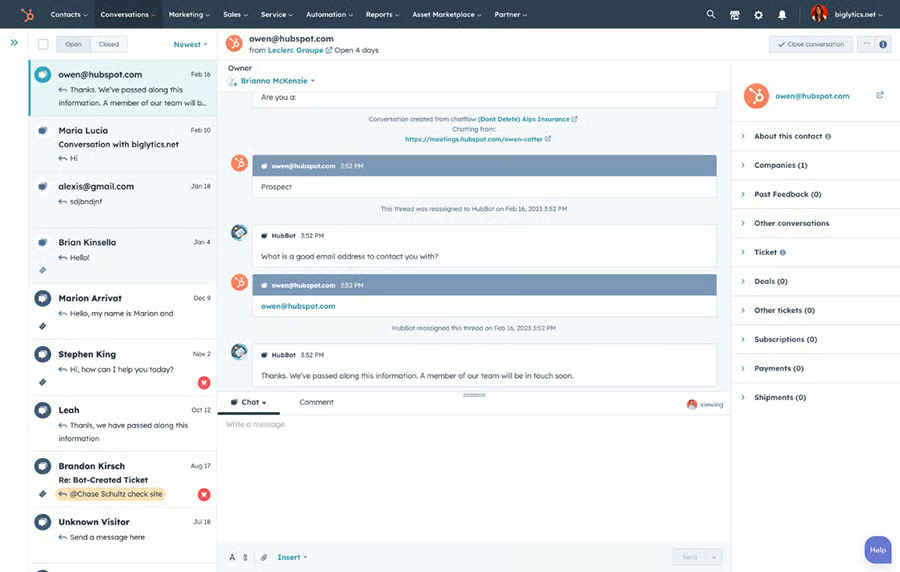
14. 63% of customers prefer using live chat & phone to communicate with businesses.
(Source: Hiver)
Summary: In this survey, email (77%) tops the list of customers’ preferred communication channels. While it is an assumed and must-have feature for CRMs, live chat and phone channels are catching up because people now want answers quickly and in real time.
CRM Stats for Improving the Sales Pipeline
Getting deals quickly through the pipeline is a huge priority for sales teams. A CRM plays a significant role in pipeline management in terms of generating opportunities and getting them through the sales stages. These stats show the value a CRM has in boosting pipeline efficiency and helping reps increase productivity.
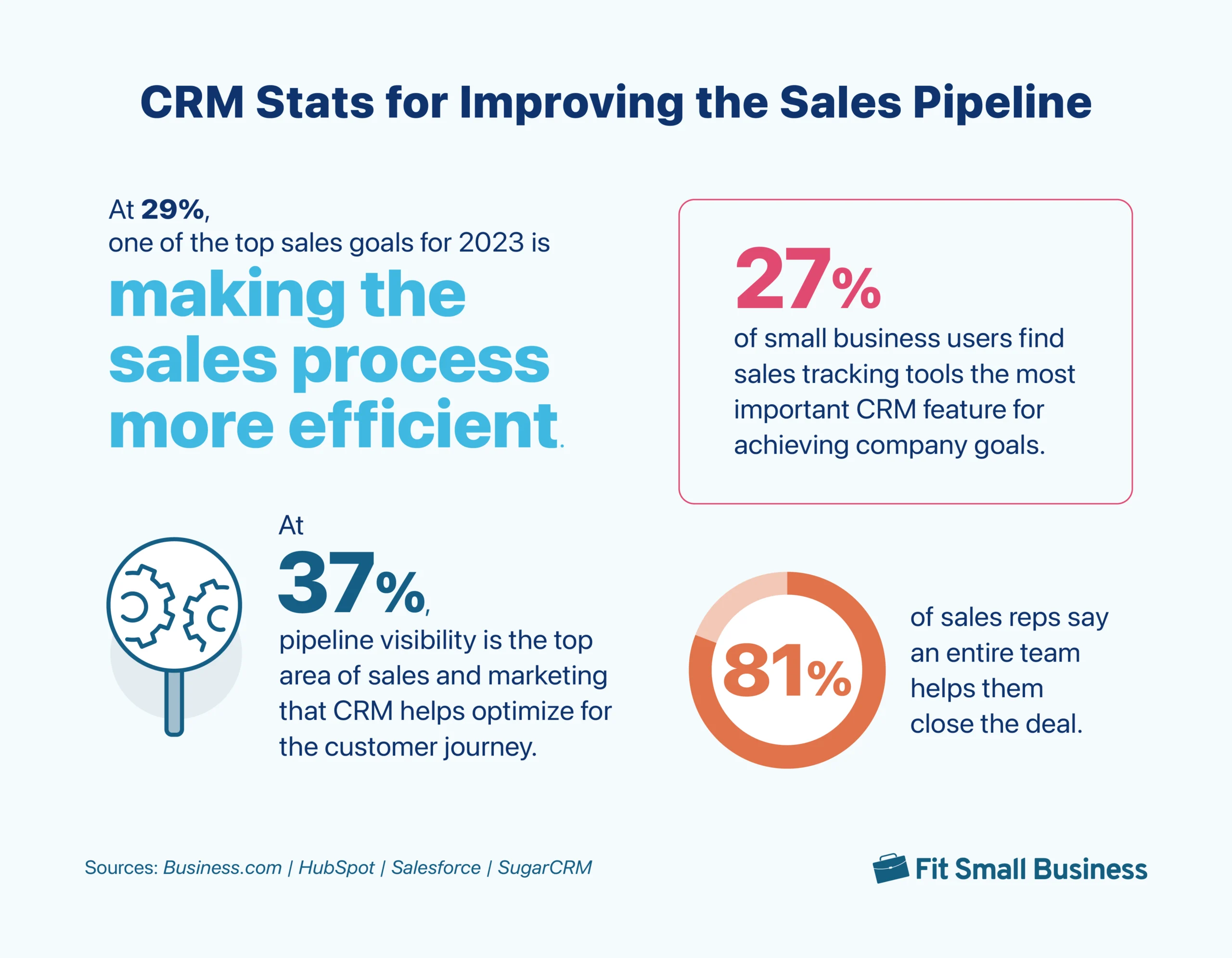
15. More than one-fourth of small business users think sales tracking tools are the most important CRM feature for achieving company goals.
(Source: Business.com)
Summary: Especially popular in business-to-business (B2B) sales, sales tracking features via deal or pipeline management are crucial to seeing where an opportunity is in the sales process. These CRM features are also typically supplemented with forecasting tools to predict revenue based on deal size and likelihood of closing—helping plan growth. If this survey was only for B2B organizations, the number would be much higher than 27%.
16. 29% of sales professionals think that reducing their tech stack would make the sales process more efficient.
(Source: HubSpot)
Summary: The more efficient your sales pipeline, the more deals you close. Businesses often lose prospects because the process takes too long, there’s poor communication, or they struggle to get all decision-makers on board with their product or service. You can solve these problems by using a CRM with built-in tools for deal management, activity tracking, contact storage, and communication in a single platform.
17. Most sales reps (81%) say an entire team helps them close the deal.
(Source: Salesforce)
Summary: Essentially, this survey found that most deals aren’t closed by one rep, but rather the marketing, finance, customer service, and IT teams, other sellers, and sales leaders who are often involved to get a deal through the pipeline. CRMs have shifted from supporting just sales teams to providing complete revenue operations (RevOps) solutions for sales, marketing, and service teams—letting them work with the same data and communicate with one another.
18. At 37%, pipeline visibility is the top area of sales & marketing that a CRM helps optimize for the customer journey.
(Source: SugarCRM)
Summary: Based on this SugarCRM survey, 37% of sales professionals want to improve the visibility of their pipeline. They also cited quality of leads (35%) and quantity of leads (31%) as the other top areas of sales and marketing that their CRM has helped optimize. This highlights the capabilities of CRMs to point reps to the top leads and to help move them through the sales pipeline stages.
CRM Statistics on Data Management & Reporting
CRMs offer an elaborate database for insights on leads, rep activity, and sales performance. These statistics outline the value of a CRM in helping businesses store and organize their data and generate reports that drive decision-making.
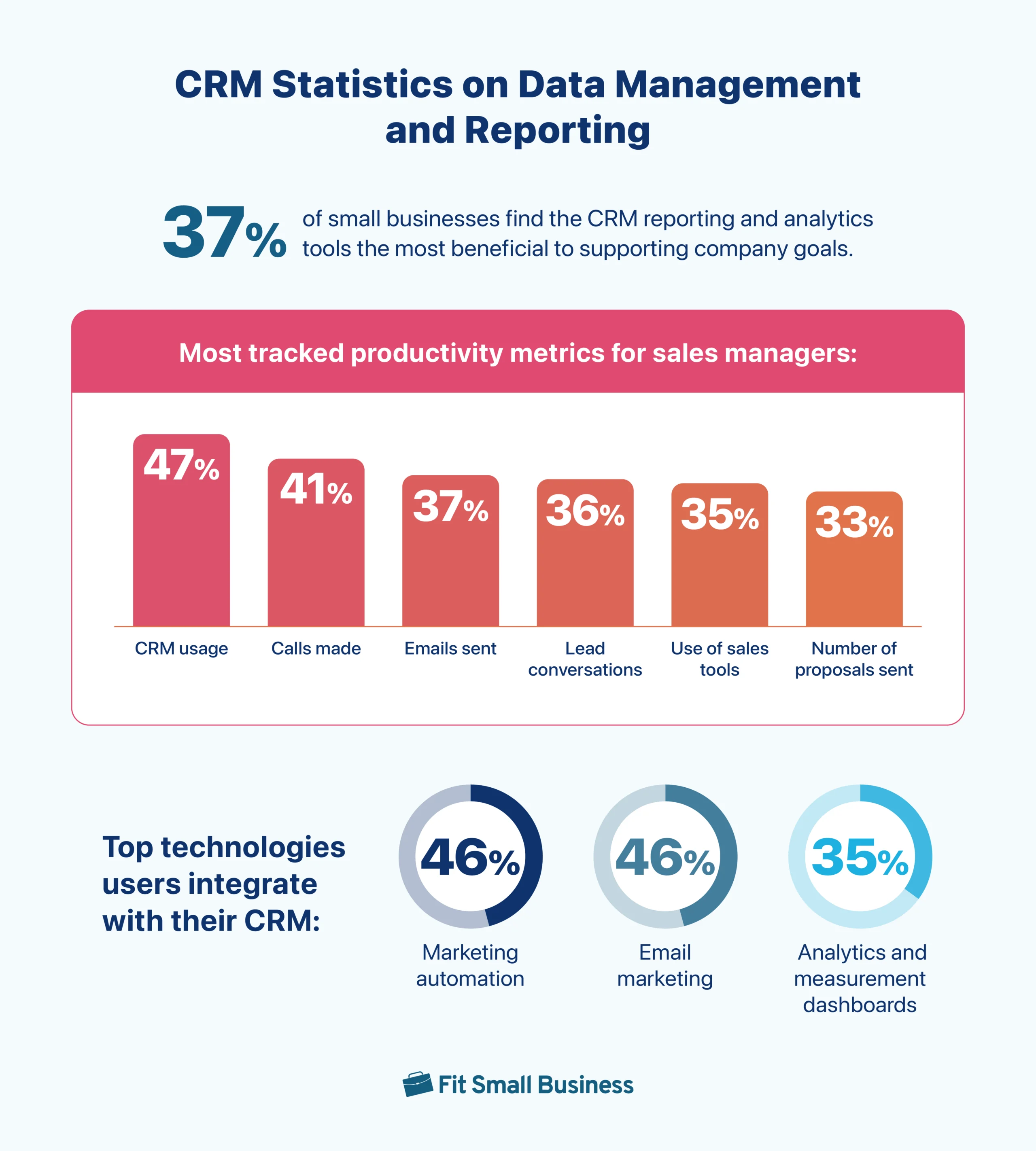
19. 37% of small businesses find CRM reporting & analytics tools the most beneficial to supporting company goals.
(Source: Business.com)
Summary: CRM reporting and analytics tools are the number one ranked features most important to small businesses. Assuming you keep a clean and up-to-date database, these tools are super valuable. They can tell you how you’re performing in terms of revenue and deals closed, your pipeline efficiency, where your leads are coming from, and sales activity numbers. CRMs also come with forecasting capabilities to predict revenue so you can plan for growth.
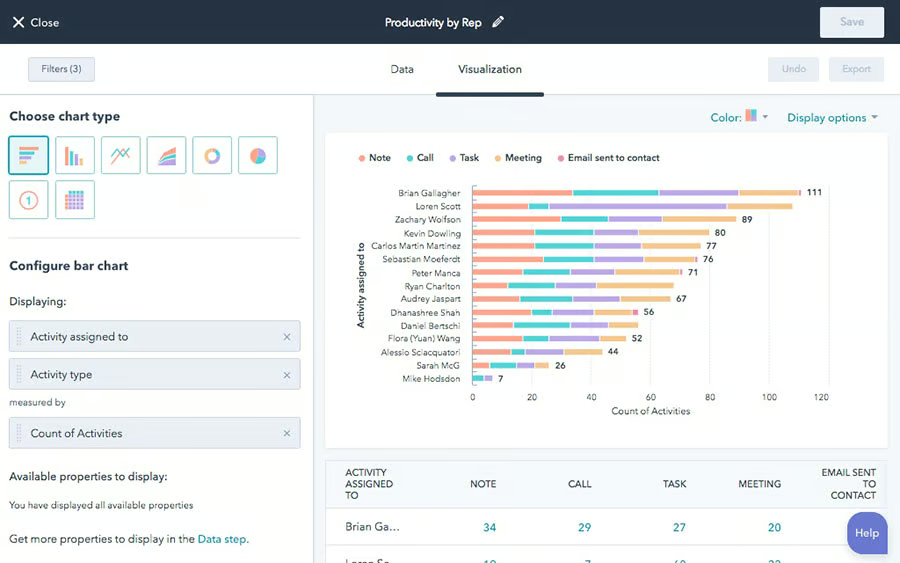
20. CRM usage, calls made & emails sent are the most-tracked productivity metrics for sales managers.
(Source: HubSpot)
Summary: HubSpot reviewed various activities that sales managers track for reporting purposes. Forty-seven percent track CRM usage, 41% track calls made, and 37% track emails sent. Additionally, 36% monitor lead conversations, 35% track the use of sales tools, and 33% monitor the number of proposals sent. Activity tracking, which can all be done in a CRM, is useful as input data to ensure reps are meeting quotas and predicting revenue numbers.
21. At 46% each, marketing automation & email marketing are the top technologies users integrate with their CRM.
(Source: SugarCRM)
Summary: Next to marketing automation and email marketing, analytics and measurement dashboards (35%) rank second among technologies integrated with CRMs. These CRM stats highlight the need for businesses to centralize their marketing and sales automation functions in a single platform. Analytics are also important because they provide sales and marketing teams with intent data, thus allowing them to prioritize high-value deals and send targeted messaging.
Stats on Artificial Intelligence (AI) & CRM Automation
Emerging technologies like artificial intelligence (AI) have made their way into CRM systems to help provide data insights and automate sales tasks. These statistics dive into where companies are in their AI-CRM adoption journey and the value it can provide.
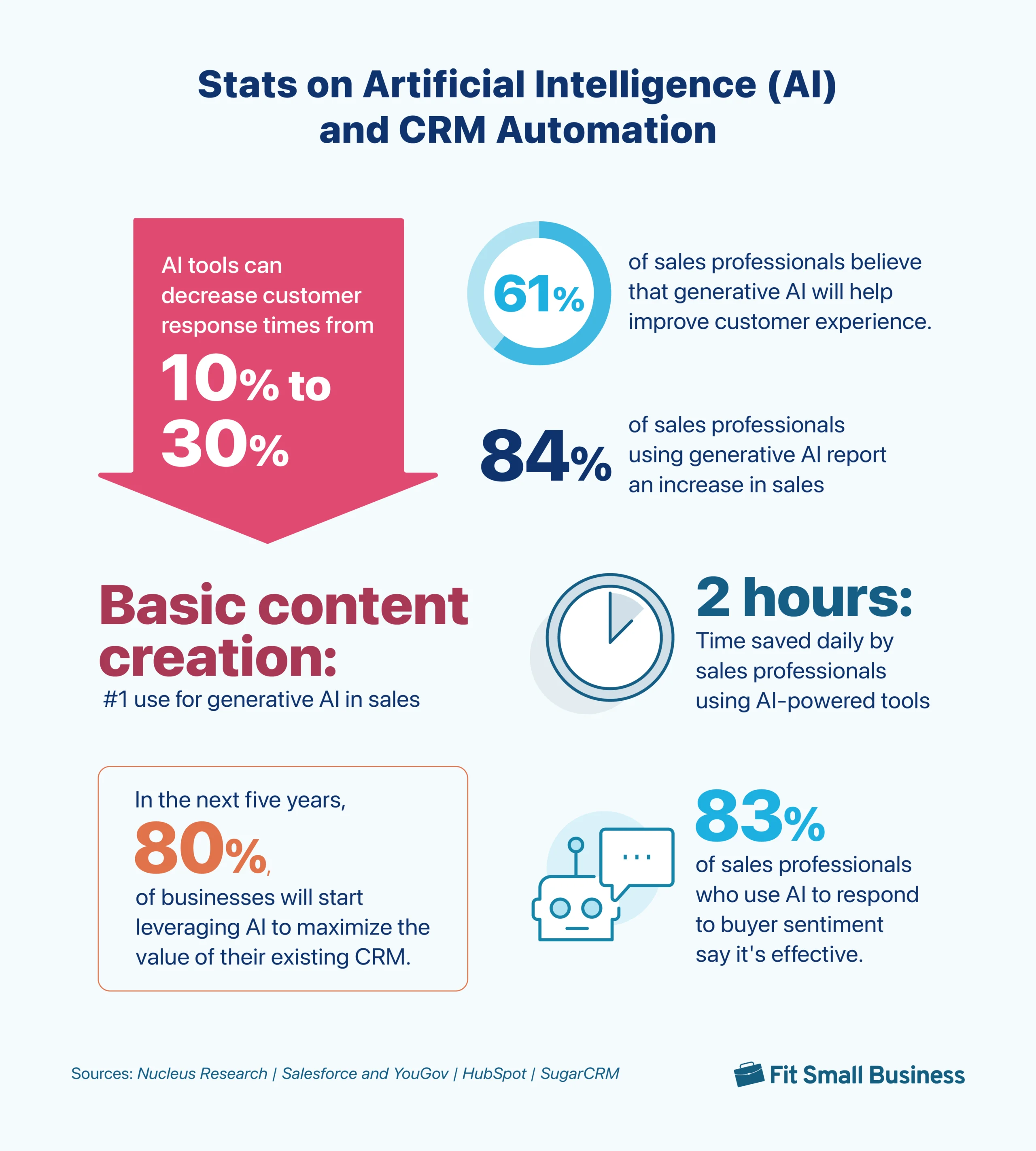
22. AI tools can decrease customer response times from 10% to 30%.
(Source: Nucleus Research)
Summary: AI in customer service is one of the most popular use cases of the technology—specifically, using it to auto-engage website visitors and respond to support inquiries. CRM providers are fully aware of this trend and the time-saving benefits it can offer. Many now provide chatbot communications in their systems where users can put entire conversations on auto-pilot so they can focus on other activities.
23. 61% of sales professionals believe that generative AI will help improve customer experience.
(Source: Salesforce and YouGov)
Summary: Salesforce partnered with YouGov to conduct an online survey on generative AI for over 2,000 full-time sales and service reps in the U.S., U.K., and Australia. The majority (61%) of respondents said they believed generative AI would help them deliver better and more efficient customer service.
24. 84% of sales professionals who use generative AI report increased sales through enhanced & more efficient customer interactions.
(Source: Salesforce and YouGov)
Summary: This survey from Salesforce and YouGov proved how effective generative AI is in increasing sales. Aside from the 84% of salespeople who affirmed this, 90% of service reps also said it helps them deliver better customer service. AI can reduce response times for faster ticket resolutions and automate tasks, helping businesses focus more on the customer and improve their product offerings.
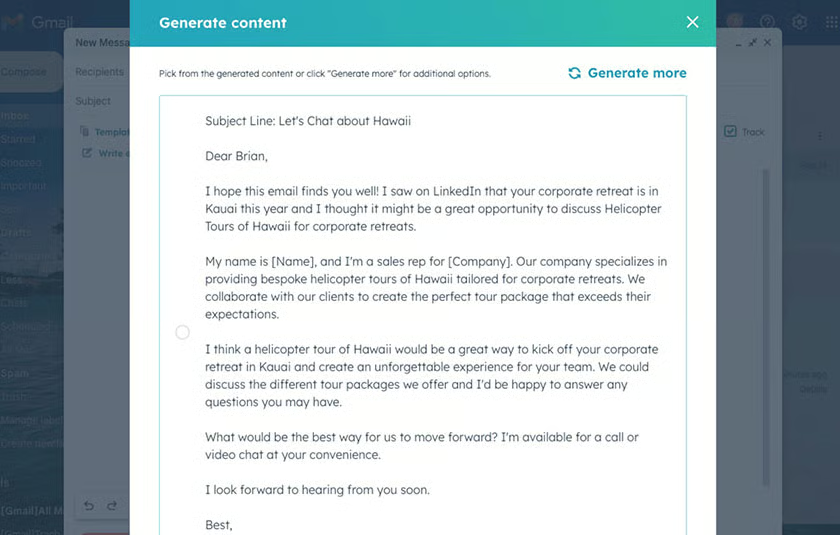
25. The top use for generative AI in sales is basic content creation.
(Source: Salesforce and YouGov)
Summary: Early adopters of generative AI use this technology for content creation (82%), analyzing market data (74%), and automating personalized sales communications (71%). However, respondents believe that it would have the biggest impact on a more complex use case like generating sales reports.
26. AI-powered tools can help sales professionals save two hours of work time per day.
(Source: HubSpot)
Summary: This HubSpot Sales Trends Report highlights how AI-powered tools like CRMs make it easier for reps to automate repetitive tasks to save two hours of work time in a day. These saved hours can now be used better by engaging and building relationships with prospects and customers.
27. In the next five years, 80% of businesses will start leveraging AI to maximize the value of their existing CRM.
(Source: SugarCRM)
Summary: In this survey, generative AI is the second priority of CRM users in the next five years, next to getting a complete view of customer interactions. With more businesses turning to AI in the next few years, it will become one of the main factors that will drive content creation and personalized engagement with customers.
28. 83% of sales professionals who use AI to respond to buyer sentiment say it’s effective.
(Source: HubSpot)
Summary: This HubSpot report also predicts that 52% of sales professionals who use AI to respond to buyer emotions are more likely to exceed their quota than those who don’t. A sales leader from the survey pointed out that AI tools can consider customers’ business needs and preferences to offer relevant responses. This feature eliminates the need for sales reps to guess what the customer really wants.
Bottom Line
Keeping up with CRM industry trends empowers you to make better decisions on the products and features you invest in. By applying these CRM statistics to your business, you can level up your sales performance in terms of lead management, customer communications, and the sales pipeline. You can also improve how you manage your data and automate tasks using emerging artificial intelligence tools.
