







RingCentral and Aircall are both voice-over-internet-protocol (VoIP) business phone systems offering unlimited calling and texting in the U.S. and Canada. In this RingCentral vs Aircall comparison, RingCentral beats Aircall with its comprehensive communications features, such as extensive integrations, virtual conferencing, team messaging, and lower pricing. However, Aircall notably offers robust customer service and sales features, such as a built-in power dialer.
Based on our comparison, the best use cases for Aircall vs RingCentral are as follows:
- RingCentral: Better unified communications as a service (UCaaS) platform for centralizing conversations across the entire organization
- Aircall: Better for businesses focused on phone sales needing a straightforward solution to drive efficiency within their telesales teams
- RingCentral vs Aircall at a Glance
- Best Alternatives
- Best for Pricing: RingCentral
- Best for Integrations: RingCentral
- Best for Call Monitoring & Management: RingCentral
- Best for Communication Channels: RingCentral
- Best for Team Collaboration: RingCentral
- Best for Customer Service: Aircall
- Frequently Asked Questions (FAQs)
- How We Evaluated RingCentral vs Aircall
- Bottom Line
RingCentral vs Aircall at a Glance
| RingCentral vs Aircall Pricing & Plans |  |  |
|---|---|---|
| Starting Monthly Price(per User) | $30 per user | $40 |
| Annual Pricing(per User) | $19.99 | $30 |
| Free Trial | 7 days | 14 days |
| Unlimited Calls Within the U.S. & Canada | ✓ | ✓ |
| Conference Calling | ✓ | ✓ |
| Video Conferencing | 200 | None |
| Ring Groups | ✓ | ✓ |
| Call Recording | ✓ | ✓ |
| Advanced Call Handling & Agent Monitoring | ✓ | ✓ |
| Integrations | 200+ | 100+ |
| Customer Support | 24/7 chat and phone | 24/7 chat, phone, and email |
| For More Information | Visit RingCentral | Visit Aircall |
Best Alternatives
RingCentral and Aircall are some of the cloud-based phone systems of choice that seamlessly integrate communication channels. However, there’s a chance that neither of these providers satisfies your business needs. Other top-notch Aircall and RingCentral alternatives offer unique features that better match your needs and budget.
The best RingCentral vs Aircall alternatives to consider include:
- Nextiva: Nextiva is one of our top VoIP services for home offices, offering a comprehensive all-in-one home office phone and conferencing solution. Users get great functionality at lower pricing points and access to an extensive library of integrations to streamline their workflows.
- Dialpad: Dialpad is a complete UCaaS solution with calling, messaging, meetings, and video features. Dialpad’s artificial intelligence (AI) capabilities include real-time call transcriptions and automated post-call summaries that improve business communications. It is a low-cost business phone solution with advanced AI, which is why it topped our list of the best cheap VoIP services.
- Grasshopper: If Aircall and RingCentral offer more features than you need, consider Grasshopper. It’s a simple and affordable VoIP service offering unlimited domestic calling and texting in an easy-to-use app.
Best for Pricing: RingCentral
| |
|---|---|
Monthly Plans* (per User):
| Monthly Starting Price** (per User):
|
*Quote is based on one to 20 users; save up to 40% with annual billing.
**Plans have a minimum of three to 10 users; save up to 29% with annual billing.
RingCentral wins over Aircall in overall value because its base plan comes with a lower price tag of $32.99 compared to Aircall’s $40 basic plan. RingCentral’s Essentials plan accommodates one to 20 users, while Aircall’s Essentials plan accommodates exactly three users only. Both providers offer annual billing discounts, with RingCentral offering a more significant discount. Annual billing for RingCentral starts at $19.99 monthly and $30 monthly for Aircall.
RingCentral’s four pricing tiers and optional add-ons allow businesses to pay only for what they need. This makes it an excellent option for startups and small businesses that don’t necessarily need custom third-party integrations and API access. Its base plan already includes crucial UCaaS features, such as document sharing, team messaging, and high-definition (HD) voice.
Best for Integrations: RingCentral
| |
|---|---|
| Offers 200+ integrations and includes API access. | Provides 100+ software integrations and has API access. |
For businesses needing extensive third-party software integration, RingCentral is the better choice. The platform integrates with over 200 platforms and includes API access for custom integrations. Key integrations include Salesforce, Chrome, and Microsoft Teams. On the other hand, Aircall only offers around 100 integrations and provides API access.
While RingCentral has about double the integrations of Aircall in this category, Aircall notably includes plenty of crucial integrations, such as HubSpot, Zoho CRM, and Salesforce.
Best for Call Monitoring & Management: RingCentral
| |
|---|---|
| Provides real-time analytics, call monitoring, call whispering, call barging, and advanced analytics. Overflow call queues, screen recording, user groups, and role-based access control with customized permissions are also available. | Offers real-time viewing of all calls with call whispering and tagging, live feeds, and Analytics+, a monitoring dashboard. |
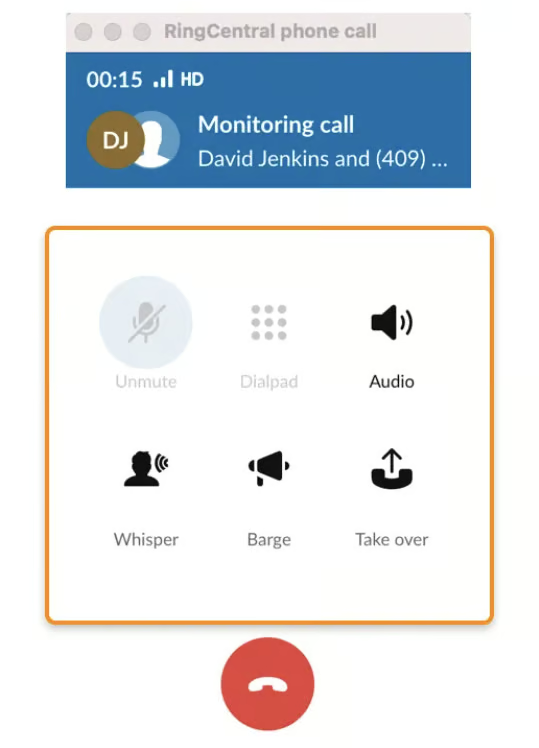
When it comes to real-time call monitoring and management, RingCentral takes a slight lead. Its call handling features, such as call barge, call takeover, and dual listening, are unavailable on Aircall. Both providers have call recording, whispering, and tagging, but advanced supervisor features like call barge allow immediate managers to take action if an agent needs assistance.
If you’re comparing Aircall vs RingCentral’s interactive voice response (IVR) and call queue features, RingCentral wins over Aircall with its multi-level auto-attendant functionality and overflow call queues. Both providers have extensive analytics, including custom analytics that allow businesses to drill down on users and teams using predefined templates for better performance tracking.
Best for Communication Channels: RingCentral
| |
|---|---|
| RingCentral is a complete UCaaS solution, offering calling, SMS texting, video conferencing, audio conferencing, team messaging, faxing, and file sharing. | Aircall provides basic communication channels like calling, SMS texting, and audio conferencing. |
RingCentral is a comprehensive UCaaS platform offering all major business channels for communication, including calling, texting, video conferencing, audio conferencing, team messaging, faxing, and file sharing. This helps small businesses unify all communications, eliminating the need for multiple tools.
Compared to RingCentral, Aircall’s communication channels are more basic; it doesn’t offer video conferencing, team messaging, faxing, or file sharing. However, it provides fundamental channels like calling, texting, and audio conferencing.
Best for Team Collaboration: RingCentral
| |
|---|---|
| RingCentral includes team messaging, task assignments, team huddle, file sharing, ring groups, and shared cloud storage. | Aircall offers shared call inbox, call assignments, annotations, shared contacts, and call tagging. |
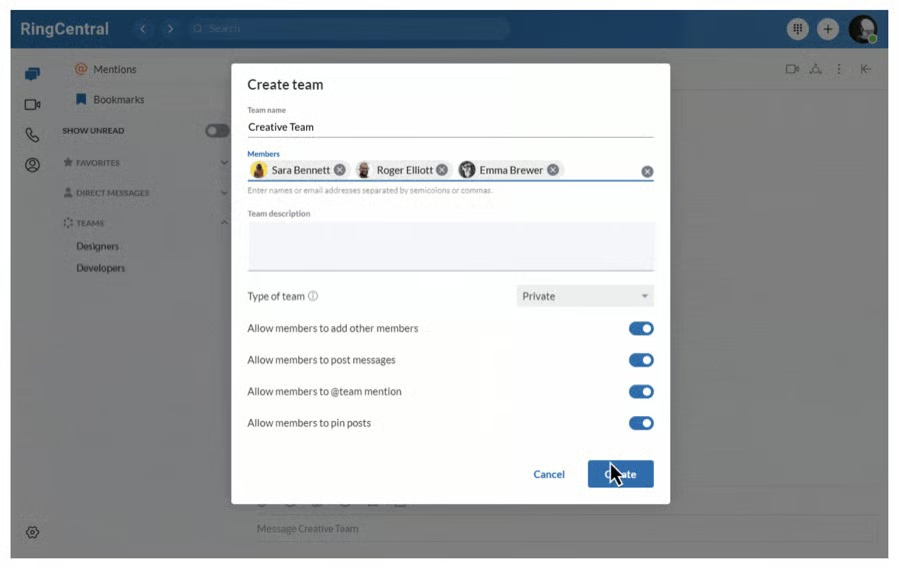
RingCentral is the better platform for team collaboration, thanks to team messaging that places all internal communication in a single application. File sharing, shared contacts, and file storage keep documents protected and accessible to all.
While Aircall lacks team messaging for file sharing, it still has some notable capabilities, like sharing contacts, assigning calls, commenting on calls, setting up ring groups, and establishing distribution rules for call routing. They’re straightforward compared to RingCentral’s team messaging and IVR routing, but more advanced than many other service providers.
Best for Customer Service: Aircall
| |
|---|---|
| 24/7 chat, phone, and email support, plus access to API developer support and VIP hotlines | 24/7 chat, phone, and social media support |
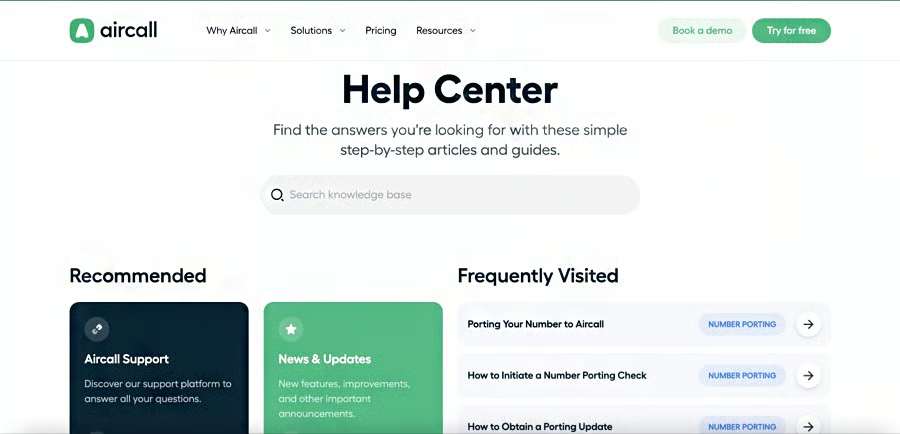
Aircall beats RingCentral when it comes to customer support with 24/7 chat, phone, and email support. Aircall’s Custom plan also gives users access to API developer support. RingCentral provides 24/7 support for chat and phone channels. Reviews reveal they’re not quite as responsive as Aircall, offering extensive documentation to help businesses self-serve.
RingCentral’s 24/7 support unlocks on its second-tier plan priced at $40.99 monthly, which is pretty steep for small businesses. With Aircall, upgrading to the premium plans unlocks VIP hotlines and API developer support. It costs a little more to upgrade to access this support, but you’ll receive priority support and quicker service.
Frequently Asked Questions (FAQs)
Are RingCentral integrations free?
Yes. Users subscribed to Premium and Ultimate plans have free access to all RingCentral integrations. However, you must have an active account with RingCentral and the other software provider—let’s say, HubSpot—to integrate the platforms.
How does UCaaS differ from VoIP?
VoIP is a business phone system with calling services, such as inbound and outbound calls and audio conferencing. UCaaS expands these communication offerings to include channels like text, chat, video, and file sharing. Read our guide for a detailed comparison between UCaaS and VoIP and how to use them for your business.
Is there free training for new Aircall customers?
Yes. Live group onboarding sessions are available and free for all Aircall plan subscribers. There is also an onboarding community resource available for customers.
How We Evaluated RingCentral vs Aircall
As VoIP service providers, RingCentral and Aircall share several standard offerings, so we looked at features, pricing, ease of use, and expert score to find out what makes each provider stand out. We also tested each software and checked user feedback on popular review websites. Our scoring system is based on the following categories: pricing, video meeting capabilities, collaboration features, ease of use, integrations, and security.
Here’s a complete breakdown of the factors used in this Aircall vs RingCentral comparison:
We compared monthly per-user costs for RingCentral vs Aircall and features accessible at different tiers. We also checked for the availability of a free plan, free trial, and discounts for annual billing and volume purchases.
We looked at capabilities essential to a video conferencing service, such as screen sharing, meeting recordings, and breakout rooms. We also checked which provider has a larger participant capacity and longer meeting duration.
We used each platform for specific activities to determine how easy or complicated it was to perform various tasks, such as scheduling a meeting or starting a video conference. In addition, we evaluated Aircall versus RingCentral based on ease of setup and installation.
We explored how each platform supports third-party integrations, including the amount and types of supported software. We also considered how RingCentral and Aircall work within the respective RingCentral and Aircall product ecosystems.
To get an expert score for RingCentral versus Aircall, we analyzed each product’s value by looking at total costs and feature sets. We also checked user reviews to determine the overall popularity of both platforms while considering our own experiences.
Bottom Line
Looking at RingCentral vs Aircall, we found that both providers are industry-leading VoIP small business solutions. RingCentral beats Aircall with its extensive integrations, collaboration features, and call management tools. It bundles team messaging, video conferencing, and file sharing into a unified communications (UC) platform. If you’re looking for a powerful dialer and top-notch customer support, Aircall is a provider for you to consider.
