







Shopify and WooCommerce are both popular ecommerce platforms for small businesses. We compared the two by testing them ourselves and building demo stores. We also evaluated their pricing plans, site builder, sales and product features, marketing tools, and ease of use.
Based on our WooCommerce vs Shopify evaluation, we recommend:
- WooCommerce: Best for businesses that use WordPress, have a web developer, and need a highly customized online store
- Shopify: Best overall among our top picks for ecommerce platforms
While WooCommerce is free and offers endless customization opportunities for an online store, Shopify won by a mile in every evaluation criteria other than pricing.
- Shopify vs WooCommerce Quick Comparison
- When to Use Each
- WooCommerce vs Shopify: Pricing & Payments
- WooCommerce vs Shopify: Site Builder & Maintenance Features
- WooCommerce vs Shopify: Sales & Product Features
- WooCommerce vs Shopify: Ease of Use
- WooCommerce vs Shopify: Expert Score
- Methodology—How We Evaluated WooCommerce vs Shopify
- WooCommerce vs Shopify Frequently Asked Questions (FAQs)
- Bottom Line
Shopify vs WooCommerce Quick Comparison
 |  | |
|---|---|---|
| Visit WooCommerce | Visit Shopify | |
| Overall Score | 3.46 out of 5 | 4.65 out of 5 |
| Best For | Businesses that already use WordPress | Small businesses or startups |
| Monthly Fees | Forever-free plan | $39–$399; Shopify Starter plan available ($5) |
| Additional Sales Channels | Facebook, TikTok, Pinterest, Amazon, Walmart, and more | Facebook, Instagram, Pinterest, TikTok, Etsy, and more |
| POS App | Yes; free and paid options (no built-in POS) | Yes; free and paid options (built-in Shopify POS) |
| Built-in Payment Processing | WooCommerce Payments | Shopify Payments (no additional fees) or third-party (0.5%–2% additional fee) |
| Product Limits | Unlimited | Unlimited |
| Online Store and Website Builder | Standalone website | Standalone website |
| Customer Support | Helpdesk, community forum, paid support via agencies | 24/7 email, live chat, and phone |
When to Use Each
Shopify is Best For
- Online stores wanting to do social selling: Shopify has exclusive partnerships with Facebook, Instagram, and TikTok to allow in-app purchases
- Multichannel retailers: Shopify’s seamless POS and ecommerce systems are best for omnichannel sales, and make it our top-recommended multichannel POS system
WooCommerce is Best For
- Adding ecommerce functionality to WordPress websites: WooCommerce is a WordPress plugin, so it makes perfect sense to develop your online store within WordPress if your existing website is already there. If you also have experience working with WordPress and its plugins, WooCommerce installation and setup will be more straightforward for you.
- Businesses planning to hire a developer or that want to develop their own store: WooCommerce is open-source, so the sky’s the limit when it comes to customization. Whatever you want your online store to have, there will likely be a feature for it in WooCommerce. If there isn’t, you can develop your own and upload it to its extension marketplace.
| Alternative | Monthly Fee | Best For | Read More |
|---|---|---|---|
 | $39+ |
| BigCommerce Review |
| Visit BigCommerce | |||
 | $0+ |
| Square Online Review |
| Visit Square Online | |||
 | $33+ for ecommerce |
| Squarespace Review |
| Visit Squarespace | |||
.cls-1{fill:#155E85;fill-rule:evenodd;}
If you are looking for more ecommerce alternatives or are unsure if WooCommerce and Shopify are right for you, see how they compare with other top ecommerce platforms. Alternatively, you can also explore our best free ecommerce web builders.
WooCommerce vs Shopify: Pricing & Payments
| | |
|---|---|---|
| 4.88 out of 5 | 3.75 out of 5 | |
| Free Plan | Yes | N/A |
| Online Store Plans | Forever-free | $39–$399/month |
| Buy Now Button | Yes, third-party paid integrations | Yes, $5/month (Starter Plan) |
| Built-in Payment Processing | WooCommerce Payments | Shopify Payments (no additional fees) or third-party (0.5% - 2% additional fee) |
| Payment Providers | Over 100 | More than 80 |
| One-click Checkout Option | Yes, third-party paid integrations | Shop Pay |
| Visit WooCommerce | Visit Shopify |
The right ecommerce platform for you will greatly depend on your business needs—such as your chosen payment provider, preferred selling channels, and expected sales volume.
WooCommerce is a free WordPress plugin but will entail initial investments to get an online store running. Meanwhile, you launch an online store for almost $40 a month with Shopify and grow it to an enterprise-level virtual megamall for around $400 per month.
Interested to know the true cost of starting an online store with WooCommerce and Shopify? When we tested the two platforms and built demo stores, we compiled our estimated expenses and found the following:
- WooCommerce: For startup expenses, you can expect to shell out anywhere from $800 to $1,500, with monthly recurring fees starting at $50, depending on your sales volume.
- Shopify: For startup fees, expect to pay $300 to $600 initially and around $75 to $150 in monthly expenses at the onset, including add-ons. If you need to sell in-store, that will be an additional $49 to $499 for hardware purchases plus an $89 per location monthly fee for using Shopify POS Pro (which we recommend).
WooCommerce Pricing Plans
WooCommerce is technically free, but you need to pay for the rest of what a basic ecommerce store needs—domain name, hosting, SSL certificate, and plugins you might want to install. All that on top of needing a self-hosted WordPress site.
Shopify Pricing Plans
Shopify provides three subscription plans, an enterprise plan, and a Starter Plan at $5/month, which allows you to embed Buy Now buttons to existing website pages and generate checkout links for social channels. Shopify doesn’t have a forever-free plan, but offers a free 3-day trial which you can extend for $1/month for three months.
- Basic Shopify ($39/month): You access Shopify’s core features—build an online store and sell unlimited products throughout virtually any selling channel on the internet.
- Shopify ($105/month): Under the Shopify plan, you access tools like professional-level reporting, POS enhancements such as register shifts and unlimited staff PINs for tracking activities.
- Advanced Shopify ($399/month): When your business takes off like a rocket, you’ll need every ecommerce tool Shopify has in its arsenal. Advanced Shopify is where you find that. In addition to everything mentioned above, this pricing tier gives you an advanced report builder, calculated third-party shipping rates, and a discount on Shopify credit card payment rates.
WooCommerce vs Shopify: Site Builder & Maintenance Features
| | |
|---|---|---|
| 3.13 out of 5 | 4.5 out of 5 | |
| Standalone Site | Yes, store + website pages (such as a blog) | Yes, store + website pages (such as a blog) |
| Website Templates | Yes, 3 free and nearly 70 paid | Yes, 11 free and more than 125 paid |
| Site Builder | Drag-and-drop builder | Drag-and-drop builder |
| App Marketplace / Add-ons | More than 800 | More than 8,000 |
| Visit WooCommerce | Visit Shopify |
If you want to know how we tested and built our demo stores, you can follow along the guides below:
Website Builder & Site Themes
In a nutshell, both platforms provide free and paid stylish themes. WooCommerce offers three free themes and around 65 paid ones, averaging $79 per year. Shopify has 11 free and more than 100 paid themes (starting at $180).
It is worth noting that while WooCommerce’s paid themes are initially less expensive, you need to pay for it yearly to be able to keep using them, unlike Shopify’s paid ones which only require an upfront payment. Most Shopify themes also come with unlimited free trial, only requiring payments when you publish their themes to your online store.
Shopify’s default free theme is Dawn, featuring a mobile-first template built on a drag-and-drop editor (OS 2.0). WooCommerce’s child theme is Storefront and is also mobile-responsive.
When we built our demo stores using these templates, we found Shopify’s Dawn more intuitive to use and given our limited tech know-how, we love that we were able to build an aesthetically pleasing look for our online store.
WooCommerce’s Storefront was also easy to use but we were not satisfied with how our store looked given its default style settings, and we were not able to further customize it without CSS or HTML coding.

Shopify’s Dawn theme was stylish and easy to customize. 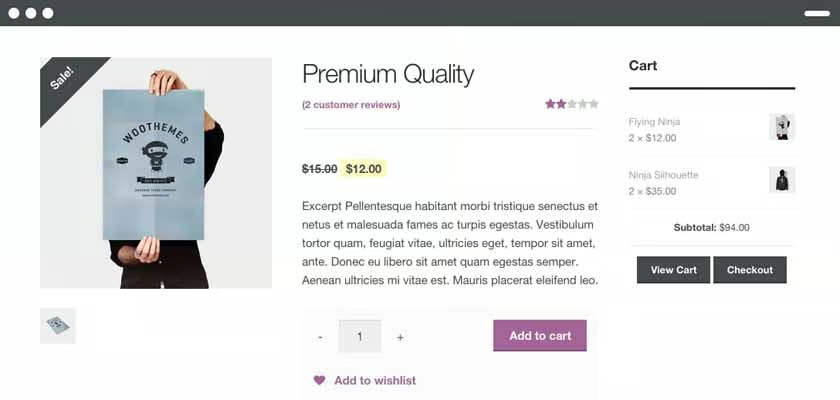
This is how WooCommerce’s Storefront’s product page looks like.


SEO & Blogging
This is the only area where WooCommerce wins over Shopify, but just by a margin. Since WooCommerce operates on WordPress (a CMS or blogging platform), you will have access to a variety of strong SEO plugins such as Yoast.
Shopify, meanwhile, lets you edit title tags, meta descriptions, URLs for blog posts, webpages, products and more. It also has close to 600 SEO apps in its App Store. However, Shopify can’t beat WordPress’ CMS platform, which it has based even its own blogging feature from.
Security & Compliance
Shopify has stronger security features than WooCommerce. Since it’s a fully hosted ecommerce solution, Shopify has a free built-in SSL certificate and is PCI compliant. WooCommerce is a self-hosted WordPress plugin, so you have to handle and install its SSL certificate and make it compliant for online sales transactions.
WooCommerce vs Shopify: Sales & Product Features
| | |
|---|---|---|
| 3.5 out of 5 | 5 out of 5 | |
| In-store and Mobile Sales | Yes, paid third-party integration | Shopify POS |
| Social Sales Channels | Facebook, Pinterest, TikTok | Facebook, Messenger, Instagram, TikTok, Pinterest, YouTube |
| Sell on Marketplaces | Google Shopping, Etsy, Walmart, eBay | Amazon and eBay |
| Product Limits | Unlimited | Unlimited |
| Product Variants | Unlimited | Three per product |
| Digital Goods | Yes, built-in | Yes, using a third-party app-free or paid (5GB size limit) |
| Abandoned Cart Recovery | Yes, paid third-party integration | Across all plans |
| Integrated Shipping Solutions | Yes | Yes |
| Real-time Shipping Calculator | No, discontinued in WooCommerce v.3.5 | Yes, starting at $399/month plan |
| Shipping Discounts | WooCommerce Shipping | Shopify Shipping (up to 74%) |
| Email Marketing | Yes, paid third-party integration | Shopify Email, across all plans |
| Multicurrency | Yes, if using WooCommerce Payments | Yes, if using Shopify Payments |
| Multilingual | Yes, paid third-party integration | Yes, all plans except Starter |
| Visit WooCommerce | Visit Shopify |
Shopify definitely gives you more bang for your buck with plenty of built-in or native integrations for sales and marketing. What we like about this setup is if you are just starting out, its built-in marketing tools will be enough to get you started in promoting your products. And when you start to scale and need more advanced features, there are plenty of apps to choose from its App Store. You can keep monthly overhead costs low just by using Shopify’s toolkit.
Sales Features
When it comes to sales, Shopify lets you sell in-person, online through your ecommerce store and via various social media platforms and marketplaces. Its POS solution, Shopify POS, is one of the best POS systems for small businesses and is free in all ecommerce plans. It also recently launched Shopify POS Go, an all-in-one device complete with an integrated card reader and barcode scanner.
Shopify also has extensive direct partnerships with platforms like Facebook, Instagram, and TikTok to activate seamless in-app shopping, catalog management, and order syncing.
While WooCommerce also lets you sell in person and in various online channels, you would need to add an integration from a third-party provider, which often is a paid add-on. For example, for in-person selling, you can use Square (which is free) or Lightspeed (which is a paid integration).
Marketing Tools
Perhaps the most significant advantage of Shopify over WooCommerce when it comes to marketing is its built-in email marketing toolkit which consists of an abandoned cart saver, Shopify Email, and Shopify Forms, which are all free.
Shopify’s abandoned cart saver is included even on its first tier subscription, Basic Shopify. Shopify Forms is a lead capture tool that lets you collect customers’ email addresses from your webpages. Shopify Email allows for sending up to 10,000 emails each month for free, and then it’s only a dollar for every 1,000 emails on top of the monthly free allocation.
These tools are usually pricey add-ons for WooCommerce.
WooCommerce vs Shopify: Ease of Use
| | |
|---|---|---|
| 1.75 out of 5 | 5 out of 5 | |
| Onboarding and Setup Guide | Yes; steep learning curve | Yes; easy-to-follow setup wizard |
| Store Management | Overwhelming due to many extensive customization options | Beginner-friendly |
| Online Knowledgebase | Extensive | Extensive |
| Community Forum | Yes; active and helpful community members | Yes; active and helpful community members |
| Customer Support | No phone support; just a helpdesk that provides limited support | 24/7 chat, email, and phone |
| Visit WooCommerce | Visit Shopify |
Customer Support
Since WooCommerce is an open-source platform, getting support for its plugins can be tricky. It does not have phone support and only entertains emails through its help desk. The only advantage is that WooCommerce has a great and supportive community and an extensive knowledge base where you can find answers for almost any question you may have and train in the form of video tutorials.
It also has a list of acknowledged agencies and developers you can work with if you need to hire one.
With Shopify, on top of helpful beginner guides and video tutorials, you have access to live support via phone or chat 24/7. We cannot stress how important this is for business owners who might need more hand-holding during initial store setup. While we did not need to reach out to support when we built our Shopify demo store (the dashboard has a setup wizard and bubble prompts that made our store setup go extremely smoothly), online user reviews have a high satisfaction rating on Shopify’s customer support.
It’s also worth noting that Shopify has a database of agencies, developers, and other experts as well should you need one.
WooCommerce vs Shopify: Expert Score
WooCommerce
4.38 / 5
WooCommerce is the perfect solution for those who understand WordPress and have technical know-how with code. WooCommerce can be a tempting solution for those that have a stringent budget, but if you are inexperienced, you will have a hard time creating an online store that you are satisfied with and will be better off using other free ecommerce website builders.
However, if you prefer a customized store and have the budget to hire a developer, go with WooCommerce as it can go as far as you want when it comes to customizing your online store.
The majority of WooCommerce reviews online note that it is the perfect ecommerce plugin for WordPress. It is easy to install and often provides updates. However, most negative feedback centers around how setting it up can be challenging for those who do not know about custom coding or building websites. WooCommerce users also say that while the plugin is free, its add-ons can get expensive.
Shopify
4.69 / 5
We have Shopify as our top pick for best ecommerce platforms with good reason. As ecommerce experts, we frequently test its platform to evaluate how it compares with other ecommerce website builders, and Shopify always outperforms them all. We also keep tabs on its updates to give real-time feedback and are surprised with all the new built-in features it has added as of late.
Go with Shopify if you want an all-in-one easy solution for your ecommerce needs. Its monthly subscription pricing of $39 is a steal considering everything you get under the plan.
The majority of Shopify online user reviews reflect the platform’s ease of use. In fact, its ease of use—even for those without tech expertise—is one of the primary points of praise among reviewers. Meanwhile, the common complaint is that Shopify is harder to customize on the back-end than other ecommerce platforms.
For real Shopify user feedback, visit our Shopify review.
Methodology—How We Evaluated WooCommerce vs Shopify
To help you decide which ecommerce platform is best for your store, we compared WooCommerce and Shopify on price, ease of use, store builder and design tools, inventory management, and sales tools. We built demo stores and added our own expert opinion based on years of experience testing different ecommerce platforms.
Click through the tabs below for our overall online payment processor evaluation criteria:
The following retail and ecommerce experts contributed to this article:
 | Meaghan Brophy is a resident retail and ecommerce expert at Fit Small Business with over 10 years of retail experience and 7 years of experience delivering actionable content to independent retailers. She has spent the last 4+ years at Fit Small Business testing retail and ecommerce software. |
|---|---|
 | Agatha Aviso is Fit Small Business’ resident ecommerce software expert. She has spent years testing and evaluating different platforms and building online stores. |
Our Scoring Methodology
How we weighted each factor in this evaluation.
We considered the price point of each base plan that offers a complete online store, what plan options are available as your business grows, and payment processing options, including fees, flexibility, and one-click checkout options.
We considered how easy it is to build and maintain a professional and attractive online store, including available templates, customization options, free domain and SSL certificates, unlimited storage and bandwidth options, and built-in SEO tools and site analytics.
We looked at what kind of product assortments Shopify and Ecwid can accommodate, tools for in-store and mobile, integrated social media, and marketplace selling, and marketing tools. We also consolidated shipping options and PCI compliance.
Because online stores operate 24/7, we prioritized platforms that offer 24/7 customer support and have multiple customer touchpoints, such as phone, email, and chat.
Here, we considered overall value, quality of features, popularity, customer satisfaction, and ease of use. We also factored in our own experience working with each platform and feedback from businesses that use each system.
WooCommerce vs Shopify Frequently Asked Questions (FAQs)
What is the best ecommerce platform?
Shopify is our top pick for best ecommerce platforms because of its ease of use and robust set of sales and marketing features.
Which platform is more scalable, WooCommerce or Shopify?
Both platforms are scalable, with WooCommerce having endless customization possibilities and Shopify offering an enterprise plan.
Can you use WooCommerce or Shopify for free?
WooCommerce is technically free but you would need to spend for domain name, hosting, security, and more. Shopify doesn’t have a free plan but offers a free trial.
Which has better apps between Shopify vs WooCommerce?
Shopify has better apps than WooCommerce, quality- and quantity-wise. WooCommerce has about 800 extensions compared to Shopify’s 8,000 apps.
Is Shopify or Woocommerce more popular?
Both are extremely popular ecommerce platforms. Shopify is popular among small business owners and WooCommerce is the preferred ecommerce plugin for WordPress.
Bottom Line
In WooCommerce vs Shopify, Shopify clearly outperforms WooCommerce in almost every category. While WooCommerce offers endless possibilities for an online store, it can be a steep investment (budget and time wise) for the small business owner.
We recommend going with Shopify when it comes to starting an online store. If you want to start selling on social media, its Starter plan at $5/month is perfect for you. However, if you are serious about selling online, its subscription plans starting at $39/month are a better fit. Shopify gives you all the tools you need to get started selling online. Start a three-day free trial of Shopify today, and extend your trial by $1 a month for three months.
