







Choosing the right website builder comes down to more than just price. The best platform for your business depends on how quickly you want to get online, whether you plan to sell products or services, and how much control you want over your site’s design and functionality.
To find the best website builders for small businesses, I evaluated today’s leading platforms based on pricing, ease of use, AI capabilities, design flexibility, SEO tools, ecommerce features, customer support, and overall value. I also built test websites, explored each platform’s AI and customization tools, and reviewed verified customer feedback to understand how they perform beyond the marketing claims.
After comparing all the options, Hostinger earned my top spot for its combination of affordability, AI-powered website creation, built-in business tools, and beginner-friendly experience. That said, it isn’t the best choice for every business. Whether you need appointment scheduling, advanced blogging tools, a WordPress-based website, or professional website design services, there’s another builder on this list that’s a better fit.
Here are my top recommendations:
| Provider | Best for | Starting price, billed annually |
|---|---|---|
| Hostinger | Overall value | $3.99/month |
| GoDaddy | Appointment booking | $9.99/month |
| IONOS | Built-in website security | $1/month |
| Squarespace | Design-focused websites | $16/month |
| B12 | AI-built websites with expert support | Free or $49/month |
| DreamHost | AI-powered WordPress sites | $2.89/month |
| Wix | A free and beginner-friendly website builder | Free or $17/month |
| HubSpot Content Hub | Content marketing and blogging | Free or $7/month |
- Overview of the best website builders for small businesses
- What makes Hostinger the best for overall value?
- Hostinger
- GoDaddy: Best for Appointment-booking Features
- What makes IONOS the best for built-in website security?
- IONOS
- What makes Squarespace the best for design-focused websites?
- Squarespace
- What makes B12 the best for AI-built websites with expert support?
- B12
- What makes DreamHost the best for AI-powered WordPress sites?
- DreamHost
- What makes Wix the best free and beginner-friendly website builder?
- Wix
- What makes HubSpot Content Hub the best for content marketing and blogging?
- HubSpot
- Frequently asked questions (FAQs)
- Bottom Line
Overview of the best website builders for small businesses
| Provider | Ecommerce | Appointment booking | CRM and marketing tools | Expert score out of 5 |
|---|---|---|---|---|
| Hostinger | ✓ | ✕ | ✕ | 4.97 |
| GoDaddy | ✓ | ✓ | ✓ | 4.94 |
| IONOS | ✓ | ✕ | ✕ | 4.76 |
| Squarespace | ✓ | ✓ | ✓ | 4.59 |
| B12 | ✓ | ✓ | ✓ | 4.58 |
| DreamHost | ✕ | ✕ | ✕ | 4.56 |
| Wix | ✓ | ✓ | ✓ | 4.20 |
| HubSpot Content Hub | ✕ | ✕ | ✓ | 3.96 |
Why you can trust Fit Small Business
Methodology: How did I evaluate the best small business website builder?
I evaluated each website builder using Fit Small Business’s proprietary scoring rubric. In addition to comparing features and pricing, I built test websites, explored each platform’s AI tools and customization options, and reviewed verified customer feedback to assess how well they perform for real small businesses.
- Pricing (30% of overall score): I compared entry-level pricing, ecommerce costs, monthly billing options, free plans or trials, money-back guarantees, and overall long-term value.
- General features (20% of overall score): I evaluated the core features every small business website builder should offer, including storage, free domains, AI website builders, SEO tools, SSL security, and ecommerce capabilities.
- Advanced features (20% of overall score): I assessed growth-focused capabilities such as blogging, appointment scheduling, marketing tools, third-party integrations, and business email options.
- Customer support (10% of overall score): I reviewed support availability across live chat, phone, email, and help centers, while also considering the quality of each provider’s documentation and self-service resources.
- Expert score (20% of overall score): I combined my hands-on testing with verified customer reviews to evaluate each platform’s ease of use, design flexibility, AI capabilities, overall feature set, and value for money.
What makes Hostinger the best for overall value?
Why I chose Hostinger
Hostinger is my top recommendation because it delivers the best overall value for most small businesses. It combines affordable pricing, reliable hosting, AI-powered website creation, and built-in business tools in a single platform, making it easy to launch a professional website without hiring a developer.
During my evaluation, Hostinger stood out for its intuitive setup process, modern templates, and well-rounded feature set. Many competitors offer similar capabilities, but Hostinger bundles AI tools, ecommerce functionality, and managed hosting into lower-priced plans, giving small businesses more value for their investment.
While Squarespace offers more design flexibility and Wix provides deeper customization, Hostinger strikes the best balance between ease of use, features, and affordability. For entrepreneurs, freelancers, and growing businesses, it’s the website builder I’d recommend first.
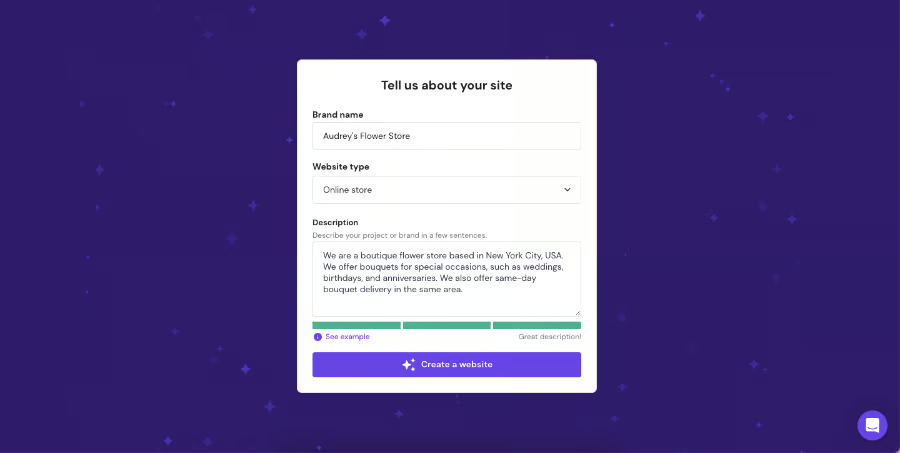
Use Hostinger’s AI website builder to instantly generate a website draft. (Source: Hostinger) 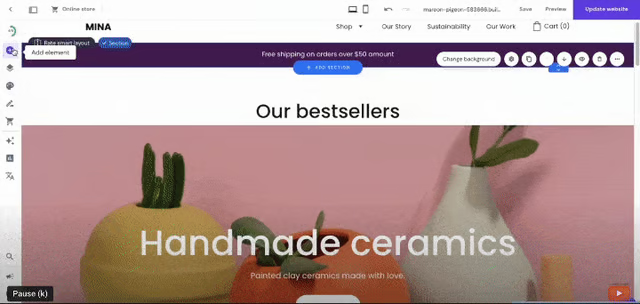
There’s also the drag-and-drop website builder that lets you start with a template. (Source: Hostinger)


Key features
- AI website builder: Generate a complete website from a simple prompt, then customize it using Hostinger’s drag-and-drop editor. Built-in AI tools can also help create text, images, and SEO-friendly content.
- Built-in ecommerce: Create an online store, accept payments, manage inventory, and sell physical or digital products without installing additional plugins.
- SEO and marketing tools: Optimize your website with built-in SEO settings, connect Google Analytics and Search Console, and monitor site performance from a single dashboard.
- Managed web hosting: Every plan includes web hosting, SSL certificates, and a 99.9% uptime guarantee. Eligible annual plans also include a free domain for the first year, while higher-tier plans add automatic backups and performance enhancements.
- Business email: Create a custom email address with your domain through Hostinger Email or integrate with Google Workspace for business communications.
Hostinger pricing
| Individuals & Business plans | Premium | Business | Cloud Startup |
|---|---|---|---|
| Monthly price, billed annually | $3.99 Renewal: $10.99 | $4.99 Renewal: $16.99 | $9.99 Renewal: $25.99 |
| Monthly price, billed monthly | $11.99 | $18.99 | $27.99 |
| Agency plans | Startup | Professional | Growth |
|---|---|---|---|
| Monthly price, billed annually | $29 Renewal: $49 | $49 Renewal: $69 | $69 Renewal: $89 |
| Monthly price, billed monthly | $49 Renewal: $69 | $69 Renewal: $89 | $89 Renewal: $109 |
GoDaddy: Best for Appointment-booking Features
Why I chose GoDaddy
If you’re building a website on GoDaddy, you’ll find one of the easiest platforms for launching a service-based business online. It combines website creation, appointment scheduling, and marketing tools in one beginner-friendly platform, making it a great fit for consultants, salons, fitness studios, home services businesses, and other companies that rely on online bookings.
The addition of GoDaddy Airo strengthens the platform even further. During my evaluation, I found it useful for generating websites, logos, marketing copy, and other branded assets from a simple prompt, helping reduce the time and effort required to launch a professional website. Combined with GoDaddy’s intuitive editor and built-in Content Studio, it’s an excellent option for first-time website owners and small teams with limited design or marketing experience.
While Hostinger offers better overall value and Squarespace delivers more polished website designs, GoDaddy remains my top recommendation for businesses that prioritize appointment booking and want AI-assisted website creation with built-in marketing tools. If your goal is to get online quickly and start attracting customers, GoDaddy is one of the strongest choices in this roundup.
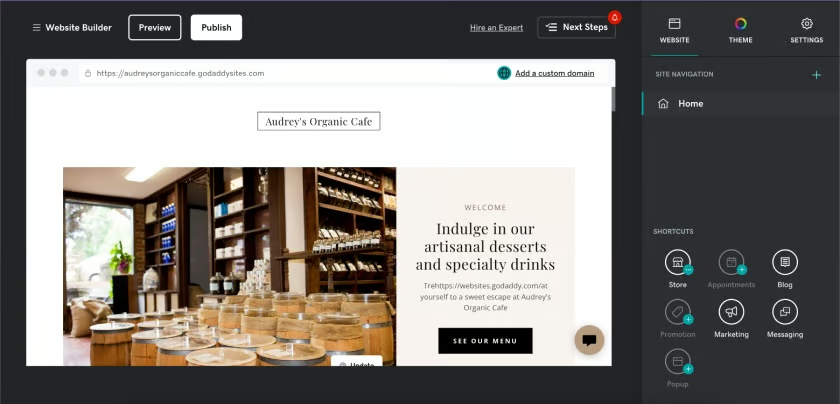
GoDaddy uses AI to generate a website, which you can customize further in the section-based editor. (Source: GoDaddy) 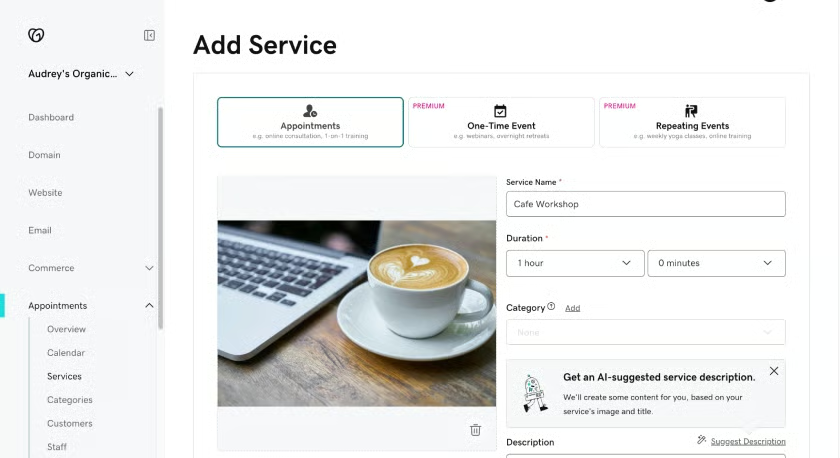
Appointment-booking tools are also available on the free plan. (Source: GoDaddy)


Key features
- GoDaddy Airo: Generate a website, logo, branded content, and marketing assets from a single prompt. Airo helps small businesses launch faster by combining AI-powered website creation with built-in hosting, publishing, and business tools.
- Appointment booking: Let customers book appointments directly from your website without third-party scheduling software. Higher-tier plans add advanced scheduling features like recurring appointments and online payments.
- Content Studio: Create email campaigns, social media posts, and branded marketing content from one dashboard, making it easier to promote your business after your website launches.
- Built-in ecommerce: Sell physical or digital products, accept online payments, and manage orders through GoDaddy’s ecommerce plans.
- Marketing dashboard: Monitor website performance, connect your Google Business Profile, and manage your online presence from a single interface.
GoDaddy pricing
| Airo AI Builder plans | Free | Starter | Professional | Ultimate |
|---|---|---|---|---|
| Monthly price, billed annually | $0 | $9.99 | $24.99 | $99.99 |
| Monthly price, billed monthly | $0 | $19.99 | $49.99 | $199.99 |
What makes IONOS the best for built-in website security?
Why I chose IONOS
IONOS is my top recommendation for small businesses that want a secure, reliable website without paying premium prices. It combines dependable hosting, built-in security features, AI-powered website creation, and professional business email into an affordable package, making it an excellent value for startups and growing businesses.
During my evaluation, I found IONOS especially appealing for businesses that handle customer information or online transactions. Its security-focused approach, paired with reliable hosting and a custom business email on every website plan, gives small businesses the essentials they need to establish a trustworthy online presence.
The tradeoff is the editing experience. Hostinger, Wix, and Squarespace all offer more intuitive editors and greater design flexibility, making them better options if visual customization is your top priority. But if security, reliability, and overall value matter more than having the most polished templates, IONOS is one of the strongest choices in this roundup.
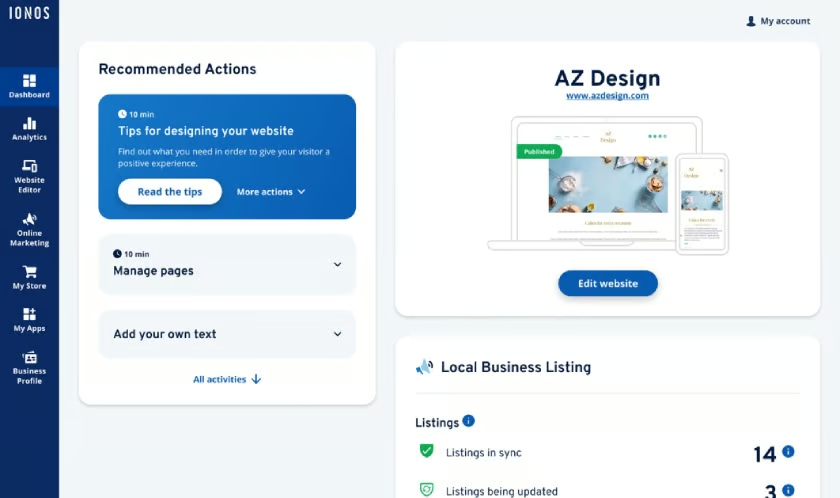
IONOS has both an AI site generator and a drag-and-drop editor. (Source: IONOS) 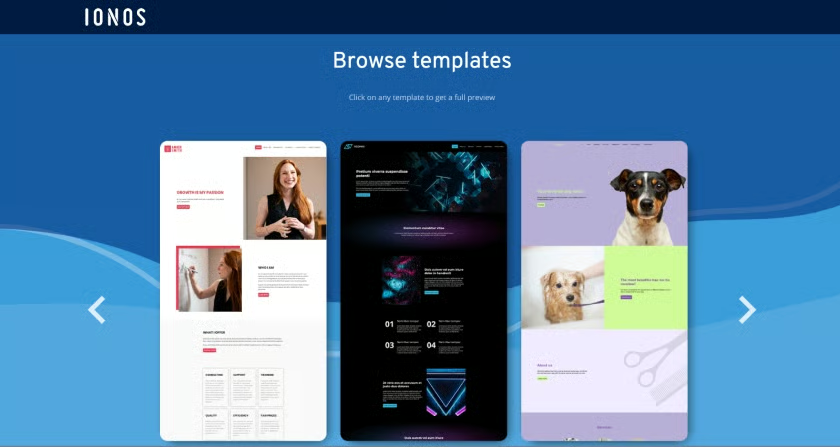
There are also various website templates choose from. (Source: IONOS)


Key features
- Security-first hosting: Every website includes an SSL certificate, while IONOS’ hosting platform adds DDoS protection and other built-in security measures to help protect your website and customer data.
- AI website builder: Generate a website from a prompt, then customize it using the drag-and-drop editor. Built-in AI tools can also assist with website copy and images to speed up setup.
- Professional business email: Every website plan includes a business email address with your custom domain, helping establish a more professional brand.
- Built-in ecommerce: Create an online store, accept payments, and manage products with IONOS’ ecommerce plans for small businesses.
- SEO and analytics: Optimize your website for search engines and monitor visitor activity using built-in SEO settings and analytics tools.
IONOS pricing
| Easy Website Builder plans (no store) | Starter | Plus | Pro |
|---|---|---|---|
| Monthly price, billed annually | $6 for 1 year Renewal: $14 | $1 for 1 year Renewal: $20 | $17 |
| Monthly price, billed monthly | $18 | $24 | $32 |
| Online Store Builder plans | Starter | Plus | Pro |
|---|---|---|---|
| Monthly price, billed annually | $6 for 1 year Renewal: $26 | $1 for 1 year Renewal: $32 | $34 |
| Monthly price, billed monthly | $27 | $37 | $65 |
What makes Squarespace the best for design-focused websites?
Why I chose Squarespace
Squarespace is a great fit for small businesses that want their website to make a strong first impression. Its professionally designed templates and intuitive editor make it easy to create a polished, modern website without hiring a designer.
If you want to build your Squarespace website, the platform’s AI-powered Design Intelligence and Blueprint AI tools help generate layouts, copy, and branding recommendations based on your business, making it faster to launch a site that feels polished from the start.
What stood out most during my evaluation was how well Squarespace helps businesses establish a distinctive brand identity. Every template feels thoughtfully designed, and the platform makes it easy to maintain a consistent look and feel across every page. That’s why I recommend it for creative professionals, agencies, restaurants, consultants, and personal brands where visual presentation can influence buying decisions.
The biggest tradeoff is cost. Squarespace doesn’t offer a permanent free plan, and features like email marketing and appointment scheduling require additional subscriptions. But if your priority is creating a premium-looking website that reflects your brand, Squarespace is one of the best investments you can make.
Key features
- Award-winning templates: Squarespace offers polished, professionally designed templates for portfolios, restaurants, service businesses, online stores, and personal brands.
- AI Design Intelligence: When you build your Squarespace website, Design Intelligence and Blueprint AI can help generate layouts, copy, color palettes, and branding recommendations based on your brand identity.
- Built-in ecommerce: Sell physical products, digital downloads, services, subscriptions, and memberships with integrated payment processing.
- SEO and analytics: Every website includes built-in SEO settings, analytics, and social sharing tools to help improve visibility and track performance.
- Business growth tools: Add email campaigns, appointment scheduling, memberships, and other tools as your business grows, though some require separate paid subscriptions.
Squarespace pricing
| Basic | Core | Plus | Advanced | |
|---|---|---|---|---|
| Monthly price, billed annually | $16 | $23 | $39 | $99 |
| Monthly price, billed monthly | $25 | $36 | $56 | $139 |
Free trial:
What makes B12 the best for AI-built websites with expert support?
Why I chose B12
Not every small business owner wants to spend hours choosing templates, tweaking layouts, or learning a website builder. That’s where B12 stands out. It combines AI-powered website creation with optional professional services, giving you a faster path to a polished business website.
During my hands-on evaluation, I found B12 especially compelling for consultants, law firms, accountants, agencies, and other service-based businesses. Beyond creating a website, it includes tools for scheduling appointments, sending invoices, capturing leads, and communicating with clients — all from a single platform. That makes it feel less like a website builder and more like a business management solution.
B12 won’t appeal to everyone. If you’re looking for extensive design customization or a feature-rich ecommerce platform, other builders on this list offer more flexibility. But for business owners who value convenience, automation, and access to professional guidance, B12 delivers an experience that’s difficult to find elsewhere.
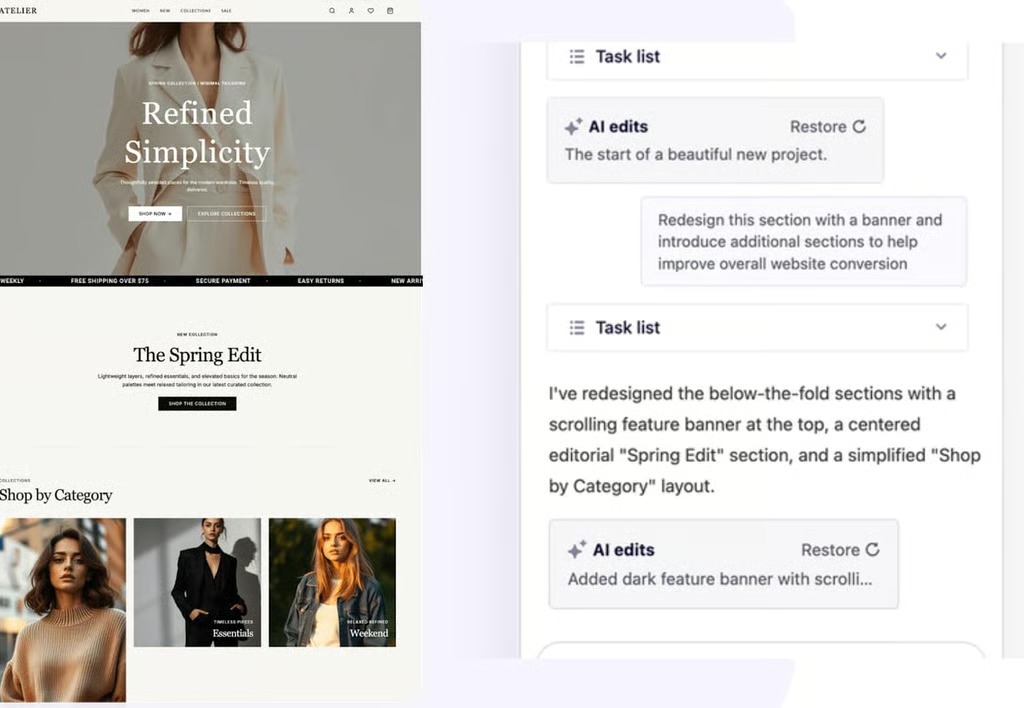
B12’s AI Agent helps generate website layouts, suggest edits, and improve pages through natural language prompts. (Source: B12) 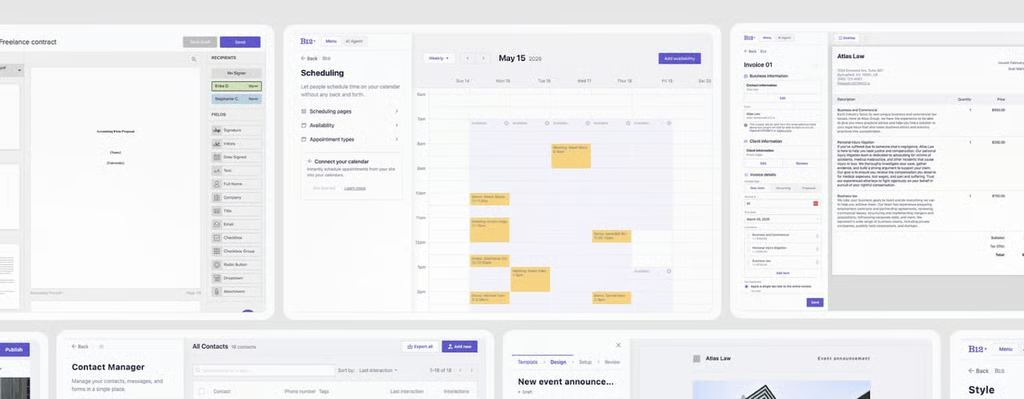
B12 combines website management with built-in business tools like scheduling, invoicing, contracts, email marketing, and contact management. (Source: B12)


Key features
- AI website builder: B12 generates a personalized website draft based on your business information, giving you a professional starting point that requires minimal setup.
- Professional website services: Get optional help from designers, copywriters, and SEO specialists to refine your website without hiring a traditional agency.
- Client engagement tools: Manage appointments, contact forms, invoicing, email marketing, and client communications from one platform.
- Built-in SEO: Customize page titles, meta descriptions, and URLs while using AI to help create search-friendly website content.
- Business management tools: Accept payments, collect leads, create intake forms, and manage customer interactions directly from your website.
B12 pricing
| DIY plans | Free | Website | Website + Client Engagement |
|---|---|---|---|
| Monthly price, billed annually | $0 | $1 for 3 months Renewal: $49 | $1 for 3 monthsRenewal: $78 |
| Monthly price, billed monthly | $0 | $42 | $67 |
| Experts Do It For You plans | Professional | Advanced |
|---|---|---|
| Monthly price, billed annually | $169 with 1 seat | $339 with 5 seats |
| Monthly price, billed monthly | $199 with 1 seat | $399 with 5 seats |
What makes DreamHost the best for AI-powered WordPress sites?
Why I chose DreamHost
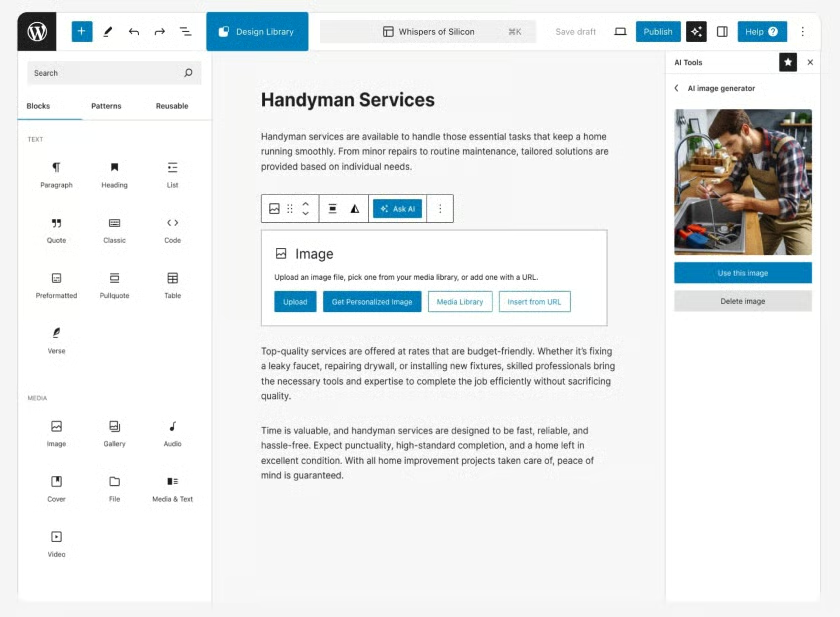
DreamHost is a great fit if you want the long-term flexibility of WordPress without handling every technical step yourself. Its AI Website Builder helps you launch quickly, while WordPress gives you room to expand your website as your business grows.
During my evaluation, I found DreamHost strikes a good balance between ease of use and customization. Automatic daily backups, WordPress-optimized hosting, and access to thousands of plugins make it a practical choice for businesses that expect their website needs to evolve.
It isn’t the simplest platform in this roundup, though. You’ll need to be comfortable working within the WordPress ecosystem. Many business features — such as ecommerce, appointment booking, and marketing tools — are added through plugins instead of being built into the platform. But if you value flexibility and complete ownership of your website, DreamHost is one of the strongest WordPress-based solutions for small businesses.
Key features
- AI WordPress website builder: DreamHost’s AI Website Builder creates a personalized WordPress website based on your business information, helping you launch faster without starting from scratch.
- WordPress-optimized hosting: Every plan is built for WordPress, with one-click installation, SSL certificates, automatic updates, and performance features that simplify website management.
- Automatic daily backups: Daily backups are included on every plan, making it easy to restore your website if something goes wrong.
- WordPress plugin ecosystem: Extend your website with thousands of WordPress plugins for ecommerce, SEO, appointments, memberships, marketing, and virtually any other business function.
- Complete website ownership: Because your website runs on WordPress, you have full control over your content, design, plugins, and future hosting options.
DreamHost pricing
| Web Hosting plans | Web Hosting Launch | DreamPress 1 | VPS Business |
|---|---|---|---|
| Monthly price, billed annually | $2.89 for 1 year Renewal: $10.99 | $14.99 for 1 year Renewal: $19.99 | $13.75 for 1 year Renewal: $31.99 |
| Monthly price, billed monthly | $4.99 for 1 year Renewal: $11.99 | $19.99 for 1 year Renewal: $24.99 | $15 for 1 year Renewal: $37.99 |
What makes Wix the best free and beginner-friendly website builder?
Why I chose Wix
Wix removes much of the complexity from building your first business website. Its intuitive editor, AI website builder, and extensive template library make it easy to launch a professional-looking website without design or coding experience.
Building a website with Wix is also flexible. You can let AI generate a personalized website, start with one of its professionally designed templates, or customize every section yourself using the drag-and-drop editor. As your business grows, the Wix App Market makes it easy to add new features without rebuilding your website.
One reason Wix consistently ranks among the top website builders for SEO is its built-in optimization toolkit. During my evaluation, I found the SEO Setup Checklist, customizable metadata, redirects, structured data, and analytics especially useful for helping small businesses improve their search visibility without relying on third-party tools. Combined with appointment scheduling, email marketing, contact forms, live chat, and ecommerce features, Wix gives you a surprisingly complete business platform.
If you’re looking for a website builder that’s easy to learn today and capable of supporting your business tomorrow, Wix is one of the most well-rounded options in this guide. It strikes an excellent balance between ease of use, customization, and built-in business tools, making it a smart choice for first-time website owners.
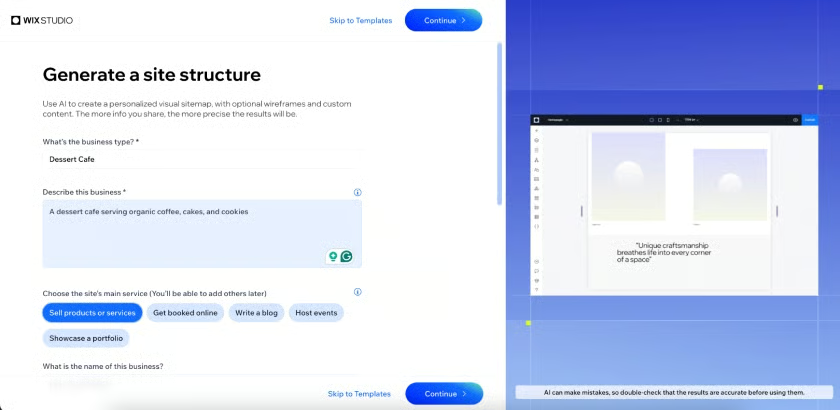
Wix’s AI site builder generates a website based on your answers to its questions. (Source: Wix) 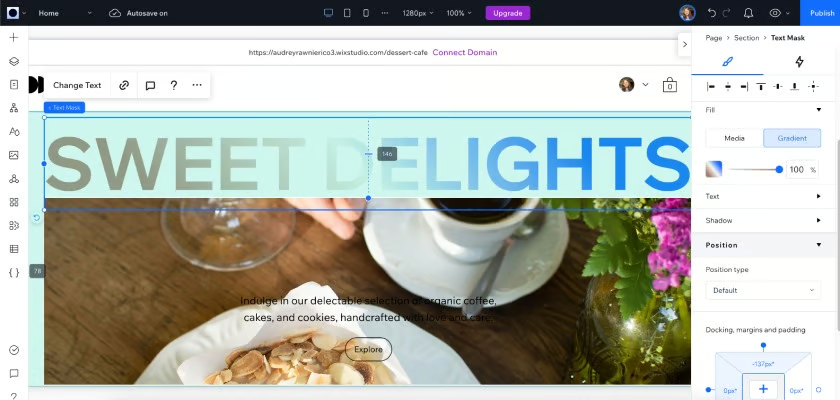
Then, you can still customize your site before publishing. (Source: Wix) 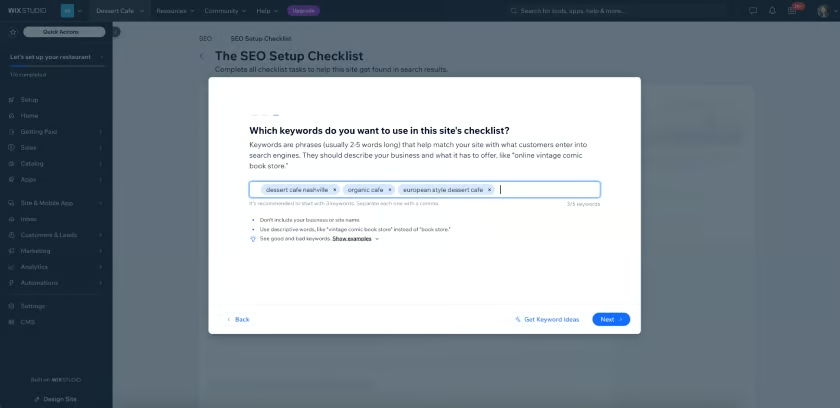
The SEO checklist is also useful for helping your site rank on search engines. (Source: Wix)


Key features
- AI website builder: Answer a few questions about your business, and Wix generates a personalized website that you can refine with its drag-and-drop editor.
- Template library: Choose from hundreds of professionally designed templates for online stores, restaurants, service businesses, portfolios, blogs, and more.
- SEO tools: Wix includes an SEO Setup Checklist, customizable metadata, redirects, structured data, and analytics, making it one of the top website builders for SEO.
- Business tools: Manage appointments, email marketing, contact forms, live chat, social media, and basic CRM functions from a single dashboard.
- App Market: Extend your website with hundreds of apps for ecommerce, marketing, events, memberships, accounting, and other business needs.
Wix pricing
| Free | Lite | Core | Business | Business Elite | |
|---|---|---|---|---|---|
| Monthly price, billed annually | $0 | $17 | $29 | $39 | $159 |
| Monthly price, billed monthly | $0 | $24 | $36 | $43 | $172 |
What makes HubSpot Content Hub the best for content marketing and blogging?
Why I chose HubSpot Content Hub
If your website’s primary job is publishing content and generating leads, HubSpot Content Hub is one of the strongest options available. Unlike traditional website builders that focus mainly on design, HubSpot is built around attracting visitors, converting them into leads, and nurturing those relationships over time.
Building a website on HubSpot is straightforward thanks to its drag-and-drop editor, professionally designed themes, and Breeze AI tools that help create blog posts, landing pages, and marketing copy faster. While it doesn’t generate an entire website from a single prompt, I found the editing experience intuitive and especially well-suited for businesses that publish content regularly.
What impressed me most during testing was how seamlessly everything works together. Forms, live chat, email signups, and landing pages all connect directly to HubSpot CRM, making it easy to turn website visitors into leads without relying on multiple third-party tools.
The biggest drawback is pricing. Publishing content is affordable — even free — but advanced features like memberships, gated content, and sophisticated automation require higher-tier plans. If content marketing is central to your growth strategy, however, HubSpot remains my best blogging platform because it combines your website, SEO, CRM, and marketing tools into one ecosystem.
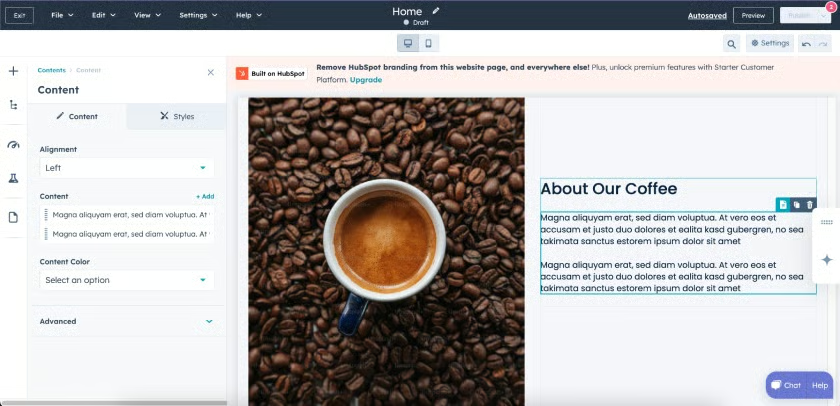
HubSpot Content Hub lets you build a website for free, and even connect your own domain. (Source: HubSpot) 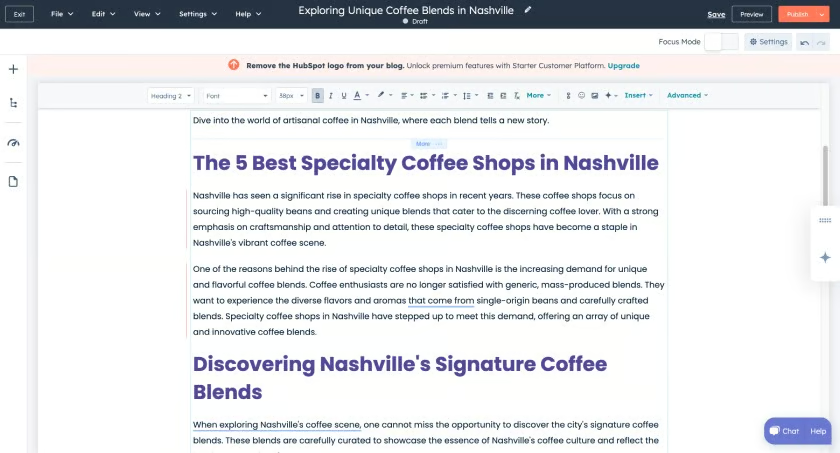
HubSpot also specializes in publishing blogs, and it even has an AI blog draft generator that creates a very workable draft. (Source: HubSpot)


Key features
- Content management: Build website pages, landing pages, and blog posts from one dashboard. The free plan supports up to 30 website pages and 100 blog posts.
- Built-in SEO tools: Optimize page titles, meta descriptions, URLs, redirects, and on-page SEO without installing third-party plugins.
- CRM integration: Every form submission, chat conversation, and lead automatically syncs with HubSpot CRM, making it easy to track prospects from first visit to sale.
- Breeze AI: Generate blog drafts, landing pages, emails, and marketing copy directly inside Content Hub using HubSpot’s built-in AI tools.
- Marketing automation: Scale your website with email marketing, workflows, lead nurturing, analytics, and reporting as your business grows.
HubSpot Content Hub pricing
| Free | Starter | Professional | Enterprise | |
|---|---|---|---|---|
| Monthly price, billed annually | $0 for 2 users | $7/user | $450 for 3 users | $1,500 for 5 users |
| Monthly price, billed monthly | $0 for 2 users | $10/user | $500 for 3 users | N/A |
Frequently asked questions (FAQs)
How much should a website cost for a small business?
The average starting cost of a small business website builder is $7.98 per month, or anywhere between $1 and $20 per month. However, this also varies based on the features offered in each platform’s starting plan. For instance, IONOS’s starting plan includes ecommerce, while Hostinger’s doesn’t. Most plans also come with a free domain but you’ll need to pay to renew it after one year. Some platforms also have 100% free plans, although with limitations.
What is the most beginner-friendly website builder?
The overall most beginner-friendly website builder is Wix. Wix has a super easy-to-navigate platform that lets you build a website using its AI tools or by using one of its templates. Then, you’ll be able to customize your site further inside its drag-and-drop website editor and then publish it once you’re done. Other similar beginner-friendly website builders I tested are Squarespace and GoDaddy.
Bottom Line
The best website builder for small businesses ultimately comes down to your own priorities and needs. For instance, if you want highly polished website designs, Squarespace is probably your best bet. If you want something completely for beginners, Wix is a good option. My advice is to outline what your business needs the most out of your website and then try the options above to see what fits best.
