







Bitrix24 is a feature-packed customer relationship management (CRM) system, offering tools for contact and lead management, sales analytics, marketing automation, social media integrations, and a landing page builder. While it provides comprehensive functionalities, it also has a complex dashboard and outdated interface. To find the best Bitrix24 alternatives, we analyzed dozens of top providers and considered critical attributes small businesses need.
The top options for alternatives to Bitrix24 and their best use cases are:
- HubSpot CRM: Best overall Bitrix24 alternative for teams wanting free CRM with built-in email marketing tools
- Freshsales: Great for users looking for a CRM that offers a robust in-app caller and 360-degree customer views
- Zoho CRM: Recommended for businesses wanting a more intuitive Bitrix24 competitor and has robust analytics tools
- Pipedrive: Ideal for users who need simple and straightforward sales pipeline management
- Salesforce Essentials: Recommended for users who want advanced lead management tools
- Agile CRM: Best for organizations needing a Bitrix24 alternative with social media management tools
- Best Bitrix24 Alternatives Compared
- HubSpot CRM: Best Overall Bitrix24 Alternative With Excellent Email Marketing Tools
- Freshsales: Best Bitrix24 Competitor With Built-in Caller
- Zoho CRM: Best Intuitive Alternative to Bitrix24 With Sophisticated Analytics Tools
- Pipedrive: Best Bitrix24 Alternative for Simple & Easy-to-Use Sales Pipeline Management
- Salesforce Essentials: Best Alternative to Bitrix24 With Advanced Lead Management Tools
- Agile CRM: Best Alternative to Bitrix24 With Social Media Management Tools
- You May Also Like…
Best Bitrix24 Alternatives Compared
| Provider | Free Plan | Starting Price for Paid Plans* | Free Trial for Paid Plans | Special Features | Customer Support |
|---|---|---|---|---|---|
 | Yes(unlimited users) | $49 per month, includes 5 users | No | Sales data analytics and project management | Help desk and live chat support for paid plans |
| Visit Bitrix24 | |||||
 | Yes(unlimited users) | $18 per month, includes 2 users seats** | 14 days*** | Free marketing automation tools | Self-help resources and email plus in-app chat support |
| Visit HubSpot CRM | |||||
 | Yes(3 users) | $9 per user, per month | 21 days | Built-in phone system | 24/7 support via phone, chat, and email |
| Visit Freshsales | |||||
 | Yes(3 users) | $14 per user, per month | 15 days | Advanced analytics and AI tools | 24/5 email support and phone support on paid plans |
| Visit Zoho CRM | |||||
 | No | $14 per user, per month | 14 days | Visual sales pipeline | Knowledge base plus 24/7 email and chat support |
| Visit Pipedrive | |||||
 | No | $25 per user, per month | 14 days | Customizable sales pipelines | Self-guided learning and ticket submission** |
| Visit Salesforce Essentials | |||||
 | Yes(Up to 10 users) | $9.99 per user, per month | No | Gamification tools | 24/5 live chat, email, and phone support |
| Visit Agile CRM | |||||
See fullscreen table×
| Provider | Free Plan | Starting Price for Paid Plans* | Free Trial for Paid Plans | Special Features | Customer Support |
|---|---|---|---|---|---|
| Yes(unlimited users) | $49 per month, includes 5 users | No | Sales data analytics and project management | Help desk and live chat support for paid plans |
| Visit Bitrix24 | |||||
| Yes(unlimited users) | $18 per month, includes 2 users seats** | 14 days*** | Free marketing automation tools | Self-help resources and email plus in-app chat support |
| Visit HubSpot CRM | |||||
| Yes(3 users) | $9 per user, per month | 21 days | Built-in phone system | 24/7 support via phone, chat, and email |
| Visit Freshsales | |||||
| Yes(3 users) | $14 per user, per month | 15 days | Advanced analytics and AI tools | 24/5 email support and phone support on paid plans |
| Visit Zoho CRM | |||||
| No | $14 per user, per month | 14 days | Visual sales pipeline | Knowledge base plus 24/7 email and chat support |
| Visit Pipedrive | |||||
| No | $25 per user, per month | 14 days | Customizable sales pipelines | Self-guided learning and ticket submission** |
| Visit Salesforce Essentials | |||||
| Yes(Up to 10 users) | $9.99 per user, per month | No | Gamification tools | 24/5 live chat, email, and phone support |
| Visit Agile CRM | |||||
*Based on annual billing; monthly pricing is available at slightly higher rates, except for Salesforce Essentials. Bitrix24 also offers quarterly pricing.
**Premier success plan costs 30% of the subscription price and adds 24/7 phone support, developer support, training sessions, and coaching.
***For Professional and Enterprise plans of CMS (content management system) Hub and Operations Hub only
HubSpot CRM: Best Overall Bitrix24 Alternative With Excellent Email Marketing Tools
How It Compares to Bitrix24
- Both offer feature-rich free plans that include essential tools, such as email marketing and reporting
- HubSpot CRM’s Enterprise plan is significantly more expensive compared to Bitrix24
- HubSpot CRM’s free plan offers excellent email marketing features that include shared inboxes, list segmentation, and team email
Bitrix24 offers email marketing tools, including in-app email, external email integration, and bulk email sending. However, all these are only available in its paid plans. HubSpot CRM, in contrast, offers useful email marketing features for free, including shared inboxes, mailing list and contact segmentation, team email, and email tracking. On top of these capabilities, it also boasts an intuitive and easy-to-use interface. All these combined make it the top option among the rest of the alternatives to Bitrix24.
While HubSpot CRM offers a free version, its plan upgrades can be expensive. Customer support for its free plan is also limited to self-help resources and community support. Businesses that want more affordable paid plans should consider either Zoho CRM or Freshsales. Those who prefer access to technical support, even with a free version, should consider Agile CRM or Zoho CRM.
HubSpot CRM Pricing at a Glance*
- Free: Supports an unlimited number of users
- Starter Sales Plan: $18 per month for two users
- Professional Sales Plan: $450 per month for five users
- Enterprise Sales Plan: $1,200 per month for 10 users
*Based on annual billing; monthly subscriptions are also available at higher rates.
HubSpot CRM Free Email Marketing Tools
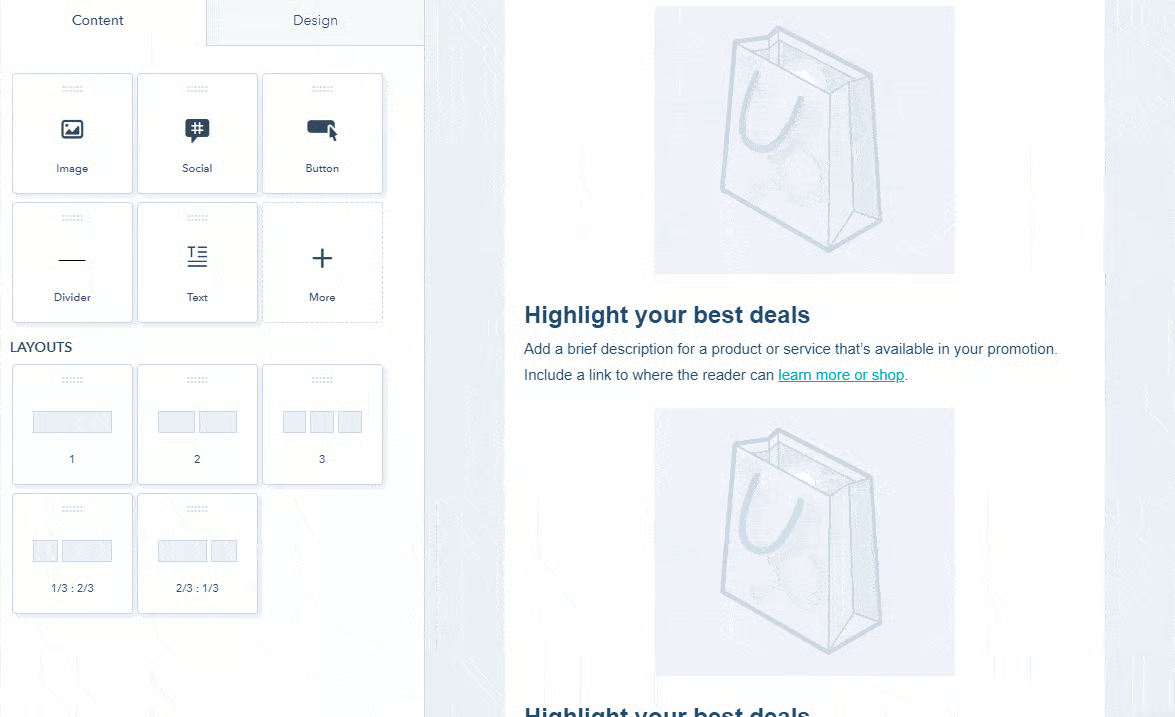
HubSpot CRM enables you to customize your email marketing outreach with access to its extensive library of customizable email templates. Other email marketing features include email reply tracking, email health reporting, bulk message sending, and follow-up form emails. It also offers an A/B testing and analytics function, helping you evaluate which types of emails convert and engage your customers most effectively.
Read our HubSpot CRM review to discover the features and benefits it offers small businesses. You can also see how it compares with other CRMs in our comparison reviews of HubSpot vs Salesforce and HubSpot vs Insightly.
Freshsales: Best Bitrix24 Competitor With Built-in Caller
How It Compares to Bitrix24
- Free plan has limited functions versus Bitrix24’s feature-rich free plan.
- Its lowest-priced plan only costs $9 per user, monthly, while Bitrix24’s lowest-priced plan costs $49 per month.
- Provides more extensive lead management features that offer users pertinent information for each contact.
Bitrix24 offers basic lead management features that let you add unlimited leads in all plans. In contrast, Freshsales provides more comprehensive lead management tools. These include website activity tracking, communication logs, deal stages and statuses, and communication touchpoints with the company. You can also monitor tasks and appointments related to each lead or contact.
Bitrix24 also offers an in-app phone with call routing and transfer, recording and transcription, as well as call interception features. Alternatively, Freshsales offers an in-app phone with even more advanced functionalities, such as agent conference calling (inviting other agents to join the call), the ability to purchase toll-free numbers, call masking, external number routing, and real-time queue visibility.
One of the disadvantages of Freshsales is that its free plan lacks essential features such as sales forecasting, email tracking, and third-party integrations. Teams that want free, feature-rich CRM systems can consider alternatives to Bitrix24, such as HubSpot CRM or Agile CRM.
Freshsales Monthly Pricing (per User) at a Glance*
- Free: up to three users
- Growth: $9
- Pro: $39
- Enterprise: $59
- Free trial: 21 days
Freshdesk Contact Center Pricing**
- Free Plan: Supports 2 users (no free minutes; includes local and toll-free numbers plus call metrics)
- Growth: $15 per agent, per month plus pay per minute (includes 2,000 incoming minutes per month plus number porting and call queues)
- Pro: $39 per agent, per month plus pay per minute (includes 3,000 incoming minutes per month plus Power Dialer and interactive voice response)
- Enterprise: Per agent, per month plus pay per minute (includes 5,000 incoming minutes per month plus voice bot and service level monitoring)
- Free trial: 21 days
*Based on annual billing; monthly subscriptions are also available at slightly higher rates.
**Check this page to see incoming and outgoing call rates.
Freshsales Built-in Cloud Telephony
Freshsales has an excellent in-app phone system that lets you efficiently handle calls, voicemails, and messages straight from your laptop or smartphone. It enables you to monitor phone usage to understand your team members’ ability to convert deals by reviewing analytics data associated with their calls. You also have the option to purchase virtual phone numbers in 90-plus countries for sales reps in varying locations.
You can access more advanced call center features by signing up for Freshdesk Contact Center (free or starting at $15 per agent, per month), which is part of Freshworks’ ecosystem of apps. It integrates seamlessly with Freshsales and offers expanded call center functionalities, such as international phone numbers, call blocking, and voice bots.
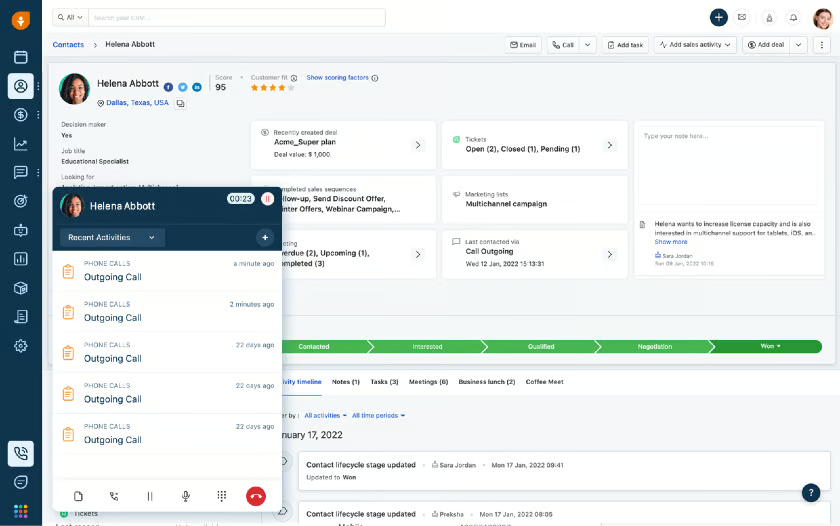
Built-in cloud telephony (Source: Freshsales) 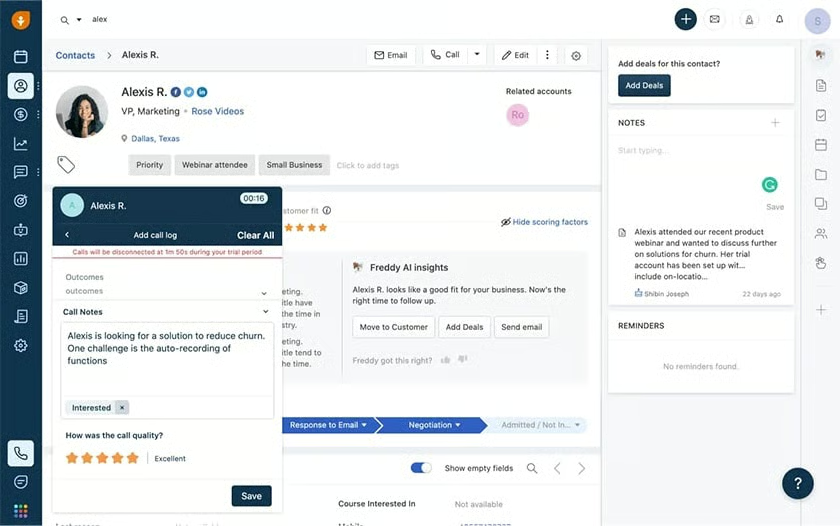
Automatic sales call logging (Source: Freshsales)


Check out our Freshsales review to explore other features that this platform offers. You can also see head-to-head comparisons of this platform with other similar CRMs in our articles Freshsales vs Salesforce and Pipedrive vs Freshsales.
Zoho CRM: Best Intuitive Alternative to Bitrix24 With Sophisticated Analytics Tools
How It Compares to Bitrix24
- Free plan offers allocation for three users versus Bitrix24’s unlimited user allocation
- Both offer access to Google AdWords data to evaluate ad spending effectiveness
- Has a beginner-friendly and simpler user interface versus Bitrix24’s complex dashboard
- Offers more sophisticated analytics tools that let users plug in data from any source
Bitrix24 provides essential sales analytics tools that include consumer behavior analysis and deal closing reports, which may be enough for some businesses. However, Zoho CRM offers more sophisticated analytics tools in a highly intuitive, simple interface. Its analytics tools include identifying high-quality leads that can potentially bring in more revenue, measuring ad spend return on investment (ROI), tracking lead conversion across sales reps, and conducting campaign revenue analysis.
However, Zoho CRM’s free plan has an allocation for only three users. Those who want a free CRM with unlimited user allocation should consider HubSpot CRM. In addition, Zoho CRM’s 24/7 customer support is only available upon purchase of an add-on support plan. Businesses that prefer always-on technical support regardless of their plan subscription with no additional charges should consider Pipedrive.
Zoho CRM Monthly Pricing (per User) at a Glance*
- Free plan: Up to three users
- Standard: $14
- Professional: $23
- Enterprise: $40
- Ultimate: $52
- Free trial: 15 days
*Based on annual billing; monthly subscriptions are also available at slightly higher rates.
Zoho CRM Analytics Tools
Zoho CRM’s interface is simple and beginner-friendly. Its advanced analytics tools let you accurately visualize sales figures and access real-time reports. These include sales trends, marketing campaigns, and team performance. It also allows you to evaluate your sales reps, including the status of their outreach and the amount of revenue they bring in.
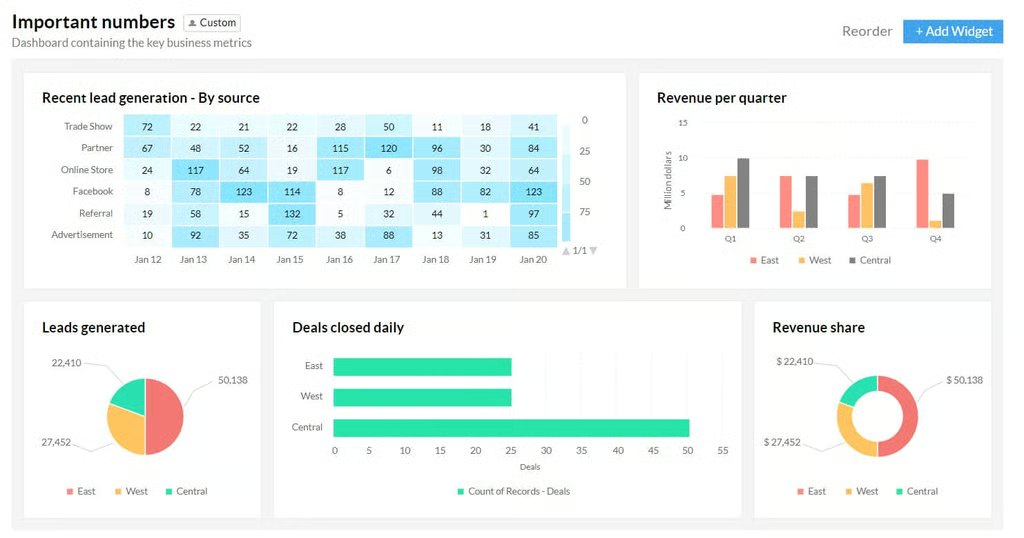
Dashboard shows key business metrics (Source: Zoho CRM) 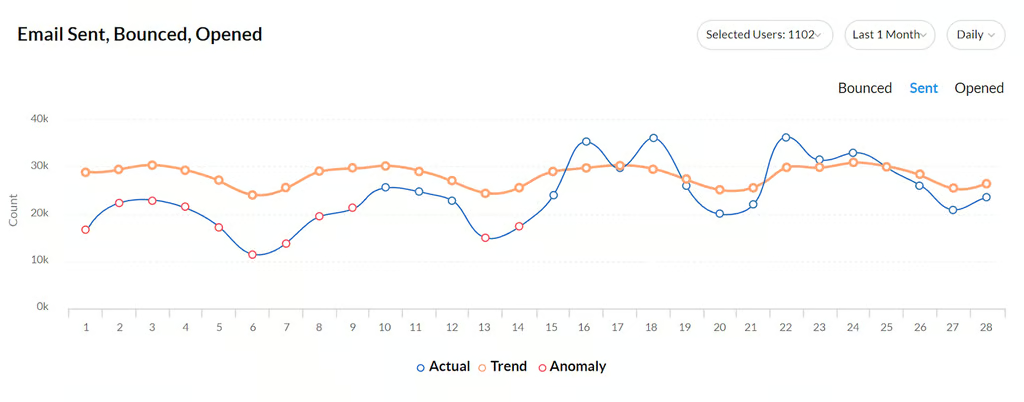
The AI-powered Anomaly Detector uncovers deviations from projected sales patterns. (Source: Zoho CRM) 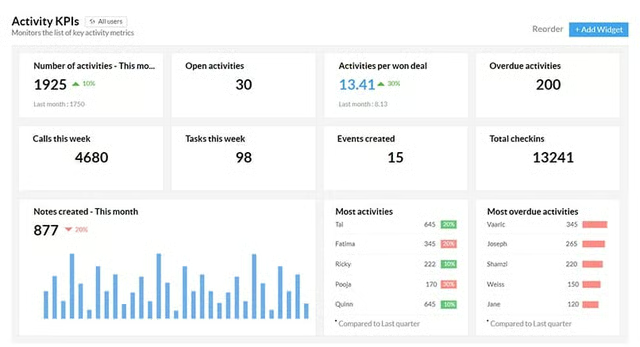
Key activity metrics (Source: Zoho CRM) 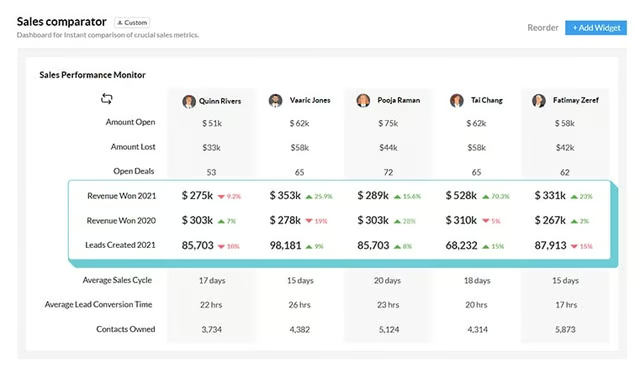
The Sales Comparator compares metrics across different modules to see how they fare against each other. (Source: Zoho CRM) 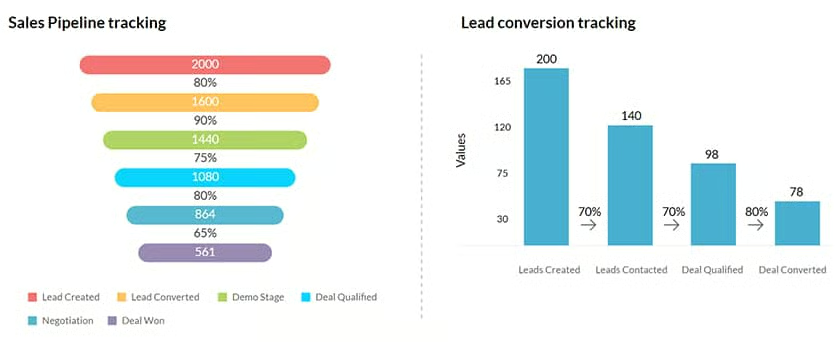
Sales pipeline and lead conversion tracking (Source: Zoho CRM)


Check out our Zoho CRM review to learn if it’s the right fit for your small business. You can also find out how it fares opposite other CRMs in our Zoho vs Salesforce and Pipedrive vs Zoho CRM reviews.
Pipedrive: Best Bitrix24 Alternative for Simple & Easy-to-Use Sales Pipeline Management
How It Compares to Bitrix24
- One of the main drawbacks is the lack of a free plan as compared to Bitrix24’s feature-rich free version with unlimited user allocation
- Has only around 150+ third-party integrations versus Bitrix24’s almost 500 integrations
- Has a simpler interface versus Bitrix24’s more complex dashboard
- Offers 24/7 support for all plans, while Bitrix24 is only available during business hours
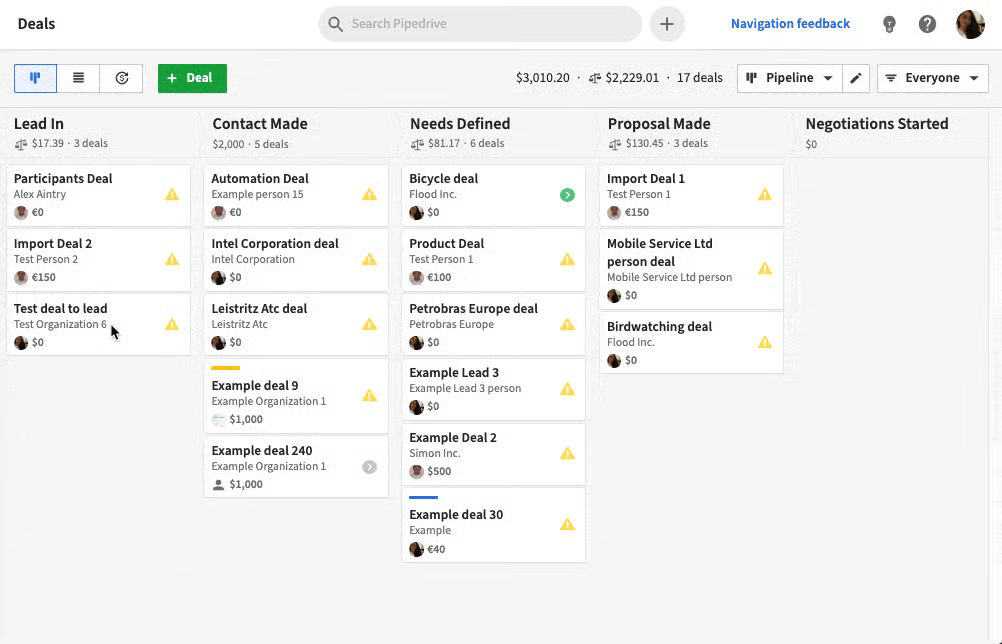
Bitrix24 provides visual representations of sales pipelines customizable based on your business process. However, its interface can be hard to navigate, especially for novice users. Pipedrive, on the other hand, offers the same pipeline management tools in a sleeker format. It lets you visualize your sales process, create sales forecasts, and move deals along stages with unlimited, customizable pipelines in a user-friendly dashboard.
Pipedrive doesn’t have a free plan, but the affordable paid plans offer limited in-app calling access. Its calling features include caller ID linked to deal activities, automatic call logging, and web-to-mobile calls. Teams that don’t have a budget for a paid plan can consider other Bitrix24 competitors like HubSpot CRM, Agile CRM, or Zoho CRM. Meanwhile, those who want an in-app caller, even for lower-tier plans, should consider Freshsales.
Pipedrive Monthly Pricing (per User) at a Glance*
- Essential: $14
- Advanced: $39
- Professional: $49
- Power: $64
- Enterprise: $99
- Free trial: 14 days
Add-ons Monthly Pricing
- Lead Booster: $32 per month
- Web Visitor Analytics: $41 per month
- Smart Docs: $32.50 per month
*Based on annual billing; monthly subscriptions are also available except for the Enterprise plan.
Pipedrive Simple Pipeline Visualizations
Pipedrive’s pipeline management tools provide a highly visual interface that prompts sales agents to take actions, such as converting a deal or initiating a follow-up call. It is simple for users to update lead information by entering new deals and contacts on desktop or mobile. They can easily drag and drop deals between stages and connect their email and third-party apps to create a single lead data location.
Check out our Pipedrive review to learn more about this CRM and the features it offers small businesses. To see how it compares with other CRMs, take a look at our HubSpot vs Pipedrive and Pipedrive vs Zoho CRM reviews.
Salesforce Essentials: Best Alternative to Bitrix24 With Advanced Lead Management Tools
How It Compares to Bitrix24
- Lacks the availability of a free plan as compared to Bitrix24’s feature-rich free version with unlimited user allocation
- While Salesforce has over 100 third-party integrations, this falls short of Bitrix24’s ability to connect to over 500 apps
- Has a sleeker user interface compared to Bitrix24—although both are more complex compared to other providers
Bitrix24 provides users with basic lead management tools, including lead status monitoring and unlimited lead creation. Its lead sales intelligence reporting is only available in its higher-priced plans. Meanwhile, Salesforce Essentials provides more sophisticated lead management tools at a lower cost, including lead assignment and routing, lead duplicate blocking, and web-to-lead capture.
Salesforce Essentials doesn’t have a free plan and has a complex dashboard better suited for experienced users. Businesses that don’t have a budget for a paid plan can consider Bitrix24 competitors HubSpot CRM or Agile CRM. Meanwhile, those who want a beginner-friendly interface should consider Zoho CRM or Pipedrive.
Salesforce Essentials Monthly Pricing (per User) at a Glance*
- Annual billing: $25
- Monthly billing: $35
Add-on
- Premier Customer Success Plan: 30% of the subscription amount
*Based on annual billing; monthly pricing is also available at slightly higher rates.
Salesforce Lead Management Tools
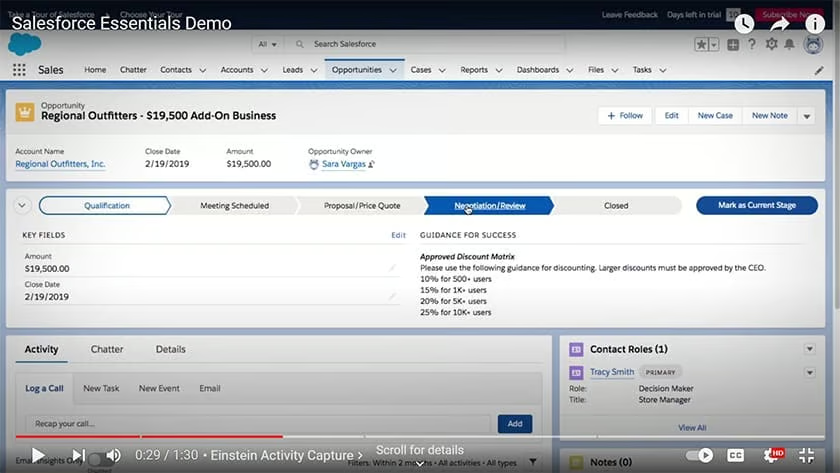
Salesforce Essentials offers various ways to efficiently manage and monitor the status of leads. It enables you to track, filter, and qualify prospective customers, as well as route hot leads to the most appropriate sales reps to increase the probability to convert. The platform allows you to generate leads with the data from your company’s website visitors. Its duplicate blocking feature lets you prevent redundant lead inputs, making data more reliable and relevant.
Read our full Salesforce Essentials review to explore features included in this CRM well-suited for small businesses. You can also see how this provider stacks against another CRM by heading to our HubSpot vs Salesforce review.
Agile CRM: Best Alternative to Bitrix24 With Social Media Management Tools
How It Compares to Bitrix24
- Free plan only offers allocation for 10 users versus Bitrix24’s unlimited user allocation
- Agile CRM’s free plan offers some key features Bitrix24 doesn’t, including an in-app phone, lead scoring, and appointment scheduling
- Both providers can be integrated with 500+ third-party apps
Bitrix24’s social media function is limited to integrating social media networks and messengers, such as Telegram, Facebook, WhatsApp, and Instagram. Agile CRM takes this further by providing advanced social media features. These include social listening to monitor mentions of your brand across various social channels, tracking contacts’ social activities, and interacting with leads through Facebook and Twitter.
Agile CRM’s free plan has a 10-user cap, and its customer support is limited to 24/5 email and phone support during standard business hours. Teams needing a free plan with unlimited user allocation should consider HubSpot CRM, while those who require 24/7 customer support should look at drive.
Agile CRM Monthly Pricing (per User) at a Glance*
- Free plan: Up to 10 users
- Starter: $9.99
- Regular: $39.99
- Enterprise: $64
*Based on annual billing; monthly subscriptions are also available at slightly higher rates.
Agile CRM Social Media Management
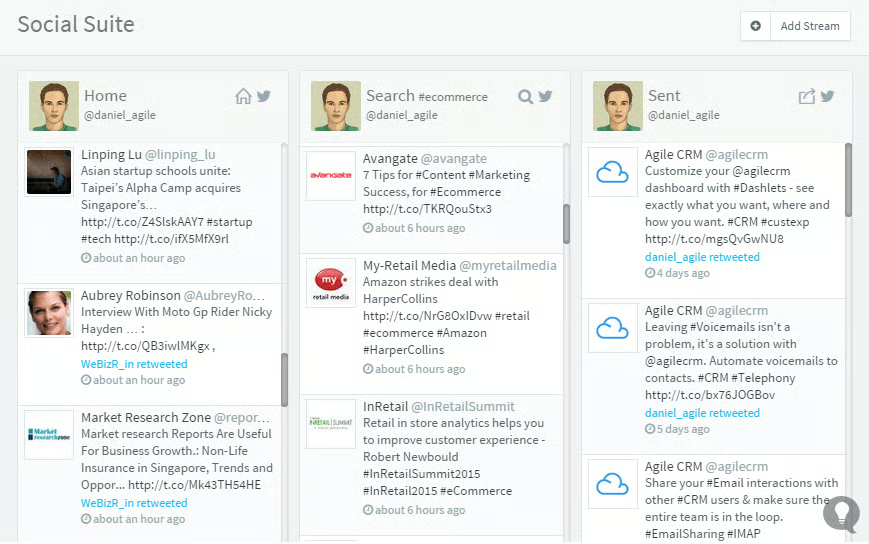
Agile CRM’s social media management suite enables you to perform key social media activities straight from your CRM dashboard. These tasks include posting company updates to social media channels, monitoring your brand mentions, keeping your followers informed by answering questions, resolving issues, and capturing leads. It also helps maximize return on investment (ROI) on your marketing automation campaigns by tracking the social behavior of leads and customers.
How We Evaluated the Best Bitrix24 Competitors
You May Also Like…
- Do you want to leverage your CRM system’s case management features to boost customer satisfaction? Follow our step-by-step guide on how to use a CRM for customer service.
- Need a CRM with engagement tracking and social listening capabilities? Read our guide on the top social media CRM platforms.
- Looking for industry-specific CRM solutions? Check out this article to learn how to find a specialized CRM for your industry.
