







Travel agencies handle multiple bookings, itinerary customization, campaign deployment, and client management. For this reason, having customer relationship management (CRM) software becomes imperative for travel agents, as it cuts the work in half while boosting productivity and efficiency. The best CRM for a travel agency has tools for online booking, schedule planning, quote generation, marketing, and data management.
We tested and reviewed a dozen solutions and came up with the six best travel CRMs:
- Best CRM for travel agencies overall: EngageBay CRM
- Solid travel agency CRM with robust marketing tools: HubSpot CRM
- Best option for contact management: Freshsales
- Top choice for building custom itineraries: Pipedrive
- Excellent customizable CRM for travel agencies: Salesforce Essentials
- Best travel agent CRM for workflow automation: Zoho CRM
- Best CRM for Travel Agency Compared
- EngageBay CRM: All-in-one Travel CRM Software
- HubSpot CRM: Best for Expanded Marketing
- Freshsales: Best Contact Management CRM
- Pipedrive: Best for Creating Custom Itineraries
- Salesforce Essentials: Best Customizable CRM for Travel Agents
- Zoho CRM: Best for Workflow Automation
- Frequently Asked Questions (FAQs)
- Bottom Line
Best CRM for Travel Agency Compared
| Provider | Starting Monthly Price | Free Plan? | Our CRM Rating Out of 5 |
|---|---|---|---|
 | $11.95 | ✓15 users | 4.66 |
| Visit EngageBay | |||
 | $15 per user, monthly | ✓Five users | 4.44 |
| Visit HubSpot CRM | |||
 | $15 per user | ✓3 users | 4.38 |
| Visit Freshsales | |||
 | $14 per user | ✕ | 4.38 |
| Visit Pipedrive | |||
 | $25 | ✕ | 4.34 |
| Visit Salesforce Essentials | |||
 | $14 per user | ✓3 users | 4.33 |
| Visit Zoho CRM | |||
EngageBay CRM: All-in-one Travel CRM Software
When to Use EngageBay
- You’re looking for a travel agency CRM for a full revenue operation (RevOps): EngageBay’s CRM and Sales Bay offers features not just for sales management but also for marketing and customer service—all of which are crucial for RevOps teams. These include essential tools for managing travel bookings and activities like an appointment scheduler, contact storage, predictive lead scoring, live chat channels, and promotional campaigns.
- You want an omnichannel marketing and support system: One standout feature of EngageBay is its multichannel marketing and customer support tools. Travel agents can engage with clients and send marketing materials through email, social media, live chat, video messaging, and short message service (SMS). It also has a drag-and-drop landing page builder for a dedicated booking page and promotions.
When to Use an Alternative
- You want a CRM with a large contact database: EngageBay’s bandwidth for records caps at 30,000 contacts and companies in its highest-tiered paid plan. If you’re a growing travel agency catering to regular and recurring clients in bulk, the data storage capacity may not be enough.
- Alternative: HubSpot has provision for 1 million contacts and company records under its Free plan for 15 users.
- You need a built-in telephone system at no cost: Telephonic capabilities remain essential to touring businesses as clients connect more directly through mobile communication, and so do suppliers and other hospitality service providers. If you’re bootstrapping, you won’t access these features for free on EngageBay.
- Alternative: Freshsales offers a free built-in telephone in its CRM system on top of the live chat, email integrations, and artificial intelligence (AI) chatbots—making it our top pick for the best operational CRM systems.
EngageBay Pricing Plan & Overview*
Cost:
- $0 for 15 users
Key Features:
- Up to 250 contacts and company records with a 360-degree view
- Email management with 1,000 branded emails monthly, tracking, and email templates
- Appointment scheduling and up to five embed forms
- Tags, deals, and tasks management
- One landing page and social media suite that includes Twitter, Facebook, and Instagram
- Reports dashboard
- Live chat integration
- Email and chat support
- Predictive lead scoring
- Integration with Gmail, Outlook, and Office 365
Cost:
- $11.95 per user
Key Features:
- Everything in Free
- Up to 500 contacts and companies
- 2500 branded emails per month
- Tailored deal milestones for recurring group tours and third-party contracts
- Telephonic capabilities with calling minutes (15 credits)
Cost:
- $45.99 per user
Key Features:
- Everything in Basic
- Up to 20,000 contacts and companies
- Branded email at 20,000 sends per month
- With email scheduling and sequence activation
- Custom fields
- 10 automations and workflows with up to 15 nodes
- Access to proposal building, leaderboard, and call reports
- Free onboarding sessions
- Dedicated Account Manager
Cost:
- $73.59 per user
Key Features:
- Everything in Growth
- Up to 30,000 contacts and companies
- Up to 30,000 branded emails monthly
- Conversational inbox
- Custom reports and proposal analytics
- Role and team management
- Call records and cold calling scripts
- Account-based marketing (ABM)
- Phone support
*Pricing is based on annual billing on a monthly breakdown. Monthly billing is also available for a higher cost, and two-year billing for a lower cost. We update pricing information regularly but encourage readers to check current pricing here.
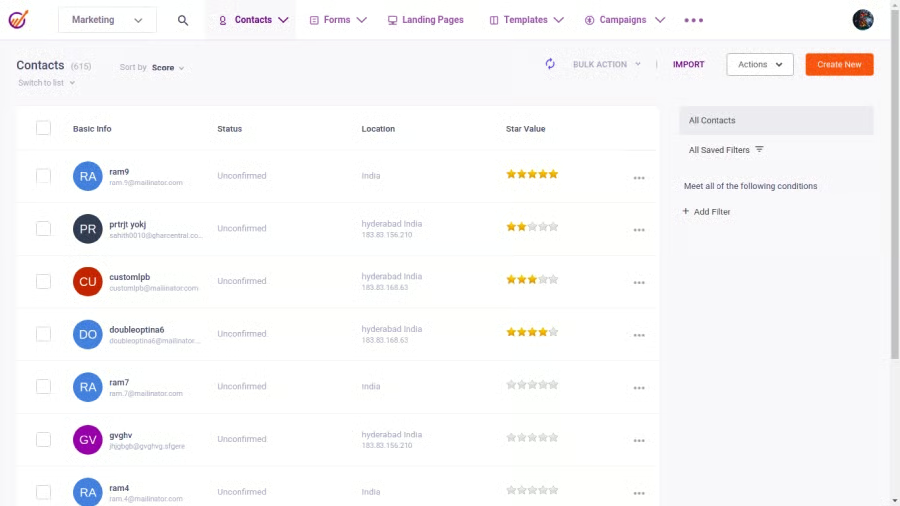
Our Expert Opinion
EngageBay is a one-stop shop CRM for travel agencies in that its complete set of features, with scalable plans to match, allow travel agents and touring businesses to operate their sales processes without breaking the bank. The multichannel engagement tools and the drag-and-drop landing page caught our attention as travel agents can leverage these features for lead generation and marketing efforts.
HubSpot CRM: Best for Expanded Marketing
When to Use HubSpot CRM
- You need robust marketing features for free: HubSpot is a marketing powerhouse on top of being the best CRM for small business for having solid tools like email management, customizable web forms, and design capabilities for web and landing pages. Plus, it has search engine optimization (SEO) suggestions and artificial intelligence (AI) assistance that enhance web visibility and traffic. All of these and more are accessible starting from the Free plan.
- You’re aiming for a CRM with solid data management: Contact storage is crucial for travel agencies, especially when nurturing clients and building loyalty programs. HubSpot sticks out from the competition in that it provides capabilities for storing up to a whopping 1 million contacts and company records in a single system. This feature also includes task tracking and a prospecting workspace to manage sales activities.
When to Use an Alternative
- You’re looking for a travel CRM with scalable pricing plans: HubSpot’s Free CRM Suite plan offers essential sales, marketing, and customer service features. However, moving up to the paid tiers, which unlocks advanced tools for growing travel agencies, can be relatively costly.
- Alternative: Zoho has the most cost-effective plans available for small travel businesses as the pricing gap between plans is narrower, yet the feature upgrades are robust.
- You want a low-cost e-signature tool: E-signatures are efficient as they are binding when preparing quotes and contracts. HubSpot has a native tool for this functionality, but you’ll have to shell out $1,600 per month for five users to gain access.
- Alternative: Pipedrive includes Smart Docs under the Professional plan for only $49.90 per user. Smart Docs provide e-signature for quotes, automated data fill for proposals, and status tracking.
HubSpot CRM Pricing Plan & Overview*
Cost:
- $0 for 5 users
Key Features:
- Email integrations for direct and mass email marketing, email templates, and automated message deployment
- 1 million contact and company records with activity tracking
- Appointment scheduling page
- Custom quote generation
- Third-party integrations via app marketplace
- Mobile CRM app
- Deal tracking and service ticketing on one sales pipeline
- Documents storage and sharing
- Dashboard and reporting tools
- Live chat and custom web forms
- Website and landing page design tools
- Prospecting tools
- One blog with access to search engine optimization (SEO) and artificial intelligence (AI) tools for blog post structuring
Cost:
- $15 per user, monthly
Key Features:
- Everything in the Free CRM Suite
- Additional data capacity, including more storage for email templates (e.g., sales follow-up and business introduction emails), and canned responses to booking inquiries
- Automated clearing house (ACH) and Stripe integration for payment processing
- Built-in telephone with 500 calling minutes per account, per month
- Two ticket pipelines
- Multiple deal pipelines with goal and quota tracking
- Custom call-to-action (CTA) features
Cost:
- $1,080 per month for 5 users ($45 per additional user, monthly)
Key Features:
- Everything in Starter CRM Suite
- Social media management for up to 50 social accounts (including LinkedIn, Twitter, Facebook, and Instagram) and 10,000 posts per month
- A/B testing on landing pages and emails
- Lead outreach and sales follow-ups via automated email and LinkedIn messages
- Sales forecasting and goal tracking on reports
- Data duplicate detection
- E-signatures for quotes
- Multi-blog management with web page SEO analytics
- Video library hosting
*Pricing is based on annual billing on a per-month breakdown of the plans for individuals and small teams. Monthly billing is available for a higher cost. While we update pricing information regularly, we encourage our readers to check current pricing here.
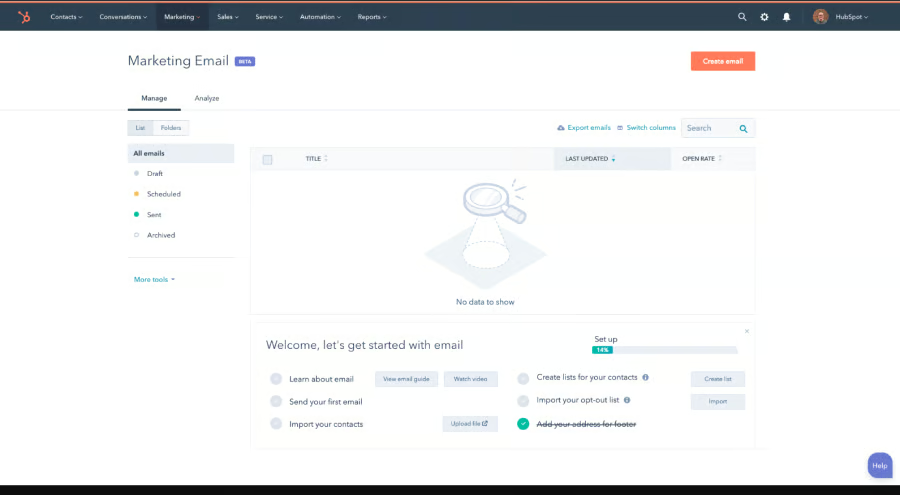
Our Expert Opinion
HubSpot CRM’s native marketing tools make lead generation and client nurturing easier for travel agencies. Even in the Free plan, you can access features commonly found under its competitors’ pricing plans, like automated email deployment, appointment management, and website design tools. In addition, HubSpot is an ideal gateway for CRM novices since its user interface provides smooth and straightforward navigation.
Freshsales: Best Contact Management CRM
When to Use Freshsales
- You want contact management features with a telephone system: An efficient data management system sets the footing for lead outreach and targeted marketing campaigns in the hospitality industry. Freshsales bags the top spot for the best management software thanks to its seamless recordkeeping capabilities and omnichannel communication options, including a free built-in telephone system.
- You need mobile CRM software with Google Maps and Uber integrations: One impressive feat of Freshsales is its connection with essential apps that are highly valuable in CRM for tour operators, such as arranging transportation. Freshsales has Google Maps and the option to book Uber services directly from the mobile CRM, which helps facilitate tours and arrange additional vehicles if necessary.
When to Use an Alternative
- You’re looking for free quote generation tools: Freshsales does offer quote generation. But you have to subscribe to its Growth plan for $15 per user, per month.
- Alternative: HubSpot’s free plan already includes quote generation you can customize based on your services or other defining metrics for your pricing.
- You want a more affordable profile enrichment: Contact data can be automatically updated through tools for profile enrichment, wherein online information from platforms like LinkedIn or company websites is screened and added or changed in the database. While Freshsales has this CRM feature, it will cost you $69 per seat as it is under the Enterprise plan.
- Alternative: Pipedrive has relatively lower-priced profile enrichment under the Advanced plan for only $27.90 per seat.
Freshsales Pricing Plan & Overview*
Cost:
- $0 per user
Key Features:
- Contact and account management with activity timelines and lifecycle tracking
- Appointment scheduling
- Built-in telephone system
- Custom data fields
- Email template storage
- Google Maps and Uber integration for direct booking
- Mobile app available with voice notes
- Artificial intelligence (AI) chatbots with canned responses
- Live chat embedded on the website for customer engagement
Cost:
- $15 per user
Key Features:
- Everything in Free
- Quote and invoice generation
- CRM workflow automation
- Third-party CRM integrations
- Data sync with an external messaging system to send emails directly from the CRM
- Expanded communication channels, including access to integrations like WhatsApp, Facebook Messenger, Google Business Messages, and Apple Business Chat
- Mass text messaging and bulk email send with automated sequences in the CRM
- Freddy artificial intelligence (AI) chatbot interaction and lead scoring
Cost:
- $39 per user
Key Features:
- Everything in Growth
- Appointment booking directly from the live chat widget
- Freddy AI recommendations and deal insights
- Sales forecasting and territory management
- Support for multi-currency option
- Multiple sales pipelines
Cost:
- $69 per seat
Key Features:
- Everything in Pro
- In-house applications and customized modules
- Automated profile enrichment
- Enhanced AI insights for forecasting that predict deal commitment likelihood
*Pricing is based on annual billing on a per-user monthly breakdown. Monthly billing is available for a higher cost. Freshsales offers a 21-day free trial and optional paid add-ons for additional workflow automations and phone credits starting at $5. Pricing reflects pricing info available at the time of publishing. While we update pricing information regularly, we encourage our readers to check current pricing here.
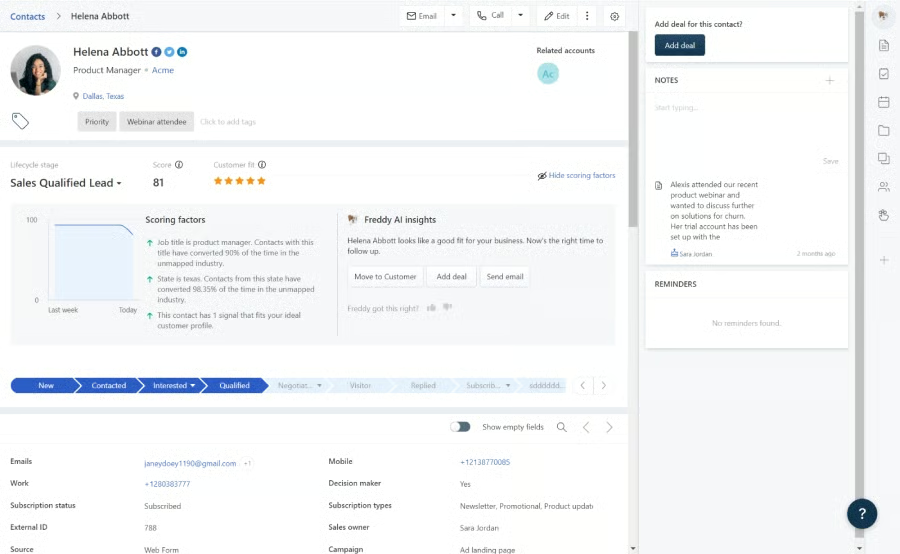
Our Expert Opinion
Freshsales is the best CRM for travel agency when managing contact and company records from clients and partner companies. The multichannel communication tools help maximize marketing efforts and keep track of conversations and other engagement activities. We also like that its mobile CRM has direct access to Uber booking and Google Maps, plus the additional app integrations in the paid plans.
Pipedrive: Best for Creating Custom Itineraries
When to Use Pipedrive
- You want a tour operator CRM with itinerary template storage: Being able to build and store templated itineraries that you can customize for a particular place or client streamlines the work process for travel agents. You can use Pipedrive’s custom fields to personalize itineraries based on their tour goals, culture preferences, and pricing range.
- You need robust lead management tools: Pipedrive offers multiple features for lead generation and management, including tools for pipeline stage visualization, proposal generation, activity monitoring, task updates, and dashboard reporting. If you aim for a higher customer retention rate, leverage the profile auto-enrichment to update your contacts and the AI sales assistant for sales forecasting and insights.
When to Use an Alternative
- You prefer a travel agency CRM software with a free plan: Although its base plan, the Essential, is relatively inexpensive at $14 per user, monthly, Pipedrive doesn’t offer a forever-free plan. Instead, you can avail of their 14-day free trial to try out the CRM features.
- Alternative: HubSpot is a solid free CRM for travel agents and a great choice if you prioritize robust marketing tools. If you want an all-in-one solution to house your sales operations, consider EngageBay’s free plan.
- You need automation for case management: The promptness of resolving customer cases, especially during the client’s travel period, can build or sully your reputation as a travel agency. Automating the initial stages of this workflow can help speed up your customer service response. Since Pipedrive focuses more on lead management, it lacks features for customer support like ticketing tools and native chatbots.
- Alternative: Salesforce offers automation for case resolution with tools for assignment routing, auto-response, escalation rules, and queues.
Pipedrive Pricing Plan & Overview*
Cost:
- $14 per user
Key Features:
- Custom data fields and sales pipeline stages
- Lead and contact management with document storage, proposal generation, and activity reporting
- Deal management with rotting indicator and progress reporting
- Service and product catalog
- Third-party integrations through the app marketplace
- Sales goals tracking
- AI sales assistant for sales forecast, performance-enhancement tips, and automated task updates
Cost:
- $39 per seat
Key Features:
- Everything in Essential
- Automated workflow
- Two-way email sync with Gmail and Outlook email systems with access to custom email templates and signatures
- Meeting scheduler with built-in video conferencing options
- Profile enrichment automation through smart contact data
- Advanced sales reports with revenue tracking
Cost:
- $49 per user
Key Features:
- Everything in Advanced
- Revenue forecasting and expanded reporting for monitoring custom fields and subscription-based revenue
- Smart Docs tool for auto-populating data on proposals to send, track, and get e-signatures
- Visual activity tracking through contacts timeline
- Sales team management
- Automated deal and lead assignment
Cost:
- $64 per seat
Key Features:
- Everything in Professional
- Project management tools with custom project data fields, activity tracking, and Kanban boards
- Phone support
- CRM implementation assistance
Cost:
- $99 per user
Key Features:
- Everything in Power
- Up to 100 active workflow automations
- Unlimited reports and sales dashboards
- Unlimited team management
- Security rules and permission settings
*Pricing is based on annual billing on a per user monthly breakdown. Monthly billing is available for a higher cost. Paid plans include a 14-day free trial. Pricing reflects pricing info available at the time of publishing. While we update pricing information regularly, we encourage our readers to check current pricing here.
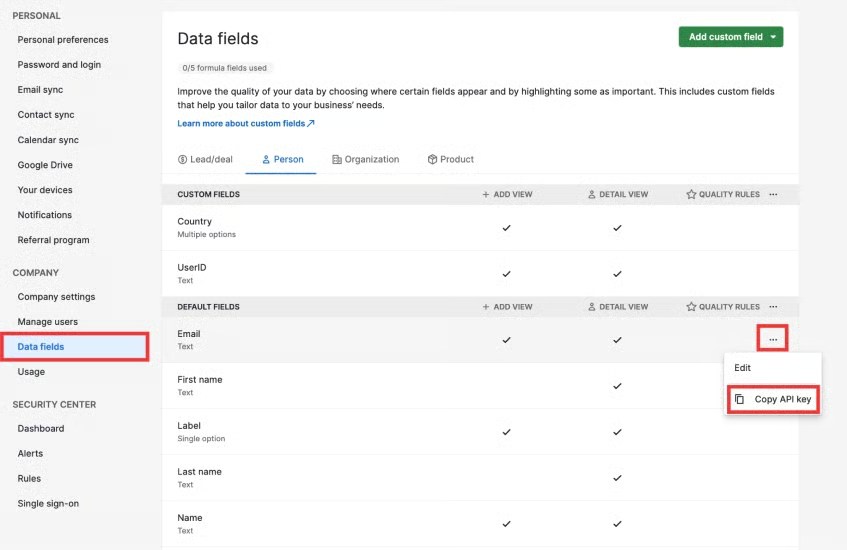
Our Expert Opinion
Pipedrive is undoubtedly at the forefront when it comes to CRMs with an excellent lead management system. While this feat applies to multiple industries, the adaptable features Pipedrive offers make it a solid industry-specific CRM for travel agencies. For example, the custom itinerary templates, in particular, stand out as a great approach to personalizing customer experience.
Salesforce Essentials: Best Customizable CRM for Travel Agents
When to Use Salesforce Essentials
- You’re looking for a customizable travel CRM: Salesforce Essentials is a CRM built particularly for small business. However, its inherent design didn’t get in the way of offering customization options—from its reporting capabilities, sales dashboards, and sales pipelines. In addition, it has the Lightning App Builder for creating custom pages for mobile apps, forecast pages, and point apps valuable to travel agencies.
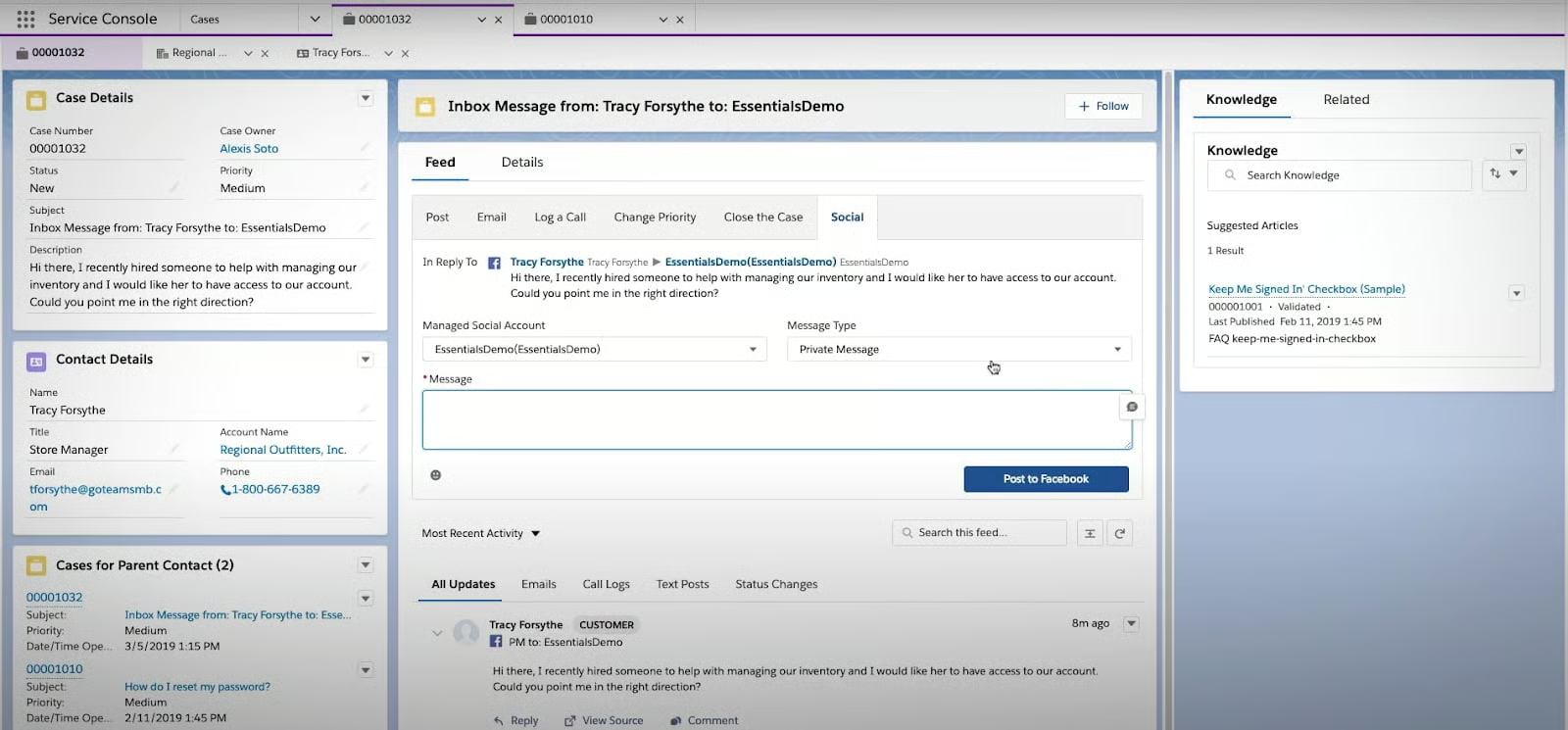
- You want to streamline your customer service support: Case management in Salesforce Essentials includes multichannel support. Customers can send their concerns or cases through email, web form, self-service website, and social media page. Plus, you can apply rules for automated assignments and easy status tracking.
When to Use an Alternative
- You prefer a scalable CRM with customer support: Salesforce Essentials does not offer a free-forever plan, and it only has one paid plan—less ideal for travel agencies looking to expand their business.
- Alternative: In terms of pricing scalability and multichannel engagement, Freshsales is the best option from the list for its cost-friendly plans that come with feature upgrades and expansion along with robust customer service features.
- You need workflow automation tools: While Salesforce Essentials has integrations with productivity tools like Google apps, it’s notably missing workflow automation features crucial for task management.
- Alternative: Zoho is a solid pick for its built-in automation for workflow and marketing campaigns.
Salesforce Essentials Pricing Plan & Overview*
Only a single plan for up to 10 users is available under Salesforce Essentials. You can sign up for its 14-day free trial to test the CRM features and decide if you wish to subscribe completely.
Salesforce Essentials Feature Inclusions
Cost:
- $25 per user
Key Features:
- Lightning App Builder
- Account, contact, lead, and opportunity management
- Mobile app with full offline functionality
- Lead assignment and sales agent routing
- Task management and activity tracking
- Mass email, campaign management, and email template storage
- Customizable sales process
- Web-to-lead capture
- Gmail and Outlook integrations
- Google apps integration
- Customizable reports and dashboards
- Case management
- Read-only knowledge base
- Third-party integration through AppExchange
- Automatic touchpoint logging using Premium Activity Capture
*Pricing is based on annual billing on a per-user, monthly breakdown. Monthly billing is also available at a higher cost. We update pricing information regularly but encourage readers to check current pricing here.
Our Expert Opinion
Salesforce Essentials provides another layer of customization through its Lightning App Builder that allows you to tailor tools and pages to your sales and marketing activities. On top of that, you have access to its pool of helpful guides and tutorials regarding how to leverage its features. Plus, there are also third-party integrations that enhance your sales process and productivity.
Zoho CRM: Best for Workflow Automation
When to Use Zoho CRM
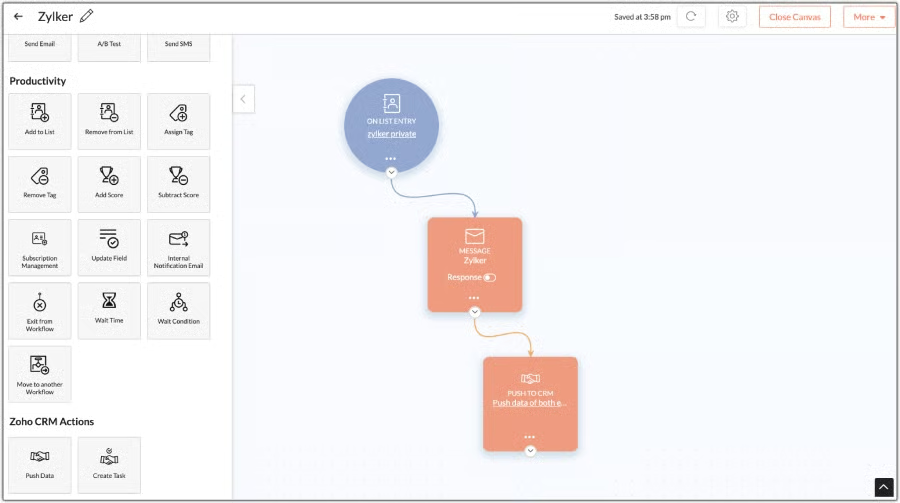
- You need a CRM with automated workflow options: Zoho’s Free plan already includes a custom workflow you can place on auto-pilot with triggers based on your sales process and operation activities. The system can send automated notifications and user reminders, task updates, and create subtasks and other activities based on event data.
- You want cost-friendly paid plans: Travel agencies that need an affordable CRM can look no further as Zoho offers highly scalable plans. You can use the CRM system for free and unlock advanced features from the paid plan starting at $14 per user, monthly. This is highly recommended for fast-growing travel agencies and touring businesses.
When to Use an Alternative
- You prefer a straightforward user interface: Absolute beginners may find Zoho CRM tough to set up due to its feature-rich interface. Plus, it may take time to fully absorb the functionality of the multiple modules in the system.
- Alternative: Freshsales is our top-rated simple CRM. It has a clean, easy-to-use interface and intuitive navigation features.
- You want a free CRM that doubles as travel booking software: Managing bookings through a CRM creates a seamless process for travel agents to generate proposals, build itineraries, and process payment options. While tools for travel bookings like email tracking, social media communication, and online appointment scheduling are available in Zoho CRM, they are locked in the paid plans.
- Alternative: EngageBay offers robust travel booking capabilities in its free plan, including the social media suite and branded email management.
Zoho CRM Pricing Plan & Overview*
Cost:
- $0 for three users
Key Features:
- Automated workflow with basic rule setting plus tasks and email notifications
- 10 custom email templates
- Three organization emails with attachments of 3MB max
- 10MB data storage for 5,000 records
- 1GB total file storage per organization with document library
- Lead, account, contact, deal, and activity management with web forms
- Marketing campaign automation
- Standard CRM reporting
Cost:
- $14 per user
Key Features:
- Everything in Free
- Appointment booking
- Contact and lead scoring
- Email management with communication monitoring
- 200MB data storage for 100,000 records
- 1GB file storage per organization plus 512MB per user license
- 100 custom reports and 10 custom dashboards
- 10 organization emails with 10MB attachments, plus 100 custom sales email templates and 250 daily mass emails per organization
- Social media integrations (Facebook and Twitter)
- Additional CRM integration with Zoho CRM Marketplace and Google Workspace
- Sales forecasting capabilities
- Scheduled actions and automated workflow task reminders
- Advanced customization for group tabs, email address duplication check, unique fields, and user layout
Cost:
- $23 per user
Key Features:
- Everything in Standard
- 500 daily mass emails per organization with automated scheduling
- 10GB data storage for approximately 5 million records
- Unlimited custom email templates
- Unlimited custom reports and CRM dashboards
- Real-time activity notifications from interactions made through SalesSignals
- Inventory management with product tracking and quote, order, and invoice generation
- Native sales gamification
- Case management
Cost:
- $40 per user
Key Features:
- Everything in Professional
- 1,000 daily mass emails per organization with scheduling
- 1GB file storage per organization plus 1GB per user license
- A/B testing and web form analytics
- Data and record sharing among team members
- Three auto-responders
- Lead scoring with custom rules
- ZIA artificial intelligence (AI) sales assistant for data enrichment
- Territory-based sales forecasting
- Marketing attribution and automated contact list segmentation
- Anomaly detector, cohort analysis, and workflow reports
Cost:
- $52 per user
Key Features:
- Everything in Enterprise
- 2,000 daily mass emails per organization
- 1GB file storage per organization plus 5GB per user license
- Five auto-responders
- Custom modules with 50 links per module
- Up to 50 sales pipelines
- Unlimited application programming interfaces (APIs)
*Pricing is based on annual billing on a per-month breakdown of the plans for individuals and small teams. Monthly billing is available for a higher cost. While we update pricing information regularly, we encourage our readers to check current pricing here.
Our Expert Opinion
Workflow automation is Zoho CRM’s turf due to its free yet robust task, contact, and deal management features that reduce manual input. These can help travel agencies establish a smooth CRM process, which in turn drives more revenue. We also can’t miss its free marketing campaign automation and highly scalable plans, making it a great CRM for work and sales activity tracking.
How We Evaluated the Best CRM for Travel Agency
Frequently Asked Questions (FAQs)
What is CRM for travel agents?
CRM software for travel agents helps manage customer relations by streamlining sales and marketing activities, such as email campaigns, lead generation, client nurturing, and travel customization. This tool also gathers, organizes, and stores business data in one system, automating analytics and sales reports.
Why do travel agencies need CRM?
Travel agencies and businesses in the hospitality industry benefit from customer relationship management (CRM) in that it simplifies data management and helps in providing tailored customer experience. For example, travel agents can form personalized itineraries, arrange destination bookings based on preferences, and review travel histories from a single database.
What is the best CRM for a travel agency?
EngageBay is our top-ranking CRM for travel agencies for its comprehensive CRM features and multichannel marketing tools. However, other options may be best suited for your business needs. HubSpot, for example, offers free marketing capabilities and an intuitive interface. On the other hand, Pipedrive is a solid choice if you want to impress your clients with automated, customizable itineraries.
Bottom Line
The best travel CRM software provides features to centralize contact data, create prospecting and marketing strategies, add online booking, and facilitate workflow automation. While EngageBay snatched the top rank in our list for its all-in-one CRM design, other options stand tall in specific use cases. That said, assess your needs, budget, and priorities when choosing a travel agency CRM.
