






The best POS app lets you accept payments, track sales, manage inventory, and run checkout from a phone, tablet, or mobile POS device. A good point of sale app should be easy to set up, work reliably during in-person sales, and support the way you sell, whether that is in-store, at events, tableside, online, or across multiple channels.
For this guide, I tested more than a dozen POS apps based on pricing, payment processing, mobile checkout tools, offline mode, device compatibility, inventory features, ease of use, and real-world performance. Square is my top pick because it offers a free POS app, built-in payments, affordable hardware, and practical tools for small businesses selling in person or on the go.
| Best for | Monthly fee | |
|---|---|---|
| Square | Overall and free mobile POS system | $0-$149 |
| Shopify | Ecommerce and multichannel sales | $5-$89 |
| Clover | Choosing your own payment processor | $0-$16+; varies based on Fiserv partner |
| Loyverse | Free customer loyalty program | $0 |
| Toast | Full-service restaurants | $0-$69 |
| Helcim | Growing business and B2B sales | $0 |
| Lightspeed Retail | Inventory management | $89-$339 |
| PayPal Zettle (PayPal Point of Sale) | Occasional sales | $0 |
- Best POS apps compared
- How I chose the best POS apps
- Square: Best overall and free mobile POS system
- Shopify: Best for ecommerce and multichannel sellers
- Clover: Best for choosing your own payment processor
- Loyverse: Best for free customer loyalty program
- Toast: Best for full-service restaurants
- Helcim: Best for growing businesses and B2B sales
- Lightspeed Retail: Best for inventory management
- PayPal Point of Sale: Best for occasional sales
- Methodology: How I evaluated the best POS apps
- How to choose the best POS apps for your small business
- Frequently asked questions (FAQs)
- Bottom line
Best POS apps compared
All of the POS apps on this list allow for multiple payment types (swipe, EMV chip, contactless, online, etc), include barcode scanning functions, and work on both iOS and Android devices.
| My score (out of 5) | Works on | Offline mode | Key limitation | |
|---|---|---|---|---|
| Square | 4.49 | iOS, Android, Square hardware | Yes | Must use Square Payments |
| Shopify | 4.38 | iOS, Android, Shopify hardware | Limited | Best value requires Shopify ecommerce |
| Clover | 4.16 | Clover hardware, mobile app | Yes | Pricing varies by reseller |
| Loyverse | 4.15 | iOS and Android | Yes | Add-ons needed for advanced tools |
| Toast | 4.01 | Toast hardware and Android-based devices | Yes | Restaurant-focused |
| Helcim | 3.93 | iOS, Android, desktop tools | Limited | Lighter POS features than Square or Shopify |
| Lightspeed Retail | 3.74 | iOS and retail hardware | Limited | Higher monthly cost |
| PayPal Point of Sale | 3.61 | iOS and Android | No | Limited advanced POS features |
How I chose the best POS apps
I evaluated more than a dozen mobile POS apps using a weighted rubric that compares pricing, core POS features, mobile capabilities, ease of use, and overall value. I also validated results through hands-on testing with demos and free plans, along with user feedback and real-world performance insights. You can learn more about our evaluation in the methodology section below.
Square: Best overall and free mobile POS system
Why I chose Square
Square is a cloud-based POS app built for mobile and in-person selling. It includes a free plan, built-in payment processing, inventory tracking, customer management, reporting, and a basic online store.
When I evaluated mobile POS systems, Square performed well across pricing, ease of use, and mobile functionality. I was able to set it up and start processing payments quickly using only a smartphone and card reader, and its straightforward interface helps reduce onboarding time.
Square also stood out for its flexibility. It supports retail, restaurant, and appointment-based businesses on the same system, and its mobile app handles transactions, inventory updates, and reporting without requiring extra software.
Compared with Shopify, which is better for ecommerce-first businesses, Square is the stronger fit for in-person and mobile sales. It earned the top spot because it combines a free entry point, integrated payments, and reliable mobile performance in a system small businesses can use right away.
Who should use Square
- Small brick-and-mortar businesses that need a flexible, all-in-one solution: Square is our top pick for mobile and in-person sales thanks to its free plan, free mobile card reader, and offline capabilities.
- Pop-up shops, market vendors, and mobile service providers: Square’s mobile-first design, offline mode, and compact hardware make it one of the most reliable options for businesses selling on the go.
- New businesses or side hustles with low startup budgets: Square offers the most generous free plan on our list, with built-in sales tools, inventory tracking, and even a basic online store, all without a monthly fee.
Square pricing
Software:
- Square Free: $0 per month
- Square Plus: $49 per month per location
- Square Premium: $149 per month per location
- Custom pricing available for businesses that process over $250,000 sales a year
- 30-day free trial for paid plans
Hardware:
- Free magstripe reader with every account ($10 for additional readers)
- Chip and tap readers: From $59
- Terminals: From $299 (financing available)
- Tap to Pay on iPhone: Free via the Square app
Payment processing rates:
- In-person transaction: 2.6% + 15 cents per transaction
- Online: 2.9% + 30 cents per transaction
- Keyed-in and card-on-file transactions: 3.5% + 15 cents per transaction
- Chargeback fee: Waived up to $250 per month
Key features
- Square POS app: Available for iOS and Android. Includes sales, inventory, and customer tools with no monthly cost.
- Offline mode: Accept payments even with no internet connection — great for pop-up events or outdoor markets.
- Mobile hardware: Use with a simple magstripe reader (free on signup), or upgrade to a contactless and chip reader for tap payments.
- In-app invoicing and estimates: Send quotes and invoices straight from the app.
- Customer directory and notes: Track preferences, purchase history, and contact info.
- Digital receipts and tipping: Let customers tip and get receipts via text or email.
- Square AI: Square’s conversational AI assistant. It is built directly into the Square Dashboard, letting sellers ask natural-language questions about sales, staff, customers, and transactions to get instant insights without running reports. It is currently available for sellers in the US.
Gallery
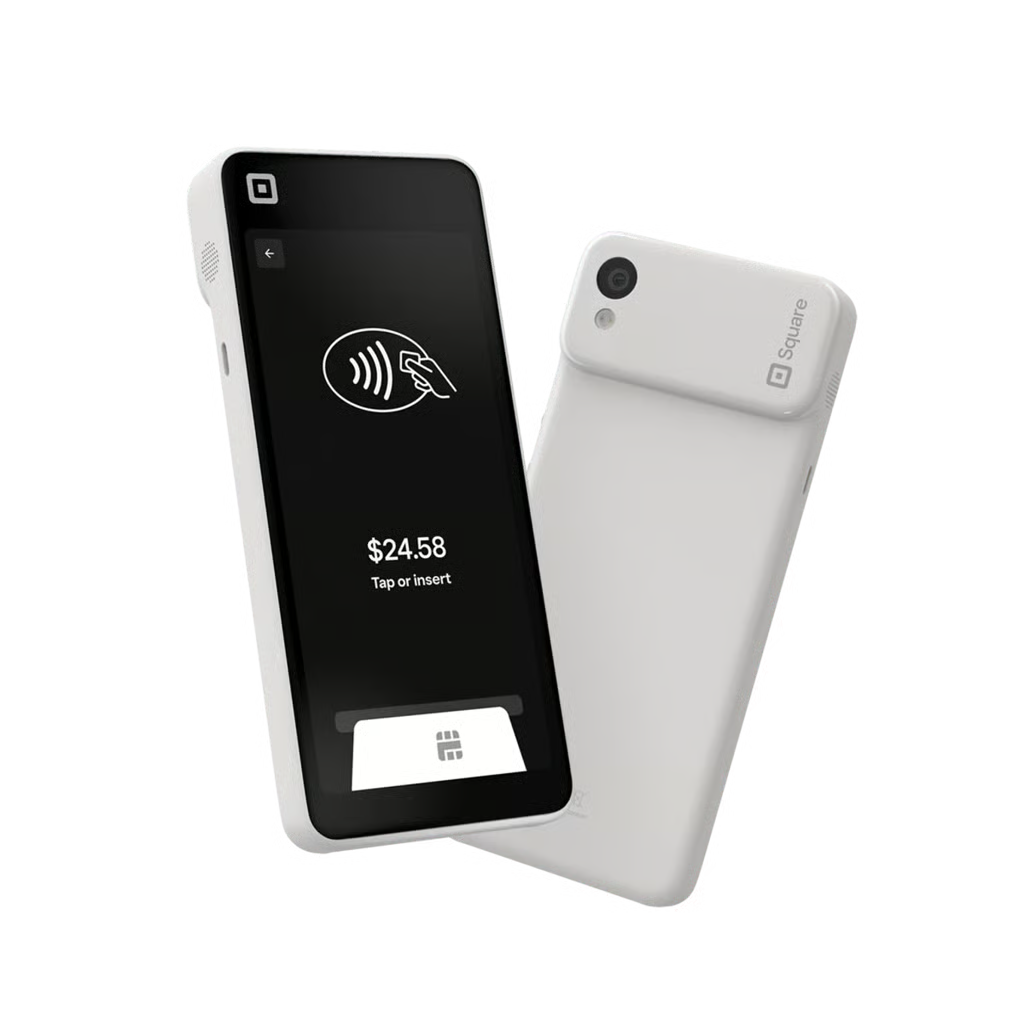
Square Handheld is Square’s newest mobile POS. (Source: Square) 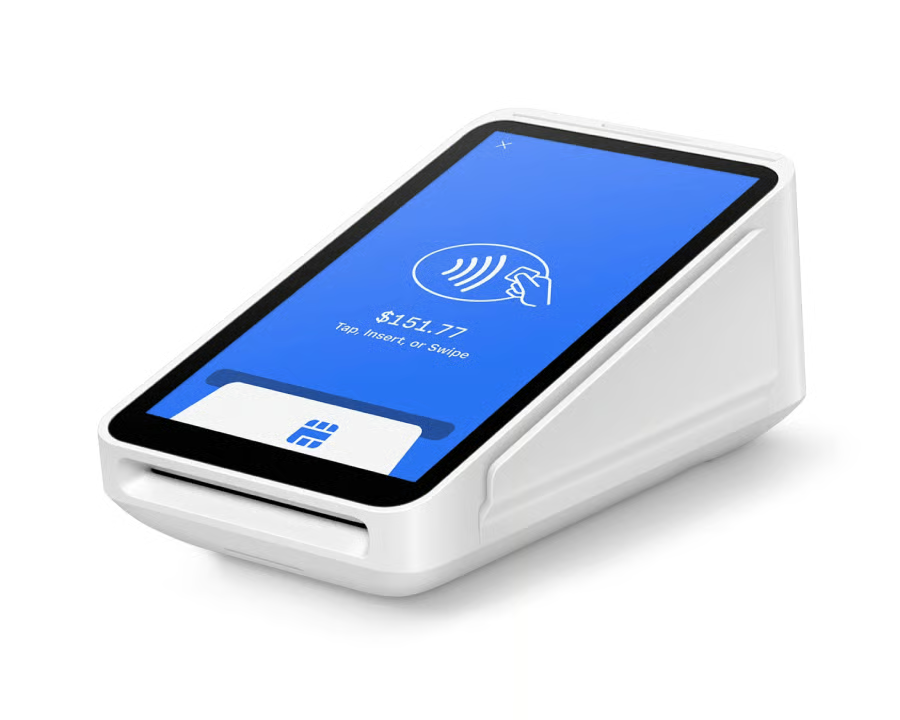
Square Terminal can process payments and print receipts. (Source: Square) 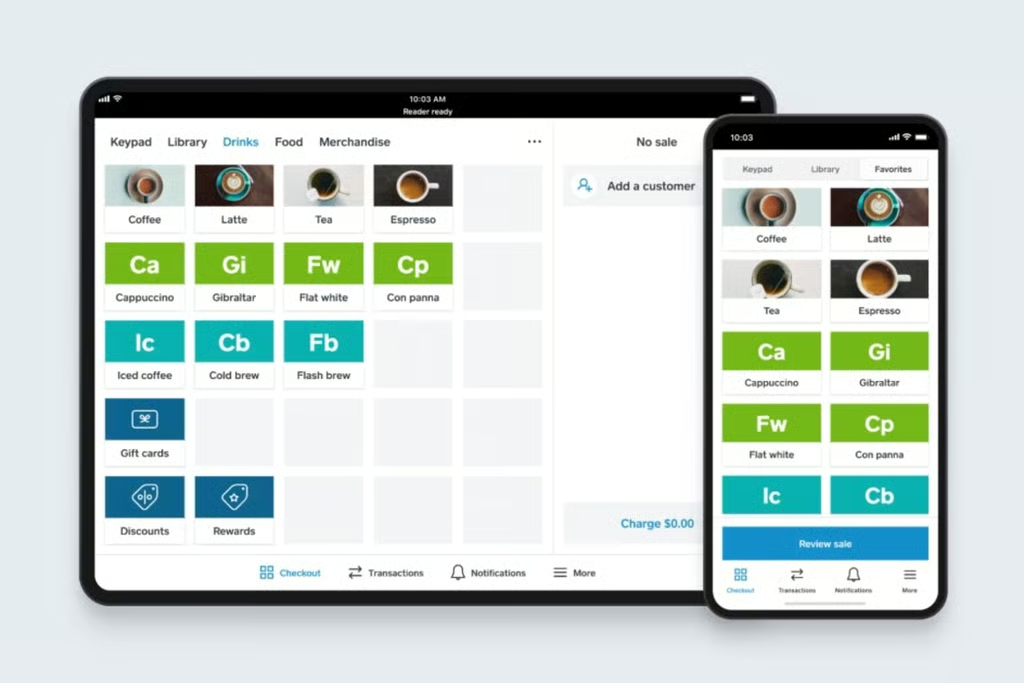
Square’s POS interface translates well and consistently across devices, shown above is how it looks on tablets and smartphones. (Source: Square)


What Square POS app users say
| Play Store | App Store | |
|---|---|---|
| Rating | 4.6 out of 5, based on 257,000 reviews | 4.8 out of 5, based on 599,000 ratings |
| What users like | Broad adoption and a large review base | Very strong iOS rating and the largest App Store review volume in this group |
| What users don’t like | Fees, paid subscriptions, setup changes, cluttered navigation, and features that are not fully available in the mobile app | Older visible reviews mention hardware and support issues after app or iOS changes |
Square has the broadest user base and strongest review volume in this group, which supports its position as the best free POS app for most small businesses. The rating gap between Android and iOS is worth noting, with App Store sentiment much stronger.
Learn more about Square:
- What Is Square? Guide to products and services.
- More details on Square fees and a monthly cost calculator,
Shopify: Best for ecommerce and multichannel sellers
Why I chose Shopify POS
Shopify POS is built to connect in-person and online sales through one system. It syncs inventory, orders, and customer data across sales channels, making it especially useful for retailers that sell both online and in person.
In testing and product walkthroughs, Shopify POS stood out for its multichannel capabilities. Its POS app connected cleanly with the Shopify ecommerce backend, allowing me to manage inventory, customer profiles, and order fulfillment from one dashboard.
Compared with Square, which is better for in-person-first businesses, Shopify offers stronger ecommerce functionality out of the box. It also supports social commerce, local delivery, and buy online, pick up in store, and handles cross-channel inventory and order management more consistently than systems like Clover.
The main drawback is that Shopify POS works best within the Shopify ecosystem. Businesses need Shopify ecommerce to get the most value, and some advanced features, such as detailed inventory management and staff permissions, require POS Pro. It also does not support offline payments, which can limit mobile sellers.
Who should use Shopify POS
- Retail businesses that primarily sell online: Shopify is our pick for best ecommerce platform, and basic Shopify POS comes free with any of its ecommerce subscription plans.
- Multichannel retailers: Shopify also tops our list of leading multichannel POS systems. It lets you sync online and in-person sales, process curbside and pickup orders, and start sales in-store and finish them online.
- Businesses that already use a Shopify ecommerce store: Every Shopify ecommerce account comes with Shopify’s basic POS already integrated
Shopify POS pricing
Software:
- POS system:
- POS Lite: $5 (free with Shopify ecommerce plan)
- POS Pro: $89 per month, per location
- Ecommerce plan:
- Monthly pricing: $5-$399/month
- Annual pricing: $29-$299/month (Billed once per year)
- Plus plan (available on a 1-year or 3-year term): $2,300+/month
- 3-day free trial
Read more: Shopify Pricing Plans: Comparison, Fees & Calculator
Hardware:
- Card reader: $49 (free shipping, 30-day free returns)
- Tap to Pay on iPhone: First 100 transactions per month free with Shopify plan; $0.25 per transaction thereafter
- Shopify Terminal: $349 (Financing available)
Read more: Shopify Hardware: Ultimate Guide for Small Businesses
Payment processing rates:
- In-person transaction: 2.4%-2.7%
- Online: 2.4%-2.9% + 30 cents
Key features
- Shopify POS app: Works on iOS and Android with a customizable home screen and access to online order history, customer profiles, and product catalog. A recent update includes a customizable smart grid, quicker access to key tools, and improved navigation for faster checkouts, designed to support smoother workflows for busy retail teams.
- Unified inventory and orders: Automatically syncs stock across online and retail channels, including returns and exchanges.
- Omnichannel tools: Supports in-store pickup, local delivery, social media selling, and buy-online-pick-up-in-store (BOPIS).
- Smart staff and customer management: Add custom roles, permissions, and detailed customer profiles with tags and notes (POS Pro required).
- Integrated payments and hardware: Includes Tap to Pay on iPhone and Shopify card readers; terminals and stands sold separately.
Gallery
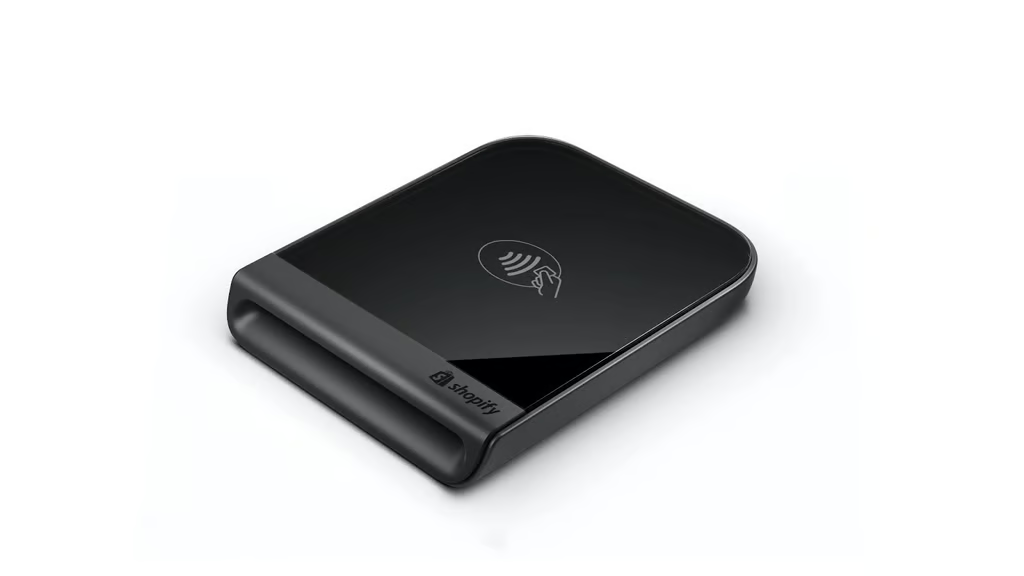
The Shopify Tap & Chip Card Reader lets you accept chip and contactless payments anywhere you sell while syncing every sale with your Shopify POS. (Source: Shopify) 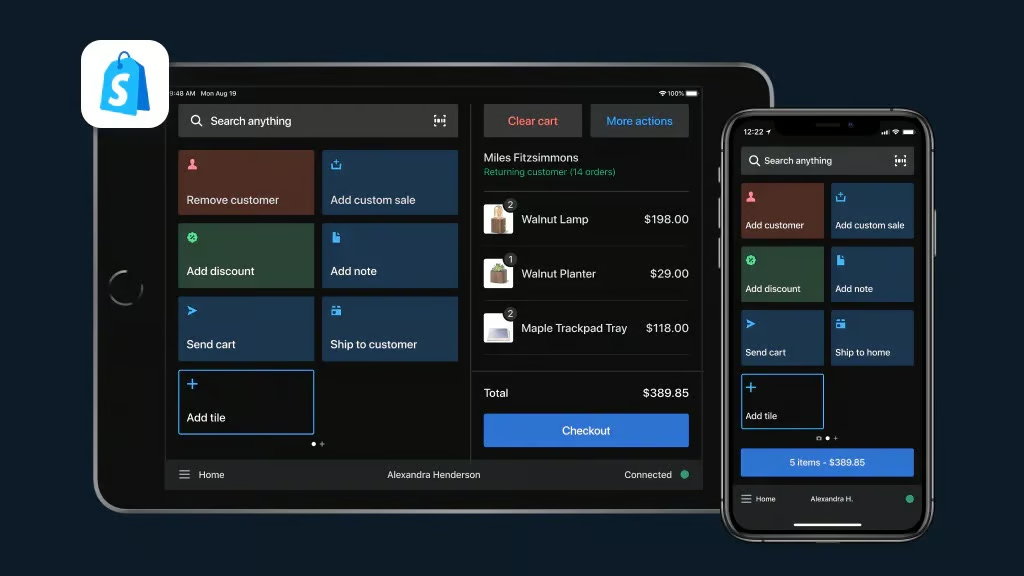
The new design of the Shopify POS dashboard. (Source: Shopify) 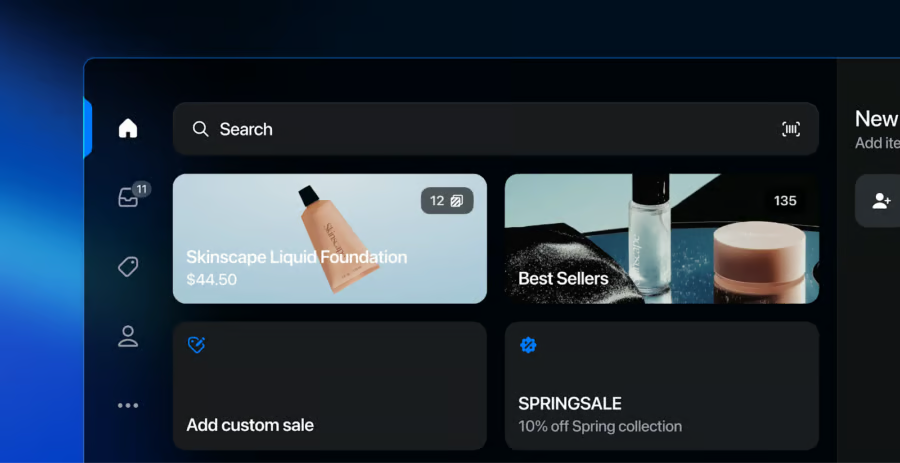
This is the revamped vertical navigation bar in Shopify POS — Register, Lock Screen, and Connectivity. (Source: Shopify)


What Shopify POS app users say
| Play Store | App Store | |
|---|---|---|
| Rating | 3.8 out of 5, based on 3,330 reviews | 4.5 out of 5, based on 7,500 ratings |
| What users like | Syncs product catalog and inventory for online and in-person selling | App design, Shopify store connection, and unified online and in-store workflows |
| What users don’t like | Checkout layout changes, removed or gated features, receipt issues, reader connection problems, and crashes | App freezing, hanging during checkout or customer search, and transaction interruptions |
Shopify POS has stronger user sentiment on iOS than Android. The review patterns fit its positioning as a strong ecommerce-connected POS app, but users are more sensitive to checkout changes because the app sits directly in the sales flow.
Learn how to set up the Shopify POS in 12 easy steps. Or check out our setup tutorial and see Shopify POS in action.
Clover: Best for choosing your own payment processor
Why I chose Clover
Clover is a flexible POS system that supports in-person and mobile selling across various business types. It offers proprietary hardware, a feature-rich mobile app, and the unique ability to work with multiple merchant service providers, giving sellers more control over payment processing rates and contracts.
Clover offers mobile POS features such as barcode scanning, staff management, and time tracking. It also offers offline payment processing, which not every POS system can provide. The software also features strong customer and loyalty tools, as well as various integrations. It offers fairly affordable monthly plans for multiple industries, and you get hardware included in each subscription.
While you can use nearly any merchant account, unless otherwise specified, Clover will default and automatically enroll its new members into Fiserv upon sign-up if you purchase directly through the Clover website.
Just a few things to take note of: Clover terminals can’t be reprogrammed for different payment processors once you have opted in, so you’ll have to stick with the processor you purchased it from. Also, Clover’s pricing structure is complicated; businesses operating in different industries will pay different monthly prices.
Who should use Clover
- High-volume or high-risk businesses: Clover’s support for third-party merchant accounts makes it ideal for businesses that want more flexibility with payment providers or need better control over processing fees.
- Retailers that want full control over hardware and payment terms: Clover gives you the option to choose your own processor and access different hardware configurations to fit your setup.
- Established businesses with stable operations: Clover works best when you’ve already got systems in place and need a reliable POS that can adapt to your preferred payment setup and industry tools.
Clover pricing
Clover has a payments-only plan that is $0 per month, but it is only for payment processing, not a full POS system.
Software*:
- Retail POS: $16-$240/month
- Restaurant POS: $179-$354/month for full-service restaurants; $135-$245 for quick-service restaurants
- Service POS: $16-$180/month
*Prices may vary based on provider. Prices reflected are from the Clover website.
Hardware*:
- CloverGo Card Reader: $49
- Terminal and other hardware: $599-$1,799
- Tap to Pay on iPhone: Free with the Clover Go app
*Prices may vary based on provider. Prices reflected are from the Clover website.
Key features
- Clover Go mobile app: Accept card and mobile wallet payments on the go with a compact reader and iOS/Android support.
- Customer engagement: Clover includes both loyalty programs and customer engagement features. You can create real-time promotions via email, text, or social media; start a rewards program; and create profiles that automatically update credit card sales and contact info.
- Customizable hardware: Clover has proprietary hardware that you can purchase from Clover directly or from authorized resellers. Portable devices and countertop registers are paid via monthly financing, billed with your software subscription. Or, you can get a Clover Go card reader for only $49, which you can pair with your smartphone.
- Customization options: Clover prides itself on being a highly customizable POS option. Not only can you use the merchant account of your choosing to process transactions, but Clover also has a massive suite of app integrations for any tools or features you need to run your business at no cost.
- Robust reporting: Clover lets you generate and view reports for sales performance across locations, overall and hourly revenue, refunds, tips, and credit card transactions. You can sync these reports with software like QuickBooks for more efficient accounting, and you can view reports from your computer or mobile device.
Gallery
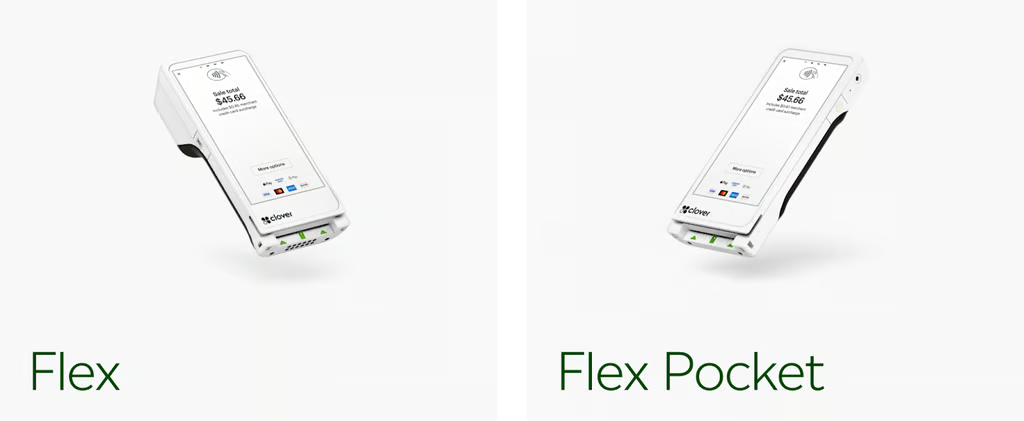
Clover’s Flex POS is a portable device packed with all the features of a full POS system. (Source: Clover) 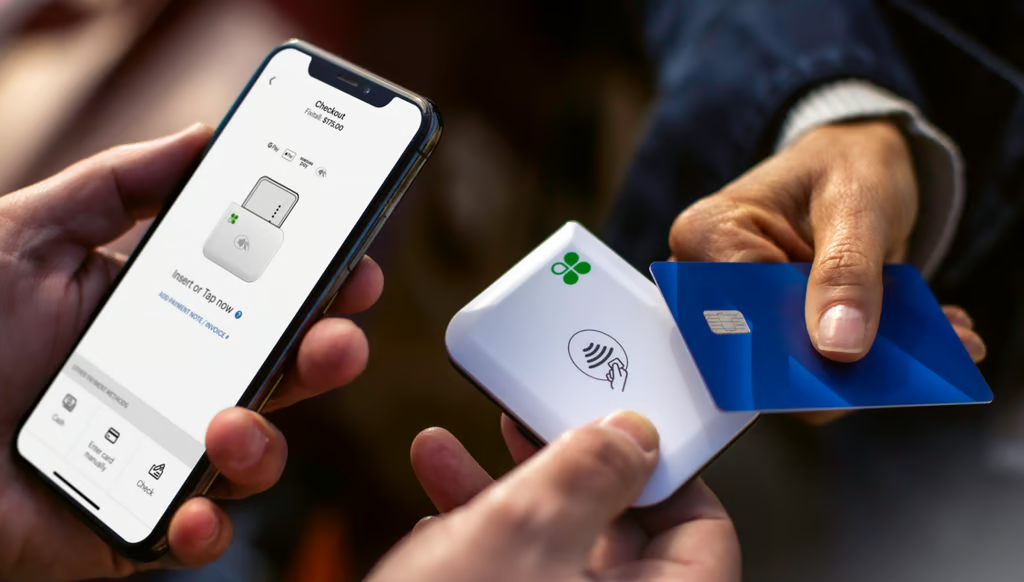
The Clover Go mobile app, along with Clover’s portable credit card reader, lets you accept card and mobile wallet contactless payments on the go. (Source: Clover) 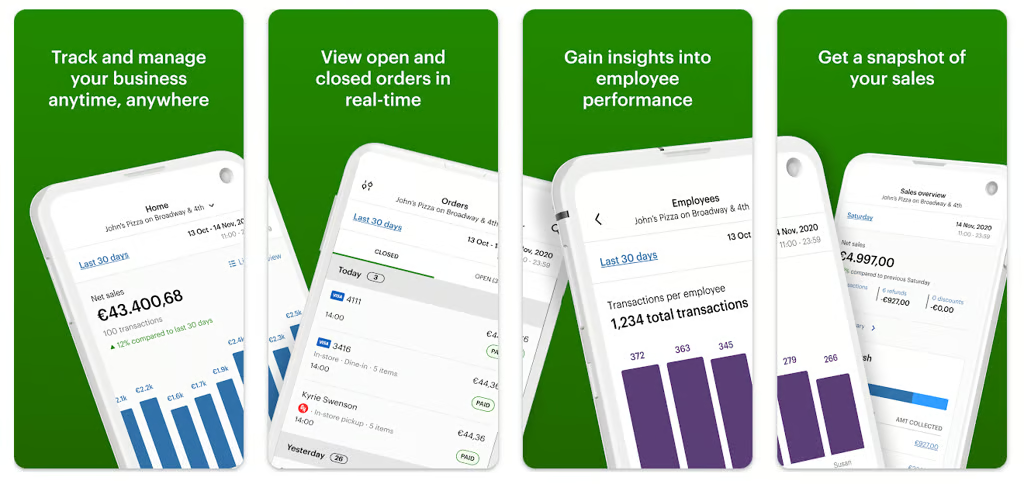
Clover has screenshots of how its POS app looks on Android devices in the Google Play store. (Source: Google Play)


What Clover POS app users say
| Play Store | App Store | |
|---|---|---|
| Rating | 4.6 out of 5, based on 6,950 reviews | 4.8 out of 5, based on 62,000 ratings |
| What users like | Mobile POS access, payments, dashboard tools, and business tracking | Real-time sales views, transaction review, and mobile business management |
| What users don’t like | The accessible Play Store page did not surface detailed review snippets | App reliability concerns, missing or limited reporting views, and support response concerns |
Clover has one of the strongest overall rating profiles in this group, especially on the App Store. Its large iOS review base and high rating support its fit for businesses that want a polished mobile POS app connected to Clover payments and hardware.
Loyverse: Best for free customer loyalty program
Why I chose Loyverse
Loyverse is a free mobile POS app built for small retail and food businesses. It includes built-in sales, inventory, and loyalty tools, and works with a wide range of third-party hardware. Its offline mode and built-in customer rewards program make it especially appealing for lean business operations.
I like that Loyverse gives small businesses access to tools that typically require a paid plan, especially its free, built-in loyalty program. You don’t have to upgrade or subscribe just to track repeat customers or offer rewards, which sets it apart from competitors like Square or Shopify, where those features come with extra fees.
Loyverse is also one of the few POS apps that work completely offline, including sales, inventory, and syncing, something even Square can’t do fully. And while you’ll need to pay for more advanced tools, such as inventory counting or staff analytics, the free version goes surprisingly far for basic retail and quick-service needs.
That said, Loyverse isn’t as strong when it comes to ecommerce or North American payment integrations. But if your focus is on in-person sales and customer relationships, it’s a flexible, low-cost POS option that delivers more value than what it’s worth.
Who should use Loyverse
- Retail shops and cafes on a budget: Loyverse offers core POS and loyalty features for free, making it ideal for small retailers or food businesses with tight margins.
- International sellers or mobile operators: With broad hardware compatibility and flexible processor support, it’s a strong choice for businesses outside the US or those with mobile setups.
- Businesses focused on customer retention: The free loyalty program stands out from competitors like Square or Clover, which charge extra for similar tools.
Loyverse pricing
Software:
- POS account and dashboard: Free
- POS customer display (CDS): Free
- POS kitchen display (KDS): Free
Hardware:
- No in-house Loyverse hardware
- Operate the free Loyverse POS app from your Android or iOS device + a compatible card reader (starting at $50)
Add-ons:
- Employee Management: $5 per month, per employee
- Advanced Inventory: $25 per month
- Integrations: From $9 per month
- 14-day free trial for add-ons
- Annual pricing available with two months free
Key features
- Loyalty: This is where Loyverse gets its name (an abbreviation of Loyalty Universe) and where it stands out. Its customer relationship and loyalty program has a database for storing information such as contact details, purchase history, customer notes, and points tracking. The built-in program also offers scannable loyalty cards where customers can keep their rewards.
- POS: Loyverse lets you use your phone’s camera as a barcode scanner. Plus, it has extra features, including open tickets and weight barcodes. You can also set up options for takeout or delivery. Finally, you can process sales and work with staff management features even offline (though you can’t update the customer database or process refunds).
- Inventory management: Loyverse boasts a strong inventory management system with item variants and modifiers, bulk upload, low-stock alerts, and inventory tracking. However, if you want purchase orders, the ability to transfer items between stores, inventory counting, and ingredient tracking, you need the advanced inventory program, which carries an additional monthly fee.
- Employee features: Loyverse has a free time clock for employees to clock in and out. If you purchase the employee management system, you also get time cards, access restriction capabilities, and employee analytics.
- Payment processing: Like with Clover, you can choose your payment provider, although choices for Loyverse are more limited. It works with SumUp, Zettle, Tyro, Smartpay, Yoco, STORES Payment, PAYGATE, SB payments, KICC, and NICE. Many of these are only available for iOS, and some are limited to specific countries. However, note that if you integrate a third-party service, you will have to pay an additional monthly integration fee.
- Analytics: Loyverse’s reporting tools (some of which you’ll need to pay extra to unlock) include tracking of sales patterns by day, week, and month; tax obligation reports to make your accounting easier; receipts history that monitors sales, discounts, and refunds; and popular items analytics that show you your best-selling products.
Gallery
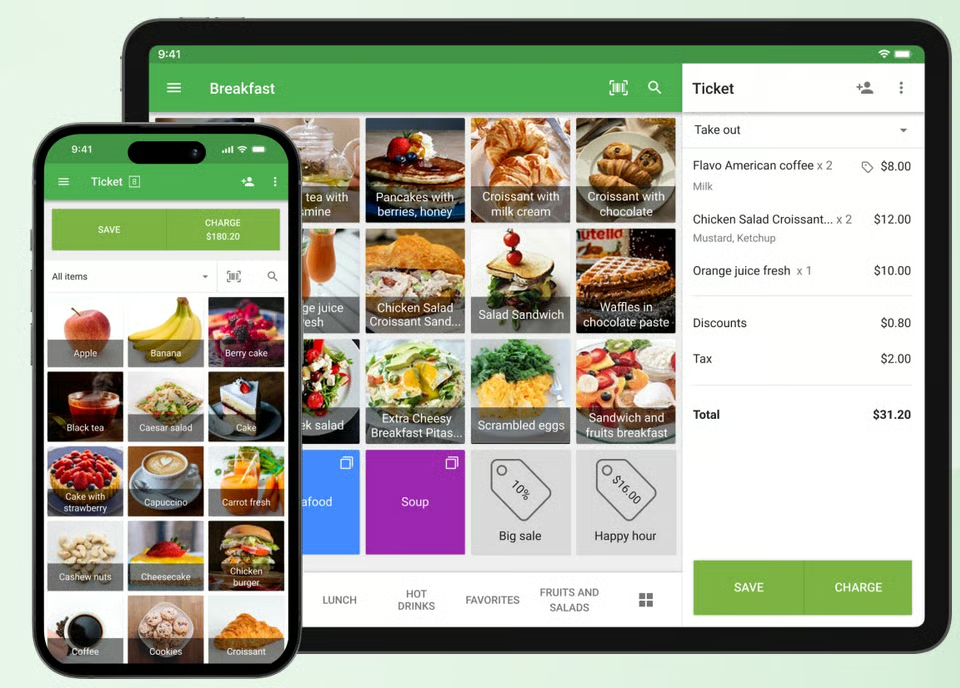
Loyverse’s POS app has lots of visuals to make it easy to use, plus compatibility with a variety of devices. (Source: Loyverse) 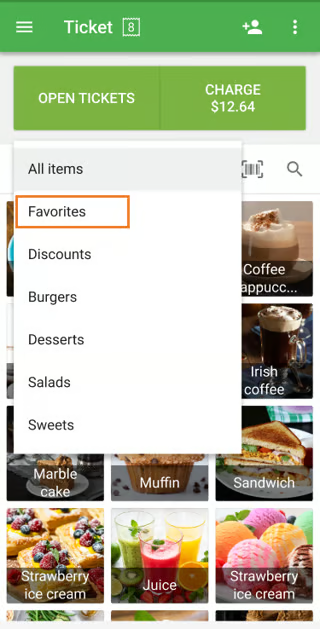
You can create a list of favorite items to quickly access popular items on the sale screen when using Loyverse POS on phones. (Source: Loyverse)


What Loyverse POS app users say
| Play Store | App Store | |
|---|---|---|
| Rating | 4.8 out of 5, based on 17,400 reviews | 4.7 out of 5, based on 360 ratings |
| What users like | Strong Android rating and high review volume for a free POS app | Positive visible feedback for sales orders, emailed receipts, and customer handling |
| What users don’t like | The accessible Play Store search page did not surface detailed review snippets | Requests for more specific fields, such as shipping address and expiry date tracking |
Loyverse has some of the strongest ratings in this group, especially on Google Play. The App Store review sample is much smaller, so the Android rating carries more weight when assessing overall user sentiment.
Toast: Best for full-service restaurants
Why I chose Toast
Toast POS is built specifically for restaurants, with proprietary hardware and software for food service workflows. It supports tableside ordering, tipping, kitchen routing, payment processing, and mobile setups for restaurants, food trucks, catering, and high-volume service environments.
Toast stood out because its handheld terminal is not just a companion device. It can run with full POS functionality, which makes it useful for tableside service and mobile food businesses that need more than basic payment acceptance.
Compared with Square, which is more general-purpose, Toast offers deeper restaurant tools for order routing, tip tracking, and kitchen workflows. It also offers a $0 upfront starter kit with software and hardware, which is uncommon for restaurant-grade POS systems.
The main trade-off is flexibility. Toast requires its built-in payment processor and a two-year contract, making it less flexible than competitors like Loyverse or Square. Still, for full-service restaurants that need mobile POS tools built around food service, Toast is the strongest pick on this list.
Who should use Toast
- Full-service restaurants and cafes: Toast is purpose-built for food service businesses, with strong tools for table service, tipping, and kitchen display systems.
- Mobile catering or food trucks with high volume: Toast’s handheld POS terminal can operate independently, making it ideal for events, festivals, or fast-paced outdoor service.
- Restaurants wanting an all-in-one setup with no upfront hardware cost: Toast’s starter kit comes bundled with essential mobile hardware and basic software, perfect for new operators on a budget.
Toast pricing
Software:
- Monthly fee: $0-$69
- Cancellation fee: $0 but remaining balance of monthly fees of the contract term should be settled
Hardware:
- From $0 to $627 + $69 per month for a handheld startup kit
- Setup and installation fee: From $0, optional, custom quoted
Payment processing rates:
- In-person transaction fee: From 2.49% + 15 cents to 2.99% + 15 cents
- Chargeback fee: $15
Key features
- Toast Go 2 handheld terminal: A fully functional POS device with payment processing, tipping, and order routing — all in one compact mobile unit.
- Tableside ordering and payment: Speeds up service and improves customer experience in dine-in settings.
- Kitchen display system (KDS): Syncs orders with back-of-house for faster, more accurate prep.
- Restaurant-grade hardware: Built to withstand heat, spills, and the pace of a busy restaurant floor.
- Free starter kit plan: Includes hardware and software for basic mobile POS use with no upfront cost (contract required).
Related read: 10 New Toast Products & Features
Gallery
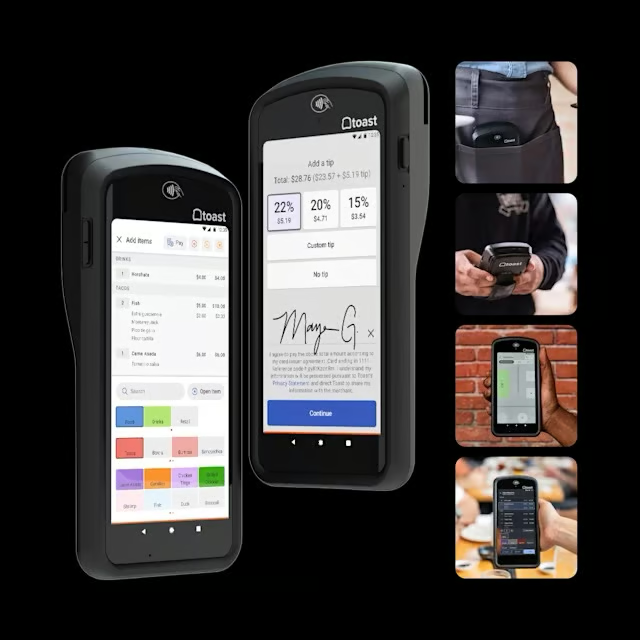
Toast Go® 2 is the newest handheld mobile POS of Toast. (Source: Toast) 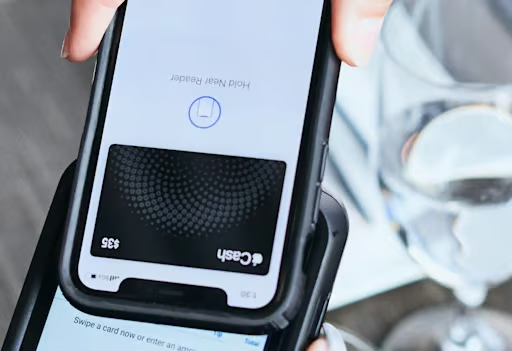
Tap to pay from your phone. (Source: Toast) 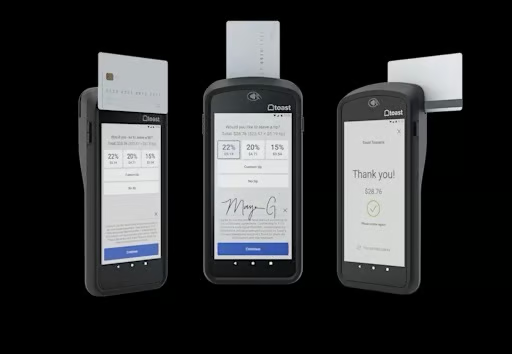
Toast accepts swipe, dip, and tap payments. (Source: Toast)


What Toast POS app users say
| Play Store | App Store | |
|---|---|---|
| Rating | 4.9 out of 5, based on 1,610 reviews | 4.9 out of 5, based on 10,000 ratings |
| What users like | Easy navigation, real-time business insights, stock controls, and team management tools | Real-time sales data, labor views, sales comparisons, item availability controls, and smooth performance |
| What users don’t like | Login or authentication friction, confusion with other Toast apps, and extra verification steps | End-user support concerns, iPhone display/layout issues, and update-related loading problems |
Toast has the most consistent ratings across both app stores, with 4.9 out of 5 on Android and iOS. Its review volume is smaller than Square and Clover, but the consistency supports its position as the best POS app for restaurants.
Helcim: Best for growing businesses and B2B sales
Why I chose Helcim
Helcim is a Canadian credit card processing and merchant services provider that offers a free, all-in-one POS system designed for small and growing businesses. It includes payment tools for both in-person and remote sales, plus integrations with ecommerce, invoicing, and accounting systems. It comes with no monthly fees and transparent interchange-plus pricing.
I like that Helcim doesn’t charge a monthly fee or offer flat-rate fees — it’s actually the only provider in this list that offers interchange pricing. That’s rare for a POS system, and it makes a big difference for high-volume sellers and B2B companies who want to save on transaction costs. This is why Helcim is also our top pick for cheapest credit card companies and B2B payment solutions.
Compared to Loyverse, Helcim does not have a native loyalty program, and you won’t find advanced inventory or ecommerce features like Shopify and Lightspeed. But for invoicing, subscription billing, and service-based payments, it’s one of the most cost-effective and flexible POS apps you can use.
If your business is more client-driven than checkout-driven, Helcim is a solid alternative to traditional POS systems.
Who should use Helcim
- B2Bs, service-based businesses and consultants: Helcim includes invoicing, recurring billing, and a virtual terminal which makes it ideal for managing client payments across multiple channels.
- Growing businesses: Helcim’s interchange-plus pricing beats flat-rate models over time, making it ideal for growing businesses and those processing high-volume sales.
- Businesses processing both remote (online) and in-person sales: Helcim’s POS, online checkout, and invoicing tools work together under one account.
Helcim pricing
Software fees: $0
Payment processing fees:
- In-person transaction fees: Interchange plus 0.15% + 6 cents to 0.4% + 8 cents
- Online transaction fees: Interchange plus 0.15% + 15 cents to 0.50% + 25 cents
- QR codes: Interchange plus 0.15% + 15 cents to 0.50% + 25 cents
- Tap to pay (iPhone): Plus 10 cents fee per successful transaction
Hardware:
- Card reader: $99
- Smart Terminal: $329 (financing available; $32 per month for a year)
Key features
- No separate fee for mobile access: The mobile POS is included in Helcim’s free software suite, no add-ons or tier upgrades needed.
- Interchange-plus processing: Transparent pricing with no monthly software fees.
- Virtual terminal: Accept payments from your computer without extra hardware.
- Custom-branded checkout links: Send payment requests via email or SMS with your logo and company info.
- Integrated product and inventory management: Add, edit, and organize products from the mobile app, with syncing across desktop and device.
- In-app invoicing and payment links: Create and send invoices or checkout links straight from your mobile device for remote or on-the-spot payments.
- Customer profiles and saved cards: Look up customer history, store card info securely, and manage repeat billing directly from your mobile dashboard.
- Cloud-based syncing: All transactions, product updates, and customer activity sync in real time across devices (mobile, tablet, and desktop). Offline mode is possible, but syncing happens once online access is restored.
Gallery
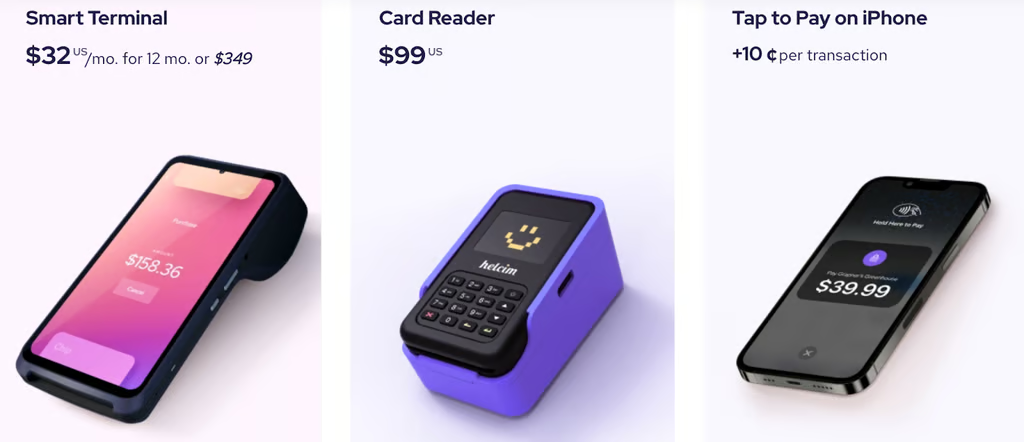
Helcim has several mobile POS solutions — a card reader, a handheld POS device, and a POS app available in Android and iOS devices. (Source: Helcim) 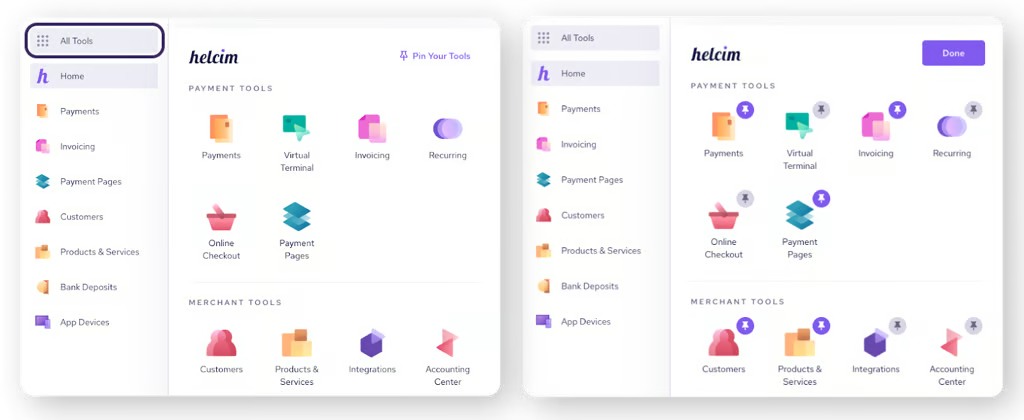
Helcim has an intuitive merchant dashboard. (Source: Helcim) 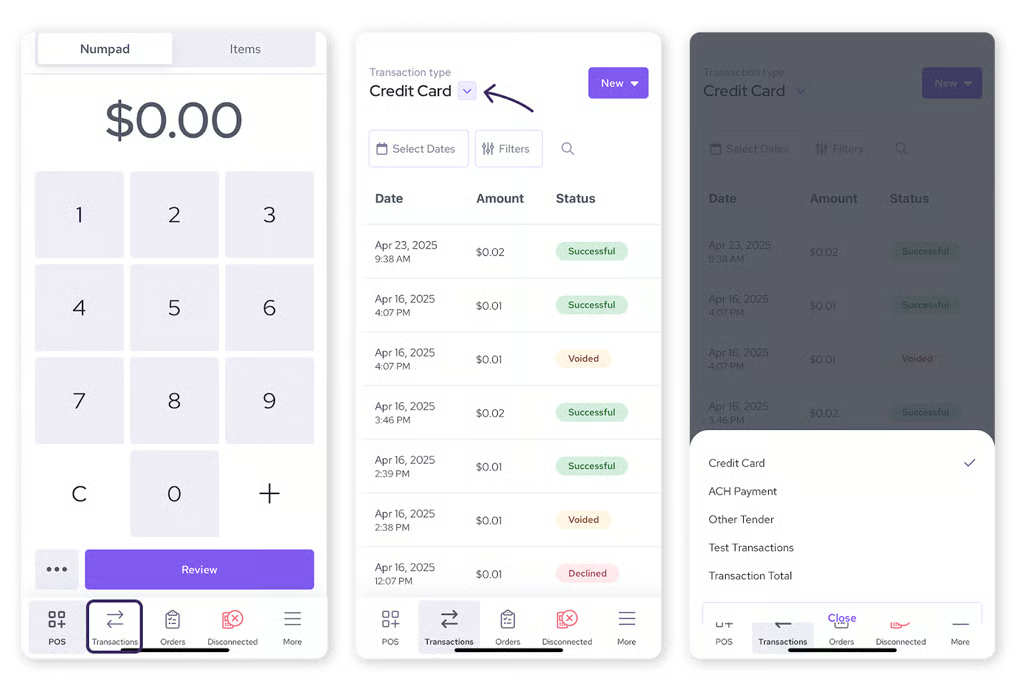
This is how the transaction history looks in the Helcim dashboard of the POS app. (Source: Helcim)


What Helcim POS app users say
| Play Store | App Store | |
|---|---|---|
| Rating | 3.2 out of 5, based on 152 reviews | 3.3 out of 5, based on 97 ratings |
| What users like | Users acknowledge app benefits, but the accessible snippets lean more critical | Lower processing rates, easy card processing, and app/card reader usability |
| What users don’t like | Account review friction, payment glitches, lockouts, desktop-only tasks, and business verification concerns | Slower deposits, limited tipping options, customer service concerns, and failed or delayed transaction handling |
Helcim has a much smaller app review base than most providers in this list, and its ratings are more mixed. It is better positioned for businesses prioritizing transparent processing costs than for those choosing mainly by mobile app sentiment.
Lightspeed Retail: Best for inventory management
Why I chose Lightspeed Retail
Lightspeed Retail is a cloud-based POS system built for complex inventory operations. It includes advanced stock management, detailed reporting, and a built-in supplier catalog, making it a strong fit for multi-location retailers, specialty shops, and wholesalers with large or fast-moving inventories.
Lightspeed stood out for how well it handles granular inventory needs, including bundles, serial numbers, purchase ordering, and vendor catalogs, without requiring additional software. It is also our top pick for POS inventory management systems.
Compared with Square or Shopify, which are better for simpler setups, Lightspeed Retail offers more inventory control and reporting depth. Its built-in supplier network and ability to place orders from the POS dashboard are features many POS apps do not offer.
The main drawbacks are cost and learning curve. Lightspeed Retail is not the cheapest option and may be more than smaller retailers need, but it is a strong fit for businesses managing large inventories or growing across multiple stores.
Who should use Lightspeed Retail
- Retailers with complex or multi-location inventory: Lightspeed’s advanced stock tools make it ideal for stores with multiple SKUs, supplier networks, or inventory that needs tracking across categories, bundles, or variants.
- Businesses that rely on data to make decisions: With built-in sales forecasting, custom reports, and detailed analytics, Lightspeed helps businesses run smarter at scale.
- Stores that want inventory and ecommerce in one system: Lightspeed Retail includes its own online store and syncs inventory across channels, no third-party plugins needed.
Lightspeed Retail pricing
Software:
- Retail POS: $109-$339 per month (Annual pricing $89-$289 per month)
- 14-day free trial for all accounts
Hardware:
- Quote-based
- Full countertop kits, mobile payments devices, and accessories available
- Tap to Pay on iPhone/iPad via Lightspeed Mobile Tap: From $69
Key features
- Inventory: Lightspeed offers multiple item variants, sophisticated analytics, a supplier network, and smart pricing. It also syncs with its online store, Lightspeed eCom. Shopify comes close to Lightspeed for inventory features, but Lightspeed has more granular details and customization options.
- Age verification: Lightspeed has age verification features in the register app. This makes it a great choice for stores that sell age-restricted items.
- Payment processing: Every Lightspeed account holder is automatically enrolled in Lightspeed Payments for processing transactions through your POS. Lightspeed Payments offers competitive processing rates and is conveniently pre-integrated into your account. The biggest drawback here is that if you do want to use a third-party processor, your monthly POS fees will increase, unlike with Clover, which lets you choose your own processor for free.
- Lightspeed Insights: Lightspeed offers over 40 reports, including products sold, profits, total sales over a specific time frame, and employee performance. You can also create detailed custom reports. Lastly, you can ask the software to forecast future sales based on historical data and suggest order quantities based on this.
Gallery
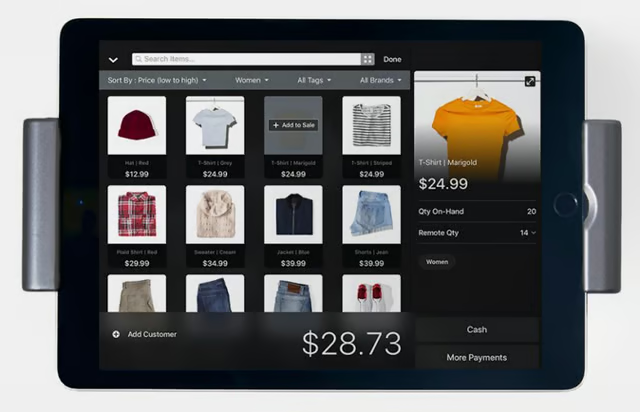
Lightspeed lets you operate your business on the go with its app. (Source: Lightspeed) 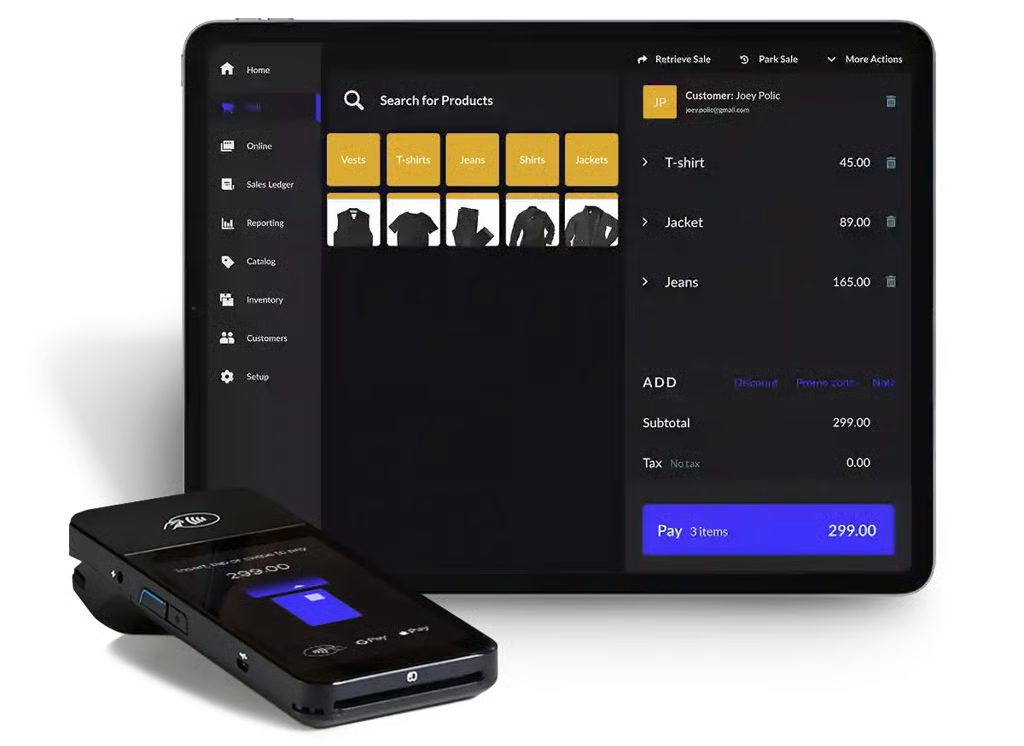
Lightspeed has mobile payment terminals. (Source: Lightspeed) 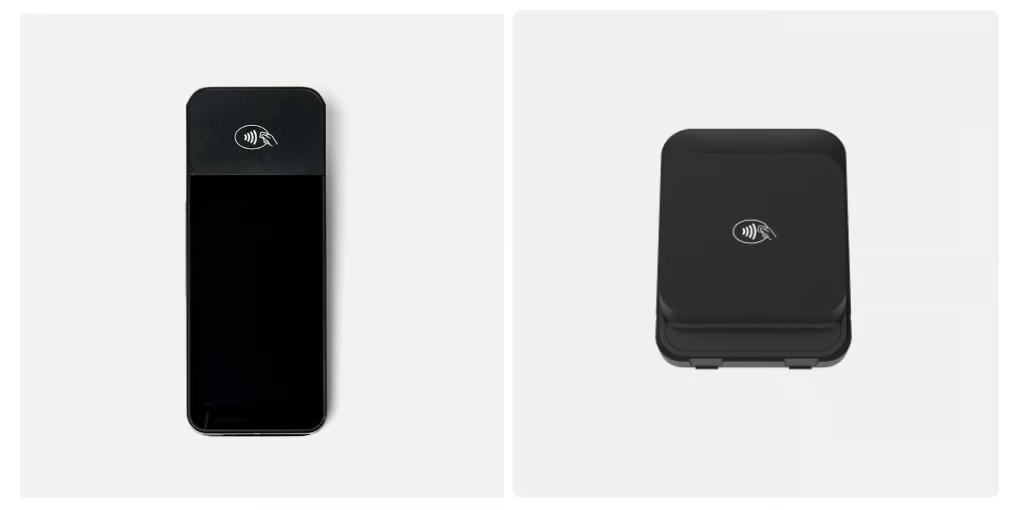
WisePOS E and Mobile Tap V2 are mobile POS equipment available in Lightspeed Retail. (Source: Lightspeed)


What Lightspeed Retail POS app users say
| Play Store | App Store | |
|---|---|---|
| Rating | 3.1 out of 5, based on 14 reviews | 2.1 out of 5, based on 175 ratings |
| What users like | The accessible review sample does not show enough positive themes to identify a pattern | The listing emphasizes retail inventory, loyalty, integrations, onboarding, and 24/7 support |
| What users don’t like | Activation problems, setup issues, app permissions concerns, and support frustration | Setup difficulty, reliability issues, crashes, card reader or printer issues, and higher cost concerns |
Lightspeed Retail has the weakest app store sentiment in this group, and the Google Play review sample is very small. It is better evaluated as a full retail POS system with advanced inventory and back-office tools, not as a mobile-first POS app.
PayPal Point of Sale: Best for occasional sales
Why I chose PayPal Point of Sale
PayPal Point of Sale is a free mobile POS system designed for small businesses that want to accept payments in person and online with minimal setup. It offers basic inventory and reporting tools, integrates with PayPal’s global payments network, and supports international sales, making it a solid entry-level option for occasional sellers or those operating across borders.
Who should use PayPal POS
- Low-volume or part-time sellers: If you only process a few in-person transactions each week or month, PayPal Point of Sale keeps costs low with no subscription fees.
- Businesses that already use PayPal for online sales: PayPal Point of Sale ties directly into your PayPal account, making it easy to manage funds and sync sales.
- International sellers: PayPal supports payments in over 100 currencies, and PayPal Point of Sale app is available in many markets outside the US.
Why I like it:
I like that PayPal Point of Sale gives sellers a no-fuss way to start accepting payments, especially if they already use PayPal online. You don’t need a separate merchant account or complicated setup — just order the card reader, download the app, and you’re ready to go.
Compared to Square, which has more robust free features and offline mode, PayPal Point of Sale is more basic. But where it stands out is global accessibility. If you’re selling across borders or traveling for business, PayPal Point of Sale’s international reach and PayPal integration are hard to beat.
That said, PayPal Point of Sale lacks the advanced tools that growing businesses may need, like offline processing, loyalty programs, or detailed inventory features. However, for casual sellers or side hustlers already in the PayPal ecosystem, it’s a simple and affordable way to go mobile.
PayPal Point of Sale pricing
Software:
- POS system: Free
Hardware:
- Card reader: $79 ($29 for the first one)
- Terminal: From $199 (paid accessories available)
- Tap to Pay on iPhone: Free via the Zettle POS app
Payment Processing:
- Card-present: 2.29% + 9 cents
- Manually keyed-in: 3.49% + 9 cents
- Invoices: From 2.99% + 49 cents
Key features
- Free POS app: Available on iOS and Android, with product tracking, discount tools, and multi-user login.
- Low-cost card reader: Accept chip and tap payments for $29 (first reader); terminal available starting at $199.
- PayPal integration: Payments land directly in your PayPal account, and you can connect to PayPal’s online checkout, invoicing, and payout tools.
- Sales and tax reporting: Basic insights into transaction history, top-selling products, and taxable sales.
- Ecommerce and platform integrations: Connects with Shopify, BigCommerce, QuickBooks, and other platforms through PayPal.
Gallery
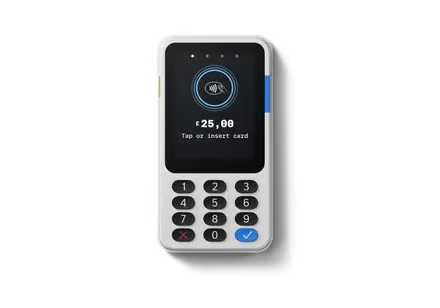
PayPal Reader device (Source: PayPal) 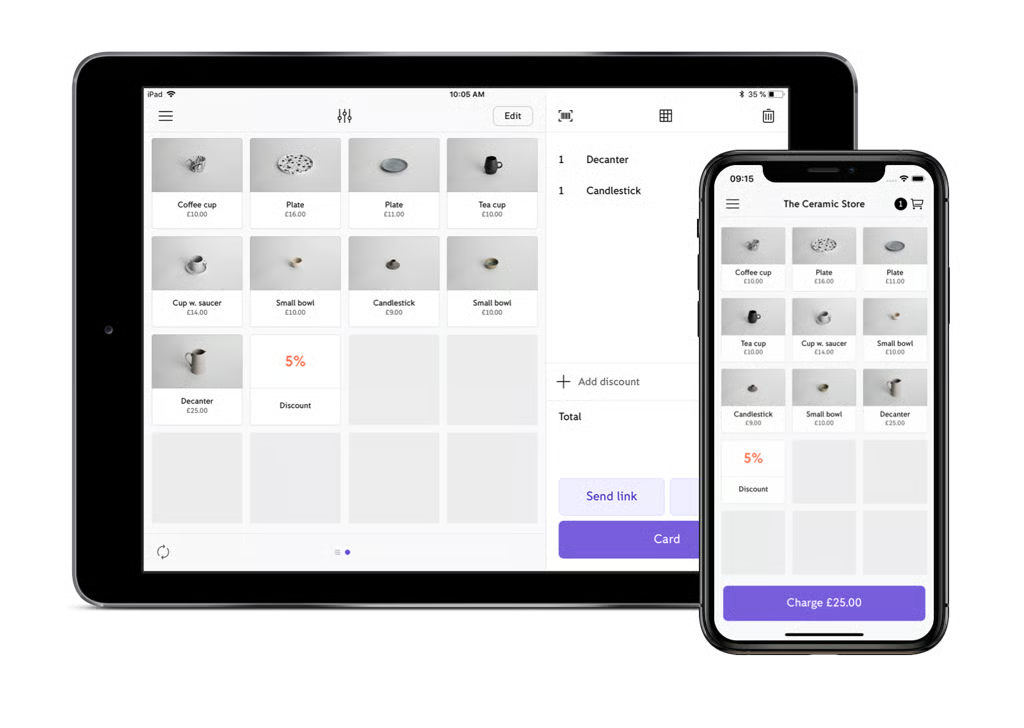
PayPal Point of Sale’s product library (Source: PayPal) 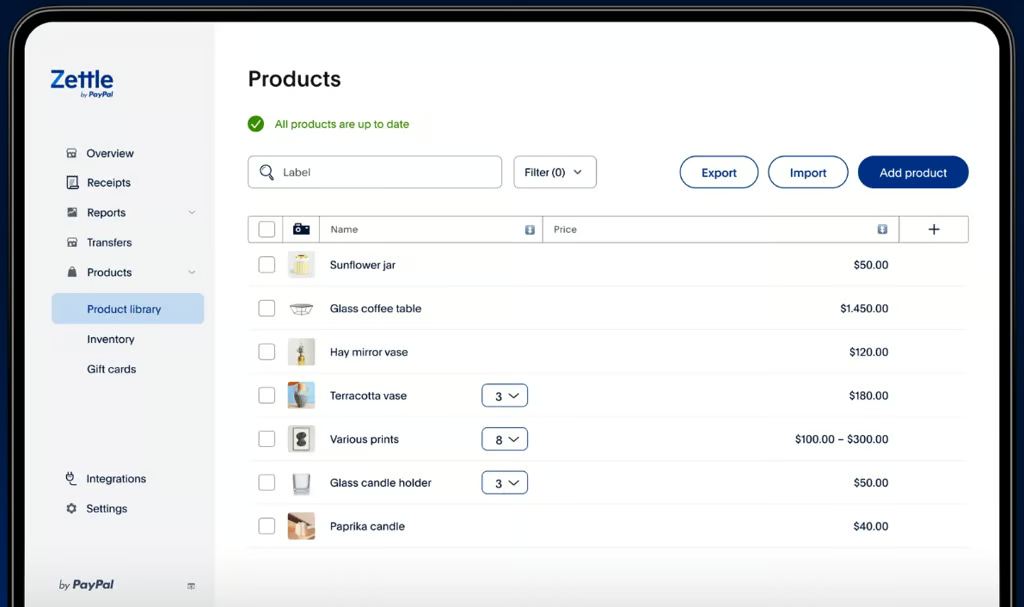
PayPal Point of Sale’s mobile POS app handles products, customers, multiple cashiers, and more. (Source: PayPal)


What PayPal POS app users say
| Play Store | App Store | |
|---|---|---|
| Rating | 3.7 out of 5, based on 40,100 reviews | 3.1 out of 5, based on 1,100 ratings |
| What users like | Some visible feedback still calls it a good app, and the Play Store review volume is sizable | Tap to Pay, PayPal Reader setup, and manual card entry once permissions are configured correctly |
| What users don’t like | Login loops, incomplete account detail prompts, support frustration, and missing shortcuts or settings | Manual card entry setup confusion, documentation gaps, and support delays |
PayPal POS has a much larger Android review base than iOS, so Google Play feedback carries more weight. The Android and iOS rating gap is worth noting when comparing PayPal POS against higher-rated mobile POS apps like Square, Clover, Toast, and Loyverse.
Methodology: How I evaluated the best POS apps
To build this list of the best mobile POS apps, I focused on tools designed for small businesses that need to accept payments, manage inventory, and run sales from anywhere. I evaluated more than a dozen platforms, prioritizing those with dedicated mobile apps and strong real-world performance across retail, restaurant, and on-the-go selling environments.
I based my analysis on hands-on experience using POS systems in retail settings, combined with direct testing through demos, free plans, and product walkthroughs where available. I also validated my findings against user feedback from trusted third-party review sites and Fit Small Business’ internal research on POS and ecommerce software.
Each product was scored using consistent criteria that reflect how businesses actually compare POS systems:
- Pricing (25%): I compared monthly software fees, payment processing rates, hardware costs, and contract requirements to evaluate total cost and long-term value. I also looked at whether providers require in-house payment processing or allow flexibility.
- Core POS features (20%): I evaluated essential functionality, including payment processing, inventory tracking, customer management, reporting, and integrations. I also gave extra weight to tools with built-in loyalty programs and advanced retail or restaurant features.
- Mobile POS features (20%): I focused on mobile-specific capabilities, including app performance on iOS and Android, offline mode, digital receipts, and the ability to sync across devices. All tools had to support transactions from a smartphone or tablet.
- Ease of use (15%): I assessed onboarding, interface design, and day-to-day usability based on both hands-on testing and consistent feedback from real users. I also considered the availability of support, especially 24/7 assistance.
- Expert score (20%): I applied my own evaluation based on overall value, feature depth, scalability, and how well each system fits real small business use cases.
When possible, I tested platforms directly using free trials, demos, or guided walkthroughs to evaluate usability and feature depth in real scenarios.
How to choose the best POS apps for your small business
The best POS app depends on how and where you sell. Use the table below to match your business type with the POS app that best fits your checkout, payment, inventory, and mobility needs.
| Business type | Best POS app | Why |
|---|---|---|
| New small business | Square | Free POS app, easy setup, built-in payments, and inventory tools |
| Mobile seller or pop-up | Square | Offline mode, mobile hardware, Tap to Pay, and quick checkout |
| Ecommerce and multichannel retailer | Shopify POS | Syncs online and in-person sales, inventory, customers, and orders |
| Full-service restaurant | Toast | Restaurant POS app with tableside ordering, menus, tipping, and kitchen tools |
| Business wanting processor choice | Clover | Works through different Fiserv partners and hardware setups |
| Growing business or B2B seller | Helcim | Interchange-plus pricing, invoicing, and payment tools |
| Retailer with advanced inventory | Lightspeed Retail | Deeper inventory, reporting, and retail management features |
| Occasional seller | PayPal Point of Sale | No monthly fee and simple PayPal-connected checkout |
| Loyalty-focused small business | Loyverse | Free POS app with built-in customer loyalty tools |
Step 1: Start with how you sell
Mobile sellers, restaurants, retailers, ecommerce businesses, and service providers need different POS app features. For example, a restaurant may need menu modifiers and tipping, while a retailer may need variants, barcodes, and stock alerts.
Step 2: Check device compatibility
Confirm whether the POS app works on iOS, Android, tablets, phones, or proprietary hardware. Also check whether you can use your own device or need to buy hardware from the provider.
Step 3: Compare payment processing
Review in-person, online, keyed-in, Tap to Pay, and invoice rates. Built-in payment processing is easier to set up, but processor flexibility can help some businesses control costs.
Step 4: Confirm offline mode
Offline mode matters for pop-ups, food trucks, markets, events, and businesses with unreliable Wi-Fi. Check whether the app can still accept payments, save orders, and sync data once you reconnect.
Step 5: Review inventory tools
Look for variants, barcode scanning, stock alerts, item modifiers, and online syncing. Retailers need product-level inventory controls, while restaurants need menu modifiers and ingredient or item tracking.
Step 6: Check sales channel support
If you sell online and in person, choose a point of sale app that syncs orders, inventory, and customers across channels. Shopify POS is especially strong for ecommerce sellers that also sell in person.
Step 7: Evaluate hardware
Compare readers, terminals, handhelds, receipt printers, cash drawers, and tablet stands. Make sure the setup fits your checkout environment, whether you sell at a counter, tableside, curbside, or on the go.
Step 8: Test ease of use
Staff should be able to check out customers, process returns, apply discounts, update inventory, and view sales quickly. During a demo or trial, test the actual checkout flow before committing.
Frequently asked questions (FAQs)
Click through the sections below to learn more about POS apps.
What is the best POS app for small businesses?
Square is the best POS app for most small businesses because it has a free plan, built-in payment processing, inventory tools, mobile hardware, offline mode, and an easy setup process. Shopify POS is better for ecommerce sellers, while Toast is best for restaurants.
What is a POS app?
A POS app is point-of-sale software that lets businesses accept payments, ring up sales, track inventory, manage customers, and view reports from a phone, tablet, or mobile POS device.
What is the best free POS app?
Square is the best free POS app for most small businesses because it includes checkout, payment processing, basic inventory, sales reports, customer tools, and online selling features with no monthly software fee.
What is the best POS app for restaurants?
Toast is the best POS app for full-service restaurants because it includes menus, modifiers, tipping, tableside ordering, kitchen display tools, online ordering, and restaurant reporting.
What is the best POS app for ecommerce?
Shopify POS is best for ecommerce businesses because it syncs online and in-person inventory, orders, customers, and payments across Shopify’s ecommerce platform and retail POS app.
Can I use a POS app on my phone?
Yes. Many POS apps work on smartphones and tablets. Square, Shopify POS, PayPal Zettle, Loyverse, and Helcim all support mobile checkout, though hardware, payment tools, and offline mode vary by provider.
What should I look for in a mobile POS app?
Look for payment processing, offline mode, mobile hardware, inventory tracking, sales reports, customer tools, device compatibility, ecommerce syncing, staff permissions, and transparent pricing.
Bottom line
The best mobile POS apps let you run your business from anywhere, whether you’re checking out customers tableside, managing sales at a market stall, or ringing up purchases on your retail floor. With the right POS app, you’re not tied to a bulky register or counter. You get the flexibility to sell on the go, track inventory, manage customers, and sync everything with your main system in real time.
After testing over a dozen options, Square stands out as the best mobile POS system overall. It offers the most complete feature set in a free plan, competitive flat-rate payment processing, and tools that scale as your business grows. Whether you’re just getting started or expanding into multiple sales channels, Square makes it easy to hit the ground running, no extra hardware or upfront cost required.
Go to Square and download the POS today.
