






Creating a gift guide is one of the fastest ways to help shoppers decide what to buy and boost your store sales. In this guide, I’ll show you how to create a gift guide from scratch, with steps, examples, and holiday-specific tips you can reuse year-round.
If you are creating one now for the holidays, you are in a good spot. The latest National Retail Federation (NRF) survey shows that US consumers plan to spend an average of $890.49 in 2025 on gifts and other seasonal items, the second-highest amount on record, which means the right guide can capture real demand.
Here’s how to do it — let’s define your audience, choose the best format, curate profitable products, and map a short promotion timeline. I’ll also cover quick wins for last-minute shoppers, gift cards, in-store materials, and shipping cutoffs so your guide works online and at the counter.
What is a gift guide?
A gift guide is a curated set of products that helps shoppers choose quickly. You can group items by price, recipient, interest, or occasion, write short benefit-focused blurbs, and make buying easy with clear buttons plus pickup options.
Gift guides have evolved from brochures and thick paper catalogs to digital and hybrid formats — landing pages and shoppable blog posts, an email series spread over a few weeks, a one-page PDF or mini lookbook for handouts, a short video or reel that walks through top picks, or in-store print like counter cards, shelf talkers, and window posters.
But between now and then, the content and value stay the same across all formats. There should be:
- Clear messaging plus three to six primary product categories
- Price tiers, such as Under 25, Under 50, Under 100
- 10 to 30 curated picks with tight copy and strong images
- A last-minute section and gift cards
- FAQs for shipping, pickup, returns, and gift wrapping
And take note, gift guides work any time shoppers need quick direction — not just in December. This is why the steps in this guide can be applied all year round. Have retail gift guides for your store promotion during:
- Holidays such as Christmas, Hanukkah, Lunar New Year
- Birthdays and life events like graduations or new homes
- Seasonal moments like Mother’s Day, Father’s Day, back to school
- Local events and pop-ups where you want an easy handout and QR to shop
You can also use gift guides to push your offerings for corporate client gifts and employee appreciation — the possibilities are endless.
Before you start: A quick note on creating gift guides
Gift guides work best when you treat them like a mini campaign, not just a product list. Before you build anything, confirm if you have the inventory for the rush of orders and the profit margins on your top product candidates. Make sure to have photos ready, and sketch the layout you have in mind. Lock your shipping options and pickup policies so you can promote with confidence.
A little preparation before building out your gift guide saves you from last-minute rewrites and out-of-stock headaches.
Next, set a clear goal. Decide what success looks like at the start. I pick one primary goal and two supporting metrics so I do not chase everything at once.
| Category | Metric | Example target |
|---|---|---|
| Good primary goals (choose one) | Revenue from the guide | Hit 15,000 dollars by December 24 |
| Average order value (AOV) from guide traffic | Lift from 48 dollars to 60 dollars | |
| Email signups from the guide | Add 1,000 net-new subscribers in November | |
| Foot traffic tied to an in-store promo | Drive 300 in-store redemptions from a postcard with a QR code | |
| Supporting metrics (choose two) | Click-through rate from emails and social to the guide | |
| Add-to-cart rate on guide pages | ||
| Number of products purchased per order | ||
| Coupon redemptions or QR scans from printed pieces | Track weekly and compare to store traffic |
Plan and build your gift guide: Step-by-step process
Step 1: Define your audience and occasions
Before you start choosing products, figure out who your shoppers are and what occasions they’re buying for. Every strong gift guide starts with clarity: who you’re creating it for, how they shop, and what motivates them to buy.
You can group shoppers by recipient, budget, and reason for gifting. Think about parents shopping for kids, coworkers shopping for a Secret Santa, or self-gifters treating themselves during sales. These insights will shape how you write copy, set price ranges, and choose images.
Gather audience data. Your point-of-sale (POS) and online analytics tools are a gold mine for this step.
- POS reports: Identify your strongest customer groups by age, gender, or region. If in-store shoppers skew female and 25–40, highlight accessories and quick buys near the checkout area.
- Online analytics: Use Google Analytics to learn which pages and price ranges your visitors spend the most time on.
- Purchase behavior: Separate repeat buyers, one-time shoppers, and high-spenders. Each segment may need a slightly different set of recommendations.
- Location insights: If certain ZIP codes order heavily online, create a promotion for that region—like free shipping over a set amount.
Combine data with real-world input. Numbers alone don’t tell the full story. Balance analytics with firsthand insight.
- Ask your team: Your sales associates know what customers ask for and which items pair well. Gather their suggestions for cross-selling and bundles.
- Talk to suppliers: Vendors see broader sales patterns. Ask which products are trending and how quickly they can restock.
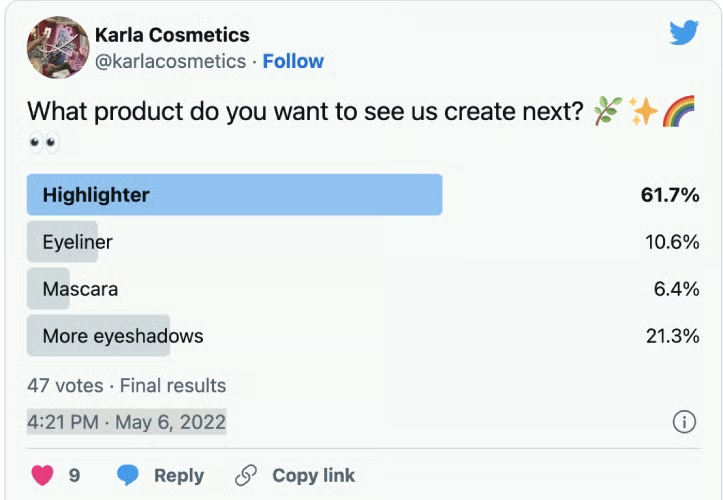
- Survey or poll your customers: In-store kiosks, receipt surveys, or social media polls all work. Ask what they’re planning to buy or which products they’d like to receive. Their answers help you fine-tune categories and price tiers.Alternatively, if you’re considering adding a particular item to your gift guide, try posting an image of it on Facebook and Instagram, then gauge how your customers react.
Segment for personalization. Once you have data, break shoppers into smaller groups so your guide feels personal.
- By behavior: Bargain hunters vs. luxury buyers.
- By product interest: Apparel lovers vs. home-goods fans.
- By purchase history: Recommend accessories that match what they already bought.
Keep occasions broad. Don’t limit your guide to the winter holidays. Gift guides also perform well for birthdays, Mother’s Day, Father’s Day, graduations, and local events. Planning for multiple occasions lets you refresh the same guide instead of starting over each season.
After completing this step, you should know who you’re speaking to, what occasions they care about, and the price ranges that make sense. With that foundation, you can move confidently into Step 2 — selecting products and bundles that fit those shoppers.
Step 2: Select products and curate bundles
Now, let’s pick what actually goes in the guide. I recommend using sales and margin data first, then layering in practical checks so you don’t feature items that will sell out or disappoint.
- Start with proven winners. Check last year’s Q4 bestsellers, low-return items, and products with healthy margins.
- Double check stock and lead times. Avoid anything with a shaky supply or long restock windows.
- Add “attach” items — small add-ons that pair naturally with your winners to lift AOV.
- Build a few bundles like ready-to-gift sets by price or theme, plus one premium bundle for upsell.
- Plan for last-minute holiday rush purchases, such as pickup-friendly items and digital gift cards, for the week leading up to the holiday. Even with the early start of holiday shopping among consumers nowadays, the majority (60%) anticipate they will finish shopping in December.
- Leave out risky SKUs. Those are products that have poor reviews, fragile packaging, or high return rates.
Here’s what I recommend including in your gift guide (without tackling categories yet):
- 10-20 individual products with strong margin and reliable inventory
- 2-4 bundles or kits (one budget, one mid, one premium)
- 1 small “stocking stuffers” row of low-price buys
- 1 “last-minute” row with BOPIS-friendly items and gift cards
Here are some product selections you can look at so you can see how you can apply it to your product mix:
- Sephora Holiday Perfume Sampler + voucher: Sephora sells a sampler where the recipient redeems a voucher for a full-size fragrance. It’s the perfect bundle play: giftable up front, repeat visit later.
- Lush pre-wrapped Christmas gift sets: Lush curates seasonal boxes (from small to “showstoppers”) and also lets shoppers build a custom bundle with reusable “Knot Wrap” packaging—great for margin and speed.
- LEGO Christmas gift picks across price points: LEGO’s official Christmas page groups sets from Secret Santa-level stocking stuffers to big “showstopper” builds — use this as inspiration for tiered bundles.
- Target “12 Days of Beauty” advent: Lightweight, low-price kits that behave like prebuilt stocking stuffer bundles — handy for your budget tier.
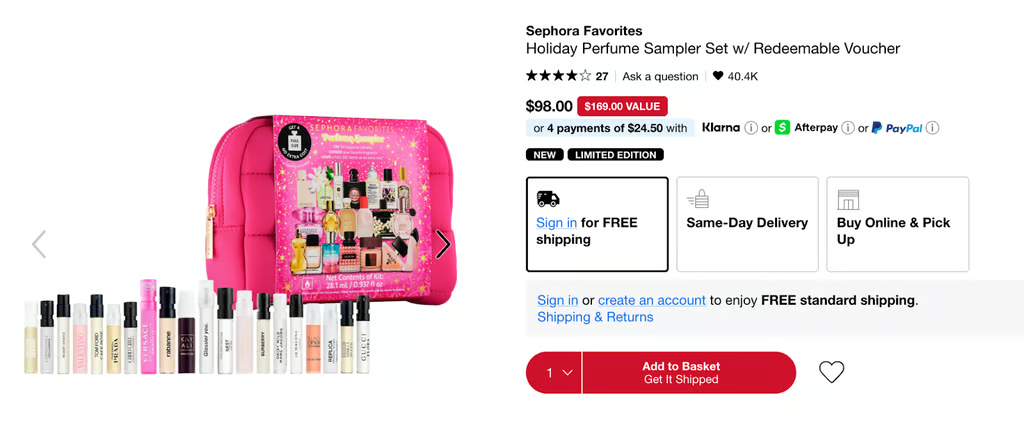
Sephora’s Holiday Perfume Sampler includes mini fragrance samples plus a redeemable voucher for a full-size bottle. This bundle not only encourages immediate gifting but also brings the recipient back to the store, turning one purchase into repeat business. 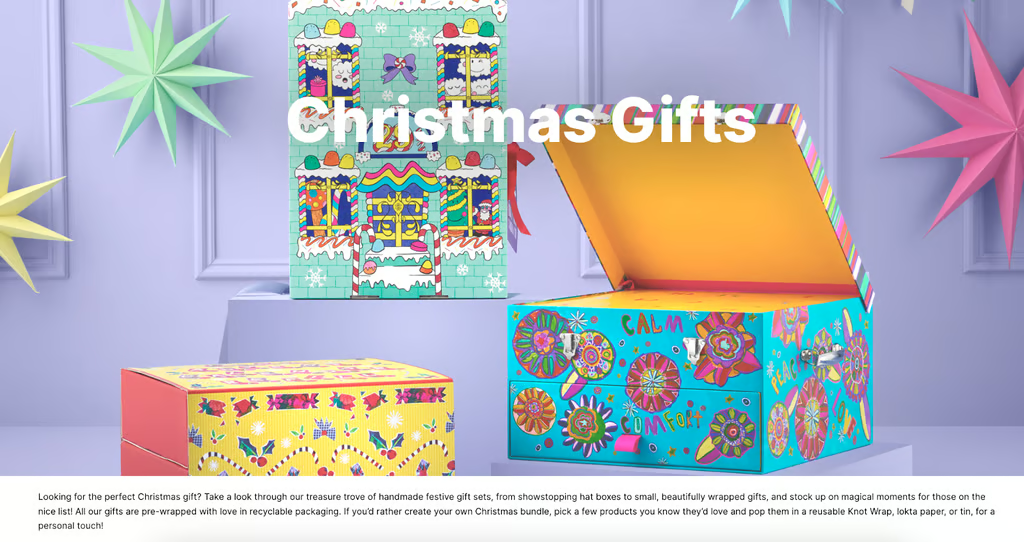
Lush’s Christmas gift sets come pre-wrapped in bright, recyclable packaging, eliminating the need for extra wrapping. The brand also lets customers build custom bundles using reusable Knot Wraps. This approach adds convenience and sustainability while reinforcing brand personality. 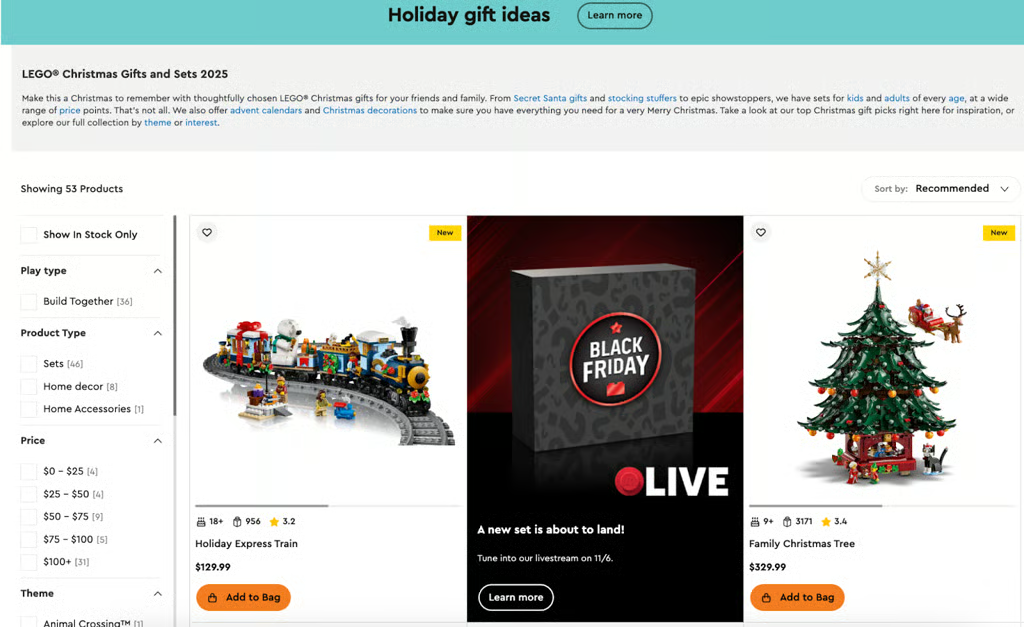
LEGO’s holiday gift section organizes products by price, theme, and audience, ranging from small Secret Santa sets to high-value “showstopper” builds like the Family Christmas Tree. It’s a smart way to appeal to both kids and adult collectors while encouraging multi-tier spending. 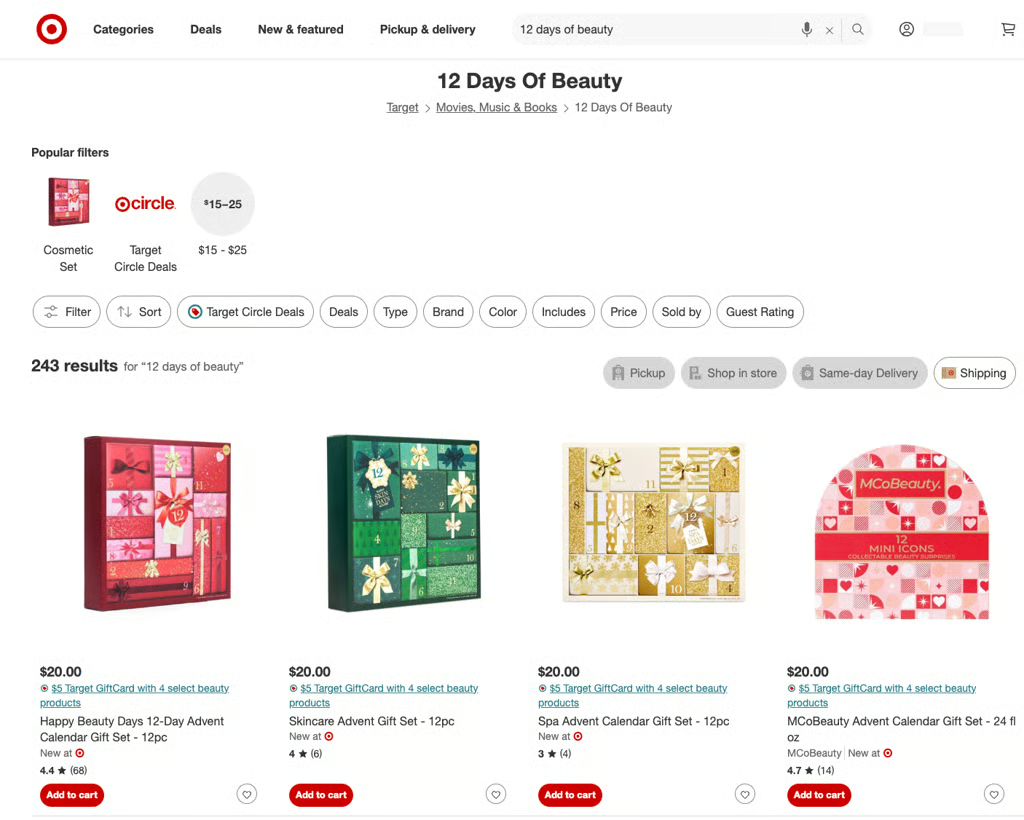
Target’s 12 Days of Beauty line features low-cost advent calendar gift sets ranging from $15 to $25. Each includes a mix of mini skincare or makeup products, making them easy “stocking stuffer” or midrange bundle options. This type of pre-packed set works well in holiday guides for budget-conscious shoppers.


Once you have selected your products and curated bundles, double check everything. Ask yourself the following questions:
- Do you have buffer stock on every featured SKU?
- Are bundle contents in stock in all sizes/shades you’re showing?
- Is packaging truly “giftable” (no dents, easy to wrap, fits in standard mailers)?
- After the final shipping cutoff, can each featured item be picked up in store or replaced with a gift card?
Step 3: Structure product categories and filters
Once you’ve chosen your products and bundles, the next move is to organize them in a way that matches how real shoppers think, not how your inventory is structured. Clear categories and filters save customers time and increase sale conversions.
- Base category titles on your store’s analytics — top sellers, high-margin items, and recurring search keywords.
- Mix segmentation types if it helps. A local boutique could offer “Gifts Under $25 for Teachers” or “Luxury Gifts for Home Chefs.”
- Review search queries and social comments to see what customers actually call things. Match your language to theirs for better SEO.
The goal here is to make the browsing experience feel effortless. Shoppers should instantly know where to click, whether they’re looking for a quick Secret Santa idea or a standout luxury piece.
Follow the steps below to make this happen:
Group your products logically. You can group items by:
- Price: “Gifts Under $25,” “Under $50,” or “Splurge Picks.” This helps budget-focused shoppers quickly decide.
- Recipient: “For Mom,” “For the Host,” or “For the Coworker Who Has Everything.” Specific titles like these instantly connect with the buyer’s intent.
- Interest or personality: “For the Coffee Lover,” “For the Home Chef,” “For the Traveler.” These tap into hobbies and lifestyles.
- Arrival or urgency: “Last-Minute Gifts,” “Ready to Pick Up Today,” or “Digital Gifts for Instant Delivery.”
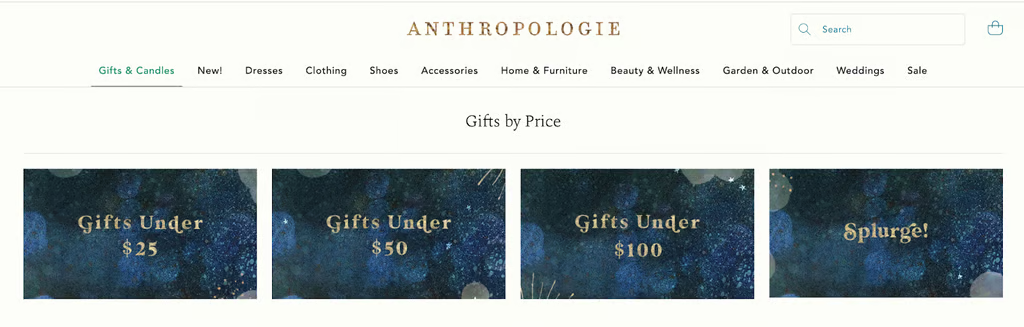
Anthropologie offers both low-end and high-end gifts based on price. It was also smart enough to label more expensive products under the “Splurge” category. 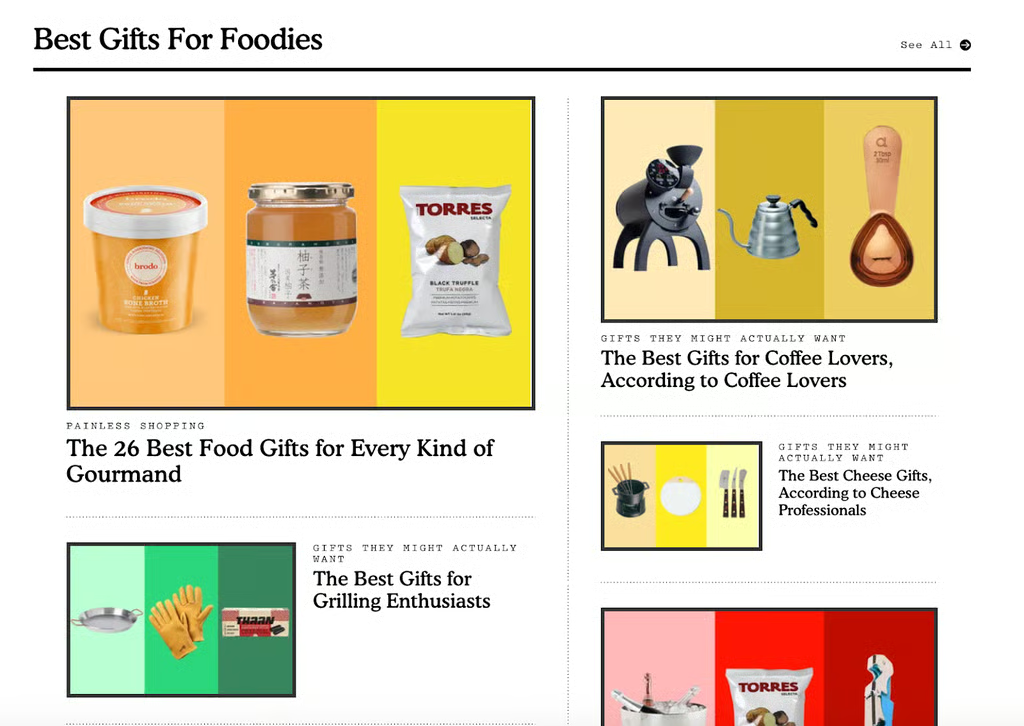
The Strategist came up with different gift guides based on recipients’ personalities, hobbies, and shopping behavior.


Make categories easy to scan. I recommend doing the following to achieve this:
- Use quick-pick tiles: On your landing page, feature clickable image tiles for each main category. Visual cues, like a “For Him” or “Under $25” image, help shoppers choose faster.
- Add anchor links: For long guides, include anchor links at the top (like a mini table of contents) so readers can jump straight to the section they need.
- Keep titles short and descriptive: Avoid vague phrasing like “Special Picks.” Instead, use terms that answer the shopper’s need, such as “Cozy Gifts for Homebodies.”
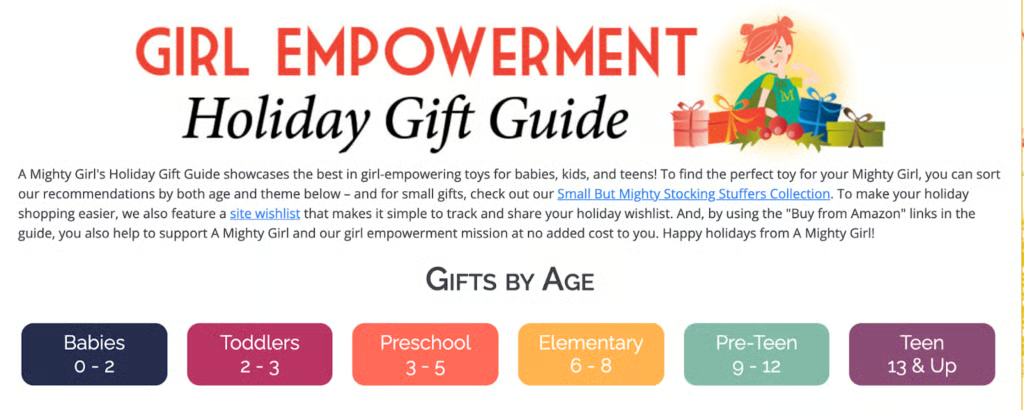
Here are some real brand examples to inspire you:
- Gymshark combines activity and price with categories like “For Lifters” and “Under $50.”
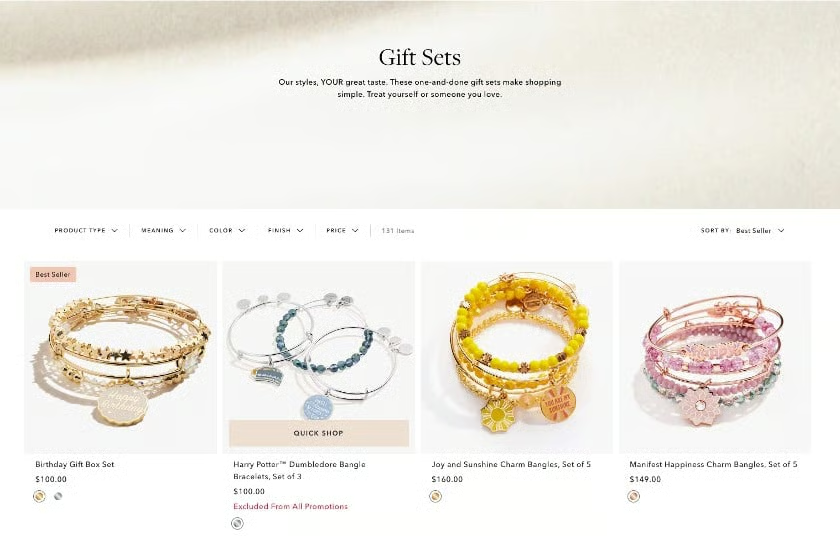
- Mejuri uses “Personalized Jewelry,” “Everyday Staples,” and “Gift Sets” to connect to style preferences.
- Chubbies Injects humor with titles like “For the Workout Warrior” and “For the Couch Captain,” which make the guide memorable.
- Macy’s includes clever event-based categories like “White Elephant” and “Secret Santa,” perfect for group shoppers.
Apply these ideas in your physical store. You can mirror your online categories and filters with in-store signage and displays. Use clear, themed signs that echo your online sections, price tiers, recipients, or bundles, so shoppers can navigate just as easily offline as online. Here are a few examples you can follow:
This store groups products visually by recipient, using bright packaging, color-coded stacks, and simple signage to make selection effortless. The large “Gift for Her” header mirrors an online quick-pick tile, reinforcing consistency between digital and physical shopping experiences.
This setup shows how you can dedicate an endcap to a specific theme or occasion. A bold headline, cohesive color palette, and grouped products under one message make the category immediately recognizable.
This example uses emotional messaging instead of strict product filters. The signage (“Gifts we love, for those you love”) appeals to sentiment while helping shoppers connect the theme to an in-store section, just like an online “Editor’s Picks” category.
Make your displays stand out with professional signage and printed materials from VistaPrint. You can design and print posters, shelf talkers, and QR stickers that bring your gift guide to life in-store. Print your retail gift guide displays with VistaPrint.
Step 4: Pick a format
As you get further in planning how to create a retail gift guide, the next step is determining the best format.
There are many gift guide formats, such as online catalogs, blog posts, printed guides for in-store distribution, printed flyers or brochures for direct mail, landing pages, social media posts, and videos. You can also include your gift guides in your holiday display ideas.
Deciding which content format to use for gift guides depends on the following factors:
- Your audience: Find out where your target audience usually looks for holiday shopping gift ideas, whether it’s social media, trustworthy blogs, magazines, flyers, or other sources.
- The platforms where you will market your gift guide: If you’re creating a holiday gift guide selection in-store, it is better to design posters for display and distribution. However, if you plan to push your gift bundles through your email list, a dedicated landing page in your ecommerce store would be a better fit.
- Your niche or industry: If you’re in a visual niche, your gift guide may not need as much text as one in a niche where information plays a more significant role in driving conversions. In this case, you might need to exert more effort in a holiday display in-store or have an excellent curation of photos for a catalog.
Your customers will likely view your gift guide on different channels or platforms, so you’ll want to make sure that your guide looks great no matter what.
Here are our suggestions based on the content format you will be going with.
Digital formats
Landing page or shoppable blog post
This is the most common and flexible option. A landing page lets you show curated categories, price filters, and clear CTAs for online orders or in-store pickup. If you already have a blog, you can build the guide as a long scrollable post with links to product pages — perfect for SEO and email traffic.
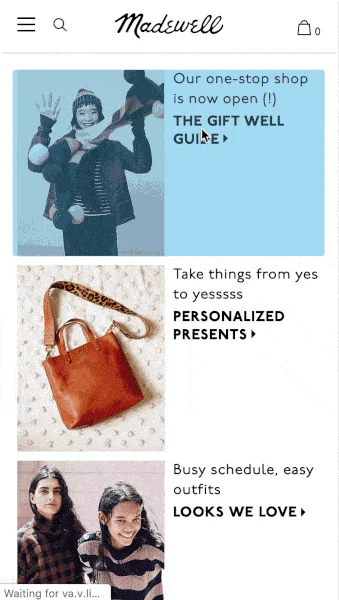
- Example: Madewell created a holiday landing page with a simple header and price filters like “Gifts Under $50.” It mirrors their navigation bar, making it easy for users to jump between sections.
- Why it works: It’s mobile-responsive, easy to update, and integrates seamlessly with online campaigns.
Email series or downloadable PDF
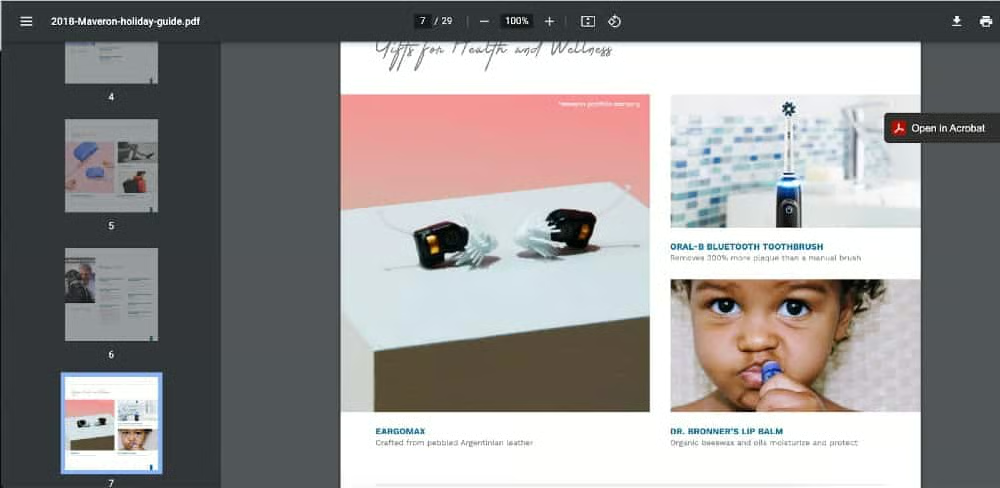
Email guides let you reach repeat customers directly. Send a weekly themed email (for example, “Stocking Stuffers,” “Gifts for Her,” “Last-Minute Finds”). PDFs work best for longer lists or B2B clients who want a printable catalog.
- Example: Fracture’s “12 Days of Giveaways” holiday email series. Read their launch and mid-series reminder emails.
- Why it works:
- Sequenced sends: A clearly defined series (12 days) keeps the audience engaged day after day rather than one-off emails.
- Single focused CTA per send: Each email drives one main action, reducing decision fatigue.
- Tie-in with guide page: The emails reference a gift-guide hub or landing page, which reinforces your overall guide content and drives traffic.
- Builds urgency and routine: Recipients expect the next day’s reveal, which increases open rates and keeps the guide top of mind.
You can replicate this by creating a short sequence (for example 5 to 7 sends) themed around your guide: “Gifts for under $50,” “Bundles they’ll love,” “Last-minute picks,” and so on, each linking back to your main gift-guide landing page.
Short video or reel
Video guides, especially reels in Facebook, Instagram, and TikTok, highlight texture, color, and use. You don’t need high production; even short clips of staff unboxing products or showing quick demos work.
- Example: Target “Gift Games” with Haley Pham
- Why it works:
- Short, engaging format: The clip runs just over a minute and features fast-paced scenes of influencer Haley Pham unboxing and deciding which gifts to “wrap” or “keep.”
- Product storytelling: Each featured item is tied to a recipient or use case—like “for my cousin Scarlet who loves crafts”—which models how to frame gifts in your own content.
- Weekly cadence: Framing it as “Week 1 of Gift Games” sets up a recurring reveal, creating anticipation and repeat engagement.
- Omnichannel potential: The video easily repurposes across YouTube Shorts, TikTok, Instagram Reels, and email embeds—driving viewers to both online and in-store promotions.
Quiz
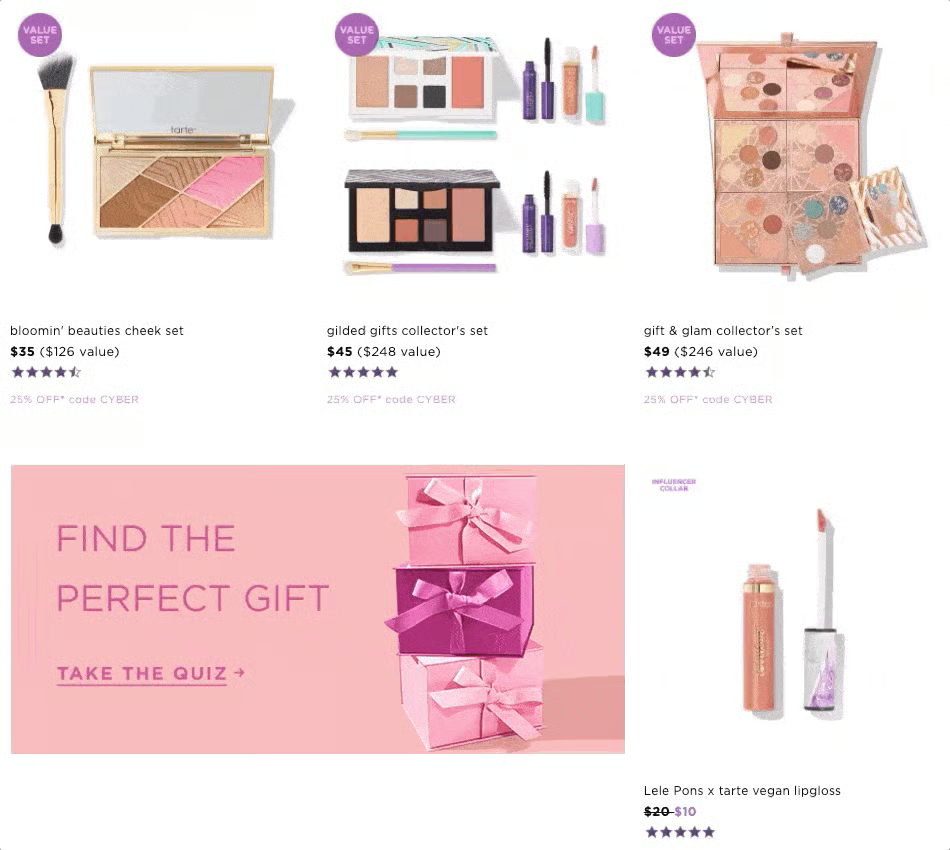
If you want a personalized recommendation (and to prevent losing a potential buyer due to scrolling too much on your holiday gift guides), why not try letting them take a short quiz where you can find out their preferences—budget, gift type, etc. The results page is a curated gift guide based on their answers.
- Example: Tarte prominently displays its quiz on its online store by utilizing a GIF and making the quiz stand out in a different color.
- Why it works: Think of it as a personalized offer for customers. By giving what the customer is looking for (even if she thinks she doesn’t know it yet), product recommendations easily convert into sales.
Physical formats
In-store signage or printed “cardalog”
Turn your digital layout into a physical experience. A one-page “cardalog” (a hybrid between a catalog and a postcard) gives shoppers a quick reference to your best sellers. Pair that with clear shelf talkers and posters that match your online design.
- Example: Nordstrom Rack’s “Gift Shop” floor displays use printed category signs (“For Her,” “For Teens,” “Under $100”) and QR codes that link back to its online guide.
- Why it works: It connects the physical and digital shopping experience, reinforcing consistency across channels.
Print and direct mail (catalogue)
In a primarily digital world, you will be surprised that direct mail is still effective in bringing in sales, with an average open rate of 57.5% to 85%. Since this is not the most cost-effective option, consider sending postcards instead of full-blown catalogs to your customer base. These postcards can include a separate campaign URL — or, better yet, a QR code — they can scan to view your gift guide, along with links to purchase.
- Example 1: Amazon’s mailed holiday toy catalog with QR codes
Amazon mails a physical toy and gift catalog each holiday season that lets shoppers scan QR codes to shop pages instantly. This is a clean precedent for postcards or mini “cardalogs” that drive to your guide. - Example: Target’s mailed holiday toy catalog
Target’s corporate press materials confirm a multi-page holiday toy catalog mailed/available in stores, used to push shoppers into budget tiers and categories (many items under $
Step 5: Design and create your gift guide
After you decide on the format of your holiday gift guides, the next step is to design them. You must present your products in a way that evokes emotion and inspires customers to action (i.e., to shop). Remember that gift buying is an emotion-driven venture for shoppers—so use words and photos effectively.
Write clear copy and calls to action
Your gift guide copy should help shoppers make fast decisions. Focus on benefits, not specs, and keep everything skimmable. Think of your text as a salesperson on autopilot, it should anticipate questions and build confidence without extra clicks.
- Use catchy headlines. Gift guide headlines should speak directly to the customer. A well-written one hooks your target audience and entices them to browse. So, I recommend that you use active voice (“Find the perfect gift”), power words (“Unwrap delight with our handpicked treasures”), and product descriptions that include benefits (“Pamper your loved ones with a relaxing spa experience”).
- Keep blurbs short and helpful. Write one to two lines that highlight why the item makes a good gift. Lead with what it does for the recipient, not its features. Instead of “Ceramic mug, 12 oz, microwave-safe,” try “Keeps their morning coffee warm and looks great on any desk.” Add small trust cues like staff favorites or best seller this season to reassure hesitant buyers.
- Use clear CTAs. Make calls to action simple and consistent across your guide. Shoppers should know exactly what happens when they click. Use verbs like Shop now, Add to cart, Reserve for pickup, or Get a gift card. Avoid vague phrases like Learn more or Explore now—those don’t drive conversions. If you offer multiple fulfillment methods, match them with your CTA: Order online, pick up in store or Send instantly by email.
Example: Sephora’s “Shop Now, Pick Up Today” holiday callout
On Sephora’s 2024 holiday campaign pages, each featured product card includes a short benefit line such as “A best-selling scent they’ll actually wear” followed by a clear CTA: Shop Now – Pick Up Today. The copy combines a confidence cue (“best-selling”) with an action that removes friction (same-day pickup).
Why it works:
- Benefit first: The microcopy highlights the gift’s appeal (“they’ll actually wear”) instead of technical specs. That makes it emotional and outcome-driven.
- Urgency + convenience: The phrase “Pick Up Today” taps into last-minute shoppers and conveys instant availability.
- Consistency: Every tile uses the same CTA format, making it easy to scan and click—especially on mobile.
- Local reinforcement: For in-store pickup, Sephora shows store availability inline, bridging online and offline shopping seamlessly.
You can borrow this format by pairing a short benefit-driven sentence with a clear, action-oriented button like Add to Cart, Reserve for Pickup, or Get It Shipped Free—depending on what your store offers.
Design the printed assets
I keep visuals clean and consistent so the guide feels easy to shop.
- Image specs: Use square or 4:5 images, minimum 1200 px on the short edge, compressed for fast mobile load. Keep backgrounds consistent to avoid a cluttered look.
- Badges that help decisions: Add small, readable labels like Staff pick, Best seller, New, or Limited. Keep badge text under 12 characters and place it in the same corner on every image.
- Copy on images: If you overlay text, cap it at a few words and test readability on a phone.
- Accessibility basics: Meet contrast guidelines (WCAG AA), write alt text in plain language, and avoid text-only color cues. Add focus states to links and buttons.
Build it on your platform
Your landing page should mirror how shoppers actually decide, and it should be fast.
- Hero section: A short headline, a 1–2 sentence subhead, and clear buttons to your top categories.
- Price filters and recipient tiles: Put these near the top so budget-minded and gift-givers can jump straight in.
- Featured bundles: Add two or three prebuilt sets to lift order value.
- Last-minute box: Promote BOPIS, local delivery, and digital gift cards as shipping cutoffs approach.
- Helpful FAQs: Shipping, pickup, returns, gift wrapping, and gift card delivery timing. Keep answers tight.
Remember — design with an omnichannel perspective. When designing your gift guides, remember the following:
- Digital gift guides should be responsive.
- Make sure it looks great on all channels — website, social media, and email campaigns.
- The layout should be clean, with some amount of empty space, to avoid overwhelming customers. Learn how to create landing pages that convert.
Step 6: Plan your launch timeline
Once you have your assets ready and your inventory re-checked, start with a soft launch to VIP email subscribers and your most loyal customers. They’ll click, buy, and share early. Then expand to your full list and social channels. Keep a steady rhythm. For example, run a five-email sequence and at least two social posts per week. As shipping cutoffs approach, move the last-minute and gift card blocks higher on the page. Include printed postcards in local orders with a QR code to the guide and a small pickup incentive (for example, $5 off same-day pickup).
Print postcards, thank-you inserts, and QR stickers with VistaPrint so you can refresh messaging mid-season as offers change.
I’ll walk through a detailed launch timeline (week-by-week) in the next section.
Step 7: Measure and improve
Most small businesses I’ve worked with usually don’t do this step once they launch and promote their gift guides. But this is actually very important to your campaigns. Track what’s working while the campaign is live because this will help you know what’s working (and what’s not) and help you change strategies right away if needed:
- CTR from email, social, and guide tiles
- Add-to-cart rate on guide sections
- AOV from guide traffic vs. site average
- Assisted revenue from guide-initiated sessions
Update your hero images and top rows twice a week based on sales. Swap out slow movers, elevate best sellers, and keep in-store signs and handouts aligned with what shoppers see online. Wrap up with a quick report on top sections, best-selling bundles, and the channels that drove the most revenue — use it to streamline next year’s plan.
My recommended promotion plan for your gift guide
A clear plan keeps your guide in front of shoppers from launching through the last-minute rush. I suggest leveraging your owned channels (email, social) plus simple in-store touchpoints, so the message shows up wherever customers shop.
Roll out a 5-email holiday sequence
Email is the fastest way to drive predictable traffic. A short, themed sequence lets you spotlight new sections, remind subscribers about deadlines, and push pickup or gift cards when shipping windows close.
- VIP early access (soft launch): Preview the guide for loyal customers with a small perk (early shipping or bonus points).
- Guide announcement: Roll out to your full list; feature three top categories and one primary CTA.
- Staff picks + bundles: Highlight 3–5 bundles with a light scarcity cue.
- Last-minute + gift cards: Promote BOPIS, same-day pickup, or digital gift cards.
- Final call: Short note with “Pickup today” or “Send a gift card now.”
Leverage social and paid ads
Social sells the story behind your picks. Quick videos and carousels help people browse by price or recipient without heavy copy, while lightweight retargeting brings back visitors who didn’t add to cart.
- Short video tour: A 15 to 30s reel of the top 10 picks; end with “Shop the full guide.”
- Carousel by price tier: Slides for Under $25, Under $50, and Splurge.
- Retargeting: Ads to anyone who viewed the guide but didn’t add to cart, with a clear urgency cue.
Amplify in-store promotions
Bring the same structure into your store so shoppers can act right away. Clear signs, QR codes to the guide, and small handouts close the loop between online discovery and in-person buying. Print counter cards, shelf talkers, and inserts through VistaPrint for quick turnaround and consistent branding.
- Counter cards: Small signs with a QR that jumps to the guide.
- A6 handouts: Slip a postcard in every local order with a QR and a short pickup offer.
- Shelf talkers: Tag featured items with “As seen in our gift guide.”.
Frequently asked questions (FAQs)
Here are some of the most common questions about creating a retail gift guide.
How early should I launch my holiday gift guide?
Start planning by late September and launch a soft preview for loyal customers in late October. Publicly launch by early November so you’re live before major shopping events like Black Friday and Cyber Monday.
What’s the ideal length for a gift guide?
Keep it to 15–25 products if you’re publishing online, and no more than one printed page for in-store or mail use. The goal is clarity, not volume. Shoppers prefer quick decisions.
Should I include prices in my gift guide?
Yes. Clear pricing and easy-to-read tiers (“Under $25,” “Under $50”) remove hesitation and improve conversion. If prices fluctuate, include a “starting at” range.
Bottom Line
A strong retail gift guide does more than showcase products. It gives your customers a reason to act. When you pair clear organization, engaging visuals, and consistent promotion, you create an experience that works across channels and drives measurable sales.
Bring everything together by making your guide visible everywhere shoppers look — on their phones, in their inbox, and at your counter.
Need professional materials to support your guide in-store or by mail? VistaPrint makes it easy to print postcards, shelf talkers, QR stickers, and window clings that match your digital campaign. Keep your branding consistent and ready before the rush.
