








HubSpot is a popular customer relationship management (CRM) system that offers small businesses a user-friendly interface and a robust free plan. It is also known for its marketing features that include email campaign tools, a web form creator, and social media integrations. However, its paid plans are expensive for small businesses wanting to scale up. Some users also prefer using HubSpot competitors that offer built-in project management tools and advanced analytics.
To determine the best HubSpot alternatives, we analyzed the features HubSpot CRM lacks and the alternatives’ benefits, like sales automation functionality at a lower price point. We looked at dozens of platforms to arrive at the top 10 CRM options:
- Best HubSpot competitor for easy sales management: Pipedrive
- Advanced automation and analytics features: Zoho CRM
- Great solution with customizable sales pipelines: monday CRM
- Excellent in-app phone system: Freshsales
- Good option for auto-writing sales emails: Capsule CRM
- Recommended for solopreneurs and small teams: ClickUp
- Best all-in-one CRM: Apptivo
- Great fit for Google Workspace users: Copper CRM
- Top CRM with built-in project management feature: Insightly CRM
- Best for customer support teams: Salesforce Essentials
- Best HubSpot Competitors Compared
- Pipedrive: Best for Easy Sales Automation
- Zoho CRM: Best HubSpot Alternative With Advanced CRM Features
- monday CRM: Highly Customizable Sales Pipelines
- Freshsales: Best In-app Phone System
- Capsule CRM: Best for Auto-writing Sales Emails
- ClickUp: Best Free Workflow Management Tool for Solopreneurs & Small Teams
- Apptivo: Best All-in-One Alternative to HubSpot
- Copper CRM: Best for Google Workspace Users
- Insightly CRM: Best Built-in Project Management Features
- Salesforce Essentials: Best for Customer Support Teams
- Frequently Asked Questions (FAQs)
- Bottom Line
Best HubSpot Competitors Compared
| Provider | Starting Monthly Price | Free Plan? | Our CRM Rating out of 5 |
|---|---|---|---|
 | $18 for 2 users | ✓Unlimited users | 4.80 |
| Visit HubSpot CRM | |||
 | $14 per user | ✕ | 4.74 |
| Visit Pipedrive | |||
 | $14 per user | ✓3 users | 4.71 |
| Visit Zoho CRM | |||
 | $10(3-user minimum requirement) | ✕ | 4.65 |
| Visit monday CRM | |||
 | $9 per user | ✓3 users | 4.55 |
| Visit Freshsales | |||
 | $18 per user | ✓2 users | 4.50 |
| Visit Capsule CRM | |||
 | $7 per user | ✓Unlimited users | 4.45 |
| Visit ClickUp | |||
 | $8 per user | ✕ | 4.43 |
| Visit Apptivo | |||
 | $23 per user | ✕ | 4.43 |
| Visit Copper CRM | |||
 | $29 per user | ✓2 users | 4.41 |
| Visit Insightly CRM | |||
 | $25 per user | ✕ | 4.27 |
| Visit Salesforce Essentials | |||
Take our quiz to find out which HubSpot competitor works best for you.
Which HubSpot competitor is best for you?
Answer a few questions about your business, and we'll give you a personalized product match.
Question 1 of 4
Is it important for your CRM to have built-in customizable workflow automation features?
Pipedrive: Best for Easy Sales Automation
When to Use Pipedrive Over HubSpot
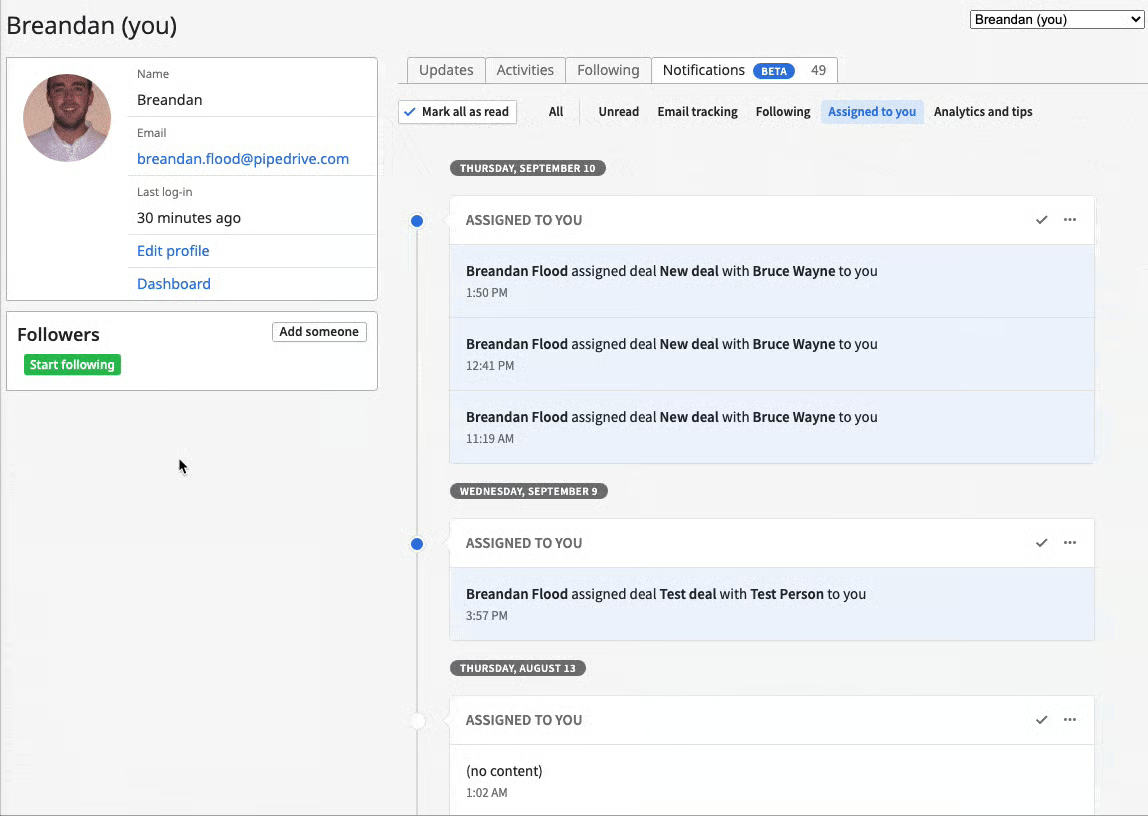
- You need a sales-focused CRM with easy-to-use sales automation tools: Pipedrive is one of our top-recommended sales automation software because of its robust yet beginner-friendly tools. It lets you easily automate task assignments, CRM record updates, and sales emails. HubSpot has a minimal learning curve, and it comes with sales, marketing, and customer service tools.
- You seek a CRM with more affordable AI tools: Pipedrive has an artificial intelligence (AI)-powered Sales Assistant that is available across all plans, starting at $14.90 per user, monthly. With HubSpot, this feature is available only with the Enterprise plan at $1,200 per month for 10 users.
When to Use an Alternative
- You’re a freelancer or startup looking for a free CRM: Pipedrive is easy to learn and use, but it does not offer a free plan.
- Alternative: Freshsales and ClickUp both offer free options with unlimited user allocation and customizable sales pipelines. Freshsales has a built-in phone system that you can use to engage with leads, while ClickUp features advanced project collaboration tools.
- You want low-cost workflow automation tools: With Pipedrive, you get access to workflow automation tools starting with its Advanced plan at $24.90 per user, monthly.
- Alternative: Zoho CRM and ClickUp offer workflow automation tools for free. Freshsales Growth plan also offers automation features at $9 per user, monthly.
Pipedrive Pricing Plan & Overview*
Cost:
- $14 per user
Key Features:
- Contact, lead, and deal management
- Customizable pipelines
- Products catalog
- Custom fields
- Calendar view and activity management
- Email inbox
- Sales Assistant
- Insights and reports (deals, activities, and user goals)
- Visual dashboards with shareable links
- Native mobile apps
- Access to Apps Marketplace with more than 400 integrations
- Access to the help center and 24/7 live chat support
Cost:
- $34 per user
Key Features:
- Everything in Essential
- Two-way email sync
- Customizable email templates and signature
- Email open tracking and scheduling
- Mass email
- Deal and email automation
- Contact profile enrichment using web and social media sources
- Report collaboration
- Web-to-mobile calls
Cost:
- $49 per user
Key Features:
- Everything in Advanced
- Contacts timeline
- Smart Docs (trackable and shareable documents with e-signature)
- Custom rules for automatic lead assignment
- Revenue forecast reports
- Dashboard collaboration
- Custom field options
- Team management with goal tracking
- Unlimited scheduled meetings, document tracking, and visual dashboards
Cost:
- $64 per user
Key Features:
- Everything in Professional
- Project management (map out complex projects in Kanban view with to-do lists and custom labels)
- Access to scheduled calls with the support team
- Guidance on effective CRM Implementation
Cost:
- $99.00 per user
Key Features:
- Everything in Power
- Unlimited open deals, custom fields, reports, and teams
- Security alerts on suspicious access to the company’s account and potential data leaks
- Security rules (enforce password strength requirements, two-factor authentication, and access restrictions)
*Pricing is based on annual billing on a per-user, monthly breakdown. Monthly billing is also available at a higher cost. We update pricing information regularly but encourage readers to check current pricing here.
Our Expert Opinion
When it comes to HubSpot competition, Pipedrive takes the lead because of the robust set of sales tools that come with its entry-level plan. One of the most valuable benefits of this plan is the inclusion of its smart Sales Assistant. Using past performance and pipeline tracking, this artificial intelligence (AI) tool offers coaching tips on how to manage and improve sales performance. Comparing Pipedrive vs HubSpot in terms of usability, Pipedrive wins with its drag-and-drop functionality and simple layout that makes it easy to learn, use, and navigate.
Zoho CRM: Best HubSpot Alternative With Advanced CRM Features
When to Use Zoho CRM Over HubSpot
- You want a CRM that offers free sales automation tools: With Zoho CRM, you can set workflow rules even with its free plan. It also allows you to create new contact records, assign record owners, and customize data fields based on changes in deal status. HubSpot’s sales automation features are available only with its paid plans, starting at $18 per month for two users.
- You’re seeking a highly customizable CRM: Most of Zoho CRM’s mass customization options are available for free or at a low cost of $14 per user, monthly. This platform lets you customize data fields, create custom record views, alter your search layouts, and build custom modules for your team.
When to Use an Alternative
- You prefer using a sales-focused CRM: Since Zoho CRM is an all-in-one CRM solution, it offers comprehensive features for sales, marketing, and customer service management.
- Alternative: Freshsales and Pipedrive are both top-rated sales-focused CRM solutions. They offer specialized sales tools like workflows, deal management, and visual sales pipelines. You can also check out our list of the best sales enablement tools for similar options.
- You want a free CRM that offers built-in phone features for customer engagement: Zoho CRM’s PBX (Private Branch eXchange) integration is available only with its paid plans that cost at least $14 per user, monthly.
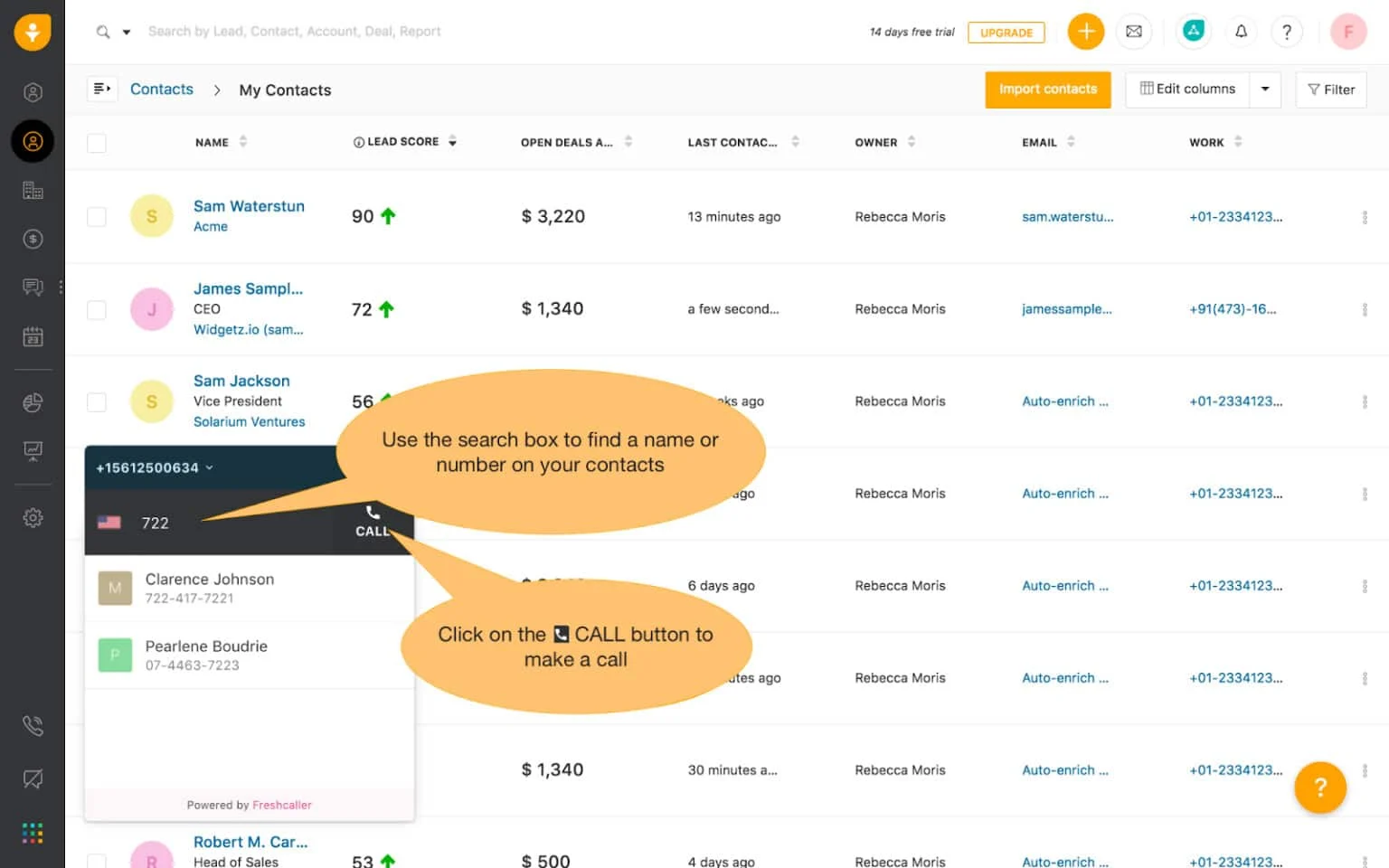
- Alternative: Freshsales is our best-recommended free CRM with a robust built-in phone system. This includes an in-app dialer, the option to buy local and toll-free numbers, and an inbound caller ID.
Zoho CRM Pricing Plan & Overview*
Cost:
- $0 for three users
Key Features:
- 1GB file storage per organization
- 10MB data storage (5,000 records)
- 10 custom email templates
- Three organization emails with 3MB attachments
- Lead, account, contact, deal, and activity management
- Document library
- Standard reports
- Marketing campaign automation with email opt-out
- Customized home page components, tabs, list views, and search layout
- Basic automation (workflow rules, tasks, and email notifications)
- Web forms for leads and contacts
- Zoho integrations (SalesIQ, Desk, Projects, Analytics, Campaigns, and Forms)
Cost:
- $14 per user
Key Features:
- Everything in Free
- 1GB file storage per organization plus 512MB per user license
- 200MB data storage (100,000 records)
- 100 custom reports and 10 custom dashboards
- 10 organization emails with 10MB attachments
- 100 custom sales email templates plus 250 daily mass emails per organization
- Sales forecasting
- Calendar booking
- Facebook and Twitter integrations
- Advanced customization for group tabs, email address duplication check, unique fields, and user layout
- Advanced automations (scheduled actions and reminders for workflow tasks)
- Additional CRM integration (Zoho CRM Marketplace and Google Workspace)
Cost:
- $23 per user
Key Features:
- Everything in Standard
- 10GB data storage (approximately 5 million records)
- 500 daily mass emails per organization
- Unlimited custom reports and CRM dashboards
- Unlimited custom email templates
- SalesSignals (real-time activity notifications on lead and customer interactions)
- Motivator (sales gamification)
- Inventory management
- Case management
- Advanced automations (create records, assign record owner, and webhooks)
Cost:
- $40 per user
Key Features:
- Everything in Professional
- 1GB file storage per organization plus 1GB per user license
- 1,000 daily mass emails per organization with scheduling
- Three auto-responders
- Zia AI (smart recommendations from conversational sales assistant)
- Territory-based sales forecasting
- Anomaly detector and cohort analysis
- Custom schedules, marketing attribution, segmentation, and workflow usage reports
- Web form analytics and A/B testing
Cost:
- $52 per user
Key Features:
- Everything in Enterprise
- 1GB file storage per organization plus 5GB per user license
- 2,000 daily mass emails per organization
- Five auto-responders
- Custom modules
*Pricing is based on annual billing on a per-user, monthly breakdown. Monthly billing is also available at a higher cost. We update pricing information regularly but encourage readers to check current pricing here.
Our Expert Opinion
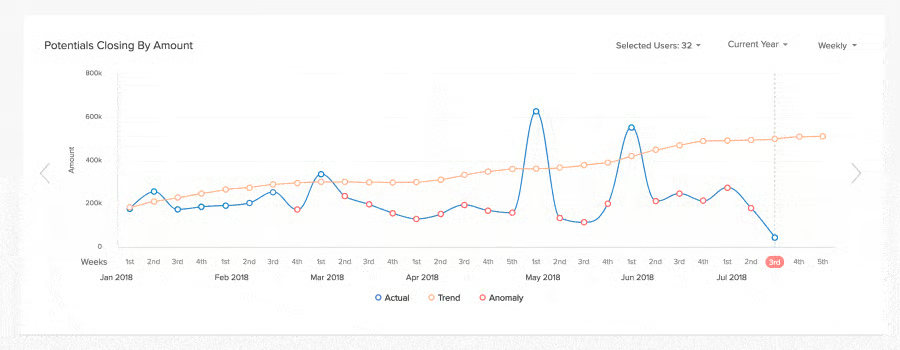
Zoho CRM is one of the best HubSpot alternatives for users who prioritize advanced automation and analytics tools over HubSpot’s mass email marketing automation capabilities. While Zoho CRM has a steeper user learning curve, sales teams can take advantage of built-in and integrated features for orchestrating customer journeys. It allows you to automatically generate and nurture leads based on marketing segmentation. You can also use the artificial intelligence (AI) assistant Zia to pull data, ask questions, and make advanced predictions.
monday CRM: Highly Customizable Sales Pipelines
When to Use monday CRM Over HubSpot
- You need a CRM with robust customization options: Although monday CRM is known for its product simplicity, it is a highly customizable system. All plans allow you to tailor its board, data items, and workflow templates to fit your unique sales cycle, projects, and marketing campaigns. HubSpot’s customization options for data views and reports do not come in until the Professional plan, which costs $450 per month for five users.
- You want multiple viewing options for your sales data: This platform provides various board viewing options for your database. These options include Kanban, timeline, calendar, chart, workload, and map. With HubSpot, your main options are limited to Kanban, pipeline, and chart views.
When to Use an Alternative
- You are a small business needing free lead scoring: While monday CRM offers lead scoring for qualifying leads, this feature is available only with its Enterprise plan. You’ll have to contact its sales team to find out how much this would cost your team.
- Alternative: Freshsales offers lead scoring tools across all of its plans, including the free option for up to three users.
- Your customer support team uses CRM for case management: monday CRM does not have built-in tools for customer support.
- Alternative: Salesforce Essentials features a Service Cloud that you can use for customer case management. It integrates with Private Branch eXchange (PBX) systems or voice-over-internet-protocol (VoIP) to let you make and receive calls. You can also engage with customers via live chat.
- You want to leverage AI for analytics and automation: You can only use artificial intelligence (AI) features with monday CRM via third-party app integration.
- Alternative: Zoho CRM has an AI assistant called Zia, which is available starting with its Enterprise plan at $40 per user, monthly. This feature can automate tasks, predict sales activity results, provide next-best recommendations, and even pull relevant records and metrics for you.
monday CRM Pricing Plan & Overview*
Cost:
- $10 per user
Key Features:
- 5GB file storage
- Activity log for one week
- Unlimited contacts, boards, and customizable pipelines
- Templates for lead, contact, and deal management
- Unlimited free viewers (users with read-only access)
- Customizable notifications
- Unlimited dashboards (create one dashboard based on one board)
- Shared documents and whiteboard collaboration
- Kanban view of tasks
- iOS and Android apps
- Access to knowledge base, daily live webinars, and 24/7 support via live chat, email, and call request
Cost:
- $14 per user
Key Features:
- Everything in Basic
- 20GB file storage
- Activity storage for six months
- Combine up to five dashboards in one board
- Lead, account, contact, deal, and activity management
- Two-way integration with Gmail and Outlook
- Create and share unlimited customizable quotes and invoices
- Basic integrations including PandaDoc, DocuSign, Aircall, and Zoom
- Automate repetitive work
- Guest access (four guests billed as one seat)
- Additional views (timeline, calendar, and map views)
Cost:
- $24 per user
Key Features:
- Everything in Standard
- 100GB file storage
- Activity log for one year
- Email templates with tracking and automation
- Mass emails
- Google Calendar sync
- Customizable email signatures
- Additional integrations (Mailchimp, HubSpot, Facebook Ads, and time tracking tools)
- Sales forecasting and analytics
- Combine up to 10 dashboards in one board
- Additional views (chart and workload views)
- Private boards and docs
Cost:
- Contact provider for a custom quote
Key Features:
- Everything in Pro
- 1,000GB file storage
- Activity log for five years
- Salesforce integration
- Lead scoring
- Data duplicate warning
- Advanced analytics (team performance, activities, pipeline, and revenue)
- Team goal tracking
- Combine up to 50 dashboards in one board
- Post-sales management (account management, client projects, and collection tracking)
- Sales operations (employee headcount planning, sales team onboarding process, sales resources and documents, and contract reviews)
- Dedicated customer success manager
- 99.9% uptime service level agreement (SLA)
*Requires a minimum of three users. Pricing is based on annual billing on a per-user, monthly breakdown. Monthly billing is also available at a higher cost. We update pricing information regularly but encourage readers to check current pricing here.
Our Expert Opinion
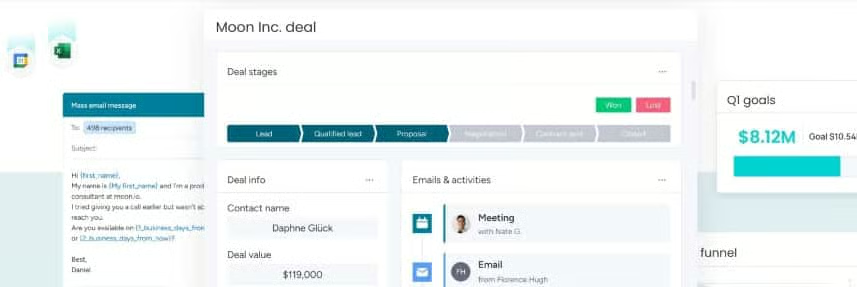
monday CRM offers highly customizable, prebuilt templates for managing your sales cycle. It lacks the marketing automation and email tracking features that HubSpot offers, but it scores higher in terms of usability because of its highly intuitive interface. Aside from that, it is an excellent tool for inter-department collaboration, forecasting, and sales analytics.
Freshsales: Best In-app Phone System
When to Use Freshsales Over HubSpot
- You need a free CRM with robust built-in phone features for your call center business: Freshsales is our top pick among the best CRM call center software because it offers a built-in phone system with robust call management features across all plans. These features include an inbound caller ID and the ability to buy local and toll-free numbers. While HubSpot offers free VoIP integration, advanced phone features like inbound calls, outbound calls, and call transcription start at $18 per month for two users.
- You are a sales team looking for territory management software: Starting with its Pro plan ($39 per user, monthly), Freshsales gives you access to its sales territory management capabilities. It allows you to manage up to 100 unique territories.
When to Use an Alternative
- You run a project-based business or agency: Freshsales does not have built-in project management tools.
- Alternative: Consider using Insightly CRM, monday CRM, or ClickUp if you need a CRM with project management features. Alternatively, read our guide to the best project management software to explore similar options.
- You are a small sales team seeking low-cost data enrichment tools: Freshsales’ auto-profile enrichment features are available with its Enterprise plan at $69 per user, monthly. This could be too expensive for small teams with limited budgets.
- Alternative: Pipedrive’s Advanced plan has a Smart Contact Data tool that instantly retrieves web data about your contacts with just a single click. This plan costs $27.90 per user, monthly.
Freshsales Pricing Plan & Overview*
Cost:
- $0 for three users
Key Features:
- Contact, deal, and account management
- Contact lifecycle stages with activity timeline
- Tasks, appointments, and notes
- CRM customization (rename modules, custom fields, and unique fields)
- Data import, export, and migration from other CRMs
- Email templates
- Built-in phone with inbound caller ID
- Live chat and AI chatbot builder
- Website tracking for contact activity
- Basic dashboard (incoming conversations, team inbox, and speed of response)
- Mobile app
- 24/5 support via phone, chat, and email
Cost:
- $9 per user
Key Features:
- Everything in Free
- Up to 20 automated CRM workflows
- 2GB file storage
- Five sales sequences (automated steps for lead nurturing)
- 500 daily sales sequences email limit
- 250 personalized daily bulk emails
- 500 AI chatbot sessions
- Advanced sales activity tracking (activity home dashboard, custom sales activities, and sales dashboard)
- Record tags and product catalog
- Sales email template tags
- Visual pipeline management with rotten deal indicator
- Two-way email sync
- Team inbox
- Advanced phone features (parallel calling, queue transfer, call masking, call recording, voicemails, and call queues)
- Advanced chat features (chat assignment rules, canned responses, private notes, and frequently asked questions)
- Messaging channel integrations (Short Message Service, Facebook Messenger, WhatsApp, Apple Business Chat, LINE, and Google Business Messages)
- Contact and lead scoring
- Web forms
- Default and custom reports with chat conversation overview reports
- Access to Freshworks Marketplace integrations
Cost:
- $39 per user
Key Features:
- Everything in Growth
- 5GB file storage
- 10 sales sequences
- 10 sales pipelines
- 50 workflows
- 50 custom roles
- Manage up to 50 sales teams and oversee sales territories
- 1,000 daily sales sequences email limit
- 1,000 personalized daily bulk emails
- Warm call transfer
- Bring Your Own Carrier (BYOC)
- Conference calling
- Advanced chat features (chat auto-resolve rules, smart chat assignment, chat campaigns, live translation, book meetings from chat)
- Freddy AI insights (deal insights, data deduplication, and next best action analysis)
- Territory management
- Advanced chat dashboard with team performance insights, customer satisfaction survey, and agent availability reports
- Offline access for mobile app
Cost:
- $59 per seat
Key Features:
- Everything in Professional
- 100GB file storage
- 100 workflows
- 10 custom modules
- 100 custom roles
- Manage up to 100 sales teams and oversee sales territories
- 25 sales sequences
- 2,000 daily sales sequences email limit
- 5,000 personalized daily bulk emails
- 10 custom modules
- Deal teams (multiple users in a single deal)
- Auto-profile enrichment
- Call routing, hold, and recording opt-in and opt-out
- Sales forecasting insights
- Dedicated account manager
*Pricing is based on annual billing on a per-user, monthly breakdown. Monthly billing is also available at a higher cost. We update pricing information regularly but encourage readers to check current pricing here.
Our Expert Opinion
Freshsales is the best HubSpot alternative for businesses looking for a CRM with advanced built-in calling features that include call recording, call masking, and queue transfer. It also offers inbound caller ID and the ability to buy toll-free numbers with its free plan. With HubSpot, the free plan allows you to integrate your CRM with VoIP providers like Aircall. Advanced calling features are only available with the Professional plan ($450 per month for five users).
Another advantage of Freshsales is its wide customization capabilities for data fields, sales pipelines, and user roles. In addition, it allows you to interact with customers in real time via messaging channels like Facebook Messenger and WhatsApp. These are some of the reasons why we named Freshsales as one of the best CRMs for small business.
Capsule CRM: Best for Auto-writing Sales Emails
When to Use Capsule CRM Over HubSpot
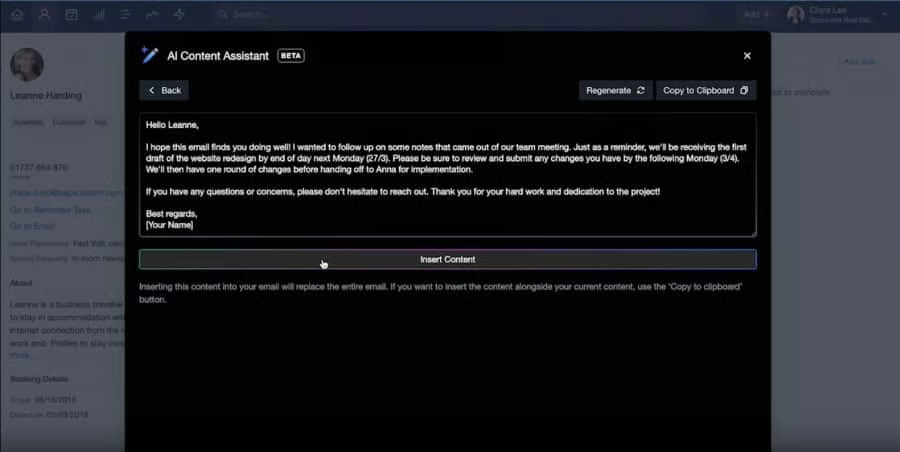
- You want to leverage an established AI tool for writing sales emails: All of Capsule CRM’s plans offer an artificial intelligence (AI) content assistant tool that helps you compose personalized emails from contact records. It gives recommendations on the content, length, and even the tone of your message, then generates a draft that you can add to your email message. As of this writing, HubSpot’s AI content assistant is fairly new and has yet to be tested by the majority of HubSpot users.
- You’re a freelancer looking for a CRM for basic contact management: Capsule CRM’s free plan supports up to two users and offers basic tools for contact management. This option also includes email marketing and sales opportunity management features. HubSpot, on the other hand, is nothing but basic with its integrated sales, marketing, and customer service tools.
- You run a project-based business or consultancy: This platform offers built-in tools for tracking creating project timelines, managing tasks, and overseeing client deliverables across all plans. This makes it ideal for professional service providers, consultancies, manufacturing agencies, and software companies. HubSpot does not offer tools for project management.
When to Use an Alternative
- You’re looking for a free CRM with more contact capacity: Capsule CRM’s bare-bones free plan allows you to store only up to 250 contact records.
- Alternative: Freshsales has a free option that allows you to store an unlimited number of contact records in its database.
- You own an ecommerce store: Capsule CRM lacks tools for managing an ecommerce business, such as inventory management, order processing, website design, and point-of-sale (POS).
- Alternative: Zoho CRM made it to our list of the best ecommerce CRMs because it offers various tools for online selling, such as inventory management, marketing, analytics, and customer support. These features are available with its Professional plan at $23 per user, monthly.
- You are a startup that uses multiple sales processes: For some business-to-business (B2B) companies, multiple pipelines are necessary to track different sales processes. One example of this is an insurance agency that sells employee benefits plans and business property and liability coverage. Capsule CRM’s multiple pipeline management feature does not come in until the Teams plan, which costs $36 per user, monthly.
- Alternative: monday CRM’s Basic plan ($10 per user, monthly) allows unlimited boards. With this system, you can create and track unique sales processes as well as multiple sales pipelines. Apptivo also allows you to manage multiple sales pipelines across all its plans, which start at $8 per user, monthly.
Capsule CRM Pricing Plan & Overview*
Cost:
- $0 for two users
Key Features:
- 250 contacts
- 50MB storage per user
- 10 AI content assists
- Contact, activity, and task management
- Customizable sales pipeline and workflows for opportunities or projects
- Data segmentation tools (lists, filters, and tags)
- Basic project management tools (projects, tasks, and calendar)
- Calendar sync
- Mobile app
- Offline access
Cost:
- $18 per user
Key Features:
- Everything in Free
- 50,000 contacts
- Five email templates
- Email sending
- Activity reporting
- Additional integrations (Microsoft 365, Google, and Xero)
Cost:
- $36 per user
Key Features:
- Everything in Professional
- 100,000 contacts
- 20GB storage per user
- 50 email templates
- 1,000 AI content assists
- Advanced sales reporting
- User roles and permissions
- Team or individual record assignment
- Workflow automation
- Custom activity types
- Multiple sales pipelines and project boards
Cost:
- $54 per user
Key Features:
- Everything in Teams
- 200,000 contacts
- 40GB storage per user
- 500 email templates
- Implementation support and data import assistance
- Custom CRM training
- Dedicated customer access manager
- Ongoing priority support
*Pricing is based on annual billing on a per-user, monthly breakdown. Monthly billing is also available at a higher cost. We update pricing information regularly but encourage readers to check current pricing here.
Our Expert Opinion
Capsule CRM distinguishes itself from other HubSpot competitors on this list with its free AI content assistant tool, which helps reduce manual tasks through auto-generated sales emails. HubSpot also offers a similar tool in the form of HubSpot AI. Moreover, Capsule CRM features a straightforward dashboard that makes it easy to learn and use, putting it on a par with HubSpot in terms of usability ratings.
ClickUp: Best Free Workflow Management Tool for Solopreneurs & Small Teams
When to Use ClickUp Over HubSpot
- You are a solopreneur or small team looking for a free workflow management tool: ClickUp offers a free plan that supports an unlimited number of users. This option lets you create customized workspaces for managing various aspects of your business and track workflow for any industry. HubSpot, on the other hand, has a free plan, but is designed for customer relationship management and marketing more than workflow management.
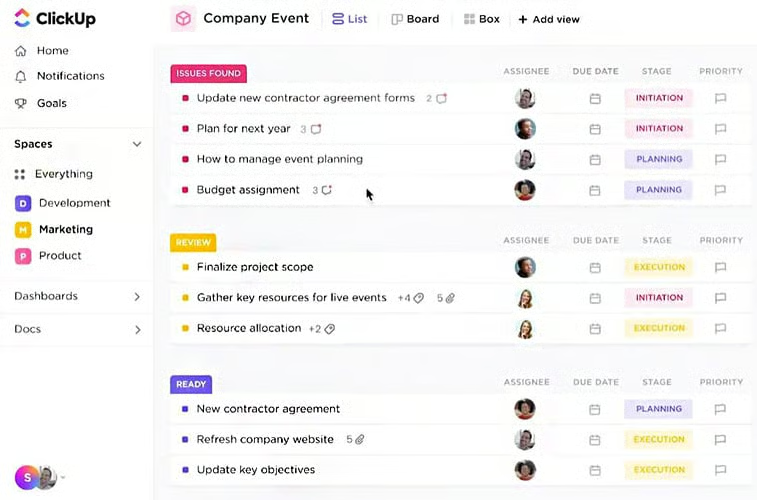
- You prefer using a CRM alternative for project collaboration: ClickUp is a work management solution that you can use for collaborating on projects and tasks. You can also use its highly customizable boards to store customer information and manage personal relationships. Meanwhile, HubSpot is a traditional CRM that does not offer tools for project management.
When to Use an Alternative
- You prefer a traditional CRM over a work management solution: Since ClickUp is not a traditional CRM, first-time users would require some time to adjust to the process of customizing it for client management uses.
- Alternative: Freshsales, Pipedrive, and Copper CRM are among the traditional CRMs on this list with the best usability ratings. You may also explore other similar options by reading our guide to the best simple CRMs.
- Your field sales team needs a CRM with more advanced mobile capabilities: While ClickUp has a mobile app, it is limited to basic functions, like managing data records, tracking dashboard metrics, and viewing tasks. You cannot send emails or get multifunctional board views.
- Alternative: Salesforce Essentials is one of the best mobile CRM apps. Its mobile app is known to be virtually identical to its web app in terms of functionality. You can also access case management tools and even create custom CRM apps.
ClickUp Pricing Plan & Overview*
Cost:
- $0 for unlimited users
Key Features:
- 100MB file storage
- Five Spaces (custom workspaces for data storage and workflow management)
- Unlimited tasks and custom views
- Workspace templates
- Workspace views (list, board, calendar, Gantt, activity, timeline, workload, table, and mind map)
- Whiteboard collaboration
- Custom data fields
- Workflow automation on boards
- Email integration
- Basic CRM dashboards and reporting (goals, milestones, time tracking, scheduling, and workload profiles)
- 24/7 support via help center and ticket submission
Cost:
- $7 per user
Key Features:
- Everything in Free
- Unlimited file storage and Spaces
- Guest access
- Additional workspace views (box and forms)
- Future recurring tasks
- User groups
- Time tracking widgets
- Live chat support
Cost:
- $12 per user
Key Features:
- Everything in Unlimited
- Branded and customized forms
- Custom task IDs
- Publicly shared workspaces
- Remove email branding
- Time tracking widgets with billable reports and timesheets
Cost:
- Contact provider for a custom quote
Key Features:
- Everything in Business
- Unlimited folders and lists
- Custom capacity and additional groups
*Pricing is based on annual billing on a per-user, monthly breakdown. Monthly billing is also available at a higher cost. We update pricing information regularly but encourage readers to check current pricing here.
Our Expert Opinion
ClickUp is the best HubSpot free alternative because of its free and low-cost plans that suit freelancers and small teams needing a work management tool. All of its plans include project collaboration tools like project templates, team chat, and time tracking. However, it is way behind HubSpot when it comes to simplicity, as its task view appears cluttered due to the many details on display.
Apptivo: Best All-in-One Alternative to HubSpot
When to Use Apptivo Over HubSpot
- You’re looking for more cost-effective, all-around CRM: Apptivo has a suite of up to 65 apps that include tools for managing contacts, leads, deals, inventory, projects, billing, and supply chains. It also offers marketing modules that allow users to send bulk emails, create email templates, and automate marketing campaigns. While it lacks the free option that HubSpot offers, its plans are more affordable ($8 to $20 per user, monthly) and more scalable than HubSpot.
- You generate sales leads through referrals: Apptivo offers low-cost and easy-to-use referral tracking features across all tiers. Teams can organize behavioral data on their leads, track their lead sources, and create customizable reports presenting top referral sources.
When to Use an Alternative
- You want a CRM with a short learning curve: Apptivo’s rich feature inclusion and less intuitive interface make it tricky for beginner-level users to learn and navigate.
- Alternative: Freshsales, Pipedrive, and Copper CRM are sales-focused CRMs that have little to no learning curve, making them ideal for absolute beginners.
- You require a multitude of third-party integrations: Apptivo’s third-party integration options are limited to Google Workspace apps, Microsoft products, and accounting and billing software.
- Alternative: Zoho CRM and Salesforce Essentials are our top-recommended options for integrations. These providers offer thousands of third-party integration options plus several native software tools.
Apptivo Pricing Plan & Overview*
Cost:
- $8 per user
Key Features:
- 18 apps**
- 25 workflows
- 100 custom fields per app
- 1GB file storage
- Five custom reports with eight custom dashboards
- Basic sales automation tools (lead list, contact, and deal management)
- Product catalog
- Multiple sales pipelines
- Web form-to-lead
- Custom fields mapping
- Marketing tools (two-way email sync, email integration, email templates, and email tracking)
- Data backup, export, import, and migration from other CRMs
- Standard reports and dashboards
- Performance dashboard, win/loss/lead analysis, and Kanban view
- Basic integrations (Google Workspace, Office 365, Dropbox, and RingCentral)
- Mobile apps
- Access to knowledge base, how-to videos, webinars, and training support
- 24/5 phone support and 24/7 email and live chat support
Cost:
- $12 per user
Key Features:
- Everything in Free
- 46 apps**
- 75 workflows
- 250 custom fields per app
- 1,000 monthly mass emails
- 3GB file storage
- 25 custom reports with 25 custom dashboards
- Contact relationships
- Ecommerce data
- Campaign management and marketing automation
- Multiple business accounts
- Scheduled reports
- Premium integrations (PayPal, Stripe, Authorize.net, Zipmark, Slack, and Fuze)
Cost:
- $20 per user
Key Features:
- Everything in Premium
- 57 apps**
- 150 workflows
- 350 custom fields per app
- 3,000 monthly mass emails
- 10GB file storage
- 50 custom reports with 50 custom dashboards
- Email sequences
- SMS (Short Message Service) integration
- CPQ (Configure, Price, Quote)
- Custom apps and branding
- Territory management
- QuickBooks and Xero integration
Cost:
- Contact provider for a custom quote
Key Features:
- Everything in Ultimate
- 65 apps**
- 300 workflows
- 500 custom fields per app
- 5,000 monthly mass emails
- 15GB file storage
- 100 custom reports with 100 custom dashboards
- Google Maps integration
- Service level agreement (SLA)
- Professional services (dedicated account manager, customization, and white labeling)
*Pricing is based on annual billing on a per-user, monthly breakdown. Monthly billing is also available at a higher cost. We update pricing information regularly but encourage readers to check current pricing here.
**Each plan comes with a suite of Apptivo applications that serve the end-to-end needs of businesses. These include CRM, project management, online billing, supply chain, marketing, product management, human resources, technology, and knowledge base systems.

Our Expert Opinion
Apptivo stacks up nicely against HubSpot in terms of being an all-in-one CRM. Like HubSpot, it offers a robust set of apps that include basic sales automation, marketing automation, and analytics. It also received additional points for offering features that are lacking in HubSpot, such as project management, invoicing, and contract management. While it does not have a free option, its plans are much more affordable ($8 to $20 per user, monthly) versus HubSpot’s paid plans ($18 for two users to $1,200 per month for 10 users).
Copper CRM: Best for Google Workspace Users
When to Use Copper CRM Over HubSpot
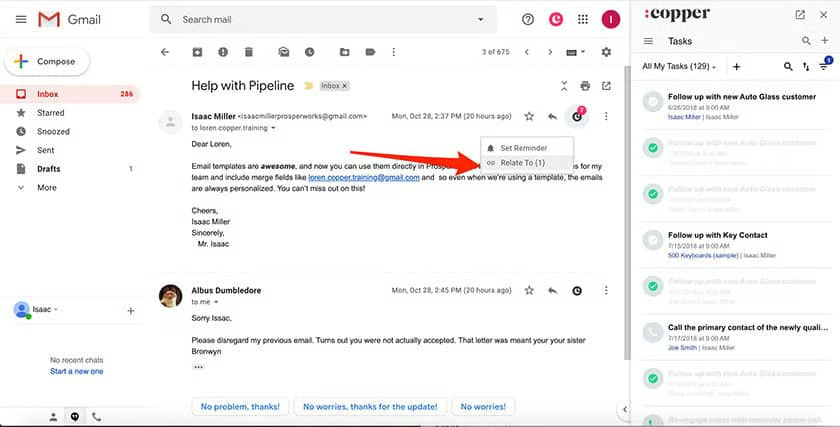
- You use Google Workspace apps for work collaboration: Copper CRM’s seamless integration with Google is the main reason why it is included in our list of the best Google CRMs. Its interface is similar to Google apps, and its Chrome extension allows you to access CRM data from within your Gmail inbox or Calendar. HubSpot also has a Chrome extension that lets you access the CRM directly from Gmail.
- You’re looking for a more affordable social CRM that integrates with LinkedIn: Copper CRM’s Business plan ($99 per user, monthly) includes integration with LinkedIn via Surfe. This connection lets you create and enrich your contacts, qualify leads, and sync LinkedIn interactions with a single click. With HubSpot, LinkedIn integration does not come in until the Professional plan ($450 per month for five users).
When to Use an Alternative
- You’re a startup looking for a low-cost marketing automation solution: Copper CRM’s marketing automation tools are included in the Professional plan, which costs $59 per user, monthly. This could be a bit pricey for startups and small businesses with limited budgets.
- You want a CRM with free Google integrations: Copper CRM integrates seamlessly with Google apps, but it does not offer a free plan. Its paid options are also relatively expensive, starting at $23 per user, monthly.
- Alternative: Freshsales is an excellent alternative that offers a free plan with Google app integrations at no cost.
Copper CRM Pricing Plan & Overview*
Cost:
- $23 per user
Key Features:
- 2,500 contacts
- 10 custom fields
- Web, Chrome, and mobile apps
- Google Workspace integrations
- Productivity and collaboration tools (notes, file attachment, task management, activity logs, task assignment and tagging, reminders, and comments)
- Customizable pipelines
- Deal management with opportunity slippage view
- Access to Copper Community and live chat support
Cost:
- $59 per user
Key Features:
- Everything in Basic
- 15,500 contacts
- Unlimited custom fields
- Premium integrations (Zapier, HubSpot, DocuSign, Mailchimp, QuickBooks, Slack, and Zendesk)
- Basic marketing tools (email templates and bulk email sending)
- Sales automation (tasks, contact profile updates, and change deal status)
- Reporting (report templates, custom reports, and activity insights)
Cost:
- $99 per user
Key Features:
- Everything in Professional
- Unlimited contacts
- Additional integrations (LinkedIn, Facebook Lead Ads, Wix, and WordPress)
- Email sequences and drip campaigns
- Website visitor tracking
- Lead scoring
- Email scheduling
- Personal onboarding
- Premium support with customer success manager
*Pricing is based on annual billing on a per-user, monthly breakdown. Monthly billing is also available at a higher cost. We update pricing information regularly but encourage readers to check current pricing here.
Our Expert Opinion
When it comes to Google integration, Copper CRM is the winner because of its deep integration with Google Workspace apps, making it an excellent choice for productivity and collaboration. HubSpot, on the other hand, is limited to Gmail and Google Contacts integrations. Copper CRM is also significantly easier to use than the all-in-one HubSpot because it primarily focuses on customer relationships and sales processes. On top of that, all tiers offer automatic profile enrichment via web sources and social media.
Insightly CRM: Best Built-in Project Management Features
When to Use Insightly CRM Over HubSpot
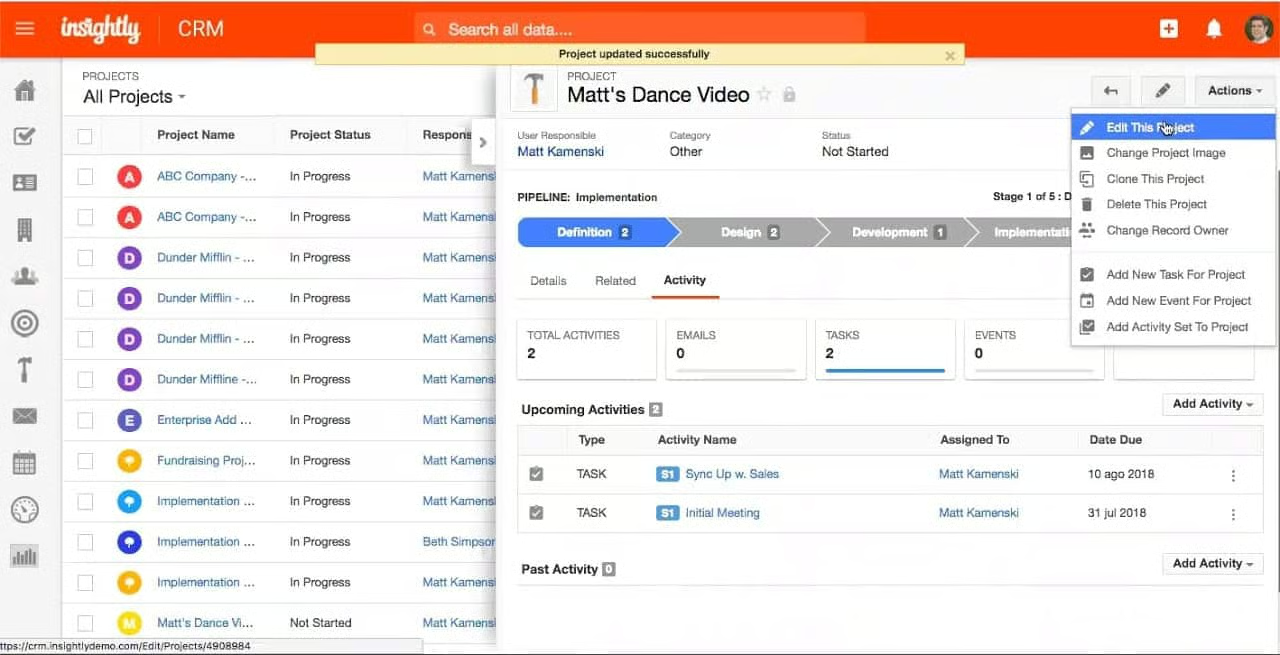
- You run a startup or a project-based business: Insightly CRM offers robust features for project management and delivery across all plans. It allows teams to assign and collaborate on project tasks, create workflows, and track key milestones. This is especially useful for project-based businesses like marketing agencies, software developers, and graphic designers. HubSpot does not have project management features.
When to Use an Alternative
- You are a revenue operations team: Insightly CRM’s key features include sales, project management, and mass emailing. It does not offer built-in customer service features and broader marketing tools like email campaign automation and landing pages.
- You’re looking for a CRM with social media capabilities: Insightly does not offer features for social media management, social profile enrichment, and social engagement.
- Alternative: Subscribe to Freshsales, Copper CRM, Capsule CRM, and Salesforce Essentials if you need a solid social CRM option. These platforms allow you to engage with customers on social media from within your CRM and to generate leads via social media.
Insightly CRM Pricing Plan & Overview*
Cost:
- $0 for two users
Key Features:
- 2,500 records
- Five email templates
- 10 daily email sends
- Two custom fields
- Custom page layouts
Cost:
- $29 per user
Key Features:
- Everything in Free
- 100,000 records
- 10GB file storage
- 25,000 records per import
- 2,500 daily mass emails
- Two role-based permissions
- Two configurable profiles
- 50 custom fields
- Lead, contact, organization, and opportunity management
- Kanban view of lead pipeline
- Email templates with email automation and tracking
- Web-to-lead capture
- Native integration with Insightly Marketing and Insightly Service
- Customizable sales processes
- Task management
- Relationship linking for contacts and organizations
- File attachments
- Mobile app with real-time data sync, business card scanning, contact and calendar integration, and voice notes
- Built-in business intelligence dashboards and customizable reports
- Project delivery (project management, convert won opportunities to projects, and automated workflows)
- Basic integrations (Google, Microsoft, PandaDoc, QBO, and Xero)
- Access to self-help resources, 24/7 email support, and phone support during business hours (9:00 a.m. to 4:00 p.m. Pacific Time)
Cost:
- $49 per user
Key Features:
- Everything in Plus
- 250,000 records
- 100GB file storage
- 50,000 records per import
- 5,000 daily mass emails
- 100 customizable real-time insight cards
- 100 custom fields
- Unlimited role-based permissions and configurable profiles
- Lead assignment and routing
- Schedule outbound emails
- Custom queues for tasks, opportunities, projects, and leads
- Custom page layouts
- Workflow automation
Cost:
- $99 per user
Key Features:
- Everything in Professional
- Unlimited records
- Unlimited file storage
- 10,000 daily mass emails
- 200 custom fields
- Unlimited customizable, real-time insight cards
- Field-based permission
- Products, price books, and quotes
- Sandboxes
*Pricing is based on annual billing on a per-user, monthly breakdown. We update pricing information regularly but encourage readers to check current pricing here.
**Required for customers subscribed to Premier Support and Success.
Our Expert Opinion
When comparing Insightly CRM vs HubSpot, we find that both offer great value for money, but they differ in terms of specialized features. Insightly CRM offers a robust set of project management tools that are unavailable in HubSpot. However, Insightly CRM does not have the advanced email marketing automation and social media management capabilities of HubSpot. Nevertheless, Insightly CRM is an excellent tool for business-to-business (B2B) companies that want to track contact relationships for referral marketing because you can link records together to indicate their connection.
Salesforce Essentials: Best for Customer Support Teams
When to Use Salesforce Essentials Over HubSpot
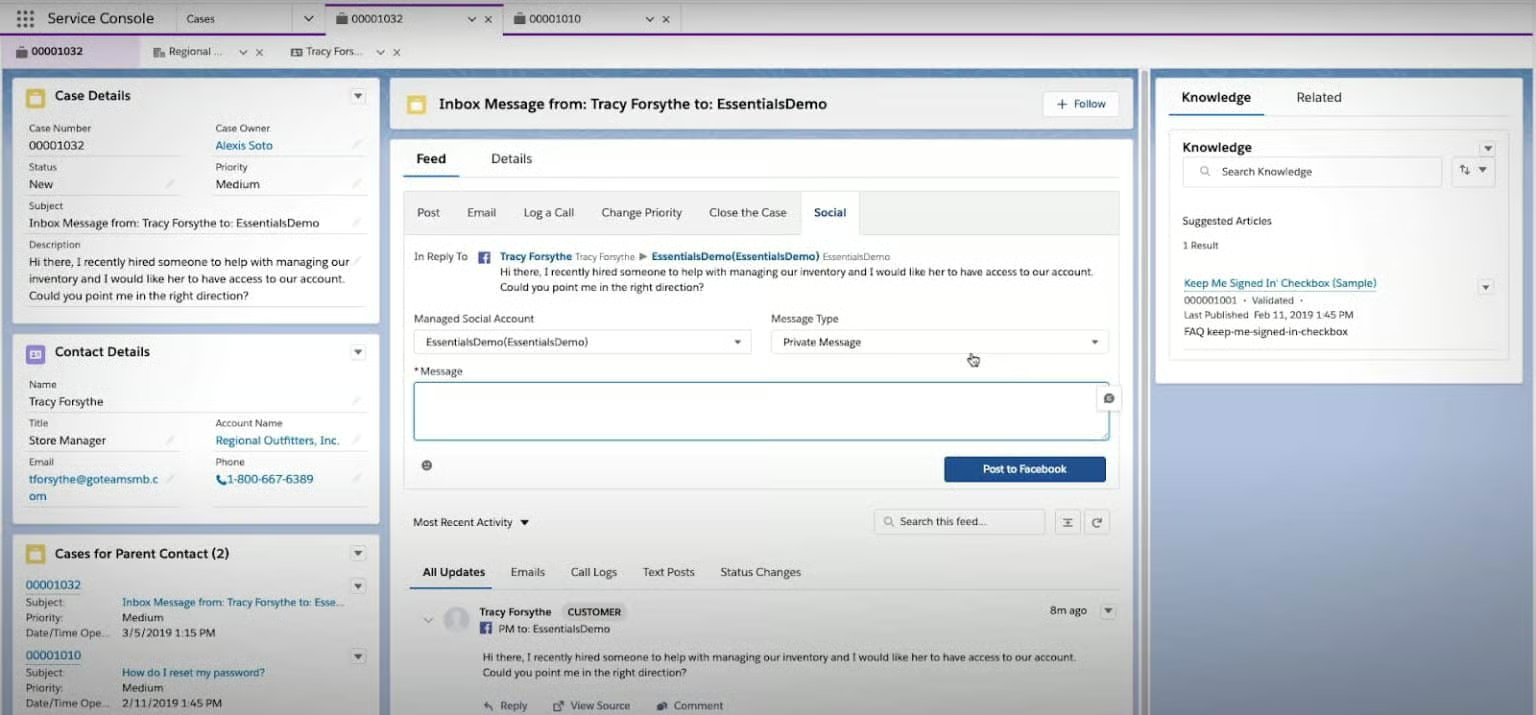
- You are a small business needing customer service CRM with robust analytics: Salesforce Essentials has a Service Cloud that you can use to provide customer service. It allows you to manage customer cases, make and receive calls, engage with customers via live chat, and create tickets from social media interactions. HubSpot also offers these capabilities, but Salesforce Essentials is more sophisticated with its fully customizable data and business intelligence reports.
- You are a remote sales team seeking a custom CRM module: This platform has a Lightning App designer that allows you to build modules and pages within your CRM for its mobile app equivalent. These custom builds include expense tracking apps, custom home pages, and dashboards for lead tracking. HubSpot, on the other hand, does not have this capability.
When to Use an Alternative
- You have more than 10 members in your team: Salesforce Essentials limits its number of users to five sales reps and five service reps.
- Alternative: Upgrade to Salesforce’s higher tiers (Professional, Enterprise, or Unlimited) if you need a CRM that can support more users. You can also choose other providers like Freshsales, Pipedrive, and Zoho CRM.
- You manage an ecommerce or wholesale business: Salesforce Essentials does not have ecommerce capabilities like customer activity tracking, order management, and product catalogs.
- Alternative: Use monday CRM’s multi-view options for customer tracking, or choose an all-in-one CRM like Apptivo, which offers inventory and financial management features.
Salesforce Essentials Pricing Plan & Overview*
Cost:
- $25 per user
Key Features:
- Account, contact, lead, and opportunity management
- Lead assignment and routing
- Web-to-lead capture
- Mass email
- Campaign management
- Email templates
- Customizable sales process
- Task management and activity feed
- Gmail and Outlook integrations
- Mobile app with full offline functionality
- Customizable reports and dashboards
- Chatter (enterprise social network)
- Case management
- Read-only knowledge base
- Lightning App Builder
- AppExchange (marketplace)
- Premium Activity Capture (automatic touchpoint logging)
- Google apps integration
*Pricing is based on annual billing on a per-user, monthly breakdown. Monthly billing is also available at a higher cost. We update pricing information regularly but encourage readers to check current pricing here.
Our Expert Opinion
In our head-to-head Salesforce Essentials vs HubSpot comparison, we show that both offer excellent features for lead and opportunity management, mobile capabilities, and live chat. Salesforce Essentials stands out among other HubSpot CRM alternatives with its ability to build custom apps for your team and to create customer cases out of social interactions. It does not have HubSpot’s advanced marketing capabilities—like landing pages and email reply tracking—but it is equipped with basic email marketing tools. You can create targeted email lists, manage and track marketing campaigns, and create email templates.
How We Evaluated the Best HubSpot Alternatives
To determine the top HubSpot competitors, we evaluated CRM systems offered by companies similar to HubSpot, like an easy-to-use interface, a free CRM plan, and tools for generating and deploying mass marketing email campaigns. We also analyzed software feature gaps offered by competitors to HubSpot.
Based on our evaluation, Pipedrive is the best alternative to HubSpot. While it does not offer a free plan, it has cost-effective and more scalable plans. Its standout features and capabilities include custom fields, customizable reports, and unlimited contacts, sales pipelines, email templates, and product lists. It also offers 24/7 support across all of its plans.
The tabs below provide insight into our evaluation process for choosing the best alternatives to HubSpot:
Cost is typically among the most important criteria for any small business. Plus, with HubSpot offering a free plan, the price was heavily weighted when reviewing the best options. For comparison specific to HubSpot, we considered the availability of a free plan, scalable subscription plans, and monthly billing availability.
We looked at overall features we feel are necessary for a CRM, including reporting and analytics capabilities, tools for managing sales pipelines, and the ability to communicate with leads. We also evaluated each CRM’s mobile application and third-party integrations.
We also looked at the niche and targeted features of the software to see the value a user can get by subscribing. We checked if they offer specialized features such as lead generation and management, email and SMS marketing, marketing automation, and sales forecasting.
Platforms like HubSpot were also evaluated on product usability. This was analyzed in terms of the expertise needed to set up and integrate the CRM with other applications, the skill required to operate the platform, and the intuitiveness of navigating the interface.
Extensive support and service can prevent issues a user might encounter while using any one of these HubSpot alternatives. Help and support were evaluated in terms of customer service hours and the availability of support via phone, live chat, and email.
In addition to firsthand experiences with CRM platforms offered by companies like HubSpot, we evaluated what other users say about each CRM. Based on their reviews, these criteria consider how customers feel to gain insight into platform popularity, ease of use, and overall value for the price.
Frequently Asked Questions (FAQs)
How is HubSpot different from other CRMs?
HubSpot offers a free plan that includes an array of sales, marketing, and service tools that are usually unavailable with other free CRMs. These features include email marketing, live chat, deal management, and a ticket pipeline. This makes it an excellent CRM for startups looking for a robust, all-in-one CRM that they can later scale up.
Should I use Salesforce or HubSpot?
Choose HubSpot if you want a more affordable CRM with high usability and free AI tools. However, we recommend Salesforce if you want more advanced reporting and analytics tools, broader customization options, and a more robust mobile app.
Which is better—Zoho or HubSpot?
Both HubSpot and Zoho CRM offer advanced features with a host of sales, marketing, and support tools. However, HubSpot has a simpler interface that makes it easy for beginners to learn and navigate, and its free option is more robust. Zoho CRM, on the other hand, offers more affordable and scalable plan options. In terms of feature inclusion, HubSpot is superior to Zoho CRM, but it is also more expensive at scale.
Bottom Line
When it comes to sales CRMs, HubSpot is hard to beat with its comprehensive sales, marketing, and customer service features. Its free CRM supports an unlimited number of users and 1 million contacts, plus advanced features like automated email marketing and service ticketing. However, one of its greatest disadvantages is the huge price jump when you upgrade to the Professional and Enterprise plans. This guide helps you make an informed decision when you want to find an alternative to HubSpot that best suits your business needs.
