







Territory management software lets businesses oversee sales operations across multiple departments, separated by geographic location, product line, or industry. While it’s a common feature in customer relationship management (CRM) software, teams can also invest in specialty mapping tools. The best territory management tools are affordable and have intuitive features to monitor performance and assign leads to the proper teams. We compared dozens of providers to arrive at the top seven territory management systems:
- Best overall: Freshsales
- Great for territory-based customer support: Zoho CRM
- Best specialty sales map software: BadgerMaps
- Excellent sales reporting tools: Salesforce Essentials
- Solid territory goal tracking: Pipedrive
- Best sales mapping tool for cost scalability: SalesRabbit
- Most cost-friendly: Apptivo
- Best Sales Territory Management Tools Compared
- Freshsales: Best Sales Territory Management Software Overall
- Freshsales Pricing Plan & Overview*
- Zoho CRM: Best Territory Management Software for Customer Support
- Zoho CRM Pricing Plan & Overview*
- BadgerMaps: Best Sales Mapping Tool
- BadgerMaps Pricing Plan & Overview*
- Salesforce Essentials: Best for Reporting & Analytics
- Salesforce Essentials Pricing Plan & Overview
- Pipedrive: Best for Team Goal Tracking
- Pipedrive Pricing Plan & Overview*
- SalesRabbit: Best Scalable Sales Territory Mapping App
- SalesRabbit Pricing Plan & Overview*
- Apptivo: Best for Lowest-priced Territory Management
- Apptivo Pricing Plan & Overview*
- Frequently Asked Questions (FAQs)
- Bottom Line
Best Sales Territory Management Tools Compared
| Provider | Starting Monthly Price per User* | Free Plan? | Our CRM Rating Out of 5 |
|---|---|---|---|
 | $9 | ✓ | 4.80 |
| Visit Freshsales | |||
 | $14 | ✓ | 4.38 |
| Visit Zoho CRM | |||
 | $49 | ✕ | 4.02 |
| Visit BadgerMaps | |||
 | $25 | ✕ | 3.99 |
| Visit Salesforce Essentials | |||
 | $14 | ✕ | 3.98 |
| Visit Pipedrive | |||
 | $29 | ✓ | 3.98 |
| Visit SalesRabbit | |||
 | $8 | ✕ | 3.96 |
| Visit Apptivo | |||
*Based on annual billing; monthly billing is also available for slightly higher rates.
Freshsales: Best Sales Territory Management Software Overall
When to Use Freshsales
- You are a business-to-business (B2B) firm: Managing various sales territories is common in both B2B and business-to-consumer (B2C) sales. Freshsales has far more use cases in the B2B and is one of our top picks for the best B2B CRM system. In addition to territory management capabilities with automated record assignment based on territory, Freshsales has useful B2B tools and modules, like account and deal management, a phone system, and invoice generation.
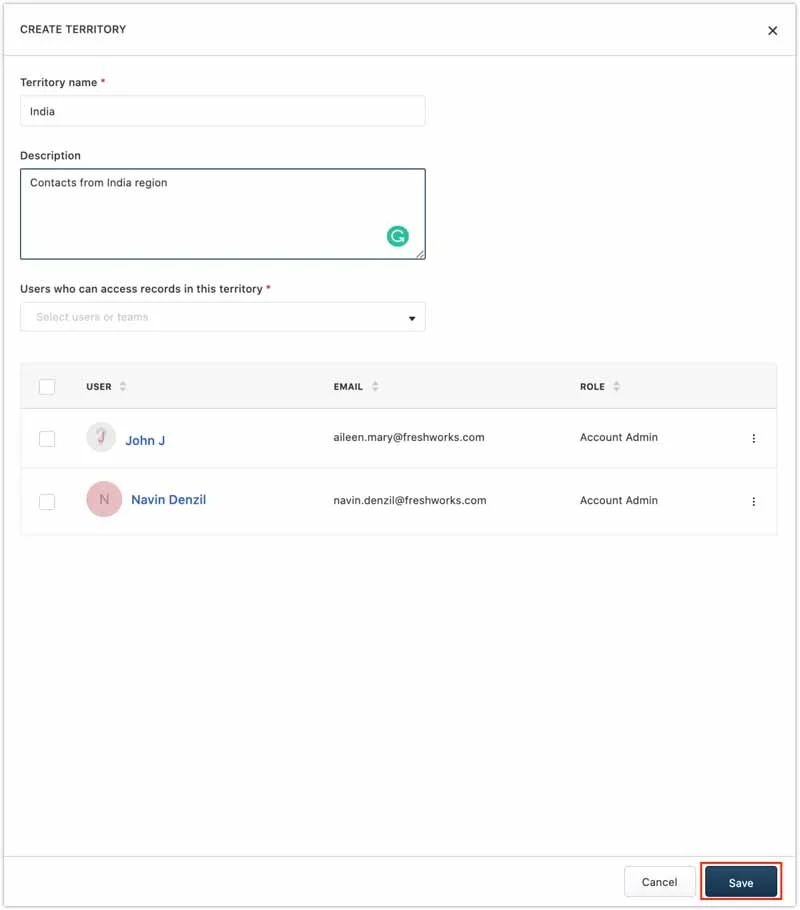
- You need simple sales mapping software: Freshsales is known for its intuitive interface and easy-to-use features—making it one of the best simple CRMs. These attributes translate to territory management, where it’s easy for an admin to create new territories based on region or product line and invite new users. They can also configure the phone system for call routing and create rule-based automations for segmenting leads to assign them to appropriate reps.
When to Use an Alternative
- You need low-cost territory management tools: Despite offering a starting low price that allows three free users, Freshsales isn’t the best territory mapping solution in terms of cost, as users must be on the Pro plan for those capabilities.
- Alternative: Apptivo offers territory oversight tools for just $20 per user, monthly.
- You only need a specialty sales mapping tool: In many cases, businesses might already be happy with their CRM system and only need a third-party tool for mapping features. Clearly, Freshsales is a general-use CRM with complete CRM capabilities and not a specialty product.
- Alternative: BadgerMaps is the best alternative that is a specialty product exclusively for sales territory management. It integrates with popular CRM systems such as Salesforce, HubSpot, Zoho, and Insightly.
Freshsales Pricing Plan & Overview*
The Freshsales offers a 21-day free trial to test out the paid plans. Plus, users may purchase optional add-ons with their subscription plans. One is for additional automated workflows where users can put tedious tasks like email follow-ups, data updates, or user assignment notifications on auto-pilot. These cost $5 for every 10 additional workflows. Users can also purchase additional telephone credits starting at $5 to place and receive more calls from the CRM.
Cost:
$9 per user
Key Features:
- Contact, deal, and account management
- Freshworks Marketplace connections for third-party integrations
- Profile activity timelines with tasks, appointments, and notes
- Built-in telephone with inbound caller ID
- Live chat and AI chatbot builder with the ability to book meetings from the widget
- Custom sales activities with activity dashboard tracking
- Basic custom data fields for records plus tagging
- Product catalog
- Sales documents for quotes and invoices generation
- Up to 20 automated CRM workflows
- Visual pipelines with rotten deal indicator
- Two-way email sync plus automated email sequences
- Call queue transfer
- Contact and lead scoring
Cost:
- $39
Key Features:
- Automated contact, account, and deal assignment, including based on territory criteria
- Sales quota management
- Ability to manage up to 50 sales teams, oversee sales territories, and handle multiple currencies
- 10 sales pipelines
- 50 automated workflows with time-based triggers
- Advanced custom fields for formulas and lookup fields
- Sales forecasting
- Warm call transfer
- Freddy AI deal insights, data deduplication, and next-best action analysis
Cost:
- $59
Key Features:
- Deal teams
- Auto-profile enrichment
- Custom modules
- Sales forecasting insights
*Pricing is based on annual billing on a per-user monthly breakdown. Monthly billing is also available for a higher cost.
Our Expert Opinion
Freshsales is a clear front-runner for the best CRM with built-in sales territory planning software. While we wish those features were offered on the Growth plan, it’s still a fairly inexpensive option that allows up to 50 unique territories. Plus, it has automated lead assignment, multiple pipelines and currencies, and team-based reporting on the Pro plan starting at $39 per user, per month. Freshsales also scores well in product usability for its intuitive setup, navigation, and operation.
Freshsales is cost-friendly, easy to use, and offers tremendous value in terms of features and all-around sales capabilities. See if it’s the right solution for your business in our Freshsales review.
Zoho CRM: Best Territory Management Software for Customer Support
When to Use Zoho CRM
- You want to manage customer support territories: In addition to managing leads, deals, contacts, and accounts in Zoho, teams can oversee customer service operations using Zoho’s built-in case management system. One of those customer service features is automated case assignment to reps depending on triggers. Once subscribed to the Enterprise plan, teams can auto-route cases based on territories, like product line or region, to get inquiries to the right agents.
- You need to oversee sales teams within territories: Zoho CRM uses a hierarchy system for its data and operations management. While actual territories cannot be created until the Enterprise plan, businesses can begin sorting users into groups on the Standard plan if they have multiple sales teams in the same location, industry specialty, or product line. Once you bring territories into the mix, you can begin managing various teams within territories in a structured way.
When to Use an Alternative
- You need low-cost territory management features: Unfortunately for Zoho, the territory management capabilities are unavailable until the Enterprise plan, starting at $40 per user, monthly.
- Alternative: Apptivo stands out as the most cost-friendly territory tracking CRM.
- You want a more intuitive CRM and territory mapping software: Overall, Zoho is cost-friendly and has many built-in modules and third-party integration options. However, the CRM is notoriously difficult to operate as users find the interface bulky and overwhelming with too many menu options.
- Alternative: Freshsales and BadgerMaps are our favorite territory management solutions for product usability.
Zoho CRM Pricing Plan & Overview*
Cost:
- $0 for three users
Key Features:
- Leads, accounts, deals, and contacts management with up to one sales pipeline
- Documents management
- Sales activity tracking
- 10 workflow rules per module
- One webform for lead and contact generation into the CRM
- Standard CRM reporting
Cost:
- $14
Key Features:
- Sales group management
- Multiple sales pipelines
- Sales forecasting
- Multiple sales currencies
- Mass email with up to 100 stored email templates
- Macro automation and up to 30 workflow automation rules per module
- Custom and scheduled reports plus custom dashboards
Cost:
- $23
Key Features:
- Automated record assignment to owner based on triggers or sales groupings
- Inventory management module with products, quotes, orders, invoices, and price books management
- Customer support module with case management and automated assignment
- Mass email scheduling and unlimited email templates
- Sales gamification and motivation tools
- Sales anomaly detector
Cost:
- $40
Key Features:
- Up to 150 unique sales territories
- Automated case and record assignment based on territories
- Zia artificial intelligence (AI) tool for task reminders, predictions on deal conversion, and data enrichment of CRM records
- Zia AI for providing automated workflow suggestions and recommendations for record owners based on assignment rules, including using territory criteria
- Territory-based sales forecasting
- A/B testing on webforms
- Customizable modules
- Multi-rule lead scoring
- Three email auto-responders
- Automated customer case escalation rules
Cost:
- $52
Key Features:
- 250 unique sales territories
- 50 sales pipelines
- 50 unique currencies
- 2,000 mass emails daily
*Pricing is based on annual billing on a per-user monthly breakdown. Monthly billing is also available for a higher cost. Zoho CRM comes with a 15-day free trial for the paid plans.
Our Expert Opinion
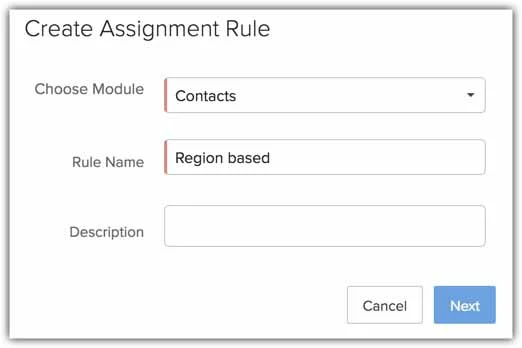
Zoho offers robust territory management capabilities compared to other providers on this list. The hierarchy data management system makes Zoho a solid pick for overseeing sales teams and territories simultaneously. We also liked how the automated record assignment features apply to the case management modules, allowing teams to route incoming cases to proper agents based on the product line, location, or industry specialty.
Teams can manage sales and customer service operations in Zoho CRM. Check out our Zoho CRM review for more details to see if it’s right for your business.
BadgerMaps: Best Sales Mapping Tool
When to Use BadgerMaps
- You prefer a specialty mapping tool: While most products on this list are CRM systems, BadgerMaps is software specifically used for mapping lead or account locations, finding routes to contact destinations, and managing geographic territories. Because of its use cases, teams should only adopt BadgerMaps if they already have a CRM and just need mapping tools. If you are already using Salesforce, HubSpot, Zoho, or Insightly, you can integrate this tool with those CRMs.
- You do a lot of on-the-road sales activities: BadgerMaps is arguably the best field service and sales management software because of its focus on in-person appointments and client mapping. Those who do tons of client-facing engagement benefit from features like location tracking and route optimization to visit multiple lead or account sites in one day using the best possible route. Businesses like trade contractors, real estate brokers, or insurance agencies can get the most use from BadgerMaps.
When to Use an Alternative
- You want a traditional CRM system: Since BadgerMaps isn’t a CRM system, it lacks built-in outreach tools via chat, email, or phone, pipeline management, and sales document generation capabilities found in most CRM solutions.
- Alternative: Freshsales is our best overall territory management product that’s also CRM software.
- You manage a virtual sales operation: Even virtual sales operations can still segment into territories despite not handling any sales tasks or meeting in person. BadgerMaps exclusively benefits geographic-based territory management and does not have features to suit remote environments.
- Alternative: We recommend using a traditional CRM with territory management features, such as Freshsales, Zoho CRM, or Apptivo, to support a virtual operation.
BadgerMaps Pricing Plan & Overview*
Cost:
- $49
Key Features:
- Appointment scheduling with calendar sync
- Route optimization that lets reps travel to multiple client or lead locations in one trip using the quickest route
- Ability to find new leads on a geographic map and collection their information to add into the database
- User route sharing with check-ins
- Team and territory creation plus the option to put multiple users on the same opportunity
- Management view of territories, sales opportunities, and performance
- Custom data fields
- CRM integration with Salesforce, HubSpot, Zoho CRM, and Insightly
- Mobile app
Cost:
- $95
Key Features:
- Enhanced lead generation that lets you search for accounts on a map and automatically optimize routes for their locations
- Customizable mapping layers
- Enterprise resource planning (ERP) software integrations
*Pricing is based on annual billing on a per-user monthly breakdown. Monthly billing is also available for a higher cost. BadgerMaps offers a seven-day free trial for the Business plan.

Our Expert Opinion
BadgerMaps is the heavy favorite for managing location-based field sales teams. Its features are designed for businesses to find leads in a specific location, store their data, travel to client sites, and check into appointment locations. Though it isn’t a true CRM, we like that users can integrate with popular CRM products like Salesforce, HubSpot, and Zoho. Additionally, its mobile application stood out as both highly sophisticated from a features point of view and easy to use.
Salesforce Essentials: Best for Reporting & Analytics
When to Use Salesforce Essentials
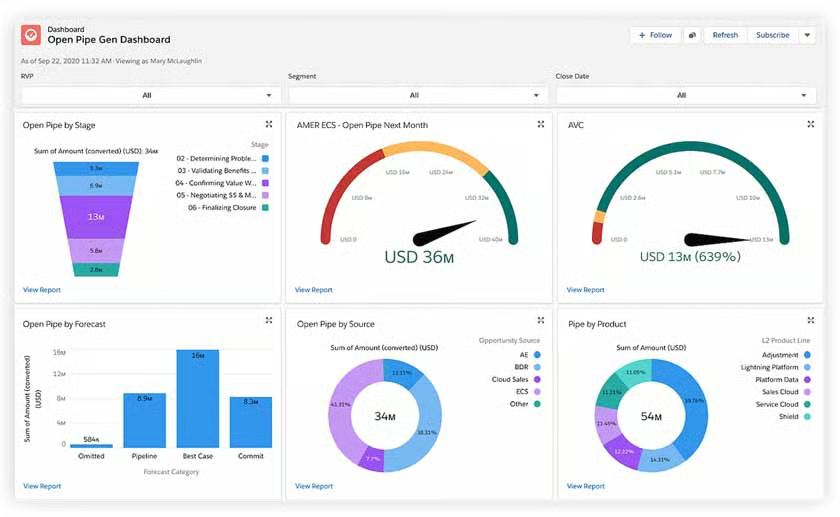
- You want highly sophisticated reporting dashboards: Despite being designed for small businesses, Salesforce Essentials offers some of the best CRM reporting and analytics tools of any provider. Sales managers can create and track customizable metrics and view them in real time on the system dashboard. They can be broken down into activity or production data based on factors like product line, industry, deal size, and team.
- You need to manage sales territories based on deal size or industry: Salesforce Essentials is a great option for teams that assign sales leads based on their customer profiles. For example, certain sales reps may be responsible for larger deal sizes or accounts that fall into a specific industry vertical. Salesforce Essentials lets you auto-assign those CRM records to users based on that preset criteria.
When to Use an Alternative
- You need geographic-based territory mapping: Salesforce offers an enterprise territory management module with more advanced sales mapping features and the ability to oversee sales deals based on location. Unfortunately, that feature is not available until the Enterprise plan of the Sales Cloud.
- Alternative: BadgerMaps is our favorite tool for geographic-based sales management, and even integrates with Salesforce.
- You want a simple territory management CRM: Salesforce Essentials has a lot of advanced capabilities to help sales teams grow. It does, however, demand a steep learning curve for its new users.
- Alternative: Freshsales is a better CRM alternative with high usability ratings.
Salesforce Essentials Pricing Plan & Overview
Salesforce Essentials is the Salesforce Cloud plan meant for small businesses. It’s $25 per user, per month, and comes with a 14-day free trial. Included in this product are account, contact, lead, and opportunity management, mass email campaigns, a case management module, and a robust mobile app. There’s also the ability to auto-route and assign leads based on territory factors like deal size. Finally, users can conduct robust reporting on sales activity and deals associated with a territory or sales team.
Our Expert Opinion
Salesforce Essentials is a solid CRM and territory management software option if you’re trying to automate lead routing based on profile attributes and monitor your various sales teams. As a CRM juggernaut, Salesforce Essentials meets high expectations for platform sophistication, especially for its dashboard reporting tools. We also like how it can integrate with so many other general business and industry-specific tools, including mapping software like BadgerMaps.
Use our Salesforce Essentials review to gain more insight into this excellent CRM system and see if it’s right for your business.
Pipedrive: Best for Team Goal Tracking
When to Use Pipedrive
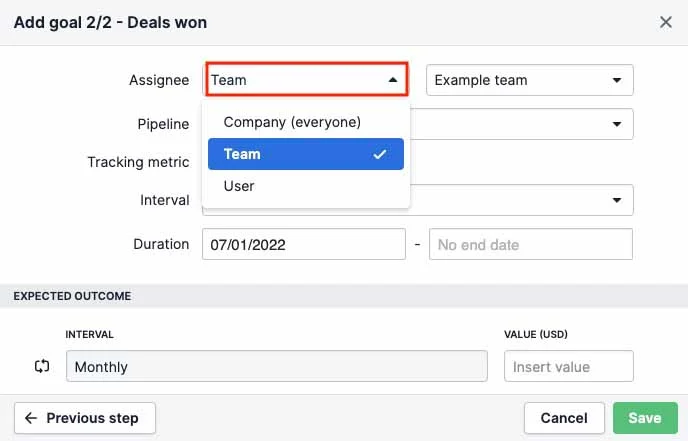
- You need robust goal tracking features: Pipedrive uses its team management capabilities to group sales reps into departments based on location or a service specialty. Plus, the CRM comes with elaborate goal management features where you can set detailed objectives, such as activity input, revenue, or deal-closed goals, for individuals, teams, or entire organizations. You can track goal progress between territories using various intervals and output metrics.
- You primarily use direct sales methods for new customers: Pipedrive is focused on deal tracking, lead management, contact outreach, and sales document generation features. Therefore, it’s best used for managing territories and sales teams in businesses that use a traditional sales process. These include those undergoing a repeated cycle of prospect research and directly reaching out through phone or email, presentations, and nurturing until a deal is finalized.
When to Use an Alternative
- You need an elaborate mapping tool: While Pipedrive does allow you to map out prospect or customer locations through integration with Google Maps, it doesn’t have elaborate route optimization tools. Plus, you can’t auto-assign a lead to a rep based on location.
- Alternative: BadgerMaps is our favorite sales mapping tool with built-in navigation and lead management capabilities.
- You want low-cost territory management features: Pipedrive does not offer a free plan and the team management and goal-setting features are not accessible until the Professional plan for $49 per user, monthly.
- Alternative: SalesRabbit is a mapping tool that comes with a free plan and Apptivo is the most affordable territory management solution on this list.
Pipedrive Pricing Plan & Overview*
Cost:
- $14
Key Features:
- Lead, contact, and deal management with file attachments and activity tracking
- Customizable pipelines with deal rotting indicators
- Products catalog
- Duplicate data merge
- Built-in artificial intelligence (AI) sales assistant with insights on user performance, task recommendations, and behavior
- Goal management for deal production and input activity
Cost:
- $39
Key Features:
- Subscription revenue reporting
- Two-way email sync for sending, receiving, and tracking emails from the CRM
- Custom email templates plus email scheduling and engagement tracking
- Built-in meeting and video call scheduler
- Workflow automation for 30 active workflows plus up to three delayed, time-triggered steps
- Smart contact data for auto-enriching contact profiles
- Web-to-mobile application calling
Cost:
- $49
Key Features:
- Revenue forecasting plus customizable reports
- Team management for up to three unique teams and separate team-based pipelines
- Team goals tracking on system dashboard
- Unlimited system and data visibility controls plus groupings
- Visual contacts timeline
- Smart Docs for auto-filling sales documents with contact data
- Required data fields
- Document open tracking plus e-signature capabilities
- Google Drive and OneDrive integration
- 60 active automated workflows, including 10 delayed steps
Cost:
- $64
Key Features:
- Phone support and CRM implementation
- Scalable controls for account permissions and visibilities
- 90 active automated workflows, plus 10 delayed steps
- Team management for 15 teams
Cost:
- $99
Key Features:
- Team management for unlimited teams
- Unlimited reports and dashboards
- 180 active automated workflows with 10 delayed steps
*Pricing is based on annual billing on a per user, per month breakdown. Monthly billing is also available for a higher cost. Paid plans include a 14-day free trial.
Our Expert Opinion
We found that Pipedrive’s sales-focused features combine well with its team management tools to oversee territories and pipelines. The product is easy to use, particularly when creating new teams, assigning users to teams, and setting activity, revenue, and deal goals. Pipedrive is also the best territory management software for evaluating and reporting goals across multiple teams. Though we would like more advanced mapping tools, Pipedrive has the features to support company revenue objectives.
Read our in-depth Pipedrive review to get full insights on pricing, features, and integrations to see if it suits your business needs.
SalesRabbit: Best Scalable Sales Territory Mapping App
When to Use SalesRabbit
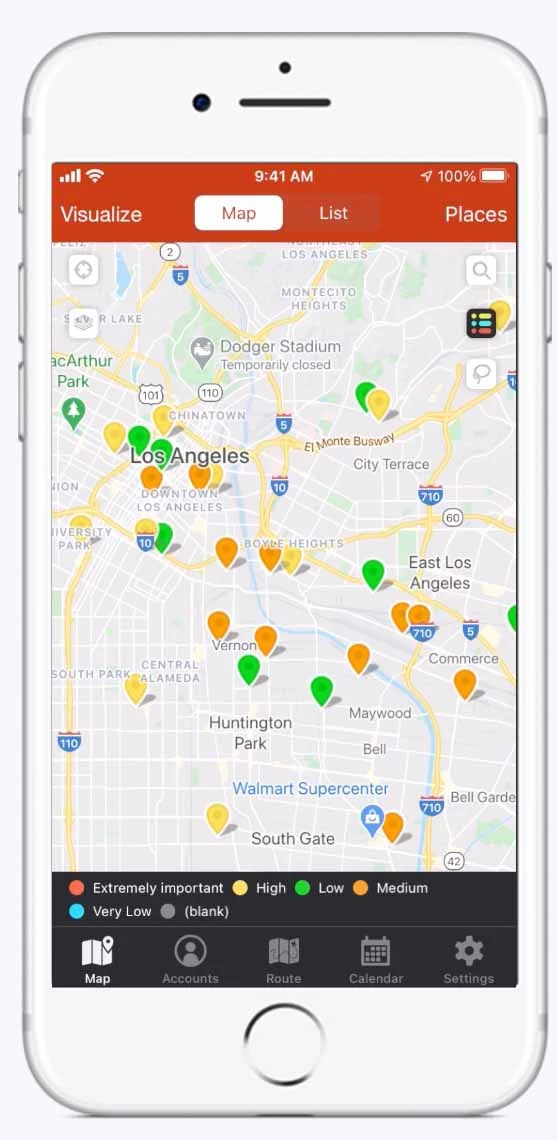
- You are a trade contractor: Like BadgerMaps, SalesRabbit is sales territory mapping software designed for outside sales reps. One of the key differences, however, are the tools and integrations particularly useful for construction and trade contracting businesses. There are leads and customer mapping, appointment scheduling, proposal generation, digital signature, and credit check tools. It even integrates with popular contractor CRMs like JobNimbus and MarketSharp.
- You are looking to scale your field sales operations: SalesRabbit is the only product with any type of territory management capabilities available for free. Businesses can also easily scale their software requirements as their features and capacity needs arise. The paid plans aren’t overly expensive and are built to support field sales teams in the high-growth business phase.
When to Use an Alternative
- You want to manage product or industry-based territories: Since SalesRabbit is primarily a sales mapping tool that helps oversee geographic-based territories, it’s not ideal for businesses that separate their sales teams based on the product line, deal size, or industry specialty.
- Alternative: Freshsales, Zoho CRM, and Salesforce Essentials are solid tools for auto-routing leads and tracking performance for territory-based sales teams that do not divide by location.
- You need low-cost proposal generation and signature tools: SalesRabbit includes features for creating contract proposals and obtaining signatures. Those capabilities, however, require the Pro plan for $39 per user, monthly.
- Alternative: Freshsales has built-in sales document generation on the Growth plan and allows you to obtain signatures through integration with tools like DocuSign and PandaDoc.
SalesRabbit Pricing Plan & Overview*
Cost:
- $0 for one user
Key Features:
- Lead tracking from a list or map views
- Lead filtering based on priority and opportunity status
- Appointment scheduling with reminders
- Route optimizer on mobile app
Cost:
- $29 (three-user minimum)
Key Features:
- Route planning and optimization
- Option to upload full customer lists and import lead data
- Sales territory mapping with team messaging and performance tracking
- Built-in sales training and coaching tools
- Sales materials storage and design features
Cost:
- $39 (10-user minimum)
Key Features:
- DataGrid features that find and pin locations of business leads
- File attachments to leads plus custom data fields in system records
- Lead qualification tools conduct do title checks to ensure the proper prospects are targeted
- Customizable digital contracts with e-signature
- Access to third-party CRM and marketing platform integrations like Mailchimp, Copper, Salesforce, HubSpot, and SugarCRM
Cost:
- Contact for pricing
Key Features:
- Built-in credit check tool for help qualifying buyers
- Customizable integrations
*Pricing is based on annual billing on a per-user monthly breakdown. Monthly billing is also available for a higher cost.
Our Expert Opinion
SalesRabbit is the more cost-friendly version of BadgerMaps that’s slightly more difficult to use. We like its trade contractor focus, wide range of third-party integration options, free and scalable plans, and the robust sales mapping capabilities like lead finder and route optimization. SalesRabbit is also unique because users can design, store, and access sales materials and coaching resources on the platform.
Apptivo: Best for Lowest-priced Territory Management
When to Use Apptivo
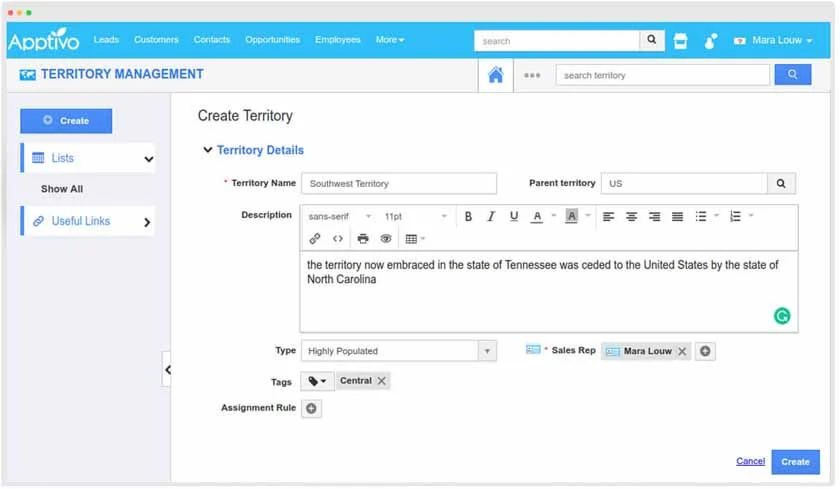
- You’re on a tight budget: Apptivo has the lowest-priced territory management tools as those capabilities start at just $20 per user, monthly. In addition to being able to create sales territories, based on region or a custom CRM data field, users can set hierarchies for their territories. Also, they can set lead or customer assignment rules to auto-route CRM records to company reps based on contact location or some other data category like industry and product line.
- You want to tailor your territory management platform for other uses: Apptivo is a business management solution that can be tailored to various use cases depending on a company’s needs. In addition to offering CRM functionally, teams can create modules for project management, billing and invoicing, help desk and ticketing support, and field service management. There are also robust customization options and tools for mass marketing and supply chain management.
When to Use an Alternative
- You want a modern-looking CRM interface: Usability is a recurring issue with the Apptivo platform. The primary flaw is the interface design, which appears slightly outdated compared to other CRM and territory mapping tools.
- Alternative: Freshsales is our favorite solution for a clean, modern interface design.
- You need advanced sales mapping tools: While you can create territories and trigger automated lead assignments to reps based on those territories, Apptivo lacks features for optimizing routes to destinations and letting users check into a location.
- Alternative: SalesRabbit is the best for these advanced geo-tracking and navigation tools, which are also available at a low price.
Apptivo Pricing Plan & Overview*
Cost:
- $8
Key Features:
- Deal management with multiple sales pipelines
- Contact management with list segmentation
- Task management, appointments, and notes within records
- Products and services catalog
- File storage and sharing
- Two-way email sync with open and click tracking plus stored email templates
- Referral tracking system
- Sales stage automaton with 25 automated workflow triggers
Cost:
- $12
Key Features:
- Contact relationships and hierarchy tracking
- Item tracking for ecommerce management
- 75 automated workflows
- 1,000 mass emails per month with marketing automation and scheduling
- Scheduled reporting
- Payment processing through integrations with PayPal, Stripe, and Authorize.net
Cost:
- $20
Key Features:
- Territory management with role- and field-based security privileges
- Built-in assignment rules for sales territories for lead and customer records
- Email sequences plus short message service (SMS) texting
- Proposal and quote generation tools
- Custom applications
- 150 automated workflows
- 3,000 mass emails per month
- CRM integration with Xero and QuickBooks
Cost:
- Contact for pricing
Key Features:
- CRM white labeling solutions
- Up to 300 automated workflows
- Google Maps integration
*Pricing is based on annual billing on a per user, per month breakdown. Monthly billing is also available for a higher cost. Paid plans include a 30-day free trial.
Our Expert Opinion
Standing out as the most cost-friendly territory tracking system, Apptivo is a great option for lean businesses to manage sales operations that serve numerous regional, industry, or product needs. We also like that teams can extend the value of their CRM to other solid business uses, including projects, inventory, marketing, customer support, and field service management. Its robust system customization ultimately gives you a complete, low-cost business management solution.
Apptivo’s highly customizable applications make it a versatile product that suits many business use cases.
How We Evaluated the Best Territory Mapping Software
Frequently Asked Questions (FAQs)
What is a territory management tool?
Territory management software help sales departments oversee their operations within numerous regional locations, product lines, industry specialties, or a wide range of deal sizes. It allows them to separate teams based on their jurisdiction, automatically assign leads or customers to proper reps, and track performance based on a particular territory. Some products even include mapping tools to find accounts on a map, optimize routes, and receive navigation directions.
Who should use territory management software?
Any business with a segmented sales operation should use territory management software to streamline productivity and capture the right leads. For instance, if they sell in various regions, offer multiple products or services, or utilize specialized reps based on deal size or industry, they should invest in territory management tools, customer mapping software, or a CRM with these capabilities.
What are the benefits of territory management software?
A territory management software ensures that sales opportunities are maximized by only letting specialized reps handle certain markets or deal sizes. It also helps managers monitor performance among various territories and ensure even distribution of sales leads to their team. Finally, territory tracking and mapping tools help efficiently plan time and resources with route optimization, lead discovery, and customer location monitoring capabilities.
What are the features to look for when selecting territory management software?
When identifying territory management systems, users should look for features to create territories based on criteria like location, product line, industry, or deal size. There should also be assignment capabilities that auto-route leads, deals, or customers to responsible reps based on pre-established criteria. Lastly, teams should be able to track performance broken down by territory criteria, filter out customer lists, and have mapping tools to pin customer locations on a map and optimize routes to those locations.
Bottom Line
Territory management and mapping software for business allows a sales team to stay organized, improve production, and evaluate performance by dividing customers based on criteria like region or product line. While we selected Freshsales as the best overall territory management tool for small business, other products could be a better fit depending on feature needs. BadgerMaps, for example, is a great sales mapping tool for monitoring customer locations, obtaining directions, and finding nearby leads.
